 |
PandoCitPandoc citations in Obsidian |
 Developed by l'Atelier — book-making and research tools (EHESS)
🇫🇷 Français · 🇬🇧 English · 🇩🇪 Deutsch · 🇪🇸 Español



|
PandoCitPandoc citations in Obsidian |
Developed by l'Atelier — book-making and research tools (EHESS)
🇫🇷 Français · 🇬🇧 English · 🇩🇪 Deutsch · 🇪🇸 Español
 |
|  |
---
## 📖 About
Shows a formatted reference list in the sidebar for each Pandoc citation key (`[@key]`) in the active note.
## ⬇️ Install via BRAT (one click)
> **Plugin ID (Obsidian community)** : `pandocit` — the folder under `.obsidian/plugins/` must be named **`pandocit`** (IDs cannot contain `obsidian`; see [Manifest guidelines](https://docs.obsidian.md/Reference/Manifest)). Migrating from `obsidian-pandoc-reference-list`? Rename the folder or reinstall, then copy `data.json` and `pandoc.wasm`.
1. 🔌 Install **BRAT**: [Obsidian — BRAT](https://obsidian.md/plugins?search=BRAT#)
2. ➕ Add this repo with *“Add Beta plugin”*:
`https://github.com/Atelier-Recherche/pandocit`
> 💡 Our plugins may still be pending Obsidian community review; BRAT lets you try them now. See also 🌐 [l'Atelier](https://atelier.atechnologie.fr/).
## ⚙️ How it works
- 🦀 Uses **Pandoc 3.9 WebAssembly** (`pandoc.wasm`) to convert bibliography files (BibTeX, etc.) to CSL JSON. **No system Pandoc install required.**
- 📱 Works on **Obsidian desktop** (Windows, macOS, Linux) **and mobile** (Android, iOS).
## 🔧 Configuration
1. **📚 Bibliography**
Path to your bibliography file (Pandoc-compatible: `.bib`, CSL `.json`, etc.).
- 🖥️ **Desktop**: file picker or absolute / vault-relative path.
- 📱 **Mobile**: **vault-relative** path only (e.g. `refs/library.bib`). File dialog is desktop-only.
2. **🎨 Citation style (CSL)** *(optional)*
Built-in list or `.csl` file (path or URL); overridable via note frontmatter (`bibliography`, `csl`, `lang`, etc.).
3. **📋 Reference panel**
Command palette: **“PandoCit : Show reference list”** (label depends on Obsidian UI language).
4. **🌐 Plugin language** *(optional)*
Plugin settings: UI language for labels (settings, item editor, dedicated sidebar).
## 📚 Zotero (optional)
### 🔗 Better BibTeX / local feed
**Better BibTeX** and local network sync work best on **desktop**. On mobile, prefer a bibliography file in the vault.
### ☁️ Zotero Web API
When enabled in settings:
- 🔑 **API key** and **personal** or **group** library (numeric ID).
- 👥 **Merge group libraries**: group IDs + **Load groups** or **custom display names** (one line per ID + label).
- 🔄 **Bidirectional sync** (Zotero API model).
- 📤 Optional **BibTeX export** to a vault `.bib` (for Pandoc, LaTeX, Typst).
Data is stored as JSON in the plugin folder; **no local Zotero Node install** — offline vault use after sync.
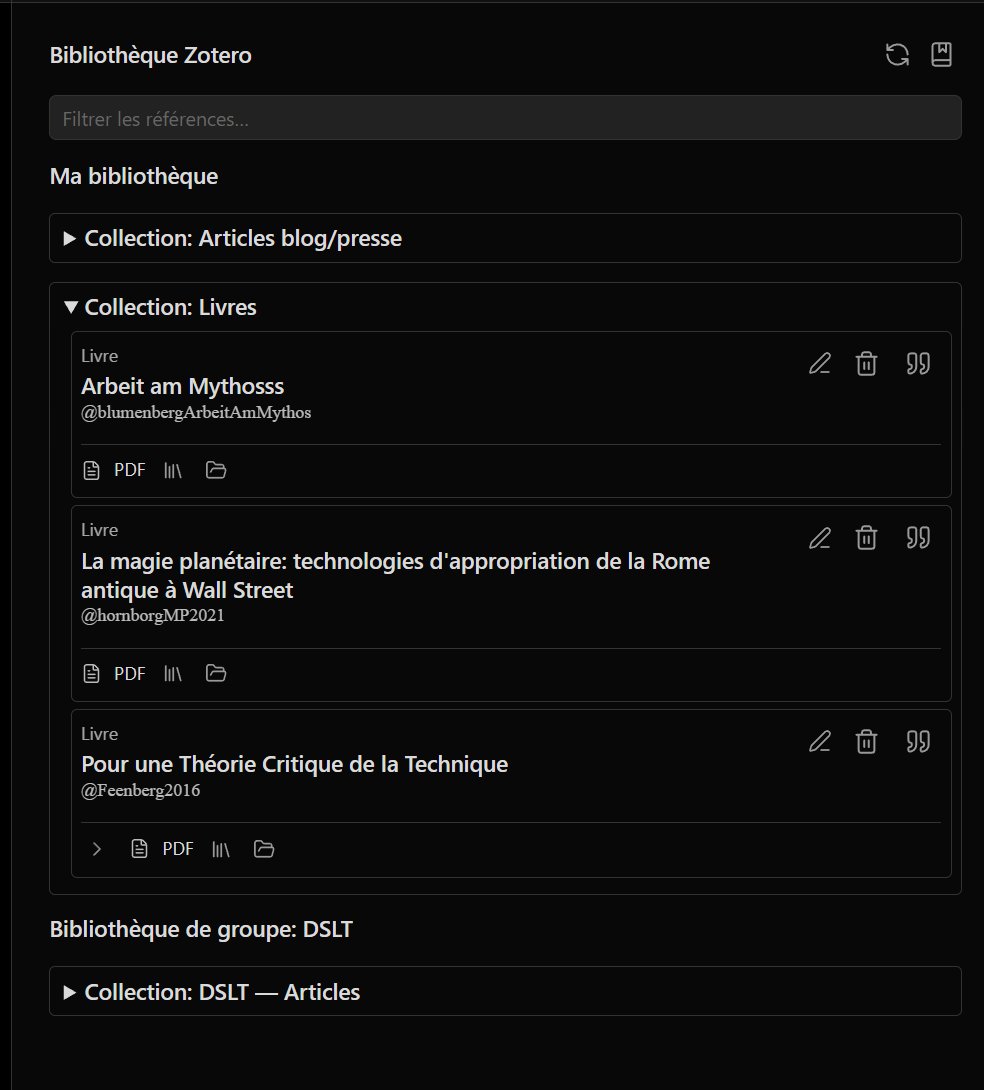
### 🌳 “Library” panel
Command: **“Open library panel”**.
**Tree view** (collections, unfiled items, standalone attachments, trash). Filter, edit items (including Zotero HTML notes), **PDF / file** attachments on each row.
- **▸ Collapsed subtrees by default**: chevron in the attachment strip to expand / collapse children.
- **🏷️ Type badges** (book, journal article…) follow the **plugin UI language** when supported.
Use **“Sync Zotero library (Web API)”** to refresh after the first sync.
### 📥 Import vault PDF folder to Zotero
Command **“Import vault PDF folder to Zotero”**: recursive scan, duplicate detection, suggested citation keys (author + year + title initials), long/short PDF collections, linked or uploaded attachments. Settings: default folder, exclusion patterns, filename regex.
## 📄 Built-in PDF reader
- Open PDFs from the vault in Obsidian's native PDF reader.
- **Highlights** to PDF and/or **Zotero** (Web API), saved styles, context menu.
- **Annotations panel**: unified list, Pandoc reference copy (`> quote`, Obsidian link, `[@citekey]`).
- Sync with Zotero attachments linked to vault files.
## 📗 Built-in EPUB reader
- **foliate-js** reader in Obsidian (navigation, local highlights).
- Annotation **sidecar** next to the EPUB.
- Early **Zotero** linking (read/push highlights when EPUB attachment is matched) — see roadmap below.
## 📝 Hypothesis (optional)
API token and group in settings. **Import** Hypothesis annotations into the document panel (EPUB); **export** local annotations to Hypothesis. UI hidden when not configured.
## 🗺️ Roadmap (summary)
Today: **Pandoc citations + Zotero API + PDF** are the most mature; **EPUB** and **Hypothesis** have a working base that still needs polish.
| Priority | EPUB | Hypothesis | Other |
| :---: | --- | --- | --- |
| **Short term** | Annotations panel parity with PDF; Zotero HTML notes from library; reliable highlight ↔ Zotero (CFI) | Test matrix (vault URIs, groups, round-trip import/export); clearer errors | Vault PDF import UX |
| **Medium term** | In-book search; typography prefs; PDF-like Zotero targets | Rich selectors; same work on web/PDF | Copy reference from EPUB annotations |
| **Long term** | PDF/EPUB feature parity (overlay, mobile) | Scheduled sync, conflict handling | Obsidian community listing; broader CI tests; offline PDF assets |
**EPUB**
- [x] Foliate reader, sidecar, basic toolbar
- [x] Read Zotero annotations; push highlights via API
- [ ] Zotero **notes** on EPUB items
- [ ] Smooth bidirectional highlight sync
- [ ] Full document annotations panel integration
- [ ] Large files & mobile testing
**Hypothesis**
- [x] Token + group; import search API; export POST
- [ ] Systematic tests (browser PDF, EPUB, multiple URIs)
- [ ] Network resilience and API limits
- [ ] Alignment with Zotero flow (dedup, source choice)
**Other ideas**
- Global search across recent document annotations.
- Batch export of reading-session references.
- Zotero sync reminder before `.bib` export.
- Reading-note templates from annotations (Typst, etc.).
> Checkboxes reflect the repo at doc update time; track changes on [GitHub Issues](https://github.com/Atelier-Recherche/pandocit/issues).
## 💻 Development and build
Requires [Node.js](https://nodejs.org/) and [Yarn](https://yarnpkg.com/).
```bash
yarn install
yarn build
```
CI/release uses `yarn install --frozen-lockfile --ignore-scripts` (skips `@codemirror/language` git `prepare` script).
Build outputs include:
- `main.js` (bundle; not in git — see [GitHub releases](https://github.com/Atelier-Recherche/pandocit/releases))
- `manifest.json`, `styles.css`
- `pdf.worker.min.mjs`, `foliate-view.mjs` (optional in the vault; worker embedded in `main.js`; EPUB reader downloadable from settings)
- `pdf-assets/`, `foliate/` (build outputs, not in git; `foliate/` is used to produce `foliate-view.mjs`)
**Local deploy** (Windows): `.\Deploy-LocalPlugin.ps1` — copies `main.js`, `manifest.json`, `styles.css`, `pdf.worker.min.mjs`, and `foliate-view.mjs` to your vault plugin folder (keeps `data.json` and `pandoc.wasm`).
**Release**: `.\Release-Plugin.ps1` bumps version, builds, commits, tags, pushes; [.github/workflows/release.yml](.github/workflows/release.yml) publishes **only** `main.js`, `manifest.json`, and `styles.css` (Obsidian community requirement). The PDF worker is **embedded in `main.js`**; optional `pdf.worker.min.mjs` download is in **plugin settings** (like `pandoc.wasm`).
Install **`pandoc.wasm`** from plugin settings in the vault (required for non-JSON bibliographies).
## ⚠️ Known limitations (WASM)
Pandoc WASM runs in a sandbox: no arbitrary network or shell commands. This plugin only uses bibliography → CSL JSON conversion.
## 🔗 Resources
| | |
| --- | --- |
| 🌐 **l'Atelier** | [atelier.atechnologie.fr](https://atelier.atechnologie.fr/) |
| 📦 **Repository** | [github.com/Atelier-Recherche/pandocit](https://github.com/Atelier-Recherche/pandocit) |
| 📄 **Pandoc** | [pandoc.org](https://pandoc.org/) — [Releases / pandoc.wasm 3.9](https://github.com/jgm/pandoc/releases) |
| 🎓 **CSL** | [citationstyles.org](https://citationstyles.org/) |
---
|
---
## 📖 About
Shows a formatted reference list in the sidebar for each Pandoc citation key (`[@key]`) in the active note.
## ⬇️ Install via BRAT (one click)
> **Plugin ID (Obsidian community)** : `pandocit` — the folder under `.obsidian/plugins/` must be named **`pandocit`** (IDs cannot contain `obsidian`; see [Manifest guidelines](https://docs.obsidian.md/Reference/Manifest)). Migrating from `obsidian-pandoc-reference-list`? Rename the folder or reinstall, then copy `data.json` and `pandoc.wasm`.
1. 🔌 Install **BRAT**: [Obsidian — BRAT](https://obsidian.md/plugins?search=BRAT#)
2. ➕ Add this repo with *“Add Beta plugin”*:
`https://github.com/Atelier-Recherche/pandocit`
> 💡 Our plugins may still be pending Obsidian community review; BRAT lets you try them now. See also 🌐 [l'Atelier](https://atelier.atechnologie.fr/).
## ⚙️ How it works
- 🦀 Uses **Pandoc 3.9 WebAssembly** (`pandoc.wasm`) to convert bibliography files (BibTeX, etc.) to CSL JSON. **No system Pandoc install required.**
- 📱 Works on **Obsidian desktop** (Windows, macOS, Linux) **and mobile** (Android, iOS).
## 🔧 Configuration
1. **📚 Bibliography**
Path to your bibliography file (Pandoc-compatible: `.bib`, CSL `.json`, etc.).
- 🖥️ **Desktop**: file picker or absolute / vault-relative path.
- 📱 **Mobile**: **vault-relative** path only (e.g. `refs/library.bib`). File dialog is desktop-only.
2. **🎨 Citation style (CSL)** *(optional)*
Built-in list or `.csl` file (path or URL); overridable via note frontmatter (`bibliography`, `csl`, `lang`, etc.).
3. **📋 Reference panel**
Command palette: **“PandoCit : Show reference list”** (label depends on Obsidian UI language).
4. **🌐 Plugin language** *(optional)*
Plugin settings: UI language for labels (settings, item editor, dedicated sidebar).
## 📚 Zotero (optional)
### 🔗 Better BibTeX / local feed
**Better BibTeX** and local network sync work best on **desktop**. On mobile, prefer a bibliography file in the vault.
### ☁️ Zotero Web API
When enabled in settings:
- 🔑 **API key** and **personal** or **group** library (numeric ID).
- 👥 **Merge group libraries**: group IDs + **Load groups** or **custom display names** (one line per ID + label).
- 🔄 **Bidirectional sync** (Zotero API model).
- 📤 Optional **BibTeX export** to a vault `.bib` (for Pandoc, LaTeX, Typst).
Data is stored as JSON in the plugin folder; **no local Zotero Node install** — offline vault use after sync.
### 🌳 “Library” panel
Command: **“Open library panel”**.
**Tree view** (collections, unfiled items, standalone attachments, trash). Filter, edit items (including Zotero HTML notes), **PDF / file** attachments on each row.
- **▸ Collapsed subtrees by default**: chevron in the attachment strip to expand / collapse children.
- **🏷️ Type badges** (book, journal article…) follow the **plugin UI language** when supported.
Use **“Sync Zotero library (Web API)”** to refresh after the first sync.
### 📥 Import vault PDF folder to Zotero
Command **“Import vault PDF folder to Zotero”**: recursive scan, duplicate detection, suggested citation keys (author + year + title initials), long/short PDF collections, linked or uploaded attachments. Settings: default folder, exclusion patterns, filename regex.
## 📄 Built-in PDF reader
- Open PDFs from the vault in Obsidian's native PDF reader.
- **Highlights** to PDF and/or **Zotero** (Web API), saved styles, context menu.
- **Annotations panel**: unified list, Pandoc reference copy (`> quote`, Obsidian link, `[@citekey]`).
- Sync with Zotero attachments linked to vault files.
## 📗 Built-in EPUB reader
- **foliate-js** reader in Obsidian (navigation, local highlights).
- Annotation **sidecar** next to the EPUB.
- Early **Zotero** linking (read/push highlights when EPUB attachment is matched) — see roadmap below.
## 📝 Hypothesis (optional)
API token and group in settings. **Import** Hypothesis annotations into the document panel (EPUB); **export** local annotations to Hypothesis. UI hidden when not configured.
## 🗺️ Roadmap (summary)
Today: **Pandoc citations + Zotero API + PDF** are the most mature; **EPUB** and **Hypothesis** have a working base that still needs polish.
| Priority | EPUB | Hypothesis | Other |
| :---: | --- | --- | --- |
| **Short term** | Annotations panel parity with PDF; Zotero HTML notes from library; reliable highlight ↔ Zotero (CFI) | Test matrix (vault URIs, groups, round-trip import/export); clearer errors | Vault PDF import UX |
| **Medium term** | In-book search; typography prefs; PDF-like Zotero targets | Rich selectors; same work on web/PDF | Copy reference from EPUB annotations |
| **Long term** | PDF/EPUB feature parity (overlay, mobile) | Scheduled sync, conflict handling | Obsidian community listing; broader CI tests; offline PDF assets |
**EPUB**
- [x] Foliate reader, sidecar, basic toolbar
- [x] Read Zotero annotations; push highlights via API
- [ ] Zotero **notes** on EPUB items
- [ ] Smooth bidirectional highlight sync
- [ ] Full document annotations panel integration
- [ ] Large files & mobile testing
**Hypothesis**
- [x] Token + group; import search API; export POST
- [ ] Systematic tests (browser PDF, EPUB, multiple URIs)
- [ ] Network resilience and API limits
- [ ] Alignment with Zotero flow (dedup, source choice)
**Other ideas**
- Global search across recent document annotations.
- Batch export of reading-session references.
- Zotero sync reminder before `.bib` export.
- Reading-note templates from annotations (Typst, etc.).
> Checkboxes reflect the repo at doc update time; track changes on [GitHub Issues](https://github.com/Atelier-Recherche/pandocit/issues).
## 💻 Development and build
Requires [Node.js](https://nodejs.org/) and [Yarn](https://yarnpkg.com/).
```bash
yarn install
yarn build
```
CI/release uses `yarn install --frozen-lockfile --ignore-scripts` (skips `@codemirror/language` git `prepare` script).
Build outputs include:
- `main.js` (bundle; not in git — see [GitHub releases](https://github.com/Atelier-Recherche/pandocit/releases))
- `manifest.json`, `styles.css`
- `pdf.worker.min.mjs`, `foliate-view.mjs` (optional in the vault; worker embedded in `main.js`; EPUB reader downloadable from settings)
- `pdf-assets/`, `foliate/` (build outputs, not in git; `foliate/` is used to produce `foliate-view.mjs`)
**Local deploy** (Windows): `.\Deploy-LocalPlugin.ps1` — copies `main.js`, `manifest.json`, `styles.css`, `pdf.worker.min.mjs`, and `foliate-view.mjs` to your vault plugin folder (keeps `data.json` and `pandoc.wasm`).
**Release**: `.\Release-Plugin.ps1` bumps version, builds, commits, tags, pushes; [.github/workflows/release.yml](.github/workflows/release.yml) publishes **only** `main.js`, `manifest.json`, and `styles.css` (Obsidian community requirement). The PDF worker is **embedded in `main.js`**; optional `pdf.worker.min.mjs` download is in **plugin settings** (like `pandoc.wasm`).
Install **`pandoc.wasm`** from plugin settings in the vault (required for non-JSON bibliographies).
## ⚠️ Known limitations (WASM)
Pandoc WASM runs in a sandbox: no arbitrary network or shell commands. This plugin only uses bibliography → CSL JSON conversion.
## 🔗 Resources
| | |
| --- | --- |
| 🌐 **l'Atelier** | [atelier.atechnologie.fr](https://atelier.atechnologie.fr/) |
| 📦 **Repository** | [github.com/Atelier-Recherche/pandocit](https://github.com/Atelier-Recherche/pandocit) |
| 📄 **Pandoc** | [pandoc.org](https://pandoc.org/) — [Releases / pandoc.wasm 3.9](https://github.com/jgm/pandoc/releases) |
| 🎓 **CSL** | [citationstyles.org](https://citationstyles.org/) |
---