# Note Image Gallery
A powerful Obsidian plugin that displays all images from your current note in a beautiful, interactive gallery view.


English | 简体中文
---
## 🎬 Demo
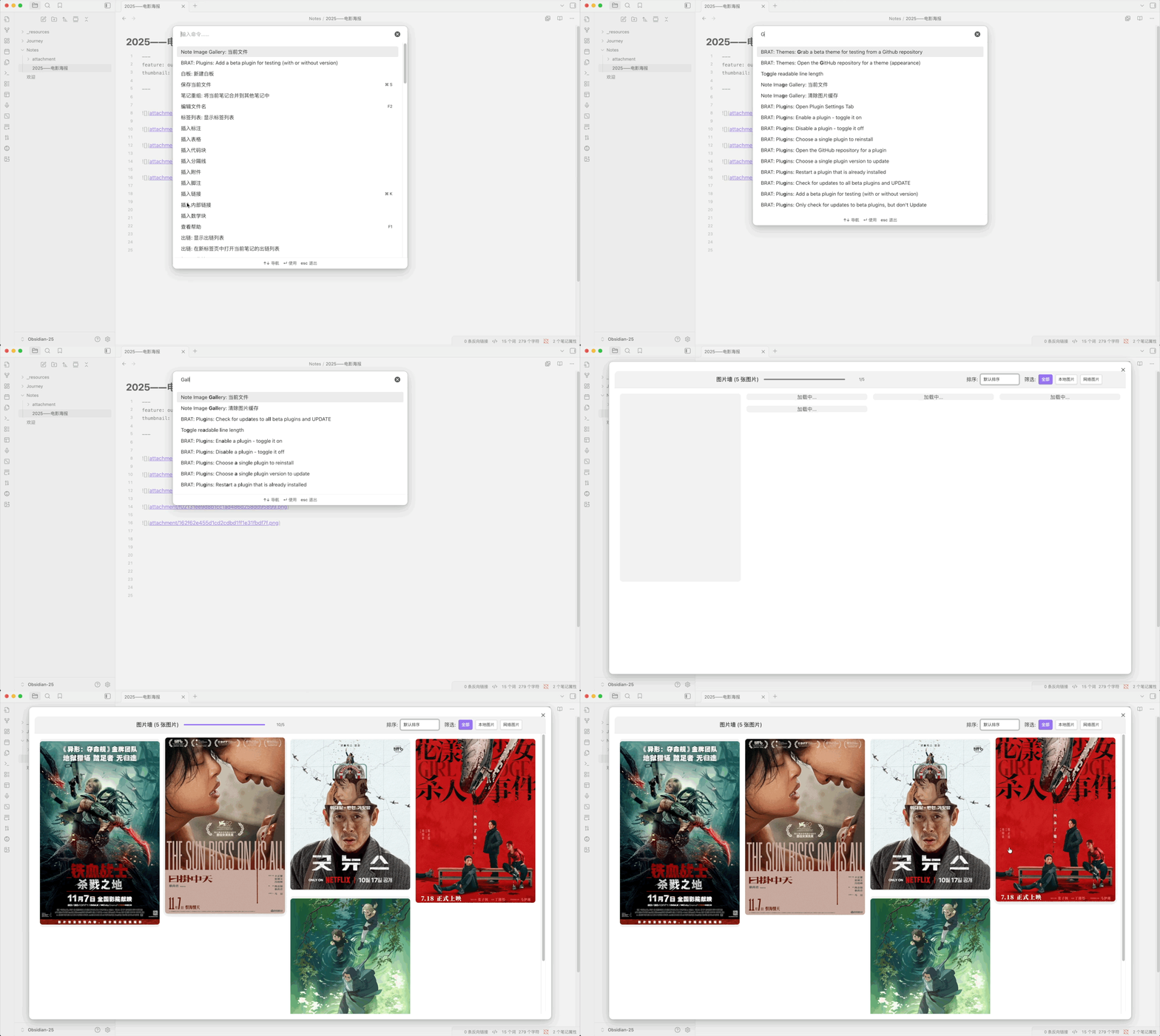
### 1、Enable via Command Palette
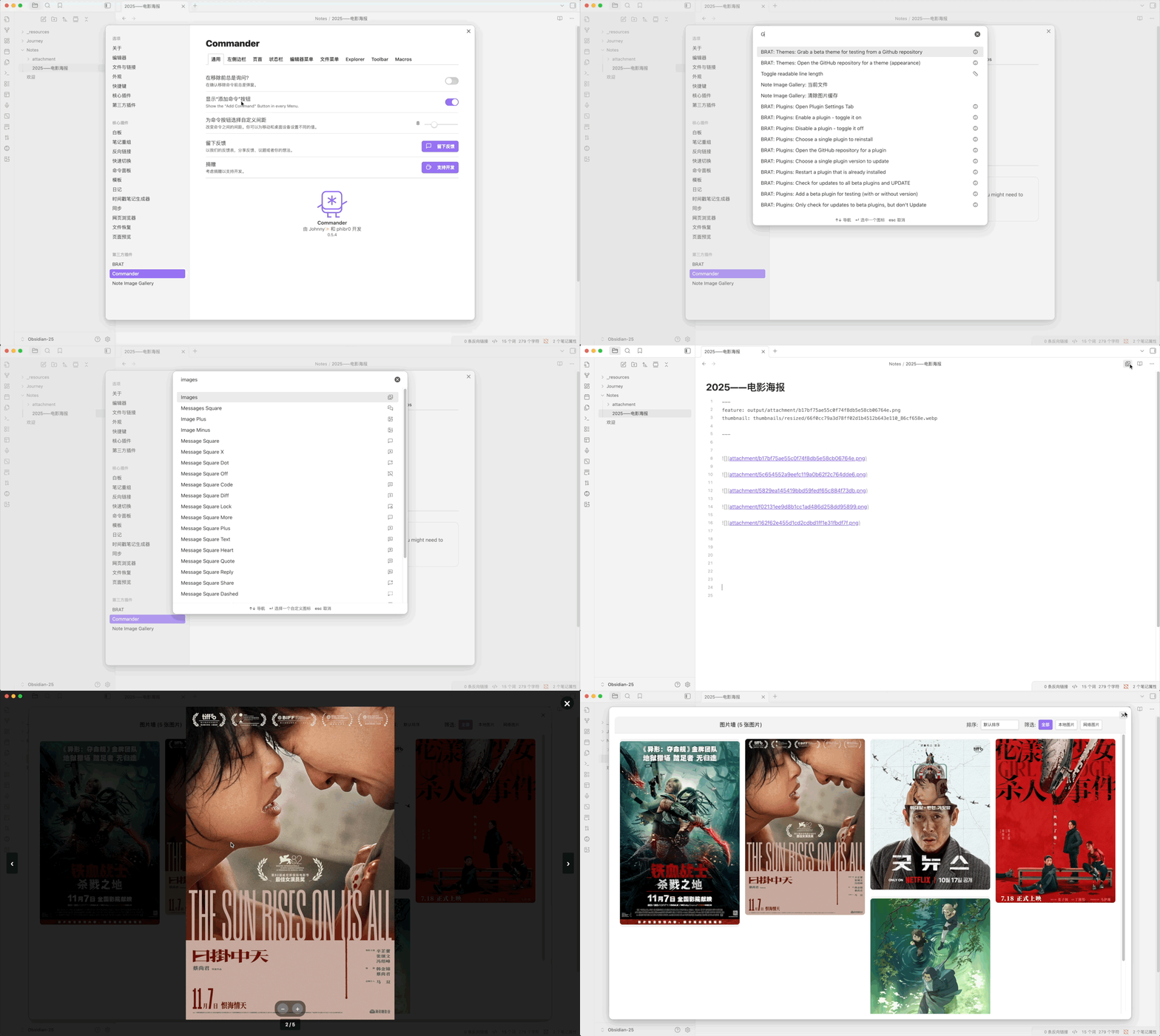
### 2、Enable via Commander Plugin
---
## ✨ Features
- **📸 Gallery View**: Display all images from your note in an elegant waterfall/masonry layout
- **🖼️ Image Support**:
- Local images (vault attachments)
- Remote images (HTTP/HTTPS URLs)
- Special handling for Weibo images (微博图片)
- **🎨 Interactive UI**:
- Click any image to open lightbox view with navigation
- Arrow keys for quick navigation
- Zoom in/out with mouse wheel or keyboard
- Context menu for copying and downloading images
- **🔍 Filter & Sort**:
- Filter images by type (All / Local / Remote)
- Sort by size or default order
- **⚡ Performance**:
- Lazy loading for improved performance
- Virtual scrolling for large image collections
- Smart image queue with priority management
- Concurrent loading with configurable limits
- **💾 Smart Caching**:
- File-based caching system for remote images
- Configurable cache size and expiration
- LFU+LRU hybrid cache eviction algorithm
- Automatic cache cleanup and management
- **🌍 Internationalization**:
- Auto-detects Obsidian language settings
- Full support for English and Chinese (Simplified)
- Easy to extend for more languages
- **📱 Cross-Platform**: Works on desktop and mobile devices
---
## 📦 Installation
### From Obsidian Community Plugins (Recommended)
1. Open Obsidian Settings
2. Navigate to **Community Plugins** and disable Safe Mode
3. Click **Browse** and search for "Note Image Gallery"
4. Click **Install**, then **Enable**
### Manual Installation
1. Download the latest release from the [Releases page](https://github.com/Lemon695/obsidian-note-image-gallery/releases)
2. Extract the files to your vault's plugins folder: `/.obsidian/plugins/note-image-gallery/`
3. Reload Obsidian
4. Enable the plugin in Settings → Community Plugins
---
## 🚀 Usage
### Opening the Gallery
There are three ways to open the image gallery:
1. **Command Palette**: Press `Ctrl/Cmd + P` and search for "Open gallery for current note"
2. **Ribbon Icon**: Click the image gallery icon in the left sidebar
3. **Hotkey**: Assign a custom hotkey in Settings → Hotkeys
### Gallery Navigation
- **Click** any image to view it in full-screen lightbox mode
- **Arrow Keys** (← →) to navigate between images
- **Mouse Wheel** or **+/-** keys to zoom in/out
- **ESC** or click outside to close lightbox
- **Right-click** on any image for context menu options:
- Copy image to clipboard
- Download image
### Filtering and Sorting
- Use the **filter buttons** at the top to show:
- All images
- Local images only
- Remote images only
- Use the **sort dropdown** to order images by:
- Default order (as they appear in the note)
- Size (large to small)
- Size (small to large)
---
## ⚙️ Settings
Access plugin settings via Settings → Note Image Gallery
### Cache Settings
| Setting | Description | Default |
|---------|-----------------------------------------|---------|
| **Enable Image Cache** | Cache remote images to speed up loading | Enabled |
| **Cache Validity Period** | Maximum cache age in days (1-60) | 7 days |
| **Maximum Cache Size** | Maximum cache size in MB (10-300) | 100 MB |
### Cache Management
- **Refresh Cache Status**: Recalculate current cache size
- **Clear All Cache**: Delete all cached images
### Developer Settings
| Setting | Description | Default |
|---------|-------------|---------|
| **Debug Mode** | Enable detailed console logging | Disabled |
---
## 🔒 Privacy and disclosures
- **No account required**: The plugin works without signing in to any service.
- **No telemetry or ads**: The plugin doesn't collect analytics or show advertisements.
- **Network use**: The plugin may send network requests only when your current note contains remote image URLs and you choose to open the gallery.
- **External file access**: The plugin reads images referenced by the current note and stores remote-image cache files inside the plugin data directory.
- **Open source**: The source code is available in this repository.
---
## 🎯 Performance Tips
1. **Enable Caching**: Keep image caching enabled for faster loading of remote images
2. **Adjust Cache Size**: Increase cache size if you work with many remote images
3. **Regular Cleanup**: Clear cache periodically if storage space is limited
4. **Image Optimization**: Use optimized image formats (WebP, JPEG) for better performance
---
## 🛠️ Development
### Building the Plugin
```bash
# Install dependencies
npm install
# Build for development (with watch mode)
npm run dev
# Run lint
npm run lint
# Build for production
npm run build
# Run TypeScript type checking
npm run build
```
### Project Structure
```
obsidian-note-image-gallery/
├── src/
│ ├── main.ts # Plugin entry point
│ ├── settings.ts # Settings tab and configuration
│ ├── i18n/
│ │ └── locale.ts # Internationalization strings
│ ├── service/
│ │ ├── current-note-image-gallery-service.ts # Main gallery service
│ │ ├── image-cache-service.ts # Cache management
│ │ ├── image-extractor-service.ts # Extract images from markdown
│ │ └── obsidian-image-loader.ts # Image loading utilities
│ └── utils/
│ ├── log-utils.ts # Logging system
│ ├── retry-handler.ts # Retry logic
│ └── resource-manager.ts # Resource cleanup
├── styles.css # Plugin styles
└── manifest.json # Plugin manifest
```
### Technologies Used
- **TypeScript**: Type-safe development
- **Obsidian API**: Plugin framework
- **CSS Grid**: Waterfall layout
- **IntersectionObserver**: Lazy loading
- **File System API**: Cache management
---
## 🤝 Contributing
Contributions are welcome! Here's how you can help:
1. **Report Bugs**: Open an issue with detailed reproduction steps
2. **Suggest Features**: Share your ideas in the issues section
3. **Submit Pull Requests**:
- Fork the repository
- Create a feature branch (`git checkout -b feature/amazing-feature`)
- Commit your changes (`git commit -m 'Add amazing feature'`)
- Push to the branch (`git push origin feature/amazing-feature`)
- Open a Pull Request
### Development Guidelines
- Follow existing code style
- Add comments for complex logic
- Test on both desktop and mobile
- Update README for new features
---
## 📝 License
This project is licensed under the GNU General Public License v3.0 - see the [LICENSE](LICENSE) file for details.
---
## 🙏 Acknowledgments
- Thanks to the Obsidian team for the excellent plugin API
- Inspired by various image gallery plugins in the community
- Special thanks to all contributors and users
---
## 📧 Support
- **Issues**: [GitHub Issues](https://github.com/Lemon695/obsidian-note-image-gallery/issues)
- **Discussions**: [GitHub Discussions](https://github.com/Lemon695/obsidian-note-image-gallery/discussions)
- **Author**: [@Lemon695](https://github.com/Lemon695)
---
## 🔄 Changelog
See [RELEASES](https://github.com/Lemon695/obsidian-note-image-gallery/releases) for a list of changes in each version.
---
Made with ❤️ for the Obsidian community