
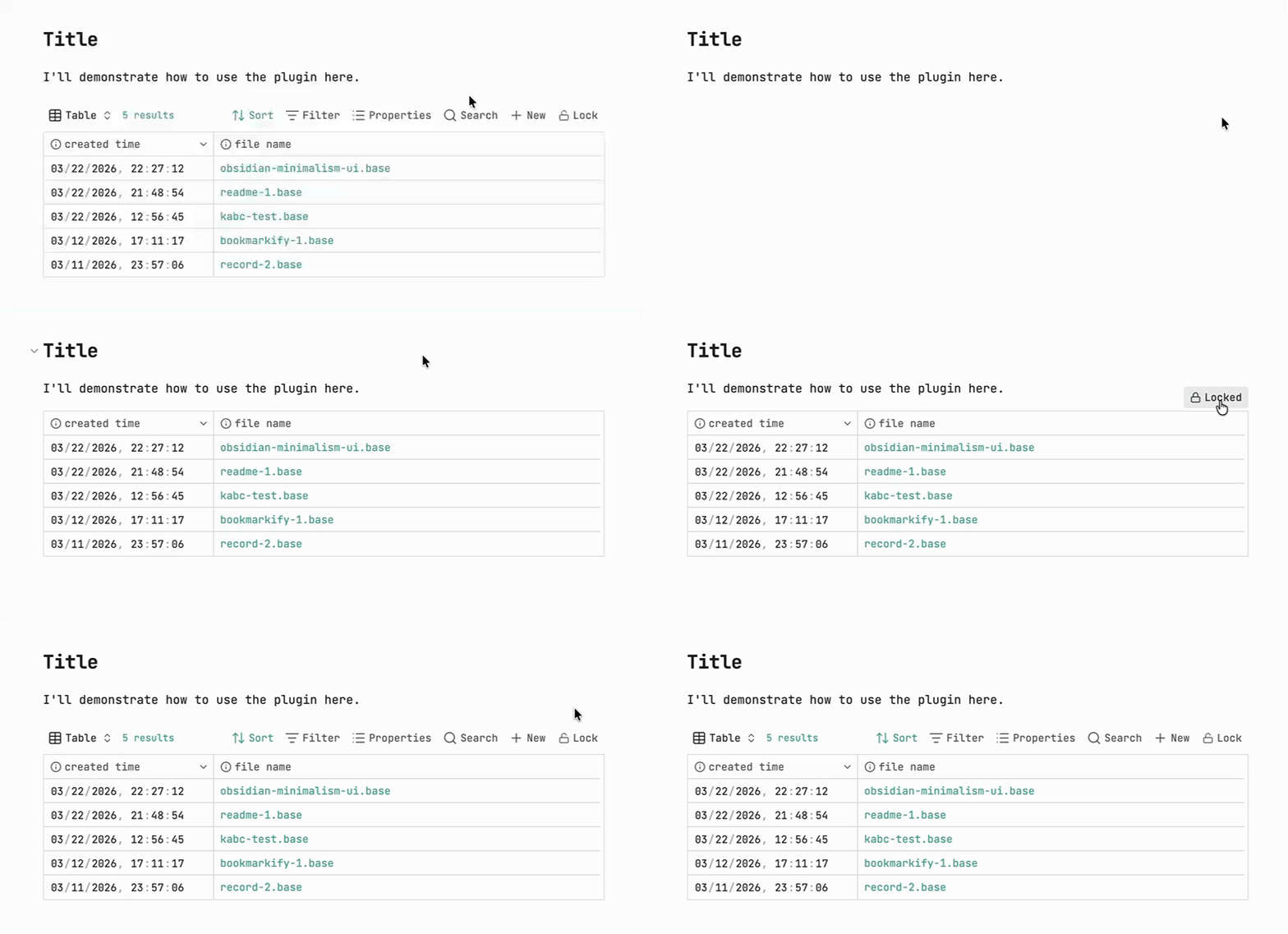
A small Obsidian plugin to **hide the Obsidian Bases toolbar and lock header interaction on demand**.
You can quickly switch the state by clicking the **Lock / Unlock** button.
**Note:** The plugin only works in **Reading view**.
## ⬇️ Installation
### From community plugins (recommended)
You can install this plugin directly from Obsidian’s community plugins browser:
1. Open Obsidian and go to **Settings → Community plugins**
2. Select **Browse** and search for **“Bases lock”**
3. Click **Install**, then enable the plugin
You can also install it directly from the community plugins page:
[Install from community plugins](https://obsidian.md/plugins?id=bases-lock)
### Manual install (local/dev build)
1. Create the plugin folder inside your vault:
```text
/.obsidian/plugins/obsidian-bases-lock/
```
2. Copy these files into that folder:
- `main.js`
- `manifest.json`
3. Open Obsidian:
- Go to **Settings → Community plugins → Installed plugins**
- Enable **Bases Lock**
4. Make sure the official **Bases** core plugin is enabled.
## ⭐ Usage
1. Move your mouse over a Base; a **locked** button will appear.
2. Click it to toggle **lock / unlock**.
## Development & build
- **Install dependencies:**
```bash
npm install
```
- **Development mode (watch build):**
```bash
npm run dev
```
- **Production build:**
```bash
npm run build
```
After building, the latest `main.js` will be generated in the plugin root folder for Obsidian to load.
### Notes
- The plugin only renders the button and controls toolbar / header behavior in **Reading view**.
- The selectors (such as `.bases-toolbar`, `.bases-header`, `.bases-thead`, etc.) depend on the current Obsidian Bases DOM structure:
- If a future Obsidian update changes these classes, you can inspect the actual classes via DevTools and adjust the selectors in `styles.css`.
- The plugin only looks at the `.base` embed syntax (`|x` / `|o`) in the **current document** and does not scan or modify other notes.
### Design rationale
Assume `src/a.base` is embedded in any of the following forms:
- `![[src/a.base]]`
- ``
- ``
- ``
After clicking the button:
- From **unlocked → locked**
- Any of the forms above will be normalized to:
```markdown

```
- If there was no display name (for example `![[src/a.base]]`), the file name (without the `.base` suffix) will be used:
```markdown
![[src/a.base]] → 
```
- From **locked → unlocked**
- If the current syntax is ``, it will be changed to:
```markdown

```
At the same time:
- `x` → hide toolbar + disable `.bases-thead` click, button text shows **locked**
- `o` → restore toolbar and header interaction, button text shows **unlocked**




