# Forest & Homestead: user guide
A short guide to how the game layer of **Pomodoro Timer Forest** works. For the exact numbers and data schema see the [technical spec](../FOREST_SPEC.md). The [README](../README.md) covers installation and the classic timer features (logging, task tracking, Dataview).
- [The loop in one minute](#the-loop-in-one-minute)
- [Opening things](#opening-things)
- [Growing trees](#growing-trees)
- [Done early? Harvest early](#done-early-harvest-early)
- [Hyperfocus mode ("Ride the wave")](#hyperfocus-mode-ride-the-wave)
- [Kanban boards](#kanban-boards)
- [Boards and the Kanban plugin](#boards-and-the-kanban-plugin)
- [Lanes](#lanes)
- [Cards](#cards)
- [Focusing on a card](#focusing-on-a-card)
- [What finishing a card earns](#what-finishing-a-card-earns)
- [Board statistics](#board-statistics)
- [Rewards](#rewards)
- [Levels and unlocks](#levels-and-unlocks)
- [Building your village](#building-your-village)
- [Garden plots and crops](#garden-plots-and-crops)
- [Villagers and hens](#villagers-and-hens)
- [Daily quests and achievements](#daily-quests-and-achievements)
- [Streaks, vitality and withering](#streaks-vitality-and-withering)
- [Smart seeds (tags)](#smart-seeds-tags)
- [The Grove journal](#the-grove-journal)
- [Sounds](#sounds)
- [Settings](#settings)
- [Export and sharing](#export-and-sharing)
- [Your data](#your-data)
- [Uninstalling without losing your progress](#uninstalling-without-losing-your-progress)
- [Using more than one device](#using-more-than-one-device)
- [Troubleshooting](#troubleshooting)
## The loop in one minute
1. **Start a focus session.** A seed is planted in the timer.
2. **Stay with it.** The plant grows through four stages as the minutes pass.
3. **Harvest.** You earn ☀️ Sunlight, 🪙 Coins and XP, and a sapling of the tree you grew.
4. **Spend and place.** Buy buildings, plant your saplings, upgrade things. Perks make the next session pay more.
5. **Come back tomorrow.** Fresh quests, a streak to keep, and a village that is happiest when you visit.
## Opening things
| What | How |
|---|---|
| Timer + village panel (right sidebar) | Ribbon icon **Toggle timer panel** (timer), or the command *Open timer panel in the right sidebar* |
| Full-page village | Ribbon icon **Open homestead village** (trees), or the command *Open homestead village (full view)* |
| A Kanban board | Ribbon icon **Open a board** (kanban), or the command *Open a board…*: pick one of your boards, or create a new one |
| Start / pause, reset, switch work/break | Commands *Start / pause timer*, *Reset timer*, *Switch timer mode (work / break)*, or click the timer |
| Hyperfocus | Commands *Start hyperfocus session*, *Land hyperfocus session*, or click the status bar icon |
Both the sidebar panel and the full page have four tabs: **Village**, **Grove**, **Market** and **Journey**.
## Growing trees
- Click the plant in the timer (while idle) to choose which seed to grow. Only species you have unlocked are listed.
- The plant moves through **seed → sprout → sapling → fully grown** at 0 / 25 / 50 / 75 % of the session, and the ring around it fills up.
- Finish the session and the tree is harvested: sound, petals, a reward card that itemises every bonus.
- **Giving up** (reset, or switching mode mid-session) after the first minute withers the tree, if *Withering* is on. The reset button asks you to confirm first.
- Breaks are rewarded too, so resting is part of the game.
### Done early? Harvest early
Planned 25 minutes but the task took 10? You don't have to sit out the rest of the timer.
When you **tick off the task you are focusing on** during a focus session (in its note, or with the Tasks plugin), the timer panel offers to end the session early. If the panel is hidden you get a notice instead; click it to open the timer.
- **After 5 minutes of focus** (or half the session, for sessions shorter than 10 minutes), *Harvest early* grows a **young tree** for today's grove and pays **75 % of the usual rate for the minutes you focused**, plus your streak and building bonuses.
- **Before that**, *End session* stops the timer without a tree. Nothing withers either way: once the task is done, stopping is finishing, not giving up. Reset and mode switching don't wither the tree any more either.
- **Past the halfway mark** the session also counts as a 🍅 on the task (with task tracking on) and your break starts. Shorter ones go straight back to a fresh focus session for your next task.
- **Keep going** instead and nothing changes: pick your next task from the list and the tree finishes growing as usual.
Finishing a session is always worth more than harvesting early. An early harvest gives **no sapling** for your village and doesn't count toward your **daily goal**, *Grow trees* quests or trees-grown achievements. It does keep your **streak**, adds to your focus minutes (and *Focus for N minutes* quests), and wakes the village a little. Because every minute pays less than it would in a full session, ticking off lots of tiny tasks never beats focusing properly.
Unchecking the task takes the offer back. Switching to another task does the same, and the timer carries on with that task. Turn the feature off with *Early harvest when the task is done* in settings. The command *Harvest focus session early (focused task is done)* does the same as the button.
### Hyperfocus mode ("Ride the wave")
For ADHD brains and deep technical tasks, fixed 25-minute Pomodoro intervals can sometimes be counter-productive—interrupting intense flow states with jarring alarms just when momentum is peaking.
**Hyperfocus mode** turns the timer into an open-ended count-up focus journey with thoughtful scaffolding:
- 🌊 **Ride the wave:** When a regular Pomodoro session finishes, the timer offers to transition smoothly into Hyperfocus without interruption or tree resets. Or, start Hyperfocus directly via the command *Start hyperfocus session* or by cycling the mode chip (`Focus` → `🌊 Hyperfocus` → `Break`).
- 🛡️ **Zero wither guarantee:** Stopping or resetting a Hyperfocus session is always treated as a successful landing, never a failure. If you focused for at least 10 minutes, you harvest your tree, earn full rewards, and collect your sapling. If you stop before 10 minutes, the session cancels cleanly without withering.
- 🌱 **Gentle body check-ins:** Every 30 minutes (configurable), a soft chime or gentle banner prompts you to take a sip of water, relax your shoulders, and check the wall clock. Acknowledging check-ins earns bonus coins (up to +6🪙 per session).
- 🌾 **Landing & breadcrumb note:** When you decide to land, the timer prompts for a quick "Where was I?" note (e.g., `Next: write integration test for auth`). This breadcrumb is saved to your session log and appended right below your active task, eliminating post-hyperfocus re-entry paralysis.
- ⚖️ **Fair rewards & pacing:** Focus time earns 1.2 Sunlight/min and 1 Coin/10m for the first 90 minutes. Beyond 90 minutes, rewards continue at half-rate (0.6 Sunlight/min) to gently disincentivize marathon sessions. Finished time counts fairly toward your daily goal and task pomodoro totals (`minutes / 25`).
- ☕ **Recovery breaks:** After landing, the timer recommends a proportional recovery break (up to 30 minutes) to help restore cognitive energy.
## Kanban boards
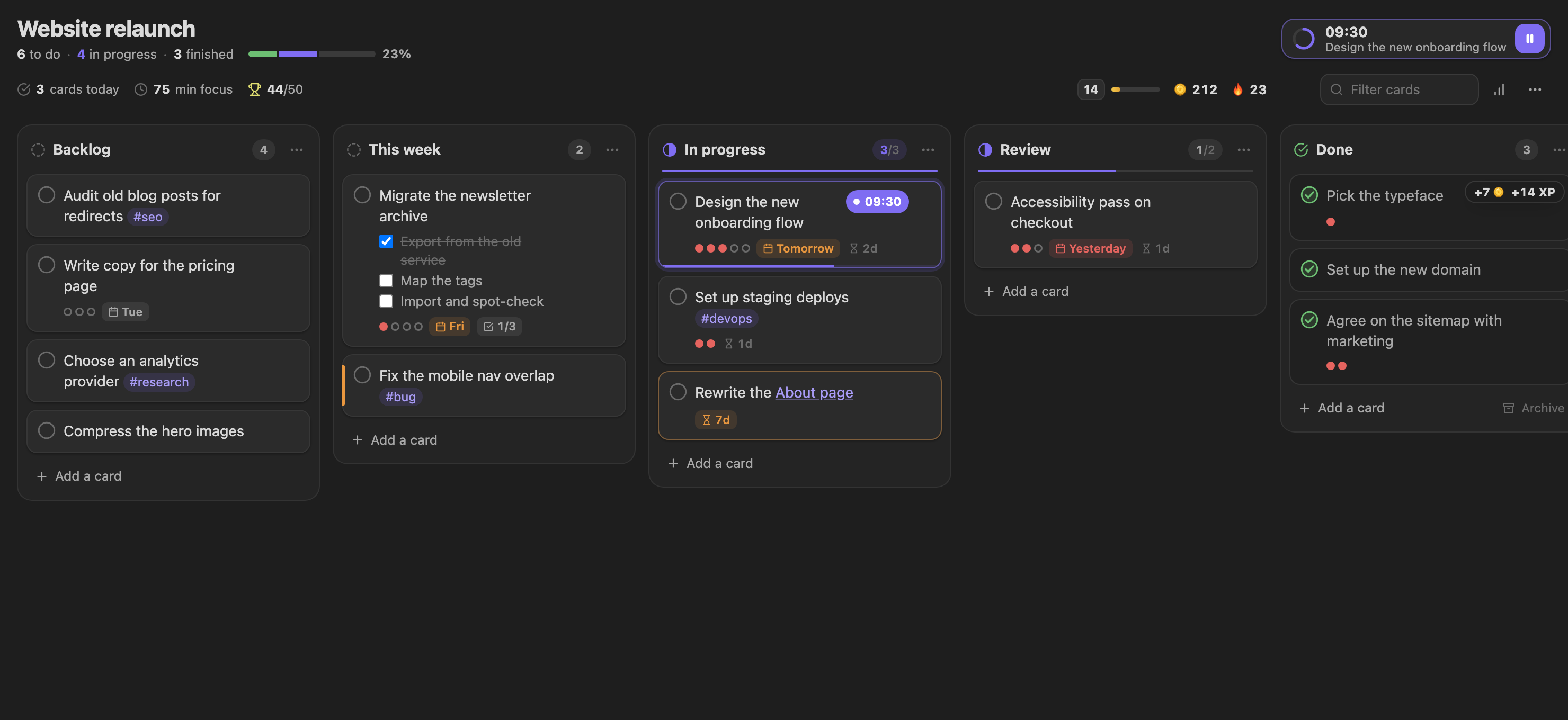
A board is a note with lanes of cards: waiting, in progress, finished. Boards are where planning, focus and rewards meet: you pick a card, focus on it, and finishing it pays.
| What | How |
|---|---|
| A new board | The ribbon icon **Open a board** → *Create a new board*, the command *Create a new board*, or right-click a folder → *New board* |
| Open an existing board here | The ribbon icon **Open a board** (your boards, the most recently changed first), or click the note (see the setting below), right-click it → *Open as Forest board*, or the command *Open this note as a Forest board* |
| See or edit the markdown | The page icon in the board's header, the board's ⋯ menu, or the command *Open this board as markdown* |
| Undo / redo | ⌘/Ctrl + Z, ⌘/Ctrl + Shift + Z while the board has focus |
### Boards and the Kanban plugin
Boards use the file format of the [Kanban plugin](https://github.com/mgmeyers/obsidian-kanban): a `kanban-plugin: board` key in the frontmatter, lanes as `##` headings, cards as list items. Any board made with the Kanban plugin opens here, and any board made here opens in the Kanban plugin. Only the lines you change are rewritten; notes between lanes, spacing and other frontmatter stay as they are.
*Settings → Boards → Open Kanban boards in* decides which view a board note opens in:
| Setting | Boards open in |
|---|---|
| Automatic (default) | The Kanban plugin's view if it is enabled, otherwise the Forest board |
| Forest board | The Forest board, even with the Kanban plugin installed |
| Leave as they are | Whatever Obsidian or the Kanban plugin would open; switch by hand |
Switching an open board to another view is always respected. With both plugins installed you can keep the Kanban plugin as your default and still get the rewards: **cards finished in the Kanban plugin's view count too**, and so do cards you move by editing the markdown.
### Lanes
- **What a lane is for** is read from its title (*To do*, *In progress*, *Review*, *Done*, *Shipped*…, in several languages), shown by the icon next to it. Change it in the lane's ⋯ menu. Making a lane a done lane adds the Kanban plugin's **Complete** marker, so cards moved there are ticked off in both plugins.
- **Card limits.** *Set a card limit…* writes it the Kanban way, `## Doing (3)`. The count turns orange when a lane holds more, and the thin bar under its title fills up as it gets full. Small limits are how work gets finished instead of just started.
- Rename a lane by double-clicking its title. Move lanes left and right, collapse them, sort their cards by due date or priority, or delete them from the ⋯ menu. *Archive* in a done lane moves its cards to the board's archive.
### Cards
- **Add** cards with *Add a card*: Enter adds one and keeps the box open for the next, Shift+Enter starts a new line, Esc closes it.
- **Drag** cards between lanes and within them. On a phone or tablet, press and hold a card for a moment, then drag. Esc cancels a drag.
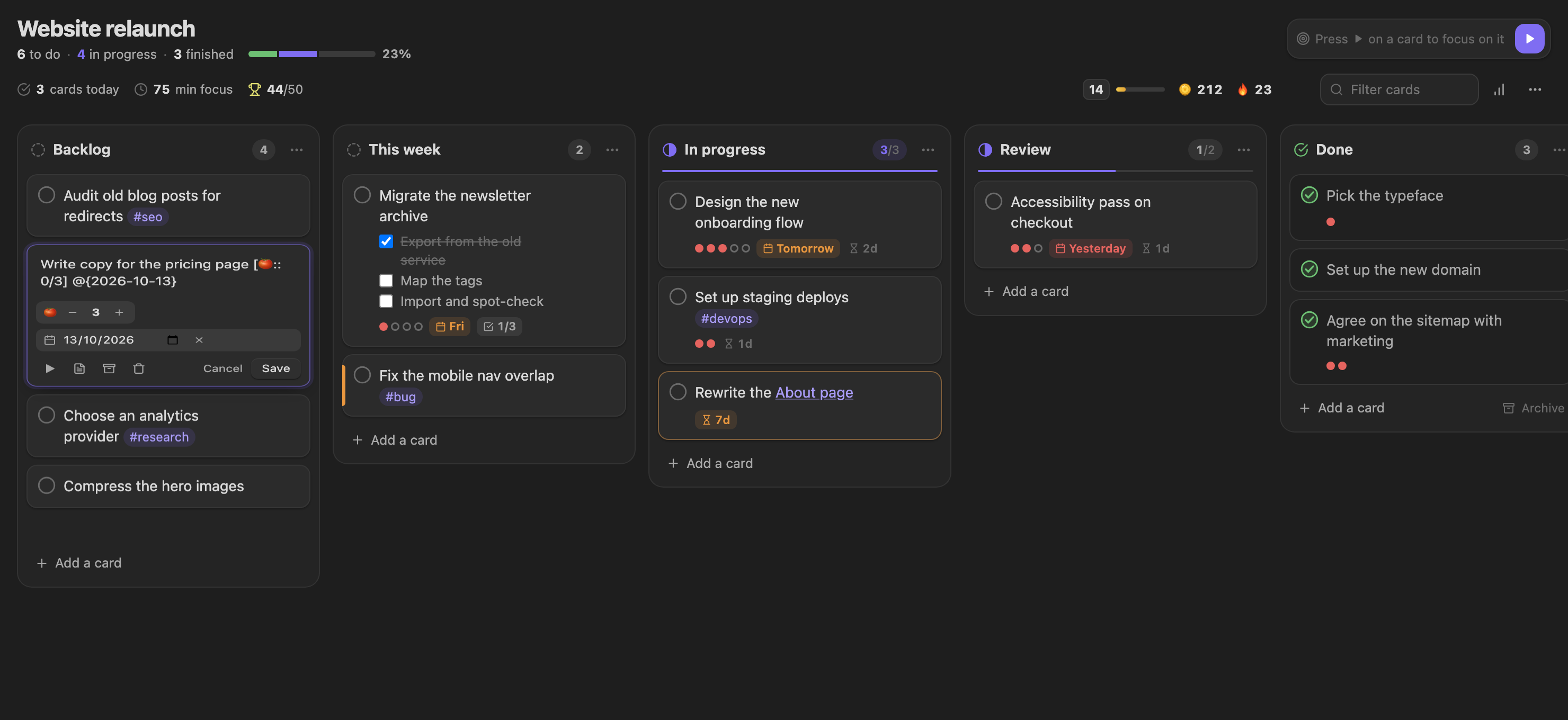
- **Click** a card to edit it. The editor has a 🍅 stepper for the planned pomodoros and a due date with *Today*, *Tomorrow* and *Next week* shortcuts. Enter saves.
 - **Finish** a card with the circle on its left. With *Move ticked-off cards to the done lane* on, it also moves to the top of the done lane. The same circle opens a finished card again.
- **Right-click** a card, or press the ⋯ that appears on it, for everything else: focus, move to another lane, open it in the note, copy a link to it (`[[Board#^id]]`), archive, delete.
- Cards show what is on them: planned and done pomodoros as dots, the due date (red when overdue), a future start date, checklist progress, and a priority edge from the Tasks plugin's priority emoji. Checklist items inside a card can be ticked right on the board, and clicking a tag filters the board by it.
- **Ageing.** A card in an in-progress lane shows how many days it has been there. After *Mark cards as stale after* days (5 by default) it turns orange: finish it, split it, or move it back.
Dates are read and written the way your board writes them: Kanban dates `@{2025-10-03}`, the Tasks plugin's `📅 2025-10-03`, or Dataview's `[due:: 2025-10-03]`. A new date is written as a Kanban date when the board already uses them or the Kanban plugin is installed, otherwise in your *Task format*.
### On a phone
In a narrow pane (a phone, or a thin split on the desktop) the board shows **one lane at a time**. Swipe sideways to move between lanes, or tap a lane's name in the row of tabs above them; each tab shows how many cards the lane holds.
- **Finish** a card with the circle on its left. With *Move ticked-off cards to the done lane* on, it also moves to the top of the done lane. The same circle opens a finished card again.
- **Right-click** a card, or press the ⋯ that appears on it, for everything else: focus, move to another lane, open it in the note, copy a link to it (`[[Board#^id]]`), archive, delete.
- Cards show what is on them: planned and done pomodoros as dots, the due date (red when overdue), a future start date, checklist progress, and a priority edge from the Tasks plugin's priority emoji. Checklist items inside a card can be ticked right on the board, and clicking a tag filters the board by it.
- **Ageing.** A card in an in-progress lane shows how many days it has been there. After *Mark cards as stale after* days (5 by default) it turns orange: finish it, split it, or move it back.
Dates are read and written the way your board writes them: Kanban dates `@{2025-10-03}`, the Tasks plugin's `📅 2025-10-03`, or Dataview's `[due:: 2025-10-03]`. A new date is written as a Kanban date when the board already uses them or the Kanban plugin is installed, otherwise in your *Task format*.
### On a phone
In a narrow pane (a phone, or a thin split on the desktop) the board shows **one lane at a time**. Swipe sideways to move between lanes, or tap a lane's name in the row of tabs above them; each tab shows how many cards the lane holds.
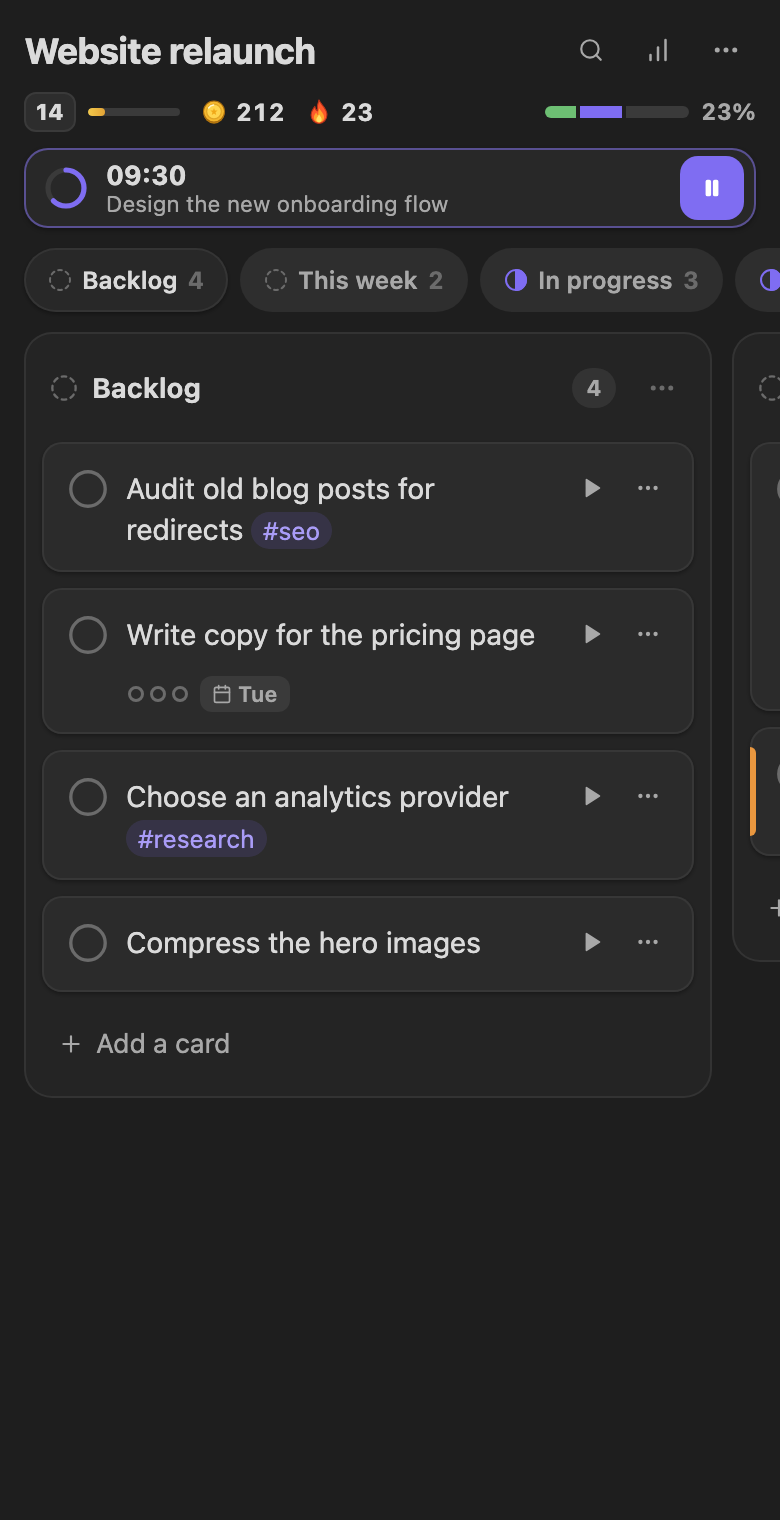
- **Press and hold** a card to pick it up, then drag. Drop it on another **lane's tab** to move it to the top of that lane, or drag to the edge to scroll to the next lane.
- Every card shows ▶ and ⋯; the ⋯ menu has *Move to…* for each lane, so nothing needs a drag.
- In the editor, Enter starts a new line and the **Save** button saves (there is no Shift+Enter on a phone keyboard).
- The statistics open in place of the lanes; tap the chart button again to come back.
### Focusing on a card
Press ▶ on a card (or right-click → *Focus and start the timer*) and the card becomes the timer's task:
- the card gets a block ID (such as `^a1b2c3`; the Kanban plugin keeps those) so it is found wherever it moves;
- each finished session adds a 🍅 to the card. This works even with task tracking off, unless you turn off *Count pomodoros on cards*;
- the card shows the time left and a progress line, and the board's header shows the session with pause and resume;
- finishing the card mid-session (moving it to done, or ticking it off) offers to [harvest early](#done-early-harvest-early).
The command *Focus on the next card in progress* picks the top open card of your in-progress lane, or of the first lane if none is in progress.
### What finishing a card earns
A card is finished when it is ticked off or moved into a done lane. Like a task, each card pays once a day and shares the daily cap of 30 with tasks. Cards that were added straight into a done lane, or that were already in a lane when it became a done lane, pay nothing.
| | Coins 🪙 | XP |
|---|---|---|
| Finishing a card | +3 | +6 |
| Pomodoros counted on it | +2 | +2 per pomodoro, up to 8 |
| Finished while the timer was on it (no pomodoro counted yet) | +2 | |
| Estimate on target (within a quarter, or one pomodoro, of the plan) | | +4 |
| Done by its due date | +2 | |
| Every limited lane within its limit | | +2 |
A finished card also counts as a task for quests and the task tally, and waters your garden. **Milestones** at 10, 25, 50, 100, 250 and 500 cards finished on a board pay Sunlight, Coins and XP, and **clearing a board** (finishing every card on a board of five or more) is celebrated once a day per board.
### Board statistics
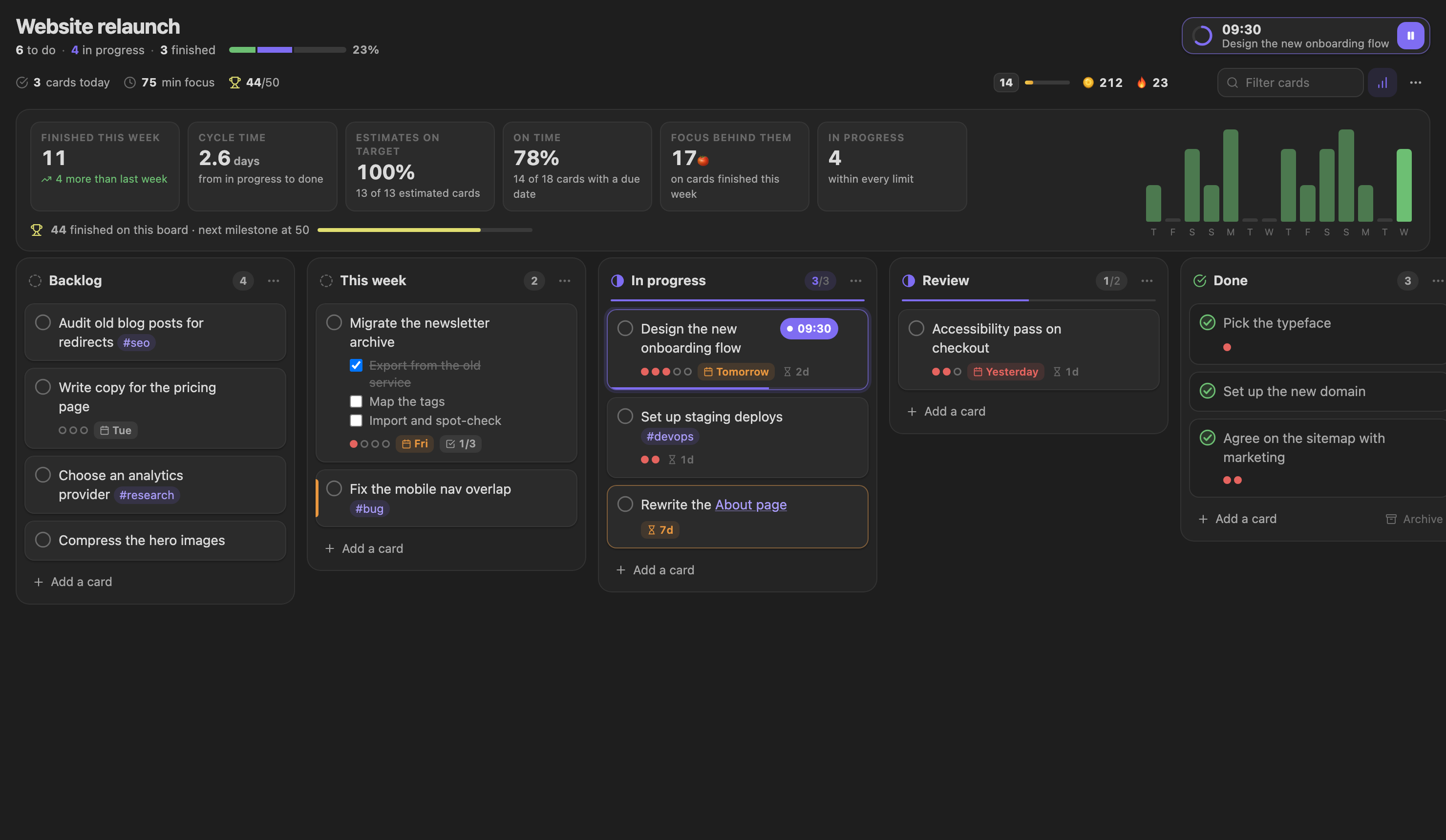
The chart button in the board's header opens its statistics: cards finished this week (compared with last week), the average **cycle time** from in progress to done, how often your **estimates** were on target, how many cards were done **on time**, the pomodoros behind this week's cards, a two-week chart, and the progress to the next milestone.
## Rewards
| Source | Sunlight ☀️ | Coins 🪙 | XP |
|---|---|---|---|
| Focus session | about 1.2 per minute | 1 per 10 minutes | 1 per minute |
| [Early harvest](#done-early-harvest-early) (task done before the timer) | 75 % of the above, for the minutes focused | | |
| First tree of the day | | | +10 |
| Reaching your daily goal | +40 | +5 | +20 |
| Ticking a task `[ ]` → `[x]` | | +3 (+2 if it was a 🍅 task, or the timer's task mid-session) | +5 |
| [Finishing a card](#what-finishing-a-card-earns) on a board | | +3 to +7 | +6 to +28 |
| [Board milestone](#what-finishing-a-card-earns) (10, 25, 50… cards) | 2 per card | 1 per 5 cards | 1 per card |
| Finishing a break | Tea Gazebo perk | | +3 |
| Harvesting a [crop](#garden-plots-and-crops) | | 2–15, by crop | 3–18, by crop |
| Each daily quest | 20–35 | 3–4 | 15–25 |
| Daily chest (all three quests) | +60 | +10 | +40, plus a sapling |
On top of that, your **streak** adds up to +20 % Sunlight, and building **perks** add more (see below).
**Tasks:** the plugin watches for a task changing from open to done while you work in a note. Each task pays once per day, up to 30 tasks a day. Pasting in tasks that are already checked pays nothing.
## Levels and unlocks
Everything you do earns XP. Levels unlock species, buildings, biomes and more land:
| Level | Unlocks (examples) |
|---|---|
| 1 | Classic Pine, Sunflower, Campfire, Cobblestone Path, Lantern, Bench |
| 2–4 | Oak, Lavender, Maple, Well, Brook, Footbridge, Tea Gazebo, Garden Plot, Hay Bale, Scarecrow, Chicken Coop, tomatoes, Sakura Grove biome, 6×6 land |
| 5–8 | Cherry Blossom, Willow, Bamboo, Cabin, Torii Gate, Watermill, wheat and pumpkins, Autumn Valley and Alpine Frost biomes |
| 9–14 | Bonsai, Fairy Ring, Celestial Gold Tree, Conservatory, Windmill, Twilight Sanctuary biome, 8×8 land |
The full table lives in the [spec](../FOREST_SPEC.md#3-flora-catalog).
## Building your village
- **Inventory.** Every finished session gives you a sapling of the species you grew. Buildings you buy also go to your inventory. Open the *Village* tab, pick an item, then tap an empty tile.
- **Select** any placed item to see what it does, then **Upgrade**, **Move** or **Stow** it back into your inventory. Press `Esc` to cancel placing.
- **Perks** are real and scale with upgrades. Two copies of the same building don't stack; the strongest counts.
| Building | Perk |
|---|---|
| Cozy Cabin | + % Sunlight on every session |
| Village Well | + % Coins on every session |
| Dutch Windmill | + % Sunlight on sessions of 45 min or more |
| Stone Lantern | + % Sunlight for evening sessions (19:00–05:00) |
| Garden Bench | + Coins for every task you tick |
| Tea Gazebo | + Sunlight for every finished break |
| Torii Gate | + % daily quest rewards |
| Glass Conservatory | + % XP from everything |
| River Watermill | Streak shields for days you rest |
| Hearth Campfire | The village fades more slowly on days off |
| Friendly Scarecrow | Crops grow + % faster |
| Chicken Coop | + Coins with your first tree of the day (fresh eggs) |
- **Paths, brooks and bridges** shape the ground. Put a footbridge on a brook tile.
- **Biomes** change the ground, foliage and hills. **Land** grows from 5×5 up to 8×8.
- The sky follows your computer's clock: dawn, day, dusk and night, with lights and fireflies after dark.
### Garden plots and crops
A **Garden Plot** (market, level 2, up to six) is a tile of tilled soil with a crop on it. Crops grow with your **focus minutes**, not with the clock:
- Every minute of a focus session (or an early harvest) grows every plot by a minute. A **Friendly Scarecrow** makes that faster.
- Every task you tick off **waters** the garden: each crop grows 5 more minutes.
- A ripe crop shows a gold marker. Click the plot, or **🧺 Harvest** above the village, to pick it. The plot is sown again right away.
- Crops **never wilt**. A ripe crop waits for you as long as it takes, and a plot left alone just pauses.
| Crop | Level | Focus minutes | Harvest |
|---|---|---|---|
| 🥕 Carrots | 1 | 50 | 2 Coins, 3 XP |
| 🍅 Tomatoes | 3 | 100 | 5 Coins, 6 XP |
| 🌾 Golden Wheat | 5 | 150 | 8 Coins, 10 XP |
| 🎃 Pumpkins | 8 | 250 | 15 Coins, 18 XP |
Select a plot to choose its crop. Switching crops keeps the minutes already grown, and stowing a plot picks a ripe crop first. Planting and harvesting both count for the *Tend your village* quest.
### Villagers and hens
Villagers come out as your village gets livelier and gains buildings. They walk around what you build, keep to paths and bridges where they can, stop by the well, the bench or a ripe garden plot, and gather at the campfire after dark. A **Chicken Coop** adds hens that potter around it.
Click a villager and they'll tell you how today is going. They cheer when you finish a tree, a quest or a level.
With *Low animation frame rate* on, or when your system asks for reduced motion, everyone stands still instead.
## Daily quests and achievements
Each morning the *Journey* tab shows **three quests**, picked by date. They are things like *Focus for 75 minutes*, *Check off 3 tasks*, *Take a proper break*, *Focus on a specific task* or *Tend your village*. Once you use [boards](#kanban-boards), *Finish 2 cards on a board* and *Finish a card you focused on* join them. Finish all three to open the **daily chest**.
There are **25 achievements** (first tree, streaks, focus hours, tasks, finished cards, estimates on target, a cleared board, breaks, harvests, full plot, and more), each with a reward and a progress bar.
## Streaks, vitality and withering
The game is meant to pull you back gently, not to punish you.
- **Streak:** consecutive days with at least one finished session. A missed day resets it, unless a River Watermill shield covers it.
- **Vitality (0–100 %):** shown as *Thriving / Healthy / Sleepy / Dormant*. It fades by a bit for each day without a session, never below 10 %, and one session lifts it again. It only changes how the village looks: fewer villagers, no chimney smoke, mist. **Nothing is ever destroyed.**
- **Withering:** abandoning a session leaves a withered tree in today's grove. You can turn this off in settings. Ending a session because its task is done never withers: see [Harvest early](#done-early-harvest-early).
## Smart seeds (tags)
When a session starts, the plugin looks at the tags on the task you are tracking, on the task text, and on the note. The first tag that has a mapping to a species you have unlocked picks the seed:
| Tags | Seed |
|---|---|
| `#code` `#dev` | Classic Pine |
| `#write` `#writing` | Cherry Blossom |
| `#study` `#reading` | Ancient Oak |
| `#zen` `#meditate` | Zen Bonsai |
| `#creative` | Autumn Maple |
| `#sprint` | Sunflower Grove |
Mappings are stored in the plugin's `data.json` under `gamification.tagMappings` if you want to change them.
## The Grove journal
The *Grove* tab shows the trees you grew on any day as a small island. Use the arrows to browse past days, click a tree to see its task and note, then click the card to open the note. A four-week activity map at the bottom jumps you to any day.
## Sounds
- **Forest chimes** for planting, harvesting and levelling up, generated in the browser, with no audio files.
- **Ambient soundscapes** while you focus: rain, a forest stream, or a breeze. Choose one from the drop-down under the timer; when the timer is idle you get a short preview.
## Settings
Under *Settings → Pomodoro Timer Forest → Forest & homestead*:
| Setting | What it does |
|---|---|
| Daily focus goal | Pomodoros that make a "full" day (default 4). Sizes the goal meter and quests. |
| Reward checked-off tasks | Coins and XP for ticking tasks. |
| Early harvest when the task is done | Offer to end a session early when you tick off its task (on by default). |
| Withering (hardcore mode) | Abandoned sessions leave a withered tree. |
| Celebration effects | Petals, sparkles and the reward card. |
| Forest chimes | Synthesized sound effects. |
| Log trees to daily note | Adds a Dataview-friendly line to today's daily note for every tree. |
| Low animation frame rate | Also pauses the village animations. |
The village animations also stop when your system asks for reduced motion.
Under *Boards*:
| Setting | What it does |
|---|---|
| Open Kanban boards in | Automatic, Forest board or Leave as they are. See [Boards and the Kanban plugin](#boards-and-the-kanban-plugin). |
| Count pomodoros on cards | Finished sessions add a 🍅 to the focused card, even with task tracking off (on by default). |
| Move ticked-off cards to the done lane | Ticking a card off on the board also moves it to the done lane (on by default). |
| Mark cards as stale after | Days in an in-progress lane before a card turns orange (5; 0 turns it off). |
If daily-note logging is on, each tree adds a line like this:
```markdown
- 🌲 **Pomodoro Forest** (14:35): Draft RFC · [[Projects/Thesis]] · *Cherry Blossom* · [duration:: 25m] [tree:: sakura] [sunlight:: +44] [coins:: +2] [status:: completed]
```
An early harvest logs the same line with `[status:: early]` and the minutes actually focused.
## Export and sharing
In the *Journey* tab:
- **Download village snapshot (.html):** a single self-contained page with your village, stats and recent trees. The scenery is animated; villagers stand still in a snapshot. Open it in any browser or share it.
- **Copy dashboard JSON** (also available as the command *Copy forest data as JSON (for a web dashboard)*): a structured summary (levels, streak, village layout, the last 30 days) for building your own dashboard. The schema is in the [spec](../FOREST_SPEC.md#7-web-dashboard-export-schema).
## Your data
Everything is stored locally in the plugin's `data.json` inside your vault (`.obsidian/plugins/pomodoro-timer-forest/`, or your vault's config folder if you renamed it). It holds your village, XP, streaks, quests, achievements and the plugin's settings. The game makes no network requests and uses no external assets. Data from earlier versions is upgraded automatically, and past focus time is converted into starting XP.
### Uninstalling without losing your progress
**Uninstalling the plugin deletes its folder, and `data.json` with it. Your progress is gone for good.** Disabling the plugin is safe: the file stays where it is.
If you might come back one day, keep a copy of the save file:
1. **Before you uninstall,** copy `.obsidian/plugins/pomodoro-timer-forest/data.json` to somewhere outside the plugin folder (your documents, a cloud drive, a note in the vault).
2. **When you return,** install the plugin again but don't enable it yet. Put the saved `data.json` into `.obsidian/plugins/pomodoro-timer-forest/`, then enable the plugin. If you already enabled it, put the file there and restart Obsidian.
The plugin is still under active development, so the save format can change between versions. Older saves are upgraded automatically when they are loaded, but nothing guarantees that a file from a much older version will load perfectly in a much newer one. Note which plugin version the backup came from (the `version` in `manifest.json`), and if a restore looks wrong, try it on that version first.
*Copy dashboard JSON* and *Download village snapshot* are for sharing, not backups: they cannot be loaded back into the plugin.
### Using more than one device
The plugin does not sync anything itself. Your whole game is that one `data.json`, so whatever syncs your vault (Obsidian Sync, the Git plugin, Syncthing…) carries your progress between devices, with no manual export or import. Make sure your sync setup includes `.obsidian/plugins/pomodoro-timer-forest/data.json`. Some setups skip the config folder or plugin settings by default, and Git users should check the file is not in `.gitignore`.
What the plugin does to play well with your sync tool:
- When the sync tool updates `data.json` while Obsidian is open, the new progress is loaded right away, without a restart.
- It never saves over a newer `data.json` it has not loaded yet. The synced file wins.
- Opening Obsidian does not rewrite the file. Only real progress does, so pulls don't conflict with a file that merely got opened.
- Pending progress is saved before the app goes to the background, so the sync tool can pick it up.
- If the file is damaged or contains merge-conflict markers, the plugin pauses with a notice instead of starting a fresh game over it. Keep one version of the file in your sync tool, then reload the plugin.
For the smoothest experience, let the sync finish before you play on the other device, and keep the same plugin version on every device.
## Troubleshooting
- **Nothing rewards me for ticking tasks.** Check that *Reward checked-off tasks* is on. Only tasks that change from `[ ]` to `[x]` while the note is open count, and each task counts once per day.
- **I can't hear the ambient sound.** Pick it from the drop-down under the timer. You should get a 5-second preview. Also check your system volume; browsers only play audio after you have interacted with the app.
- **A building or species is greyed out.** It unlocks at a higher village level; the card says which.
- **I want a fresh start.** Run the command *Reset forest progress (debug)*. This wipes your progress.