# vibgyor
> **Customize your Obsidian notes with custom color palettes and built-in background patterns.**


[](https://github.com/sponsors/ZeroDark-0)
Give each note its own personality -> apply custom page colors, text colors, link colors, accent colors, and background patterns through a simple visual interface or frontmatter properties.
---
## Features
- **Per-note theming :** Set unique background, text, link, and accent colors for individual notes
- **Background patterns :** Apply textures like Grid, Blueprint, Cosmos, Starfield, Zen Waves, and more
- **Image color matching :** Automatically tints transparent-background images to match your note's pen color, with a one-click toggle to view originals
- **10 built-in presets :** Ready-to-use themes including Dark Mode, Vampire, Nord Dark, Neon Noir, and more
- **Custom palettes :** Create and save your own reusable color combinations
- **Real-time updates :** Changes to frontmatter are applied instantly
---
## Getting Started
### Ribbon Icons & Usage
The plugin provides two main entry points in your left ribbon:
| Icon | Name | Purpose |
| :--- | :--- | :--- |
|  | **Create Themed Note** | Opens a modal to name a new note and pick its initial theme/pattern. |
|  | **Edit Active Theme** | Modifies the theme and pattern of the note you are currently viewing. |
---
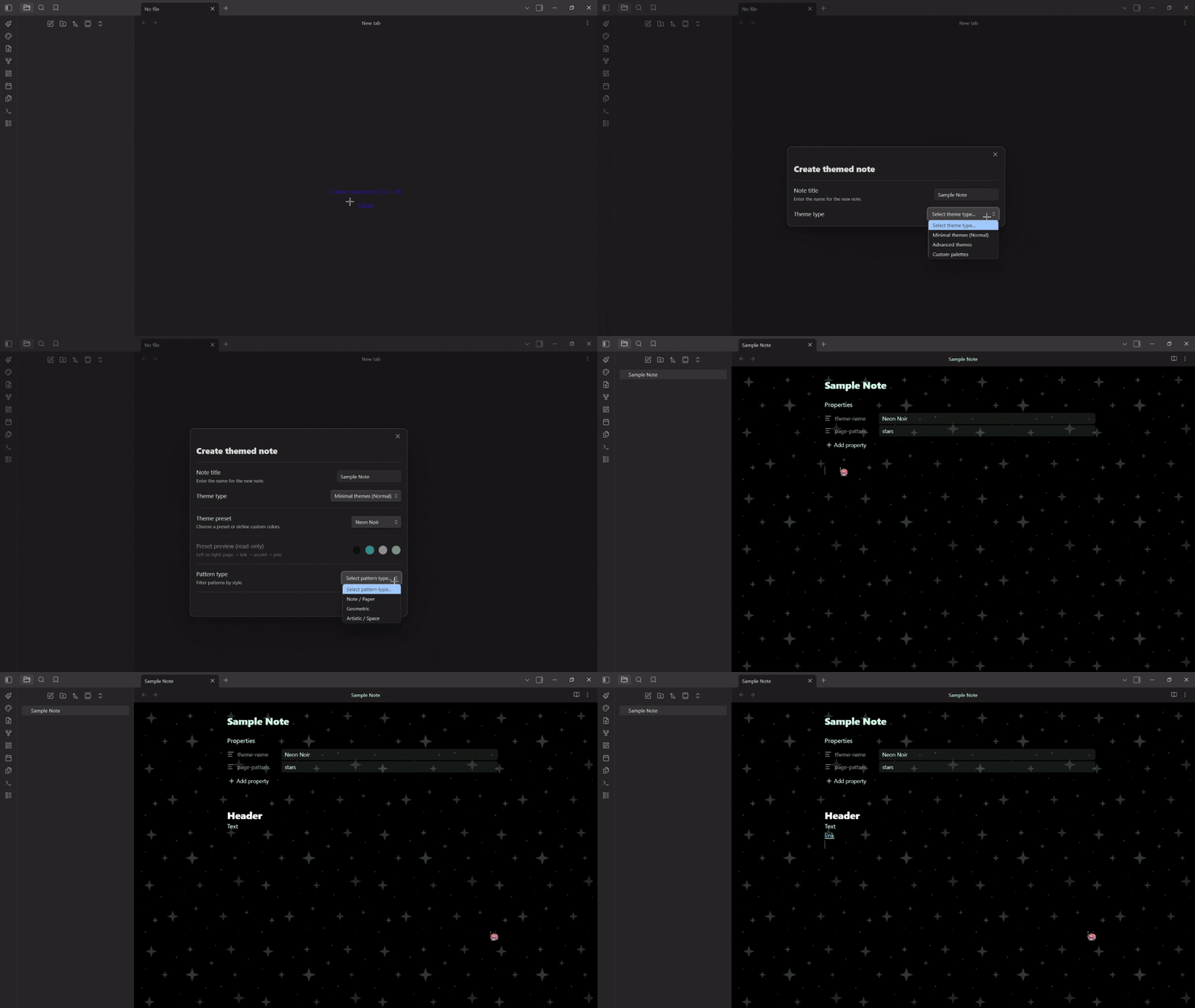
### 🎨 Creating a Themed Note
Use the **Paintbrush** ribbon icon or the command palette (`Create themed note`) to open the creation modal:
1. Enter a **note title**
2. Pick a **theme type :** Minimal, Advanced, or Custom Palettes
3. Choose a **preset** or define **custom colors** (page, link, accent, pen)
4. Select a **background pattern** (optional)
5. Click **Create note**

---
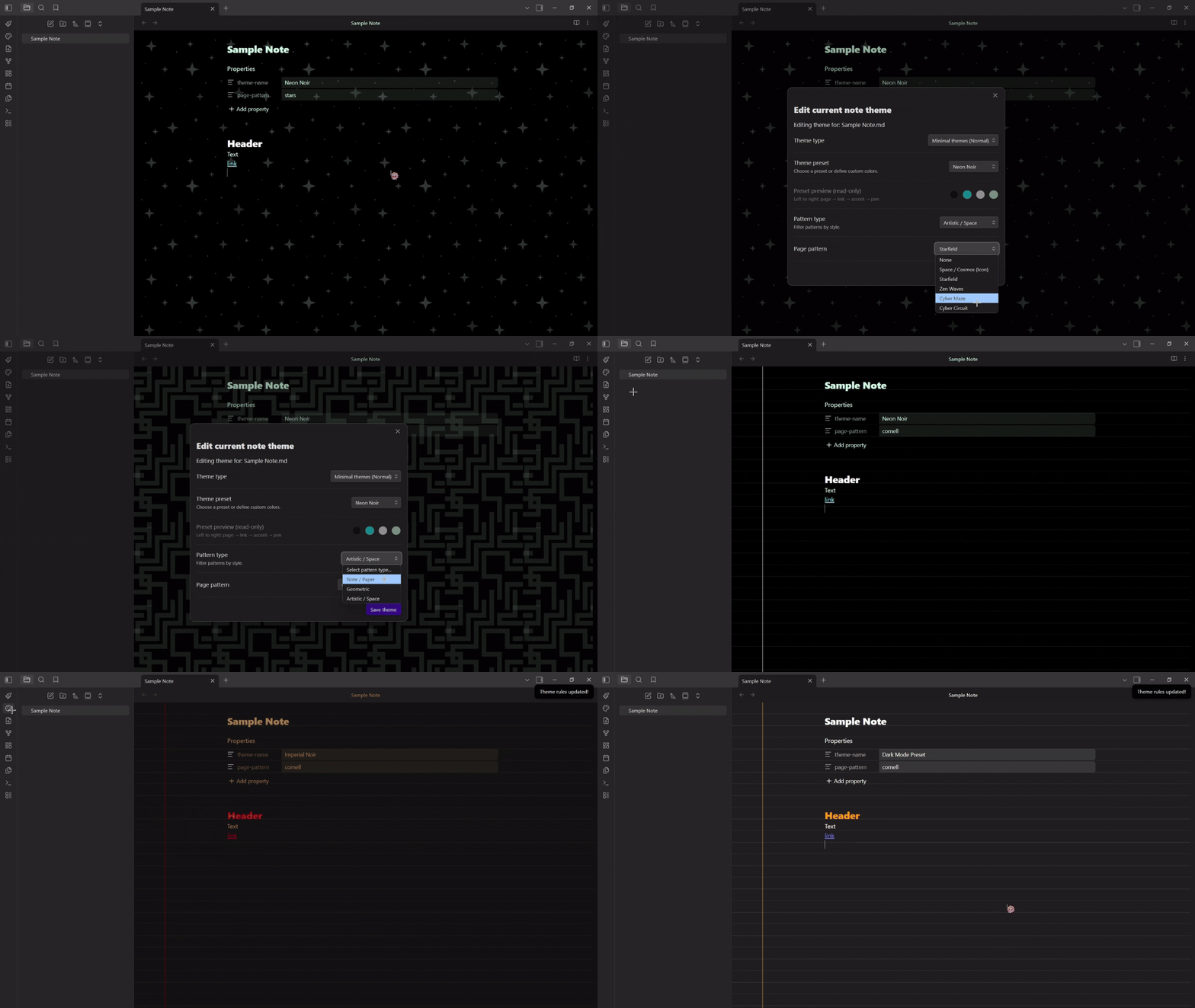
### ✏️ Editing an Existing Note's Theme
1. Navigate to the **Edit active note theme** at the left sidebar.
2. Pick the new **theme type** and the **new palette** or **custom colors**.
3. Modify as you wish.
4. Click on **Save theme** button to apply the changes.
---
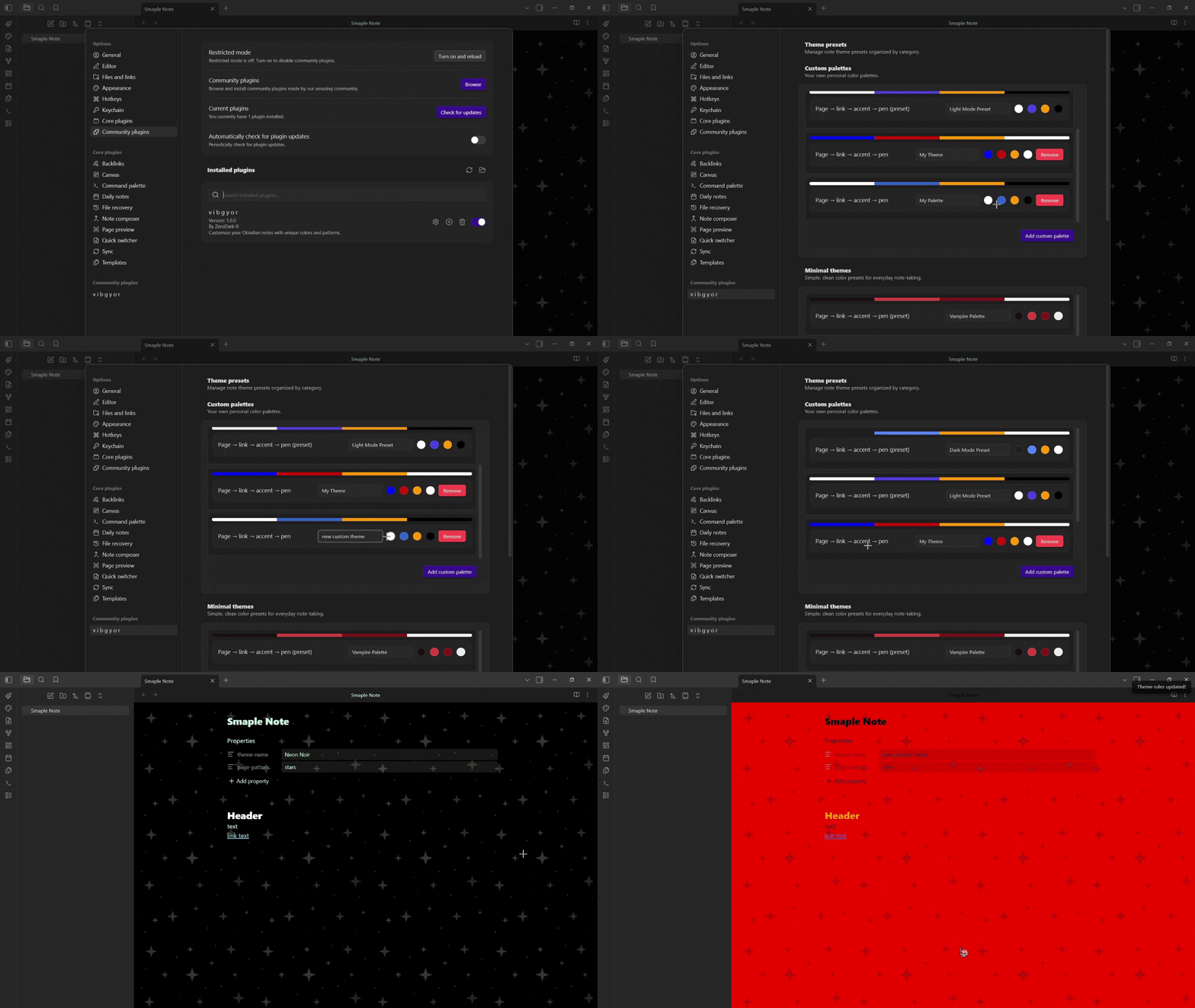
### 🖌️ Create Custom Palettes
1. Navigate to the Obsidian **Settings tab**.
2. Under **Community plugins** search for **vibgyor**, hit the settings icon.
3. Under **Custom palettes**, click **Add custom palette**, name it and define your own color combinations.
4. Navigate back to the Edit active theme tab, select Custom Palettes and use your custom colors.
---
### 🖼️ Image Color Toggle
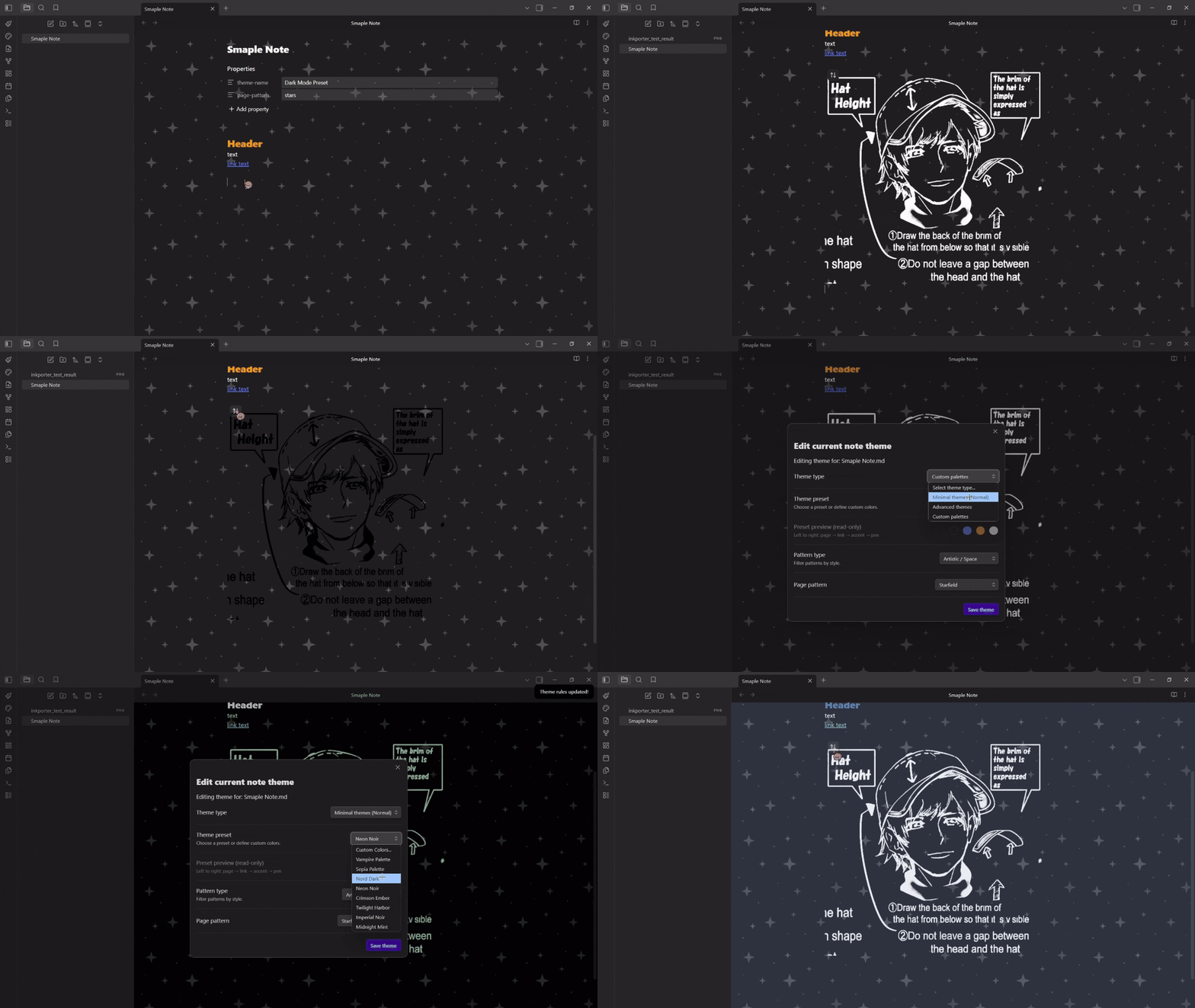
When a note has a theme applied, images with transparent backgrounds are automatically tinted to match the pen color. Hover over any image to reveal a toggle button at the top-left corner:
- Click to **view original colors**
- Click again to **re-apply theme tinting**
The plugin remembers your choice per image.
---
## Built-in Theme Presets
| Theme | Palette Preview (Page, Pen, Link, Accent) |
|:---|:---|
| **Dark Mode** | 


 |
| **Light Mode** |
|
| **Light Mode** | 
 |
| **Vampire** |
|
| **Vampire** | 


 |
| **Sepia** |
|
| **Sepia** | 


 |
| **Nord Dark** |
|
| **Nord Dark** | 


 |
| **Neon Noir** |
|
| **Neon Noir** | 
 |
| **Crimson Ember** |
|
| **Crimson Ember** | 


 |
| **Twilight Harbor** |
|
| **Twilight Harbor** | 


 |
| **Imperial Noir** |
|
| **Imperial Noir** | 

 |
| **Midnight Mint** |
|
| **Midnight Mint** | 


 |
---
## Background Patterns
### 🗒️ Note / Paper
- **Lined :** Horizontal ruled lines
- **Dotted :** Evenly spaced dot grid
- **Grid :** Square grid overlay
- **Cornell :** Ruled lines with a left margin
- **Blueprint :** Fine + coarse grid (engineering style)
### 📐 Geometric
- **Woven :** 45° crosshatch texture
- **Hexagonal :** Sci-fi hexagonal grid
### 🌌 Artistic / Space
- **Cosmos :** Scattered stars and sparkles
- **Starfield :** Dense 4-pointed star field
- **Zen Waves :** Concentric ripple circles
- **Cyber Maze :** Thick maze-like corridors
- **Cyber Circuit :** Circuit board traces with nodes
---
## Settings
Open **Settings** → **vibgyor** to manage your theme library:
- **Custom palettes :** Create, edit, and delete your own color combinations
- **Minimal themes :** View built-in preset themes (read-only)
---
## Frontmatter Reference
The plugin reads and writes these frontmatter properties:
```yaml
---
theme-name: "Vampire Palette" # Name of the selected preset
page-pattern: "grid" # Background pattern
page-color: "#1a1a1a" # Page background (custom colors only)
pen-color: "#ffffff" # Text color (custom colors only)
link-color: "#3366cc" # Link color (custom colors only)
accent-color: "#ff9900" # Headings & accent (custom colors only)
grid-color: "#333333" # Pattern grid color (optional)
---
```
> **Note:** When using a preset, only `theme-name` and `page-pattern` are stored. The colors are resolved from the preset at runtime, so updating a preset automatically updates all notes using it.
---
## Installation
### 📦 From Obsidian Community Plugins
1. Open **Settings** → **Community plugins** → **Browse**
2. Search for **vibgyor**
3. Click **Install**, then **Enable**
### 🔧 Manual Installation
1. Download `main.js`, `manifest.json`, and `styles.css` from the [latest release](https://github.com/ZeroDark-0/vIbGyOr/releases)
2. Create a folder named `vIbGyOr` in your vault's `.obsidian/plugins/` directory
3. Move the downloaded files into that folder
4. Reload Obsidian and enable the plugin in **Settings** → **Community plugins**
---
## Development
```bash
git clone https://github.com/ZeroDark-0/vIbGyOr.git
cd vIbGyOr
npm install
npm run dev # Start compilation in watch mode
npm run build # Production build
npm run lint # Run ESLint
```
---
## Contributing
Found a bug or have a suggestion? All feedback is welcome!
- 🐛 **GitHub Issues:** [Having any issues, tell me!!](https://github.com/ZeroDark-0/vIbGyOr/issues)
- 💬 **Discord:** [Boldness](https://discordapp.com/users/659447909208686632)
- 💡 **Ideas & Brainstorming:** [Discussions](https://github.com/ZeroDark-0/vIbGyOr/discussions)
- ✉️ **Email:** [Slide into my inbox](mailto:zerodark.hopium@gmail.com)
---
## Support
If you enjoy vIbGyOr and want to support its development, any support means a lot!
|
---
## Background Patterns
### 🗒️ Note / Paper
- **Lined :** Horizontal ruled lines
- **Dotted :** Evenly spaced dot grid
- **Grid :** Square grid overlay
- **Cornell :** Ruled lines with a left margin
- **Blueprint :** Fine + coarse grid (engineering style)
### 📐 Geometric
- **Woven :** 45° crosshatch texture
- **Hexagonal :** Sci-fi hexagonal grid
### 🌌 Artistic / Space
- **Cosmos :** Scattered stars and sparkles
- **Starfield :** Dense 4-pointed star field
- **Zen Waves :** Concentric ripple circles
- **Cyber Maze :** Thick maze-like corridors
- **Cyber Circuit :** Circuit board traces with nodes
---
## Settings
Open **Settings** → **vibgyor** to manage your theme library:
- **Custom palettes :** Create, edit, and delete your own color combinations
- **Minimal themes :** View built-in preset themes (read-only)
---
## Frontmatter Reference
The plugin reads and writes these frontmatter properties:
```yaml
---
theme-name: "Vampire Palette" # Name of the selected preset
page-pattern: "grid" # Background pattern
page-color: "#1a1a1a" # Page background (custom colors only)
pen-color: "#ffffff" # Text color (custom colors only)
link-color: "#3366cc" # Link color (custom colors only)
accent-color: "#ff9900" # Headings & accent (custom colors only)
grid-color: "#333333" # Pattern grid color (optional)
---
```
> **Note:** When using a preset, only `theme-name` and `page-pattern` are stored. The colors are resolved from the preset at runtime, so updating a preset automatically updates all notes using it.
---
## Installation
### 📦 From Obsidian Community Plugins
1. Open **Settings** → **Community plugins** → **Browse**
2. Search for **vibgyor**
3. Click **Install**, then **Enable**
### 🔧 Manual Installation
1. Download `main.js`, `manifest.json`, and `styles.css` from the [latest release](https://github.com/ZeroDark-0/vIbGyOr/releases)
2. Create a folder named `vIbGyOr` in your vault's `.obsidian/plugins/` directory
3. Move the downloaded files into that folder
4. Reload Obsidian and enable the plugin in **Settings** → **Community plugins**
---
## Development
```bash
git clone https://github.com/ZeroDark-0/vIbGyOr.git
cd vIbGyOr
npm install
npm run dev # Start compilation in watch mode
npm run build # Production build
npm run lint # Run ESLint
```
---
## Contributing
Found a bug or have a suggestion? All feedback is welcome!
- 🐛 **GitHub Issues:** [Having any issues, tell me!!](https://github.com/ZeroDark-0/vIbGyOr/issues)
- 💬 **Discord:** [Boldness](https://discordapp.com/users/659447909208686632)
- 💡 **Ideas & Brainstorming:** [Discussions](https://github.com/ZeroDark-0/vIbGyOr/discussions)
- ✉️ **Email:** [Slide into my inbox](mailto:zerodark.hopium@gmail.com)
---
## Support
If you enjoy vIbGyOr and want to support its development, any support means a lot!
[](https://github.com/sponsors/ZeroDark-0)
[ ](https://www.buymeacoffee.com/ZeroDark)
---
## Acknowledgements
> [!IMPORTANT]
> 🎨 The image background removal feature is handled by [Inkporter](https://github.com/AmadeussSystem/Inkporter) -> a fantastic plugin by AmadeussSystem. If you enjoy that feature, go show their plugin some love! ⭐
---
## License
MIT License -> [MIT](LICENSE) © [ZeroDark-0](https://github.com/ZeroDark-0)
](https://www.buymeacoffee.com/ZeroDark)
---
## Acknowledgements
> [!IMPORTANT]
> 🎨 The image background removal feature is handled by [Inkporter](https://github.com/AmadeussSystem/Inkporter) -> a fantastic plugin by AmadeussSystem. If you enjoy that feature, go show their plugin some love! ⭐
---
## License
MIT License -> [MIT](LICENSE) © [ZeroDark-0](https://github.com/ZeroDark-0)