# Countdown Day
[中文说明](README.zh.md)
An [Obsidian](https://obsidian.md) plugin for tracking countdowns and memorial days — birthdays, anniversaries — with full **solar & lunar calendar** support (leap months included).
## Features
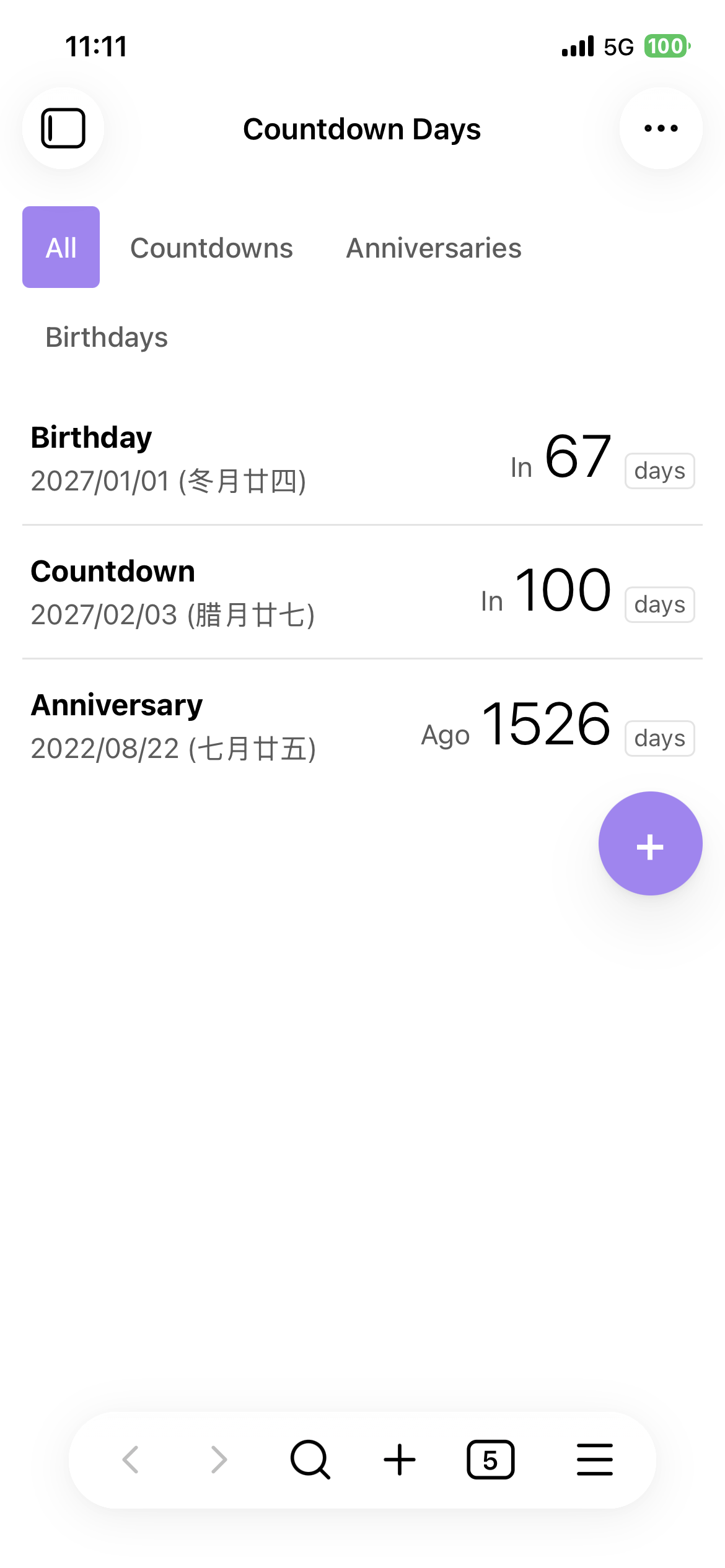
- **List view** — one row per event (name, date with lunar label, big day count), soonest first; pinned on top, expired sink to the bottom; type filters (all / countdowns / anniversaries / birthdays). Text actions on desktop, left-swipe on touch devices.
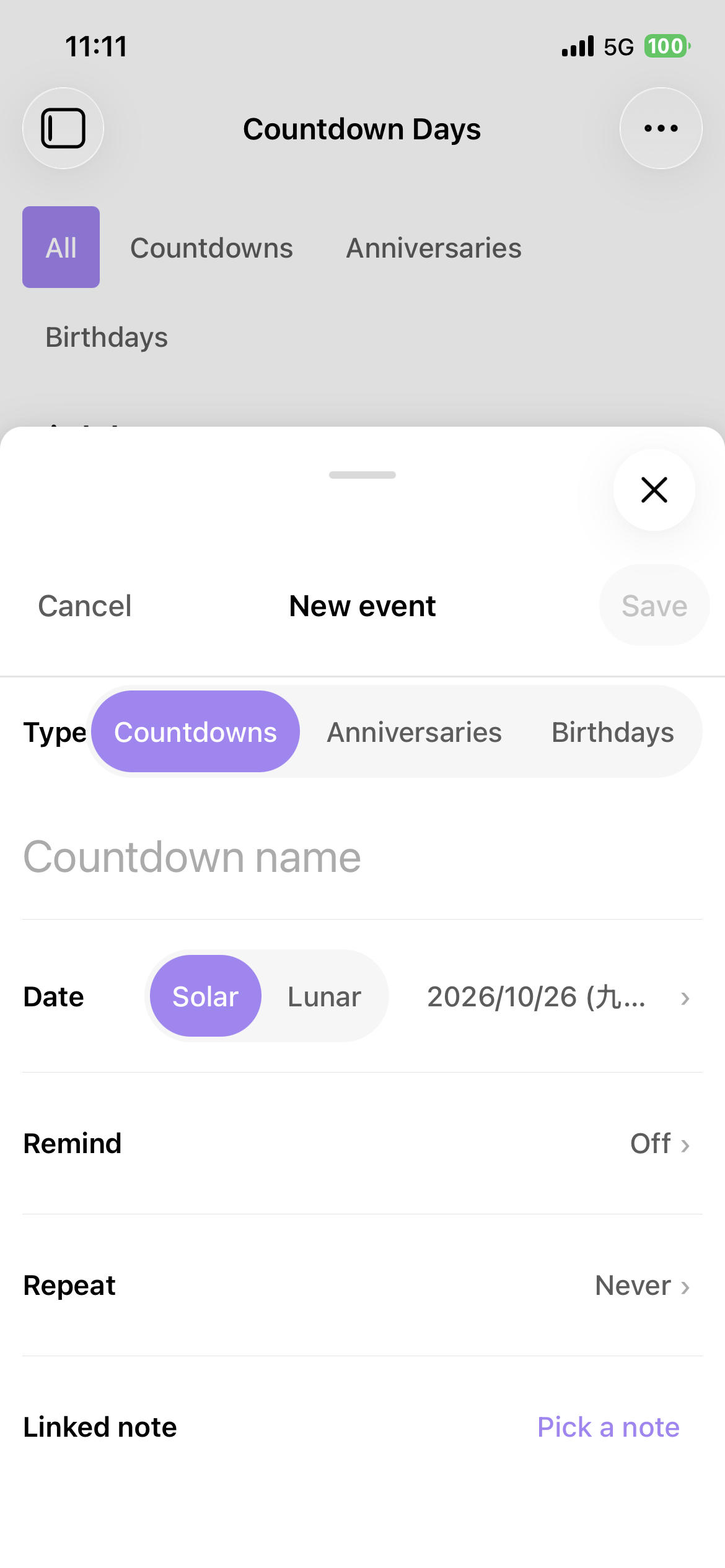
- **Sheet-style dialogs** — bottom sheets on mobile, centered on desktop; month-grid date picker on desktop, iOS-style wheel on mobile; solar/lunar picks convert automatically, so an invalid date can never be entered.
- **Repeat** — never / daily / weekdays / weekly / monthly / yearly, or custom every-N-days. Yearly lunar events fall back automatically in years without that leap month or a 30th day.
- **Events are notes** — one markdown file per event (default folder `Countdowns/`), frontmatter is the data. Edit by hand or via the form — the view updates live.
- **Embed anywhere** — render event rows in any note with a `countdown` code block.
- **Reminders** — multi-select days ahead; desktop system notifications (Obsidian notices as fallback / on mobile), once per occurrence and day.
- **Bilingual UI** (English / 简体中文), follows your Obsidian language.
## Usage
### Creating events
Open the view via the ribbon icon (calendar-clock) or the command palette (_"Countdown Day: Countdown Days"_), tap **+**, fill the form, save.
### Embedding in a note
````markdown
```countdown
type: birthday, anniversary
limit: 5
```
````
| Option | Format | Default | Description |
| ------- | --------------------- | --------- | --------------------- |
| `type` | comma-separated types | all | filter by event type |
| `limit` | positive integer | unlimited | show only the first N |
### Reminders
Pick one or more **remind** days on an event. A notification fires when today is exactly one of those days ahead of an occurrence — checked at startup, every 10 minutes, and when events change; once per occurrence and day.
### Settings
- **Events folder** — where event files live (default `Countdowns/`); created automatically on first event.
### Event file format
File name = event name; body = your notes. Frontmatter fields (unknown fields are always preserved):
| Field | Values | Default | Description |
| -------------- | -------------------------------------------------------------------------- | -------- | -------------------------------------------------------- |
| `type` | `countdown` / `anniversary` / `birthday` | required | event type |
| `date` | `yyyy-MM-dd` | required | event date (lunar month/day for lunar events) |
| `calendar` | `solar` / `lunar` | `solar` | calendar of `date` (lunar: years 1900–2100, leap months) |
| `leap-month` | boolean | `false` | lunar only: the month is a leap month |
| `repeat` | `none` / `daily` / `weekdays` / `weekly` / `monthly` / `yearly` / `custom` | `none` | repeat rule |
| `repeat-every` | integer ≥ 1 | — | `custom` only: every N days |
| `note` | `"[[Note]]"` | — | linked note |
| `remind` | integer or list ≥ 0 | — | days ahead to notify, `0` = on the day |
| `pinned` | boolean | `false` | pin to top |
```yaml
---
type: birthday
date: 1985-06-08
calendar: lunar
repeat: yearly
note: "[[Family]]"
remind: [0, 3]
pinned: true
---
Your notes here.
```
## Install
Until the plugin is listed in the community marketplace:
1. Download `main.js`, `manifest.json`, `styles.css` from the [latest release](../../releases).
2. Put them in `/.obsidian/plugins/countdown-day/`.
3. Enable "Countdown Day" in Settings → Community plugins.
## Development
```bash
npm install
npm run dev # watch build
npm test # vitest
npm run build # type-check + production bundle
```
## License
[MIT](LICENSE)