
Hand over the vault chore you keep putting off.
An AI note-taking companion that lives in an Obsidian side panel —
you ask, it acts, and what changes is the note itself,
not a block of text handed back for you to paste in.




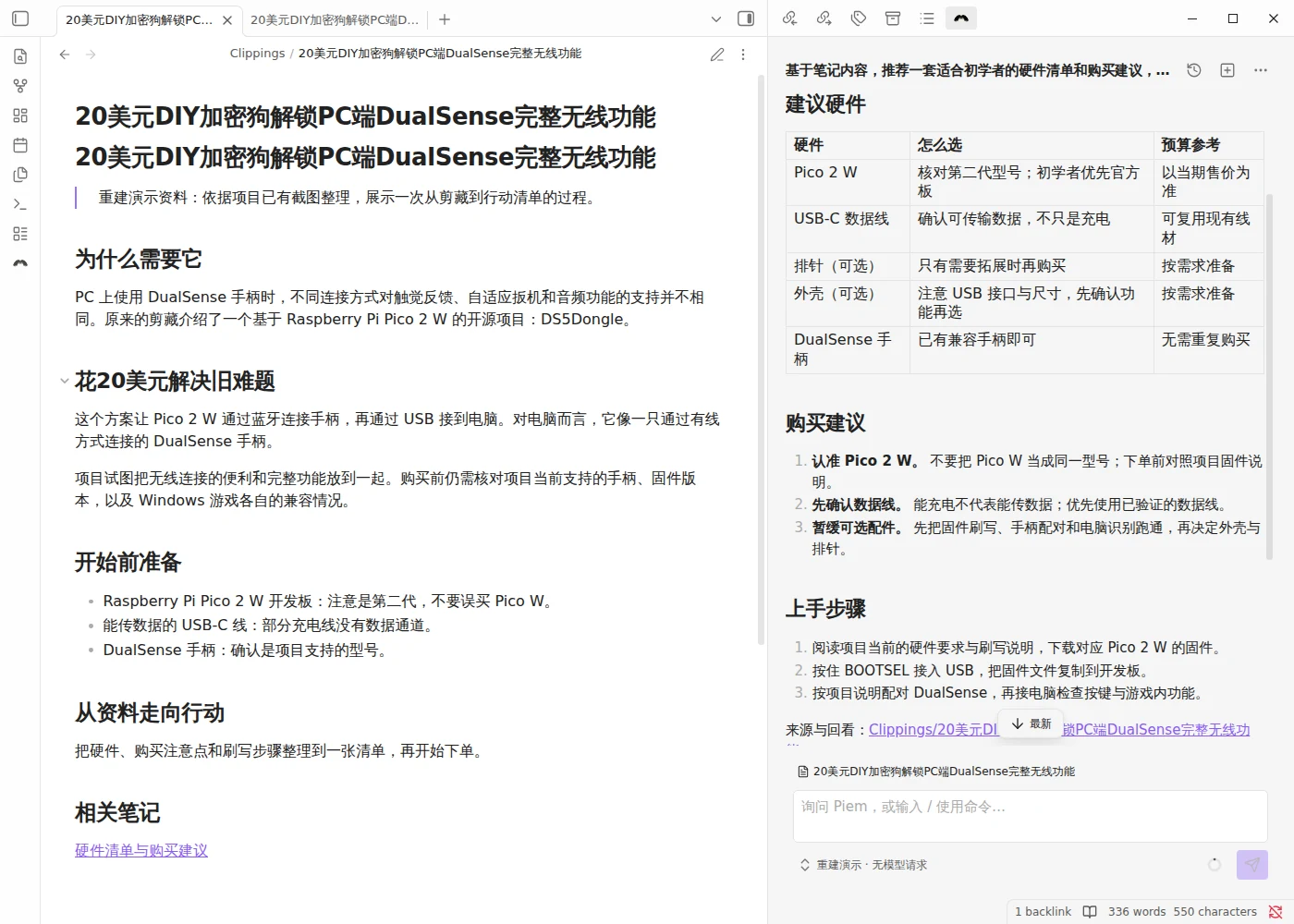
Your note on the left, the agent on the right. Reconstructed demo, real plugin file operations; UI shown in Simplified Chinese.
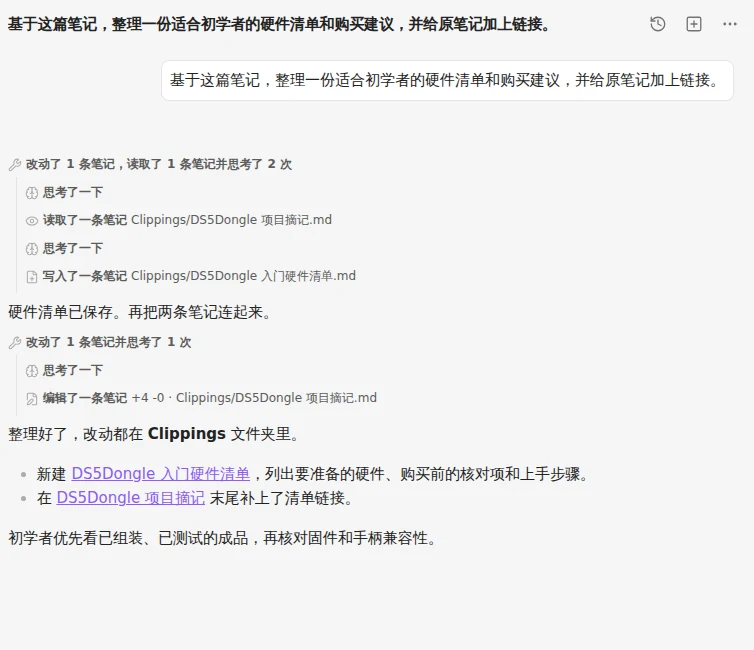
--- ## ▶️ One errand, start to finish You have a clipped article open. Saved months ago, never acted on. You type into the side panel: > **Based on this note, recommend a beginner's hardware list with buying advice.**

疯狂星期四,V 我 50。🍗
## 🧰 What else it has in hand | | | | --- | --- | | **Two dozen vault tools** | read, search, write, edit, move, trash, walk links, rewrite frontmatter, sweep tasks, drive the editor — [see them all](docs/tools.md) | | **Subagents, in parallel** | hand off a self-contained task; isolated transcript, capped at three levels by construction, not by a check — [how they work](docs/tools.md#subagents) | | **MCP servers** | remote tools merge into the agent's own tool set, name-spaced so a transcript never lies about where a tool came from — [connect one](docs/extending.md#mcp-servers) | | **Skills** | reusable instructions from bundled, from your vault, or from the `~/.pi` folders you already use with pi. Type / — [write one](docs/extending.md#skills) | | **Context that follows you** | the note you have open — path and body — rides along with every turn, and the conversation compacts itself when the window fills | | **Proactive perception** | while you write, a background scout reads the note you have open and finds the missing frontmatter, the broken link, the external reference whose takeaway was never recorded — and stages each as a tap-to-run suggestion. It only suggests; it never edits on its own | | **Suggestions in context** | an empty panel opens with first moves the model shapes to the note you have open; after a reply, a fresh row of follow-ups arrives — the obvious next step first, a deeper one behind it — beside copy, insert at cursor, append to the note, or ask again in place | | **Your endpoint, your key** | any OpenAI-compatible or Anthropic-messages base URL, sixteen presets to start from, capabilities auto-filled — [configure it](docs/settings.md#models) | | **Images** | paste or drop them into the composer and they ride along | | **English & 简体中文** | follows Obsidian's own language, with an override when you want otherwise | ## ⏱️ Up and running in five minutes **1. Install it.** Easiest path is [BRAT](https://github.com/TfTHacker/obsidian42-brat): install BRAT from Obsidian's community plugins, then **Add beta plugin** → `YoungSx/piem`. It handles updates for you. Prefer to do it by hand? Grab `main.js`, `manifest.json`, and `styles.css` from [the latest release](https://github.com/YoungSx/piem/releases/latest), drop them into `
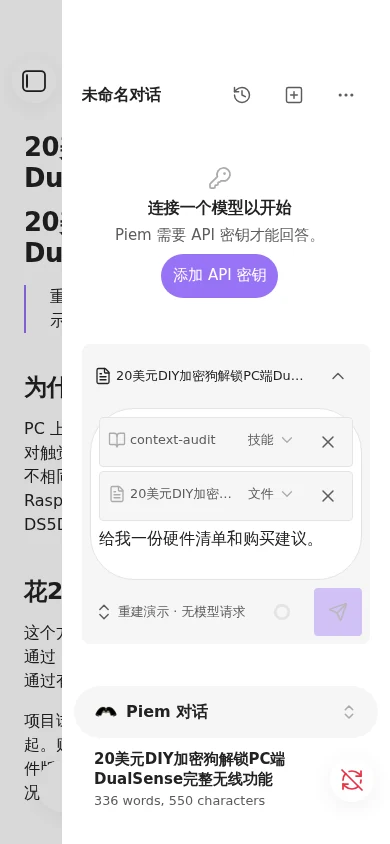
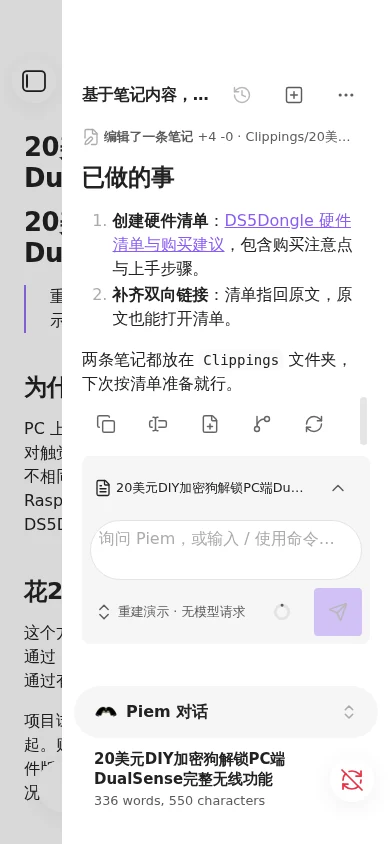
Before and after: a skill and note reference in the input, then the completed example. Both captures use Obsidian's official phone emulation.
Piem ships with `isDesktopOnly: false` and means it. Tools, subagents, skills, images — all of it works on a phone. So does streaming, once you turn it on. That commitment costs something, and it is worth knowing what. **MCP servers are remote only.** A stdio transport would spawn child processes and a phone cannot. A capability that cannot exist on mobile gets refused for everyone rather than shipped as a desktop-only surprise. **Token-by-token streaming is off by default.** Obsidian's `requestUrl` is the only request path free of CORS on every platform, and it has no incremental read at all — a reply lands whole, when it finishes. Real streaming means the browser's own `fetch`, which most endpoints do accept; it is one setting away (Models → Network → Network transport). It stays the non-default because whether it works is the endpoint's call rather than ours, and a locally hosted model usually has to be told to allow it. ## 🔓 Before you install: it edits without asking **There is no confirmation step before `write` or `edit`.** No dialog, no diff to approve. You ask, and your notes change. That is deliberate, and it is the deal: an agent that asks permission twelve times is an agent you stop using. What it asks of you in return: - point it at a vault you are willing to have changed, and to have **sent to your model provider** — a search that touches a file sends that file; - read the transcript afterwards. Every change came from a tool call, and every tool call is right there, in the open; - keep the vault in version control, or lean on Obsidian's file recovery. `trash_note` goes through Obsidian's trash, so deletions come back the ordinary way. Your API keys are sealed with your OS keychain on desktop, and stored in plaintext on mobile — because there is nothing to seal with there, and saying so is better than implying otherwise. Release builds carry [signed provenance](https://github.com/YoungSx/piem/attestations), so the bytes you downloaded can be traced back to this repo. Error reports and performance data go to Piem's maintainers by default; you can turn sharing off in **Extensions**. Content capture is off, but error messages may include note text. [Security and privacy](docs/security.md) explains what is sent. ## 📚 Go deeper | | | | --- | --- | | [**The agent's tools**](docs/tools.md) | Every tool, what it cannot do, and how subagents work | | [**Extending Piem**](docs/extending.md) | Skills, prompt templates, MCP servers | | [**Settings**](docs/settings.md) | Providers and models, chat behavior, commands, where sessions live | | [**Security and privacy**](docs/security.md) | What leaves your vault, where keys live, the capabilities Obsidian's review flags | Contributing? [CONTRIBUTING.md](CONTRIBUTING.md) for the workflow, [AGENTS.md](AGENTS.md) for the conventions. ## 🙏 Standing on shoulders Piem runs on [`@earendil-works/pi-agent-core`](https://github.com/earendil-works/pi-mono), the pi agent runtime — which is why the skills you already wrote for pi work here unchanged. It grew from [`lhr0909/pi-obsidian`](https://github.com/lhr0909/pi-obsidian). Thank you for that starting point. MIT licensed. Third-party notices in [THIRD_PARTY_NOTICES.md](THIRD_PARTY_NOTICES.md).