# Theme Engine for Obsidian
[](https://opensource.org/licenses/MIT)
[](https://github.com/YazanAmmar/obsidian-theme-engine/releases)
[](https://github.com/YazanAmmar/obsidian-theme-engine/releases)
[](https://github.com/YazanAmmar/obsidian-theme-engine/blob/main/src/i18n/strings.ts)
[](https://github.com/YazanAmmar/obsidian-theme-engine/stargazers)
[](https://github.com/YazanAmmar/obsidian-theme-engine/issues)

**Customize Obsidian without touching CSS. Profiles, backgrounds, snippets, and themes - all from one place.**
Theme Engine lets you customize 100+ Obsidian variables (plus your own custom ones) through a polished UI. Manage profiles, snippets, and even video backgrounds - no CSS knowledge required - yet powerful enough for advanced users.
## Table of Contents
- [Overview](#overview)
- [Why Theme Engine?](#why-theme-engine)
- [Features](#features)
- [Screenshots / Demos](#screenshots--demos)
- [Included Profiles](#included-profiles)
- [Supported Languages](#supported-languages)
- [Usage Guide](#usage-guide)
- [Commands & Hotkeys](#commands--hotkeys)
- [Tips & Performance](#tips--performance)
- [Variable Reference](#variable-reference)
- [Installation (End User)](#installation-end-user)
- [Building from Source (Developer)](#building-from-source-developer)
- [Project Structure](#project-structure)
- [Contributing](#contributing)
- [Roadmap](#roadmap)
- [Changelog (Summary)](#changelog-summary)
- [Troubleshooting / FAQ](#troubleshooting--faq)
- [License](#license)
- [Trademark & Branding](#trademark--branding)
- [Contact / Links](#contact--links)
## Overview
Theme Engine is an Obsidian plugin that allows you to edit and manage a large set of Obsidian’s core CSS color variables using an interactive UI. Create theme **profiles** (bundles of colors, snippets, notice rules, and settings), switch between them instantly, export/share them as JSON, or even import CSS from your installed themes to create new, editable profiles.
Designed for both:
- **Beginners** - Simple color pickers, preset profiles, and a "Set Background" feature to get a polished look fast.
- **Power users / Developers** - Full variable list, per-profile & global snippets, drag-and-drop reordering, regex notice rules, and exportable JSON.
## Why Theme Engine?
- **Dynamic Theme Engine**: Theme Engine acts as a **smart layer** on top of your existing theme. It dynamically captures your active theme's colors, allowing you to override only what you need.
- **Centralize Control:** Unify theme tweaks into **Profiles** (collections of variables + snippets + backgrounds).
- **No More CSS Sprawl:** Keep small CSS hacks tied to specific profiles instead of managing dozens of separate `.css` files.
- **Shareable Themes:** Create shareable theme packages (profiles export to a single `.json` file).
- **Automate Your Workspace:**
- Force Dark/Light mode automatically per profile.
- Apply custom video or image backgrounds per profile.
- **Intelligent & Dynamic:**
- Style notice boxes by content (keyword / regex / keyword highlighting).
- Get warned if an external theme might be interfering with your profile.
- **Performance Tuned:** Use the Live Preview FPS slider to balance visual feedback with CPU usage on your machine.
## Features
### 1. Core Profile Management
- **Live Color Editor**: An intuitive UI with color pickers and text inputs for over 100 core Obsidian color variables. It now provides instant visual feedback: variables matching your theme's default are **dimmed** (`Pristine`), while your customizations **light up** (`Modified`).
- **Full Profile Management**: Create, delete, rename, and switch between multiple color profiles.
- **Import / Export**:
- **Export to JSON**: Save your complete profile (colors, snippets, rules, background path) to a single `.json` file.
- **Import from JSON**: Import a profile JSON. The UI lets you choose a new name, preventing accidental overwrites.
- **Beautiful Default Themes**: Comes with 3 stunning, ready-to-use profiles to get you started.
### 2. Advanced Customization
- **Per-Profile Backgrounds (Image & Video!)**:
- Set a custom **image or video** background for each profile.
- Built-in **Background Browser** to manage all your media: select, rename, and safely delete.
- Easily add new media via file upload, drag & drop, or pasting a URL.
- Automatically applies necessary transparency to UI elements for you.
- Dedicated settings for **video (opacity, mute)** and **images (JPG conversion/quality)**.
- **Import from Installed Themes**:
- Instantly create a new, editable CSS-based profile by importing the code from your already-installed community themes or snippets.
- **Advanced Notice Coloring**:
- Control the background and text color of pop-up notices based on their content (keywords or Regex).
- **New**: "Highlight Only" mode to apply color _only_ to specific keywords within a notice.
- Rules are saved **per-profile** and are included in exports.
- **CSS Snippets (Profile & Global)**:
- **Per-Profile Snippets**: Attach CSS snippets that are _only_ active when their profile is active. Included in exports.
- **Global Snippets**: Create snippets that stay active across _all_ of your profiles, perfect for a custom font or a small, universal UI tweak.
- **Drag & Drop**: Easily reorder your snippets with drag & drop to manage CSS priority (cascade).
- **Lock Reordering**: A lock button to prevent accidental reordering of snippets.
### 3. Workflow & UI
- **Complete i18n Overhaul (Translation System)**:
- **Custom Languages Support:** No longer limited to the 4 built-in languages. Add **any language** (e.g., Chinese, Spanish) directly from the settings.
- **Tree-View Translation Editor:** A powerful modal to edit translations in a nested tree, with deep search and highlighting.
- **Management Tools:** Import, Export, Copy, and Paste translations as JSON.
- **Smart Fallback Engine:** Gracefully falls back to English for any missing keys.
- **Quick Theme Toggle**: Instantly cycle the active profile's theme setting between "Force Light," "Force Dark," and "Auto" with a new icon in the profile manager.
- **Ribbon Icon**: Access the Theme Engine settings with a single click from the Obsidian ribbon.
- **Selective Data Reset**: The "Reset Plugin" feature is now granular. You can choose to delete only specific categories of data (Profiles, Snippets, Backgrounds, Settings, or Languages).
- **Theme Interference Warning**: A small icon appears if you have a community theme enabled, warning you that it might override your Theme Engine settings.
- **Add Custom CSS Variables**:
- Add any CSS variable (e.g., from another plugin) to the UI.
- Define its type (color, size, text, number) for the correct UI controls.
- Custom variables are saved and exported with your profile.
- **Reliable Profile Snapshots**: Use the **Pin** button to save a complete snapshot of your profile (colors, CSS, snippets, rules). Experiment freely and restore with one click.
- **Multi-Step Color Undo**: The "Undo" icon (`reset`) remembers the last 5 changes you made to each specific color.
- **Plugin Integrations**: Full color control for the **Iconize** plugin, with an automated cleanup system.
## Screenshots / Demos
### Default Themes
| **OLED Matrix (Dark)** | **Citrus Zest (Light)** |
| -------------------------------------------------------------- | -------------------------------------------------------------- |
| 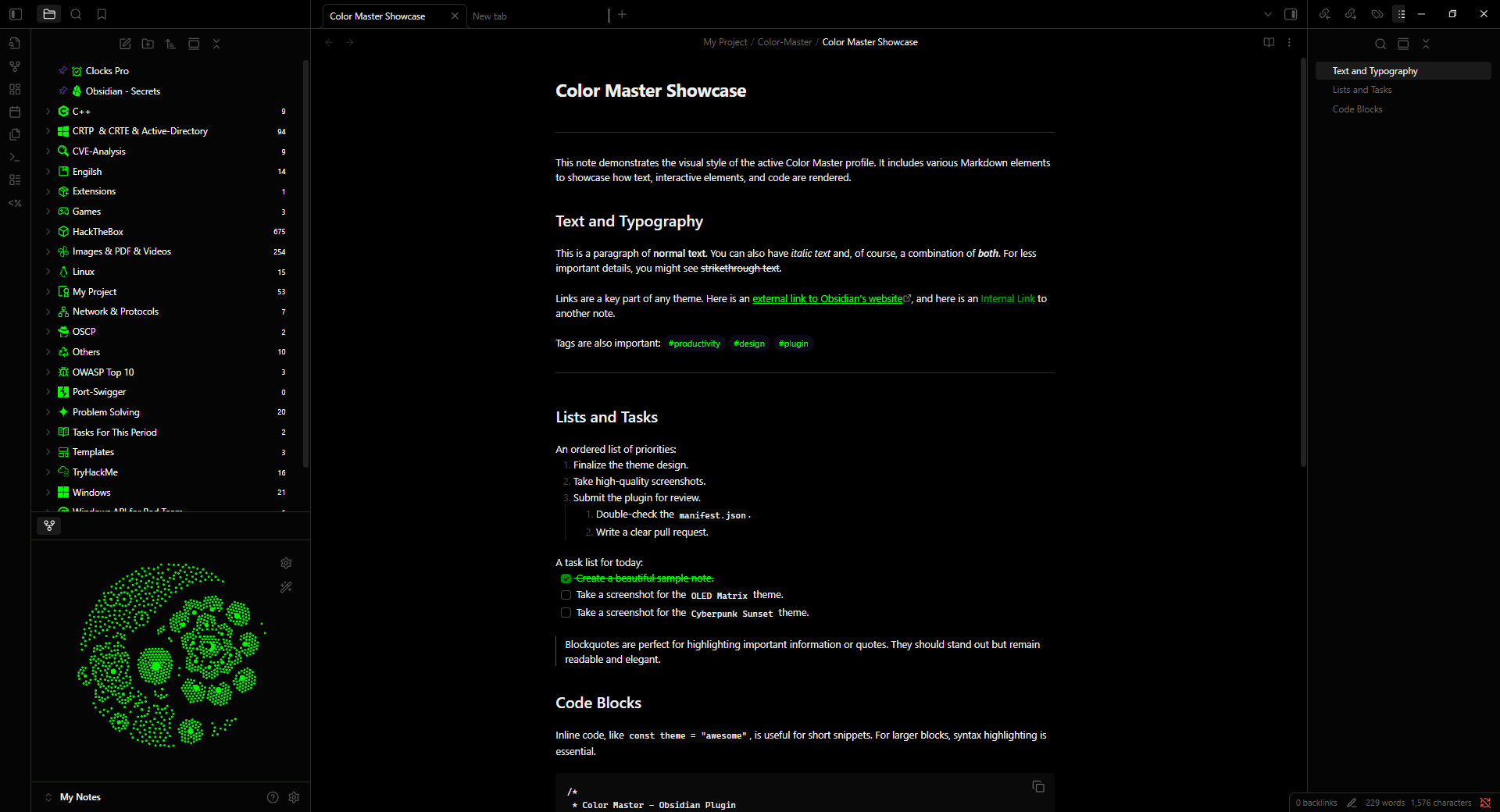 |
| 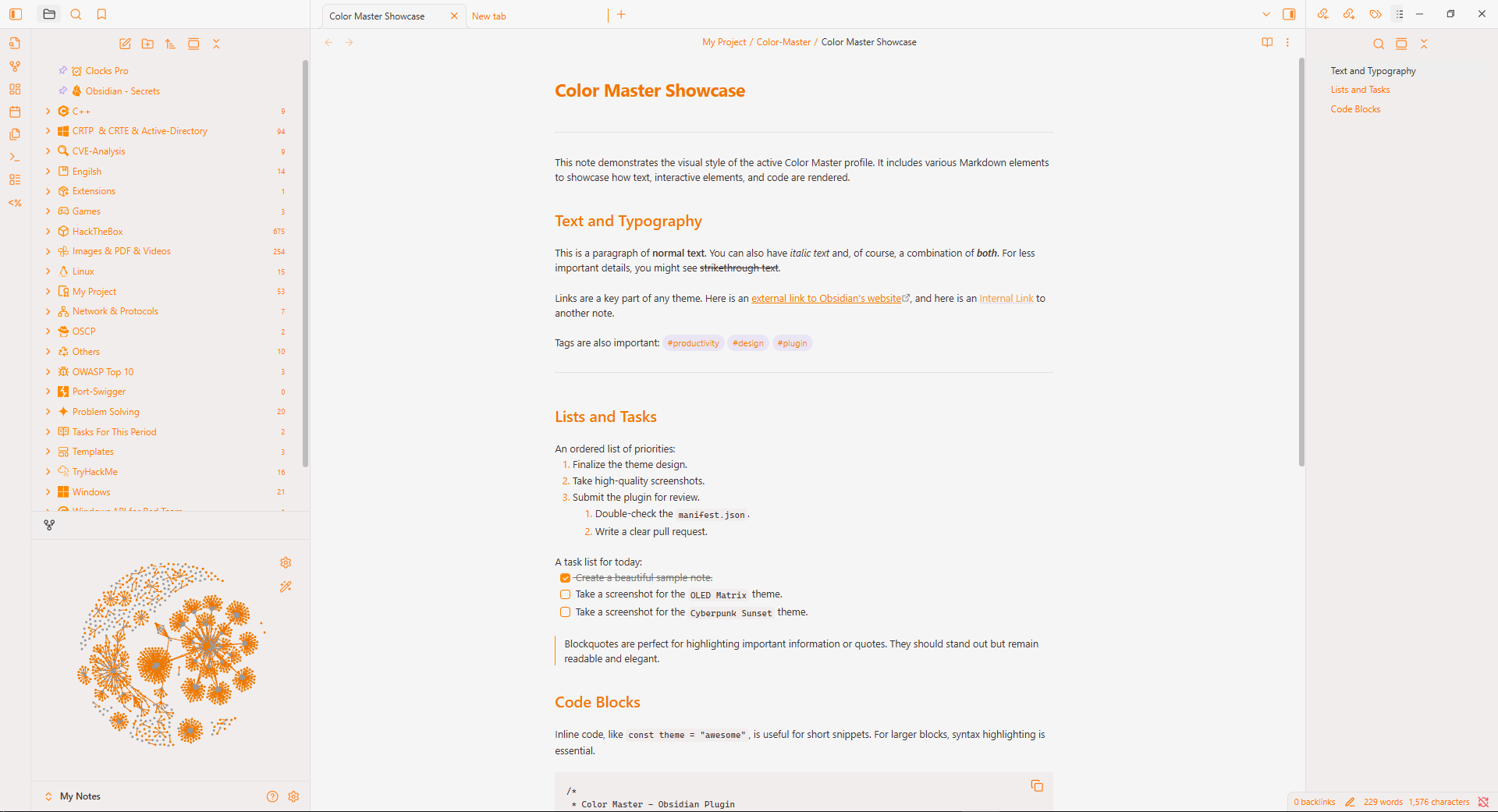 |
## Included Profiles
The plugin comes with these hand-crafted profiles by default:
1. **Default**: A dynamic profile that acts as a **transparent layer**, automatically capturing and adopting the colors of your currently active Obsidian theme.
2. **OLED Matrix**: A true-black, high-contrast theme with vibrant green accents.
3. **Citrus Zest**: A brilliant light theme with a clean design and stunning orange highlights.
## Supported Languages
Theme Engine has a powerful, extensible translation system. It includes full support for 4 built-in languages and allows you to add your own **Custom Languages** via the settings menu.
**Built-in Languages:**
- **English** (Default)
- **العربية (Arabic)** - Full RTL Support
- **Français (French)**
- **فارسی (Persian)** - Full RTL Support
## Usage Guide
Need help getting started?
See the complete usage guide:
**[Open Usage Guide →](./docs/guide.md)**
Includes:
- Creating profiles
- Importing & exporting
- Background setup
- CSS snippets
- Notice rules
- Hotkeys
## Commands & Hotkeys
Theme Engine includes built-in commands for:
- Profile switching
- Theme cycling
- Settings access
**[View Full Command List →](./docs/hotkeys.md)**
## Tips & Performance
Want better responsiveness and smoother behavior?
See the complete performance guide:
**[Open Tips & Performance Guide →](./docs/tips.md)**
Includes:
- Live Preview optimization
- Background performance recommendations
- Community theme conflict advice
- Suggested workflows
- Stability troubleshooting
## Variable Reference
Theme Engine exposes more than **100+ core Obsidian variables** covering:
- Backgrounds
- Text & Typography
- Navigation
- Links
- Code Blocks
- Tables
- Callouts
- Interactive Elements
- Graph View
- Canvas
- Tabs
- Scrollbars
- Plugin integrations
- Custom variables
> [!TIP]
>
> View the complete variable documentation here:
>
> **[Variable Reference →](./docs/variables.md)**
## Installation (End User)
> [!IMPORTANT]
> **Requires Obsidian v1.11.0 or higher.** Please ensure your Obsidian app is updated before installing.
1. Download the latest release from the [GitHub Releases page](https://github.com/YazanAmmar/obsidian-theme-engine/releases).
2. Extract the plugin folder into your vault's plugins folder: `/.obsidian/plugins/`.
3. In Obsidian, go to `Settings` -> `Community plugins`.
4. Enable the "Theme Engine" plugin.
5. Open the plugin settings to start customizing!
## Building from Source (Developer)
If you want to customize the plugin or contribute to its development, you can easily build it from the source code.
1. **Clone the Repository:**
```Bash
git clone https://github.com/YazanAmmar/obsidian-theme-engine.git
cd obsidian-theme-engine
```
2. **Install Dependencies:**
Make sure you have Node.js installed. Then, run the following command.
```Bash
npm install
```
3. **Build the Plugin:** To compile the TypeScript code and package the plugin for Obsidian:
- **Standard Build:** Use `npm run build` to compile the core files (`main.js`, `styles.css`, `manifest.json`) into the project root.
```Bash
npm run build
```
- **Lint the Code:** Run the ESLint script to check for code style issues.
```Bash
npm run lint
```
- **Development Build (Advanced):** Use `npm run dev` to **compile AND automatically copy** the resulting files to a local Obsidian vault.
```Bash
npm run dev
```
> [!NOTE]
>
> The `npm run dev` command is configured to automatically copy the built files to a local Obsidian vault for testing.
>
> You must edit the `vaultDir` variable inside the `esbuild.config.mjs` file to point to your local vault's plugin folder (`/.obsidian/plugins/obsidian-theme-engine`) before running this command.
4. **Load into Obsidian:** The compiled files (`main.js`, `styles.css`, `manifest.json`) will be in the project's root. Copy these files into your vault's plugin folder:
```Bash
/.obsidian/plugins/obsidian-theme-engine/
```
## Project Structure
The codebase is organized by concern: plugin core, UI, modal system, i18n, and SCSS layers.
```text
src/
|- main.ts # Plugin entrypoint and lifecycle orchestration
|- constants.ts # Built-in defaults, maps, and static config
|- types.ts # Shared TypeScript domain types
|- utils.ts # Cross-cutting utility helpers
|
|- commands/
| |- index.ts # Command registration and command handlers
|
|- i18n/
| |- strings.ts # Translation engine + fallback behavior
| |- types.ts # i18n-specific typings
| |- locales/ # Built-in locales + custom locale files
| |- en.ts
| |- ar.ts
| |- fr.ts
| |- fa.ts
|
|- styles/
| |- main.scss # Root SCSS entry (compiled to styles.css)
| |- base/ # Core tokens, animation, layout direction, editor styles
| |- components/ # Shared component-level styles
| |- modals/ # Styles scoped to modal experiences
| |- settings/ # Settings tab layout, controls, search, accessibility
|
|- ui/
|- settingsTab.ts # Main settings screen composition
|- components/ # Reusable settings UI sections/widgets
|- modals/ # Modal architecture split by feature domain
|- index.ts # Central modal exports
|- base.ts # Shared modal base class/infrastructure
|- info.ts # Informational modal(s)
|- common/ # Generic dialogs (confirmation, file conflict)
|- editors/ # Content editors (CSS, notice rules, custom vars)
|- profiles/ # Profile creation/import/browser modals
|- settings/ # Settings-related modals (language, translator, etc.)
```
## Contributing
Contributions are welcome!
1. Fork the repo.
2. Create a feature branch: `git checkout -b feat/your-feature`.
3. Run `npm install` and `npm run build` locally to ensure no errors.
4. Open a pull request with a clear description.
5. Update `CHANGELOG.md` and this `README.md` where relevant.
Please follow the existing code style, and ensure your contributions are **innovative and consistent with the plugin's vision**.
> [!TIP]
>
> Are you a developer of another plugin? If you'd like your plugin to be natively supported by Theme Engine (e.g., controlling a specific color variable of your UI), feel free to open a Pull Request. Supporting integration is a great way to gain more visibility for your work!
## Roadmap
Here are the future plans for Theme Engine. Feel free to contribute or suggest features!
- [ ] **Community Profile Marketplace**: An easy way to browse, share, and import profiles from other users.
- [ ] **More Plugin Integrations**: Add dedicated color variables for other popular plugins (e.g., Kanban, Calendar).
- [ ] **AI-Powered Theming**: Integrate with Gemini or ChatGPT API to generate profiles and snippets, helping users build their dream theme.
- [ ] **Export as Full Theme (.zip)**: Allow exporting a complete profile (colors, snippets, settings, and base64 background) as a ready-to-publish Obsidian theme file.
- [ ] **Advanced Context Triggers**: Automatically activate profiles based on context (time of day, current folder, or note tags).
- [ ] **Advanced CSS Editor**: Upgrade the snippet editor with syntax highlighting, autocomplete for Obsidian variables, and live error detection (Linting).
- [ ] **Advanced Color Helpers**:
- [ ] Live contrast ratio warnings (AA/AAA) directly in the color picker.
- [ ] A "Suggest Accessible Color" button based on contrast algorithms.
- [ ] **Color Blindness Simulator**: Add an accessibility tool that applies an SVG filter to the UI to simulate various types of color blindness.
- [ ] **Expanded Core Variable Support**: Add support for more official Obsidian color variables as they are introduced.
## Changelog (Summary)
For full details, see [`CHANGELOG.md`](https://github.com/YazanAmmar/obsidian-theme-engine/blob/main/CHANGELOG.md).
- **v2.1.0** - Expanded core variable coverage, introduced native Obsidian language detection, improved build architecture, strengthened CSS safety, and refined overall performance and maintainability.
- **v2.0.0** - The **Theme Engine Update**. Re-wrote the core to dynamically capture your active theme's colors. UI now shows "Pristine" (dimmed) vs. "Modified" (bright) states. Added a complete **Custom Language** and translation editor system. Implemented granular data reset and SCSS/ESLint.
- **v1.1.1** - Added **Per-Profile Video Background** support, enhanced settings display performance by **restoring scroll position**, and refactored the translation structure.
- **v1.1.0** - Added **Per-Profile Custom Backgrounds** (Image & Video), background browser, and media management tools.
- **v1.0.9** - Added **Import from Installed Themes/Snippets**, Quick Theme Toggle, Reset Plugin button, and Theme Interference Warning.
## Troubleshooting / FAQ
Having problems or questions?
See the complete FAQ documentation:
**[Open FAQ →](./docs/faq.md)**
Common topics include:
- Community theme conflicts
- Background transparency behavior
- Profile vs Global snippets
- Snapshots
- RTL support
- Migrating from Color Master
## License
MIT - see [LICENSE](https://github.com/YazanAmmar/obsidian-theme-engine/blob/main/LICENSE).
> [!NOTE]
> This license does not grant rights to use the project's logo or visual identity see [TRADEMARK.md](./TRADEMARK.md).
## Trademark & Branding
The official logo (phoenix emblem) and visual identity of this project are protected.
- You may use, modify, and distribute the code under the MIT license
- You may NOT use the official logo or visual identity in forks, derivatives, or redistributed versions
> For full trademark and branding rules, see [TRADEMARK.md](./TRADEMARK.md).
## Contact / Links
- **GitHub Repository**:
- **Issues & Feature Requests**:
- **Telegram Channel**:
- **Support My Open Source Work**:
|
## Included Profiles
The plugin comes with these hand-crafted profiles by default:
1. **Default**: A dynamic profile that acts as a **transparent layer**, automatically capturing and adopting the colors of your currently active Obsidian theme.
2. **OLED Matrix**: A true-black, high-contrast theme with vibrant green accents.
3. **Citrus Zest**: A brilliant light theme with a clean design and stunning orange highlights.
## Supported Languages
Theme Engine has a powerful, extensible translation system. It includes full support for 4 built-in languages and allows you to add your own **Custom Languages** via the settings menu.
**Built-in Languages:**
- **English** (Default)
- **العربية (Arabic)** - Full RTL Support
- **Français (French)**
- **فارسی (Persian)** - Full RTL Support
## Usage Guide
Need help getting started?
See the complete usage guide:
**[Open Usage Guide →](./docs/guide.md)**
Includes:
- Creating profiles
- Importing & exporting
- Background setup
- CSS snippets
- Notice rules
- Hotkeys
## Commands & Hotkeys
Theme Engine includes built-in commands for:
- Profile switching
- Theme cycling
- Settings access
**[View Full Command List →](./docs/hotkeys.md)**
## Tips & Performance
Want better responsiveness and smoother behavior?
See the complete performance guide:
**[Open Tips & Performance Guide →](./docs/tips.md)**
Includes:
- Live Preview optimization
- Background performance recommendations
- Community theme conflict advice
- Suggested workflows
- Stability troubleshooting
## Variable Reference
Theme Engine exposes more than **100+ core Obsidian variables** covering:
- Backgrounds
- Text & Typography
- Navigation
- Links
- Code Blocks
- Tables
- Callouts
- Interactive Elements
- Graph View
- Canvas
- Tabs
- Scrollbars
- Plugin integrations
- Custom variables
> [!TIP]
>
> View the complete variable documentation here:
>
> **[Variable Reference →](./docs/variables.md)**
## Installation (End User)
> [!IMPORTANT]
> **Requires Obsidian v1.11.0 or higher.** Please ensure your Obsidian app is updated before installing.
1. Download the latest release from the [GitHub Releases page](https://github.com/YazanAmmar/obsidian-theme-engine/releases).
2. Extract the plugin folder into your vault's plugins folder: `/.obsidian/plugins/`.
3. In Obsidian, go to `Settings` -> `Community plugins`.
4. Enable the "Theme Engine" plugin.
5. Open the plugin settings to start customizing!
## Building from Source (Developer)
If you want to customize the plugin or contribute to its development, you can easily build it from the source code.
1. **Clone the Repository:**
```Bash
git clone https://github.com/YazanAmmar/obsidian-theme-engine.git
cd obsidian-theme-engine
```
2. **Install Dependencies:**
Make sure you have Node.js installed. Then, run the following command.
```Bash
npm install
```
3. **Build the Plugin:** To compile the TypeScript code and package the plugin for Obsidian:
- **Standard Build:** Use `npm run build` to compile the core files (`main.js`, `styles.css`, `manifest.json`) into the project root.
```Bash
npm run build
```
- **Lint the Code:** Run the ESLint script to check for code style issues.
```Bash
npm run lint
```
- **Development Build (Advanced):** Use `npm run dev` to **compile AND automatically copy** the resulting files to a local Obsidian vault.
```Bash
npm run dev
```
> [!NOTE]
>
> The `npm run dev` command is configured to automatically copy the built files to a local Obsidian vault for testing.
>
> You must edit the `vaultDir` variable inside the `esbuild.config.mjs` file to point to your local vault's plugin folder (`/.obsidian/plugins/obsidian-theme-engine`) before running this command.
4. **Load into Obsidian:** The compiled files (`main.js`, `styles.css`, `manifest.json`) will be in the project's root. Copy these files into your vault's plugin folder:
```Bash
/.obsidian/plugins/obsidian-theme-engine/
```
## Project Structure
The codebase is organized by concern: plugin core, UI, modal system, i18n, and SCSS layers.
```text
src/
|- main.ts # Plugin entrypoint and lifecycle orchestration
|- constants.ts # Built-in defaults, maps, and static config
|- types.ts # Shared TypeScript domain types
|- utils.ts # Cross-cutting utility helpers
|
|- commands/
| |- index.ts # Command registration and command handlers
|
|- i18n/
| |- strings.ts # Translation engine + fallback behavior
| |- types.ts # i18n-specific typings
| |- locales/ # Built-in locales + custom locale files
| |- en.ts
| |- ar.ts
| |- fr.ts
| |- fa.ts
|
|- styles/
| |- main.scss # Root SCSS entry (compiled to styles.css)
| |- base/ # Core tokens, animation, layout direction, editor styles
| |- components/ # Shared component-level styles
| |- modals/ # Styles scoped to modal experiences
| |- settings/ # Settings tab layout, controls, search, accessibility
|
|- ui/
|- settingsTab.ts # Main settings screen composition
|- components/ # Reusable settings UI sections/widgets
|- modals/ # Modal architecture split by feature domain
|- index.ts # Central modal exports
|- base.ts # Shared modal base class/infrastructure
|- info.ts # Informational modal(s)
|- common/ # Generic dialogs (confirmation, file conflict)
|- editors/ # Content editors (CSS, notice rules, custom vars)
|- profiles/ # Profile creation/import/browser modals
|- settings/ # Settings-related modals (language, translator, etc.)
```
## Contributing
Contributions are welcome!
1. Fork the repo.
2. Create a feature branch: `git checkout -b feat/your-feature`.
3. Run `npm install` and `npm run build` locally to ensure no errors.
4. Open a pull request with a clear description.
5. Update `CHANGELOG.md` and this `README.md` where relevant.
Please follow the existing code style, and ensure your contributions are **innovative and consistent with the plugin's vision**.
> [!TIP]
>
> Are you a developer of another plugin? If you'd like your plugin to be natively supported by Theme Engine (e.g., controlling a specific color variable of your UI), feel free to open a Pull Request. Supporting integration is a great way to gain more visibility for your work!
## Roadmap
Here are the future plans for Theme Engine. Feel free to contribute or suggest features!
- [ ] **Community Profile Marketplace**: An easy way to browse, share, and import profiles from other users.
- [ ] **More Plugin Integrations**: Add dedicated color variables for other popular plugins (e.g., Kanban, Calendar).
- [ ] **AI-Powered Theming**: Integrate with Gemini or ChatGPT API to generate profiles and snippets, helping users build their dream theme.
- [ ] **Export as Full Theme (.zip)**: Allow exporting a complete profile (colors, snippets, settings, and base64 background) as a ready-to-publish Obsidian theme file.
- [ ] **Advanced Context Triggers**: Automatically activate profiles based on context (time of day, current folder, or note tags).
- [ ] **Advanced CSS Editor**: Upgrade the snippet editor with syntax highlighting, autocomplete for Obsidian variables, and live error detection (Linting).
- [ ] **Advanced Color Helpers**:
- [ ] Live contrast ratio warnings (AA/AAA) directly in the color picker.
- [ ] A "Suggest Accessible Color" button based on contrast algorithms.
- [ ] **Color Blindness Simulator**: Add an accessibility tool that applies an SVG filter to the UI to simulate various types of color blindness.
- [ ] **Expanded Core Variable Support**: Add support for more official Obsidian color variables as they are introduced.
## Changelog (Summary)
For full details, see [`CHANGELOG.md`](https://github.com/YazanAmmar/obsidian-theme-engine/blob/main/CHANGELOG.md).
- **v2.1.0** - Expanded core variable coverage, introduced native Obsidian language detection, improved build architecture, strengthened CSS safety, and refined overall performance and maintainability.
- **v2.0.0** - The **Theme Engine Update**. Re-wrote the core to dynamically capture your active theme's colors. UI now shows "Pristine" (dimmed) vs. "Modified" (bright) states. Added a complete **Custom Language** and translation editor system. Implemented granular data reset and SCSS/ESLint.
- **v1.1.1** - Added **Per-Profile Video Background** support, enhanced settings display performance by **restoring scroll position**, and refactored the translation structure.
- **v1.1.0** - Added **Per-Profile Custom Backgrounds** (Image & Video), background browser, and media management tools.
- **v1.0.9** - Added **Import from Installed Themes/Snippets**, Quick Theme Toggle, Reset Plugin button, and Theme Interference Warning.
## Troubleshooting / FAQ
Having problems or questions?
See the complete FAQ documentation:
**[Open FAQ →](./docs/faq.md)**
Common topics include:
- Community theme conflicts
- Background transparency behavior
- Profile vs Global snippets
- Snapshots
- RTL support
- Migrating from Color Master
## License
MIT - see [LICENSE](https://github.com/YazanAmmar/obsidian-theme-engine/blob/main/LICENSE).
> [!NOTE]
> This license does not grant rights to use the project's logo or visual identity see [TRADEMARK.md](./TRADEMARK.md).
## Trademark & Branding
The official logo (phoenix emblem) and visual identity of this project are protected.
- You may use, modify, and distribute the code under the MIT license
- You may NOT use the official logo or visual identity in forks, derivatives, or redistributed versions
> For full trademark and branding rules, see [TRADEMARK.md](./TRADEMARK.md).
## Contact / Links
- **GitHub Repository**:
- **Issues & Feature Requests**:
- **Telegram Channel**:
- **Support My Open Source Work**: