# Attachment Cloud Cache


**English** · [简体中文](#attachment-cloud-cache附件云端缓存) —— 中文版在本文下方
> **中文摘要** —— 把笔记附件上传到**你自己的** S3 兼容存储,本地留一份**可丢弃的缓存副本**:断网、存储停机也能看。
> 需要 Obsidian **1.13.0+**;界面跟随系统语言;**完整中文说明见下方「中文版」**。
Upload your attachments to **your own** S3-compatible storage — Cloudflare R2, AWS S3, MinIO, Backblaze B2 or any other
S3 endpoint — and keep a local copy that does the rendering. Paste a file and it uploads; the note keeps a portable,
shareable link while the copy stays behind, so files render with **zero remote requests**.
[Install](#installation) · [Releases](https://github.com/udarent/obsidian-plugins-attachment-cloud-cache/releases) · [Report a problem](https://github.com/udarent/obsidian-plugins-attachment-cloud-cache/issues) · Requires Obsidian **1.13.0+** ([why](#requirements))
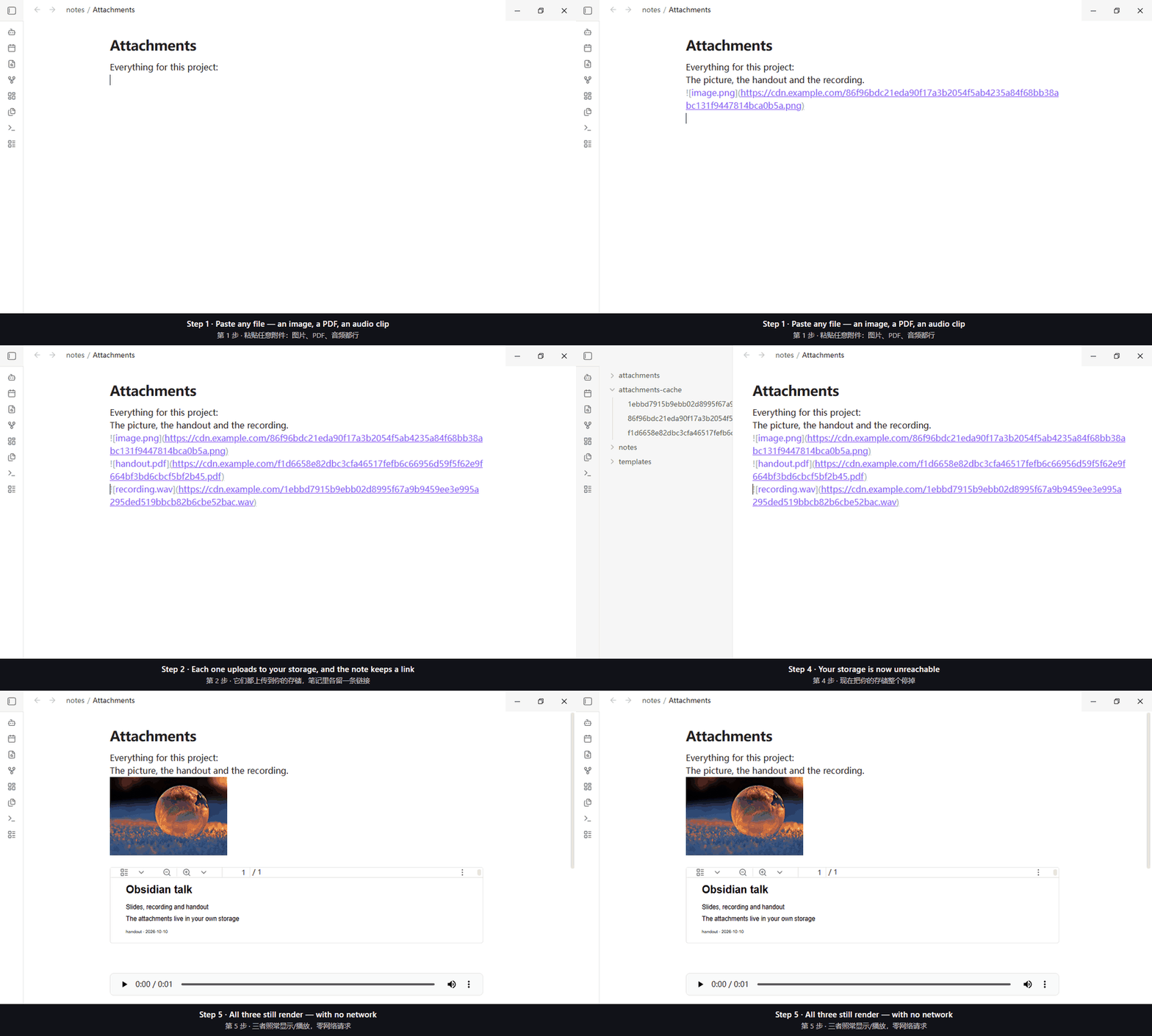
*Recorded from the plugin running in Obsidian: paste an image, a PDF and an audio clip → each one uploads → the note keeps a link while a copy of each stays in the vault's cache folder. The last step stops the storage to show that all three still work — the image, the PDF page, and an audio player.*
> **Everything here has been exercised for real** — see [How far it is verified](#how-far-it-is-verified).
> **Not proven yet:** iOS never run; Android never run on a real device.
## Why use it
Upload plugins break your notes the moment you are offline; "localize" plugins only help *after* you have been online
once. This does both — the file goes to your bucket, and the copy that renders stays behind:
| | Upload-only | Localize-only | This plugin |
| --- | --- | --- | --- |
| Offline | broken | after one online pass | **works — zero remote requests** |
| A new device | links work online | re-download everything | **copies back-filled on demand** |
| Vault size | small | grows with every file | **small — copies are disposable** |
| Who holds the original | a third party | you, but locally only | **you, in your own storage** |
## Features
- **Any S3-compatible storage** — Cloudflare R2, AWS S3, MinIO, Backblaze B2, self-hosted.
- **Upload however the file gets in** — pasted, dropped, added from your phone's gallery or camera, shared into
Obsidian, or copied into the vault. The note's link is rewritten to the remote URL. Keys are content-addressed
(`{hash}.{ext}`), so the same bytes are stored once.
- **Any file type, not just images** — images, audio, video, PDF, archives, documents, extension-less files. Types
Obsidian can preview (image/audio/video/PDF) are inserted as embeds; everything else becomes a clickable link.
- **Offline, multi-device, and light to sync** — the rendering copy is local (zero remote requests, always, not
just when the network is down); a new device back-fills copies on demand; and with the default "move into the cache
folder" the vault's bulk is text plus disposable copies, so syncing stays fast and cheap.
- **Canvas references count the same as note references** — a file placed on a canvas is uploaded, and its canvas
reference keeps working.
- **Bulk-upload what you already have** — one command handles the files your notes link to and leaves the rest alone.
- **Cloud space cleanup** — lists the objects in your storage no note refers to, with the count and the size, and
deletes only what you confirm.
- **Two optional features, both off by default** — caching files from other sites, and a cache size limit that trims
least-recently-used copies in the background.
## Requirements
- **Obsidian 1.13.0 or newer**, desktop and mobile. Older versions see *No appropriate version found.* in the community
catalogue — that is Obsidian's installer refusing, not a broken plugin.
- **An S3-compatible bucket you control**, plus an access key pair for it.
- **The bucket must allow anonymous reads**, or you must set a public URL prefix (CDN or custom domain) — otherwise the
links in your notes open for you but not for anyone else. **Test connection** checks exactly this.
## Installation
**From inside Obsidian:** Settings → Community plugins → Browse → search `Attachment Cloud Cache` → Install → Enable.
**Manually:** put `main.js`, `manifest.json` and `styles.css` from the
[latest release](https://github.com/udarent/obsidian-plugins-attachment-cloud-cache/releases/latest) into
`/.obsidian/plugins/attachment-cloud-cache/` (⚠️ the folder name must equal the plugin id).
Then fill in the storage settings below.
## Settings
In **Settings → Attachment Cloud Cache** (the Chinese names are in the [中文版](#attachment-cloud-cache附件云端缓存) half):
| Setting | What it does |
| --- | --- |
| **Endpoint · Bucket · Region** | Where your storage lives (`us-east-1` is the usual filler for self-hosted). |
| **Access key ID** | A plain text field; capitals are normal. |
| **Secret access key** | Goes into the OS keychain, never into `data.json`. |
| **Public URL prefix** | Optional. Empty means `endpoint/bucket/key`, which requires anonymous reads. |
| **Test connection** | One signed request, then one **credential-free** request to the address your links would use. |
| **Import from a credentials file** | MinIO's "Download credentials" JSON fills in endpoint, key and addressing mode; no copy is kept. |
| **Upload new attachments automatically** | On by default; off returns all of it to Obsidian, leaving files local only. |
| **Where the local copy goes** | Cache folder (default), attachments folder, or none. "None" turns caching off: the plugin uploads and rewrites links, and never fetches a copy back — so nothing works offline. |
| **Cache folder** | Relative to the vault root. Disposable: deleting it costs one re-download. |
| **Cache size limit (MB)** | Trims least-recently-used copies past this; `0` means no limit. |
| **Download missing copies** | Auto-downloads our own objects that have no local copy — never anything from other sites. Hidden when "none" is selected above, because caching is off then. |
| **Cache files from other sites** | Off by default; while it is off, nothing off-site is touched. |
| **When a note links to a file on another site** | `Leave it alone` (default) or `Cache straight away`. |
| **Pick specific files** | Tick individual off-site files; only those are fetched. |
| **Attachments folder override · Object key template · Compatibility mode** | Advanced: override Obsidian's attachment folder; change the key template (`{hash}`, `{ext}`, `{filename}`, `{date}`); use path-style addressing (keep on for R2 and MinIO). |
## Commands
| Command | What it does |
| --- | --- |
| **Show cache usage** | How much the cache holds, and how much could be reclaimed. |
| **Repair the local-copy index** | Drops index entries whose files are already gone. |
| **Clean up unused cache files** | Deletes cache files no note points at any more. Cannot be undone. |
| **Upload existing attachments** | Uploads what your notes link to, rewrites those links, moves each file into the cache folder. |
| **Cache files from other sites…** | Tick individual off-site files to fetch. Needs the off-site feature turned on. |
| **Clean up unused objects in the cloud…** | Lists objects no note here refers to — with count and size — then deletes what you confirm. |
## Good to know
- **`tiff`, `heic` and `ico` are inserted as plain links, not embeds** — Obsidian cannot preview them in an embed, so a
remote `![]()` would be a broken image. Your files are untouched; only the link shape changed in this release.
- **A dropped file's link lands at the caret, not at the pointer** — no public API maps pointer coordinates to an editor
position. Deliberate.
- **Links written before you change the storage URL are not recognised as "ours" on a new device** — they still work
online, but never render offline and are never downloaded automatically.
- **When a file you uploaded stops being linked from any note, the plugin asks once whether to clean it up** — keep
it, delete just the local copy, or delete it locally *and* from your storage. The default is to keep it. The same
content is stored once, so an object may be shared across notes and devices, and a storage deletion cannot be
undone; only *this* device's references are visible.
- **"Do not keep a local copy" turns caching off**, which is the plain-image-host behaviour: files are uploaded and
the note's link is rewritten, but nothing is kept or fetched back, so nothing is available offline.
- **Moving to another device: copy the plugin folder, but delete `.cache-index.json` first** — it records where *this*
device keeps its copies. The secret access key is not in the folder at all (it lives in Obsidian's keychain).
**Common failures**
| Symptom | What it means |
| --- | --- |
| *No appropriate version found.* | Your Obsidian is older than 1.13.0 — the installer refusing, not a broken plugin. |
| Links open for you but not for others | No anonymous read and no public URL prefix; **Test connection** says exactly that. |
| Broken on a second device | No local copy there, and it could not download one. |
| An off-site file refused as "a web page or plain text" | That address serves HTML, so it is refused on purpose. |
## Privacy & security
- **It normally talks only to your storage**, and touches nothing outside your vault. No telemetry, no analytics.
- **One optional feature reaches other sites — only after you turn it on and tell it to act** ("Cache files from other
sites", off by default, and doing nothing by default). The request carries nothing beyond the file's own address.
- **A web page is never stored** — `text/html` and other `text/*` answers are refused rather than uploaded.
- **The secret access key lives in the OS keychain**, never in `data.json`. The **access key ID is** written to
`data.json`: an identifier, not a secret, and Obsidian's keychain accepts only lowercase IDs.
- **Importing a credentials file reads that file and nothing else**, where it already sits.
## How far it is verified
- **Automated tests** cover signing, key and path derivation, settings merging, the cache index, the upload chain
(byte-identical, exactly one PUT, zero GETs), paste/drop decisions, canvas rewriting and cleanup safety — then a
**mutation check** breaks each rule on purpose. An assertion that cannot fail is not an assertion.
- **Real host, real storage:** the shipped build ran in real Obsidian against a real MinIO instance — eight file types
checked down to the uploaded bytes and Content-Type, canvas rewriting for both node kinds, audio/video/PDF previewed
offline in both view modes with the remote address never reaching an element, both cloud-cleanup entry points, and a
full round trip whose key is recomputed from the bytes and whose link opens **anonymously**. Reproduce with
`npm run verify:real-storage`.
- **Not verified:** iOS and Android have never been run on a real device (the code avoids APIs known to be missing
there, but that is reasoning, not evidence); non-ASCII object keys have tests but no real-provider run.
## Getting help
Open an issue: — say what you saw, your
Obsidian version and which storage provider you use; the errors name the step that failed. Working on the plugin?
`npm install`, then `npm run dev` (watch build) or `npm test` (build + suites).
---
# Attachment Cloud Cache(附件云端缓存)
[English](#attachment-cloud-cache) · **简体中文**
把笔记附件上传到**你自己的** S3 兼容存储 —— Cloudflare R2、AWS S3、MinIO、Backblaze B2 或任何 S3 端点 —— 同时在
本地留一份**负责渲染的缓存副本**。粘贴一个文件就自动上传,笔记里留下一条可迁移、可分享的链接,而渲染走本地副本,
**零远端请求**。
[安装](#安装) · [版本发布](https://github.com/udarent/obsidian-plugins-attachment-cloud-cache/releases) · [反馈问题](https://github.com/udarent/obsidian-plugins-attachment-cloud-cache/issues) · 需要 Obsidian **1.13.0+**([为什么](#环境要求))

*动图取自真实运行中的 Obsidian:粘贴图片、PDF 和音频 → 各自上传 → 笔记里各留一条链接,同时 vault 的缓存目录里各留一份副本。最后一步把存储整个停掉,用来证明图片、PDF 页和音频播放器都照常工作。*
> **下面写的每条行为都真机跑过** —— 见[已验证到什么程度](#已验证到什么程度)。
> **还没验证的:** iOS 从未运行过;Android 也没在真机上跑过。
## 为什么用它
上传类插件一断网就让笔记裂图;「本地化」类插件只有在**联网一次之后**才有用。本插件两件都做 —— 文件进你的桶,
负责渲染的副本留在本地:
| | 只上传 | 只本地化 | 本插件 |
| --- | --- | --- | --- |
| 断网时 | 打不开 | 联网一次之后可用 | **可用 —— 零远端请求** |
| 换新设备 | 在线能看 | 得把所有文件重下一遍 | **副本按需自动补回** |
| vault 体积 | 小 | 每存一个文件就大一分 | **小 —— 副本是可丢弃的** |
| 原件归谁 | 第三方 | 归你,但只在本机 | **归你,在你自己的存储里** |
## 功能
- **任何 S3 兼容存储** —— Cloudflare R2、AWS S3、MinIO、Backblaze B2、自建端点。
- **附件怎么进来都行** —— 粘贴、拖入、手机相册或相机、分享到 Obsidian、从别处拷进库,都会被上传,笔记里的链接换成远端地址。key 默认按内容寻址(`{hash}.{ext}`),同一份字节只存一份。
- **任何类型的附件,不只图片** —— 图片、音频、视频、PDF、压缩包、文档、没有扩展名的文件。Obsidian 能预览的
类型(图片/音频/视频/PDF)插入为嵌入,其余插入为可点开的普通链接。
- **离线、多设备、同步轻快** —— 渲染走本地副本(零远端请求,始终如此,不只是「网不通」时);换新设备时副本按需补回;
默认档「移入缓存目录」下,vault 的体量是纯文本 + 可丢弃的副本,把那个目录排除在同步外就又快又省。
- **画布引用与笔记引用同等算数** —— 摆在画布上的文件同样会被上传,画布里的引用会继续有效。
- **存量附件一条命令搬完** —— 只处理笔记引用着的文件,其余的绝不碰。
- **云端空间清理** —— 列出你存储里「本库没有笔记引用」的对象(连同个数与体积),只删你确认过的那些。
- **两个可选功能,默认都关** —— 缓存站外文件;缓存大小上限(超限时后台按最近最少使用清理)。
## 环境要求
- **Obsidian 1.13.0 或更新**,桌面端与移动端。更低的版本在社区目录里只回一句 *No appropriate version found.* ——
那是 Obsidian 的安装机制在拒绝,不是插件坏了。
- **一个你自己控制的 S3 兼容存储桶**,以及一对访问密钥。
- **存储桶要允许匿名读取**,或者你得填一个公开访问前缀(CDN 或自定义域名)。否则写进笔记的链接你自己打得开、
别人打不开 —— **测试连接** 检查的正是这件事。
## 安装
**在 Obsidian 里装:** 设置 → 第三方插件 → 浏览 → 搜 `Attachment Cloud Cache` → 安装并启用。
**手动安装:** 从[最新 release](https://github.com/udarent/obsidian-plugins-attachment-cloud-cache/releases/latest)
下载 `main.js`、`manifest.json`、`styles.css`,放进 `/.obsidian/plugins/attachment-cloud-cache/`
(⚠️ 目录名必须等于插件 id)。
然后填下面的存储设置。
## 设置
在 **设置 → Attachment Cloud Cache** 里(英文名见本文英文半):
| 设置项 | 说明 |
| --- | --- |
| **服务地址 · 存储桶 · 区域** | 你的存储在哪(自建服务填 `us-east-1` 之类的占位值即可)。 |
| **访问密钥 ID** | 普通输入框,含大写是正常的。 |
| **秘密访问密钥** | 进系统钥匙串,绝不写进 `data.json`。 |
| **公开访问前缀** | 可留空。留空就用 `服务地址/存储桶/键`,那要求存储桶允许匿名读取。 |
| **测试连接** | 先发一次签名请求,再**不带凭据**请求一次「你笔记里会写的那条地址」。 |
| **从凭据文件导入** | MinIO「下载凭据」的 JSON 会填好服务地址、密钥与寻址方式;不留副本。 |
| **新增附件自动上传** | 默认开启;关闭后这些全交回 Obsidian,文件只存在本地。 |
| **本地副本的处理** | 缓存目录(默认)/ 附件目录 / 不留。选「不留」等于关闭缓存:只上传并改写链接,也不会把副本补回来,所以离线不可用。 |
| **缓存目录** | 相对 vault 根目录。可丢弃:删掉只会多下载一次。 |
| **缓存大小上限(MB)** | 超过后按最近最少使用清理;`0` 表示不限制。 |
| **缺本地副本时自动下载** | 只自动下载**本存储**没有副本的对象,站外文件永不下载。上面选「不留」时这一项不显示(那一档已关闭缓存)。 |
| **缓存站外文件** | 默认关闭;关着时站外的东西一步都不会被碰。 |
| **遇到站外文件链接时** | `什么都不做`(默认)或 `直接缓存`。 |
| **挑选要缓存的文件** | 勾选具体的站外文件,只有勾中的会被取。 |
| **附件目录覆盖 · 对象 key 模板 · 兼容模式** | 高级:覆盖 Obsidian 的附件目录;改 key 模板(`{hash}`、`{ext}`、`{filename}`、`{date}`);按「地址/桶/键」寻址(R2 与 MinIO 都要开着)。 |
## 命令
| 命令 | 做什么 |
| --- | --- |
| **查看缓存占用** | 缓存里有多少、其中多少可以回收。 |
| **自检并修复本地副本索引** | 丢掉那些文件已经不在的索引记录。 |
| **清理未使用的缓存文件** | 删掉已经没有笔记指向的缓存文件。无法撤销。 |
| **上传已存在的附件** | 上传笔记里引用着的附件、改写链接,并把每个文件移入缓存目录。 |
| **缓存站外文件(可挑选)…** | 勾选具体的站外文件去下载。需要先打开站外文件功能。 |
| **清理云端未使用对象…** | 列出「本库没有笔记引用」的对象(含个数与体积),确认后删除。 |
## 需要注意的
- **`tiff`、`heic`、`ico` 插入的是普通链接,不再嵌入** —— 宿主无法在嵌入里预览它们,写 `![]()` 只会得到一个坏图。
你的文件没被动;这一版变的只是链接形态。
- **拖放文件的链接插在光标处,不是指针落点** —— 公开 API 里没有「指针坐标 → 编辑器位置」的映射。有意取舍。
- **改了存储地址之后,「新设备」上认不出老链接** —— 那些链接照常在线显示,但离线不显示、也不会被自动下载。
- **某个已上传的对象在本库不再被任何笔记引用时,会问你一次怎么处理** —— 保留、只删本地副本、或本地与云端一起删;
默认保留。相同内容只存一份,所以一个对象可能被多篇笔记、多台设备共用,而云端删除无法撤销;清理只能看到**本设备**的引用。
- **「不留本地副本」这一档等于关闭缓存**,也就是普通图床的行为:文件照常上传、笔记里的链接照样改写,
但不保留副本、也不把副本取回来,所以断网时什么都看不到。
- **换设备:把插件目录复制过去,但先删掉 `.cache-index.json`** —— 它记的是**这台设备**的副本在哪。秘密访问密钥
根本不在目录里(它存在 Obsidian 的钥匙串中)。
**常见故障**
| 现象 | 含义 |
| --- | --- |
| 社区目录说 *No appropriate version found.* | 你的 Obsidian 低于 1.13.0 —— 安装机制在拒绝,不是插件坏了。 |
| 链接自己打得开、别人打不开 | 没开匿名读,也没填公开前缀;**测试连接** 会明确报出这一条。 |
| 换台设备就裂 | 那台设备没有本地副本,也补不下来。 |
| 站外文件被以「返回的是网页或纯文本」拒收 | 那个地址回的是 HTML,所以刻意拒收。 |
## 隐私与安全
- **默认只连你自己的存储**,也不碰 vault 之外的文件。不含遥测、统计。
- **有一个可选功能会访问其它站点,而且只有你打开它、并明确让它做时才会**(「缓存站外文件」默认关闭,打开后也默认
什么都不做)。请求里除文件地址本身不带任何其它内容。
- **网页永远不会被存下来** —— `text/html` 与其它 `text/*` 一律拒收,而不是传上去。
- **秘密访问密钥存在系统钥匙串里**,绝不写进 `data.json`。**访问密钥 ID 会**写进 `data.json`:它是标识符而不是
秘密,而且 Obsidian 的钥匙串只接受小写 ID。
- **导入凭据文件只读那一份文件**,就在它原来的位置读。
## 已验证到什么程度
- **自动化测试**覆盖签名、key 与路径推导、设置合并、缓存索引、上传链路(字节一致、恰好 1 次 PUT、0 次 GET)、
粘贴/拖放判定、画布改写与清理安全性质 —— 之后还有一道**变异验证**:把每条规则故意改坏。不会失败的断言等于没有断言。
- **真实宿主与真实存储:** 构建产物在真实 Obsidian 里对着真实 MinIO 跑过 —— 八种类型的文件逐项核对上传字节与
Content-Type;画布两类节点的改写;音频、视频、PDF 在两种视图模式下离线预览,且**远端地址从未落进任何元素**;
云端清理两条入口;以及一次完整回环 —— key 由脚本从字节独立重算,链接**匿名**能打开。可用
`npm run verify:real-storage` 复现。
- **没验证的:** iOS 与 Android 都没在真机上跑过(代码避开了已知缺失的 API,但那是推理不是证据);含非 ASCII 字符的
对象 key 有测试覆盖,但没在真实服务商上跑过。
## 遇到问题
到 提 issue —— 请说清你看到的、你的
Obsidian 版本和用的哪家存储;插件的报错都写明了失败在哪一步。
想改插件本身?`npm install`,然后 `npm run dev`(监听构建)或 `npm test`(构建 + 全部套件)。