# Task Base
An Obsidian plugin for a note-per-task system: capture a task through a form,
pick a cadence from a builder instead of typing RFC 5545, and complete a task
with the next due date computed for you.
It conforms to an existing schema rather than inventing one. A note is a task
because it carries `type: task`; a Bases file collects them from anywhere in
the vault.
> A community plugin, not affiliated with or endorsed by Obsidian. "Bases"
> refers to Obsidian's own feature, which this plugin reads and writes but is
> not part of.
## Screenshots
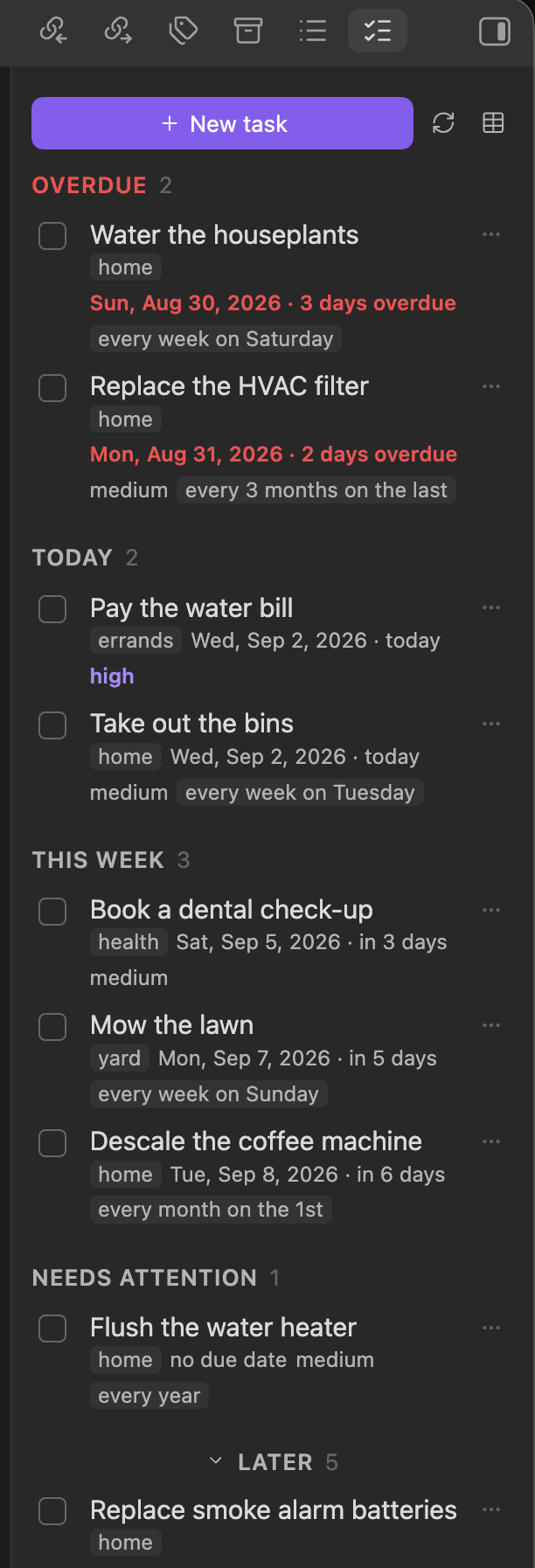 The pane's sections **partition the open set** — `Later` is whatever the other
sections did not catch, so nothing can be due-dated into invisibility. It is
collapsed by default so the pane opens on what is urgent.
The pane's sections **partition the open set** — `Later` is whatever the other
sections did not catch, so nothing can be due-dated into invisibility. It is
collapsed by default so the pane opens on what is urgent.
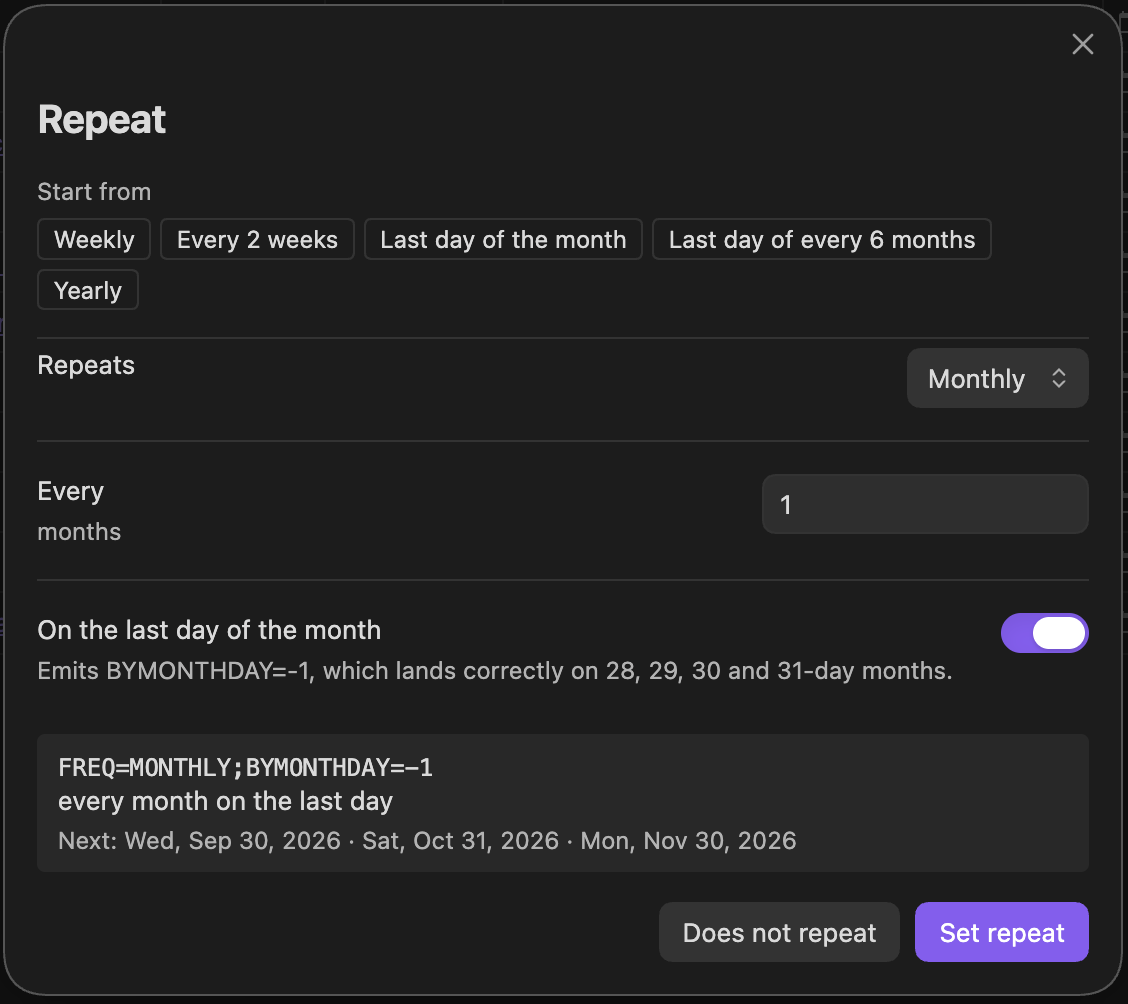 Recurrence without typing RFC 5545. The preview shows the rule it will store,
what that means in English, and the next three dates it resolves to — here
30 September, 31 October, 30 November, because `BYMONTHDAY=-1` means *the last
day*, not *the 30th*.
Recurrence without typing RFC 5545. The preview shows the rule it will store,
what that means in English, and the next three dates it resolves to — here
30 September, 31 October, 30 November, because `BYMONTHDAY=-1` means *the last
day*, not *the 30th*.
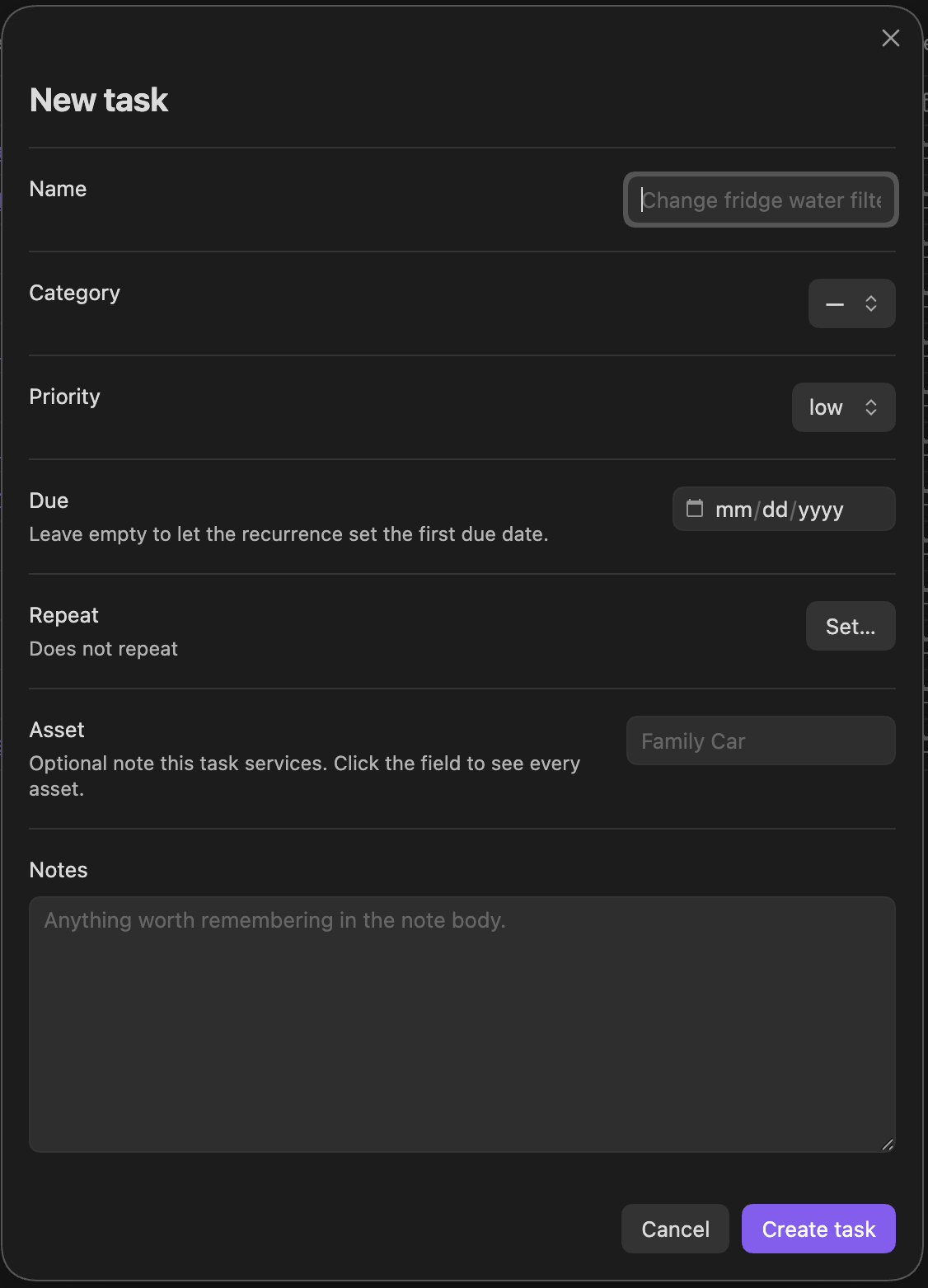
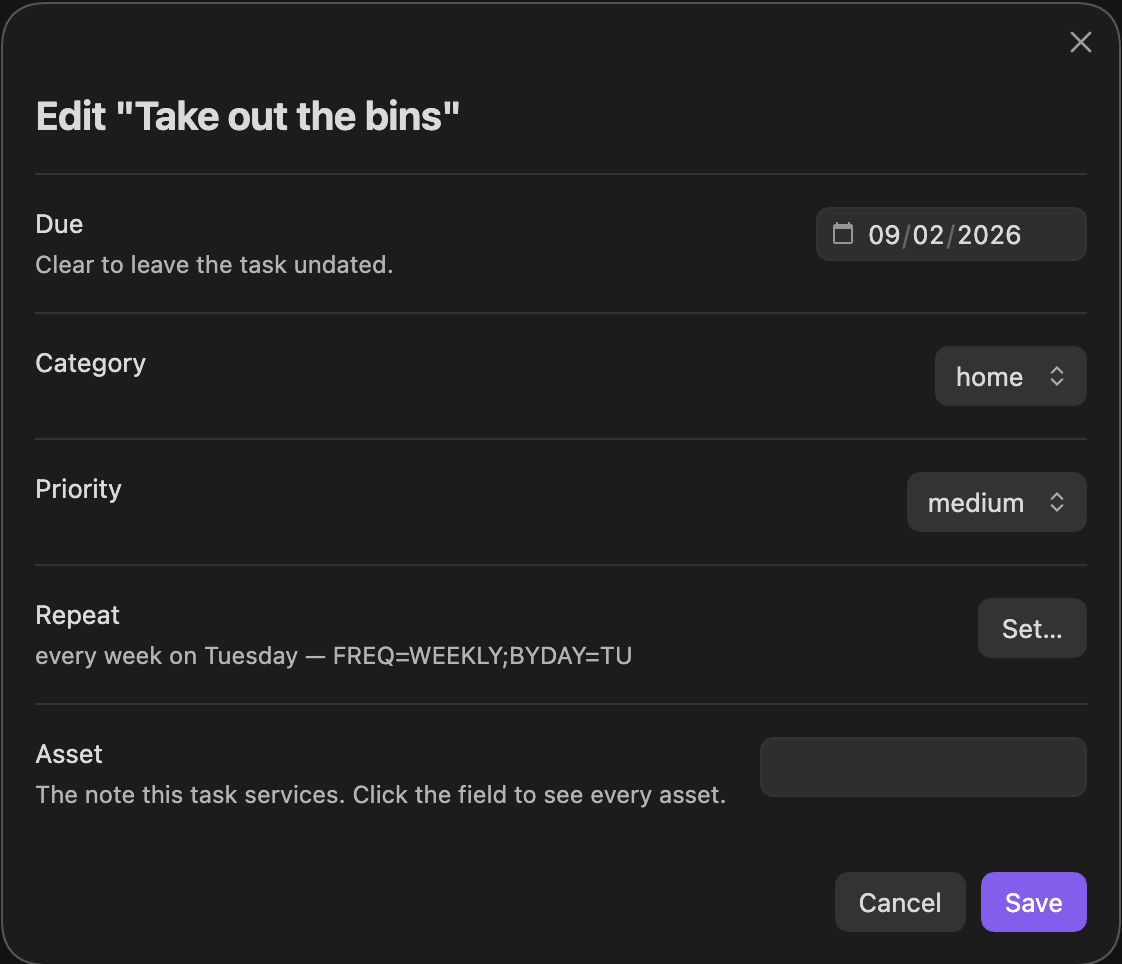 Capture on the left, edit on the right. Every field stays changeable after
creation, and the asset field is a type-ahead over the notes in your vault
rather than free text you can typo.
Capture on the left, edit on the right. Every field stays changeable after
creation, and the asset field is a type-ahead over the notes in your vault
rather than free text you can typo.
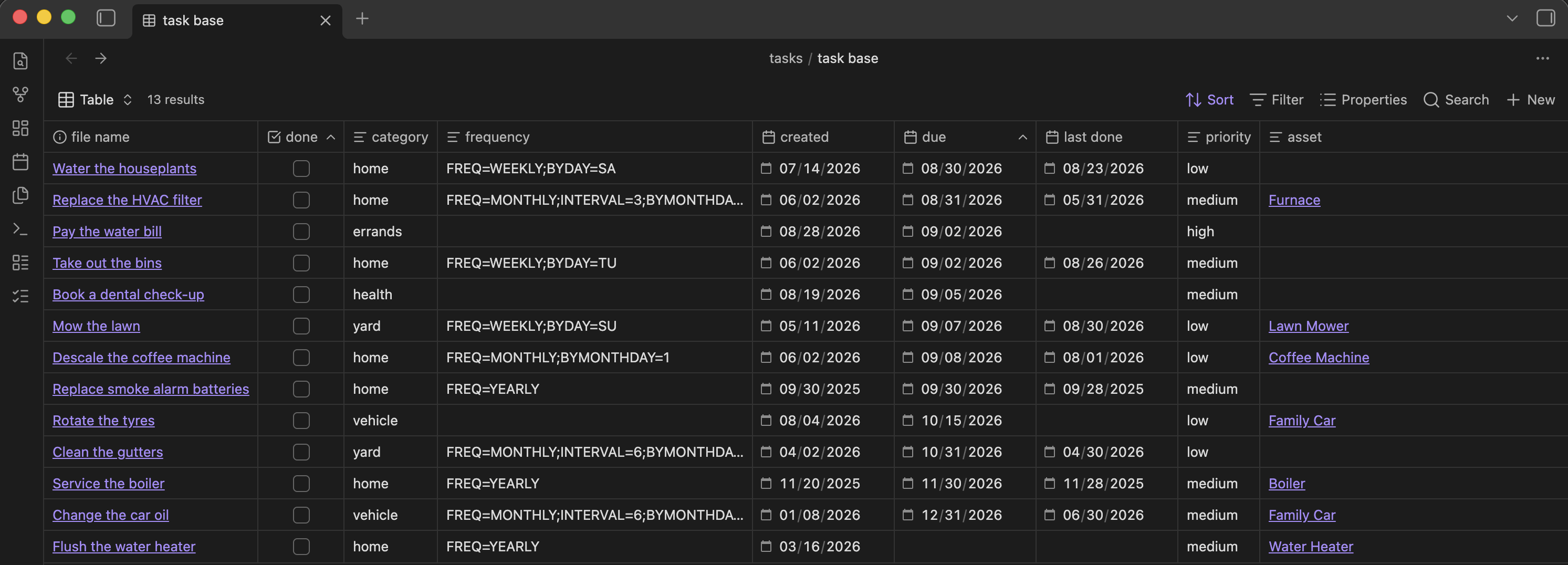 The same tasks in Obsidian's own Bases table. The plugin can create this base
for you; it is optional, and the pane works without it.
## How this differs from the other task plugins
**No plugin in Obsidian's 7,000-plus community registry mentions RRULE.** That
is the distinction: recurrence here is an RFC 5545 rule stored on the note —
`FREQ=MONTHLY;INTERVAL=6;BYMONTHDAY=-1` — evaluated with the same library
calendar software uses, rather than a bespoke "every 6 months" string.
- **Tasks** manages checkboxes written inline in note bodies. Different unit of
work entirely; the two do not overlap.
- **TaskNotes** is also note-per-task, built around a calendar, pomodoro and
time tracking. If you want time tracking, use that.
This one is for things that come back on a schedule — maintenance, chores,
services — where the note is the record, a Bases file is the view, and the
recurrence rule is a standard you can read somewhere else.
## The task note contract
```yaml
---
done: false # checkbox
due: 2026-12-31 # date
created: 2026-08-31 # date
priority: low # low | medium | high
category: vehicle # home | yard | errands | vehicle | health
last done: 2026-06-19 # date — latest completion only
frequency: FREQ=MONTHLY;INTERVAL=6;BYMONTHDAY=-1 # RRULE, or empty
type: task # identity — this is what puts it in the base
asset: "[[Family Car]]" # optional
---
```
`frequency` is the only thing separating the two kinds of task. Set means
recurring; empty means one-time.
## Commands
| Command | What it does |
|---|---|
| Create task | Form for name, category, priority, due, repeat rule, asset |
| Complete task | Branches on `frequency` — see below |
| Edit task | Change the name, due date, priority, category, repeat rule, asset or notes |
| Edit repeat rule | Opens the RRULE builder on a task |
| Set asset | Attaches, changes, or clears the asset on an existing task |
| Create asset note | Creates a `type: asset` note and opens it — no task needed |
| Recompute due date from repeat rule | Rolls `due` forward from `last done` |
| Reschedule overdue tasks | Moves every overdue due date forward, after a preview — see below |
| Open task base | Opens the base file, creating one if there isn't one |
| Open task list | The sidebar view |
The task pane carries its own toolbar — **New task**, refresh, and a button
that opens the base file, **creating one if you don't have a base yet**. Its
filters are generated from the **Excluded folders** setting, so a base made this
way agrees with the pane by construction. It sticks to the top so the primary action stays
reachable once the list scrolls. Right-click any row for Edit / Complete / Open.
While anything is overdue, the **Overdue** heading carries a button that
reschedules the lot — see [Rescheduling overdue tasks](#rescheduling-overdue-tasks).
Its sections — Overdue, Today, This week, Needs attention, Later — **partition
the open set**: `Later` is defined as everything not caught by the others, not
as a date window, so no open task can be missing from the pane while the footer
counts it. `Later` is collapsed by default, with its count on the header.
Commands act on the active note when it is a task, and offer a picker when it
is not.
## Notes
Both create forms end in a **Notes** box that becomes the note's body. On a
phone that was the one field you could not see while typing into it: the form
is taller than the screen long before the box is reached, so tapping it leaves
the box at the bottom of the view with the on-screen keyboard over it.
So on a phone the box is not there. In its place is a one-line button carrying
the opening of what you wrote, and tapping it opens an editor holding **one
field and its heading** — the top of the screen, which is the half the keyboard
leaves alone. Collapsing the box lifts every field above it back into view as
well, which is the same complaint from the other end.
On a tablet or a desktop the inline box stays, with an expand button beside it
opening that same editor for anything longer than a line.
The editor writes nothing to the vault: it edits the field, and the form still
has to be submitted. It commits as you type rather than on **Done**, because
Escape, a tap outside it, and the Android back gesture all dismiss a modal, and
losing a paragraph to any of the three is not a trade worth making.
**Edit task** offers the same box on an existing note, filled from the note's
body. It is given the prose and not the completion log: the log is history —
one dated line per completion, written over months — and editing a paragraph
should not be able to take a service record with it. Everything from
`## Service log` down is carried across untouched, and the field says so when
there is one. Editing the log itself means opening the note.
The box also never rewrites what it did not touch. Save the form without
changing the notes and the body is left byte-identical — the same rule the
properties have always followed here, extended to the prose.
## Renaming a task
**Edit task** carries a **Name** field, which renames the note. It goes through
Obsidian's own rename, so every link pointing at the task is rewritten with it
— a task renamed out from under the notes that reference it would be a worse
outcome than the typo it fixed.
A name another note in the same folder already holds is **refused**, not
quietly numbered the way a newly created note is. Creating a second "Mow lawn"
is normal; renaming a task and silently getting "Mow lawn 1" is not what was
asked for. Correcting only a name's capitalisation is not a collision with
itself and goes through.
The rename runs last, after the properties and the notes are written, and
reports on its own. A refused rename therefore costs you the rename — which
the notice names — and not the edits made alongside it, which are already
saved. The form stays open on it, since the field to correct is the one in
front of you.
## Assets
A task's `asset` property links the note for the thing being serviced —
`asset: "[[Lawn Mower]]"`.
**A note is an asset because it carries `type: asset`**, the same rule this
plugin uses for tasks. A vault may also collect the same notes by folder — an
`Inventory` base filtering on `file.inFolder("Inventory")`, say. The two agree
as long as every asset note lives in that folder, and diverge if one is moved
out; matching on the property is what keeps the picker working either way.
The asset field is a type-ahead: click it and every asset drops down, typing
narrows the list. A name with no matching note is still accepted — capturing a
chore for something not yet inventoried is normal — but the field says so
plainly rather than writing a dangling link in silence.
**The field states that rule and the + beside it acts on it.** Where the list
came from used to be answerable only by reading this file: an empty dropdown
explained neither why it was empty nor what would fill it. The field now says
what makes a note an asset, and the button creates one without leaving the form
— the new note appears in the list straight away, and its name drops into the
field you were filling in.
New asset notes go to the **New asset folder** setting, and carry exactly two
properties:
```yaml
---
type: asset
created: 2026-09-03
---
```
That is the whole contract. `type: asset` is what puts the note in the picker;
`created` matches what tasks carry and is a real date, so it sorts. Nothing
else is written, because a lawn mower is described with fields no task plugin
can guess — model numbers, warranty dates, where it lives — and those are yours
to add.
The folder is only consulted when *writing* one. Assets are still found
anywhere in the vault by their property, so moving a note out of that folder
does not stop it being an asset.
## Completing a task
- **Recurring** — `last done` = today, `due` recomputed, `done` back to
`false`. A recurring task is never left at `done: true`; that is what makes
it recur.
- **One-time** — `last done` = today, `done` = `true`. The note stays on disk
and stays in the base. **Nothing is ever deleted.**
- **Unreadable rule** — refuses to act and asks for the rule to be fixed.
Completing it as one-time would write `done: true` and retire a task that was
meant to keep recurring.
Anything that is not a date — mileage, part numbers, what was actually done —
goes on a dated line under `## Service log` in the body, never into `last done`.
## How the next due date is computed
The policy is **skip the rest of the period you just did it in**, then take the
schedule's next occurrence.
| Rule | Completed | Next due |
|---|---|---|
| `FREQ=WEEKLY;BYDAY=MO` | Mon 2026-08-24 | 2026-08-31 |
| `FREQ=WEEKLY;BYDAY=SU` | Mon 2026-08-17 | 2026-08-30 |
| `FREQ=WEEKLY;INTERVAL=2;BYDAY=MO` | Mon 2026-08-24 | 2026-09-07 |
| `FREQ=MONTHLY;BYMONTHDAY=-1` | 2026-08-22 | 2026-09-30 |
| `FREQ=MONTHLY;INTERVAL=6;BYMONTHDAY=-1` | 2026-06-19 | 2026-12-31 |
| `FREQ=YEARLY` | 2026-06-19 | 2027-06-19 |
Three cases, in order:
1. **No day-selection in the rule** (`FREQ=YEARLY`) — the day is implied by the
anchor, so the roll is one period later. A yearly task done 19 June comes
back the following 19 June, not on 1 January.
2. **More than one occurrence per period** (`FREQ=WEEKLY;BYDAY=MO,TH`) — the
remaining occurrences this period are real, so take the strict next one.
3. **One occurrence per period** — anchor the rule at the start of the current
period so nothing is clipped, then take the first occurrence after that
period ends. `INTERVAL` does the rest of the skipping itself.
Case 3 is why this is not a plain `rrule.after(today)`. Anchoring at the
completion date makes `INTERVAL` step from there, so an oil change on
2026-06-19 under `FREQ=MONTHLY;INTERVAL=6;BYMONTHDAY=-1` would roll to
2026-06-30 — eleven days out instead of six months.
## Rescheduling overdue tasks
**Reschedule overdue tasks** — a command, and a button on the pane's Overdue
heading while anything is overdue — moves every overdue due date forward at
once. It is not completing: **only `due` changes**. `done`, `last done` and the
service log are left alone, because nothing was done.
- **Repeating** — `due` moves to the first date in the task's own schedule on
or after today.
- **One-time** — `due` moves to today.
- **Unreadable rule, or a schedule that has ended** (`COUNT`, `UNTIL`) — left
as it is. Moving an unreadable rule to today would treat it as one-time, the
same guess completing refuses to make.
**Nothing is written until you have seen where each task lands.** The dates it
replaces cannot be read back from the notes afterwards, so a dialog lists every
task with its old and new date first, and the ones it will leave alone with the
reason. Each task is decided again from its note at the moment of writing, so
one completed while the list was open stays as it was.
"The first date in its own schedule" steps the task's chain of due dates — each
the date completing it on time would have produced — forward from the date it
holds, until it reaches today. That is not the same as completing it today,
which spends the current period and restarts an `INTERVAL` from this week:
| Rule | Due | Today | Rescheduled to | Completing today gives |
|---|---|---|---|---|
| `FREQ=WEEKLY;BYDAY=SU` | Sun 2026-09-13 | Tue 2026-09-22 | 2026-09-27 | 2026-10-04 |
| `FREQ=MONTHLY;BYMONTHDAY=-1` | 2026-08-31 | Tue 2026-09-22 | 2026-09-30 | 2026-10-31 |
| `FREQ=WEEKLY;INTERVAL=2;BYDAY=MO` | Mon 2026-09-14 | Tue 2026-09-22 | 2026-09-28 | 2026-10-05 |
| `FREQ=WEEKLY;BYDAY=TU` | Tue 2026-09-15 | Tue 2026-09-22 | 2026-09-22 | 2026-09-29 |
An occurrence that falls today makes the task due today rather than skipping
past it. **Recompute due date from repeat rule** is different again: it works
from `last done`, as though the task had been completed then.
Only open tasks due before today are touched. A recurring task stuck at
`done: true` is not overdue work — the pane goes on reporting it, and
rescheduling leaves it alone.
## Things this plugin will not do
- **Delete a note.** Sweeping finished one-time tasks is deliberately out of
scope. The sidebar surfaces recurring tasks stuck at `done: true`, and
unreadable repeat rules, and the generated base carries a `Sweep` view of
finished one-time tasks - but all three only ever report.
- **Write `.obsidian/types.json`.** The property-type registry is vault-wide;
a stray write there breaks date sorting on every note at once.
- **Write to a Kanban board or any hand-maintained table.** Frontmatter is the
source of truth.
## Known seam: the base filters are duplicated
Bases exposes no documented plugin API, so `src/model/taskRepository.ts` does
not query `tasks/task base.base`. It walks the vault and re-implements the
base's two filter clauses against the metadata cache:
```
type == "task" and !file.inFolder("Templates")
```
**If the `.base` file's filters change, that file must change with them**, or
the sidebar and the base will quietly disagree. **Excluded folders** is a
setting for exactly this reason.
`src/model/assetRepository.ts` is the same shape for assets, and matches on
`type: asset` rather than mirroring `inventory.base`'s folder filter — see
**Assets** above for why.
## Installing in another vault
A packaged Obsidian plugin is three files — `main.js`, `manifest.json`,
`styles.css` — in `/.obsidian/plugins/task-base/`. There is no installer
format beyond that.
### From a release (any machine)
Pushing a tag that matches `manifest.json`'s version builds and publishes those
three files as release assets:
```bash
git tag 0.2.2 && git push origin 0.2.2
```
Then, on the machine with the other vault:
```bash
gh release download 0.2.2 --repo tteschon/obsidian-task-base \
-D "/.obsidian/plugins/task-base"
```
Or download the three assets from the Releases page while signed in — the repo
being private only means you must be authenticated, not that this stops working.
Enable **Task Base** under Settings → Community plugins afterwards; if Obsidian
is already running, reload it first so it rescans the plugins folder.
The release workflow refuses to publish when the tag disagrees with
`manifest.json`, because Obsidian matches a release to an installed plugin by
that version and a mismatch installs nowhere. `npm version patch` bumps
`manifest.json` and `versions.json` together, which keeps them honest.
### On this machine
```bash
ln -s /path/to/repo /.obsidian/plugins/task-base # after npm run build
```
One build then serves every vault. Copying the three files by hand works too,
and lets each vault run a different version.
### A new vault needs configuring, not just the files
The plugin finds tasks by `type: task` **anywhere in the vault**, so the
defaults — which describe one particular vault — are usually wrong somewhere
else. Four settings matter:
- **New task folder** — where new notes land. Created if missing.
- **New asset folder** — where the **+** beside the asset field writes new
asset notes. Created if missing, and matched to a folder that already exists
under a different capitalisation rather than colliding with it.
- **Excluded folders** — any folder whose notes carry `type: task` for an
unrelated reason. This is the one that bites: a vault with Kanban cards or
another `type: task` convention will otherwise list them in the pane's count
and offer them in the **Complete task** picker, where choosing one writes
`done: true` and `last done` into a note that was never a task.
- **Task base** — clear it, or point it at that vault's base. When the path
does not resolve, the pane's "Open task base" button is simply hidden.
**No `.base` file is required.** The pane reads the metadata cache directly, so
every command and every section works in a vault with no base at all. The base
only adds Obsidian's own table view. If you want one, the pane's base button
creates it — that is the whole setup.
Property types need no setup either: Obsidian infers `done` as a checkbox and
`due` / `last done` as dates from the values the plugin writes. The plugin never
touches `.obsidian/types.json`.
## `created` is a date, vault-wide
`created` used to hold a wikilink to the daily note — `"[[2026-08-31]]"` — which
made it **text**, so it could not be sorted, compared, or used in a formula.
It is now a bare `YYYY-MM-DD`, registered as `date` in `.obsidian/types.json`.
Worth knowing before touching it again: **Obsidian property types are
vault-wide, not per-note-type.** `created` was on 259 notes in three
incompatible formats — 194 daily notes carrying `["YYYY-MM-DD HH:MM"]`, 36
wikilinks, 23 bare dates — so registering the type meant normalising all of
them. Daily notes lost the time component in the process.
The plugin writes the bare form, and the vault's task template matches.
## What the plugin reads, and why it reads the whole vault
To find tasks it **enumerates the vault's markdown files and reads each one's
frontmatter**, keeping those with `type: task` (and `type: asset` for the asset
picker). That is inherent to the design rather than incidental: a note is a task
because of a property, not because of where it sits, and Obsidian offers no API
to query notes by frontmatter property.
It reads frontmatter only — never the body of a note it was not asked to open —
and the asset list is cached rather than recomputed per keystroke. It **makes no
network requests of any kind**, collects no telemetry, and never deletes a note.
Everything it writes goes through the vault API, inside the vault.
If you would rather it looked at less, **Excluded folders** narrows what it
considers.
## A hazard worth knowing
**Do not name a method on the view class after a Workspace lifecycle verb.**
`View.open()` is a real method Obsidian calls to open a view, but it is absent
from `obsidian.d.ts` — so defining `private open(task: Task)` on the view type
checks cleanly, overrides Obsidian's own method, and the pane then renders
blank: the view constructs, `onload` and `onOpen` never run, and **nothing is
logged anywhere**. It is named `openNote` for that reason.
`render()` catches its own failures and paints the error into the pane, so the
next render bug reports itself rather than showing an empty panel.
## Layout
```
src/
main.ts commands, view registration, ribbon
settings.ts settings + tab
dates.ts all-day date helpers
recurrence.ts RRULE parse / describe / next-due / build
rruleCompat.ts CJS/ESM interop shim for the rrule package
model/frontmatter.ts pure text: note rendering, YAML normalisation
model/assetLink.ts pure text: asset wikilink <-> bare name
model/completion.ts pure: the branch completing a task takes
model/reschedule.ts pure: where rescheduling moves an overdue task
model/task.ts the field contract, read + write
model/asset.ts write an asset note
model/note.ts placing a new note: folder, casing, name collisions
model/taskRepository.ts find and bucket tasks
model/assetRepository.ts find asset notes
settingsData.ts pure: settings shape, defaults, migration
ui/ modals and the sidebar view
test/ node:test suites over the pure modules
```
`model/frontmatter.ts` holds everything that does not touch the Obsidian API,
which is what makes the test suite runnable outside the app — and those are the
functions most worth testing, since a regex that strays out of the frontmatter
would rewrite someone's note body.
## Third-party code
`main.js` is a bundle: it contains [rrule](https://github.com/jakubroztocil/rrule)
(BSD-3-Clause). Its notice travels in the banner at the top of every built
`main.js` as well as in [THIRD-PARTY-NOTICES.md](THIRD-PARTY-NOTICES.md).
## Development
```bash
npm install
echo "$HOME/path/to/YourVault/.obsidian/plugins/task-base" > .vault-plugin-dir
npm run dev # watch build, writes straight into the vault plugin folder
npm test # node:test over recurrence, completion, rescheduling, frontmatter, asset links, settings
npm run lint # eslint
npm run build # typecheck + minified build to the repo root, for release
```
The dev build destination is per-machine and not committed. It comes from
`.vault-plugin-dir` (gitignored) or from a `VAULT_PLUGIN_DIR` environment
variable, which wins if both are set. `npm run dev` writes `main.js`,
`manifest.json` and `styles.css` there so an Obsidian reload picks the change
up, and exits with an error if neither is set rather than quietly building
somewhere you are not watching. `npm run build` ignores both and writes to the
repo root.
After the first build, enable **Task Base** in Settings → Community plugins.
### Cutting a release
```bash
npm version patch && git push --follow-tags
```
`npm version` bumps `manifest.json` and `versions.json` together and creates the
tag; `--follow-tags` pushes the commit and the tag as one step. **Bumping without
tagging breaks installs silently** — the directory reads the manifest to learn
the current version and then downloads the release tagged with it, so a listing
that looks healthy fails for everyone. The `Release drift` workflow warns on
push and fails on its daily run if the two ever disagree.
Reload it after a rebuild with the Obsidian CLI:
```bash
obsidian plugin:reload id=task-base
```
The same tasks in Obsidian's own Bases table. The plugin can create this base
for you; it is optional, and the pane works without it.
## How this differs from the other task plugins
**No plugin in Obsidian's 7,000-plus community registry mentions RRULE.** That
is the distinction: recurrence here is an RFC 5545 rule stored on the note —
`FREQ=MONTHLY;INTERVAL=6;BYMONTHDAY=-1` — evaluated with the same library
calendar software uses, rather than a bespoke "every 6 months" string.
- **Tasks** manages checkboxes written inline in note bodies. Different unit of
work entirely; the two do not overlap.
- **TaskNotes** is also note-per-task, built around a calendar, pomodoro and
time tracking. If you want time tracking, use that.
This one is for things that come back on a schedule — maintenance, chores,
services — where the note is the record, a Bases file is the view, and the
recurrence rule is a standard you can read somewhere else.
## The task note contract
```yaml
---
done: false # checkbox
due: 2026-12-31 # date
created: 2026-08-31 # date
priority: low # low | medium | high
category: vehicle # home | yard | errands | vehicle | health
last done: 2026-06-19 # date — latest completion only
frequency: FREQ=MONTHLY;INTERVAL=6;BYMONTHDAY=-1 # RRULE, or empty
type: task # identity — this is what puts it in the base
asset: "[[Family Car]]" # optional
---
```
`frequency` is the only thing separating the two kinds of task. Set means
recurring; empty means one-time.
## Commands
| Command | What it does |
|---|---|
| Create task | Form for name, category, priority, due, repeat rule, asset |
| Complete task | Branches on `frequency` — see below |
| Edit task | Change the name, due date, priority, category, repeat rule, asset or notes |
| Edit repeat rule | Opens the RRULE builder on a task |
| Set asset | Attaches, changes, or clears the asset on an existing task |
| Create asset note | Creates a `type: asset` note and opens it — no task needed |
| Recompute due date from repeat rule | Rolls `due` forward from `last done` |
| Reschedule overdue tasks | Moves every overdue due date forward, after a preview — see below |
| Open task base | Opens the base file, creating one if there isn't one |
| Open task list | The sidebar view |
The task pane carries its own toolbar — **New task**, refresh, and a button
that opens the base file, **creating one if you don't have a base yet**. Its
filters are generated from the **Excluded folders** setting, so a base made this
way agrees with the pane by construction. It sticks to the top so the primary action stays
reachable once the list scrolls. Right-click any row for Edit / Complete / Open.
While anything is overdue, the **Overdue** heading carries a button that
reschedules the lot — see [Rescheduling overdue tasks](#rescheduling-overdue-tasks).
Its sections — Overdue, Today, This week, Needs attention, Later — **partition
the open set**: `Later` is defined as everything not caught by the others, not
as a date window, so no open task can be missing from the pane while the footer
counts it. `Later` is collapsed by default, with its count on the header.
Commands act on the active note when it is a task, and offer a picker when it
is not.
## Notes
Both create forms end in a **Notes** box that becomes the note's body. On a
phone that was the one field you could not see while typing into it: the form
is taller than the screen long before the box is reached, so tapping it leaves
the box at the bottom of the view with the on-screen keyboard over it.
So on a phone the box is not there. In its place is a one-line button carrying
the opening of what you wrote, and tapping it opens an editor holding **one
field and its heading** — the top of the screen, which is the half the keyboard
leaves alone. Collapsing the box lifts every field above it back into view as
well, which is the same complaint from the other end.
On a tablet or a desktop the inline box stays, with an expand button beside it
opening that same editor for anything longer than a line.
The editor writes nothing to the vault: it edits the field, and the form still
has to be submitted. It commits as you type rather than on **Done**, because
Escape, a tap outside it, and the Android back gesture all dismiss a modal, and
losing a paragraph to any of the three is not a trade worth making.
**Edit task** offers the same box on an existing note, filled from the note's
body. It is given the prose and not the completion log: the log is history —
one dated line per completion, written over months — and editing a paragraph
should not be able to take a service record with it. Everything from
`## Service log` down is carried across untouched, and the field says so when
there is one. Editing the log itself means opening the note.
The box also never rewrites what it did not touch. Save the form without
changing the notes and the body is left byte-identical — the same rule the
properties have always followed here, extended to the prose.
## Renaming a task
**Edit task** carries a **Name** field, which renames the note. It goes through
Obsidian's own rename, so every link pointing at the task is rewritten with it
— a task renamed out from under the notes that reference it would be a worse
outcome than the typo it fixed.
A name another note in the same folder already holds is **refused**, not
quietly numbered the way a newly created note is. Creating a second "Mow lawn"
is normal; renaming a task and silently getting "Mow lawn 1" is not what was
asked for. Correcting only a name's capitalisation is not a collision with
itself and goes through.
The rename runs last, after the properties and the notes are written, and
reports on its own. A refused rename therefore costs you the rename — which
the notice names — and not the edits made alongside it, which are already
saved. The form stays open on it, since the field to correct is the one in
front of you.
## Assets
A task's `asset` property links the note for the thing being serviced —
`asset: "[[Lawn Mower]]"`.
**A note is an asset because it carries `type: asset`**, the same rule this
plugin uses for tasks. A vault may also collect the same notes by folder — an
`Inventory` base filtering on `file.inFolder("Inventory")`, say. The two agree
as long as every asset note lives in that folder, and diverge if one is moved
out; matching on the property is what keeps the picker working either way.
The asset field is a type-ahead: click it and every asset drops down, typing
narrows the list. A name with no matching note is still accepted — capturing a
chore for something not yet inventoried is normal — but the field says so
plainly rather than writing a dangling link in silence.
**The field states that rule and the + beside it acts on it.** Where the list
came from used to be answerable only by reading this file: an empty dropdown
explained neither why it was empty nor what would fill it. The field now says
what makes a note an asset, and the button creates one without leaving the form
— the new note appears in the list straight away, and its name drops into the
field you were filling in.
New asset notes go to the **New asset folder** setting, and carry exactly two
properties:
```yaml
---
type: asset
created: 2026-09-03
---
```
That is the whole contract. `type: asset` is what puts the note in the picker;
`created` matches what tasks carry and is a real date, so it sorts. Nothing
else is written, because a lawn mower is described with fields no task plugin
can guess — model numbers, warranty dates, where it lives — and those are yours
to add.
The folder is only consulted when *writing* one. Assets are still found
anywhere in the vault by their property, so moving a note out of that folder
does not stop it being an asset.
## Completing a task
- **Recurring** — `last done` = today, `due` recomputed, `done` back to
`false`. A recurring task is never left at `done: true`; that is what makes
it recur.
- **One-time** — `last done` = today, `done` = `true`. The note stays on disk
and stays in the base. **Nothing is ever deleted.**
- **Unreadable rule** — refuses to act and asks for the rule to be fixed.
Completing it as one-time would write `done: true` and retire a task that was
meant to keep recurring.
Anything that is not a date — mileage, part numbers, what was actually done —
goes on a dated line under `## Service log` in the body, never into `last done`.
## How the next due date is computed
The policy is **skip the rest of the period you just did it in**, then take the
schedule's next occurrence.
| Rule | Completed | Next due |
|---|---|---|
| `FREQ=WEEKLY;BYDAY=MO` | Mon 2026-08-24 | 2026-08-31 |
| `FREQ=WEEKLY;BYDAY=SU` | Mon 2026-08-17 | 2026-08-30 |
| `FREQ=WEEKLY;INTERVAL=2;BYDAY=MO` | Mon 2026-08-24 | 2026-09-07 |
| `FREQ=MONTHLY;BYMONTHDAY=-1` | 2026-08-22 | 2026-09-30 |
| `FREQ=MONTHLY;INTERVAL=6;BYMONTHDAY=-1` | 2026-06-19 | 2026-12-31 |
| `FREQ=YEARLY` | 2026-06-19 | 2027-06-19 |
Three cases, in order:
1. **No day-selection in the rule** (`FREQ=YEARLY`) — the day is implied by the
anchor, so the roll is one period later. A yearly task done 19 June comes
back the following 19 June, not on 1 January.
2. **More than one occurrence per period** (`FREQ=WEEKLY;BYDAY=MO,TH`) — the
remaining occurrences this period are real, so take the strict next one.
3. **One occurrence per period** — anchor the rule at the start of the current
period so nothing is clipped, then take the first occurrence after that
period ends. `INTERVAL` does the rest of the skipping itself.
Case 3 is why this is not a plain `rrule.after(today)`. Anchoring at the
completion date makes `INTERVAL` step from there, so an oil change on
2026-06-19 under `FREQ=MONTHLY;INTERVAL=6;BYMONTHDAY=-1` would roll to
2026-06-30 — eleven days out instead of six months.
## Rescheduling overdue tasks
**Reschedule overdue tasks** — a command, and a button on the pane's Overdue
heading while anything is overdue — moves every overdue due date forward at
once. It is not completing: **only `due` changes**. `done`, `last done` and the
service log are left alone, because nothing was done.
- **Repeating** — `due` moves to the first date in the task's own schedule on
or after today.
- **One-time** — `due` moves to today.
- **Unreadable rule, or a schedule that has ended** (`COUNT`, `UNTIL`) — left
as it is. Moving an unreadable rule to today would treat it as one-time, the
same guess completing refuses to make.
**Nothing is written until you have seen where each task lands.** The dates it
replaces cannot be read back from the notes afterwards, so a dialog lists every
task with its old and new date first, and the ones it will leave alone with the
reason. Each task is decided again from its note at the moment of writing, so
one completed while the list was open stays as it was.
"The first date in its own schedule" steps the task's chain of due dates — each
the date completing it on time would have produced — forward from the date it
holds, until it reaches today. That is not the same as completing it today,
which spends the current period and restarts an `INTERVAL` from this week:
| Rule | Due | Today | Rescheduled to | Completing today gives |
|---|---|---|---|---|
| `FREQ=WEEKLY;BYDAY=SU` | Sun 2026-09-13 | Tue 2026-09-22 | 2026-09-27 | 2026-10-04 |
| `FREQ=MONTHLY;BYMONTHDAY=-1` | 2026-08-31 | Tue 2026-09-22 | 2026-09-30 | 2026-10-31 |
| `FREQ=WEEKLY;INTERVAL=2;BYDAY=MO` | Mon 2026-09-14 | Tue 2026-09-22 | 2026-09-28 | 2026-10-05 |
| `FREQ=WEEKLY;BYDAY=TU` | Tue 2026-09-15 | Tue 2026-09-22 | 2026-09-22 | 2026-09-29 |
An occurrence that falls today makes the task due today rather than skipping
past it. **Recompute due date from repeat rule** is different again: it works
from `last done`, as though the task had been completed then.
Only open tasks due before today are touched. A recurring task stuck at
`done: true` is not overdue work — the pane goes on reporting it, and
rescheduling leaves it alone.
## Things this plugin will not do
- **Delete a note.** Sweeping finished one-time tasks is deliberately out of
scope. The sidebar surfaces recurring tasks stuck at `done: true`, and
unreadable repeat rules, and the generated base carries a `Sweep` view of
finished one-time tasks - but all three only ever report.
- **Write `.obsidian/types.json`.** The property-type registry is vault-wide;
a stray write there breaks date sorting on every note at once.
- **Write to a Kanban board or any hand-maintained table.** Frontmatter is the
source of truth.
## Known seam: the base filters are duplicated
Bases exposes no documented plugin API, so `src/model/taskRepository.ts` does
not query `tasks/task base.base`. It walks the vault and re-implements the
base's two filter clauses against the metadata cache:
```
type == "task" and !file.inFolder("Templates")
```
**If the `.base` file's filters change, that file must change with them**, or
the sidebar and the base will quietly disagree. **Excluded folders** is a
setting for exactly this reason.
`src/model/assetRepository.ts` is the same shape for assets, and matches on
`type: asset` rather than mirroring `inventory.base`'s folder filter — see
**Assets** above for why.
## Installing in another vault
A packaged Obsidian plugin is three files — `main.js`, `manifest.json`,
`styles.css` — in `/.obsidian/plugins/task-base/`. There is no installer
format beyond that.
### From a release (any machine)
Pushing a tag that matches `manifest.json`'s version builds and publishes those
three files as release assets:
```bash
git tag 0.2.2 && git push origin 0.2.2
```
Then, on the machine with the other vault:
```bash
gh release download 0.2.2 --repo tteschon/obsidian-task-base \
-D "/.obsidian/plugins/task-base"
```
Or download the three assets from the Releases page while signed in — the repo
being private only means you must be authenticated, not that this stops working.
Enable **Task Base** under Settings → Community plugins afterwards; if Obsidian
is already running, reload it first so it rescans the plugins folder.
The release workflow refuses to publish when the tag disagrees with
`manifest.json`, because Obsidian matches a release to an installed plugin by
that version and a mismatch installs nowhere. `npm version patch` bumps
`manifest.json` and `versions.json` together, which keeps them honest.
### On this machine
```bash
ln -s /path/to/repo /.obsidian/plugins/task-base # after npm run build
```
One build then serves every vault. Copying the three files by hand works too,
and lets each vault run a different version.
### A new vault needs configuring, not just the files
The plugin finds tasks by `type: task` **anywhere in the vault**, so the
defaults — which describe one particular vault — are usually wrong somewhere
else. Four settings matter:
- **New task folder** — where new notes land. Created if missing.
- **New asset folder** — where the **+** beside the asset field writes new
asset notes. Created if missing, and matched to a folder that already exists
under a different capitalisation rather than colliding with it.
- **Excluded folders** — any folder whose notes carry `type: task` for an
unrelated reason. This is the one that bites: a vault with Kanban cards or
another `type: task` convention will otherwise list them in the pane's count
and offer them in the **Complete task** picker, where choosing one writes
`done: true` and `last done` into a note that was never a task.
- **Task base** — clear it, or point it at that vault's base. When the path
does not resolve, the pane's "Open task base" button is simply hidden.
**No `.base` file is required.** The pane reads the metadata cache directly, so
every command and every section works in a vault with no base at all. The base
only adds Obsidian's own table view. If you want one, the pane's base button
creates it — that is the whole setup.
Property types need no setup either: Obsidian infers `done` as a checkbox and
`due` / `last done` as dates from the values the plugin writes. The plugin never
touches `.obsidian/types.json`.
## `created` is a date, vault-wide
`created` used to hold a wikilink to the daily note — `"[[2026-08-31]]"` — which
made it **text**, so it could not be sorted, compared, or used in a formula.
It is now a bare `YYYY-MM-DD`, registered as `date` in `.obsidian/types.json`.
Worth knowing before touching it again: **Obsidian property types are
vault-wide, not per-note-type.** `created` was on 259 notes in three
incompatible formats — 194 daily notes carrying `["YYYY-MM-DD HH:MM"]`, 36
wikilinks, 23 bare dates — so registering the type meant normalising all of
them. Daily notes lost the time component in the process.
The plugin writes the bare form, and the vault's task template matches.
## What the plugin reads, and why it reads the whole vault
To find tasks it **enumerates the vault's markdown files and reads each one's
frontmatter**, keeping those with `type: task` (and `type: asset` for the asset
picker). That is inherent to the design rather than incidental: a note is a task
because of a property, not because of where it sits, and Obsidian offers no API
to query notes by frontmatter property.
It reads frontmatter only — never the body of a note it was not asked to open —
and the asset list is cached rather than recomputed per keystroke. It **makes no
network requests of any kind**, collects no telemetry, and never deletes a note.
Everything it writes goes through the vault API, inside the vault.
If you would rather it looked at less, **Excluded folders** narrows what it
considers.
## A hazard worth knowing
**Do not name a method on the view class after a Workspace lifecycle verb.**
`View.open()` is a real method Obsidian calls to open a view, but it is absent
from `obsidian.d.ts` — so defining `private open(task: Task)` on the view type
checks cleanly, overrides Obsidian's own method, and the pane then renders
blank: the view constructs, `onload` and `onOpen` never run, and **nothing is
logged anywhere**. It is named `openNote` for that reason.
`render()` catches its own failures and paints the error into the pane, so the
next render bug reports itself rather than showing an empty panel.
## Layout
```
src/
main.ts commands, view registration, ribbon
settings.ts settings + tab
dates.ts all-day date helpers
recurrence.ts RRULE parse / describe / next-due / build
rruleCompat.ts CJS/ESM interop shim for the rrule package
model/frontmatter.ts pure text: note rendering, YAML normalisation
model/assetLink.ts pure text: asset wikilink <-> bare name
model/completion.ts pure: the branch completing a task takes
model/reschedule.ts pure: where rescheduling moves an overdue task
model/task.ts the field contract, read + write
model/asset.ts write an asset note
model/note.ts placing a new note: folder, casing, name collisions
model/taskRepository.ts find and bucket tasks
model/assetRepository.ts find asset notes
settingsData.ts pure: settings shape, defaults, migration
ui/ modals and the sidebar view
test/ node:test suites over the pure modules
```
`model/frontmatter.ts` holds everything that does not touch the Obsidian API,
which is what makes the test suite runnable outside the app — and those are the
functions most worth testing, since a regex that strays out of the frontmatter
would rewrite someone's note body.
## Third-party code
`main.js` is a bundle: it contains [rrule](https://github.com/jakubroztocil/rrule)
(BSD-3-Clause). Its notice travels in the banner at the top of every built
`main.js` as well as in [THIRD-PARTY-NOTICES.md](THIRD-PARTY-NOTICES.md).
## Development
```bash
npm install
echo "$HOME/path/to/YourVault/.obsidian/plugins/task-base" > .vault-plugin-dir
npm run dev # watch build, writes straight into the vault plugin folder
npm test # node:test over recurrence, completion, rescheduling, frontmatter, asset links, settings
npm run lint # eslint
npm run build # typecheck + minified build to the repo root, for release
```
The dev build destination is per-machine and not committed. It comes from
`.vault-plugin-dir` (gitignored) or from a `VAULT_PLUGIN_DIR` environment
variable, which wins if both are set. `npm run dev` writes `main.js`,
`manifest.json` and `styles.css` there so an Obsidian reload picks the change
up, and exits with an error if neither is set rather than quietly building
somewhere you are not watching. `npm run build` ignores both and writes to the
repo root.
After the first build, enable **Task Base** in Settings → Community plugins.
### Cutting a release
```bash
npm version patch && git push --follow-tags
```
`npm version` bumps `manifest.json` and `versions.json` together and creates the
tag; `--follow-tags` pushes the commit and the tag as one step. **Bumping without
tagging breaks installs silently** — the directory reads the manifest to learn
the current version and then downloads the release tagged with it, so a listing
that looks healthy fails for everyone. The `Release drift` workflow warns on
push and fails on its daily run if the two ever disagree.
Reload it after a rebuild with the Obsidian CLI:
```bash
obsidian plugin:reload id=task-base
```