# Claude Code IDE Pro
> Work with Claude Code in Obsidian as smoothly as you work in your IDE
## What this is
An Obsidian plugin that **hosts** the [Claude Code](https://docs.anthropic.com/claude/docs/claude-code) IDE integration protocol — the same WebSocket + MCP contract professional IDEs like VS Code or JetBrains use, implemented in full for Obsidian.
Unlike a minimal context bridge, every standard IDE tool is wired up: Claude can edit your vault through Obsidian's side-by-side **diff approval UI** (one-click Accept, no terminal double-prompt), navigate you to specific files and lines, and reason about your vault's **backlink graph, wikilinks, frontmatter, and search** via eight Obsidian-native MCP tools.
When you launch `claude` from inside your vault and type `/ide`, Claude connects to Obsidian and gets eyes on everything you're working on. No more copy-pasting paragraphs into the terminal.
Made by [Transept](https://transept.ai) — a workshop building AI tools for translators, writers, and localization teams. This plugin started as internal tooling for a fiction-universe lore wiki and WritingTool RAG experiments. Inspired by Karpathy's [llm-wiki](https://gist.github.com/karpathy/442a6bf555914893e9891c11519de94f).
*Looking for a minimal read-only context bridge instead? See [petersolopov/obsidian-claude-ide](https://github.com/petersolopov/obsidian-claude-ide) — same protocol, deliberately smaller scope.*
## What it does for you
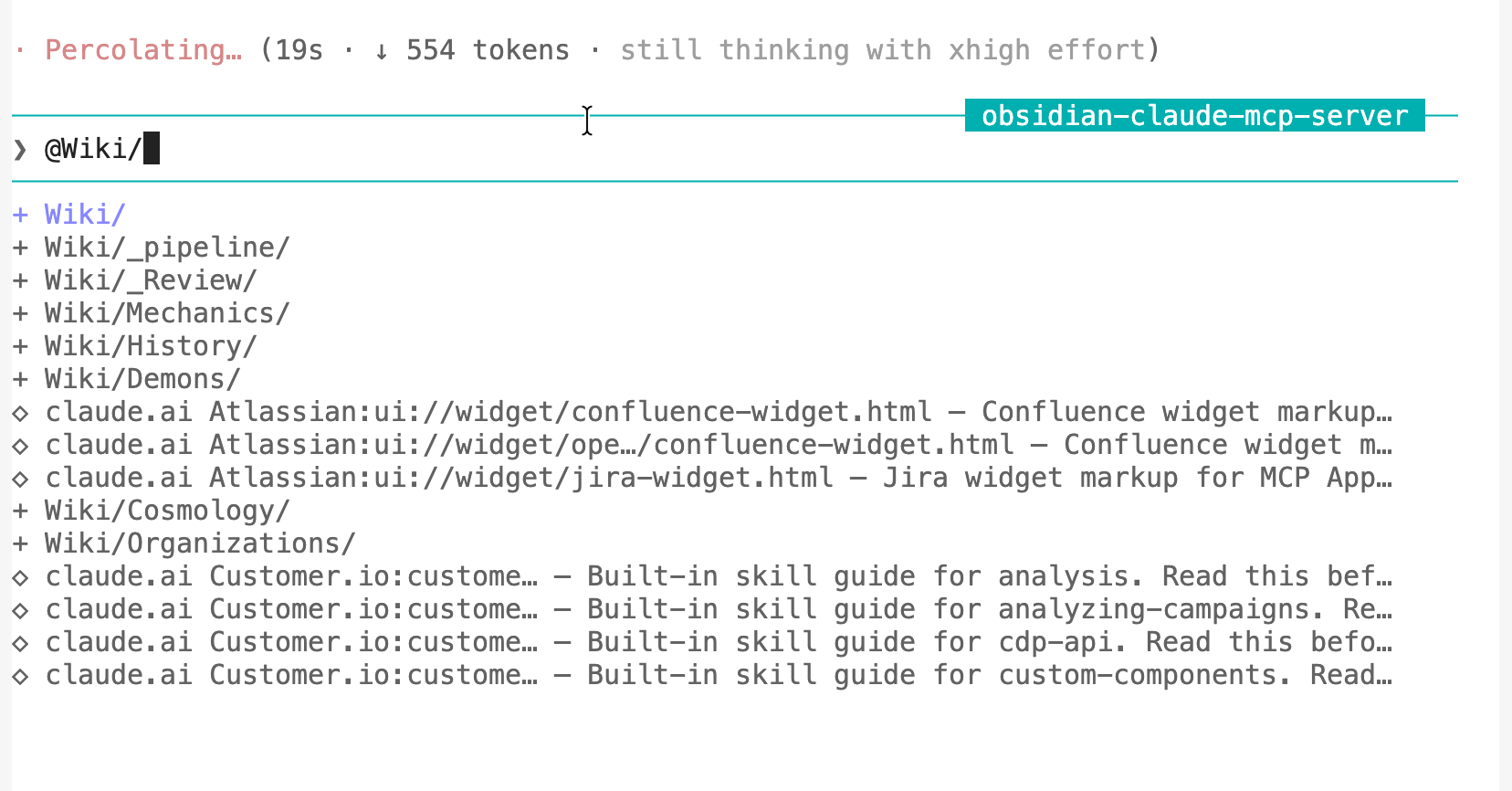
- **@-mention vault files in the Claude pane.** Type `@` and tab-complete any note or folder in your vault — Claude reads it inline. Works because the plugin exposes the vault to Claude Code as a live MCP source.
- **Claude follows you between notes.** Switch tabs and Claude's context updates automatically. Highlight a paragraph and ask "rewrite this" — Claude already has the text. No copy-paste.
- **Claude navigates Obsidian for you.** Ask "show me Anna's article" — Claude opens the note at the right line.
- **Edits land as one-click diffs in Obsidian.** Every change Claude proposes opens as a CodeMirror merge view. Accept applies it, Reject discards it. No terminal Y/n prompt — behaves exactly like VS Code or JetBrains.
- **Same protocol as VS Code and JetBrains.** Not a wrapper. The actual Claude Code IDE integration contract, implemented for Obsidian.
## Recommended companions
This plugin is the **IDE host** — the part that lives inside Obsidian and lets Claude see your editor, open files, and propose diffs. Pair it with these two for the full setup:
- **[`rps321321/obsidian-mcp-pro`](https://github.com/rps321321/obsidian-mcp-pro)** — a standalone stdio MCP server that exposes vault graph queries (backlinks, wikilinks, frontmatter, search, daily notes) **to the LLM**. The `/ide` channel can't surface custom MCP tools to the model; `obsidian-mcp-pro` covers that gap and runs filesystem-direct, so no extra Obsidian plugin is needed. One-line install:
```
claude mcp add obsidian-mcp-pro --env OBSIDIAN_VAULT_PATH=/path/to/your/vault -- npx -y obsidian-mcp-pro
```
- **[`polyipseity/obsidian-terminal`](https://github.com/polyipseity/obsidian-terminal)** — the terminal plugin this one is developed against. Hosts the `claude` CLI inside an Obsidian pane so you stay in a single window. Any terminal plugin works, but this is the smoothest tested setup. Configure its default profile to run `claude` and you're one click from a connected session.
Together they cover the three things you actually want: a Claude pane inside Obsidian (`obsidian-terminal`), Claude driving the editor (this plugin), and Claude reasoning about the vault graph (`obsidian-mcp-pro`).
## See it in action
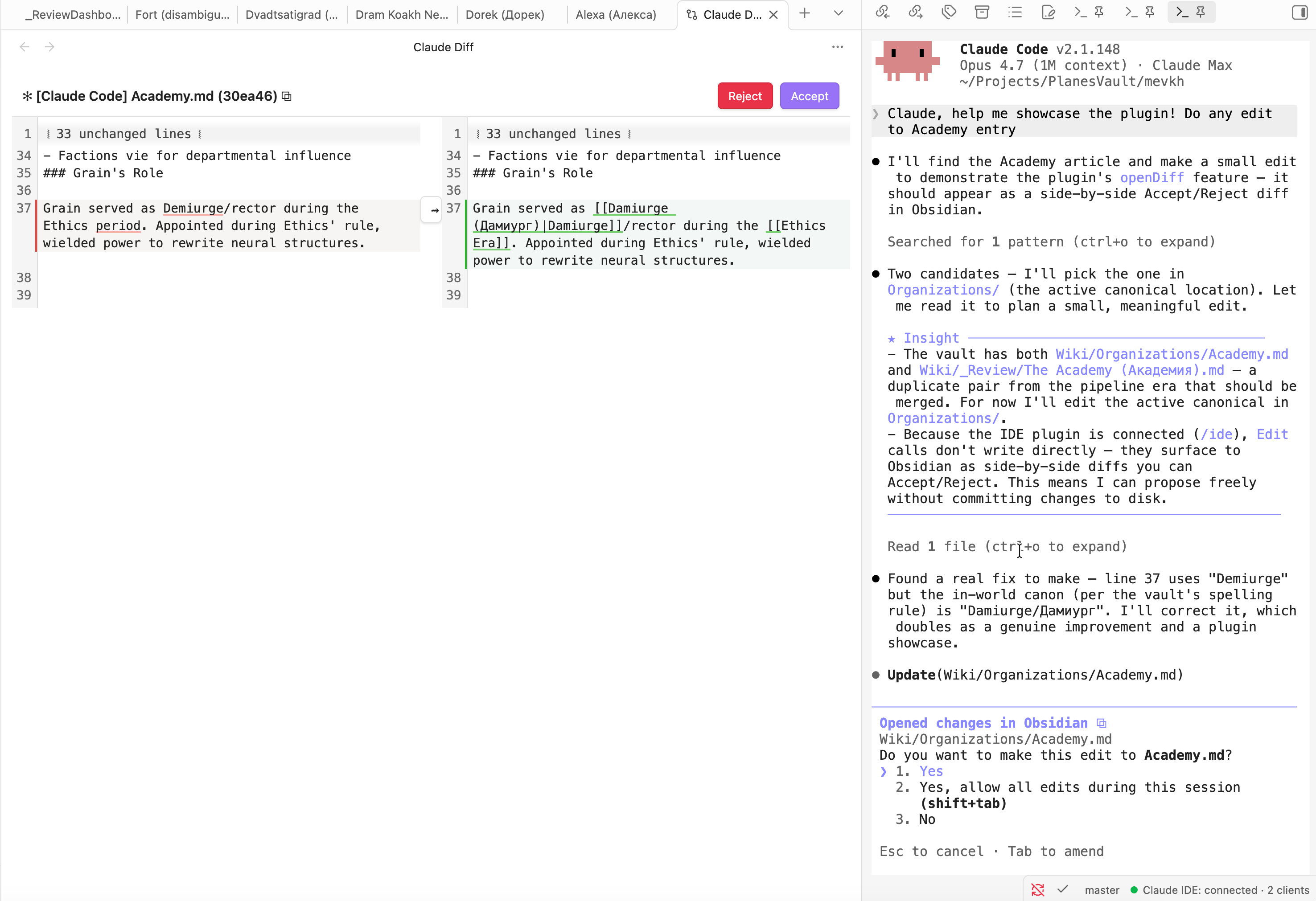
A Claude pane runs in the right sidebar (any terminal plugin works as the host). When Claude proposes an edit, it appears as a side-by-side diff in the main pane with **Accept** / **Reject** buttons. No terminal `y/n` prompt, no copy-paste — review, click, done. The status bar at the bottom-right shows `● Claude IDE: connected · N clients` so you know the bridge is live.
## Installation
### From the Community Plugins directory
In Obsidian: **Settings → Community Plugins → Browse**, search **"Claude Code IDE Pro"**, click Install, then Enable.
### Manually (current)
1. Download `manifest.json`, `main.js`, and `styles.css` from the [latest GitHub release](https://github.com/Transept-AI/obsidian-claude-code-ide-pro/releases).
2. Place them under `/.obsidian/plugins/claude-code-ide-pro/`.
3. In Obsidian → Settings → Community Plugins → enable **Claude Code IDE Pro**.
### Via [BRAT](https://github.com/TfTHacker/obsidian42-brat)
Add `Transept-AI/obsidian-claude-code-ide-pro` as a beta plugin in BRAT, then enable it.
---
## Usage
1. Open a terminal pane inside Obsidian (any terminal plugin works — see recommendation below).
2. Run `claude` from the vault root.
3. Inside Claude, type `/ide`. The plugin's lockfile is the only one matching your vault path, so Claude auto-connects to **Obsidian** without prompting.
4. Status bar shows `● Claude IDE: connected · 1 client`.
Now Claude can see your active note, your tabs, and your selection; can open files for you; and proposes edits via a side-by-side **diff view** with Accept / Reject buttons inside Obsidian.
### Sending notes and selections to Claude
Three ways to put context in front of Claude without copy-pasting:
- **Type `@` in the Claude pane** to autocomplete any vault file or folder — Claude reads it inline. Tab-complete works the same as VS Code's @-mention.
- **Command palette** → `Send to Claude (selection or whole note)`. Smart: with text selected it sends that range; otherwise it sends the entire active note. Bind a hotkey in `Settings → Hotkeys` for one-key access.
- **Right-click on a selection** → `Send selection to Claude` in the editor context menu.
The command and right-click options fire the protocol's `at_mentioned` notification — same channel VS Code uses for `@filename` references. Claude treats all three as explicit "the user wants me to look at this now" context.
Selection tracking also runs passively: when you highlight text or switch files, Claude is told via `selection_changed`. Pure cursor wiggles (empty selection, same file) are filtered out to keep the signal clean.
## 🗺️ Roadmap
> Ultimate goal – make working with Claude in Obsidian as smooth and natural as collaborating with a friend sitting next to you.
- **Custom terminal wrapper with clickable links** — embed our own terminal pane (xterm.js + node-pty) so we can intercept Claude's output and render file paths as clickable Obsidian-internal links inline. Pairs with `obsidian-terminal` for now; this would be a more integrated alternative.
- **Zero-touch auto-connect** — skip the `/ide` step entirely by exposing a preferred-port setting and coordinating with the terminal plugin to set `CLAUDE_CODE_SSE_PORT` at spawn time. Today a random port is allocated each restart, so the env var trick only works for users who manually align the two.
- **More vault-aware tools** — tag graph, embeds resolver, wikilink integrity checker (would expose validator-style data to Claude).
- **Autonomous invocation** – so that Claude can decide to message you himself and tell you that you are absolutely right.
---
## How it works (architecture sketch)
```
~/.claude/ide/.lock ◀── written on enable, removed on disable
│
▼
Claude Code ──ws (auth header)──▶ Obsidian plugin
│
▼
Obsidian APIs
(workspace · vault · metadataCache)
```
Claude Code's CLI scans `~/.claude/ide/*.lock` to discover IDEs. The plugin writes a lockfile pointing to the local WebSocket port it listens on, plus a fresh auth token. When you type `/ide`, the CLI matches the lockfile whose workspace folder is your vault root and connects.
---
## Reference: tools and protocol
The plugin exposes the full Claude Code IDE protocol — the same 12 tools VS Code's extension implements — plus **8 Obsidian-native MCP tools** that expose the vault graph to any MCP client. The first set is what powers "Claude knows what you opened"; the second is what makes Claude *Obsidian-shaped* rather than just file-aware.
### Obsidian-native MCP tools (8)
| Tool | What it does |
| ---------------------- | ------------------------------------------------------------ |
| `getActiveNoteContent` | Full text of the active note with configurable cap |
| `getBacklinks` | Every note linking *into* a file (ranked by link count) |
| `getOutgoingLinks` | Every wikilink / embed *out of* a file with resolved targets |
| `resolveWikilink` | `"Anna"` → canonical file path + aliases |
| `getFrontmatter` | YAML frontmatter, tags, and heading outline |
| `searchVault` | Filename + content search with ranked excerpts |
| `getDailyNote` | Today's daily-note path (reads Daily Notes plugin config) |
| `listFilesInFolder` | Recursive markdown listing under a folder |
These are advertised via `tools/list`. Claude Code's CLI currently filters which MCP tools reach the model — they aren't surfaced to the LLM today, but any MCP client that connects to the WebSocket can call them. **Re-enabling them for the LLM is on the roadmap** (likely via a parallel stdio MCP server users add to their Claude Code config).
**Standard IDE tools (12)** — consumed by Claude Code's CLI internally
| Tool | What it does |
| --------------------- | ----------------------------------------------------------------------------- |
| `getOpenEditors` | Open tabs with `isActive` / `isDirty` flags |
| `getCurrentSelection` | Current selection in the active note (works even when terminal has focus) |
| `getLatestSelection` | Cached last non-empty selection |
| `getWorkspaceFolders` | Vault root as `{name, uri, path}` |
| `openFile` | Open a file; supports `line`, `startText` / `endText` selection ranges |
| `openDiff` | Blocking RPC: side-by-side diff via CodeMirror 6 `MergeView`, Accept / Reject |
| `checkDocumentDirty` | Unsaved-changes flag for a file |
| `saveDocument` | Persist a file's unsaved changes |
| `close_tab` | Close a tab by label |
| `closeAllDiffTabs` | Close every Claude-created diff view |
| `getDiagnostics` | Returns `[]` (Obsidian has no LSP) |
| `executeCode` | Soft failure (no Jupyter) |
---
## Settings
Settings → Claude Code IDE Pro:
- **Active-note content cap** — characters returned by `getActiveNoteContent` before truncation (default 50,000).
- **searchVault max results** — hits per search (default 50).
- **searchVault excerpt length** — surrounding context per content match (default 200 chars).
- **Include hidden folders** — whether `searchVault` / `listFilesInFolder` traverse `.`-prefixed folders (default off).
---
## Network use
The plugin runs a **WebSocket server bound to `127.0.0.1` (loopback only)** on an OS-picked ephemeral port in the 10000–65535 range. This server is used solely by the Claude Code CLI running on the same machine to query Obsidian's state. **No outbound network calls are ever made.**
The server:
- Accepts connections only over the loopback interface — never the LAN or internet.
- Requires a per-session UUID auth token (see [Security model](#security-model) below) on every WebSocket upgrade request. Connections without the matching `x-claude-code-ide-authorization` header are rejected.
- Is started in `onload()` and torn down in `onunload()` — disabling the plugin closes the port and removes the lockfile.
The plugin is also `**isDesktopOnly: true`** — it does not load on Obsidian mobile.
---
## External file access
For protocol compliance with Claude Code's IDE discovery mechanism, the plugin reads and writes files under your home directory **outside the vault**:
| Path | Why | When |
| ------------------------------ | -------------------------------------------------------------------------------------------------------------------------------------------- | ------------------------------------- |
| `~/.claude/ide/` (directory) | Created with mode `0700` if missing — Claude Code's discovery folder | On enable |
| `~/.claude/ide/.lock` | Lockfile (mode `0600`) telling Claude Code "Obsidian is listening at this port with this auth token". Same format VS Code and JetBrains use. | Written on enable, deleted on disable |
| `~/.obsidian/daily-notes.json` | Read-only — used by the `getDailyNote` MCP tool to know your daily-note folder and date format | Only when `getDailyNote` is called |
The lockfile contains: process PID, vault root, ideName (`"Obsidian"`), transport (`"ws"`), `runningInWindows` boolean, and the auth token. **No vault content** leaves the vault folder via these paths.
---
## Security model
- **Auth token**: a fresh UUID generated by Node's `crypto.randomUUID()` each time the plugin loads. It exists only in renderer-process memory and in the lockfile (which is `0600`-owned and stored under a `0700` directory). The token is never sent over the network — it's read locally by the Claude Code CLI for handshake authentication.
- **Loopback binding**: the WebSocket server binds only to `127.0.0.1`, never to `0.0.0.0` or any external interface. The OS-picked ephemeral port further reduces predictability.
- **Per-session rotation**: every disable→enable cycle picks a new port and generates a new auth token. Restarting Obsidian invalidates any previous session's credentials.
- **Origin check via header**: WebSocket upgrades without the matching `x-claude-code-ide-authorization` header are rejected with HTTP 401 and the socket destroyed.
---
## No telemetry
This plugin sends **no telemetry**, analytics, crash reports, or any other data to any remote service. It does not phone home, check for updates, or contact any author-controlled endpoint. The only network traffic it ever generates is the local-loopback WebSocket connection from the Claude Code CLI on your own machine.
---
## Third-party code
- `[ws](https://github.com/websockets/ws)` — MIT — Node.js WebSocket library, bundled into `main.js`.
- `[@codemirror/merge](https://github.com/codemirror/merge)` — MIT — CodeMirror 6 merge view, bundled into `main.js` (other `@codemirror/`* packages are provided by Obsidian's runtime and remain external).
Protocol reverse-engineering credit:
- `[coder/claudecode.nvim](https://github.com/coder/claudecode.nvim)` — Apache 2.0 — `PROTOCOL.md` is the authoritative spec this implementation follows.
- `[manzaltu/claude-code-ide.el](https://github.com/manzaltu/claude-code-ide.el)` — GPLv3 — reference for adding custom MCP tools beyond the standard IDE 12.
---
## Building from source
```bash
git clone https://github.com/Transept-AI/obsidian-claude-code-ide-pro.git
cd obsidian-claude-code-ide-pro
npm install
npm run build # one-shot production build → main.js
npm run dev # esbuild watch mode
npm run typecheck
```
Output `main.js` is gitignored — it lives only in releases.
---
## Verification
Read-only smoke scripts that exercise the live plugin against your running Obsidian. They never modify vault content.
```bash
# Wire layer: handshake, auth, tools/list
node scripts/smoke-handshake.mjs
# Standard IDE tools — every tool with shape assertions
node scripts/smoke-tools.mjs
# openDiff lifecycle (opens a diff, programmatically dismisses it,
# verifies DIFF_REJECTED and that the vault file is unchanged)
node scripts/smoke-diff.mjs
# Obsidian-native tools — backlinks, wikilinks, search, frontmatter, ...
node scripts/smoke-obsidian-tools.mjs
```
*(`scripts/listen-notifications.mjs` exists for the deferred `selection_changed` notification — currently a no-op since the push isn't wired in v0.1.0.)*
---
## Architecture
```
src/
├── main.ts # Plugin lifecycle, composition
├── rpc-router.ts # JSON-RPC 2.0 framing & dispatch
├── ws-server.ts # WebSocket transport + auth header validation
├── lockfile.ts # ~/.claude/ide/.lock lifecycle
├── status-bar.ts # Status bar indicator
├── tools-registry.ts # name → {description, schema, handler}
├── mcp-handshake.ts # initialize / tools/list / tools/call / notifications
├── obsidian-context.ts # App + cached selection + path resolution
├── notifier.ts # selection_changed pusher (present but not wired in v0.1.0)
├── settings.ts # PluginSettingTab + persisted config
├── handlers/
│ ├── editors.ts # getOpenEditors, getCurrentSelection, ...
│ ├── files.ts # openFile
│ ├── diff.ts # openDiff, closeAllDiffTabs
│ ├── stubs.ts # getDiagnostics→[], executeCode→error
│ └── obsidian-tools.ts # getBacklinks, resolveWikilink, searchVault, ...
└── views/
└── diff-view.ts # ItemView wrapping CodeMirror 6 MergeView
```
---
## License
MIT — see [LICENSE](./LICENSE). Copyright © 2026 Vitaly Vlasyuk (mevkh).