# AsciiDoc Files
AsciiDoc Files opens `.adoc` and `.asciidoc` files in their own tab. Use the source editor, the rendered preview, or both side by side. The preview uses Asciidoctor.js for headings, tables, admonitions, lists, footnotes and source blocks.
The editor, the preview, cross reference links, code colors and Mermaid diagrams are free. Pro resolves `include::` directives from the vault, adds a side panel with the outline and the links of a document, and exports standalone HTML files. Pro costs $5 a month, or $15 once, through GitHub Sponsors. A total payment of $15 meets the payment requirement for Pro without further payment. Sign-in and the checks below still apply.
## Features
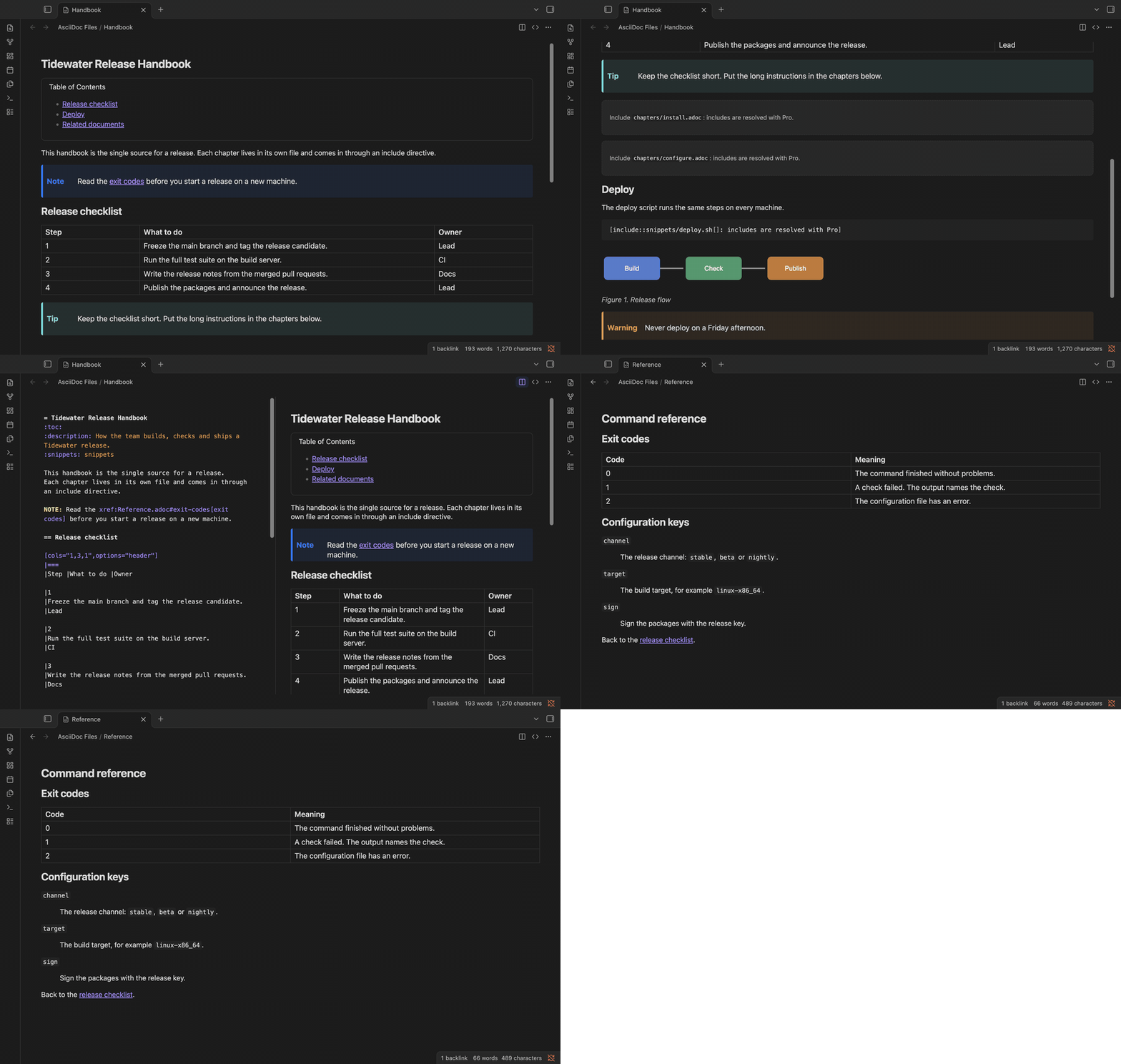 ### Rendered preview with the theme's look
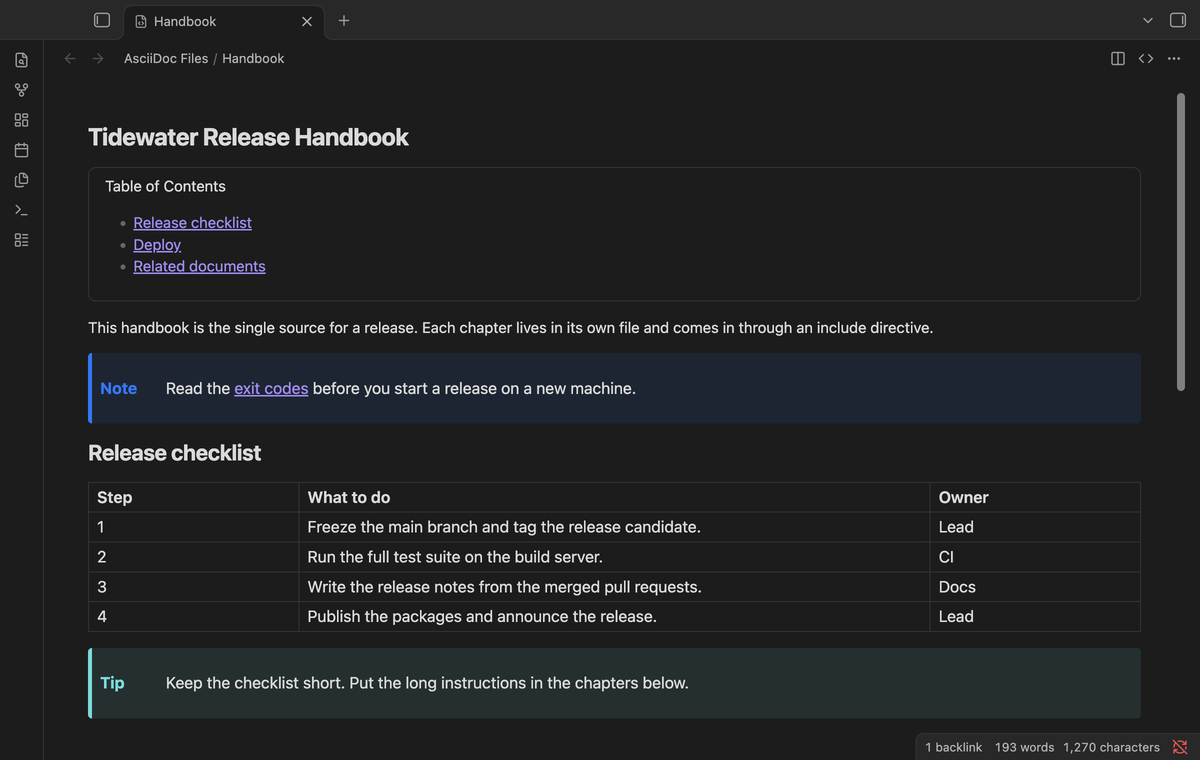 Click an `.adoc` file in the file explorer and it opens in the preview. Section titles, tables, admonitions, sidebars, quotes, callouts, keyboard keys and the table of contents use the colors and fonts of your theme, in light and dark mode. Source blocks get the same code colors as Markdown notes.
Asciidoctor warnings, such as a reference to a missing attribute, show in a small list under the preview.
### Source editor with highlighting
Click an `.adoc` file in the file explorer and it opens in the preview. Section titles, tables, admonitions, sidebars, quotes, callouts, keyboard keys and the table of contents use the colors and fonts of your theme, in light and dark mode. Source blocks get the same code colors as Markdown notes.
Asciidoctor warnings, such as a reference to a missing attribute, show in a small list under the preview.
### Source editor with highlighting
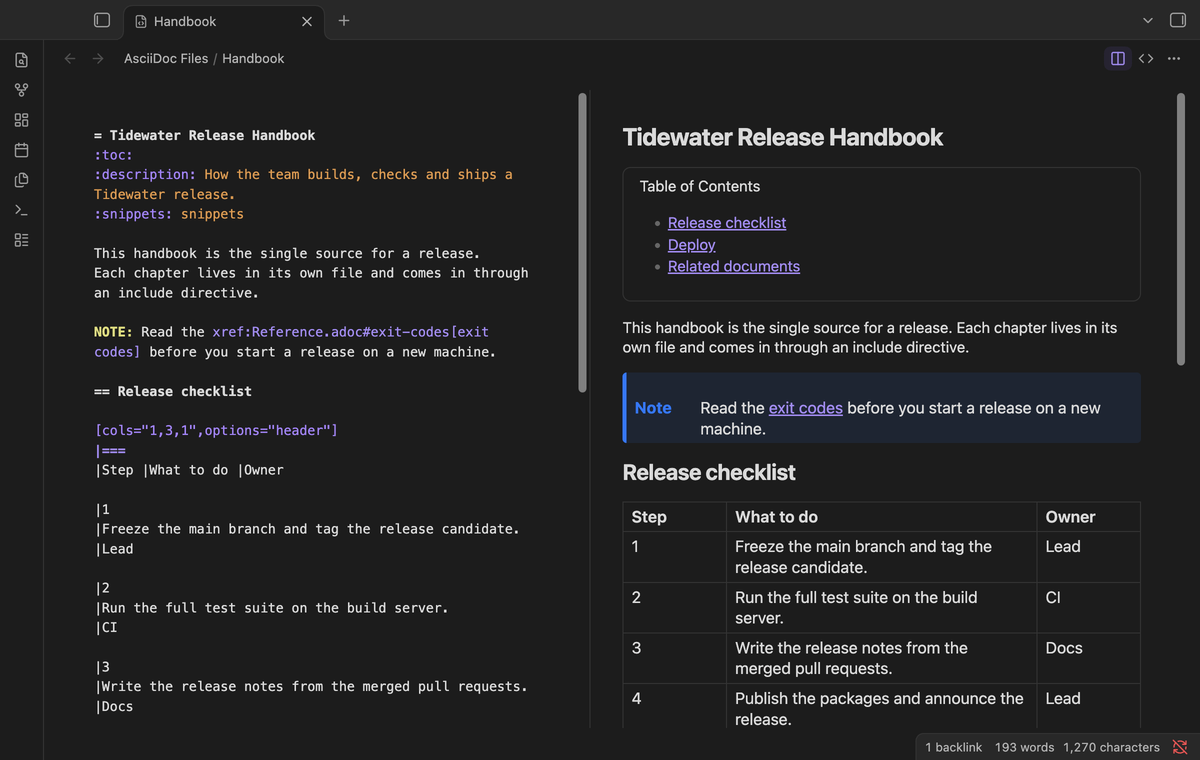 The CodeMirror 6 editor highlights titles, attributes, block delimiters, comments, lists, admonition labels, macros and inline marks. Undo and redo work. The file saves as you type. In side by side mode, the preview follows after a short delay.
### Cross references open the target
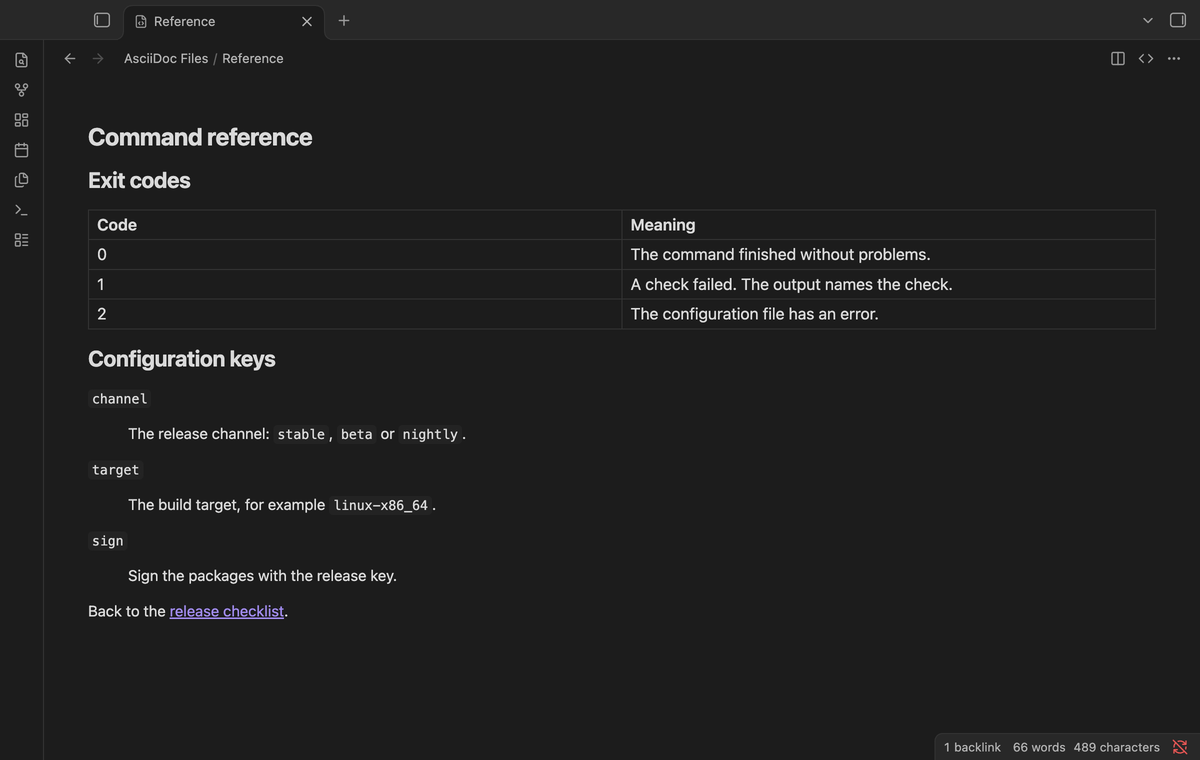
`<>` scrolls the preview to that anchor. `xref:other.adoc#section[]` opens the other file and scrolls to the section. Hold Ctrl or Cmd to open it in a new tab. Web links open in your browser. Relative image paths show the images from the vault.
The CodeMirror 6 editor highlights titles, attributes, block delimiters, comments, lists, admonition labels, macros and inline marks. Undo and redo work. The file saves as you type. In side by side mode, the preview follows after a short delay.
### Cross references open the target
`<>` scrolls the preview to that anchor. `xref:other.adoc#section[]` opens the other file and scrolls to the section. Hold Ctrl or Cmd to open it in a new tab. Web links open in your browser. Relative image paths show the images from the vault.
 ### Mermaid diagrams
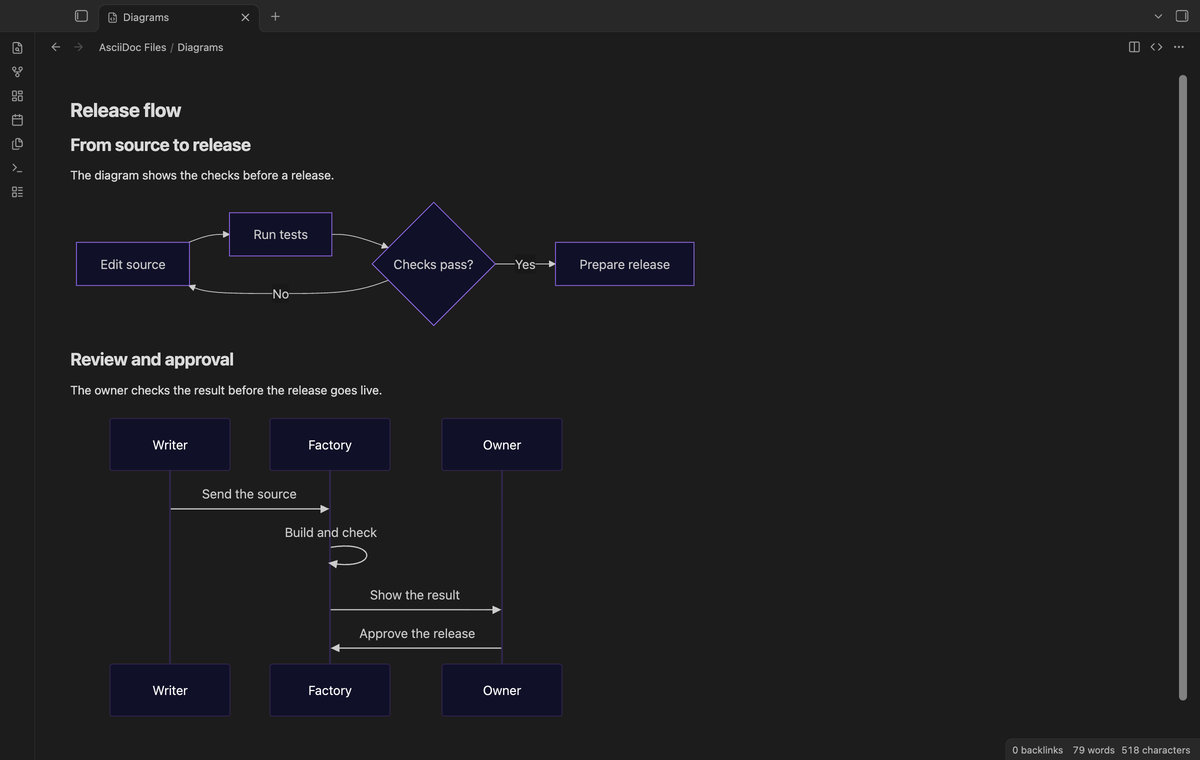 Put `[mermaid]` above a listing block to show a diagram in the preview. `[source,mermaid]`, `[,mermaid]`, `[mermaid,target,svg]` and a `....` literal block also work.
```asciidoc
[mermaid]
----
flowchart LR
A[Edit source] --> B[Run tests]
----
```
The app renders diagrams locally, with no diagram server or Pro account. The app can ask you to allow diagrams in the vault. If a diagram cannot render, the preview shows a note and keeps its source. HTML export and copy keep the source as code.
### Includes from the vault (Pro)
Put `[mermaid]` above a listing block to show a diagram in the preview. `[source,mermaid]`, `[,mermaid]`, `[mermaid,target,svg]` and a `....` literal block also work.
```asciidoc
[mermaid]
----
flowchart LR
A[Edit source] --> B[Run tests]
----
```
The app renders diagrams locally, with no diagram server or Pro account. The app can ask you to allow diagrams in the vault. If a diagram cannot render, the preview shows a note and keeps its source. HTML export and copy keep the source as code.
### Includes from the vault (Pro)
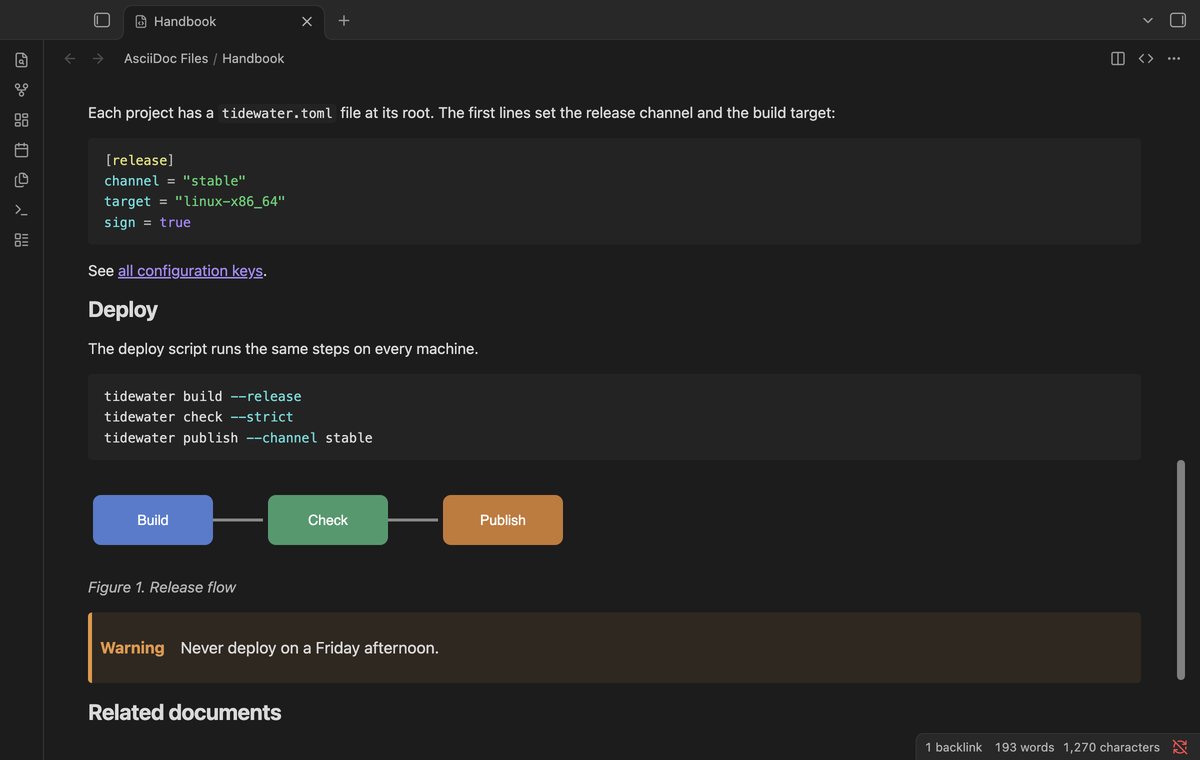 With Pro, `include::chapters/install.adoc[]` shows the included file in place. The path is relative to the file that holds the directive, and a path that starts with `/` starts at the vault root. If the file is not next to the source, the plugin also tries the same path from the vault root.
The directive options: `leveloffset`, `lines`, `tag` and `tags` (with `!name`, `*` and `**`), `indent` and `opts=optional`. Attribute references such as `{snippets}/deploy.sh` use the attributes set above the directive. A missing file, a file that includes itself, and a chain deeper than the depth setting each show a clear note instead of breaking the page. Without Pro, each directive shows a short note.
### Outline and links panel (Pro)
With Pro, `include::chapters/install.adoc[]` shows the included file in place. The path is relative to the file that holds the directive, and a path that starts with `/` starts at the vault root. If the file is not next to the source, the plugin also tries the same path from the vault root.
The directive options: `leveloffset`, `lines`, `tag` and `tags` (with `!name`, `*` and `**`), `indent` and `opts=optional`. Attribute references such as `{snippets}/deploy.sh` use the attributes set above the directive. A missing file, a file that includes itself, and a chain deeper than the depth setting each show a clear note instead of breaking the page. Without Pro, each directive shows a short note.
### Outline and links panel (Pro)
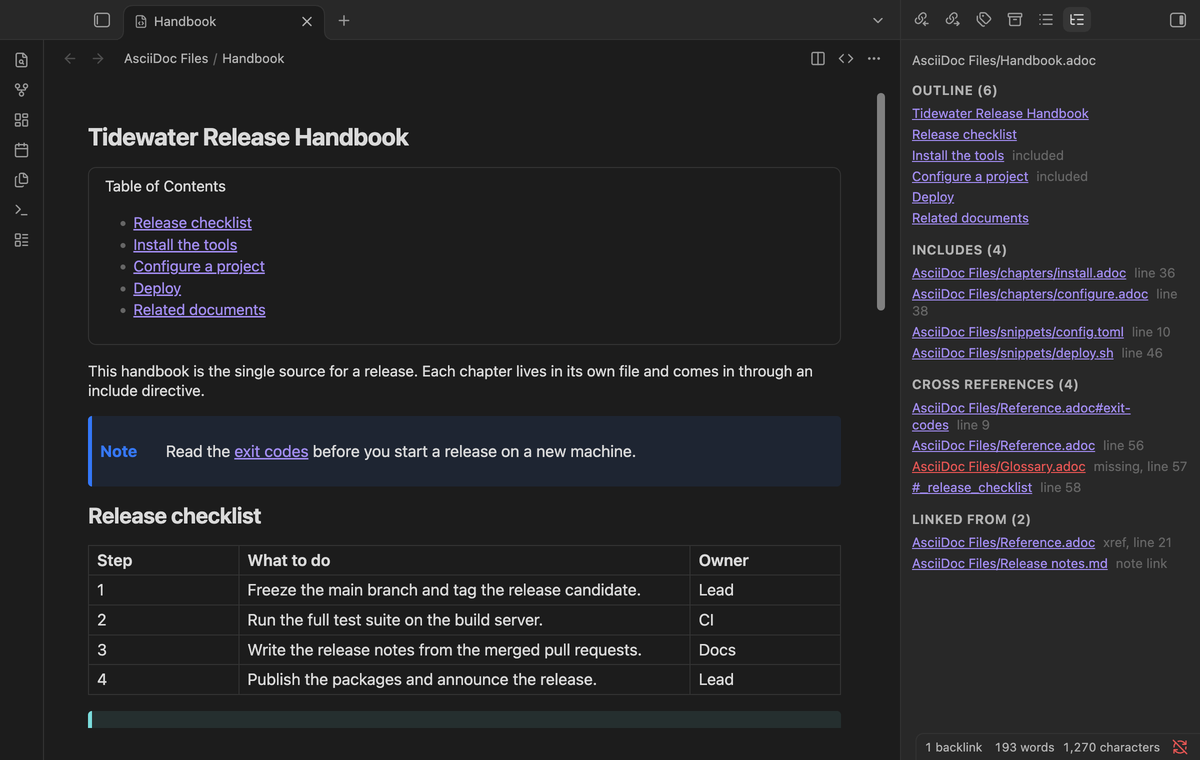 Run "Open the outline and links panel" to get a side panel for the AsciiDoc tab in focus. It lists the section outline, the includes and their status, the cross references of the document with missing targets in red, and the files that point to this one: xrefs and includes in other AsciiDoc files, and `[[Handbook.adoc]]` links in Markdown notes. The panel reads up to 2,000 AsciiDoc files. Click an entry to go there.
### HTML export and copy (Pro)
Run "Open the outline and links panel" to get a side panel for the AsciiDoc tab in focus. It lists the section outline, the includes and their status, the cross references of the document with missing targets in red, and the files that point to this one: xrefs and includes in other AsciiDoc files, and `[[Handbook.adoc]]` links in Markdown notes. The panel reads up to 2,000 AsciiDoc files. Click an entry to go there.
### HTML export and copy (Pro)
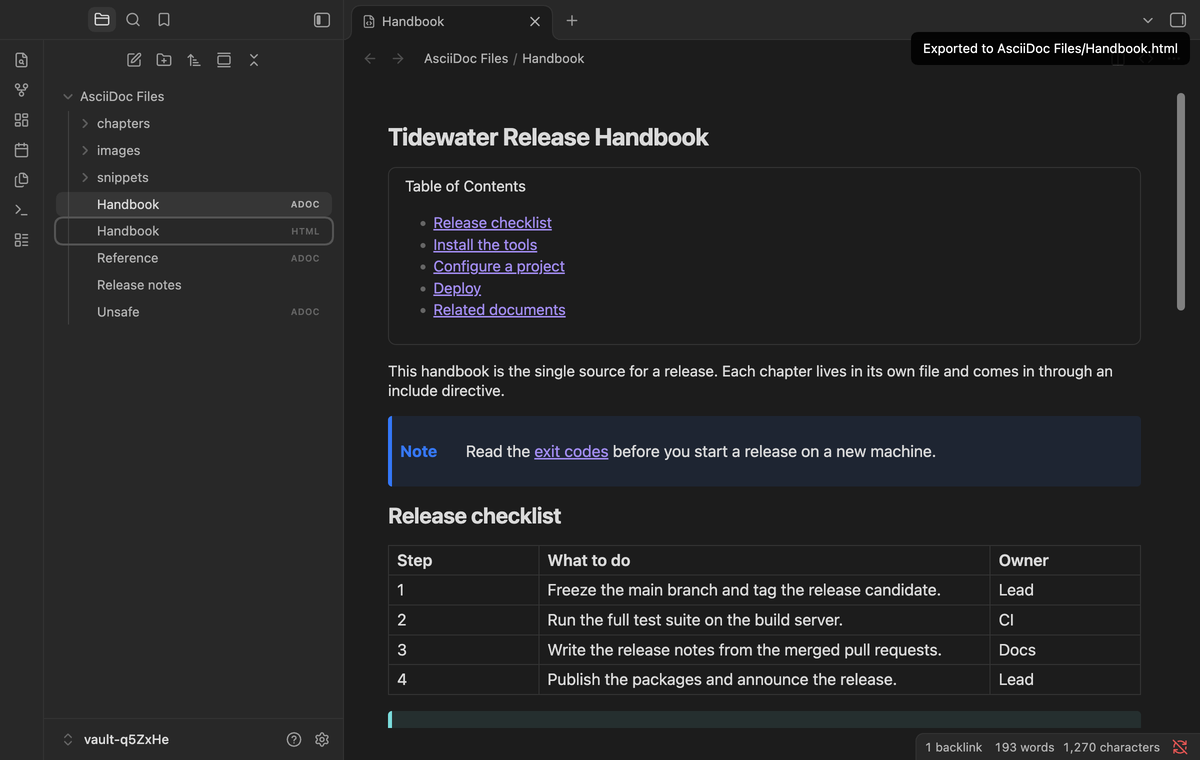 "Export the current file to HTML" writes `Handbook.html` next to `Handbook.adoc`, with the Asciidoctor default stylesheet inside the file. With "Resolve include directives" on, the includes are resolved. If a `Handbook.html` that the plugin did not write is there, the export goes to `Handbook 1.html`. Cross references to other documents point to their `.html` files, so a folder of exports links up. To make a PDF, open the HTML file in a browser and print it. "Copy the current file as HTML" puts the HTML body on the clipboard for a CMS or an email.
Both commands remove scripts and other active content first (see the FAQ). The page loads no fonts from the web.
## Install
After the community listing goes live, open Settings, Community plugins, Browse. Search for "AsciiDoc Files". Select Install, then Enable.
Copy `main.js`, `manifest.json` and `styles.css` from the latest release into `/.obsidian/plugins/asciidoc-files/`. Enable the plugin.
Only one plugin can open a file type. Turn off any other AsciiDoc plugin first. If another plugin already has `.adoc`, AsciiDoc Files shows a notice and the settings tab names the extension. The plugin needs Obsidian 1.13.4 or newer. It was tested on desktop with 1.13.4 and the latest version. Mobile is not tested yet.
## Usage
1. Open any `.adoc` or `.asciidoc` file, or run "Create a new .adoc file". The folder menu of the file explorer also has "New .adoc file".
2. Switch modes with the tab header buttons, or with "Switch between source and preview" and "Show source and preview side by side".
3. For Pro, sponsor on GitHub, then open the settings and select "Sign in with GitHub".
## Settings
"Export the current file to HTML" writes `Handbook.html` next to `Handbook.adoc`, with the Asciidoctor default stylesheet inside the file. With "Resolve include directives" on, the includes are resolved. If a `Handbook.html` that the plugin did not write is there, the export goes to `Handbook 1.html`. Cross references to other documents point to their `.html` files, so a folder of exports links up. To make a PDF, open the HTML file in a browser and print it. "Copy the current file as HTML" puts the HTML body on the clipboard for a CMS or an email.
Both commands remove scripts and other active content first (see the FAQ). The page loads no fonts from the web.
## Install
After the community listing goes live, open Settings, Community plugins, Browse. Search for "AsciiDoc Files". Select Install, then Enable.
Copy `main.js`, `manifest.json` and `styles.css` from the latest release into `/.obsidian/plugins/asciidoc-files/`. Enable the plugin.
Only one plugin can open a file type. Turn off any other AsciiDoc plugin first. If another plugin already has `.adoc`, AsciiDoc Files shows a notice and the settings tab names the extension. The plugin needs Obsidian 1.13.4 or newer. It was tested on desktop with 1.13.4 and the latest version. Mobile is not tested yet.
## Usage
1. Open any `.adoc` or `.asciidoc` file, or run "Create a new .adoc file". The folder menu of the file explorer also has "New .adoc file".
2. Switch modes with the tab header buttons, or with "Switch between source and preview" and "Show source and preview side by side".
3. For Pro, sponsor on GitHub, then open the settings and select "Sign in with GitHub".
## Settings
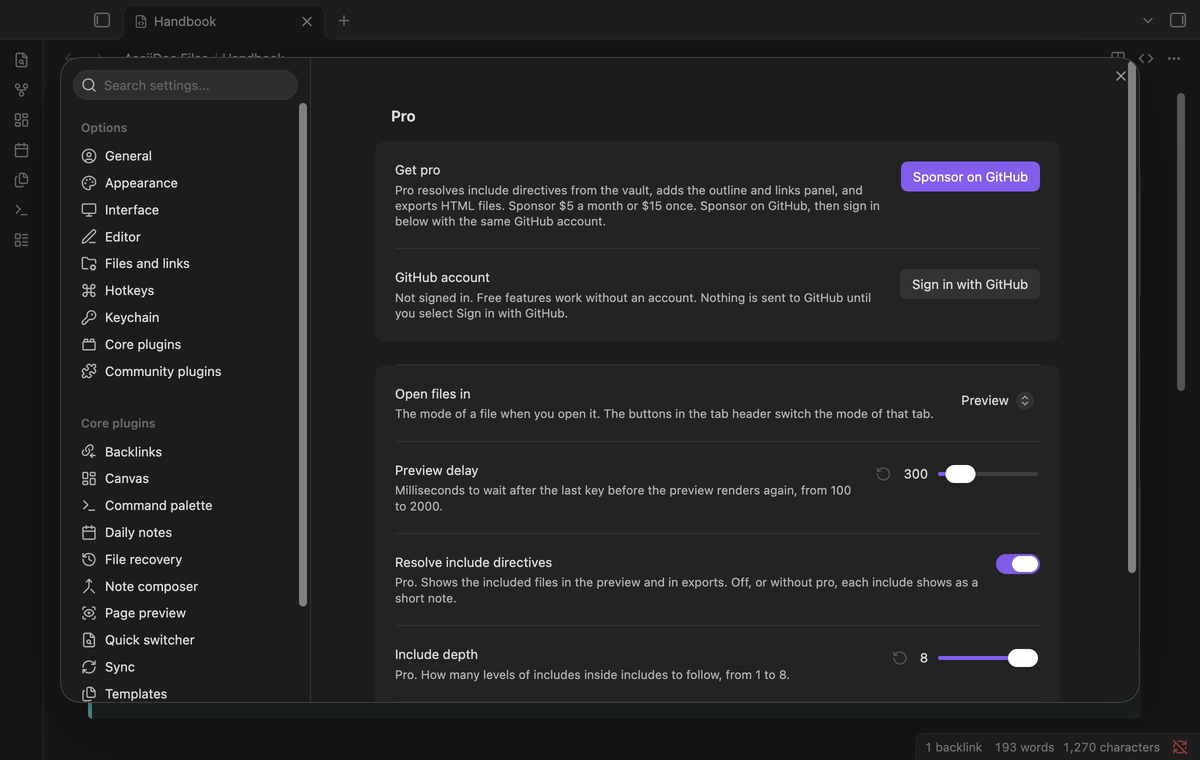 | Setting | Default | Allowed values |
| --- | --- | --- |
| Open files in | Preview | Preview, Source, or source and preview side by side |
| Preview delay | 300 | 100 to 2000 milliseconds |
| Resolve include directives | On | On or off (Pro) |
| Include depth | 8 | 1 to 8 levels (Pro) |
| Stylesheet in exports | On | On or off (Pro) |
## FAQ
### Do search, backlinks and the graph see my AsciiDoc files?
Only in part, and this is a limit of the app. Core search, the backlinks pane, the outgoing links pane and the graph read Markdown files only. A plugin cannot add other file types to them without private API. The files show in the file explorer and the quick switcher, and a Markdown link such as `[[Handbook.adoc]]` works. The Pro links panel lists AsciiDoc cross references in both directions.
### Are files from other people safe to preview and export?
Asciidoctor runs in safe mode, so a document cannot read files or URLs. In the preview, the sanitizer of the app removes scripts, event handlers and `javascript:` links, also inside passthrough blocks. The export and the copy leave the app, so an allow list in the plugin also removes frames, forms, embedded objects, inline SVG, style blocks and `data:` links. The frame of a `video::` macro becomes a plain link.
### Are Antora ids and URL includes supported?
No. Antora ids such as `partial$intro.adoc` need the Antora site structure. URL includes would need a network request for each render, so they show a note.
## Payment, account and network
The core features are free. Pro features need a GitHub Sponsors sponsorship of theluckystrike: $5 a month or more, or $15 once. A total payment of $15 meets the payment requirement for Pro without further payment. Sign-in and the checks below still apply. Your notes stay readable and editable with or without Pro.
GitHub handles the payment. Sponsor at https://github.com/sponsors/theluckystrike. You need no account for the free features. Pro needs the GitHub account that sponsors.
The preview loads web media that a document names. For `image::https://example.com/a.png[]`, the preview asks that address for the file, with or without Pro, and that host sees the request. A relative path reads a vault file and sends nothing.
Until you select "Sign in with GitHub" in the settings, AsciiDoc Files makes no network requests of its own. Sign in uses the GitHub device flow. AsciiDoc Files sends its public client ID and the scope `read:user` to `https://github.com/login/device/code` and shows you a code. While you enter the code at https://github.com/login/device, it asks `https://github.com/login/oauth/access_token` every few seconds to check the sign-in status. The scope permits profile reads only. GitHub needs this access to show the sponsorship tier. It grants no repository scope and no write access.
After sign in, AsciiDoc Files sends one query to `https://api.github.com/graphql`. It checks if the signed-in account sponsors theluckystrike. It asks for the tier and the total payment to theluckystrike. The plugin reuses a successful check for 7 days. Failed checks can retry after 6 hours. Select Refresh to request an earlier check. It sends no note content, file names or other vault data, and it has no telemetry.
After a successful check, Pro can work offline for up to 14 days. Sign out or a negative sponsorship answer turns Pro off. The plugin stores the GitHub token through the secret storage API of Obsidian. It does not put the token in its saved settings or its local sponsorship data. The local storage of this device keeps your GitHub login, the tier and the time of the last check. Sign out clears the token. You can also revoke the access in your GitHub settings, under Applications.
## Support
Report bugs and feature requests in this repository's issue tracker. Include your Obsidian version and a short AsciiDoc sample that fails.
Build from source:
```
npm ci
npm run build
npm test
```
The tests check golden cases for diagram blocks, include expansion, outline and cross reference parsing, link handling, the export page and the export sanitizer. An end-to-end test opens AsciiDoc files in Obsidian, edits one, follows a cross reference, checks the preview sanitizer and the Pro lock with a stubbed GitHub reply.
## License
MIT. The bundled Asciidoctor.js 3.0.4, its Opal runtime and the Asciidoctor default stylesheet are MIT licensed by their authors.
| Setting | Default | Allowed values |
| --- | --- | --- |
| Open files in | Preview | Preview, Source, or source and preview side by side |
| Preview delay | 300 | 100 to 2000 milliseconds |
| Resolve include directives | On | On or off (Pro) |
| Include depth | 8 | 1 to 8 levels (Pro) |
| Stylesheet in exports | On | On or off (Pro) |
## FAQ
### Do search, backlinks and the graph see my AsciiDoc files?
Only in part, and this is a limit of the app. Core search, the backlinks pane, the outgoing links pane and the graph read Markdown files only. A plugin cannot add other file types to them without private API. The files show in the file explorer and the quick switcher, and a Markdown link such as `[[Handbook.adoc]]` works. The Pro links panel lists AsciiDoc cross references in both directions.
### Are files from other people safe to preview and export?
Asciidoctor runs in safe mode, so a document cannot read files or URLs. In the preview, the sanitizer of the app removes scripts, event handlers and `javascript:` links, also inside passthrough blocks. The export and the copy leave the app, so an allow list in the plugin also removes frames, forms, embedded objects, inline SVG, style blocks and `data:` links. The frame of a `video::` macro becomes a plain link.
### Are Antora ids and URL includes supported?
No. Antora ids such as `partial$intro.adoc` need the Antora site structure. URL includes would need a network request for each render, so they show a note.
## Payment, account and network
The core features are free. Pro features need a GitHub Sponsors sponsorship of theluckystrike: $5 a month or more, or $15 once. A total payment of $15 meets the payment requirement for Pro without further payment. Sign-in and the checks below still apply. Your notes stay readable and editable with or without Pro.
GitHub handles the payment. Sponsor at https://github.com/sponsors/theluckystrike. You need no account for the free features. Pro needs the GitHub account that sponsors.
The preview loads web media that a document names. For `image::https://example.com/a.png[]`, the preview asks that address for the file, with or without Pro, and that host sees the request. A relative path reads a vault file and sends nothing.
Until you select "Sign in with GitHub" in the settings, AsciiDoc Files makes no network requests of its own. Sign in uses the GitHub device flow. AsciiDoc Files sends its public client ID and the scope `read:user` to `https://github.com/login/device/code` and shows you a code. While you enter the code at https://github.com/login/device, it asks `https://github.com/login/oauth/access_token` every few seconds to check the sign-in status. The scope permits profile reads only. GitHub needs this access to show the sponsorship tier. It grants no repository scope and no write access.
After sign in, AsciiDoc Files sends one query to `https://api.github.com/graphql`. It checks if the signed-in account sponsors theluckystrike. It asks for the tier and the total payment to theluckystrike. The plugin reuses a successful check for 7 days. Failed checks can retry after 6 hours. Select Refresh to request an earlier check. It sends no note content, file names or other vault data, and it has no telemetry.
After a successful check, Pro can work offline for up to 14 days. Sign out or a negative sponsorship answer turns Pro off. The plugin stores the GitHub token through the secret storage API of Obsidian. It does not put the token in its saved settings or its local sponsorship data. The local storage of this device keeps your GitHub login, the tier and the time of the last check. Sign out clears the token. You can also revoke the access in your GitHub settings, under Applications.
## Support
Report bugs and feature requests in this repository's issue tracker. Include your Obsidian version and a short AsciiDoc sample that fails.
Build from source:
```
npm ci
npm run build
npm test
```
The tests check golden cases for diagram blocks, include expansion, outline and cross reference parsing, link handling, the export page and the export sanitizer. An end-to-end test opens AsciiDoc files in Obsidian, edits one, follows a cross reference, checks the preview sanitizer and the Pro lock with a stubbed GitHub reply.
## License
MIT. The bundled Asciidoctor.js 3.0.4, its Opal runtime and the Asciidoctor default stylesheet are MIT licensed by their authors.