[](https://github.com/stephanteig/obsidian-color-preview/releases/latest)
[](LICENSE)
[](https://obsidian.md)
[](https://obsidian.md)
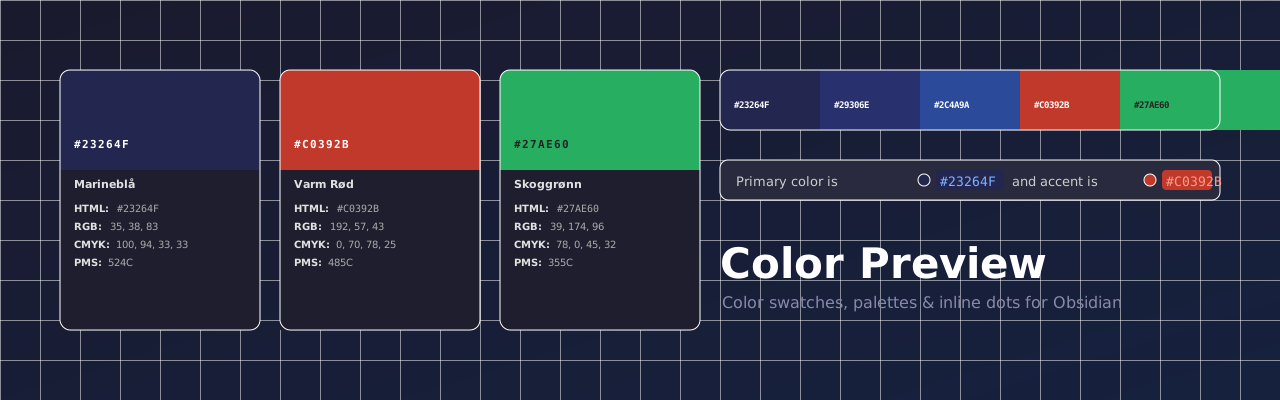
**Color Preview** turns raw hex codes into beautiful, interactive color cards inside your Obsidian notes — perfect for brand guidelines, design systems, and color documentation.
---
## Features
- **Color cards** — visual swatch with hex, RGB, CMYK, and PMS displayed below
- **Palette blocks** — display a whole brand palette as a horizontal strip of swatches
- **Inline dot previews** — small color dots appear automatically next to any hex code in your notes
- **Click swatch to edit** — tap any swatch to open the color picker and update the hex in place
- **Click to copy** — tap any value (HTML / RGB / CMYK) to instantly copy it to clipboard
- **Auto-calculated values** — if only a hex is provided, RGB and CMYK are approximated automatically
- **Multiple insertion methods** — ribbon icon, `/color` slash command, paste detection, command palette, and more
- **PDF / DOCX safe** — the underlying markdown stays readable as plain text when exported
---
## Color Card
Write a `color` fenced code block with any combination of fields:
````markdown
```color
name: Marineblå
hex: #23264F
rgb: 35, 38, 83
cmyk: 100, 94, 33, 33
pms: 524C
```
````
> **Only `hex` is required.** If `rgb` or `cmyk` are omitted, approximate values are calculated automatically and shown in italic.