 # Self Hosted Private Sync
Read in your language: [English](README.md) • [العربية](docs/ar/README.md) • [Deutsch](docs/de/README.md) • [Español](docs/es/README.md) • [فارسی](docs/fa/README.md) • [Français](docs/fr/README.md) • [Bahasa Indonesia](docs/id/README.md) • [Italiano](docs/it/README.md) • [Nederlands](docs/nl/README.md) • [Polski](docs/pl/README.md) • [Português](docs/pt/README.md) • [Português (Brasil)](docs/pt-br/README.md) • [Русский](docs/ru/README.md) • [ไทย](docs/th/README.md) • [Türkçe](docs/tr/README.md) • [Українська](docs/uk/README.md) • [Tiếng Việt](docs/vi/README.md) • [日本語](docs/ja/README.md) • [한국어](docs/ko/README.md) • [中文简体](docs/zh-cn/README.md) • [中文繁體](docs/zh-tw/README.md)
Self-hosted, end-to-end encrypted live sync for [Obsidian](https://obsidian.md).
Your notes sync through a server you run yourself. Notes, attachments and file
names are encrypted on your device, and the server never receives the key. The
plugin works on every platform Obsidian runs on, desktop and mobile. There is
no subscription and no account anywhere else.
**Something not working? → [Troubleshooting](https://snaraj.github.io/obsync/troubleshooting/)**
## Find what you need
Every page is also on the [documentation site](https://snaraj.github.io/obsync/).
### Use obsync
| I want to… | Go to |
| --- | --- |
| Choose how my devices reach my server | [Choose your setup](docs/setup.md) |
| Set up everything on my home network, with every phone screen | [Same network, step by step](docs/same-network.md) |
| Install the plugin | [Install the plugin](docs/community-plugin.md) |
| Set up my first device | [Quickstart](docs/quickstart.md) |
| Pair a phone or another computer | [Pair your phone](docs/quickstart.md#pair-your-phone) |
| Know what the status icon and the commands mean | [Daily use](docs/daily-use.md) and [Reading the status bar](docs/troubleshooting.md#reading-the-status-bar) |
| Get an older version of a note back | [Restore a retained version](docs/daily-use.md#restore-a-retained-version) |
| Know what a setting does | [Settings](docs/settings.md) |
| Deal with a conflict copy | [Conflicts](docs/conflicts.md) |
| Fix a problem | [Troubleshooting](docs/troubleshooting.md) |
| Get back in after losing a device | [Recovery](docs/recovery.md) |
| Move my vault to another server | [Moving this vault to a different server](docs/recovery.md#moving-this-vault-to-a-different-server) |
### Run a server
| I want to… | Go to |
| --- | --- |
| Run my server with Docker or Compose | [Run the server](docs/server.md) |
| Put it behind my own proxy (Caddy, nginx, Traefik, HAProxy) | [Already have a TLS terminator](docs/server.md#already-have-a-tls-terminator-docker) |
| Run it without a container, under systemd | [The static binary](docs/server.md#without-a-container-the-static-binary) |
| Run my server on Kubernetes | [Kubernetes](docs/kubernetes.md) and the [chart reference](chart/README.md) |
| Reach my server away from home, through my own VPN or proxy | [Reaching it from outside your LAN](docs/server.md#reaching-it-from-outside-your-lan) |
| Use Cloudflare (optional) | [Cloudflare](docs/cloudflare.md) |
| Trust my server's certificate on each device | [Trust the certificate authority](docs/server.md#trust-the-certificate-authority-once-per-device) |
| Know how much memory and disk it needs | [How much memory it needs](docs/server.md#how-much-memory-it-needs) and [Storage](docs/storage.md) |
| Back up my server | [Back up the two volumes](docs/server.md#back-up-the-two-volumes) |
| Upgrade my server | [Upgrade by digest](docs/server.md#upgrade-by-digest) |
| See my devices and revoke one | [The dashboard](docs/dashboard.md) |
| Wipe my server and start again | [Purging a server](docs/purge.md) |
| See what changed in each version | [`CHANGELOG.md`](CHANGELOG.md) |
### Trust and privacy
| I want to… | Go to |
| --- | --- |
| Know what this plugin touches on my device and network | [What this plugin accesses](#what-this-plugin-accesses) |
| Understand what is encrypted and what the server can see | [Threat model](docs/threat-model.md) and [the dashboard's threat model](docs/security/dashboard.md) |
| Report a security problem | [`SECURITY.md`](SECURITY.md) |
### Inside the project
For contributors and reviewers: [`CONTRIBUTING.md`](CONTRIBUTING.md),
[architecture](docs/architecture.md), [protocol](docs/protocol.md),
[benchmarks](docs/benchmarks.md), [device validation runs](docs/validation-runs/)
and [every page](docs/README.md).
## Install
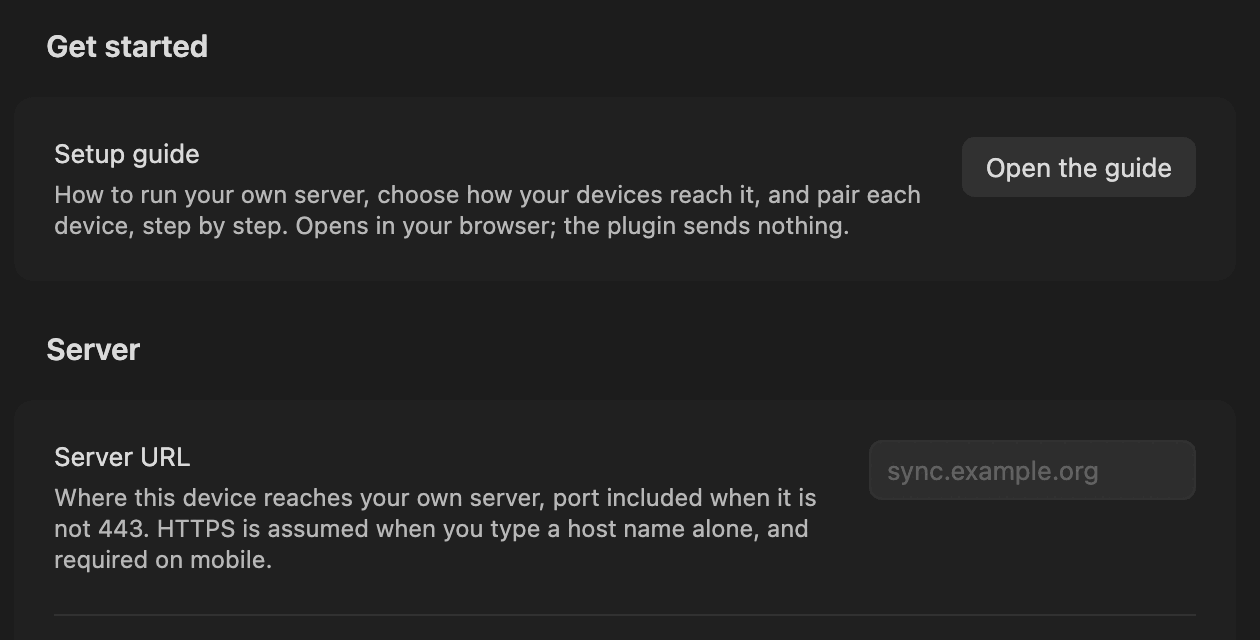
Install the plugin from **Settings → Community plugins → Browse**. Search for
**Self Hosted Private Sync** (plugin id `obsync-private-sync`). It needs
Obsidian 1.13.0 or newer. Its settings open with the setup guide, one press
away.
> [!IMPORTANT]
> - It syncs to a server **you** run: no hosted service, no account elsewhere.
> - Back up your vault first; keep the 24-word recovery phrase off the device that made it.
> - Never run it alongside another sync (Obsidian Sync, a cloud folder, another plugin) on one vault.
> - Young software: read the [`CHANGELOG.md`](CHANGELOG.md) entry for your version, update every device, and know what each [validation run](docs/validation-runs/) covered.
## Get syncing
The shortest complete path is Compose with Caddy on your own network, from a
checkout of this repository. It gives you HTTPS on any network, with no domain
and no account anywhere. [Same network, step by step](docs/same-network.md)
walks through it with every screen. Replace `vX.Y.Z` below with the release you
are installing, the newest tag on the
[Releases page](https://github.com/snaraj/obsync/releases/latest).
**1. Verify the image.** Then run exactly the digest it printed:
```sh
cosign verify ghcr.io/snaraj/obsync:vX.Y.Z \
--certificate-identity https://github.com/snaraj/obsync/.github/workflows/release-publisher.yml@refs/heads/main \
--certificate-oidc-issuer https://token.actions.githubusercontent.com
```
**2. Start the server:**
```sh
OBSYNC_IMAGE=ghcr.io/snaraj/obsync@sha256: \
OBSYNC_HOST=sync.example.org \
OBSYNC_BIND_ADDRESS=192.168.1.10 \
docker compose -f deploy/compose/docker-compose.yml up -d
```
`OBSYNC_HOST` is the name your devices will type. It only has to resolve on
your own network. `OBSYNC_BIND_ADDRESS` is the address ports 80 and 443 are
published on: a bind address limits the destination interface, not the source,
so your firewall decides who reaches it. Compose refuses to start until you have chosen.
**3. Read the setup token.** At first boot the server mints a setup token and
writes it to its journal volume, mode 0600, never logged. It creates your
account once and remains the dashboard's recovery sign-in. Guard it like the
recovery phrase. Ask the running server for it, in any shell, PowerShell and
Command Prompt included:
```sh
docker exec obsync-obsync-1 obsyncd setup-token
```
If the container is stopped, read the file off it instead, from a POSIX shell
(macOS, Linux, or WSL on Windows):
```sh
docker cp obsync-obsync-1:/data/journal/v1/setup-token - | tar -xO
```
**4. Set up each device.** Trust the server's certificate once
([how](docs/server.md#trust-the-certificate-authority-once-per-device)).
Install the plugin, then follow the [Quickstart](docs/quickstart.md): set up
the first device, then pair the others.
Already have HTTPS in front, from a proxy or tunnel you trust? Run the
[bare server](docs/server.md#already-have-a-tls-terminator-docker) instead.
## What this plugin accesses
- **Your server, nothing else.** Every request goes to the **Server URL** you type; no telemetry, no third party.
- **An account on that server**, created from the setup token; your Obsidian account plays no part.
- **GitHub Releases, through Obsidian**, for install and update; Obsidian ignores the extra release assets.
- **Your vault's file list**, to decide what to sync; hidden (`.obsidian`, `.git`) and symlinked folders skipped.
- **The clipboard, written only** by **Copy code** and **Copy link** in **Pair a new device**, never read.
- **Your browser, when you ask for the setup guide.** It opens the project's guide there; the plugin itself sends nothing.
What the server can and cannot see: [`SECURITY.md`](SECURITY.md) and the [threat model](docs/threat-model.md).
## Versions
The LATEST release is the newest tag on the
[Releases page](https://github.com/snaraj/obsync/releases/latest). That is
what Obsidian installs and updates to. `main` is the EDGE: merged but
unreleased work, for people building from source. There is no beta channel and
no pre-release tag. The changelog's Unreleased section is the edge's record.
## Questions, bugs, and security
- **A question, or not sure it is a bug:** [Discussions](https://github.com/snaraj/obsync/discussions).
- **A bug:** [open an issue](https://github.com/snaraj/obsync/issues/new/choose) with the report [Troubleshooting](docs/troubleshooting.md#how-to-collect-a-report) describes. Leave out any token, phrase or address you would not publish.
- **A suspected vulnerability:** privately, through [`SECURITY.md`](SECURITY.md), never a public issue.
## License
MIT. See [`LICENSE`](LICENSE).
# Self Hosted Private Sync
Read in your language: [English](README.md) • [العربية](docs/ar/README.md) • [Deutsch](docs/de/README.md) • [Español](docs/es/README.md) • [فارسی](docs/fa/README.md) • [Français](docs/fr/README.md) • [Bahasa Indonesia](docs/id/README.md) • [Italiano](docs/it/README.md) • [Nederlands](docs/nl/README.md) • [Polski](docs/pl/README.md) • [Português](docs/pt/README.md) • [Português (Brasil)](docs/pt-br/README.md) • [Русский](docs/ru/README.md) • [ไทย](docs/th/README.md) • [Türkçe](docs/tr/README.md) • [Українська](docs/uk/README.md) • [Tiếng Việt](docs/vi/README.md) • [日本語](docs/ja/README.md) • [한국어](docs/ko/README.md) • [中文简体](docs/zh-cn/README.md) • [中文繁體](docs/zh-tw/README.md)
Self-hosted, end-to-end encrypted live sync for [Obsidian](https://obsidian.md).
Your notes sync through a server you run yourself. Notes, attachments and file
names are encrypted on your device, and the server never receives the key. The
plugin works on every platform Obsidian runs on, desktop and mobile. There is
no subscription and no account anywhere else.
**Something not working? → [Troubleshooting](https://snaraj.github.io/obsync/troubleshooting/)**
## Find what you need
Every page is also on the [documentation site](https://snaraj.github.io/obsync/).
### Use obsync
| I want to… | Go to |
| --- | --- |
| Choose how my devices reach my server | [Choose your setup](docs/setup.md) |
| Set up everything on my home network, with every phone screen | [Same network, step by step](docs/same-network.md) |
| Install the plugin | [Install the plugin](docs/community-plugin.md) |
| Set up my first device | [Quickstart](docs/quickstart.md) |
| Pair a phone or another computer | [Pair your phone](docs/quickstart.md#pair-your-phone) |
| Know what the status icon and the commands mean | [Daily use](docs/daily-use.md) and [Reading the status bar](docs/troubleshooting.md#reading-the-status-bar) |
| Get an older version of a note back | [Restore a retained version](docs/daily-use.md#restore-a-retained-version) |
| Know what a setting does | [Settings](docs/settings.md) |
| Deal with a conflict copy | [Conflicts](docs/conflicts.md) |
| Fix a problem | [Troubleshooting](docs/troubleshooting.md) |
| Get back in after losing a device | [Recovery](docs/recovery.md) |
| Move my vault to another server | [Moving this vault to a different server](docs/recovery.md#moving-this-vault-to-a-different-server) |
### Run a server
| I want to… | Go to |
| --- | --- |
| Run my server with Docker or Compose | [Run the server](docs/server.md) |
| Put it behind my own proxy (Caddy, nginx, Traefik, HAProxy) | [Already have a TLS terminator](docs/server.md#already-have-a-tls-terminator-docker) |
| Run it without a container, under systemd | [The static binary](docs/server.md#without-a-container-the-static-binary) |
| Run my server on Kubernetes | [Kubernetes](docs/kubernetes.md) and the [chart reference](chart/README.md) |
| Reach my server away from home, through my own VPN or proxy | [Reaching it from outside your LAN](docs/server.md#reaching-it-from-outside-your-lan) |
| Use Cloudflare (optional) | [Cloudflare](docs/cloudflare.md) |
| Trust my server's certificate on each device | [Trust the certificate authority](docs/server.md#trust-the-certificate-authority-once-per-device) |
| Know how much memory and disk it needs | [How much memory it needs](docs/server.md#how-much-memory-it-needs) and [Storage](docs/storage.md) |
| Back up my server | [Back up the two volumes](docs/server.md#back-up-the-two-volumes) |
| Upgrade my server | [Upgrade by digest](docs/server.md#upgrade-by-digest) |
| See my devices and revoke one | [The dashboard](docs/dashboard.md) |
| Wipe my server and start again | [Purging a server](docs/purge.md) |
| See what changed in each version | [`CHANGELOG.md`](CHANGELOG.md) |
### Trust and privacy
| I want to… | Go to |
| --- | --- |
| Know what this plugin touches on my device and network | [What this plugin accesses](#what-this-plugin-accesses) |
| Understand what is encrypted and what the server can see | [Threat model](docs/threat-model.md) and [the dashboard's threat model](docs/security/dashboard.md) |
| Report a security problem | [`SECURITY.md`](SECURITY.md) |
### Inside the project
For contributors and reviewers: [`CONTRIBUTING.md`](CONTRIBUTING.md),
[architecture](docs/architecture.md), [protocol](docs/protocol.md),
[benchmarks](docs/benchmarks.md), [device validation runs](docs/validation-runs/)
and [every page](docs/README.md).
## Install

Install the plugin from **Settings → Community plugins → Browse**. Search for
**Self Hosted Private Sync** (plugin id `obsync-private-sync`). It needs
Obsidian 1.13.0 or newer. Its settings open with the setup guide, one press
away.
> [!IMPORTANT]
> - It syncs to a server **you** run: no hosted service, no account elsewhere.
> - Back up your vault first; keep the 24-word recovery phrase off the device that made it.
> - Never run it alongside another sync (Obsidian Sync, a cloud folder, another plugin) on one vault.
> - Young software: read the [`CHANGELOG.md`](CHANGELOG.md) entry for your version, update every device, and know what each [validation run](docs/validation-runs/) covered.
## Get syncing
The shortest complete path is Compose with Caddy on your own network, from a
checkout of this repository. It gives you HTTPS on any network, with no domain
and no account anywhere. [Same network, step by step](docs/same-network.md)
walks through it with every screen. Replace `vX.Y.Z` below with the release you
are installing, the newest tag on the
[Releases page](https://github.com/snaraj/obsync/releases/latest).
**1. Verify the image.** Then run exactly the digest it printed:
```sh
cosign verify ghcr.io/snaraj/obsync:vX.Y.Z \
--certificate-identity https://github.com/snaraj/obsync/.github/workflows/release-publisher.yml@refs/heads/main \
--certificate-oidc-issuer https://token.actions.githubusercontent.com
```
**2. Start the server:**
```sh
OBSYNC_IMAGE=ghcr.io/snaraj/obsync@sha256: \
OBSYNC_HOST=sync.example.org \
OBSYNC_BIND_ADDRESS=192.168.1.10 \
docker compose -f deploy/compose/docker-compose.yml up -d
```
`OBSYNC_HOST` is the name your devices will type. It only has to resolve on
your own network. `OBSYNC_BIND_ADDRESS` is the address ports 80 and 443 are
published on: a bind address limits the destination interface, not the source,
so your firewall decides who reaches it. Compose refuses to start until you have chosen.
**3. Read the setup token.** At first boot the server mints a setup token and
writes it to its journal volume, mode 0600, never logged. It creates your
account once and remains the dashboard's recovery sign-in. Guard it like the
recovery phrase. Ask the running server for it, in any shell, PowerShell and
Command Prompt included:
```sh
docker exec obsync-obsync-1 obsyncd setup-token
```
If the container is stopped, read the file off it instead, from a POSIX shell
(macOS, Linux, or WSL on Windows):
```sh
docker cp obsync-obsync-1:/data/journal/v1/setup-token - | tar -xO
```
**4. Set up each device.** Trust the server's certificate once
([how](docs/server.md#trust-the-certificate-authority-once-per-device)).
Install the plugin, then follow the [Quickstart](docs/quickstart.md): set up
the first device, then pair the others.
Already have HTTPS in front, from a proxy or tunnel you trust? Run the
[bare server](docs/server.md#already-have-a-tls-terminator-docker) instead.
## What this plugin accesses
- **Your server, nothing else.** Every request goes to the **Server URL** you type; no telemetry, no third party.
- **An account on that server**, created from the setup token; your Obsidian account plays no part.
- **GitHub Releases, through Obsidian**, for install and update; Obsidian ignores the extra release assets.
- **Your vault's file list**, to decide what to sync; hidden (`.obsidian`, `.git`) and symlinked folders skipped.
- **The clipboard, written only** by **Copy code** and **Copy link** in **Pair a new device**, never read.
- **Your browser, when you ask for the setup guide.** It opens the project's guide there; the plugin itself sends nothing.
What the server can and cannot see: [`SECURITY.md`](SECURITY.md) and the [threat model](docs/threat-model.md).
## Versions
The LATEST release is the newest tag on the
[Releases page](https://github.com/snaraj/obsync/releases/latest). That is
what Obsidian installs and updates to. `main` is the EDGE: merged but
unreleased work, for people building from source. There is no beta channel and
no pre-release tag. The changelog's Unreleased section is the edge's record.
## Questions, bugs, and security
- **A question, or not sure it is a bug:** [Discussions](https://github.com/snaraj/obsync/discussions).
- **A bug:** [open an issue](https://github.com/snaraj/obsync/issues/new/choose) with the report [Troubleshooting](docs/troubleshooting.md#how-to-collect-a-report) describes. Leave out any token, phrase or address you would not publish.
- **A suspected vulnerability:** privately, through [`SECURITY.md`](SECURITY.md), never a public issue.
## License
MIT. See [`LICENSE`](LICENSE).