# Highlight Non-ASCII
        
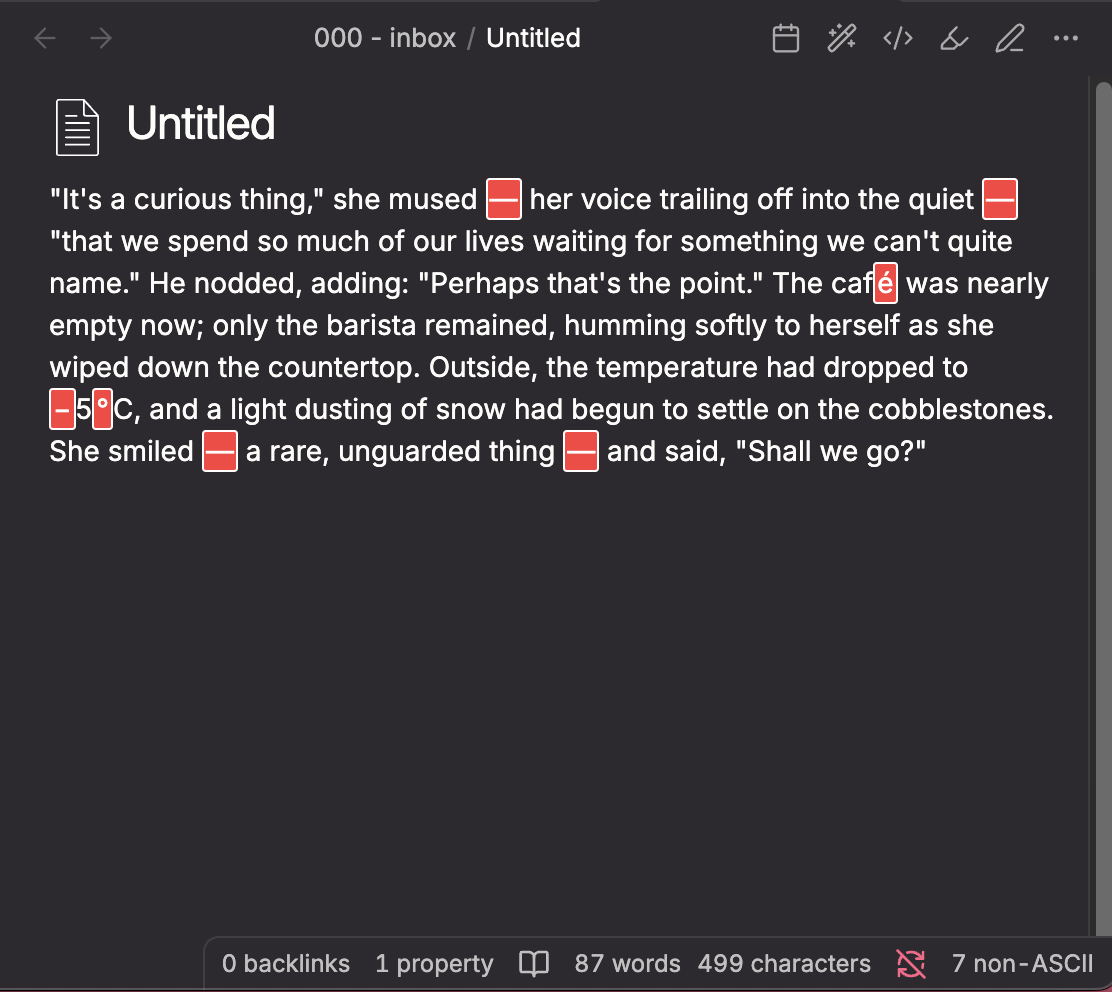
An Obsidian plugin that highlights any character outside the standard ASCII range (0x00-0x7F) in both Edit Mode (Live Preview) and Reading View.
Useful for catching invisible Unicode characters, accidental special characters, or non-standard punctuation in your notes.
## Features
- Highlights non-ASCII characters with a visible red background
- Works in Edit Mode (Live Preview) with optional Reading View support
- **Auto-replace** -- batch replace common non-ASCII characters with ASCII equivalents via the command palette
- Configurable replacement rules with a find/replace list in settings
- Configurable allowlist to exclude specific characters (accented letters, emojis, etc.)
- Per-note control via frontmatter
- **Status bar counter** -- shows the number of non-ASCII characters in the current note alongside Obsidian's word and character counts
- **Reading view toggle** -- optionally enable highlighting in preview/reading mode (off by default)
- Customizable highlight CSS
- Toggle on/off from settings or the command palette
## Usage
1. Install and enable the plugin.
2. Non-ASCII characters will be highlighted automatically.
3. Use **Settings > Highlight Non-ASCII** to configure:
- **Enable highlighting** -- toggle the feature on or off
- **Highlight in reading view** -- enable highlighting in preview/reading mode (off by default, since edit mode is usually sufficient)
- **Allowed characters** -- paste characters that should NOT be highlighted (e.g. accented letters, specific emojis)
- **Custom CSS** -- edit the highlight style directly
4. Use the command palette: **Toggle non-ASCII highlighting** to quickly enable/disable.

## Auto-replace
The plugin includes a batch replacement feature for cleaning up common non-ASCII characters like curly quotes, em dashes, and non-breaking spaces.
### How to use
1. Open a note that contains non-ASCII characters
2. Open the command palette (`Ctrl/Cmd + P`)
3. Run **Highlight Non-ASCII: Auto replace non-ASCII characters**
4. All matching characters in the note will be replaced according to your configured rules
### Default replacement rules
The plugin comes with these defaults out of the box:
| Find | Replace | Description |
| -------------- | ------- | ------------------------ |
| `'` (U+2018) | `'` | Left single curly quote |
| `'` (U+2019) | `'` | Right single curly quote |
| `"` (U+201C) | `"` | Left double curly quote |
| `"` (U+201D) | `"` | Right double curly quote |
| `--` (U+2013) | `-` | En dash |
| `---` (U+2014) | `--` | Em dash |
| `...` (U+2026) | `...` | Horizontal ellipsis |
| ` ` (U+00A0) | ` ` | Non-breaking space |
### Customizing rules
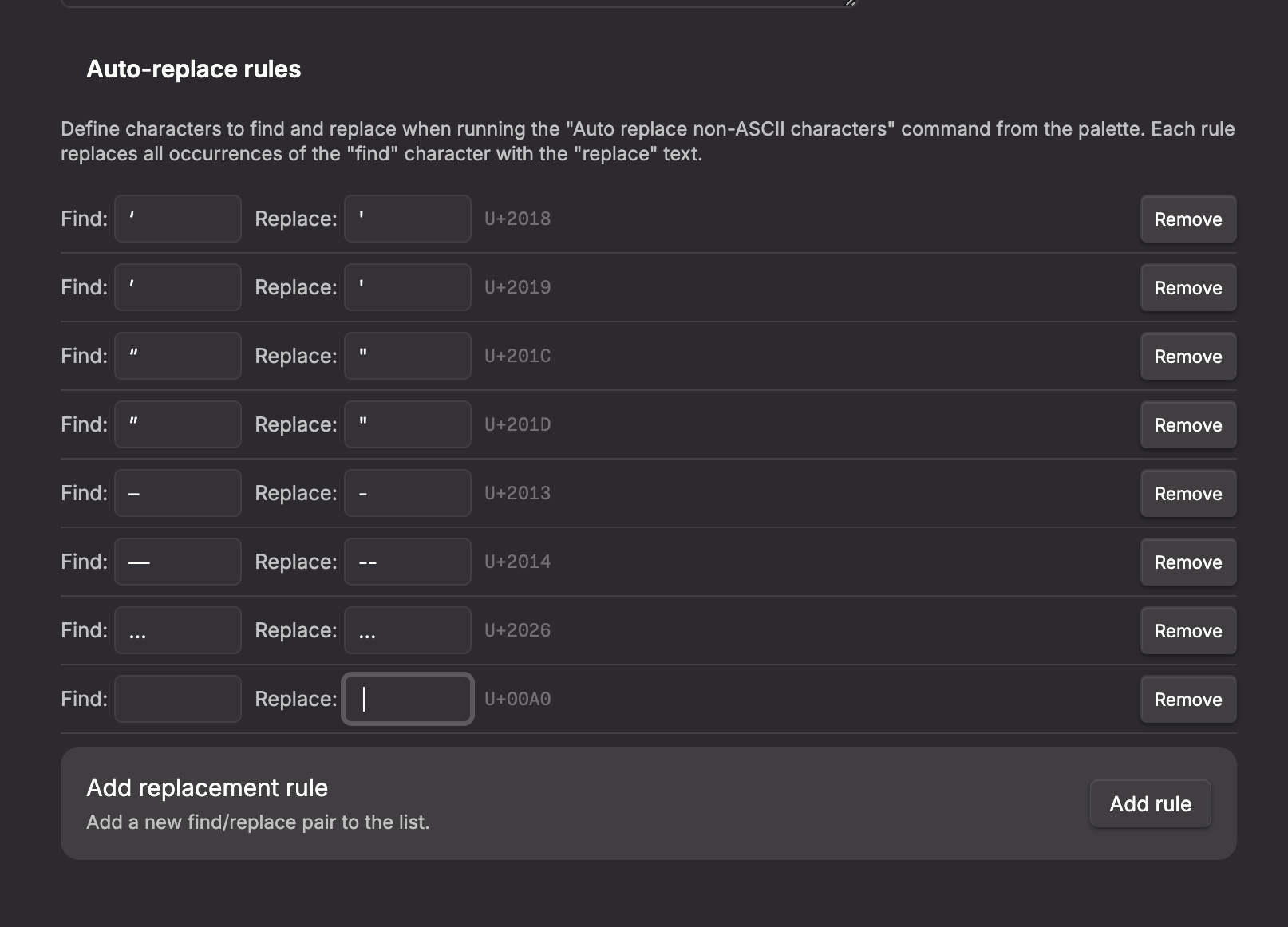
You can add, edit, or remove replacement rules in **Settings > Highlight Non-ASCII** under the **Auto-replace rules** section. Each rule shows:
- **Find** -- the character to search for
- **Replace** -- the text to replace it with
- **Unicode codepoint** -- the U+ identifier for the find character
- **Remove** button to delete the rule
Click **Add rule** to create a new find/replace pair.
## Disabling for specific notes
Add the following frontmatter to any note where you want to turn off highlighting:
```yaml
---
highlight-non-ascii: false
---
```
If the property is missing or set to `true`, highlighting remains active (as long as the global toggle is enabled).
## Installation
### Obsidian Community Plugin
This plugin is available in the official Obsidian community plugin directory. Install it from **Settings > Community plugins > Browse** and search for "Highlight Non-ASCII" or "Highlight Non-ASCII by saltyfireball".
Community plugin page:
## More Plugins by saltyfireball
Browse all of my published Obsidian plugins on my profile:
## License
MIT -- see [LICENSE](LICENSE) for details.