# Chenggao
 Obsidian desktop plugin. Keep writing Markdown on the left; preview Twitter-style cards or a WeChat article on the right. Edits update the preview as you type.
中文说明见 [README.zh.md](README.zh.md). The in-app UI follows the Obsidian language (Chinese when it starts with `zh`, otherwise English).
- **Cards**: paginated Twitter-style cards (1728×2304)
- **Article**: WeChat-style preview you can copy into the official editor
- **Export**: PNGs go to a sibling `图片/` folder; article HTML can be saved as `.wechat.html`
## Preview
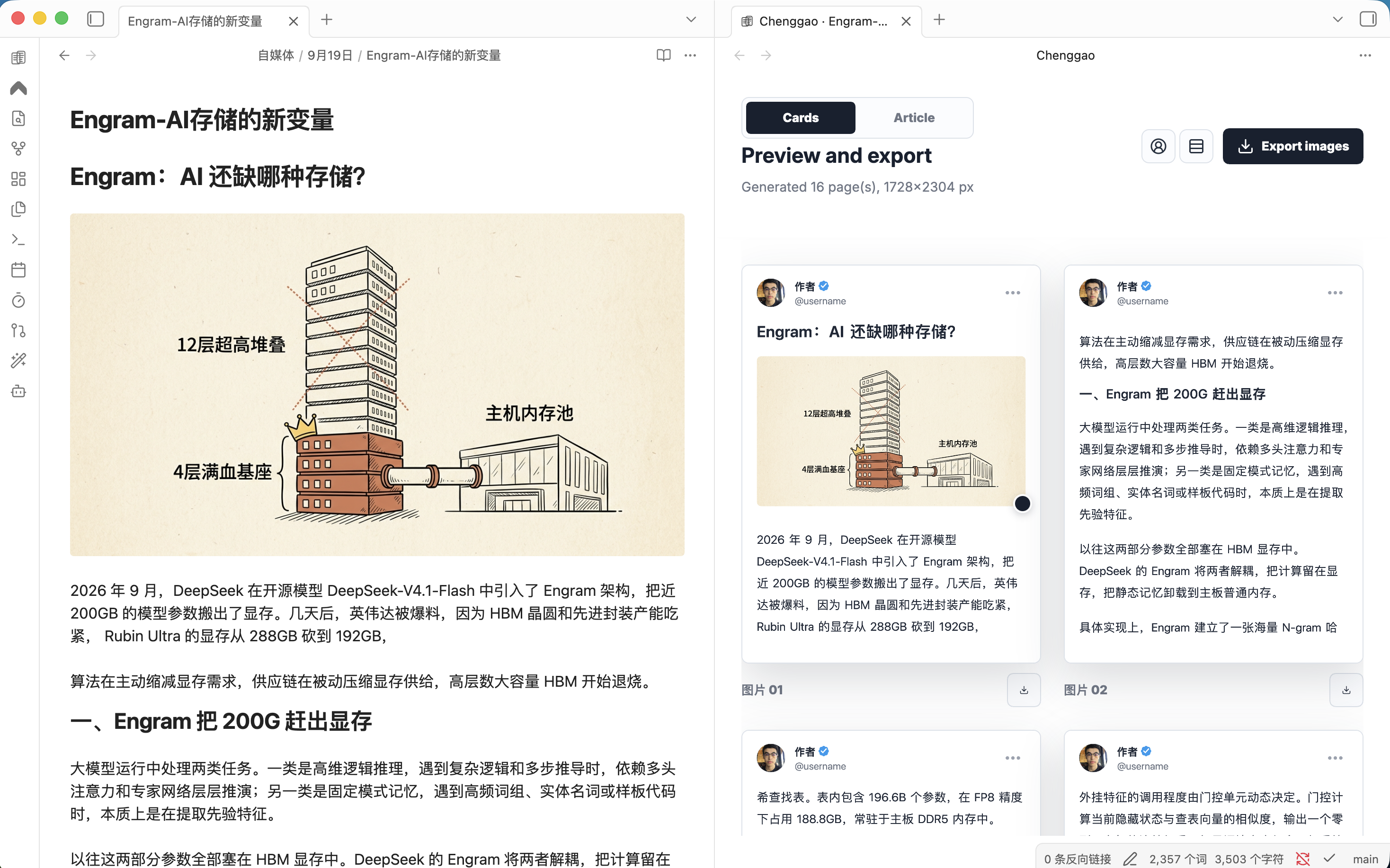
Left: keep writing in Obsidian. Right: Chenggao updates as you type.
**Cards** paginates the note into Twitter-style images.
Obsidian desktop plugin. Keep writing Markdown on the left; preview Twitter-style cards or a WeChat article on the right. Edits update the preview as you type.
中文说明见 [README.zh.md](README.zh.md). The in-app UI follows the Obsidian language (Chinese when it starts with `zh`, otherwise English).
- **Cards**: paginated Twitter-style cards (1728×2304)
- **Article**: WeChat-style preview you can copy into the official editor
- **Export**: PNGs go to a sibling `图片/` folder; article HTML can be saved as `.wechat.html`
## Preview
Left: keep writing in Obsidian. Right: Chenggao updates as you type.
**Cards** paginates the note into Twitter-style images.
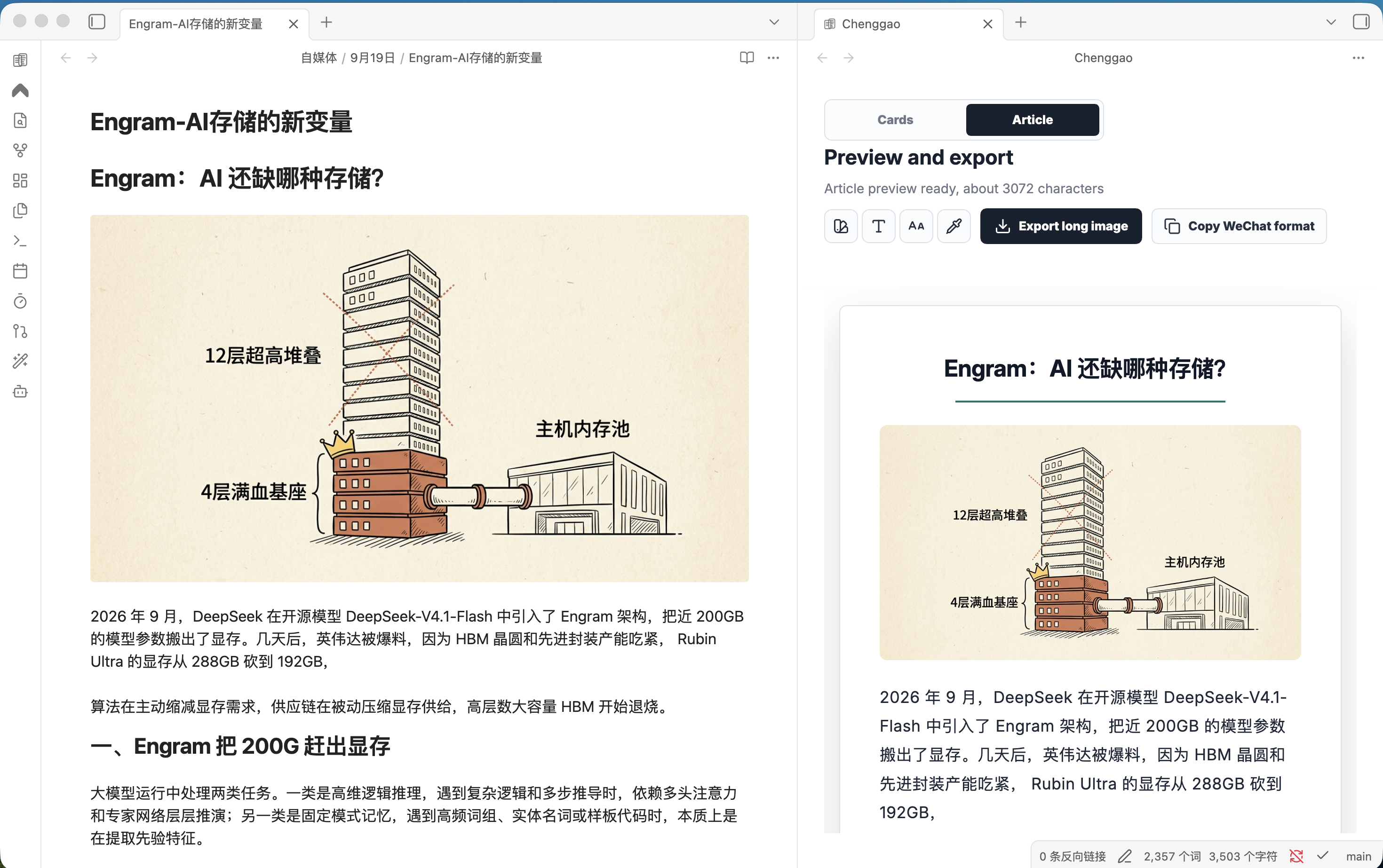
 **Article** shows a WeChat-style long preview you can copy into the official editor.
 ## Install
Until it is listed in the community directory, install from this repository.
Build:
```bash
git clone https://github.com/RYYAI/Chenggao.git
cd Chenggao
npm install
npm run build
```
Copy these files into your vault:
```
.obsidian/plugins/chenggao/
manifest.json
main.js
styles.css
```
Then enable **Chenggao** under **Settings → Community plugins**. Details: [install](docs/install.md).
## Usage
1. Open a Markdown note
2. Click the Chenggao ribbon icon, or run **Chenggao: Open layout preview**
3. Switch **Cards** or **Article** in the preview
4. Edit the note; the preview refreshes automatically
| Command | What it does |
| --- | --- |
| Open layout preview | Open preview beside the current note |
| Copy WeChat article format | Copy WeChat-ready rich text |
| Export images next to the note | Export PNG pages or a long image |
Right-click a note title and choose **Open with Chenggao**. More: [usage](docs/usage.md).
## Export paths
Relative to the current note:
| Output | Path |
| --- | --- |
| Card page N | `图片/-01.png` |
| Article image | `图片/-长文.png` |
| WeChat HTML | `.wechat.html` |
Desktop only.
## Privacy
Chenggao does not require an account and does not contact remote servers. There is no telemetry. Copying a WeChat article uses the system clipboard. Exporting writes images and optional HTML into the current vault.
## Develop
```bash
npm install
npm run dev
```
Source lives in `src/`. Reload the plugin after a rebuild. See [develop](docs/develop.md).
## Libraries
The release bundle includes html2canvas (MIT), JSZip (MIT or GPLv3), and Lucide (ISC).
## License
[MIT](LICENSE)
## Install
Until it is listed in the community directory, install from this repository.
Build:
```bash
git clone https://github.com/RYYAI/Chenggao.git
cd Chenggao
npm install
npm run build
```
Copy these files into your vault:
```
.obsidian/plugins/chenggao/
manifest.json
main.js
styles.css
```
Then enable **Chenggao** under **Settings → Community plugins**. Details: [install](docs/install.md).
## Usage
1. Open a Markdown note
2. Click the Chenggao ribbon icon, or run **Chenggao: Open layout preview**
3. Switch **Cards** or **Article** in the preview
4. Edit the note; the preview refreshes automatically
| Command | What it does |
| --- | --- |
| Open layout preview | Open preview beside the current note |
| Copy WeChat article format | Copy WeChat-ready rich text |
| Export images next to the note | Export PNG pages or a long image |
Right-click a note title and choose **Open with Chenggao**. More: [usage](docs/usage.md).
## Export paths
Relative to the current note:
| Output | Path |
| --- | --- |
| Card page N | `图片/-01.png` |
| Article image | `图片/-长文.png` |
| WeChat HTML | `.wechat.html` |
Desktop only.
## Privacy
Chenggao does not require an account and does not contact remote servers. There is no telemetry. Copying a WeChat article uses the system clipboard. Exporting writes images and optional HTML into the current vault.
## Develop
```bash
npm install
npm run dev
```
Source lives in `src/`. Reload the plugin after a rebuild. See [develop](docs/develop.md).
## Libraries
The release bundle includes html2canvas (MIT), JSZip (MIT or GPLv3), and Lucide (ISC).
## License
[MIT](LICENSE)