# Doneut
**A Simple progress circle for your Obsidian headings.**
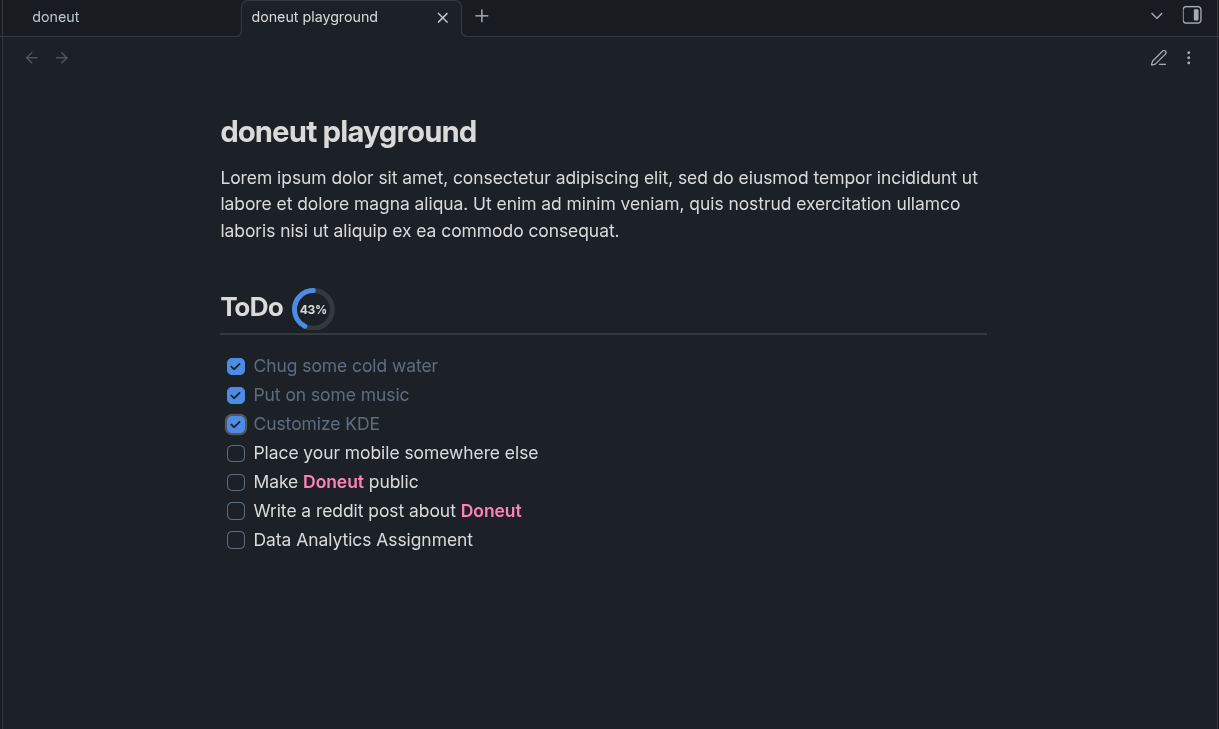
**Doneut** automatically places a small SVG progress ring next to any heading that has checkboxes underneath it. Check something off - the ring updates instantly, right inside Reading View. If you Hit 100%, you'll get a confetti burst. 🎉
---
## How it works
1. Write a heading (`## My Tasks`).
2. Add checkboxes under it (`- [ ] Do the thing`).
3. Doneut draws a progress ring right next to the heading title.
4. Every time you tick a checkbox, the ring fills up in real time.
It works out of the box. No configurations needed.
---
## Features
- **Live progress rings** — SVG rings rendered inline next to headings, updating dynamically as you check/uncheck items.
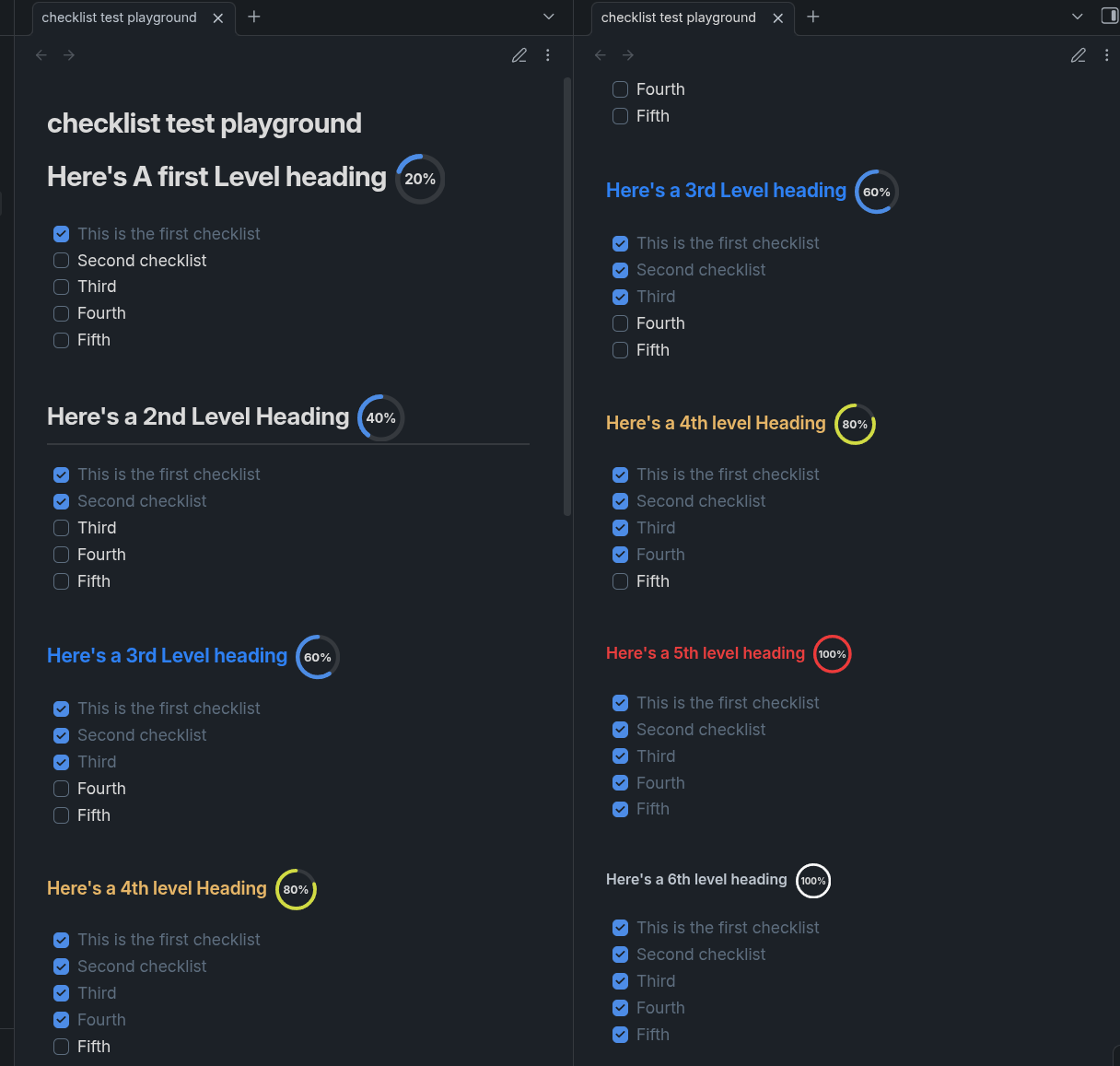
- **Proportional sizing** — rings scale down automatically for deeper heading levels (H1 is biggest, H6 is smallest).
- **Fully customisable** — every visual detail is exposed in Settings:
- Ring base size and per-level size scaling
- Stroke width and per-level scaling
- Track color (background ring)
- Progress / fill color
- Stroke linecap (`round`, `flat`, `square`)
- Fill animation duration
- Percentage label (show/hide, font size, per-level scaling, color)
- Confetti on completion (toggle)
- Per heading-level toggles (H1–H6)
- Choose color per heading (color of the progressCircle)
- **Live settings preview** — see your ring update in the settings panel as you tweak values.
- **Theme-aware defaults** — when no custom color is set, the ring uses your Obsidian theme's accent and border colors automatically.
- **Works on desktop and mobile.**
---
## Screenshots
---
## Installation
### From the Community Plugin list (recommended)
1. Open Obsidian → **Settings → Community plugins**.
2. Disable Safe mode if prompted.
3. Click **Browse**, search for **Doneut**, and install.
4. Enable the plugin.
### Manual install
1. Download `main.js`, `manifest.json`, and `styles.css` from the [latest release](https://github.com/prajwal-56/doneut/releases/latest).
2. Copy the three files into your vault at:
```
/.obsidian/plugins/doneut/
```
3. Reload Obsidian and enable Doneut under **Settings → Community plugins**.
---
## Settings
Open **Settings → Doneut** to customise the plugin. A live preview ring updates as you change values.
| Setting | Description |
|---|---|
| Enable plugin | Master toggle — turns all rings on or off. |
| Confetti on completion | Plays a confetti burst when a heading hits 100%. |
| Base ring size (H1) | Diameter (px) of the ring next to an H1 heading. |
| Size decrease per level | How many px smaller each deeper heading's ring gets. |
| Stroke width (H1) | Track/arc thickness (px) for H1. |
| Stroke decrease per level | How much thinner the stroke gets for deeper headings. |
| Track color | Background ring color. Reset button restores theme default. |
| Progress color | Fill/arc color. Reset button restores theme accent. |
| Stroke linecap | Shape of the arc ends: Round, Flat, or Square. |
| Animation duration | How long (ms) the fill transition plays. |
| Show percentage text | Toggle the % label inside the ring. |
| Font size (H1) | Base label font size for H1. |
| Font size decrease per level | How much smaller the label gets for deeper headings. |
| Text color | Label color. Reset button restores theme default. |
| H1–H6 toggles | Choose exactly which heading levels show a ring. |
| Reset to defaults | Wipes all customisation back to factory defaults. |
---
## Releasing a new version
1. Bump `version` in `manifest.json` (SemVer) and update `minAppVersion` if needed.
2. Add the new version to `versions.json`:
```json
{ "1.0.1": "1.4.0" }
```
3. Run `npm version patch` (or `minor` / `major`) — this syncs `package.json` and stages the changed files automatically.
4. Push a tag matching the version (no `v` prefix):
```bash
git tag 1.0.1
git push origin 1.0.1
```
5. The GitHub Actions [release workflow](.github/workflows/release.yml) will build and create a draft release automatically. Review it, then publish.
---
## Development
```bash
# Clone
git clone https://github.com/prajwal-56/doneut
cd doneut
# Install dependencies (Node 18+ required)
npm install
# Watch mode (auto-recompiles on save)
npm run dev
# Production build
npm run build
# Lint
npm run lint
```
Copy `main.js`, `manifest.json`, and `styles.css` into your vault's plugin folder to test locally.
---
## Contributing
Issues and pull requests are welcome at [github.com/prajwal-56/doneut](https://github.com/prajwal-56/doneut/issues).
Please keep pull requests focused and add a description of what changed and why. Feel free to fork and do anything with it 🙌🏻.
---
## Support
If you liked any of my works , feel free to [buy me a coffee](https://prajwal-56.github.io/donate) or [support me](https://prajwal-56.github.io/donate)
[](https://prajwal-56.github.io/donate)
---
## License
[0-BSD](LICENSE) — do whatever you want with it.