# Projects Plus
[Русский](README-RU.md) · [User guide](docs/user-guide-EN.md) · [Documentation](docs/README.md) · [Roadmap](ROADMAP.md)





Projects Plus helps you work with Obsidian notes as a project: compare records in a table, arrange them on a board, plan events in a calendar, and build an overview on a Dashboard.
Each record remains a Markdown file. Fields such as status, date, and assignee live in note properties — the YAML block at the beginning of the file. Editing an ordinary writable field in the plugin updates the note.
## Current work
Projects Plus is being reshaped around one idea: **every function sits where you look for it, the way Notion does it — but with your notes staying local Markdown**.
```mermaid
flowchart LR
A["3.7.0
released"] --> B["3.7.1
stability fixes
candidate"]
B --> C["3.7.2
behaviour rework
iteration 1 tested"]
C --> D["3.7.2
iteration 2"]
```
3.7.2 — the threads in progress
| Thread | Goal | State after the first device test |
| --- | --- | --- |
| Note properties | Properties live in the note header instead of a side pane | Works; two blocks on mobile, date shortcuts and the calendar button still to fix |
| One field kit | Every field and pop-up behaves the same with the on-screen keyboard; dates can be typed | Partly confirmed |
| Dashboard as a page | Blocks top to bottom, one “+”, one “⋯” menu | Confirmed |
| Tables | Smooth scrolling, tap-to-edit on phones, a reason on read-only cells, search | Confirmed; date format to fix |
| Relations, rollups, formulas | Set up from scratch without documentation | Not yet: data sources and formulas need rework |
| Charts | Set up like a spreadsheet chart | Waiting for the data work above |
| Calendar, board, gallery | No overlapping events, no sagging cards on phones, card preview | Not yet solved — next iteration |
How the work is done
Each package is a separate task with written acceptance criteria, automatic checks (types, Svelte, lint, the full test suite, an isolated build) and a manual scenario on a real phone. A package counts as done only after the manual test passes. Iteration branches are kept on GitHub for history: `iteration/3.7.2-1`.
If Projects Plus helps you, you can [support its development](https://web.tribute.tg/d/Sh6).
## What you can do
| Task | Tool |
| --- | --- |
| Compare records and edit their properties | A table inside a Dashboard block |
| Organize tasks by status | Board with draggable cards |
| Browse meetings and deadlines | Calendar with year-to-day views |
| Browse materials by cover image | Gallery |
| Combine records, charts, and metrics | Dashboard with configurable blocks |
| Total up related records | Rollups through a relation, and reverse ones — records that link here |
| Compare figures across projects | Charts with several series, another project's data and a second axis |
| Select the notes to include | Folder, tag, built-in filtered query, or Dataview |
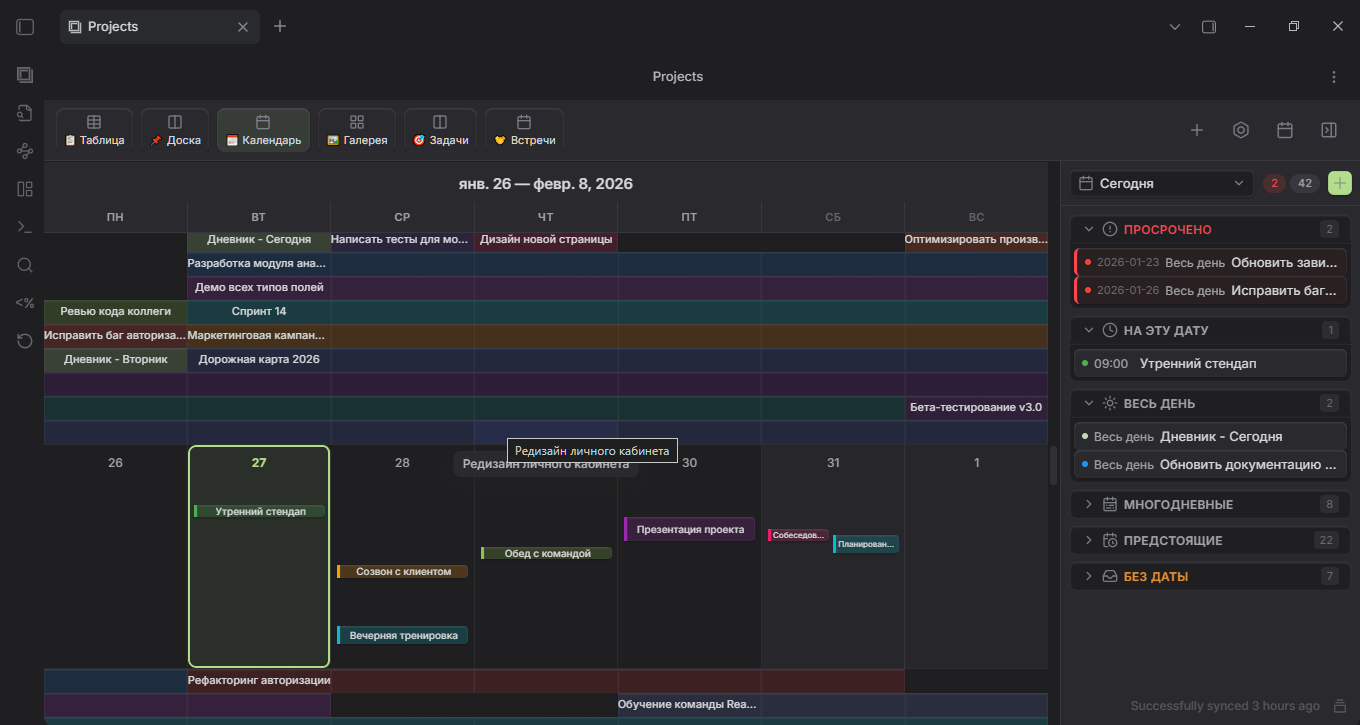
This illustration shows one interface configuration; your installed version may look different.
## Installation
Once Projects Plus is listed in the Obsidian community directory, install it from Obsidian: **Settings → Community plugins → Browse**, search for **Projects Plus**, then select **Install** and **Enable**.
To install a release by hand:
The current version is **3.7.0**: configurable gallery layouts and card fields, resizable card frames, board thumbnails, filters in the view settings, touch-first behaviour on phones and tablets, and styles that follow your Obsidian theme. 3.6.3 named the plugin Projects Plus; 3.6.1 brought a demo of three linked projects. The first version in the Obsidian community catalogue format is 3.6.0. Packaged builds are in [GitHub Releases](https://github.com/ParkPavel/obs-projects-plus/releases); it needs Obsidian 1.8.7 or newer, on desktop or mobile. See the [changelog](CHANGELOG.md) for what changed.
1. Choose a release and download **all three files** from it: `main.js`, `manifest.json`, and `styles.css`.
2. Create `.obsidian/plugins/obs-projects-plus/` inside your vault and place the files there.
3. Restart Obsidian and enable **Projects Plus** in Community plugins settings.
When updating, replace these three files with files from the same build. Keep `data.json`: it contains your project and view settings.
## Usage
Create your first project:
1. Create a `Projects` folder in your vault and a note named `First task.md` inside it:
```yaml
---
title: First step
status: todo
startDate: 2026-09-15
---
```
2. Open the Obsidian command palette and find **Create new project plus**.
3. Name the project, choose **Folder** as its source, and select `Projects`.
4. Open it with **Show projects plus**. Use the add-view control to add a view; for a table, use a data block on a Dashboard.
5. Change the record's `status`, then open its Markdown file: the updated value should be stored in its properties.
To explore prepared data, use **Create demo project**: it creates three linked projects — a massage practice, a wellbeing tracker and a personal budget — whose data flows between them. The welcome dialog and the empty projects screen offer it too. A separate [demo vault](demo-vault/README.md) is also available.
## Privacy and access
Projects Plus works only with your vault through the Obsidian API. It makes no network requests and collects no data.
- **Vault files.** To find the notes of a project and the records that link to one another, it lists the files in the vault and reads their properties. It writes to a note only when you edit a record, create one, or run an action such as creating the demo.
- **Clipboard.** It writes to the clipboard only when you press the copy button in the formula debug panel; it never reads the clipboard.
- **Settings.** Projects and views are stored in the plugin's `data.json` inside your vault.
## Continue
- [User guide](docs/user-guide-EN.md): sources, views, filters, templates, and troubleshooting.
- [Note templates](templates/README.md): examples for tasks, meetings, and reviews.
- [Roadmap](ROADMAP.md): what comes next.
- [Changelog](CHANGELOG.md) and [issue tracker](https://github.com/ParkPavel/obs-projects-plus/issues).
- [Contributing](CONTRIBUTING.md) and [custom view API](docs/api.md).
Development is managed through [Claudex](https://github.com/ParkPavel/claudex). AI configuration and instructions are maintained in that separate project.
Projects Plus is based on Marcus Olsson's [Obsidian Projects](https://github.com/marcusolsson/obsidian-projects). The current maintainer is Park Pavel. Licensed under [Apache 2.0](https://github.com/ParkPavel/obs-projects-plus/blob/main/LICENSE); see [NOTICE](https://github.com/ParkPavel/obs-projects-plus/blob/main/NOTICE) for attribution.