# Note Database
[简体中文说明](README.zh-CN.md)
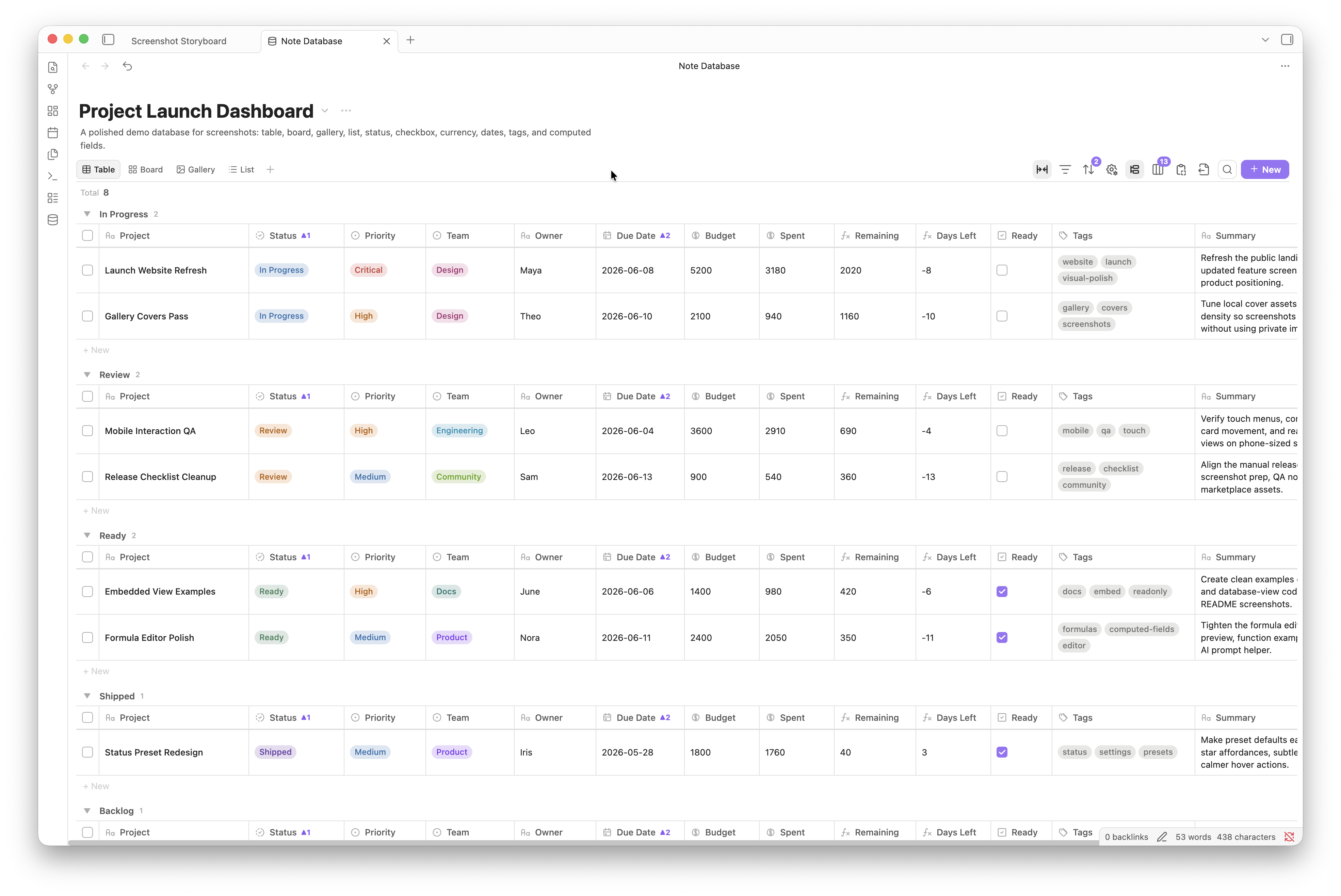
Note Database is a local database-view plugin for Obsidian notes. It turns Markdown files and frontmatter into editable, filterable, groupable, embeddable databases, so your notes can stay in an open Markdown format while still working like a structured workspace.
It is useful for project tracking, reading plans, subscription lists, content libraries, task workflows, research notes, course notes, resource indexes, and any vault area where notes need to be organized by properties.
## What's New In 1.0.8
**Complete .base source rule import**: method chains (file.inFolder("X").and(file.hasTag("#Y"))), AND/OR/NOT logic, comparisons, type checks, regex, prefix/suffix, empty/truthy, negation, link/tag/property checks, multi-tag filters, and view-level filters are all converted. Complex expressions that cannot be mapped to structured rules are preserved as editable expression rules.
**.base formula import with native syntax**: imported formulas retain Bases syntax and are evaluated by a dedicated engine supporting method chains, conditionals, date arithmetic, duration math, link resolution, string/number/list/object helpers, and summary aggregates (sum/count/average/unique/join). Cross-formula dependencies are resolved in definition order.
**Computed field sync modes**: each database can now choose between display-only (virtual values, never written to frontmatter), manual (write back only when you click the sync button), and automatic (write back whenever values change). The toolbar shows a sync button in manual mode and a live indicator in automatic mode.
Smarter source rule editor: the field picker groups options into note properties, formula fields, and file properties. The operator dropdown now filters by field type — number fields no longer show in folder, tag fields no longer show starts with, and so on. Legacy operators in saved rules are preserved in a compatibility group.
**Bug fixes**: data safety, computed field sync, view state persistence, undo/redo reliability, embedded view permissions, CSV import/export, database deletion, property rename migration, and .base conversion accuracy.
**Security & audit fixes**: replaced `new Function` with a safe recursive-descent expression parser, replaced `createContextualFragment` with DOMParser, and resolved all Obsidian plugin review errors.
**Popout window compatibility**: all `document`, `setTimeout`, `clearTimeout`, and `requestAnimationFrame` calls now use the window-scoped equivalents (`window.activeDocument`, `window.setTimeout`, etc.) for correct behavior in Obsidian popout windows.
## What's New In 1.0.5 (Compared To 1.0.4)
- **Markdown database files as the single storage model**: every database is now stored as a normal `db_view: true` Markdown file. Existing settings-based databases are migrated automatically when the plugin loads.
- **Manual ordering across all four views**: table rows, board cards, gallery cards, and list rows share a LexoRank-like view order. Drag to place items precisely on desktop; explicit property sorting still takes precedence.
- **Touch-friendly manual ordering**: phone layouts expose move menus instead of relying on free-form drag. Table, gallery, and list views support up/down/top/bottom and cross-group moves; board cards can also move before or after a specific card.
- **More precise computed-field sync**: computed values update on relevant save events instead of depending on periodic full refreshes, reducing unnecessary work.
- **Faster inline editing**: ordinary property edits and card checkboxes use optimistic local updates where possible, reducing full-view flicker while values are written back to Markdown frontmatter.
- **Better creation flow**: creating a database can scan existing frontmatter and open a property confirmation dialog. Newly created databases open immediately.
- **Refined grouping and file navigation**: custom group order is now an immediately saved popover; database files receive a `DB` marker in the file explorer; file-name fields reveal folder prefixes on hover.
- **Interaction polish**: date editing uses the same contextual popover language as text and number fields, horizontal scrolling is easier to discover, and wide lists reveal newly created entries from their leading edge.
## Highlights
- **Four database views**: show the same notes as a table, board, gallery, or list. Each database can have up to 15 views, and every view can keep its own filters, sorting, grouping, visible properties, title field, and layout settings.
- **Inline property editing**: edit text, numbers, dates, currency, checkboxes, select, multi-select, status, and file names directly from the view. Changes are written back to Markdown frontmatter, and the file-name column can rename notes.
- **Complete property management**: add properties, rename labels, change keys, change types, hide or show fields, resize and reorder columns, manage option colors, configure status presets, and sync property types with Obsidian.
- **Stronger filters, sorting, and grouping**: combine AND/OR filter rules, use type-aware sorting, group tables, group board columns, add board subgroups, collapse groups, customize group order, and batch-select records.
- **Computed fields and formulas**: write formulas with field references, helper functions, syntax highlighting, live results, referenced-field values, and step-by-step calculation previews. Each database controls whether results stay display-only, sync automatically, or write back only after a manual sync.
- **Embed views in notes**: embed a database view in any Markdown note. Embedded views keep records read-only while still allowing view switching, filters, sorting, grouping, visible properties, computed fields, and copy/export actions.
- **Markdown database files**: each database configuration lives in a normal `db_view: true` Markdown file, making it easy to organize, open, and manage alongside notes.
- **Import, export, and migration**: import or export CSV + Markdown ZIP files, optionally include frontmatter in exported Markdown files, and convert Obsidian `.base` files into Note Database databases.
- **Local-first and localized**: the plugin runs inside Obsidian and does not upload vault content, metadata, formulas, or settings. The interface supports System, English, Simplified Chinese, and Traditional Chinese.
## Views
Table view is for structured data, field-heavy records, quick property editing, and column-header sorting.

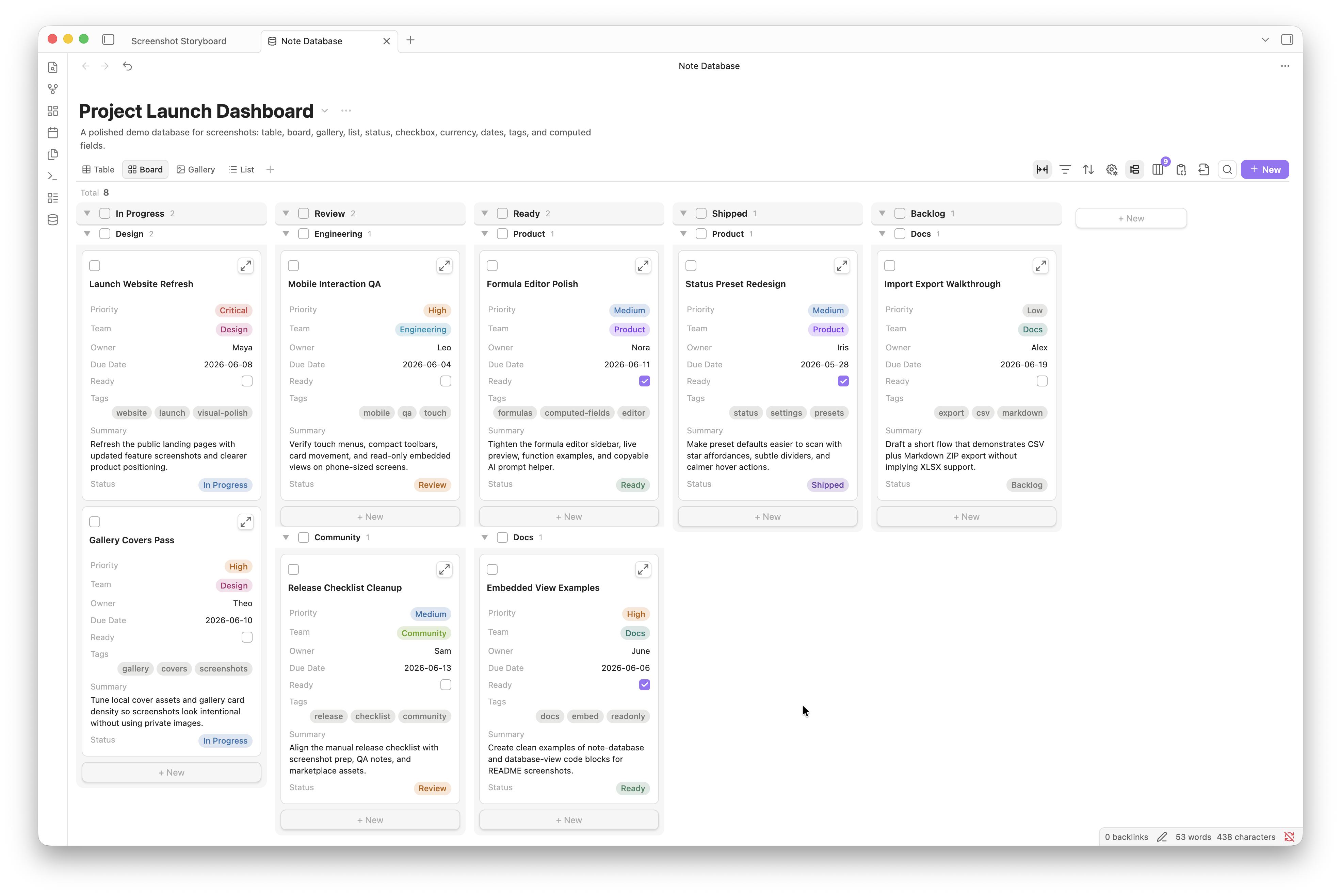
Board view is for status-driven workflows such as tasks, process stages, reading progress, and review queues. It supports grouped columns, subgroups, card fields, batch selection, and custom group order.
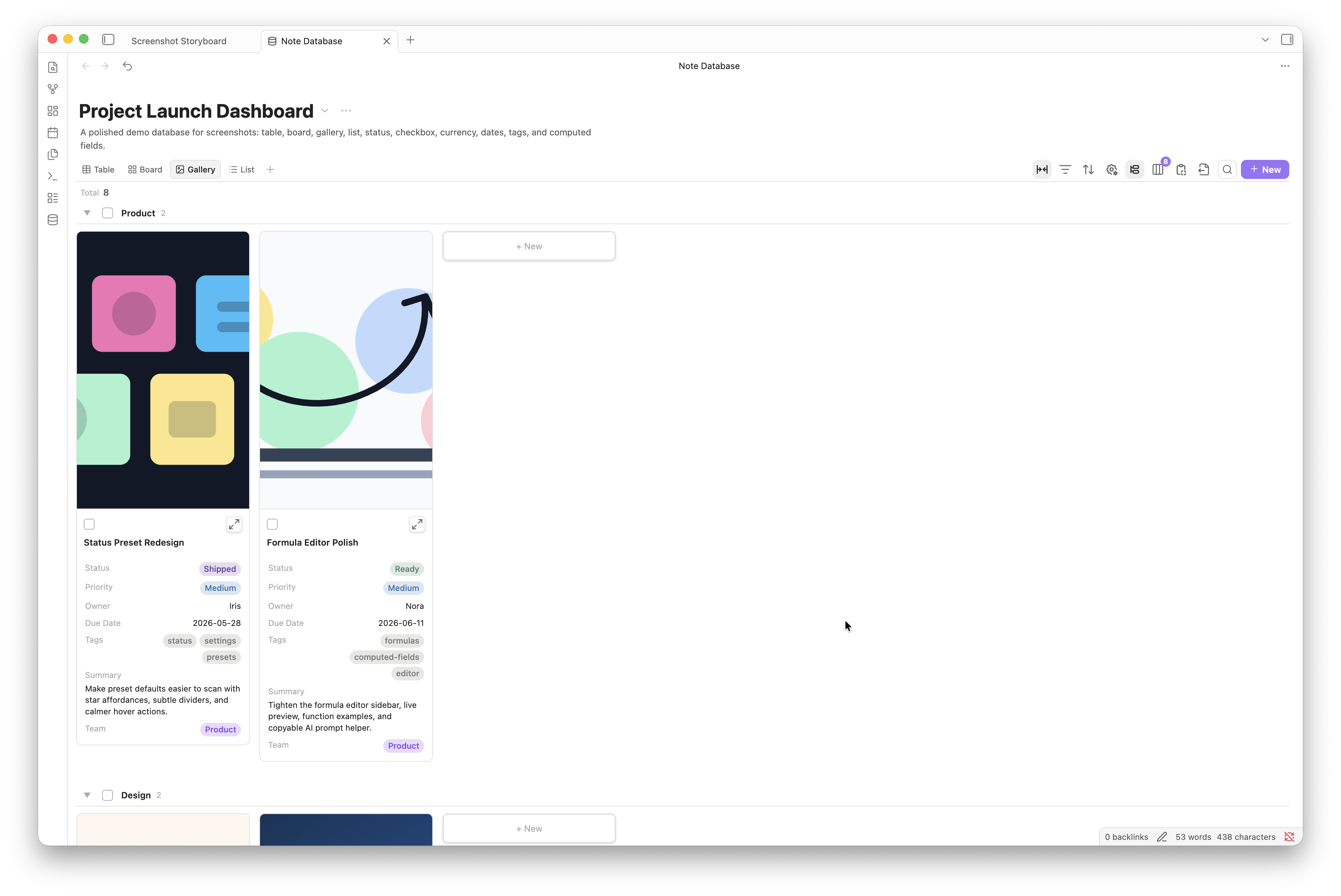
Gallery view is for reading plans, image references, portfolios, card-style content libraries, and visual browsing. You can configure cover fields, card width, image ratio, image fit, and visible properties.
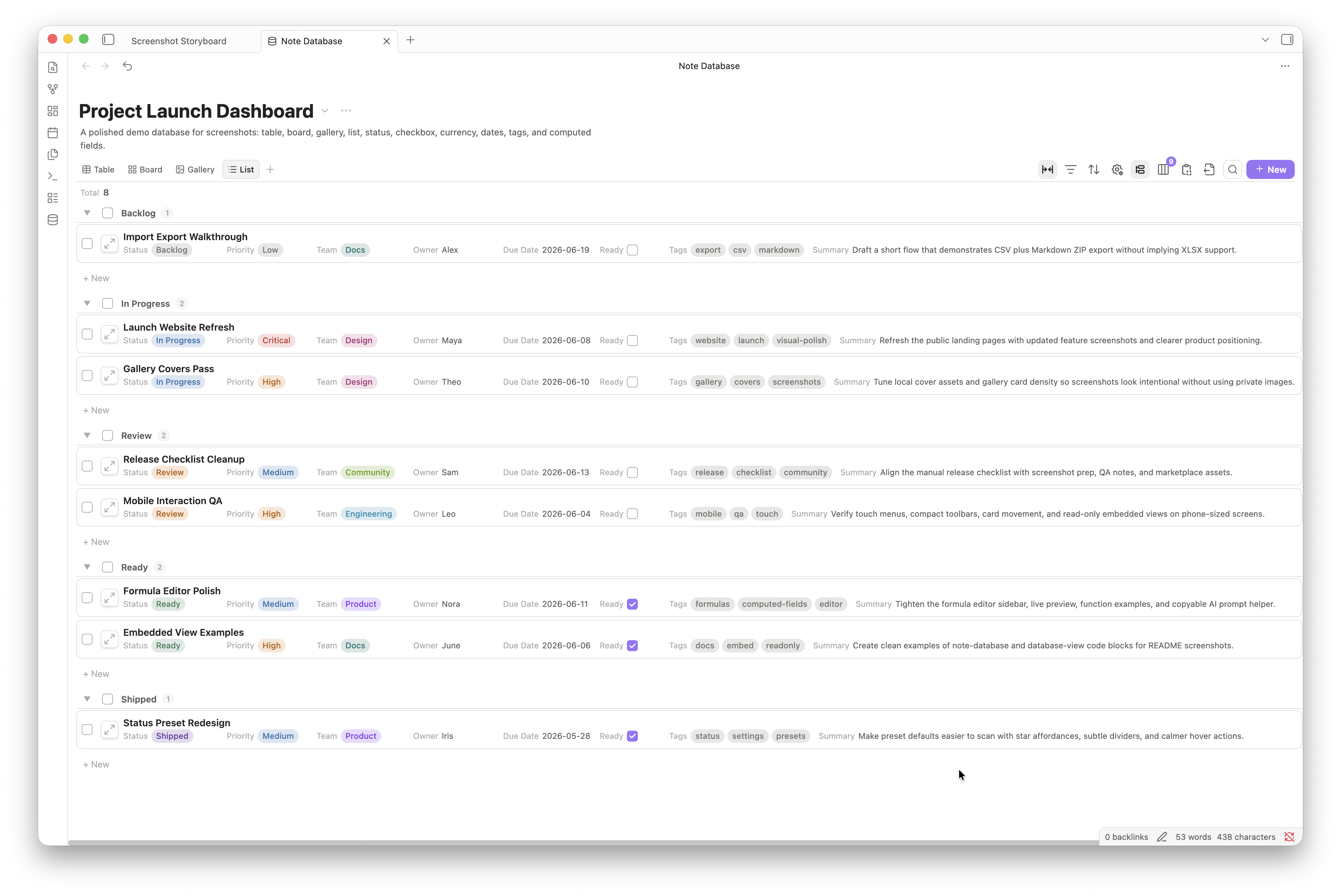
List view is for compact indexes, lightweight task lists, and directories. It keeps property display and grouping while using less space than gallery view.
## Getting Started
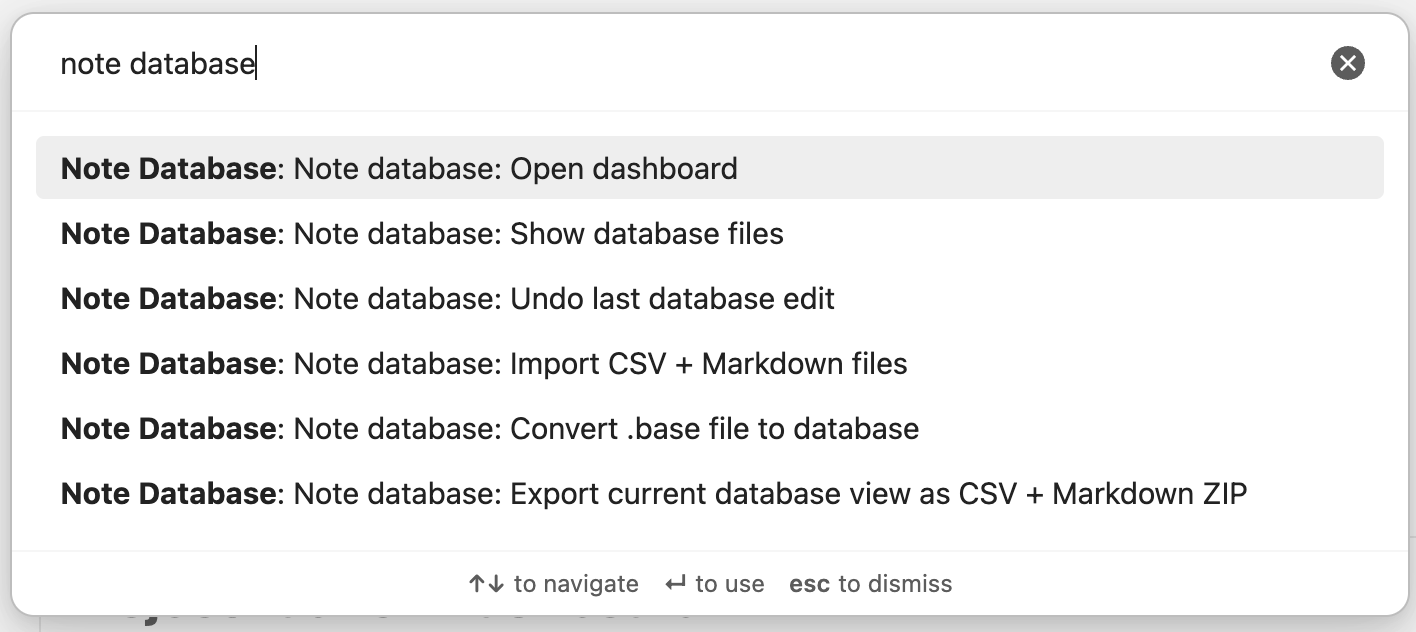
Click the database icon in the left ribbon, or run `Note database: Open dashboard` from the command palette. The command palette can also import data, convert `.base` files, or open the corresponding database file.
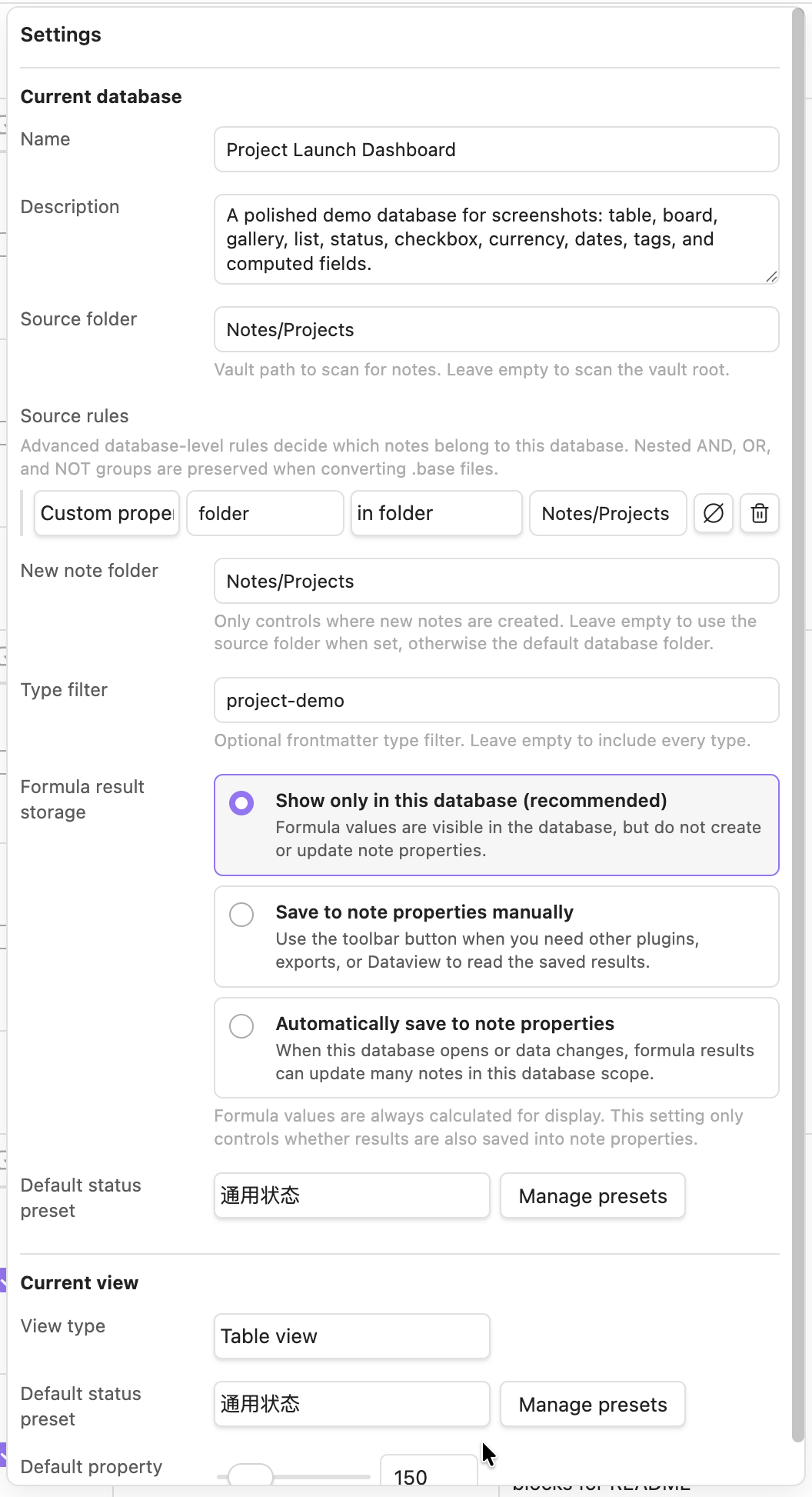
After creating a database, choose a source folder, then add properties and views. The source folder decides which Markdown notes belong to the database; view settings decide how those notes are presented.
The full dashboard settings panel separates "Current database" and "Current view": database settings cover the name, description, source folder, and new-note folder; view settings cover the title field, default field width, gallery cover, board subgroup, status presets, and layout behavior.
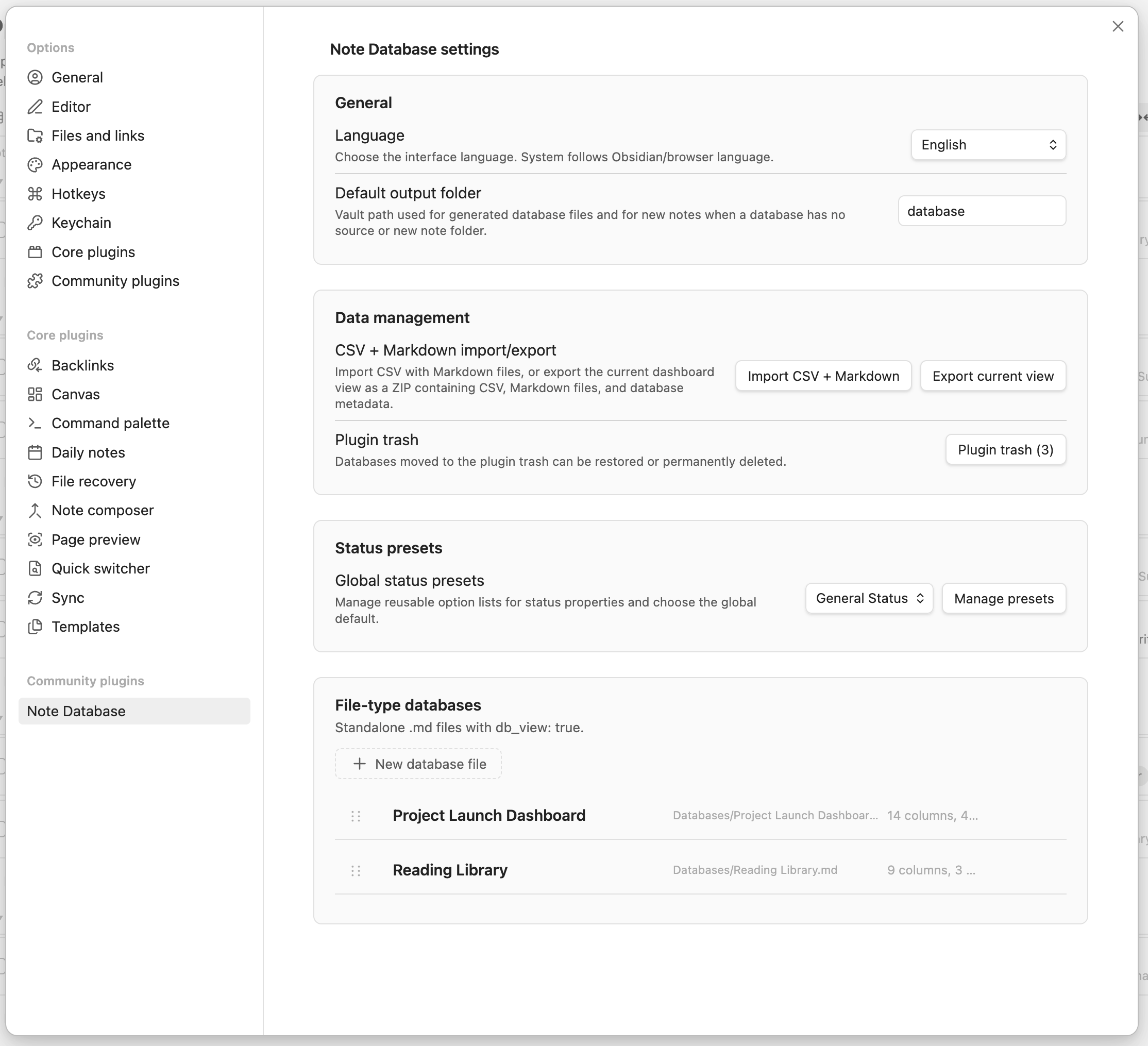
The plugin settings page manages global options such as language, the default database-file folder, global status presets, database files, import/export, and the plugin trash.
## Embedded Views
Right-click a view tab in the full dashboard, or use the export menu to copy the current view's embed code.
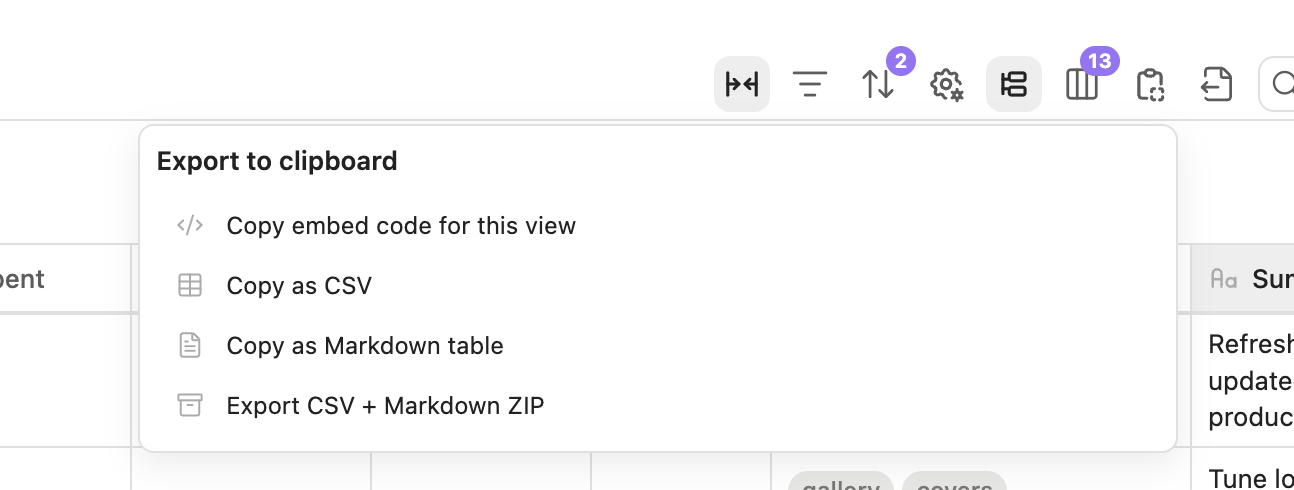
Paste the code into any Obsidian note to get a read-only embedded database view. Embedded views still include view switching, filters, sorting, grouping, visible properties, computed fields, and copy/export tools.
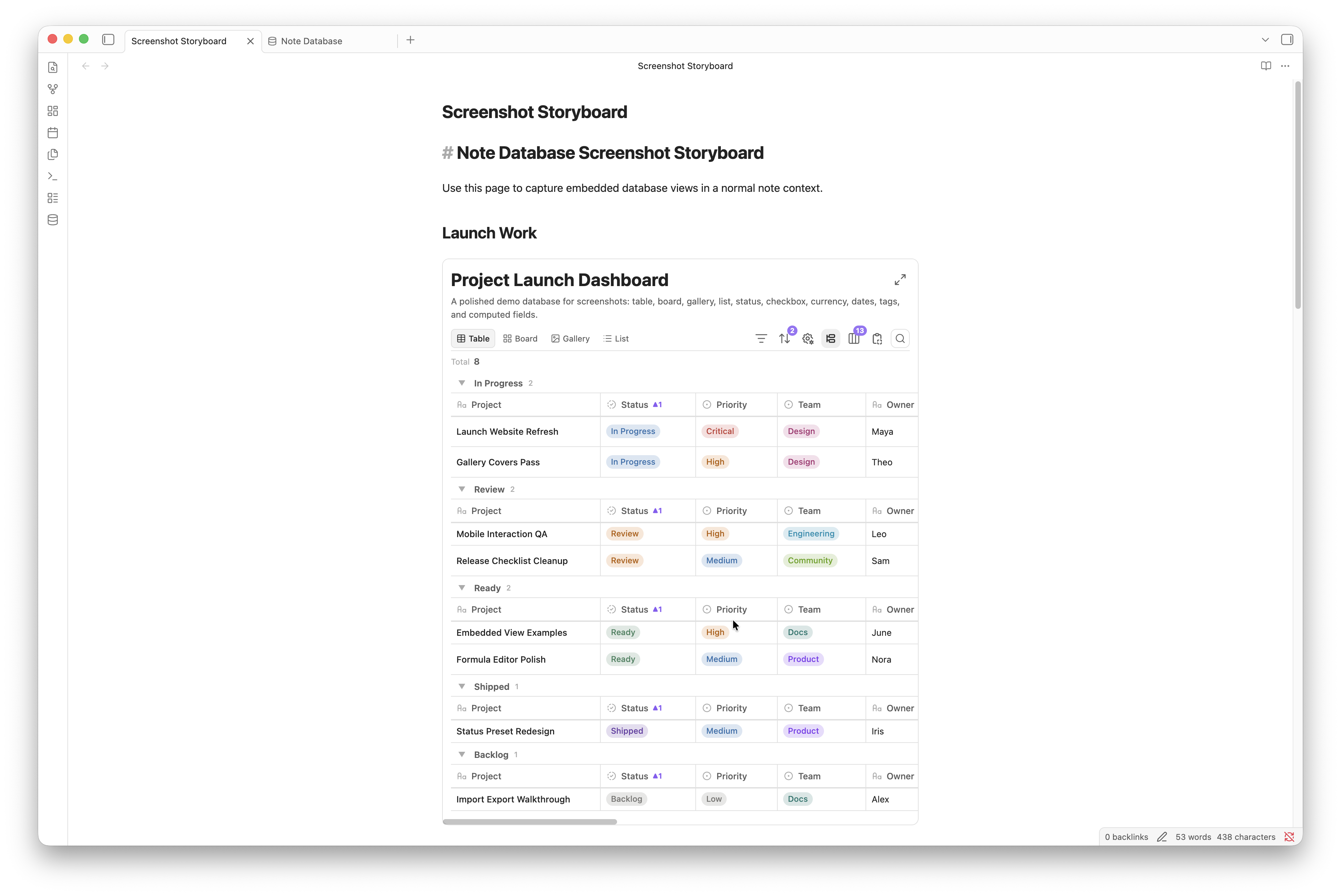
Embed code example:
~~~markdown
```note-database
dbPath: database/Example.md
viewId: mh2g9dz3_abcd123
```
~~~
Every database configuration is saved as a Markdown file with `db_view: true`, with its configuration stored in the frontmatter `database` object. Existing settings-based databases from earlier versions are migrated automatically.
## Computed Fields And Formulas
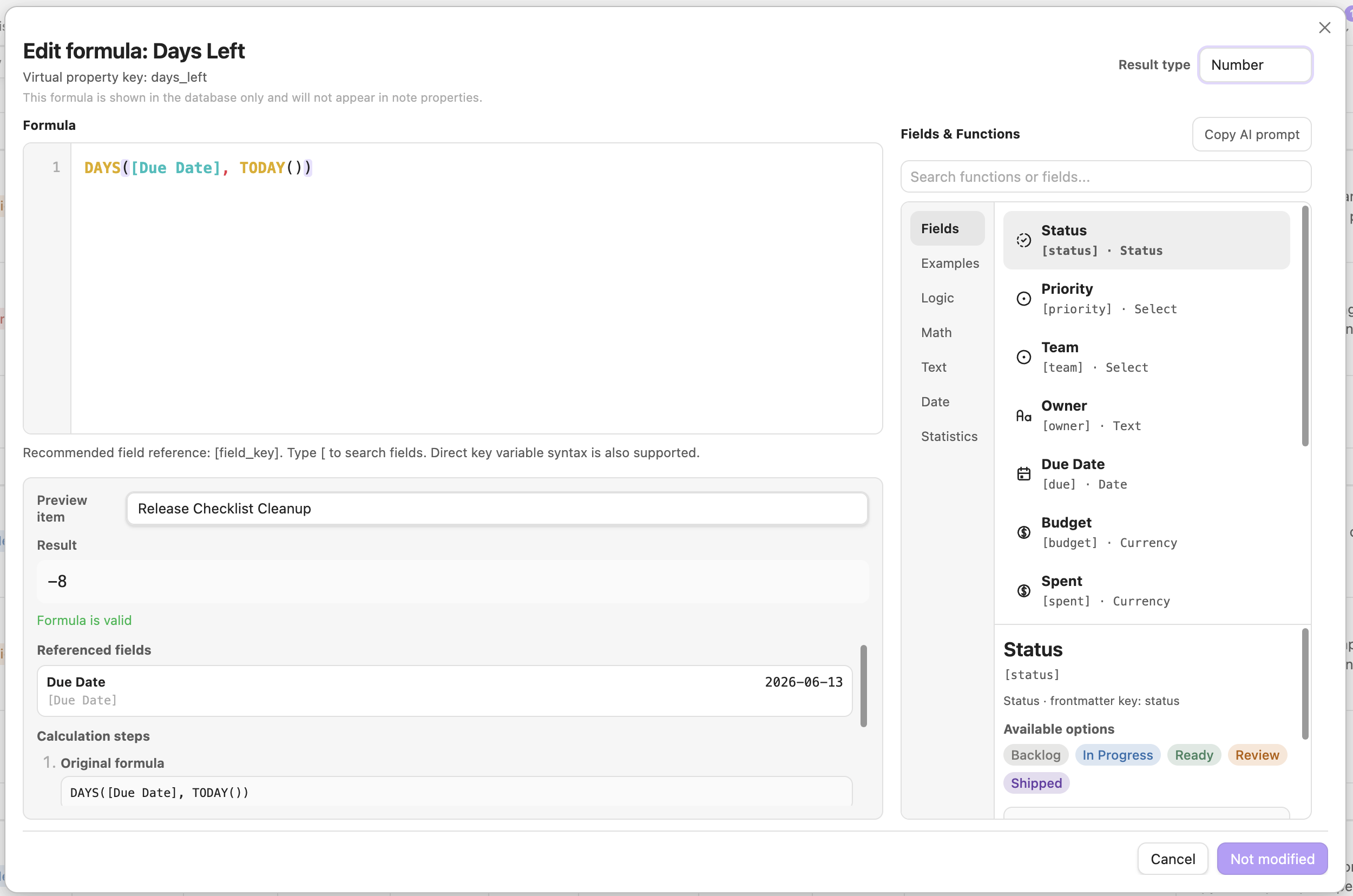
Computed fields support bracket references such as `[Property name]`, as well as `field(name)` references. Formulas are evaluated as JavaScript expressions with a set of built-in helpers for note databases.
Common helpers:
| Function | Description |
| --- | --- |
| `today()` | Current date |
| `now()` | Current date and time |
| `days(dateA, dateB)` | Days between two dates |
| `daysFromNow(date)` | Days from today |
| `addMonths(date, n)` | Add n months to a date |
| `addYears(date, n)` | Add n years to a date |
| `round(n, d)` | Round a number |
| `floor(n)`, `ceil(n)` | Math rounding helpers |
| `max(a, b)`, `min(a, b)` | Compare values |
| `concat(a, b, ...)` | Join text |
| `if(condition, thenValue, elseValue)` | Conditional logic |
The formula editor shows available fields, function lists, examples, live preview results, referenced values, and step-by-step substitutions, so users do not have to write formulas in a blank textarea. It also includes a copyable AI prompt helper for sending the current formula draft, fields, and function context to an assistant.
Computed values refresh for display whenever a database view is opened. In the database settings, choose whether those values remain display-only virtual properties, are written back to frontmatter automatically, or are written back only when you click the manual sync button.
## Import And Export
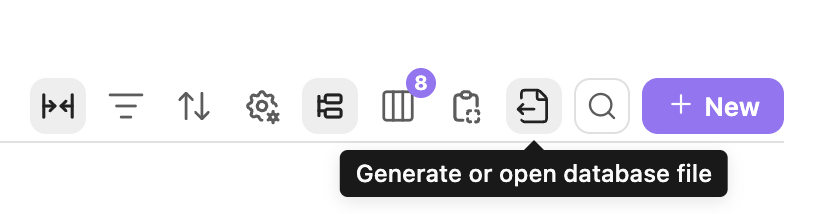
Note Database can export the current database as a CSV + Markdown ZIP, and import the same format back. Export lets you choose the ZIP location, can optionally include frontmatter in the Markdown files, and the ZIP also includes database metadata to help restore properties, views, and configuration on re-import.
If imported CSV + Markdown files do not include database metadata, the plugin infers property types from CSV content and opens a confirmation dialog so you can review dates, numbers, checkboxes, select, multi-select, status fields, and other types before import.
The toolbar export menu can also copy the current view as embed code, CSV, or a Markdown table.

## `.base` File Conversion
If you already use Obsidian Bases, you can convert the current `.base` file into a Note Database database from the command palette. Conversion tries to preserve source rules, column order, column widths, sorting, grouping, and cards/list view information.
Source filters are converted without flattening nested `AND`, `OR`, or `NOT` groups. Simple rules are editable as fields and operators; richer Bases filter statements are preserved as editable expression rules and evaluated with the built-in compatibility layer. Unsupported plugin-specific expressions are not silently simplified.
Before conversion finishes, the plugin opens a property confirmation dialog so you can review field types and adjust dates, numbers, checkboxes, select, multi-select, status fields, and other properties.
## Installation
### From Obsidian Community Plugins
1. Open Settings -> Community Plugins.
2. Search for `Note Database`.
3. Install and enable the plugin.
### Manual Installation
1. Download `main.js`, `styles.css`, and `manifest.json` from the latest release.
2. Create `.obsidian/plugins/note-database/` in your vault.
3. Copy the three files into that folder.
4. Enable the plugin in Settings -> Community Plugins.
## Development
```bash
npm install
npm run dev
npm run build
```
## Privacy
Note Database runs locally inside Obsidian. It does not send vault content, metadata, formulas, or settings to any external service. See [PRIVACY.md](PRIVACY.md).
## Support
If Note Database helps you, a star or donation helps support continued development:

 ## License
MIT
## License
MIT