# Daily Report
An Obsidian plugin that extends the native Daily Notes plugin with:
- **Dynamic directory paths** - Generate daily note folders using Luxon date formats
- **Template rendering** - Use templates with date placeholders
- **Task carry-over** - Automatically carry over incomplete tasks from yesterday
- **Section-level confirmation** - Confirm whether requirements are closed even when all tasks are done

 ## Installation
1. Copy the `obsidian-daily-report` folder to your vault's `.obsidian/plugins/` directory
2. Enable the plugin in Obsidian (Settings > Third-party plugins > Community plugins > Enable Daily Report)
3. Configure the plugin settings (directory format, filename format, template path)
## Configuration
### Daily Path Format
Uses Luxon date format strings with `/` to separate directory levels:
```
YYYY/MM/[W]WW/MMDD
```
Example: `2026/09/[W]39/0922` → creates `2026/09/第39周/0922.md`
Common formats:
- `YYYY` - 4-digit year
- `MM` - Month (01-12)
- `DD` - Day (01-31)
- `WW` - Week number (01-53)
- `GGGG` - ISO year
- `cccc` - Weekday name (Monday, Tuesday...)
- `[text]` - Literal text in square brackets
### Template Path
Path to the template file in your vault, e.g.:
```
Templates/Daily Report.md
```
### Date Placeholders
Templates support three date placeholder formats:
| Format | Example | Output |
|--------|---------|--------|
| `**date:FORMAT**` | `**date:YYYY-MM-DD**` | `2024-01-15` |
| `${date:FORMAT}` | `${date:cccc}` | `Monday` |
| `{{date:FORMAT}}` | `{{date:GGGG-[W]WW}}` | `2024-[W]03` |
### Options
- **Confirm before create** - Show confirmation modal before creating daily note
- **Delete completed tasks** - Remove completed tasks (`- [x]`) from yesterday's note when carrying over
## Template Structure
The plugin uses a hierarchical template structure:
```markdown
## Fixed Section (template, daily)
### Specific Requirement (may carry over)
#### Sub-task/Item (clear boundary)
- Content...
- [ ] Optional task marker
```
### Section Levels
| Level | Purpose | Carry-over |
|-------|---------|------------|
| `##` | Fixed template sections | Never carried over |
| `###` | Specific requirements | May carry over |
| `####` | Sub-tasks/Items | Part of parent section |
### Status Markers
Mark section status with HTML comments or strikethrough:
| Status | Marker | Carry-over |
|--------|--------|------------|
| **Pending** (in progress) | `` or no marker | Yes |
| **Verifying** (verifying) | `` | Yes |
| **Done** (completed) | `~~Title~~` or `` | No |
| **Cancelled** (dropped) | `` | No |
**Note**: Strikethrough (`~~title~~`) can only represent "done", not "cancelled". Use HTML comment for cancelled.
### Auto-completion
If all `####` sub-tasks under a `###` requirement are completed, the requirement is automatically marked as done and not carried over.
## Usage
### Create Today's Daily Report
1. Open command palette (Ctrl/Cmd+P)
2. Type "Create today's daily report"
3. Press Enter
### Workflow
```
Create Today's Daily Report
│
├─ Read template → Render date placeholders → Generate today's note
│
├─ Read yesterday's note
│ │
│ ├─ Parse sections and sub-tasks
│ │
│ └─ Check section status
│ │
│ ├─ All #### done → Auto-mark as done, skip
│ ├─ Has pending #### → Ask user for confirmation
│ ├─ Already done/cancelled → Skip
│ └─ Show confirmation modal
│
├─ Apply status decisions to yesterday's note
│
├─ Carry over pending sections to today's note
│
└─ Save and open today's note
```
### Carry-over Rules
1. **Sections with `done` or `cancelled` status**: Not carried over
2. **Sections with `pending` or `verifying` status**:
- All `####` sub-tasks completed → Auto-mark as done, not carried over
- Has incomplete `####` sub-tasks → Carried over
3. **Section matching**:
- If today's template has matching section: Insert under that section
- If no matching section: Append to end of note
## Status Flow
```
┌─────────────────────────────────────┐
│ │
▼ │
┌──────────┐ ┌──────────┐ ┌──────────┐
│ Pending │───▶│ Verifying│───▶│ Done │
│(进行中) │◀───│ (验证中) │◀───│ (已完成) │
└──────────┘ └──────────┘ └──────────┘
│ │ │
│ │ │
▼ ▼ │
┌──────────┐ ┌──────────┐ │
│Cancelled │ │Cancelled │ │
│(已取消) │ │ (已取消) │ │
└──────────┘ └──────────┘ │
│ │
└─────────────────────────────────────┘
```
All statuses can be switched back and forth.
## Example Templates
### Default Template (English)
```markdown
# Daily Report - **date:YYYY-MM-DD**
## feature
### item-1
- [ ] task-1
- [ ] task-2
### item-2
- [ ] task-1
- [ ] task-2
## bugfix
### item-1
- [ ] task-1
- [ ] task-2
## summary
### item-1
- content
```
### Example Template (Chinese)
```markdown
# 日报 - **date:YYYY-MM-DD**
## 今日AI
### item-1
- [ ] 任务1
- [ ] 任务2
### item-2
- [ ] 任务1
- [ ] 任务2
## 外部支持
### item-1
- [ ] 任务1
- [ ] 任务2
### item-2
- [ ] 任务1
- [ ] 任务2
## 重要迭代
### item-1
- [ ] 任务1
- [ ] 任务2
### item-2
- [ ] 任务1
- [ ] 任务2
## 待修复的问题
### item-1
- [ ] 任务1
- [ ] 任务2
### item-2
- [ ] 任务1
- [ ] 任务2
## 每日总结
### item-1
- 内容
```
## Plugin Settings Screenshot
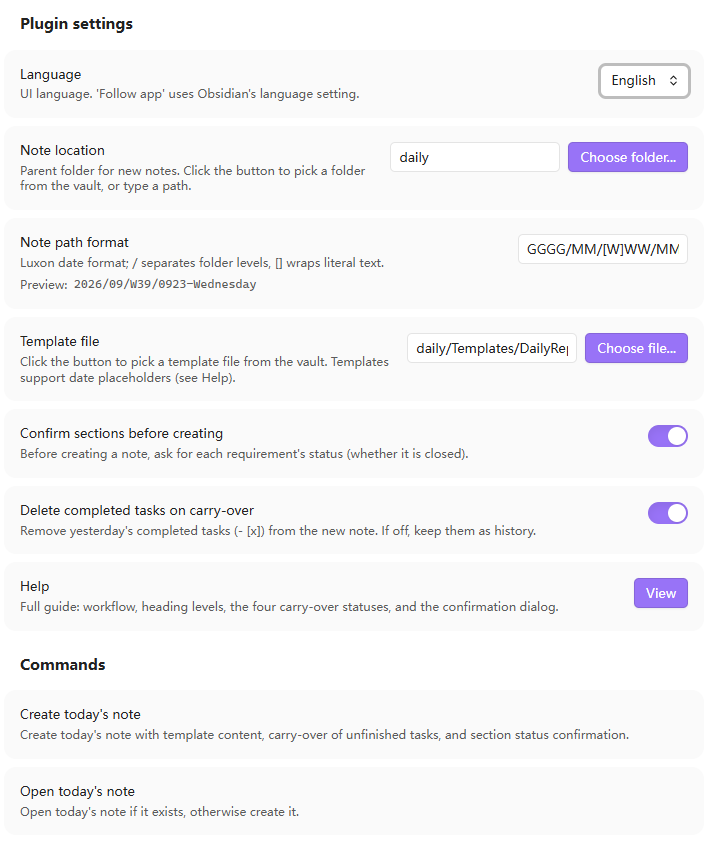
*Settings page showing daily path format, template path, and options*
## Development
```bash
# Install dependencies
pnpm install
# Development mode (watch)
pnpm dev
# Production build
pnpm build
# Type check
pnpm typecheck
# Run tests
pnpm test
# Lint
pnpm lint
```
## Dependencies
- `obsidian` - Obsidian plugin API (dev reference only)
- `luxon` - Date handling (bundled with Obsidian, no extra install needed)
- `esbuild` - Build tool
- `typescript` - Type safety
## License
MIT
## Installation
1. Copy the `obsidian-daily-report` folder to your vault's `.obsidian/plugins/` directory
2. Enable the plugin in Obsidian (Settings > Third-party plugins > Community plugins > Enable Daily Report)
3. Configure the plugin settings (directory format, filename format, template path)
## Configuration
### Daily Path Format
Uses Luxon date format strings with `/` to separate directory levels:
```
YYYY/MM/[W]WW/MMDD
```
Example: `2026/09/[W]39/0922` → creates `2026/09/第39周/0922.md`
Common formats:
- `YYYY` - 4-digit year
- `MM` - Month (01-12)
- `DD` - Day (01-31)
- `WW` - Week number (01-53)
- `GGGG` - ISO year
- `cccc` - Weekday name (Monday, Tuesday...)
- `[text]` - Literal text in square brackets
### Template Path
Path to the template file in your vault, e.g.:
```
Templates/Daily Report.md
```
### Date Placeholders
Templates support three date placeholder formats:
| Format | Example | Output |
|--------|---------|--------|
| `**date:FORMAT**` | `**date:YYYY-MM-DD**` | `2024-01-15` |
| `${date:FORMAT}` | `${date:cccc}` | `Monday` |
| `{{date:FORMAT}}` | `{{date:GGGG-[W]WW}}` | `2024-[W]03` |
### Options
- **Confirm before create** - Show confirmation modal before creating daily note
- **Delete completed tasks** - Remove completed tasks (`- [x]`) from yesterday's note when carrying over
## Template Structure
The plugin uses a hierarchical template structure:
```markdown
## Fixed Section (template, daily)
### Specific Requirement (may carry over)
#### Sub-task/Item (clear boundary)
- Content...
- [ ] Optional task marker
```
### Section Levels
| Level | Purpose | Carry-over |
|-------|---------|------------|
| `##` | Fixed template sections | Never carried over |
| `###` | Specific requirements | May carry over |
| `####` | Sub-tasks/Items | Part of parent section |
### Status Markers
Mark section status with HTML comments or strikethrough:
| Status | Marker | Carry-over |
|--------|--------|------------|
| **Pending** (in progress) | `` or no marker | Yes |
| **Verifying** (verifying) | `` | Yes |
| **Done** (completed) | `~~Title~~` or `` | No |
| **Cancelled** (dropped) | `` | No |
**Note**: Strikethrough (`~~title~~`) can only represent "done", not "cancelled". Use HTML comment for cancelled.
### Auto-completion
If all `####` sub-tasks under a `###` requirement are completed, the requirement is automatically marked as done and not carried over.
## Usage
### Create Today's Daily Report
1. Open command palette (Ctrl/Cmd+P)
2. Type "Create today's daily report"
3. Press Enter
### Workflow
```
Create Today's Daily Report
│
├─ Read template → Render date placeholders → Generate today's note
│
├─ Read yesterday's note
│ │
│ ├─ Parse sections and sub-tasks
│ │
│ └─ Check section status
│ │
│ ├─ All #### done → Auto-mark as done, skip
│ ├─ Has pending #### → Ask user for confirmation
│ ├─ Already done/cancelled → Skip
│ └─ Show confirmation modal
│
├─ Apply status decisions to yesterday's note
│
├─ Carry over pending sections to today's note
│
└─ Save and open today's note
```
### Carry-over Rules
1. **Sections with `done` or `cancelled` status**: Not carried over
2. **Sections with `pending` or `verifying` status**:
- All `####` sub-tasks completed → Auto-mark as done, not carried over
- Has incomplete `####` sub-tasks → Carried over
3. **Section matching**:
- If today's template has matching section: Insert under that section
- If no matching section: Append to end of note
## Status Flow
```
┌─────────────────────────────────────┐
│ │
▼ │
┌──────────┐ ┌──────────┐ ┌──────────┐
│ Pending │───▶│ Verifying│───▶│ Done │
│(进行中) │◀───│ (验证中) │◀───│ (已完成) │
└──────────┘ └──────────┘ └──────────┘
│ │ │
│ │ │
▼ ▼ │
┌──────────┐ ┌──────────┐ │
│Cancelled │ │Cancelled │ │
│(已取消) │ │ (已取消) │ │
└──────────┘ └──────────┘ │
│ │
└─────────────────────────────────────┘
```
All statuses can be switched back and forth.
## Example Templates
### Default Template (English)
```markdown
# Daily Report - **date:YYYY-MM-DD**
## feature
### item-1
- [ ] task-1
- [ ] task-2
### item-2
- [ ] task-1
- [ ] task-2
## bugfix
### item-1
- [ ] task-1
- [ ] task-2
## summary
### item-1
- content
```
### Example Template (Chinese)
```markdown
# 日报 - **date:YYYY-MM-DD**
## 今日AI
### item-1
- [ ] 任务1
- [ ] 任务2
### item-2
- [ ] 任务1
- [ ] 任务2
## 外部支持
### item-1
- [ ] 任务1
- [ ] 任务2
### item-2
- [ ] 任务1
- [ ] 任务2
## 重要迭代
### item-1
- [ ] 任务1
- [ ] 任务2
### item-2
- [ ] 任务1
- [ ] 任务2
## 待修复的问题
### item-1
- [ ] 任务1
- [ ] 任务2
### item-2
- [ ] 任务1
- [ ] 任务2
## 每日总结
### item-1
- 内容
```
## Plugin Settings Screenshot

*Settings page showing daily path format, template path, and options*
## Development
```bash
# Install dependencies
pnpm install
# Development mode (watch)
pnpm dev
# Production build
pnpm build
# Type check
pnpm typecheck
# Run tests
pnpm test
# Lint
pnpm lint
```
## Dependencies
- `obsidian` - Obsidian plugin API (dev reference only)
- `luxon` - Date handling (bundled with Obsidian, no extra install needed)
- `esbuild` - Build tool
- `typescript` - Type safety
## License
MIT