# Copy This Note
Copy a whole Obsidian note to the clipboard as Markdown, without having to select all — optionally including the filename and Properties (YAML frontmatter).
- Copy from the command palette or context menus (file explorer / editor)
- Copy an unopened note from the file explorer context menu
- 4 built-in presets (enable only the ones you want)
- Works on desktop and mobile
- Fully offline (no network access, no telemetry)
- Requires Obsidian 1.8.0+
- Open source (MIT)
## Context menu examples
| Desktop |
Mobile |
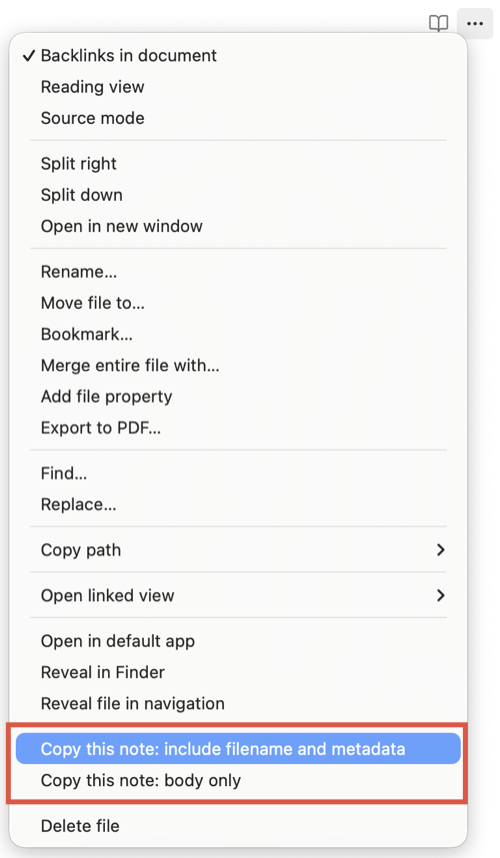 |
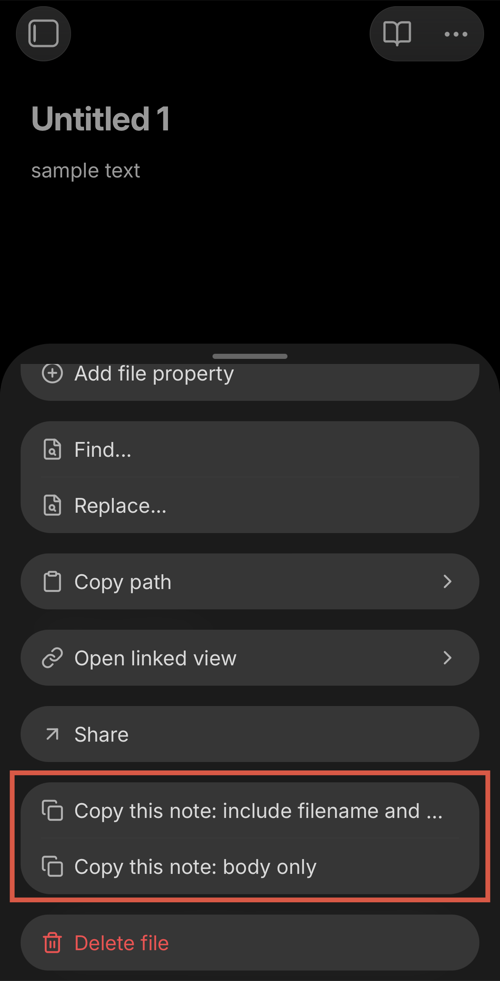 |
## When it's useful
- You want to paste a whole note into another app as Markdown (email, docs, issue tracker, chat, etc.)
- You want to share or archive a note *with* its Properties/frontmatter
- You want a quick "export to clipboard" without creating files
## How to use
### Command palette
Run one of these commands:
- Include filename and metadata
- Include filename
- Include metadata
- Body only
### Context menus
The same presets are available from context menus:
- File explorer: right-click a note → `Copy this note: ...`
- Editor: right-click inside the editor → `Copy this note: ...`
### Tip: add a hotkey
If you want a one-keystroke workflow, assign your own hotkey:
Settings → Hotkeys → search for one of the preset names.
## Presets (what gets copied)
| Preset | Includes | Example output (top) |
| --- | --- | --- |
| Include filename and metadata | Filename + frontmatter + body | `Note.md` then `---` |
| Include filename | Filename + body | `Note.md` then body |
| Include metadata | Frontmatter + body | `---` then body |
| Body only | Body only | body |
## Output format
- If the filename is included, it's added as the **first line**, followed by a **blank line**.
- If metadata is included, the note's YAML frontmatter is copied **as-is**.
Example note (`My note.md`):
```md
---
tags: [project-x, meeting]
created: 2026-01-18
---
This is the body.
```
### Include filename and metadata
```md
My note.md
---
tags: [project-x, meeting]
created: 2026-01-18
---
This is the body.
```
### Include filename
```md
My note.md
This is the body.
```
### Include metadata
```md
---
tags: [project-x, meeting]
created: 2026-01-18
---
This is the body.
```
### Body only
```md
This is the body.
```
## Notes & FAQ
### What does "metadata" mean here?
In this plugin, **metadata = YAML frontmatter (Obsidian Properties)**.
- If you store tags in frontmatter (`tags:`), those tags are included when metadata is included.
- Inline tags like `#tag` are part of the **body**, so they're copied in all presets that include the body.
- The plugin does not generate extra metadata from Obsidian (for example, backlinks, file stats, or cached tag lists).
### Does it copy my unsaved edits?
It copies the note content from your vault (**saved content**) for stability. If you want to include your latest edits, save the note first.
### Can I remove `.md` from the filename line?
Yes. In settings, you can choose whether to keep the file extension when the filename is included.
## Settings
- Enable/disable each preset (to keep the command palette and menus clean)
- Include file extension in the filename header (`.md`)
## Installation
### Install from Community Plugins
Settings → Community plugins → Browse → search "Copy This Note" → Install → Enable.
### Manual install
Download the latest release and copy `manifest.json` and `main.js` into:
`/.obsidian/plugins/copy-this-note/`
## Privacy & security (Obsidian policy disclosures)
- No network access
- No telemetry
- No ads
- No account required
- No paid features
- No external file system access (reads only from the current vault via the Obsidian API)
- Does not modify your notes (read-only access)
## Support
If you find this helpful, you can support development:
- Buy me a coffee: https://buymeacoffee.com/mssoft
## License
MIT. See `LICENSE`.
## 日本語
### 概要
Obsidian のノートを Markdown としてクリップボードにコピーするプラグインです。都度全選択をする手間なしに、ファイル名や Properties(YAML frontmatter)を含めた形でコピーできます。
- コマンドパレット / コンテキストメニューから実行
- 未オープンのノートもファイルツリーからコピー可能
- 用途別プリセット(表示/非表示を設定で切り替え)
- オフライン動作(ネットワーク通信なし・テレメトリなし)
- Obsidian 1.8.0+ 対応
- OSS(MIT)
### コンテキストメニューの例
| デスクトップ |
モバイル |
|
|
### こんなときに便利
- ノートを Markdown のまま他のアプリへ貼り付けたい(メール、ドキュメント、チケット、チャットなど)
- Properties/frontmatter を含めてノートを共有・保存したい
- ファイルを書き出さずに、手早く「クリップボードにエクスポート」したい
### 使い方
#### コマンドパレット
以下のコマンドを実行します(表記はプラグインのコマンド名そのままです):
- Include filename and metadata
- Include filename
- Include metadata
- Body only
#### コンテキストメニュー
同じプリセットをコンテキストメニューから実行できます:
- ファイルエクスプローラ: ノートを右クリック → `Copy this note: ...`
- エディタ: エディタ内で右クリック → `Copy this note: ...`
#### ヒント: ホットキーを割り当てる
自分用のホットキーを割り当てると 1 キーストロークで使えます:
設定 → ホットキー → プリセット名で検索
### プリセット(コピーされる内容)
| プリセット | 含まれるもの | 出力例(冒頭) |
| --- | --- | --- |
| Include filename and metadata | ファイル名 + frontmatter + 本文 | `Note.md` の後に `---` |
| Include filename | ファイル名 + 本文 | `Note.md` の後に本文 |
| Include metadata | frontmatter + 本文 | `---` の後に本文 |
| Body only | 本文のみ | 本文 |
### 出力形式
- ファイル名を含める場合、**1 行目**にファイル名を追加し、その後に**空行**を 1 行入れます。
- metadata を含める場合、ノート先頭の YAML frontmatter を **そのまま** コピーします。
例(`My note.md`):
```md
---
tags: [project-x, meeting]
created: 2026-01-18
---
This is the body.
```
#### Include filename and metadata
```md
My note.md
---
tags: [project-x, meeting]
created: 2026-01-18
---
This is the body.
```
#### Include filename
```md
My note.md
This is the body.
```
#### Include metadata
```md
---
tags: [project-x, meeting]
created: 2026-01-18
---
This is the body.
```
#### Body only
```md
This is the body.
```
### よくある質問
#### このプラグインでいう "metadata" とは?
このプラグインでは、**metadata = YAML frontmatter(Obsidian Properties)** です。
- frontmatter に `tags:` を保存している場合、metadata を含めると tags もコピーされます。
- `#tag` のようなインラインタグは**本文**の一部なので、本文を含むプリセットではコピーされます。
- バックリンクやファイル情報など、Obsidian 側の情報を追加生成してコピーすることはありません。
#### 未保存の編集内容もコピーされますか?
安定性のため Vault の内容(**保存済み内容**)をコピーします。最新の編集内容を含めたい場合は、先に保存してください。
#### ファイル名行の `.md` を消せますか?
はい。設定で、ファイル名を含める場合に拡張子を残すかどうかを切り替えられます。
### 設定
- 各プリセットの表示/非表示(コマンドパレットやメニューをスッキリさせる)
- ファイル名ヘッダーに拡張子(`.md`)を含めるかどうか
### インストール
#### Community Plugins からインストール
設定 → Community plugins → Browse → "Copy This Note" を検索 → Install → Enable
#### 手動インストール
最新のリリースをダウンロードし、`manifest.json` と `main.js` を以下へコピーします:
`/.obsidian/plugins/copy-this-note/`
### プライバシーと安全性(ポリシー開示)
- ネットワーク通信なし
- テレメトリなし
- 広告なし
- アカウント不要
- 有料機能なし
- 外部ファイルアクセスなし(Obsidian API 経由で Vault 内のノートを読むだけ)
- ノートを書き換えません(読み取りのみ)
### サポート
よければ開発を支援してください:
- Buy me a coffee: https://buymeacoffee.com/mssoft
### ライセンス
MIT. `LICENSE` を参照してください。