# Link Picker
[](https://www.buymeacoffee.com/mnaoumov) [](https://github.com/mnaoumov/obsidian-link-picker/releases) [](https://github.com/mnaoumov/obsidian-link-picker/releases) [](https://github.com/mnaoumov/obsidian-link-picker)
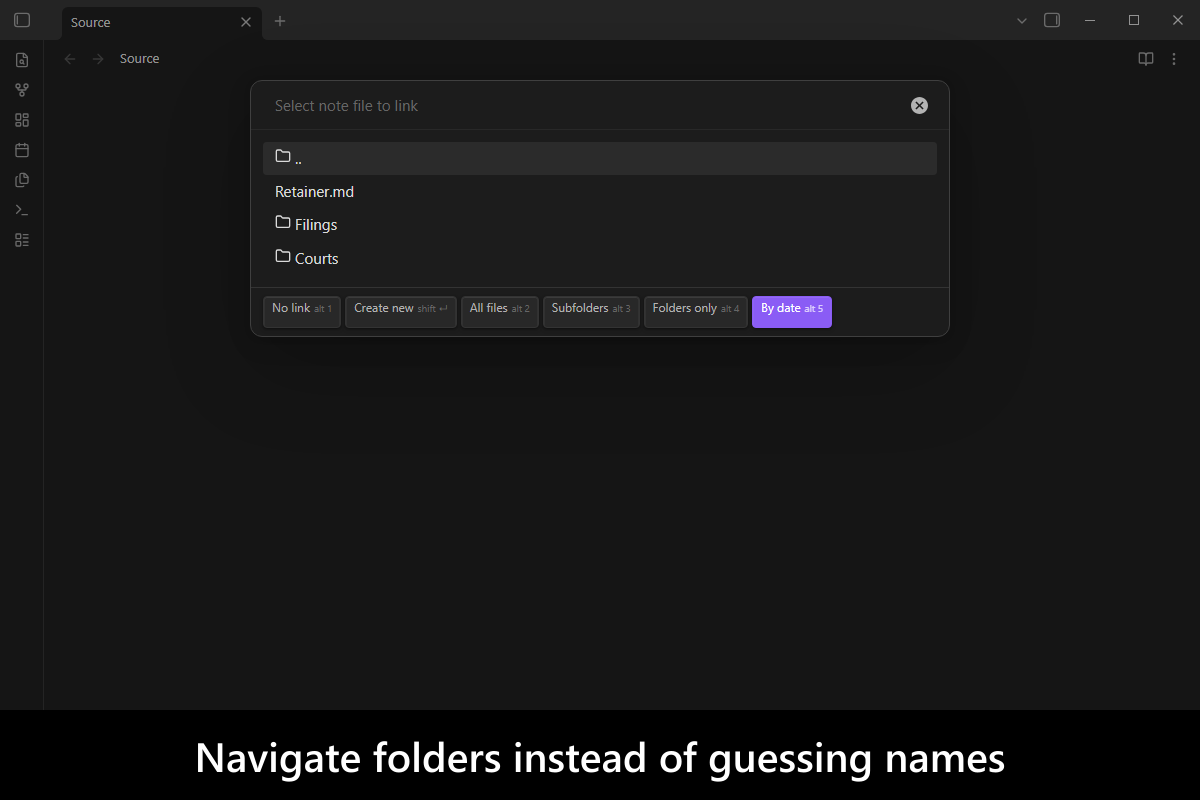
Obsidian's own link autocomplete searches the whole vault and ranks it fuzzily, which is exactly wrong when you know the link belongs in one folder and you want the same note to come first every time. This plugin is a link picker you can point at a folder and then **navigate** — pick a folder to descend into it, pick `..` to come back out — with a ranking that is deterministic rather than fuzzy: an exact name beats a prefix, which beats a path match, which beats a scattered word match.
It is also callable. The picker returns a **string**, so a template or a script can ask for a link and drop the answer straight into a property value.
More screenshots
## Demo vault
**The documentation is a demo vault.** Every feature has a note that explains what it does and how to try it.
**[Start reading here](<./demo-vault/00 Start.md>)** — it is plain markdown, so it works on GitHub with nothing installed.
A copy of the vault ships with every release. You can access it via any of the following:
1. Running the **Link Picker: Open demo vault** command.
2. Downloading `link-picker-demo-vault.zip` from the [Releases](https://github.com/mnaoumov/obsidian-link-picker/releases). It unzips into a single `link-picker-demo-vault-` folder.
3. Browsing its source in [`demo-vault/`](./demo-vault/README.md) in this repository.
## What it does
- **Navigate instead of guessing** — pick a folder to descend into it and `..` to come back out, so the list is one folder's contents rather than the whole vault. [02 Navigating folders](<./demo-vault/02 Navigating folders.md>)
- **A ranking you can predict** — an exact name beats a prefix, which beats a path match, which beats a scattered one, so the same query puts the same note first every time. [03 Ranking](<./demo-vault/03 Ranking.md>)
- **Aliases and folder notes are names too** — a note aliased three ways offers three rows, and a folder's alias lives on its folder note, read from your existing [`folder-notes`](https://github.com/LostPaul/obsidian-folder-notes) setup rather than configured again here. [03 Ranking](<./demo-vault/03 Ranking.md>)
- **Named pickers** — a folder you link into constantly becomes its own command, already rooted there, with its own prefix, suffix and placeholder. [04 Named pickers](<./demo-vault/04 Named pickers.md>)
- **Callable from a template or a script** — the picker resolves with the link as a **string**, so the answer can drop straight into a property value instead of being typed at a cursor. [06 Calling it from a script](<./demo-vault/06 Calling it from a script.md>)
## Picking a link
Run **Link Picker: Insert link...** in an editor. Any selected text seeds the query and is replaced by the link you choose.
Inside the picker, `Enter` on a folder descends into it and `Enter` on `..` goes back up.
Everything else lives in the strip along the bottom, as a control you click and a hotkey you can press instead. Both routes run the same thing, and the controls are what make the picker usable on a phone, where there is no `Alt` key at all.
| Control | Key | What it does |
| --- | --- | --- |
| **No link** | `Alt + 1` | Choose nothing, and insert an empty link |
| **Create new** | `Shift + Enter` | Create a note with the name you typed, and link to it |
| **All files** | `Alt + 2` | Show all files, not only markdown |
| **Subfolders** | `Alt + 3` | Include subfolder contents |
| **Folders only** | `Alt + 4` | Show only folders |
| **By date** | `Alt + 5` | Lead with the most recently updated note (on by default) |
A toggle that is on is filled in, so the strip says what the picker is currently doing. **All files** and **Subfolders** grey out while **Folders only** is on, since between them they would empty the list.
## Ranking
With a query typed, items are ranked in tiers, and only within a tier does anything else break the tie:
1. The name matches exactly
2. The name starts with the query
3. The path contains the query (only when the query itself contains a `/`)
4. Every query term equals some part of the path
5. Every query term starts some part of the path
6. Every query term appears somewhere in the path
7. Every query term's characters appear somewhere in the path in order — only when `Segment matching` is `Fuzzy`
Aliases count as names, so a note with three aliases offers three rows that rank separately. Inside a tier, folders come first; then recently opened files, then updated date, then shallower paths, then alphabetical.
The seventh tier is what `Segment matching` adds, and it is deliberately the weakest: turning it on changes what the picker **finds**, never the order it finds it in. `Brv` reaches `Bravo` without displacing anything you spelled out.
With no query typed, `..` and the current folder's own folder note hold the top two rows, so navigating out never means scrolling.
## Named pickers
If you link into one folder constantly, navigating there every time is the wrong shape. Add a **picker** in the settings and it becomes its own command, already rooted where you wanted to be — a vault that files people under `People` and courts under `Legal` gets two commands rather than one that asks first.
Each picker carries a name, a folder, whether it starts with subfolders included, a prefix and suffix, a placeholder, and whether it offers to create notes. The prefix and suffix wrap the link, so a prefix of `"Person: "` is what makes the result drop straight into a note's property list.
A picker's command is identified by an id minted when the picker is created, not by its name, so renaming a picker keeps whatever hotkey you bound to it.
Anything richer than those fields is code rather than configuration — validating a name, deriving a folder from it, seeding frontmatter. That is what the callable API is for.
## Folder notes
The picker understands folder notes. A folder's note is not offered under its own file name — `Foo/Foo.md` says nothing that the `Foo` row did not already say, and choosing the folder is how you reach it. A folder note's aliases are still offered, so `Foo/Foo.md` aliased `The Foo project` is reachable under that name.
Where that note lives is read from the installed [`folder-notes`](https://github.com/LostPaul/obsidian-folder-notes) plugin by default, so a vault that already has folder notes needs no configuration. `Folder note location` in the settings overrides it.
## Settings
- **Pickers** — the named, preconfigured pickers, each of which becomes its own command.
- **Folder note location** — `Auto` (read the `folder-notes` plugin), inside the folder, beside the folder, or none.
- **Folder note name** — what the note is called, when not on `Auto`.
- **Excluded paths** — substrings; a path containing any of them is hidden. Point this at your attachment folder.
- **Segment matching** — `Substring` (the default: a query term must appear inside a path part as one unbroken run) or `Fuzzy` (its characters need only appear in order, so `Brv` finds `Bravo`). Finding more, never reordering.
- **Updated property** — the frontmatter property holding a note's last-updated timestamp, used by the sort-by-updated ordering. Empty falls back to the file's modification time.
- **Title property** — the frontmatter property holding a note's display title, used as the alias of a note the picker creates. Empty falls back to the file name.
## For plugin developers
The picker is callable from another plugin or a script, and that is where this plugin came from: it is an extraction of a script whose every consumer was a Templater template writing a link into a property value. Those callers want the **string**, not an edit at a cursor, so the API is not an extra bolted onto a command — it is the other half of the plugin.
The types are in [`api.d.ts`](./api.d.ts) at the root of this repository, where every option is documented member by member. Copy that file into your own plugin: it imports from `obsidian` and nothing else, so it costs you no dependency on this plugin and none on `obsidian-dev-utils`.
The API is published through a cross-plugin API registry, keyed by the plugin id, version-negotiated, and revoked automatically when the plugin is disabled. The contract version is **`1.1.0`**, and it moves independently of the plugin's own version — pin a range against the contract, not against a release.
If your plugin already uses [`obsidian-dev-utils`](https://mnaoumov.dev/obsidian-dev-utils/guides/cross-plugin-apis/), `watchPluginApi` is the whole of it:
```typescript
import type { LinkPickerApi } from './api.d.ts';
import { watchPluginApi } from 'obsidian-dev-utils/obsidian/plugin/plugin-api';
const ref = watchPluginApi({
apiVersionRange: '^1',
app: this.app,
component: this,
pluginId: 'link-picker'
});
// `ref.value` is `null` until the plugin has loaded, and becomes non-null on its own.
const api = await ref.whenAvailable();
const link = await api.select({ folderPath: 'People', prefix: 'Person: ' });
// → 'Person: [[Ada Lovelace|Ada]]'
```
If it does not — and is not going to — you still need no dependency on anything. The registry, and the two events a plugin announces itself through, are a documented wire protocol reachable with the `obsidian` module alone; [Plugin API protocol](https://mnaoumov.dev/obsidian-dev-utils/guides/plugin-api-protocol/) is that route written out, and `api.d.ts` types it just as well, since nothing in that file imports the library either.
`select` resolves with the link text and **rejects** when the picker is dismissed — dismissing is the caller's cue that the user backed out, which is different from the empty string that `No link` returns. Every option is optional and anything omitted falls back to the settings above; three are worth knowing before you design around the API:
- **`createNote`** — called when the user picks `Create new`, and given the folder the picker is currently rooted at plus what they typed. This is the hook the whole API exists for: validating a name, deriving a subfolder from it, seeding frontmatter and applying a template are vault conventions, and none of them are expressible in settings. Without it the plugin creates an empty note.
- **`prefix`** and **`suffix`** wrap the link — a prefix of `"Person: "` produces `Person: [[Ada]]` — and **`shouldApplyPrefixSuffixWhenNoLinkSelected`** decides whether they are still emitted when the user presses `No link`. Off by default, so declining returns `''` rather than a `"Person: "` with nothing after it.
- **`sourcePathOrFile`** — the note the link is written INTO, which decides whether it comes out relative or absolute. Defaults to the active file, and worth passing explicitly when the note being written to is not the one Obsidian considers active — which is the case while a template renders a brand-new note.
[06 Calling it from a script](<./demo-vault/06 Calling it from a script.md>) in the demo vault has a runnable version of the above.
## Installation
The plugin is available in [the official Community Plugins repository](https://community.obsidian.md/plugins/link-picker).
### Beta versions
To install the latest beta release of this plugin (regardless if it is available in [the official Community Plugins repository](https://community.obsidian.md) or not), follow these steps:
1. Ensure you have the [BRAT plugin](https://community.obsidian.md/plugins/obsidian42-brat) installed and enabled.
2. Click [Install via BRAT](https://intradeus.github.io/http-protocol-redirector?r=obsidian://brat?plugin=https://github.com/mnaoumov/obsidian-link-picker).
3. An Obsidian pop-up window should appear. In the window, click the `Add plugin` button once and wait a few seconds for the plugin to install.
## Debugging
By default, debug messages for this plugin are hidden.
To show them, run the following command in the `DevTools Console`:
```js
window.DEBUG.enable('link-picker');
```
For more details, refer to the [documentation](https://mnaoumov.dev/obsidian-dev-utils/guides/debugging/).
## Changelog
All notable changes to this project will be documented in the [CHANGELOG](./CHANGELOG.md).
## Contributing
Contributions are welcome — see [CONTRIBUTING](./CONTRIBUTING.md) to get set up.
## Support
 ## My other Obsidian resources
[See my other Obsidian resources](https://github.com/mnaoumov/obsidian-resources).
## License
© [Michael Naumov](https://github.com/mnaoumov/)
## My other Obsidian resources
[See my other Obsidian resources](https://github.com/mnaoumov/obsidian-resources).
## License
© [Michael Naumov](https://github.com/mnaoumov/)


