# Advanced Markdown Export
[](https://www.buymeacoffee.com/mnaoumov) [](https://github.com/mnaoumov/obsidian-advanced-markdown-export/releases) [](https://github.com/mnaoumov/obsidian-advanced-markdown-export/releases) [](https://github.com/mnaoumov/obsidian-advanced-markdown-export)
Send someone a note and it arrives broken: the images are missing and every `[[link]]` is dead. Copying the whole folder over-shares, and copying just the `.md` under-shares. This plugin walks the note's dependencies for you and shows them as a tree of checkboxes, so you decide exactly what travels with it — then writes the bundle out with its links still working.
More screenshots
## Demo vault
**The documentation is a demo vault.** Every feature has a note that explains what it does, with a worked example graph you can export yourself.
**[Start reading here](<./demo-vault/00 Start.md>)** — it is plain markdown, so it works on GitHub with nothing installed.
A copy of the vault ships with every release. You can access it via any of the following:
1. Running the **Advanced Markdown Export: Open demo vault** command.
2. Downloading `advanced-markdown-export-demo-vault.zip` from the [Releases](https://github.com/mnaoumov/obsidian-advanced-markdown-export/releases). It unzips into a single `advanced-markdown-export-demo-vault-` folder.
3. Browsing its source in [`demo-vault/`](./demo-vault/README.md) in this repository.
## What it does
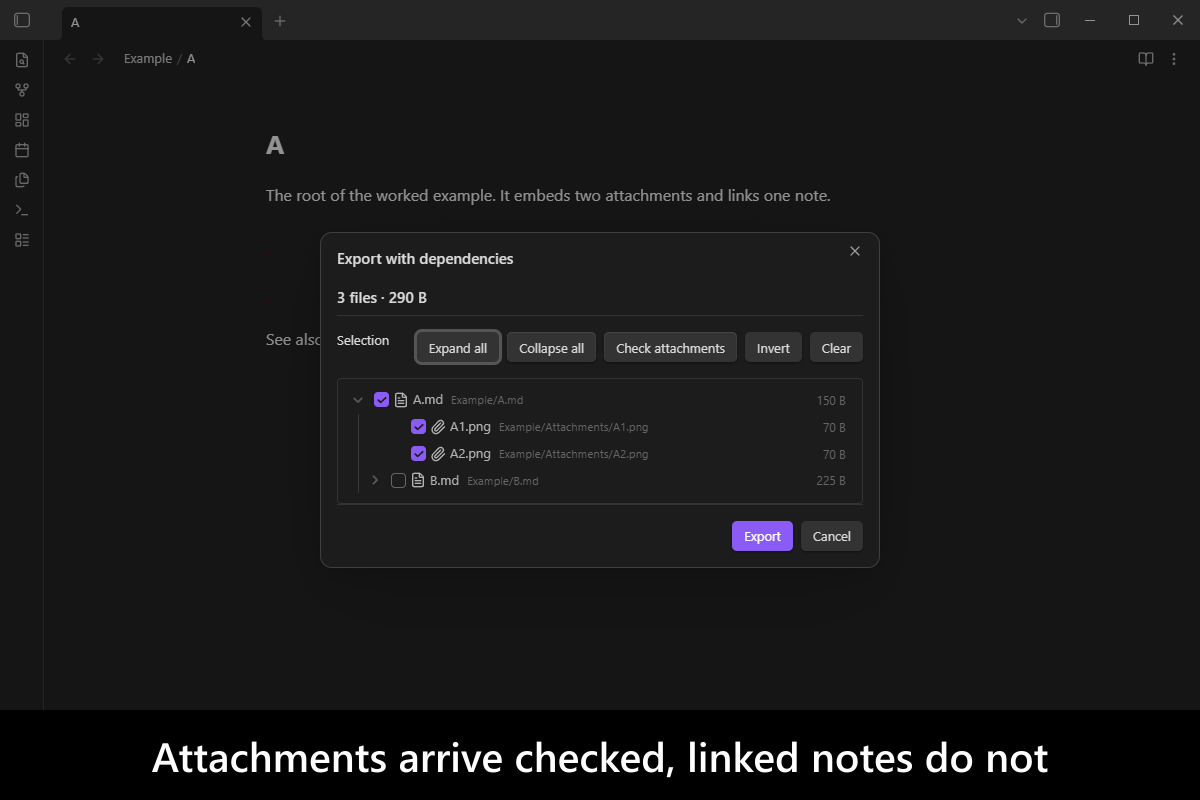
**Attachments and linked notes are not the same thing, so they do not get the same default.** An embedded image is part of the note; a linked note is a separate document you may or may not want to hand over. So attachments arrive **checked** and linked notes arrive **unchecked**:
```text
[x] A.md
[x] A1.jpg
[x] A2.jpg
[ ] B.md
```
**Depth is driven by your ticks, not by a number you guess up front.** Tick `B.md` and it expands, applying the same rule one level deeper — `B`'s attachments come in checked, `B`'s own linked notes do not:
```text
[x] A.md
[x] A1.jpg
[x] A2.jpg
[x] B.md
[x] B3.jpg
[x] B4.jpg
[ ] C.md
```
**The export has many roots.** Start from one note, from a multi-selection in the file explorer, or from a whole folder — every note in it becomes a root, and the tree becomes a forest.
**A running total, before you commit to it.** The dialog keeps a live file count and total size above the tree, so "is this export getting huge?" is answered while you are still ticking rather than after the bundle is written.
**Links that survive the trip.** The bundle keeps its vault-relative structure, so links between included files still resolve after extraction and two files with the same name cannot collide. Links to files you left out are handled by a policy you choose rather than silently breaking.
## Usage
- Right-click a note in the file explorer → **Export with dependencies**.
- Right-click a folder → every note in it becomes a root.
- Select several files, right-click → **Export with dependencies**.
- Command palette → **Export active note with its dependencies**.
On the desktop, **Export** opens a system directory picker, so the bundle can land anywhere — including outside your vault. On mobile there is no such picker, so it goes to a vault-relative folder instead. Either way, turning on **Create a ZIP archive** gives you a single `.zip` rather than a folder.
## Installation
The plugin is available in [the official Community Plugins repository](https://community.obsidian.md/plugins/advanced-markdown-export).
### Beta versions
To install the latest beta release of this plugin (regardless if it is available in [the official Community Plugins repository](https://community.obsidian.md) or not), follow these steps:
1. Ensure you have the [BRAT plugin](https://community.obsidian.md/plugins/obsidian42-brat) installed and enabled.
2. Click [Install via BRAT](https://intradeus.github.io/http-protocol-redirector?r=obsidian://brat?plugin=https://github.com/mnaoumov/obsidian-advanced-markdown-export).
3. An Obsidian pop-up window should appear. In the window, click the `Add plugin` button once and wait a few seconds for the plugin to install.
## Debugging
By default, debug messages for this plugin are hidden.
To show them, run the following command in the `DevTools Console`:
```js
window.DEBUG.enable('advanced-markdown-export');
```
For more details, refer to the [documentation](https://mnaoumov.dev/obsidian-dev-utils/guides/debugging/).
## Changelog
All notable changes to this project will be documented in the [CHANGELOG](./CHANGELOG.md).
## Contributing
Contributions are welcome — see [CONTRIBUTING](./CONTRIBUTING.md) to get set up.
## Support
 ## My other Obsidian resources
[See my other Obsidian resources](https://github.com/mnaoumov/obsidian-resources).
## License
© [Michael Naumov](https://github.com/mnaoumov/)
## My other Obsidian resources
[See my other Obsidian resources](https://github.com/mnaoumov/obsidian-resources).
## License
© [Michael Naumov](https://github.com/mnaoumov/)


