# Shamsi Date Converter Plugin for Obsidian
Automatically convert Gregorian dates to Shamsi (Jalali/Persian) dates in your Obsidian notes. Perfect for tracking movie watch dates, reading logs, or any time-based records with both start and end dates!
## Features
- **✨ Multiple Date Pairs**: Support for start/end dates or any custom date property pairs
- **🔄 Automatic Conversion**: Automatically adds Shamsi dates when you add Gregorian date properties
- **♻️ Automatic Updates**: When you change source dates, Shamsi dates update automatically
- **⚙️ Customizable Mappings**: Add, edit, or remove date pair mappings in settings
- **⚡ High Performance**: Optimized with early returns - only processes files with relevant properties
- **🎯 Manual Conversion**: Command palette option to convert current file
- **📅 Flexible Date Formats**: Support for various Gregorian date formats
- **🎨 Configurable Output**: Choose your preferred Shamsi date format
## Installation
### Manual Installation
1. Download the plugin files (`main.js` and `manifest.json`)
2. Create a folder named `shamsi-date-converter` in your vault's `.obsidian/plugins/` directory
3. Copy the downloaded files into this folder
4. Restart Obsidian or reload plugins
5. Enable "Shamsi Date Converter" in Settings → Community plugins
### From Community Plugins (when published)
1. Open Settings → Community plugins
2. Search for "Shamsi Date Converter"
3. Click Install, then Enable
## Usage
### Multiple Date Pairs Example
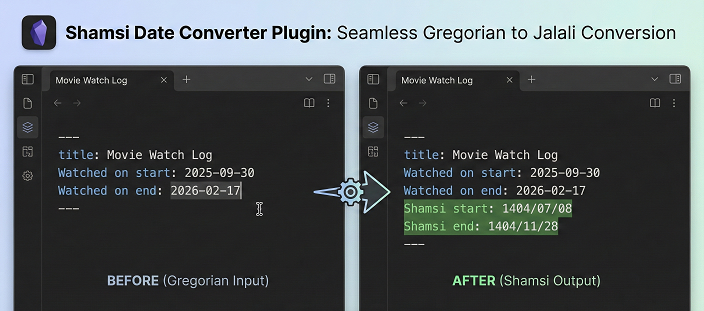
The plugin handles multiple date pairs simultaneously:
```yaml
Watched on start: 2025-09-30
Watched on end: 2026-02-17
```
After saving, it automatically adds both Shamsi dates:
```yaml
Watched on start: 2025-09-30
Watched on end: 2026-02-17
Shamsi start: 1404/07/08
Shamsi end: 1404/11/28
```
### Automatic Updates
Change any source date and the corresponding Shamsi date updates automatically:
```yaml
Watched on start: 2025-10-15 ← Changed from 2025-09-30
Watched on end: 2026-02-17
Shamsi start: 1404/07/23 ← Automatically updated!
Shamsi end: 1404/11/28
```
### Manual Conversion
1. Open a note with date properties
2. Open Command Palette (Ctrl/Cmd + P)
3. Search for "Convert all date pairs to Shamsi"
4. Execute the command
## Settings
Access settings via Settings → Shamsi Date Converter:
### Basic Settings
- **Auto-convert**: Enable/disable automatic conversion on file modification
- **Date format**: Output format for Shamsi dates (YYYY/MM/DD, YYYY-MM-DD, etc.)
### Date Pair Mappings
Configure which properties should be converted:
**Default Pairs:**
1. `Watched on start` → `Shamsi start`
2. `Watched on end` → `Shamsi end`
**Custom Pairs:**
- Click "Add Date Pair" to create new mappings
- Click "Edit" to modify existing pairs
- Click "Delete" to remove pairs you don't need
### Example Custom Mappings
**For Reading Tracker:**
```
Source: "Started reading" → Target: "تاریخ شروع"
Source: "Finished reading" → Target: "تاریخ پایان"
```
**For Projects:**
```
Source: "Project start" → Target: "Shamsi project start"
Source: "Project deadline" → Target: "Shamsi deadline"
```
**For Events:**
```
Source: "Event date" → Target: "تاریخ رویداد"
```
## Supported Date Formats
The plugin accepts various Gregorian date formats:
- `2024-02-12` (ISO 8601 - recommended for best performance)
- `2024/02/12`
- `Feb 12, 2024`
- `February 12, 2024`
- Any format parseable by JavaScript Date object
## Examples
### Example 1: Movie Watching Tracker
```yaml
---
title: Inception
type: Movie
Watched on start: 2024-01-15
Watched on end: 2024-01-15
Shamsi start: 1402/10/25
Shamsi end: 1402/10/25
rating: 5
---
```
### Example 2: TV Series Tracker
```yaml
---
title: Breaking Bad
type: TV Series
Watched on start: 2024-06-01
Watched on end: 2024-08-15
Shamsi start: 1403/03/12
Shamsi end: 1403/05/25
seasons: 5
---
```
### Example 3: Book Reading Log
```yaml
---
title: The Alchemist
Started reading: 2024-03-01
Finished reading: 2024-03-20
Shamsi reading start: 1403/01/11
Shamsi reading end: 1403/01/30
---
```
### Example 4: Persian Date Usage
```yaml
---
title: نوروز
Event date: 2024-03-20
تاریخ شمسی: 1403/01/01
---
```
## How It Works
1. **File Modification Detection**: Monitors when you save or modify files
2. **Quick Check**: Scans if file contains any configured source properties
3. **Property Extraction**: Parses frontmatter and extracts Gregorian dates
4. **Conversion**: Converts dates using Persian calendar algorithm
5. **Smart Update**: Only writes to file if Shamsi dates are missing or outdated
## Troubleshooting
### Dates not converting?
- ✓ Check that auto-convert is enabled in settings
- ✓ Verify property names match your settings exactly
- ✓ Ensure dates are in valid format (try YYYY-MM-DD)
- ✓ Try the manual conversion command
- ✓ Check console (Ctrl/Cmd + Shift + I) for errors
### Plugin not loading?
- ✓ Files must be in `.obsidian/plugins/shamsi-date-converter/`
- ✓ Restart Obsidian completely
- ✓ Check Developer Console for error messages
## Advanced Usage
### Empty/Missing Dates
If a source property exists but has no value:
```yaml
Watched on start:
```
The plugin will skip it (no Shamsi date added until you fill in the source).
### Mixed Date Pairs
You can have files with different combinations:
- Some with only start dates
- Some with both start and end
- Some with neither
The plugin handles all cases gracefully!
## Development
Want to contribute or customize?
1. Clone the repository
2. Modify `main.js`
3. Test in your vault's plugin folder
4. Submit pull requests!
## License
MIT License - feel free to use and modify as needed.
## Support
If you encounter issues:
1. Check the troubleshooting section
2. Check Developer Console for specific errors
3. File an issue with example files and error messages
## Credits
- Shamsi calendar conversion algorithm based on standard Persian calendar calculations
- Built with ❤️ for the Obsidian community
- Special thanks to all users providing feedback and feature requests!
## Support
This project is offered for free so everyone can use it without restrictions.
If you found this tool useful, you can support its continuous development and improvement through donations.

 ---
**Enjoy seamless Gregorian ↔ Shamsi date conversion!** 🎉📅
---
**Enjoy seamless Gregorian ↔ Shamsi date conversion!** 🎉📅