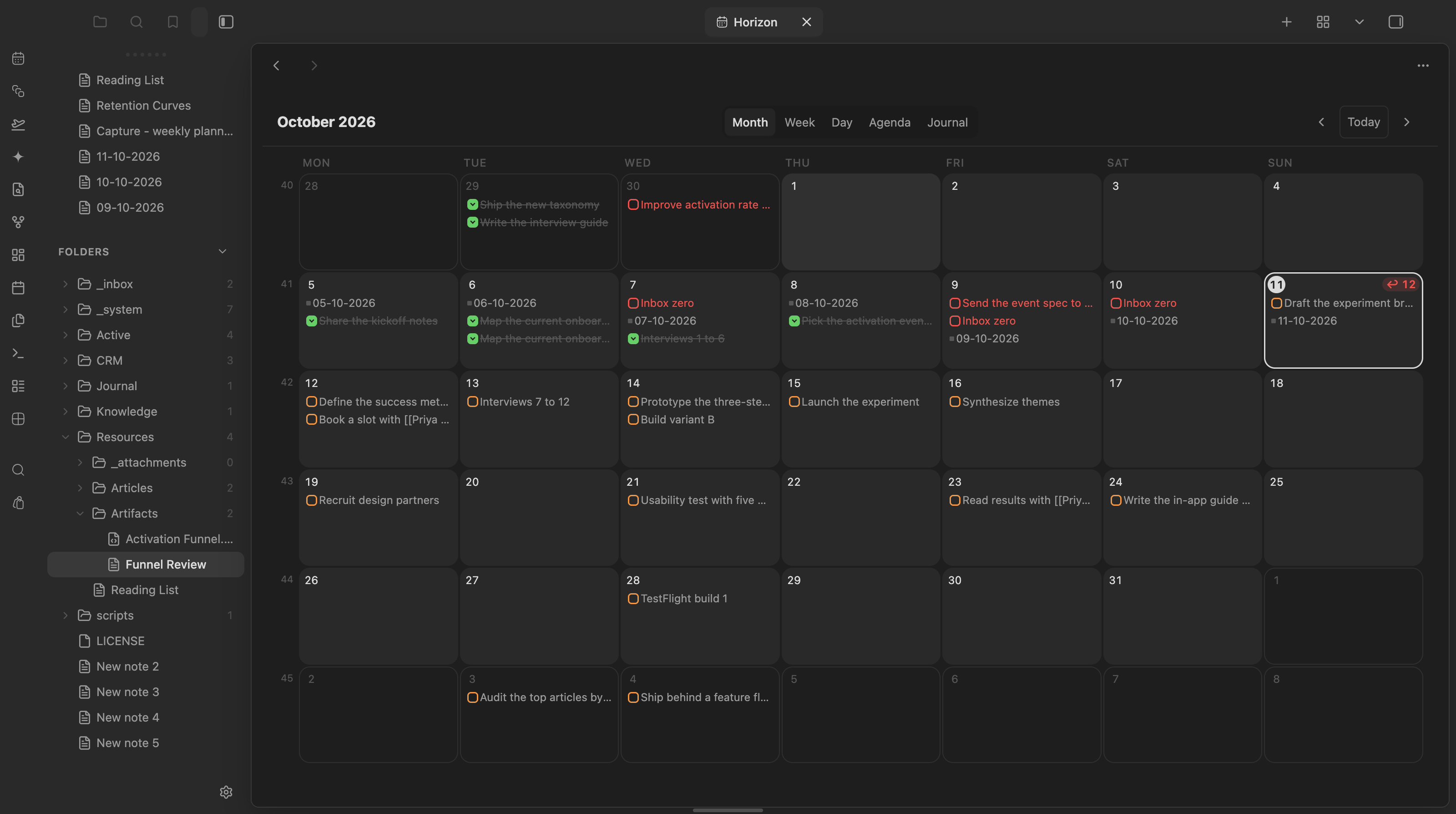
The month grid, with daily notes and open, done and overdue tasks shown right on their date.
## Views - **Sidebar mini calendar** — month at a glance with content dots: daily note (accent), due tasks (orange), overdue (red), scheduled (cyan), done (green), dated notes (gray). ISO week numbers open weekly notes. - **Calendar tab** (ribbon icon or `Horizon: Apri il calendario`) with three modes: - **Mese** — 7-column grid with content chips per day; "+N altri" jumps to the week view - **Settimana** — hour grid for the week: an all-day lane per day (all-day events, tasks, untimed notes) above timed events and timed notes placed by time, with a current-time line - **Giorno** — the same grid for a single day - **Agenda** — chronological list of the upcoming days that have content - **Diario** — a text-first feed of existing daily notes, newest first, with expandable previews ## Data sources 1. **Daily / weekly / monthly / yearly notes** — existence resolved live from the per-period folder + filename format configured in settings (monthly/yearly are off by default) 2. **Tasks** with obsidian-tasks-plugin emoji dates: 📅 due, ⏳ scheduled, ✅ done. Cancelled tasks (status `-`) are hidden 3. **Notes with a `date` frontmatter property** (periodic notes are excluded to avoid duplicates) 4. **Google Calendar events** (read-only, optional) — see below ## Google Calendar Horizon reads your Google calendars and shows their events in every view. It never writes to Google. Setup (once, on desktop): 1. In Google Cloud Console create a project, enable the **Google Calendar API**, configure the OAuth consent screen (External, add yourself as a test user, then **publish** it: tokens of an app left in Testing expire after 7 days). 2. Create an OAuth client of type **Desktop app**. 3. In Horizon settings → Google Calendar paste the client ID, store the client secret as an Obsidian secret, and press **Connect**. Sign-in happens in the browser and returns to a one-shot local port. The refresh token lives in Obsidian's secret storage on that device, never in the vault. Calendars follow your Google Calendar selection; switch single ones off in settings. Events refresh every 5 minutes, or with *Refresh Google Calendar*. Click an event for: **Join call** (Meet, Zoom or Teams link), **Open/Create meeting note**, **Open daily note**, **Open in Google Calendar**. A meeting note gets `date`, `gcal_event` and a `daily` link; a Granola note with the same title on the same day is reused instead of creating a new one. On phones events show only after connecting there, which needs the desktop sign-in flow, so mobile stays without events for now. ## Rich mini-cards Notes in Agenda, Week, the day popover, and Bases views render as **mini-cards**: title (with time), a clean two-line excerpt, and the note's cover image (frontmatter `cover`/`image`/`thumbnail` → first embed → first external image). Hydration is async and LRU-cached. In the compact Month grid, hovering a note chip shows a floating **hover-card** with image and a longer excerpt. Settings: card length slider and a `richCards` toggle to fall back to compact chips. ## Overdue triage Open overdue tasks roll up to a pinned **"In ritardo"** section on today in the Agenda (with a batch "Porta tutto a oggi"), and today's cell shows a red `↩ N` badge in every view. Right-click any task chip for **snooze presets** (Oggi / Domani / Lunedì prossimo / +1 settimana). Every reschedule Notice carries a 10-second **Annulla** that re-applies the old date through the same guarded writes. ## Bases view Horizon registers as a **Bases view**: any `.base` gains a month calendar. The Base decides *which* notes (filters); the view option `dateProperty` decides *when* (default `date` — set it to `created` for Granola meeting notes). Timestamps with an explicit offset (Granola writes UTC `Z`) are converted to the local day and time. ## Template tokens Beyond `{{title}}` / `{{date:FMT}}` / `{{time:FMT}}`, periodic-note templates can use: - `{{agenda}}` — the target day's calendar events and meetings (with times) and open tasks, as plain bullets with source links (never `- [ ]` lines: no task duplication) - `{{week-digest}}` — pre-compiled weekly review: *Fatto* (done per day), *Meeting e note*, *In arrivo* (due next week). ## Agents `(app.plugins.getPlugin('horizon') as HorizonPlugin).api` exposes: `getAgenda(from, to)`, `getOverdue()`, `rescheduleTask(ref, kind, day)`, `toggleTaskDone(ref)`, `exportAgenda()`, `propose(proposal)`. Reads come from the live index; writes go through the guarded line-edit path. - **Agenda export** — disabled by default; when enabled, writes to the configurable `.horizon/agenda.json` path at most every 5 minutes of activity. - **Ghost proposals** — agents append to the configurable `.horizon/proposals.json` path (`kind: 'reschedule' | 'new-task'`, `targetKey`, optional `reason`). Horizon renders dashed ✦ ghost chips on the target days; ✓ accepts, ✕ dismisses. ## Interactions - Click a day (or its number in the tab view) → open the daily note, creating it from the template when missing ({{title}}, {{date:FMT}}, {{time:FMT}} tokens fill against the target day). Mod-click opens in a new tab - Click a week number → open/create the weekly note - Hover a day with a note → native page preview - **Checkbox on a task chip** → toggle done with a `✅` date, Tasks-plugin compatible. Recurring (🔁) tasks open at the line instead — completing them needs the Tasks rrule engine - **Drag a task chip onto another day** (any view, including the sidebar) → its date field is rewritten in the source file. Writes are guarded: exact text at the expected line, unique-match fallback, abort on ambiguity ## Notes - Replaces the community **Calendar** plugin — disable it manually to avoid two sidebar calendars - The stale Periodic Notes config is ignored on purpose; Horizon keeps its own per-period settings (first launch seeds the daily period from `daily-notes.json`) - Templater syntax in templates passes through unexecuted (core-Templates tokens only) ## Mobile **Verified** — `isDesktopOnly: false` in `manifest.json`; `styles.css` ships a `pointer: coarse` media query with 44px hit areas plus a `max-width: 480px` responsive rule for compact layouts. ## Development ```bash pnpm i pnpm dev # esbuild watch pnpm build # typecheck + production build pnpm test # node native test runner (74+ unit tests, no Obsidian needed) pnpm lint ``` Architecture: a pure per-day index (`src/index/`) fed by `metadataCache` events, consumed by two `ItemView`s (`src/ui/`). All date math is UTC-immune (`src/dates.ts`); file writes go through guarded line edits (`src/edits/`). Pure modules never import the Obsidian runtime, so the whole read/write logic tests headless. ## Try it See it running in the [Obsidianverse sample vault](https://github.com/mariomile/obsidianverse-sample-vault), a small, fictional vault with the whole plugin suite pre-configured.