# Wallvia
**Bring your Wallpaper Engine everywhere.**
Wallpaper Engine wallpapers and a glass interface in **VS Code**, **Obsidian** and the **Codex desktop app** —
three platforms sharing one local wallpaper library.
[](LICENSE)




English · [中文](README.zh.md)
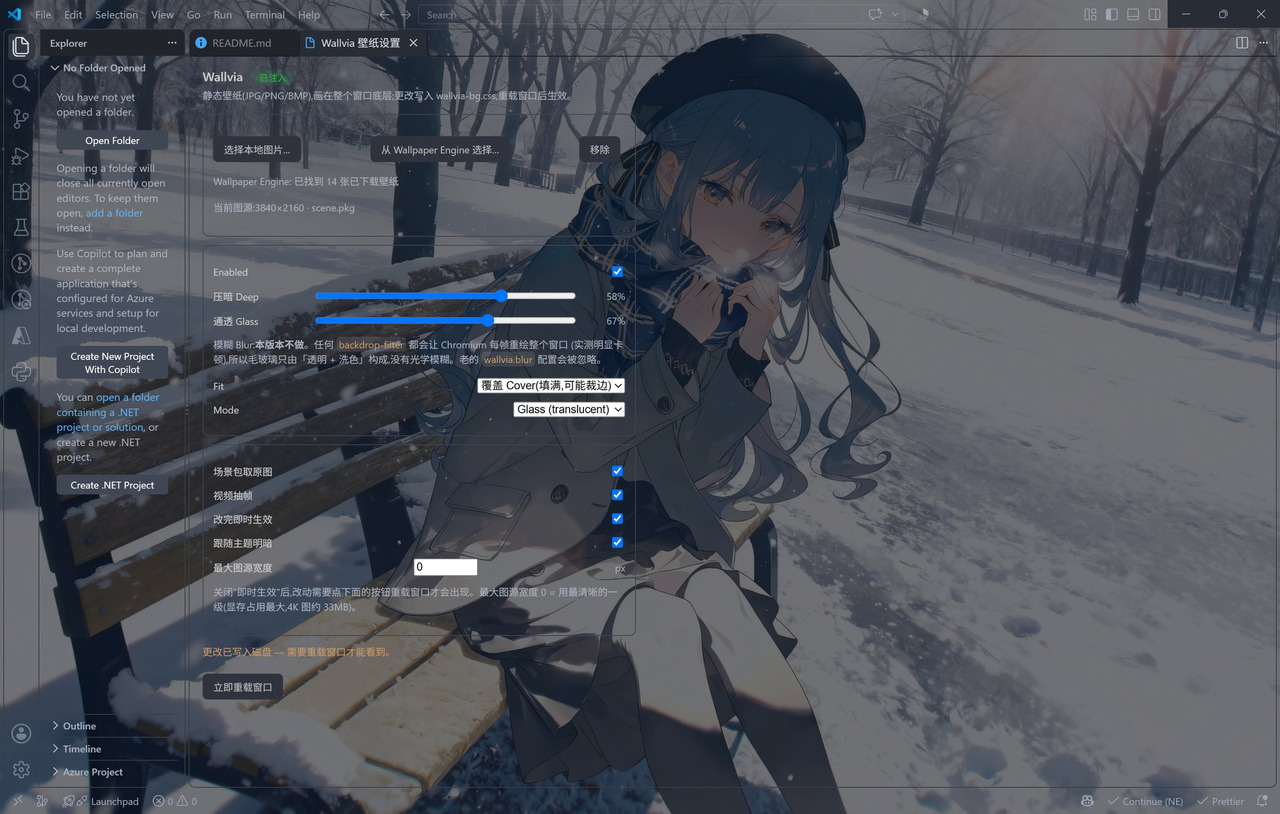 VS Code: the wallpaper fills the window, with a transparent activity bar and panels; the Wallvia settings panel on the right shows the injection status, the local Wallpaper Engine library (14 found) and every effect.
---
## Contents
- [The three platforms](#the-three-platforms)
- [In action](#in-action)
- [Quick start](#quick-start)
- [Repository layout](#repository-layout)
- [Development and tests](#development-and-tests)
- [License and credits](#license-and-credits)
## The three platforms
| Platform | How to install | How it works | Docs |
|:--|:--|:--|:--|
| **VS Code** | Install `wallvia-.vsix` | Generates CSS and a live-apply script, patches `workbench.html` and keeps the official checksum in sync | [vscode/README.md](vscode/README.md) |
| **Obsidian** | BRAT, or drop three files into the plugin folder | Official plugin API + CSS variables; the glass layer is painted on `.workspace-leaf-content::before` | [obsidian/README.md](obsidian/README.md) |
| **Codex desktop** | `npm i -g wallvia`, or the one-line script | Runtime injection over CDP — it never touches the app's own files and needs no administrator | [codex/README.md](codex/README.md) |
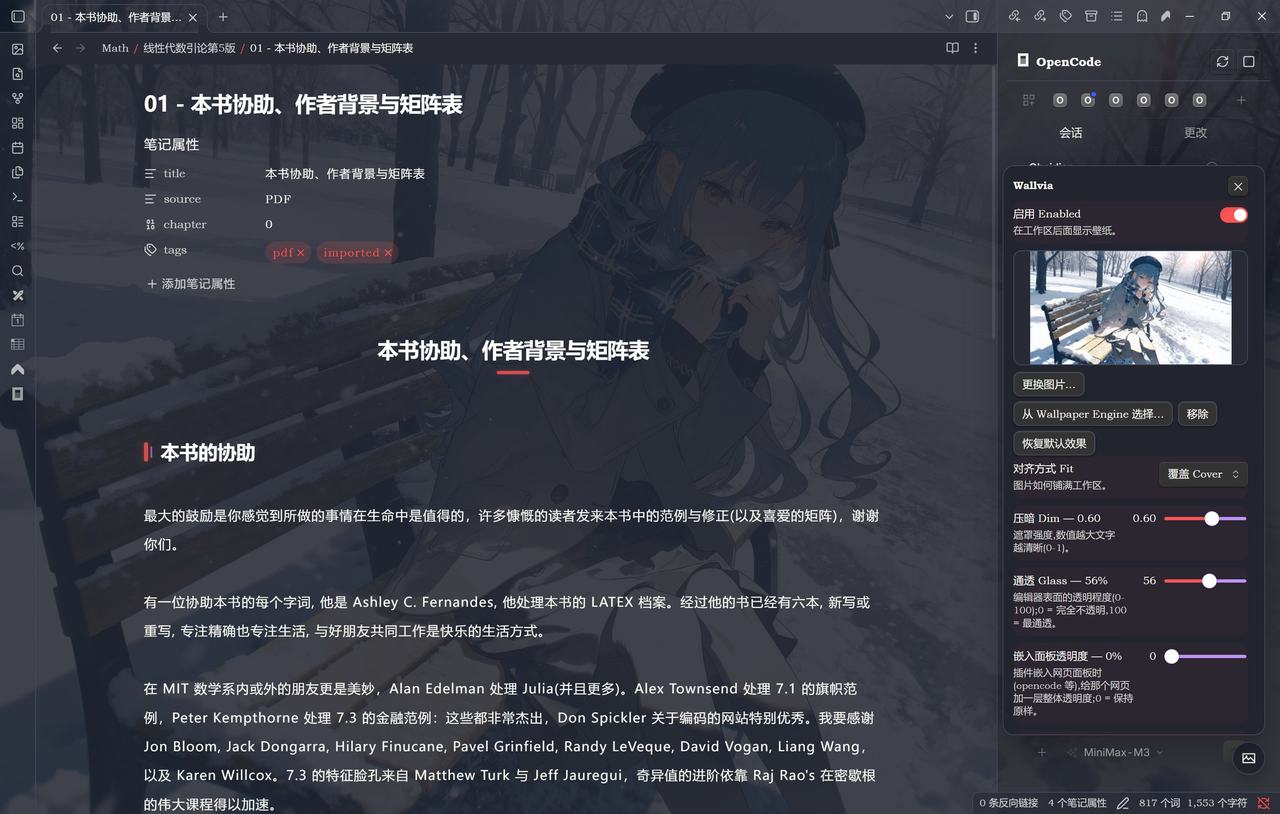
All three read the same local wallpaper library (Workshop / My Projects / built-in): each supports **cover / fill / center**, VS Code adds **contain**, and any of them can also take a plain image file.
| Shared | Detail |
|:--|:--|
| Reads wallpapers already downloaded | Wallpaper Engine does not have to be running — the downloaded library is scanned directly |
| Full-resolution artwork from a scene | Pulls the native-resolution PNG out of the `scene.pkg` mipmap chain, byte for byte: no re-encoding, no resizing |
| A frame from a video wallpaper | Takes a real frame out of the video as the still image; all three platforms decode it offscreen in the host's own Chromium — no ffmpeg, no external program |
| Three alignments | Cover (fills, may crop) / Fill (fills, may stretch) / Center (native ratio, centred) |
| Readability dim | A theme-aware dim layer — near-black on dark themes, near-white on light ones — so nothing ends up crushed or blown out |
## In action
| VS Code | Obsidian | Codex |
|:--:|:--:|:--:|
| |
VS Code: the wallpaper fills the window, with a transparent activity bar and panels; the Wallvia settings panel on the right shows the injection status, the local Wallpaper Engine library (14 found) and every effect.
---
## Contents
- [The three platforms](#the-three-platforms)
- [In action](#in-action)
- [Quick start](#quick-start)
- [Repository layout](#repository-layout)
- [Development and tests](#development-and-tests)
- [License and credits](#license-and-credits)
## The three platforms
| Platform | How to install | How it works | Docs |
|:--|:--|:--|:--|
| **VS Code** | Install `wallvia-.vsix` | Generates CSS and a live-apply script, patches `workbench.html` and keeps the official checksum in sync | [vscode/README.md](vscode/README.md) |
| **Obsidian** | BRAT, or drop three files into the plugin folder | Official plugin API + CSS variables; the glass layer is painted on `.workspace-leaf-content::before` | [obsidian/README.md](obsidian/README.md) |
| **Codex desktop** | `npm i -g wallvia`, or the one-line script | Runtime injection over CDP — it never touches the app's own files and needs no administrator | [codex/README.md](codex/README.md) |
All three read the same local wallpaper library (Workshop / My Projects / built-in): each supports **cover / fill / center**, VS Code adds **contain**, and any of them can also take a plain image file.
| Shared | Detail |
|:--|:--|
| Reads wallpapers already downloaded | Wallpaper Engine does not have to be running — the downloaded library is scanned directly |
| Full-resolution artwork from a scene | Pulls the native-resolution PNG out of the `scene.pkg` mipmap chain, byte for byte: no re-encoding, no resizing |
| A frame from a video wallpaper | Takes a real frame out of the video as the still image; all three platforms decode it offscreen in the host's own Chromium — no ffmpeg, no external program |
| Three alignments | Cover (fills, may crop) / Fill (fills, may stretch) / Center (native ratio, centred) |
| Readability dim | A theme-aware dim layer — near-black on dark themes, near-white on light ones — so nothing ends up crushed or blown out |
## In action
| VS Code | Obsidian | Codex |
|:--:|:--:|:--:|
| |  |
|  |
Obsidian's floating panel and wallpaper list:
| Floating panel | Wallpaper Engine wallpaper list |
|:--:|:--:|
|
|
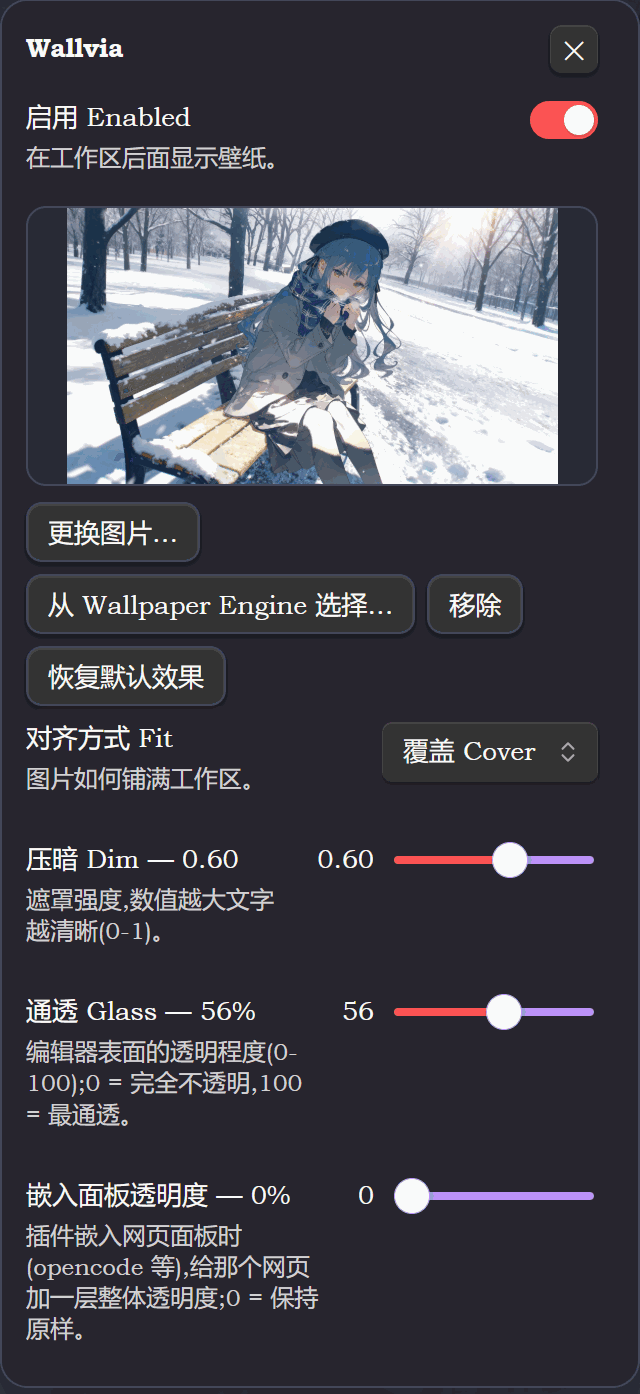
Obsidian's floating panel and wallpaper list:
| Floating panel | Wallpaper Engine wallpaper list |
|:--:|:--:|
|  |
|  |
## Quick start
### VS Code
Download `wallvia-.vsix` from [Releases](https://github.com/Maplelia/Wallvia/releases) and install it; or package it yourself:
```powershell
cd vscode
npx --yes @vscode/vsce package
code --install-extension wallvia-*.vsix --force
```
Then **reload the window** and search `wallvia` in the command palette: `Choose Wallpaper Engine Wallpaper` / `Choose Image File` / `Open Settings Panel`.
### Obsidian
**BRAT**: Settings → BRAT → Add Beta plugin, and enter `https://github.com/Maplelia/Wallvia`.
**By hand**: copy these three files into `/.obsidian/plugins/wallvia/`:
```text
manifest.json
main.js
styles.css
```
Then restart Obsidian, turn off Restricted mode and enable Wallvia. `main.js` is the built artifact, so a normal install needs no Node.js.
> Those three files sit in the **repository root** on purpose: Obsidian's auto-update, the community-directory checks and BRAT all look for them there. The source, the docs and the screenshots live in [`obsidian/`](obsidian/).
### Codex desktop
```powershell
npm i -g wallvia
wallvia watch # follow the wallpaper Wallpaper Engine is showing
wallvia list # list the wallpapers downloaded on this machine
wallvia stop # put everything back
```
To skip npm, install into `%LOCALAPPDATA%\Wallvia` with the one-line script:
```powershell
irm https://cdn.jsdelivr.net/gh/Maplelia/Wallvia@main/codex/install.ps1 | iex
```
## Repository layout
```text
.
├── manifest.json / main.js / styles.css / versions.json Obsidian deliverables (must stay in the root)
├── obsidian/ Obsidian plugin source, docs and screenshots
├── vscode/ VS Code extension (src/, images/, scripts/)
├── codex/ Codex CLI and the CDP injector
├── tests/ Test suite (mock included, zero dependencies)
├── scripts/ Maintenance scripts, such as the version bump
├── INSTALL.md Install notes
└── CREDITS.md Credits and third-party sources
```
## Development and tests
Requires **Node.js 22 or newer** (the Codex side uses the global `WebSocket`).
The toolchain lives in the repository root; all three platforms and the tests share one `node_modules`:
```powershell
npm install # once
npm run build # Obsidian: type check + esbuild bundle to the root main.js
npm run dev # Obsidian: watch for changes
npm test # the whole suite (zero dependencies, plain Node)
npm run lint # ESLint + Stylelint
```
Current regression result:
```text
ALL TESTS PASSED
```
Coverage: manifest validation, the shared core parameters, wallpaper discovery and ordering, native artwork extraction from `scene.pkg` (mipmap levels and caching included), MP4 container parsing, the video-frame cache, the Obsidian plugin lifecycle and its stylesheet invariants, the VS Code patch and restore, the VS Code real-stylesheet specificity guard, and live CDP injection into a real Chromium.
## License and credits
Wallvia is released under the [MIT License](LICENSE).
Wallpaper Engine is a product of Kristjan Skutta; Wallvia is not affiliated with it and only reads its configuration files and wallpaper folders on this machine. The glass-wallpaper idea comes from the wallpaper plugins in the DSH ecosystem — see [CREDITS.md](CREDITS.md) for the exact sources.
|
## Quick start
### VS Code
Download `wallvia-.vsix` from [Releases](https://github.com/Maplelia/Wallvia/releases) and install it; or package it yourself:
```powershell
cd vscode
npx --yes @vscode/vsce package
code --install-extension wallvia-*.vsix --force
```
Then **reload the window** and search `wallvia` in the command palette: `Choose Wallpaper Engine Wallpaper` / `Choose Image File` / `Open Settings Panel`.
### Obsidian
**BRAT**: Settings → BRAT → Add Beta plugin, and enter `https://github.com/Maplelia/Wallvia`.
**By hand**: copy these three files into `/.obsidian/plugins/wallvia/`:
```text
manifest.json
main.js
styles.css
```
Then restart Obsidian, turn off Restricted mode and enable Wallvia. `main.js` is the built artifact, so a normal install needs no Node.js.
> Those three files sit in the **repository root** on purpose: Obsidian's auto-update, the community-directory checks and BRAT all look for them there. The source, the docs and the screenshots live in [`obsidian/`](obsidian/).
### Codex desktop
```powershell
npm i -g wallvia
wallvia watch # follow the wallpaper Wallpaper Engine is showing
wallvia list # list the wallpapers downloaded on this machine
wallvia stop # put everything back
```
To skip npm, install into `%LOCALAPPDATA%\Wallvia` with the one-line script:
```powershell
irm https://cdn.jsdelivr.net/gh/Maplelia/Wallvia@main/codex/install.ps1 | iex
```
## Repository layout
```text
.
├── manifest.json / main.js / styles.css / versions.json Obsidian deliverables (must stay in the root)
├── obsidian/ Obsidian plugin source, docs and screenshots
├── vscode/ VS Code extension (src/, images/, scripts/)
├── codex/ Codex CLI and the CDP injector
├── tests/ Test suite (mock included, zero dependencies)
├── scripts/ Maintenance scripts, such as the version bump
├── INSTALL.md Install notes
└── CREDITS.md Credits and third-party sources
```
## Development and tests
Requires **Node.js 22 or newer** (the Codex side uses the global `WebSocket`).
The toolchain lives in the repository root; all three platforms and the tests share one `node_modules`:
```powershell
npm install # once
npm run build # Obsidian: type check + esbuild bundle to the root main.js
npm run dev # Obsidian: watch for changes
npm test # the whole suite (zero dependencies, plain Node)
npm run lint # ESLint + Stylelint
```
Current regression result:
```text
ALL TESTS PASSED
```
Coverage: manifest validation, the shared core parameters, wallpaper discovery and ordering, native artwork extraction from `scene.pkg` (mipmap levels and caching included), MP4 container parsing, the video-frame cache, the Obsidian plugin lifecycle and its stylesheet invariants, the VS Code patch and restore, the VS Code real-stylesheet specificity guard, and live CDP injection into a real Chromium.
## License and credits
Wallvia is released under the [MIT License](LICENSE).
Wallpaper Engine is a product of Kristjan Skutta; Wallvia is not affiliated with it and only reads its configuration files and wallpaper folders on this machine. The glass-wallpaper idea comes from the wallpaper plugins in the DSH ecosystem — see [CREDITS.md](CREDITS.md) for the exact sources.