# Veil
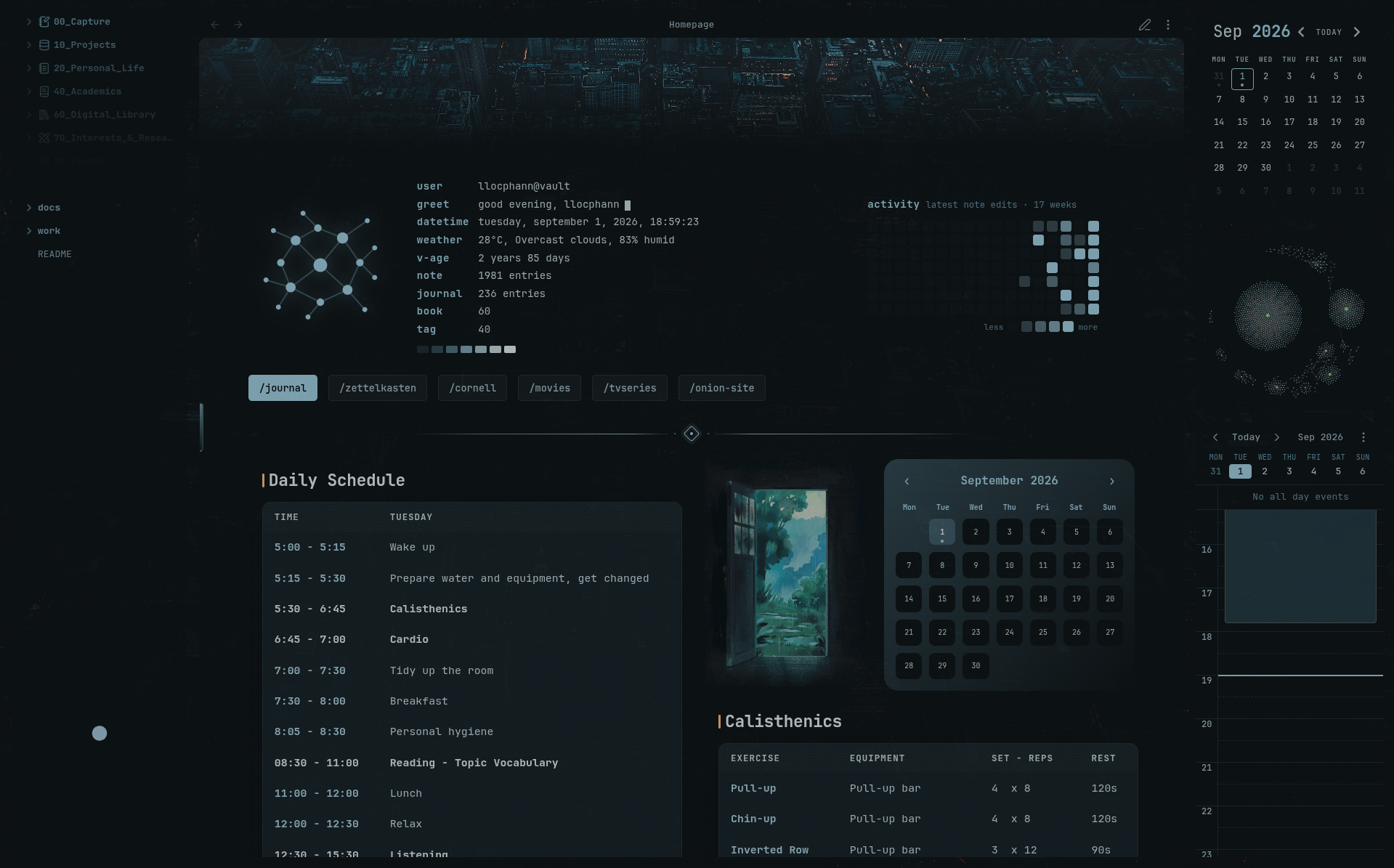
Veil adds vault-local image, animated GIF, and video wallpapers to Obsidian. It can change the complete look of your workspace automatically with reusable **Scenes**, note-aware **Routing**, wallpaper pools, and visual effects.
> Veil is desktop-only. Wallpaper media stays inside your vault after selection.
## Highlights
- Use images, animated GIFs, or videos stored in the current vault.
- Search and import SFW wallpapers from **Wallhaven** directly from the Wallpaper Library.
- Create **Scenes** that save wallpaper, framing, opacity, effects, transitions, and video behavior together.
- Route a wallpaper or Scene by note name, path, folder, tag, frontmatter, theme, day, or time.
- Build wallpaper pools from a folder, optionally include subfolders, and rotate wallpapers automatically on a configurable interval.
- Browse vault media in the **Wallpaper Library** with search, Favorites, Recent, filters, sorting, and random selection.
- Adjust focal point, zoom, display mode, wallpaper opacity, pane opacity, vignette, blur, dim, color overlay, and effect presets.
- Use Veil in the main window and Obsidian pop-out windows, with each window resolving its own context.
## Installation
### Obsidian Community Plugins
If Veil is available in the Community Plugins directory, open **Settings → Community plugins → Browse**, search for **Veil**, then install and enable it.
### GitHub release
1. Download `main.js`, `manifest.json`, and `styles.css` from the latest Veil release.
2. Place the three files in `/.obsidian/plugins/veil/`.
3. Reload Obsidian and enable **Veil** under Community plugins.
## Quick start
1. Open **Settings → Community plugins → Veil**.
2. In **Wallpaper**, choose a vault image, GIF, or video, open **Wallpaper Library → Wallhaven** to import an SFW wallpaper, or configure a wallpaper pool.
3. Use **Appearance** to adjust framing, opacity, transitions, and effects.
4. Open **Automation** to create reusable Scenes and configure Routing rules for different notes or contexts.
5. Use **Data** for backup, restore, import/export, and recovery tools.
Veil also adds these commands to the Command Palette: **Reload wallpaper**, **Shuffle wallpaper pool**, **Open wallpaper library**, and **Switch scene**.
## Documentation
The detailed user guide is in the [Veil Wiki](wiki/Home.md).
Start with:
- [Getting started](wiki/Getting-Started.md)
- [Wallpaper, Library, and Pools](wiki/Wallpaper-Library-and-Pools.md)
- [Appearance and Effects](wiki/Appearance-and-Effects.md)
- [Scenes and Manual Overrides](wiki/Scenes-and-Manual-Overrides.md)
- [Routing and Opacity Exclusions](wiki/Routing-and-Opacity-Exclusions.md)
- [Behavior and Video](wiki/Behavior-and-Video.md)
- [Data, Privacy, and Recovery](wiki/Data-Privacy-and-Recovery.md)
- [Troubleshooting and Performance](wiki/Troubleshooting-and-Performance.md)
Version-specific changes are documented in [GitHub Releases](https://github.com/llocphann/Veil/releases) and [CHANGELOG.md](CHANGELOG.md).
## Privacy
Veil reads vault-local wallpaper media and Obsidian metadata needed by your configured rules. Normal wallpaper playback does not require the network, and Veil does not collect telemetry or run analytics.
Veil connects to Wallhaven only when you use the optional Wallhaven browser in **Wallpaper Library**. Search terms and selected filters are sent to `wallhaven.cc`; result thumbnails load from Wallhaven, and the full image is downloaded only when you explicitly select it. Imported wallpapers are saved inside your vault under `Wallpapers/Wallhaven/` and are used locally afterward. Veil does not send note contents or vault metadata to Wallhaven.
The built-in Wallhaven browser is SFW-only and does not use or store a Wallhaven API key.
---
## ☕ Support Veil
If Veil has made your Obsidian workspace more enjoyable, you can support its continued development here.
Your support helps me keep refining Veil, improving wallpaper workflows, routing, visual effects, and documentation.
---
## License
[GNU General Public License v3.0](LICENSE)