**English** · [Čeština](README.cs.md)
# 4D Eisenhower Matrix — Obsidian plugin
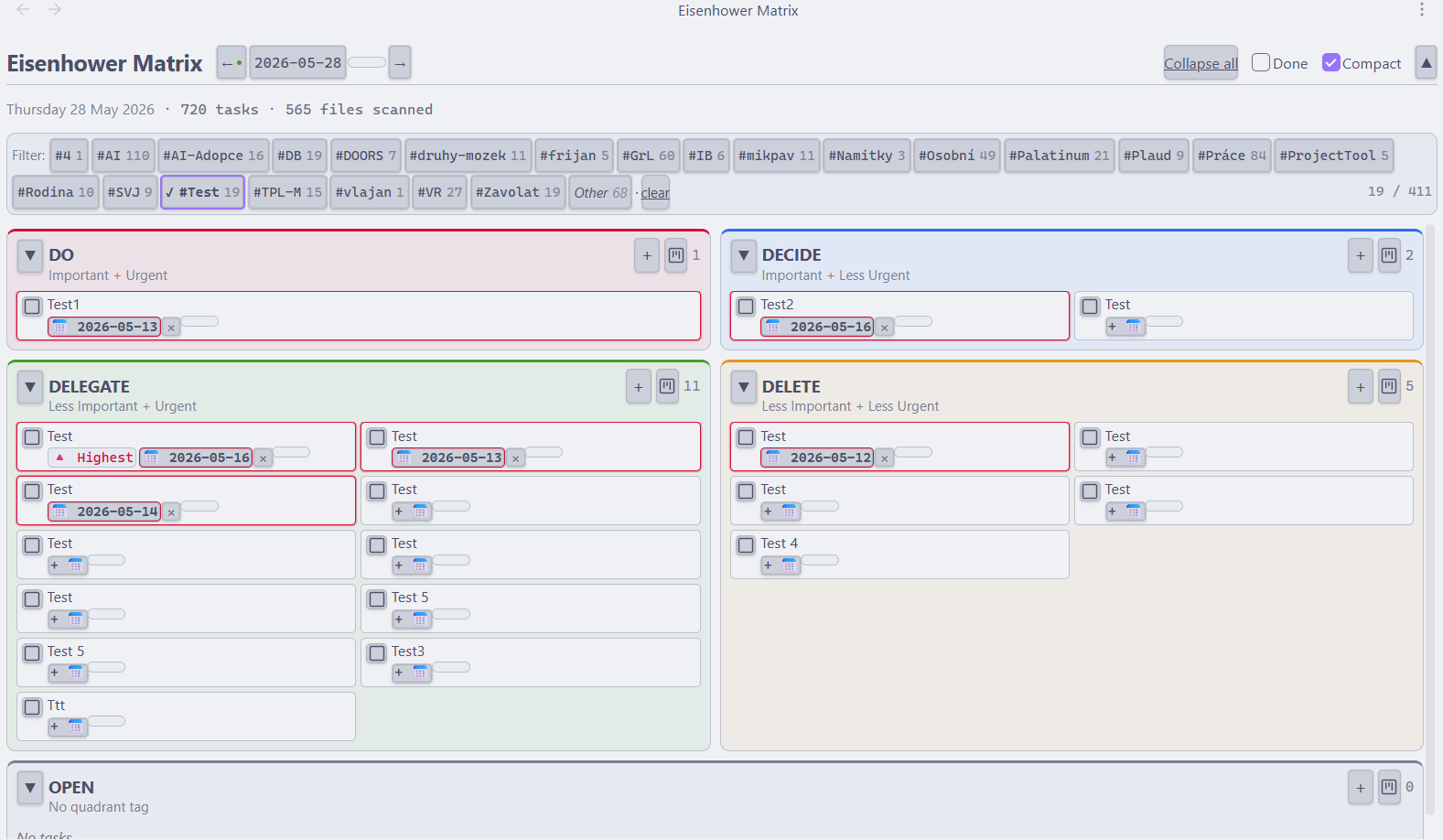
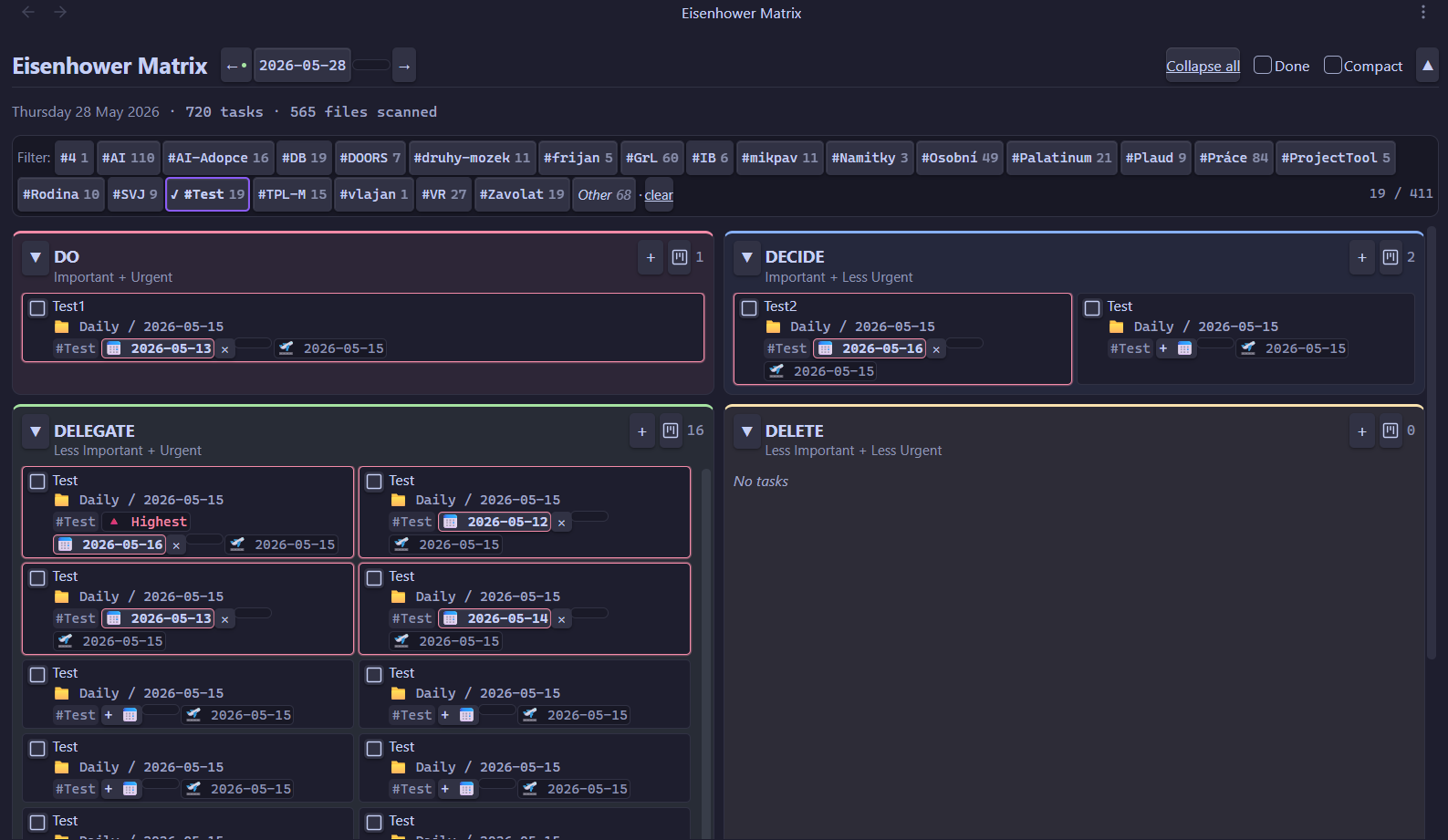
Visualize tasks across your entire vault in a **5-quadrant Eisenhower matrix** (DO / DECIDE / DELEGATE / DELETE / OPEN) + Kanban view. Reads and writes [Obsidian Tasks](https://publish.obsidian.md/tasks/Introduction) syntax — `#tags`, `📅 due`, `🛫 start`, `✅ done`, priority.
> A morning dashboard for deciding *what to do now*: open it, see tasks split by priority, check off the done ones, add new ones. Markdown files stay the source of truth — the plugin is just a visual layer on top.
## Features
| Feature | What it does |
|---------|--------------|
| **5-quadrant matrix** | DO / DECIDE / DELEGATE / DELETE plus a catch-all **OPEN**. The quadrant is the first `#tag` after the checkbox (`#DO`, `#DECIDE`, `#DELEGATE`, `#DELETE`); anything else lands in OPEN. |
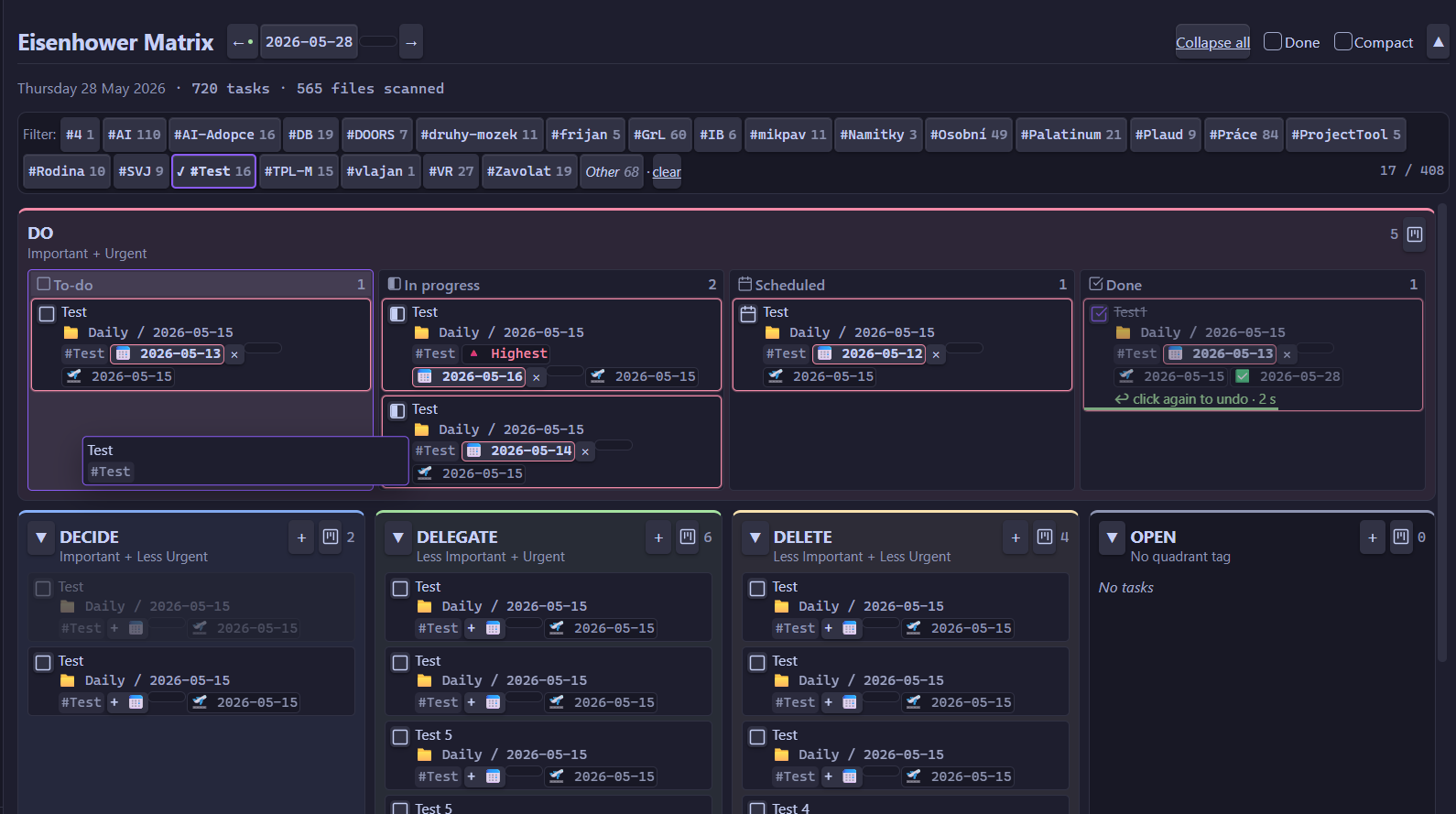
| **Kanban view** *(desktop)* | Expand any quadrant to full width with **To-do · In progress · Scheduled · Done** status columns. Drag cards between columns to change status, onto another quadrant to move them, or add a task straight into a column. |
| **Cross-vault aggregation** | Collects tasks from **every `.md` file** in the vault (Dataview-like), not just today's daily note — one board for your whole second brain. |
| **6 task statuses** | Things-style `[ ]` to-do · `[/]` in progress · `[x]` done · `[-]` canceled · `[>]` forwarded · `[<]` scheduling. Each card shows a status box; set any state via right-click → *Mark as…*. |
| **Full CRUD** | Add (text + tags + due date + priority), edit inline, toggle done, move between quadrants — every change is written straight back to your Markdown. |
| **Priority** | Obsidian Tasks convention: 🔺 highest · ⏫ high · 🔼 medium · 🔽 low · ⏬ lowest. It's also the manual lever for ordering — raise a priority and the task jumps up. |
| **Due / start / done dates** | Reads and writes `📅 due`, `🛫 start`, `✅ done`. Overdue tasks are highlighted and float to the top of their quadrant. |
| **Markdown in task text** | Inline **bold**, *italic*, `code`, ~~strikethrough~~; a leading `#`…`######` renders the task as a heading. |
| **Tag autocomplete** | Suggests existing vault tags as you type, so you don't create near-duplicates. |
| **Filter by tag** | Context-tag chips in the filter bar (multi-select, OR logic) + a virtual "Other" chip for untagged tasks. |
| **Date navigation** | ← / → / calendar / Today, plus a day-cutoff banner offering to jump to today after midnight. |
| **Undo grace period** | A 3-second window with a green countdown bar after you complete or cancel a task — click again to undo. |
| **Compact mode** | Header toggle that shrinks every card to two lines (text + priority/due date) for a denser overview. |
| **Show / hide done** | The "Done" toggle reveals or hides finished tasks (`[x]` + `[-]`); the task counter follows the toggle. |
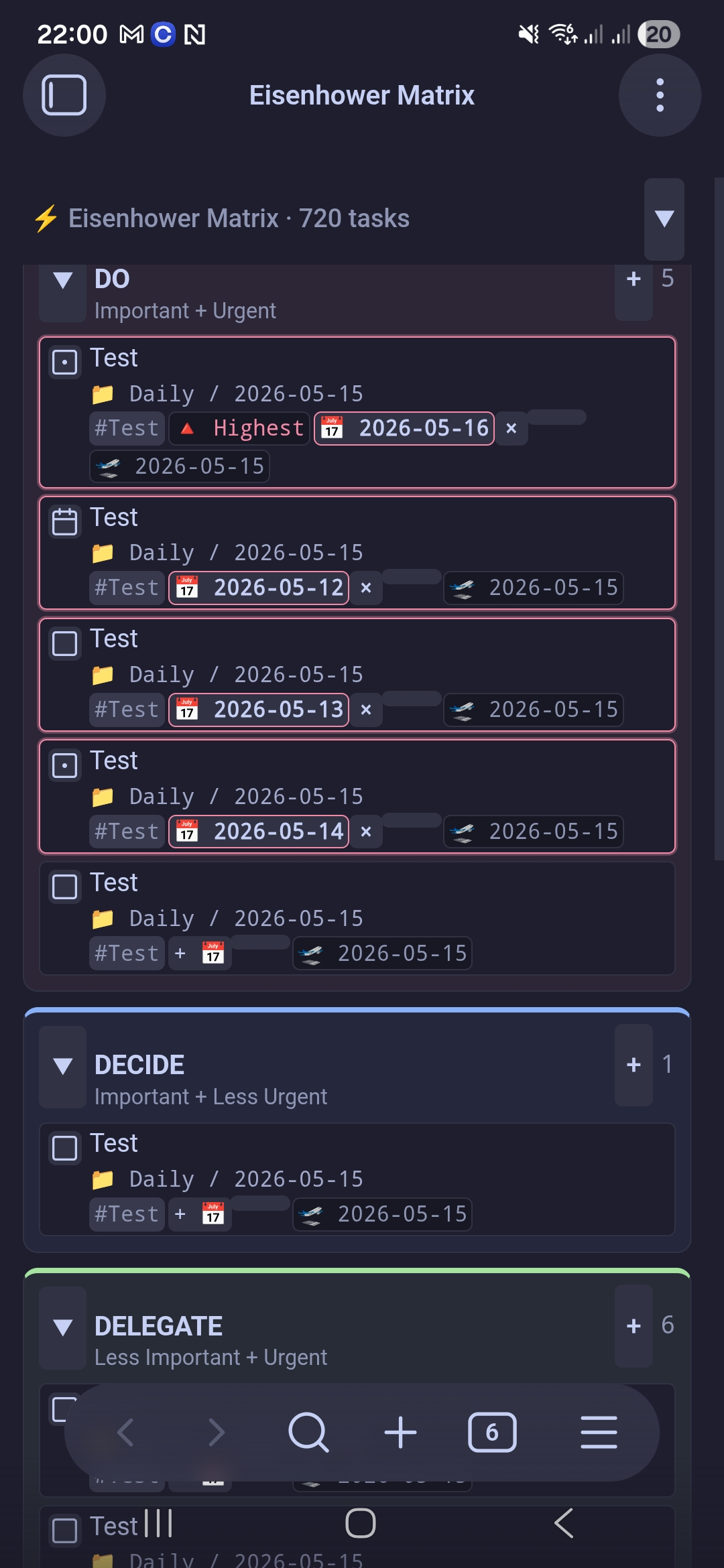
| **Collapsible UI** | Collapse individual quadrants or the whole header to free up space — handy on mobile. |
| **Deterministic sorting** | Within a quadrant: overdue → priority → due date → alphabetical. No accidental drag-reordering. |
| **Daily note integration** | New tasks go under a **configurable section heading**; if today's daily note is missing it's created automatically, honoring your core "Daily notes" template (`{{date}}`, `{{title}}`, `{{time}}`). |
| **Excluded folders** | Point the matrix away from templates, archives or anything you don't want scanned. |
| **Desktop & mobile** | Works on desktop and Android (`isDesktopOnly: false`); responsive layout with touch-friendly controls. |
| **Theme-aware** | Built entirely on Obsidian CSS variables, so it adapts to your light/dark theme and accent colour. |
## Installation
**Settings → Community plugins → Browse → search "4D Eisenhower Matrix" → Install → Enable.**
Then open it via the ribbon icon (grid, in the left sidebar) or the command palette → *Open matrix*.
## Task syntax
The plugin reads/writes standard Obsidian Tasks syntax:
```markdown
- [ ] #DO #Personal ⏫ 📅 2026-05-20 🛫 2026-05-15 Important call with Alice
- [x] #DECIDE Long-term planning ✅ 2026-05-10
- [ ] task without a quadrant tag ← lands in the OPEN quadrant
```
Quadrant tags (the first token after `- [ ]`):
| Tag | Quadrant | Meaning |
|-----|----------|---------|
| `#DO` | 🔴 DO | Important + Urgent |
| `#DECIDE` | 🔵 DECIDE | Important + Less Urgent |
| `#DELEGATE` | 🟢 DELEGATE | Less Important + Urgent |
| `#DELETE` | 🟡 DELETE | Less Important + Less Urgent |
| *(other / none)* | ⚫ OPEN | Uncategorized |
Priority ([Obsidian Tasks convention](https://publish.obsidian.md/tasks/Getting+Started/Priorities)):
| Emoji | Level |
|-------|-------|
| 🔺 | Highest |
| ⏫ | High |
| 🔼 | Medium |
| 🔽 | Low |
| ⏬ | Lowest |
## Controls
| Action | How |
|--------|-----|
| Toggle a task | Click the checkbox · 3 s grace period (click again to undo) |
| Add a task | Click `+` in the quadrant header → text + #tags + 📅 + ⏫ → Enter |
| Edit a task | **Desktop:** double-click the card. **Mobile:** long-press / double-tap → menu → Edit |
| Change due date alone | Click the 📅 badge on the card |
| Move between quadrants | **Desktop:** drag the card onto the target quadrant. **Mobile:** long-press / double-tap → menu → "Move to…" |
| Open the source file | **Desktop:** right-click the card. **Mobile:** long-press / double-tap. → menu (current pane / new tab / split / window) — the cursor lands on the task's line |
| Filter by tag | Click a chip in the filter bar (multi-select, OR) |
| Previous / next day | The ← → arrows in the header, the calendar, or "Today" |
| Collapse a quadrant | Click the ▼/▶ arrow next to the quadrant name |
| Collapse the whole header | The ▲ button top-right (handy on mobile) |
| Show completed tasks | The "Done" toggle in the header |
| Compact view | The "Compact" toggle in the header — 2-line cards |
| Set task status | Right-click the card (or the status box) → *Mark as…* |
| Kanban view (desktop) | Click the kanban icon in a quadrant header → status columns; click it again to return to the grid |
### In-quadrant order
Deterministic — cannot be reordered manually:
1. **Overdue** (📅 < today) — at the top
2. **Priority desc** — 🔺 → ⏫ → 🔼 → 🔽 → ⏬ → no priority
3. **Due date asc** — nearest deadline first
4. **Alphabetical** by text
The manual lever for reordering is **priority** — set it and the task jumps up.
## Settings
`Settings → 4D Eisenhower Matrix`:
- **Daily folder** — where new daily notes are created. Empty = respect the core "Daily notes" plugin config. Override = a custom path (with a folder suggester).
- **Daily section heading** — the heading in the daily note under which today's tasks are read and added. Default: `# Dnes`. Set it to whatever you use (e.g. `# Today`, `## Tasks`).
- **Excluded folders** — tasks from these folders are ignored. Default: none — add the folders you want excluded yourself. UI with + / × buttons and a folder suggester.
## Daily note integration
The plugin looks for a configurable section heading in the daily note (set via **Settings → Daily section heading**, default `# Dnes`). New tasks are inserted under that heading.
If a daily note for the given day doesn't exist and you add the first task, the plugin **creates it automatically**:
1. If the core "Daily notes" plugin has a **template** configured, it uses that (expanding `{{date}}`, `{{title}}`, `{{time}}`).
2. Otherwise it falls back to a minimal scaffold (frontmatter + the configured section heading).
## Mobile
Works on Android (`isDesktopOnly: false`; iOS untested but should work).
- **Long-press or double-tap** a card → context menu (Edit · Open file · **Move to…**)
- **Moving between quadrants** on mobile is done via the menu ("Move → DECIDE" etc.). Touch-drag is unreliable inside the Obsidian mobile webview, so the menu is used instead — two taps, deterministic.
- **Collapsed header** (the ▲ button) — frees up vertical space for the matrix.
## Roadmap
- [ ] Quick-add task via the Command Palette (without opening the view)
- [ ] Keyboard shortcuts inside the view (J/K navigation, X toggle, N new task)
- [ ] Full moment.js syntax in daily templates (currently only `{{date}}` / `{{title}}` / `{{time}}`)
Missing something? [Open an issue](https://github.com/krcaljaroslav/4D-eisenhower-matrix/issues).
## Known limitations
- Manual ordering across files (one task in a daily note, another in a project) is not supported — the sort is deterministic.
## Bugs / contributing
[Issues](https://github.com/krcaljaroslav/4D-eisenhower-matrix/issues) · Pull requests welcome.
## License
[MIT](LICENSE)