# AI Context Pack
> Package your Obsidian notes into context packs for any AI — ChatGPT, Claude, Gemini, NotebookLM, and more.
---
## Supported AI Assistants
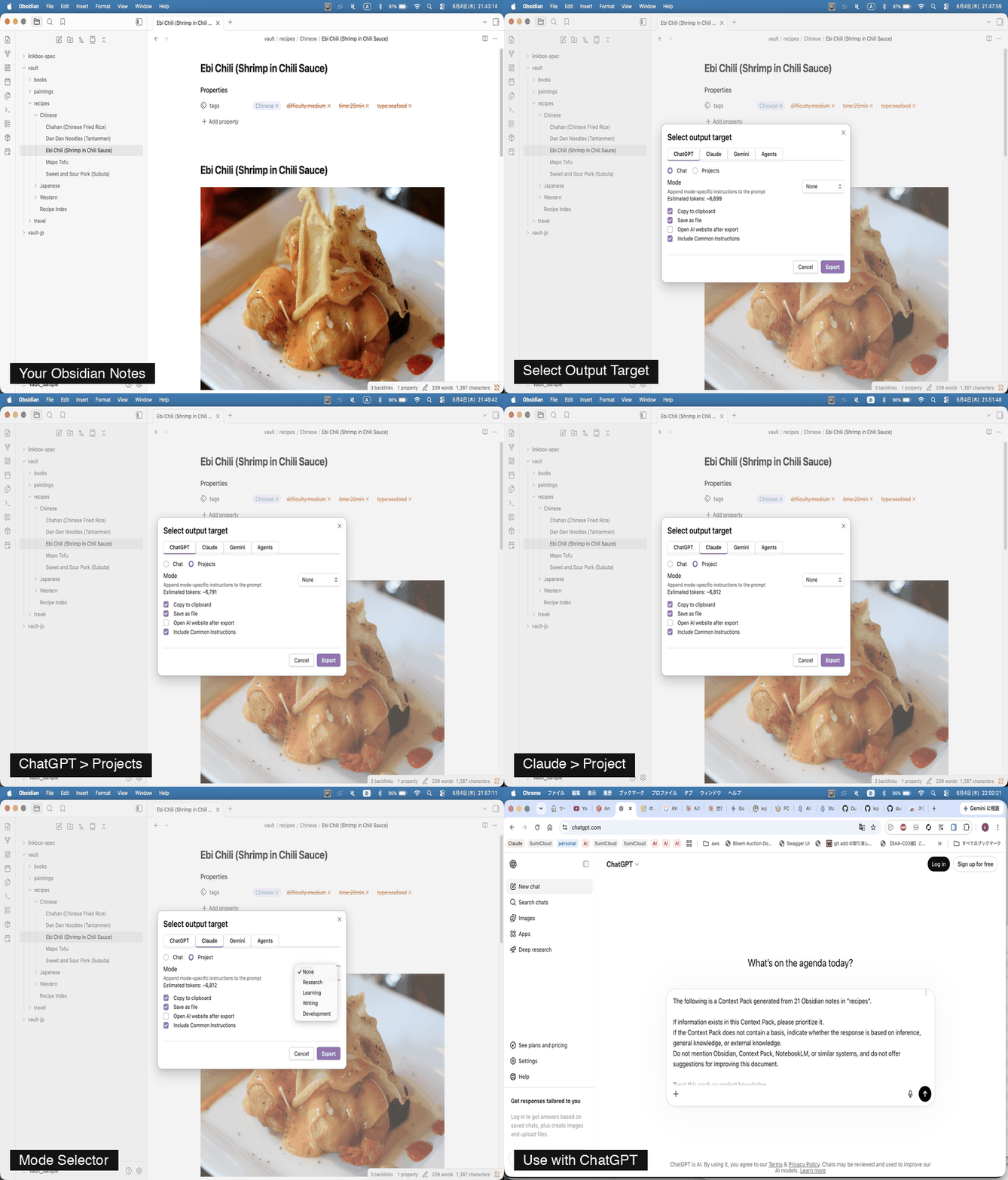
| AI | Chat | Project / Notebook |
|---|---|---|
| ChatGPT | ✓ | ✓ Projects |
| Claude | ✓ | ✓ Project |
| Gemini | ✓ | ✓ Notebook |
| Claude Code | ✓ | — |
| NotebookLM | — | ✓ |
---
## The problem
Raw Obsidian notes contain noise:
- Wikilinks
- Frontmatter
- Comments
- Templates
AI models perform better when context is clean and structured. This plugin solves that.
---
## How it works
```
Obsidian Vault
↓
Context Pack
↓
AI-ready Context
↓
ChatGPT / Claude / Gemini / NotebookLM / Claude Code
```
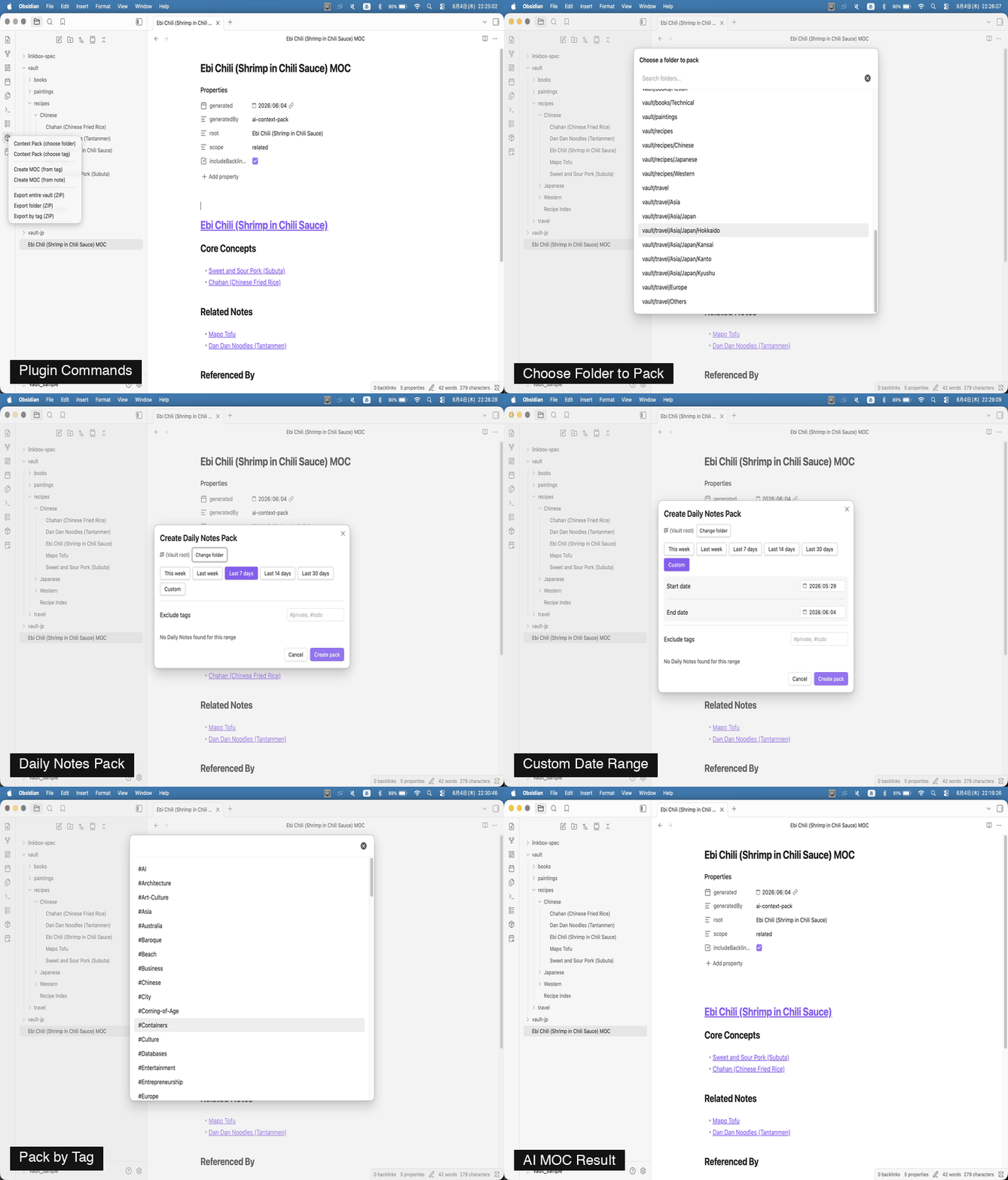
**Context Pack** bundles related notes into a single formatted `.md` file — organized by folder, tag, or MOC — and strips all Obsidian-specific syntax before export.
**AI MOC** generates a Map of Content from any note by tracing its wikilinks outward, producing a structured hierarchy with Core Concepts, Related Notes, and Referenced By sections.
**Output target selector** lets you choose where to send the pack each time — with AI-specific instructions prepended automatically.
**Mode selector** appends purpose-specific instructions (Research, Learning, Writing, Development) so the AI responds in the style that fits your workflow.
**Daily Notes Pack** collects your daily notes within a date range and bundles them into a single AI-ready file.
---
## Installation
### Community plugins (recommended)
1. Open **Settings → Community plugins → Browse**
2. Search for **AI Context Pack**
3. Install and enable
### Manual
Download `main.js`, `styles.css`, and `manifest.json` from the [latest release](../../releases/latest) and copy them to `.obsidian/plugins/context-pack-for-notebooklm/` in your vault.
---
## Sample data
Want to try the plugin without setting up your vault first?
| Vault | Notes | Topics | Download |
|---|---|---|---|
| 🇺🇸 English | 86 notes | recipes / travel / books / paintings / linkbox-spec | [vault-sample-en.zip](https://s3.ap-northeast-1.amazonaws.com/assets.dualyzeai.com/obsidian-context-pack/vault-sample-en.zip) |
| 🇯🇵 Japanese | 86件 | 料理 / 旅行 / 読書 / 絵画 / linkbox-spec | [vault-sample-jp.zip](https://s3.ap-northeast-1.amazonaws.com/assets.dualyzeai.com/obsidian-context-pack/vault-sample-jp.zip) |
1. Download and unzip
2. In Obsidian: **Open another vault → Open folder as vault** → select the unzipped folder
3. Enable AI Context Pack in Community plugins
4. Try packing a folder, exploring by tag, or using **AI MOC**:
- Right-click `Masterpieces of the World.md` → **Create AI MOC from this note**
- Set scope to **Related Notes** to discover 4 movements + 12 artists at once
5. To try Claude Code: pack the `linkbox-spec/` folder and choose **Agents → Claude Code** as the output target
---
## Documentation
- [Features](https://github.com/dualyze-ai/obsidian-context-pack/blob/main/docs/features.md) — Usage, Context Pack, AI MOC, Mode Selector, Daily Notes, Settings
- [AI Guides](https://github.com/dualyze-ai/obsidian-context-pack/blob/main/docs/ai-guides.md) — Step-by-step guides for ChatGPT, Claude, Gemini, Claude Code, NotebookLM
- [Changelog](https://github.com/dualyze-ai/obsidian-context-pack/blob/main/docs/changelog.md)
---
## Migration from Context Pack for NotebookLM
AI Context Pack is the successor to Context Pack for NotebookLM. All existing features work exactly the same. NotebookLM output is fully supported.
---
## License
MIT — made by [dualyzeAI](https://dualyzeai.com)