# marimo notes
Obsidian plugin that renders [marimo](https://marimo.io) cells as live, reactive
WASM islands inside notes. Python runs in-browser via Pyodide — no server, no
local Python install.
## Install
Install "marimo notes" from Obsidian's community plugin directory:
Settings → Community plugins → Browse → search "marimo notes", or open
[the listing](https://obsidian.md/plugins?id=marimo-notes).
To install a release by hand instead: download `main.js`, `manifest.json`,
and `styles.css` from the
[latest release](https://github.com/kirangadhave/obsidian-marimo-notes/releases/latest)
into `/.obsidian/plugins/marimo-notes/`, then enable "marimo notes"
in Settings → Community plugins.
## Usage
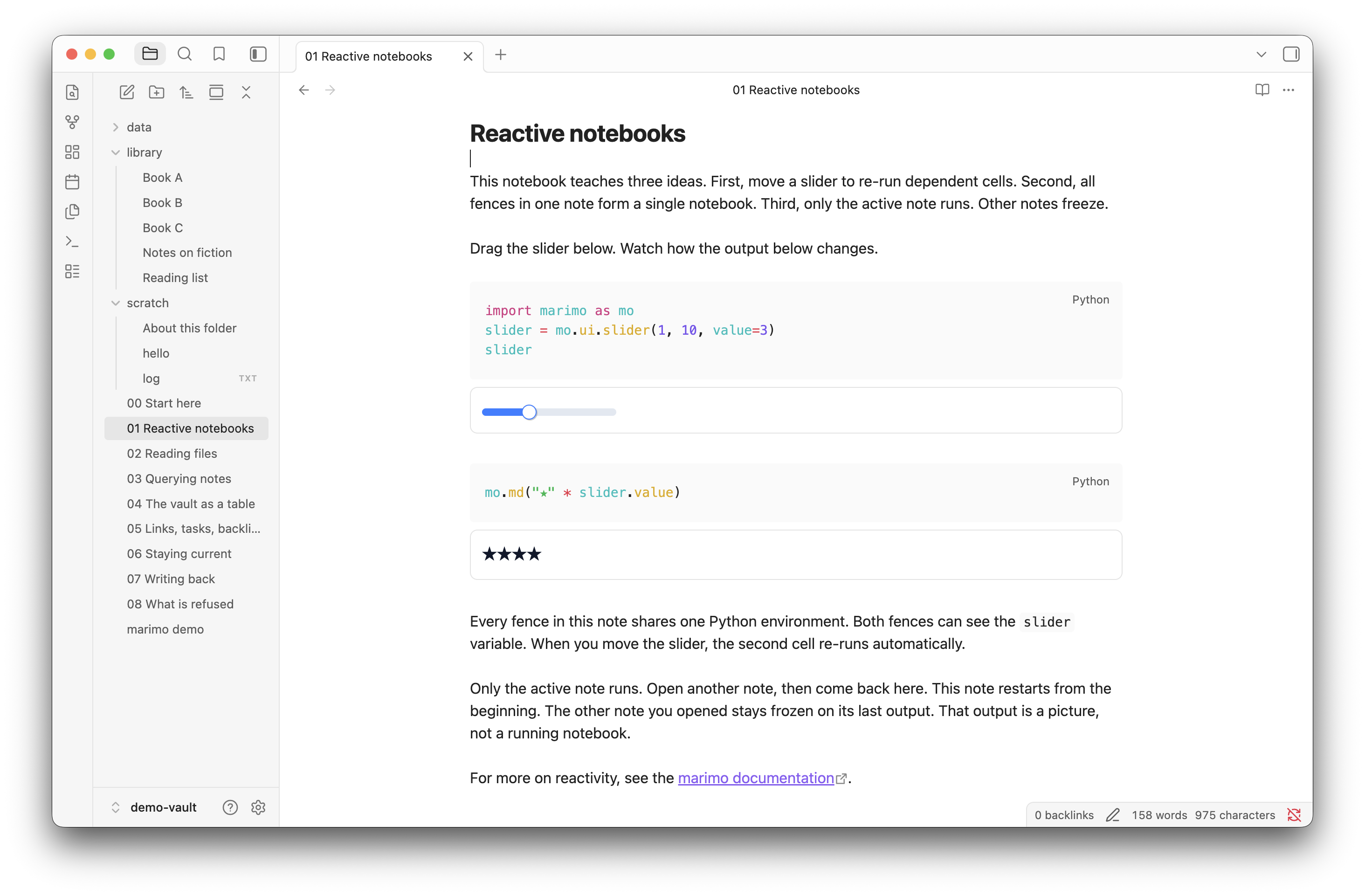
Write cells in a `marimo` fence:
````markdown
```marimo
import marimo as mo
slider = mo.ui.slider(0, 10, value=3)
slider
```
```marimo
slider.value * 2
```
````
All `marimo` blocks in one note share a single reactive notebook: moving the
slider reruns the dependent cell below it.
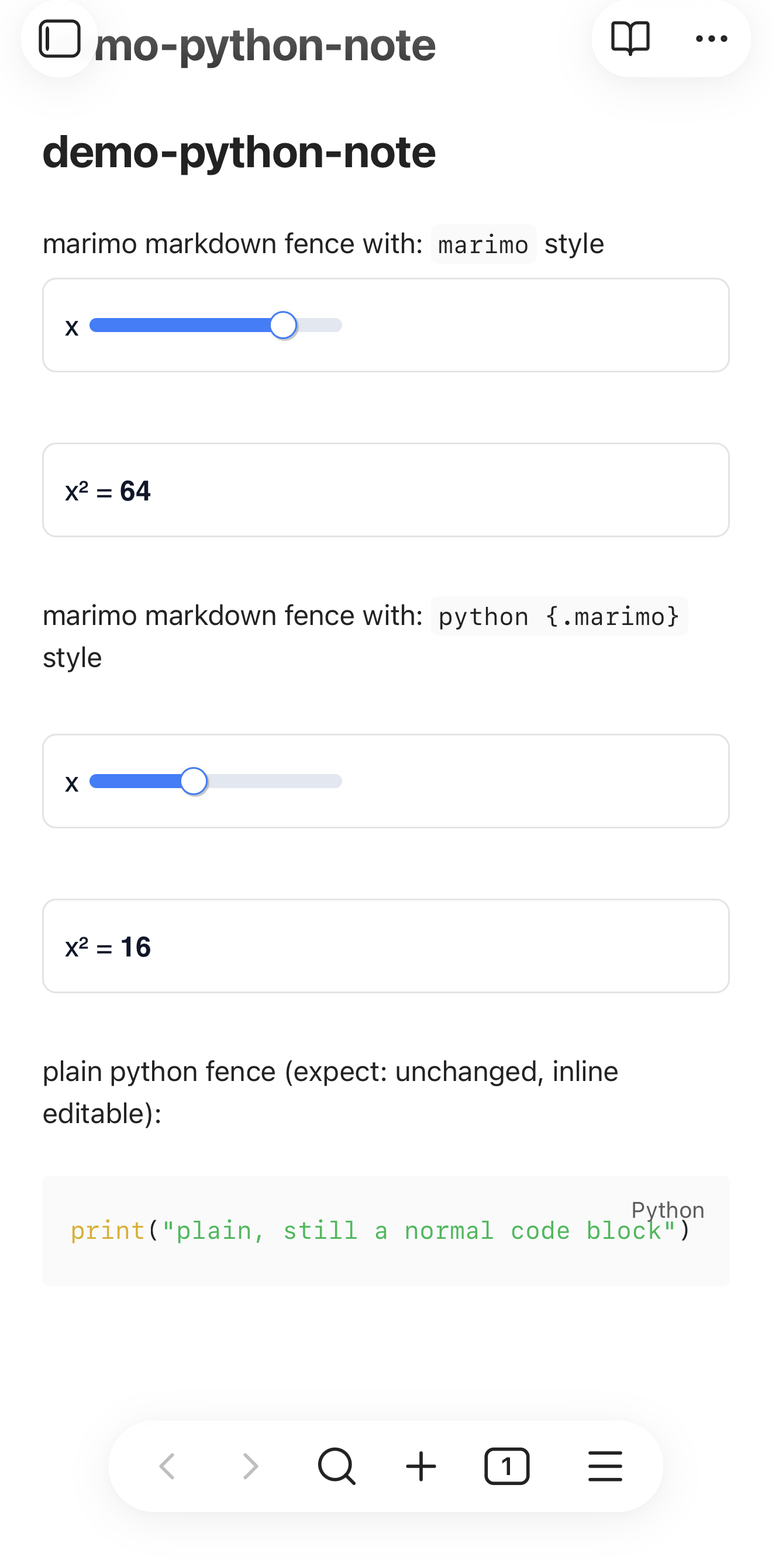
marimo's own [notebook-as-markdown format](https://docs.marimo.io/guides/exporting/markdown/)
is also supported — fences like ```` ```python {.marimo} ```` are upgraded to
islands, so a file produced by `marimo export md notebook.py` renders as a
runnable notebook when opened in Obsidian.
Both fence flavors render in reading view and in live preview. In live preview,
the island replaces the fence while the cursor is outside it. To edit the
source, move the cursor into the block or click the `` button on the
island.
## How it works
Built on [marimo islands](https://docs.marimo.io/guides/island_example/), the
same runtime behind marimo-anywhere (quarto-marimo, jupyter-book-marimo,
mdx-marimo):
1. Each code block is rendered into the DOM contract the islands runtime
expects:
```html
…
```
2. The [`@marimo-team/islands`](https://www.npmjs.com/package/@marimo-team/islands)
runtime (pinned in `src/main.ts`, versioned in lockstep with marimo) is
dynamically imported from jsDelivr on first use, along with its stylesheet.
3. Its exported `initialize()` scans the DOM, stitches all islands with the same
`data-app-id` into one notebook file, and executes it in a Pyodide web
worker. `initialize()` is idempotent, so it is re-called (debounced) as
Obsidian renders blocks.
Two render paths feed step 1. Reading view uses a markdown post-processor. Live
preview uses a CodeMirror state field (`src/live-preview.ts`) that replaces each
fence with a block widget, because live preview draws fences as editor text and
the reading-view post-processor never runs there.
Unlike the static-site integrations, no build-time Python step is needed — the
runtime executes the embedded code client-side; build-time output is only a
hydration nicety.
## Vendoring / offline
```bash
./scripts/vendor-islands.sh # islands runtime (~29 MB) → vendor/islands
./scripts/vendor-pyodide.sh # Pyodide core + boot wheels (~20 MB) → vendor/pyodide
```
With both vendored, notebooks using marimo + the Python stdlib run fully
offline; the plugin falls back to jsDelivr when vendor/ is absent. The pyodide
script also patches the vendored worker chunk to honor
`globalThis.__PYODIDE_BASE__` / `__MARIMO_LOCK__`, which the plugin injects
via its worker shim.
## Caveats
- Extra package imports in notebooks (numpy, pandas, …) still fetch from the
CDN at runtime — vendoring covers the marimo core only.
- Obsidian quirks handled by the plugin (see comments in `src/main.ts`):
Electron's `process` in workers breaks Pyodide's environment detection
(worker shim), CSP blocks remote styles (inlined, titled "marimo-notes" so
shadow roots adopt it), live-preview/reading-view DOM duplication (only the
active note's islands join the live app), and recreated block DOM rebinding
without a kernel restart (data-mo-code + cell index map).
- A notebook renders in the runtime's light colors, whatever theme the vault
uses. The published runtime does not ship CSS `light-dark()` to the browser.
It rewrites its colors into a polyfill that reuses one variable name across
rules, so a color can read a value that belongs to an unrelated property.
This one is not solved yet.
- The same polyfill can misrender single colors in a light vault: dict output
keys can paint near-white on white, and a table row can paint dark. A reload
of the note usually clears it. The copy button on dict output floats over
the text.
- Islands are marked an early/experimental feature upstream.
## Vault access
Notebooks reach the vault through the `obsidian_marimo` module. Import it with
`from obsidian_marimo import vault` and call it from any marimo cell. Every
call is async.
The vault API needs Obsidian 1.7.2 or later.
### Reading and querying
```python
from obsidian_marimo import vault
notes = await vault.notes() # all notes sorted by path
notes = await vault.notes(folder="areas/") # prefilter by folder
notes = await vault.notes(tag="#book") # prefilter by tag
files = await vault.files() # all vault files
files = await vault.files(ext="csv") # filter by extension
me = await vault.self() # the note hosting this notebook
await vault.read("path/to/note.md") # fetch one file as text
await vault.read_bytes("image.png") # fetch one file as bytes
texts = await vault.read_many(paths) # fetch many files at once
```
Each `Note` object has read-only properties and methods. Properties are:
- `path`: vault path, including the extension
- `name`: file name without the extension
- `folder`: parent folder path, empty at the vault root
- `size`: file size in bytes
- `ctime`, `mtime`: creation and modification time, in milliseconds
- `frontmatter`: the frontmatter dict, empty when the note has none
- `tags`: inline and frontmatter tags, merged by Obsidian's own rules
- `headings`: dicts with `heading` and `level`
- `links`: dicts with `link`, the text as written, and `target`, the resolved
vault path or `None`
- `unresolved`: link texts that point at no file
- `tasks`: dicts with `done` and `line`, one per checkbox
- `blocks`: block ids in the note
Methods on a `Note` are:
```python
text = await note.read() # fetch the note's current text
await note.write(text) # write the note's full text
await note.set_frontmatter({...}) # merge frontmatter keys
```
Query the vault graph and all tasks:
```python
await vault.links() # the whole forward link graph
await vault.backlinks("path/to/note.md") # notes that link to this one
await vault.frontmatter("path/to/note.md") # one note's frontmatter dict
await vault.tasks() # all checkboxes in the vault
await vault.tasks(done=True) # only finished checkboxes
await vault.tasks(done=False) # only open checkboxes
df = await vault.frame() # one row per note as DataFrame
```
`frame()` needs pandas, which Pyodide does not preload. The first call
installs it into the running kernel, which takes several seconds. A notebook
that never calls `frame()` never pays that cost. If the install fails, which
happens when you are offline, the call raises `VaultError` with code
`missing_dependency`.
To move the cost to notebook startup instead, put `import pandas as pd` in a
cell. marimo installs the packages it finds in the notebook source while the
kernel boots. It cannot find the import inside `frame()`, because this module
reaches the kernel as a string.
The DataFrame carries one column per built-in field and one column per
frontmatter key found anywhere in the vault. A frontmatter column is prefixed
with `fm_`, so a key named `path` or `tags` cannot collide with a built-in
column. A note without that key gets `None` in its row.
### Writing
A refused write raises `VaultError` in the cell, with the code and the reason.
A write never fails silently.
```python
await vault.write("path/to/file.md", "# Heading\n...") # create or replace
await vault.write("attachments/plot.png", data) # bytes write binary
await vault.append("out/log.md", "line 1\n") # creates when missing
await vault.set_frontmatter("path/to/note.md", { # merge frontmatter
"status": "done",
"due": vault.UNSET, # remove this key
"note": None, # set to YAML null
})
await vault.trash("path/to/file.md") # move to trash
await vault.exists("path/to/file.md") # test if file exists
```
### Denied paths
The validator runs in the plugin, not in Python, because a notebook author
controls the kernel and can post to the plugin directly. These paths are
refused, with the code the error carries:
| Reason | Error code |
|--------|------------|
| Path is empty or not a string | `invalid_path` |
| Path contains a null byte | `invalid_path` |
| Path is absolute (leading `/`, `\`, or drive letter) | `invalid_path` |
| Path walks out of the vault with `..` | `invalid_path` |
| Path names a folder | `invalid_path` |
| The Obsidian configuration directory, whatever its name | `denied_config_dir` |
| File extension not in the allowlist | `denied_extension` |
| Write through a symlinked folder, with the setting off | `denied_symlink` |
| The note that hosts this notebook | `denied_self_write` |
| File missing, for `trash` or `set_frontmatter` | `not_found` |
A write is limited to these file types: `md`, `csv`, `json`, `txt`, `png`,
`jpg`, `jpeg`, `gif`, `webp`, `svg`, `parquet`.
### Symlink setting
A symlinked folder inside the vault is a door out of it. The plugin resolves
the nearest existing ancestor of the target and requires it to stay inside the
vault.
The setting "Allow writes through symlinked folders" turns this check off. It
ships disabled. Turn it on only when you put a symlink in your vault on
purpose and you trust what it points at. The setting changes writes only. It
never affects reading, and it never changes the symlink itself.
The check does nothing on mobile, where Node is absent. The exposure is small,
because the iOS and Android app sandbox cannot hold a symlink.
### Debounce behavior
Validation answers immediately. Only the filesystem write waits, for 500
milliseconds, in one window per path. A write to one note never waits behind a
write to another.
Inside a window:
- `write()` and `set_frontmatter()` coalesce. A newer whole-file value
replaces the older one, and two frontmatter edits merge.
- `append()` accumulates. Later text concatenates onto earlier text, because
dropping an append loses data.
- A change of operation kind for one path flushes the pending value first.
The promise resolves when the write lands, not when the call is accepted. An
early resolve would let a kernel restart inside the window lose a write your
notebook already treated as durable.
A text write whose content matches the file is skipped. No vault event fires,
so the note does not re-render, and any write loop reaches a fixed point.
### App lifecycle
One notebook runs at a time, and the active note owns it. When you focus a
different marimo note, the plugin stops the running notebook and starts the
new one.
Here is what you see. The note you leave keeps its last output on screen. That
output is a picture, not a running notebook. Its Python state is gone, and a
slider in it no longer does anything. Focus it again and it runs from the
start.
A note that is visible but not active stays static too. In a split view with
two marimo notes, only the active pane runs.
### Staying current
The plugin batches vault changes and pushes them to the notebook every 500
milliseconds. Python drops its cached `notes()`, `files()`, and `links()`
results when a batch arrives, so the next call returns fresh data without a
kernel restart.
A cell does not re-run on its own when the vault changes. To follow the vault,
put `mo.ui.refresh` in one cell and read it in another. The second cell
depends on the first, so it re-runs on every tick.
```python
refresh = mo.ui.refresh(default_interval="5s")
refresh
```
```python
refresh
notes = await vault.notes()
mo.md(f"{len(notes)} notes")
```
### Binary example: save a plot and embed it
Save a figure as bytes, write it to the vault, then write a note that embeds
it.
```python
import io
import matplotlib.pyplot as plt
fig, ax = plt.subplots()
ax.plot([1, 2, 3], [1, 4, 9])
buf = io.BytesIO()
fig.savefig(buf, format="png")
await vault.write("attachments/plot.png", buf.getvalue())
await vault.write("out/chart.md", "# Chart\n\n![[plot.png]]")
```
Obsidian renders the image when you open `out/chart.md`.
### Threat model
Markdown is executable in many vaults. A note that holds a Dataview JS query
or a Templater trigger runs JavaScript in the renderer when you open it.
The validator cannot block this without blocking `.md`, and writing markdown
is the point of the API. So a hostile notebook can write a note that runs code
under the settings of those plugins.
Give a notebook from someone else the same trust you give a script from
someone else. Read it before you run it.
## Development
```bash
pnpm install
pnpm dev # watch build
pnpm build # type-check + production build
pnpm vault # scaffold + open the demo vault (examples/demo-vault) in Obsidian
```
`pnpm vault` symlinks the plugin into the test vault and opens it via the
`obsidian://` URL scheme; on first open, choose "Trust author and enable
plugins". For any other vault, symlink this folder into
`/.obsidian/plugins/marimo-notes/` and enable "marimo notes" in
Community plugins.
The "Reinitialize notebooks in open notes" command forces a re-scan.
## Release
Release prep lands through a normal PR. The workflow never pushes to `main`.
1. `node scripts/pin-islands.mjs` — pin the islands runtime to the latest
marimo release.
2. `node scripts/version-bump.mjs ` — set the version in
`package.json`, `manifest.json`, and `versions.json`.
3. Open a PR with these changes and merge it.
4. Run the "Release" workflow from the Actions tab. It builds, tags `main`
with the manifest version, and creates a draft GitHub release with
`main.js`, `manifest.json`, and `styles.css`.
5. Review and publish the draft release.