# 🔬 Scientific Article Card
[](https://github.com/kchennen/obsidian-scientific-article-card/releases/latest)
[](https://obsidian.md)
[](https://github.com/kchennen/obsidian-scientific-article-card/releases)
[](https://github.com/kchennen/obsidian-scientific-article-card/actions/workflows/test.yml)
[](https://github.com/kchennen/obsidian-scientific-article-card/actions/workflows/release.yml)
[](LICENSE)
[](#-network-use)
> Created by **[Kirsley Chennen](https://github.com/kchennen)**
📄 Turn a **PMID, PMCID, DOI, arXiv ID or scientific article URL** into a rich metadata card in your notes: title, authors, journal, year/volume/issue/pages, abstract, preview image, DOI, PMID, PMCID and keywords.
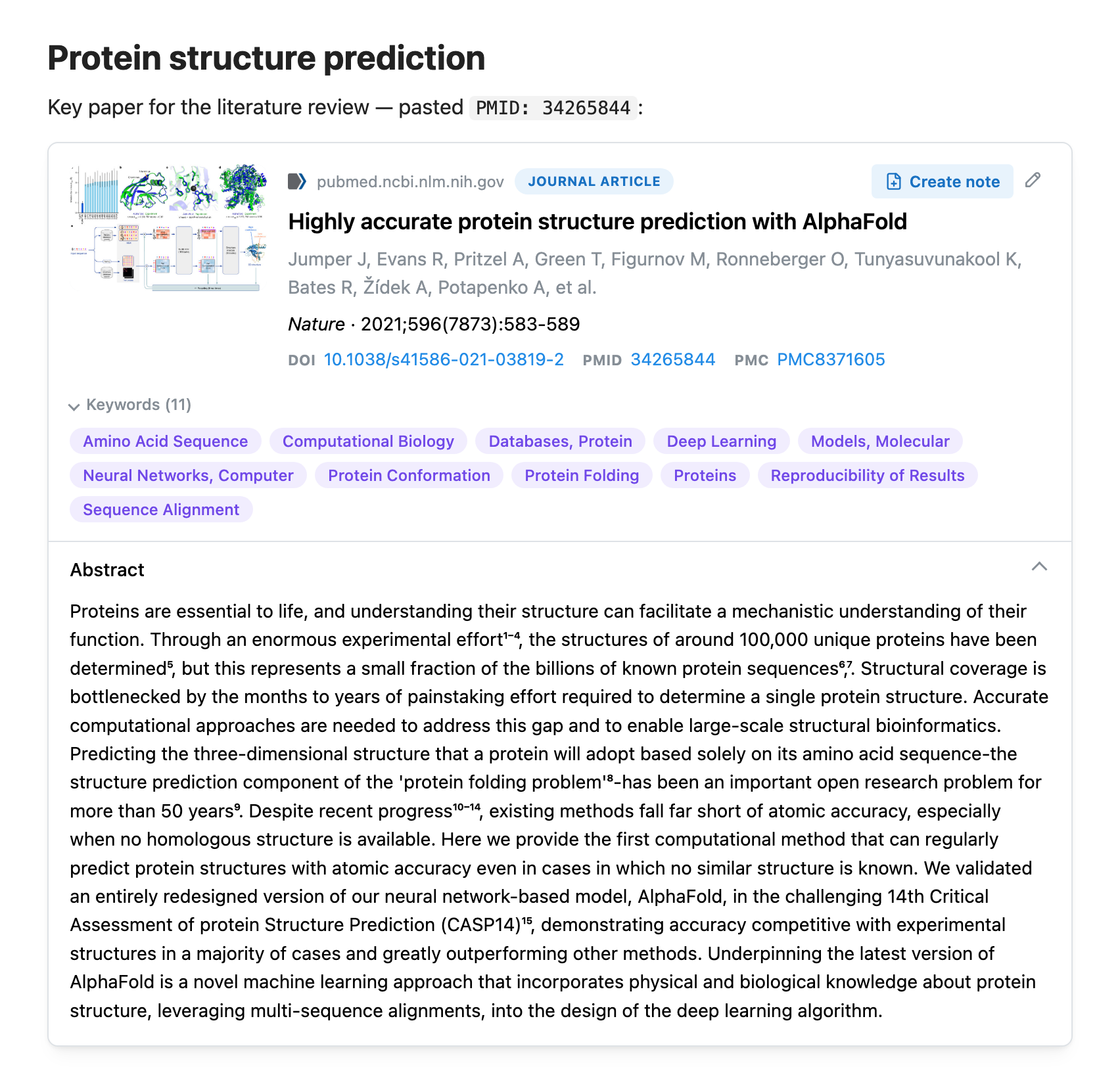 💡 Think [Auto Card Link](https://github.com/nekoshita/obsidian-auto-card-link), but for papers: instead of a generic web preview, metadata comes from scholarly databases.
````
```paper
url: "https://pubmed.ncbi.nlm.nih.gov/34265844/"
title: "Highly accurate protein structure prediction with AlphaFold"
authors: "Jumper J, Evans R, Pritzel A, Green T, Figurnov M, Ronneberger O, Tunyasuvunakool K, Bates R, Žídek A, Potapenko A, et al."
journal: "Nature"
year: "2021"
volume: "596"
issue: "7873"
pages: "583-589"
doi: "10.1038/s41586-021-03819-2"
pmid: "34265844"
pmcid: "PMC8371605"
type: "Journal Article"
host: "pubmed.ncbi.nlm.nih.gov"
abstract: "Proteins are essential to life, and understanding their structure can facilitate…"
```
````
The block is rendered as a card with a preview image on the left (the article's first figure when available), the site icon, publication type, linked title, authors, citation, clickable DOI / PMID / PMC / arXiv links, keyword chips (the author keywords, or the MeSH terms when there are none) and a collapsible abstract (structured abstracts keep their *Background / Methods / Results* sections). The card is styled after [Mantine](https://mantine.dev)'s Card component and follows Obsidian's light or dark theme. Because it is plain YAML, you can edit any field by hand.
## 🔎 Supported inputs
| Input | Examples |
| --- | --- |
| PMID | `PMID: 34265844`, `34265844` (commands), `https://pubmed.ncbi.nlm.nih.gov/34265844/` |
| PMCID | `PMC8371605`, `https://pmc.ncbi.nlm.nih.gov/articles/PMC8371605/`, Europe PMC links |
| DOI | `10.1038/s41586-021-03819-2`, `doi:…`, `https://doi.org/…` |
| arXiv | `arXiv:1706.03762`, `https://arxiv.org/abs/1706.03762`, `…/pdf/1706.03762v7` |
| Publisher URL | any URL containing a DOI (Science, Wiley, PLOS, Frontiers, bioRxiv/medRxiv, PNAS…), `nature.com/articles/…` |
| Any article page | pages exposing `citation_*` / Dublin Core / OpenGraph meta tags |
Markdown links (`[text](url)`) and `` are accepted too. Trailing `/full`, `.pdf`, `v2` and similar suffixes are stripped from DOIs.
## 🚀 Usage
💡 Think [Auto Card Link](https://github.com/nekoshita/obsidian-auto-card-link), but for papers: instead of a generic web preview, metadata comes from scholarly databases.
````
```paper
url: "https://pubmed.ncbi.nlm.nih.gov/34265844/"
title: "Highly accurate protein structure prediction with AlphaFold"
authors: "Jumper J, Evans R, Pritzel A, Green T, Figurnov M, Ronneberger O, Tunyasuvunakool K, Bates R, Žídek A, Potapenko A, et al."
journal: "Nature"
year: "2021"
volume: "596"
issue: "7873"
pages: "583-589"
doi: "10.1038/s41586-021-03819-2"
pmid: "34265844"
pmcid: "PMC8371605"
type: "Journal Article"
host: "pubmed.ncbi.nlm.nih.gov"
abstract: "Proteins are essential to life, and understanding their structure can facilitate…"
```
````
The block is rendered as a card with a preview image on the left (the article's first figure when available), the site icon, publication type, linked title, authors, citation, clickable DOI / PMID / PMC / arXiv links, keyword chips (the author keywords, or the MeSH terms when there are none) and a collapsible abstract (structured abstracts keep their *Background / Methods / Results* sections). The card is styled after [Mantine](https://mantine.dev)'s Card component and follows Obsidian's light or dark theme. Because it is plain YAML, you can edit any field by hand.
## 🔎 Supported inputs
| Input | Examples |
| --- | --- |
| PMID | `PMID: 34265844`, `34265844` (commands), `https://pubmed.ncbi.nlm.nih.gov/34265844/` |
| PMCID | `PMC8371605`, `https://pmc.ncbi.nlm.nih.gov/articles/PMC8371605/`, Europe PMC links |
| DOI | `10.1038/s41586-021-03819-2`, `doi:…`, `https://doi.org/…` |
| arXiv | `arXiv:1706.03762`, `https://arxiv.org/abs/1706.03762`, `…/pdf/1706.03762v7` |
| Publisher URL | any URL containing a DOI (Science, Wiley, PLOS, Frontiers, bioRxiv/medRxiv, PNAS…), `nature.com/articles/…` |
| Any article page | pages exposing `citation_*` / Dublin Core / OpenGraph meta tags |
Markdown links (`[text](url)`) and `` are accepted too. Trailing `/full`, `.pdf`, `v2` and similar suffixes are stripped from DOIs.
## 🚀 Usage
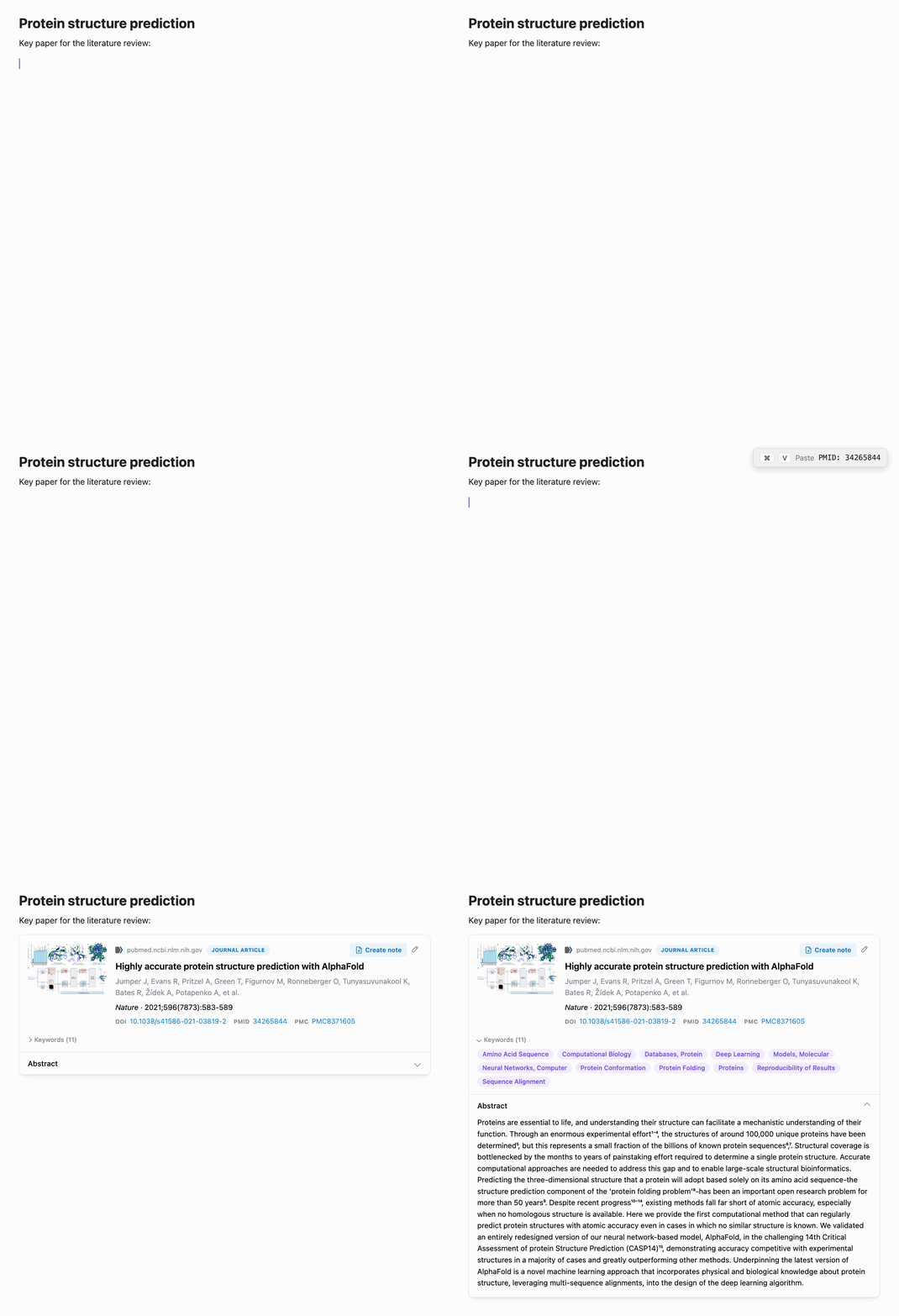 - 📋 **Paste**: with *Enhance default paste* on, pasting a PubMed/PMC/DOI/arXiv link, a DOI, `PMID: …`, or a URL from a listed publisher domain turns it into a card once it lands in your note. Other URLs are left untouched.
- ⌨️ **Commands**
- *Convert selection (or identifier under cursor) to article card* — accepts several identifiers separated by spaces, commas or new lines
- *Insert article card from PMID / DOI / URL…* — opens a prompt
- *Create paper note from PMID / DOI / URL…* — see [Paper notes](#-paper-notes)
- *Refresh paper metadata* — in a paper note
- *Link cards and paper notes in this note (backlinks)* — in a reading list
- *Create Papers base (overview of paper notes)*
- 🖱️ **Editor context menu**: *Convert to article card*.
## 🎨 Output formats
- 🃏 **Card** (default): a `paper` code block rendered by the plugin.
- 📝 **Markdown template**: plain Markdown that stays readable without the plugin. The default template is a collapsible callout; customize it with placeholders:
`{{title}} {{authors}} {{firstAuthor}} {{journal}} {{journalAbbr}} {{year}} {{date}} {{volume}} {{issue}} {{pages}} {{citation}} {{doi}} {{pmid}} {{pmcid}} {{arxiv}} {{ids}} {{url}} {{host}} {{image}} {{type}} {{publisher}} {{keywords}} {{abstract}}`
Wrap text in `{{#key}}…{{/key}}` to include it only when `key` has a value.
## 📝 Your notes
Add your own reading status, rating, tags and a note to any card: select the ✏️ button in the card's header, fill in the form and save. (Once a card has a [paper note](#-paper-notes), these live in the paper note instead.) They appear in a separate *Your notes* section, so what you wrote stays apart from the fetched metadata.
- 📋 **Paste**: with *Enhance default paste* on, pasting a PubMed/PMC/DOI/arXiv link, a DOI, `PMID: …`, or a URL from a listed publisher domain turns it into a card once it lands in your note. Other URLs are left untouched.
- ⌨️ **Commands**
- *Convert selection (or identifier under cursor) to article card* — accepts several identifiers separated by spaces, commas or new lines
- *Insert article card from PMID / DOI / URL…* — opens a prompt
- *Create paper note from PMID / DOI / URL…* — see [Paper notes](#-paper-notes)
- *Refresh paper metadata* — in a paper note
- *Link cards and paper notes in this note (backlinks)* — in a reading list
- *Create Papers base (overview of paper notes)*
- 🖱️ **Editor context menu**: *Convert to article card*.
## 🎨 Output formats
- 🃏 **Card** (default): a `paper` code block rendered by the plugin.
- 📝 **Markdown template**: plain Markdown that stays readable without the plugin. The default template is a collapsible callout; customize it with placeholders:
`{{title}} {{authors}} {{firstAuthor}} {{journal}} {{journalAbbr}} {{year}} {{date}} {{volume}} {{issue}} {{pages}} {{citation}} {{doi}} {{pmid}} {{pmcid}} {{arxiv}} {{ids}} {{url}} {{host}} {{image}} {{type}} {{publisher}} {{keywords}} {{abstract}}`
Wrap text in `{{#key}}…{{/key}}` to include it only when `key` has a value.
## 📝 Your notes
Add your own reading status, rating, tags and a note to any card: select the ✏️ button in the card's header, fill in the form and save. (Once a card has a [paper note](#-paper-notes), these live in the paper note instead.) They appear in a separate *Your notes* section, so what you wrote stays apart from the fetched metadata.
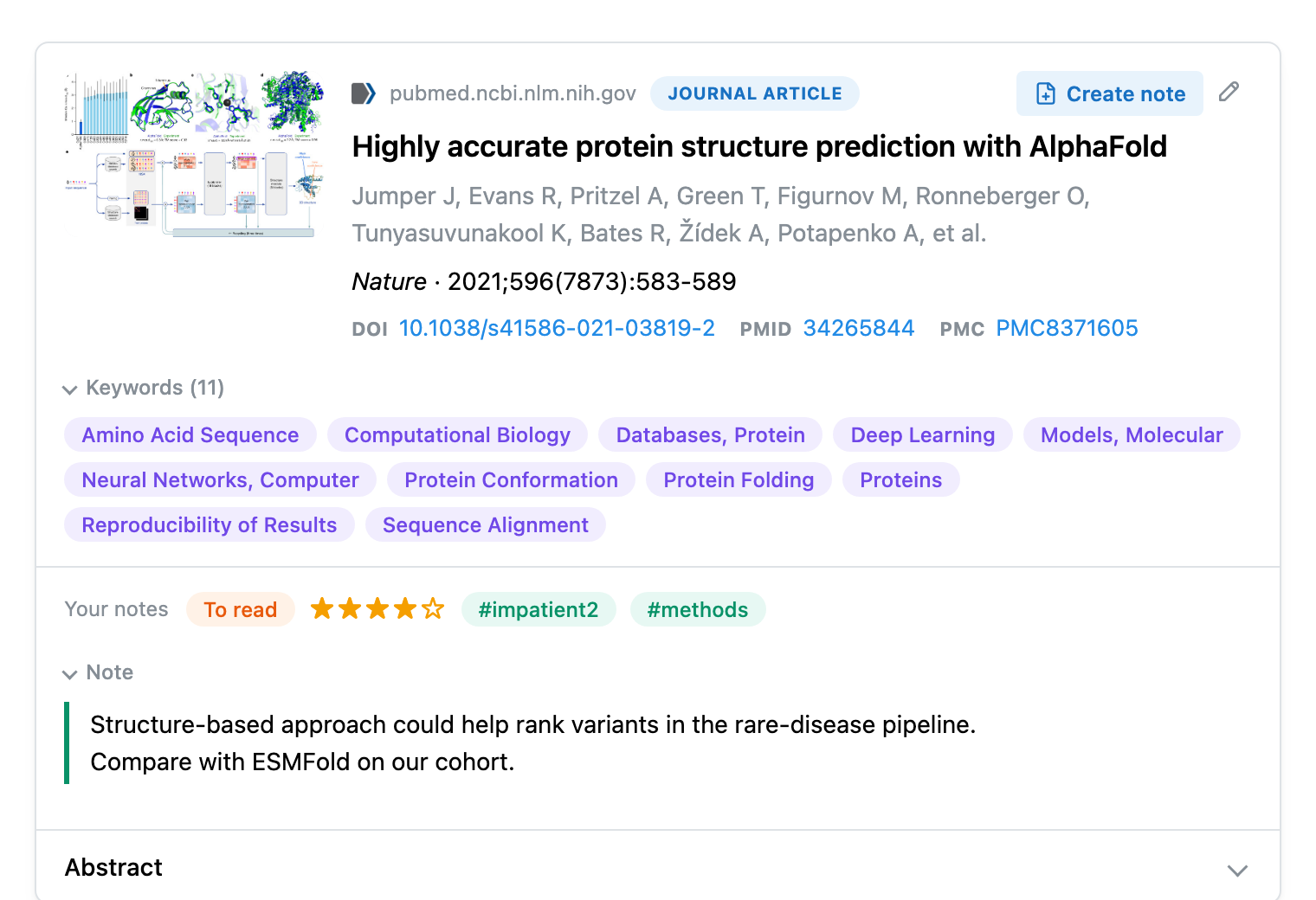 They are stored as extra fields in the card, which you can also edit by hand:
```yaml
status: "to-read" # to-read, reading or read
rating: 4 # 1 to 5
tags: ["impatient2", "methods"]
note: "Compare with ESMFold on our cohort."
```
**Tags in Obsidian.** Obsidian doesn't index tags inside code blocks. With *Add card tags to the note's tags* on (the default), saving notes also adds the card's tags to the note's `tags` property, so the tag pane, search, Dataview and Bases find the note. Removing a tag from a card doesn't remove it from the property, since you may use it elsewhere in the note.
## 📚 Paper notes
For papers you work with, create **one note per paper** with the **Create note** button in the card's header. The paper's metadata becomes the note's properties, so each paper has its own tags, status and rating in Obsidian's tag pane, search, Dataview and Bases.
- **Name**: `FirstAuthor_JournalAbbreviation_Year`, e.g. `Jumper_Nature_2021`, `Zucca_HumGenet_2025`. A different paper with the same name gets `…2025a`, `…2025b`, and so on. If a paper note with the same DOI or PMID already exists in the papers folder (or is linked from the reading list), it is reused.
- **Location**: next to the note with the card (optionally in a subfolder), or in one dedicated folder. See the settings.
- **Content**: the paper's metadata as properties (`type: paper`, `title`, `authors`, `journal`, `year`, `doi`, `pmid`, `pmcid`, `url`, `image`, `publication-type`, `keywords`, `status`, `rating`, `summary`, `tags`, `created`, `reading-lists`), the abstract, and a *Notes* section for your writing.
- **Your notes move with it**: the card's status, rating and tags become the note's properties, and its note becomes the `summary` property. The paper note is then the single place for your notes: write longer notes in its *Notes* section.
- **Reading lists keep their cards**: the card gets a `paper-note` link, its button becomes **Open note**, and its *Your notes* section shows the paper note's status, rating, tags and `summary` (labelled *in Meyer_JNeuromusculDis_2024*). Edit the `summary` property (or use ✏️) to change the text shown on the card; it is rendered as Markdown (lists, links, emphasis…). If the card's link is missing or broken, the card finds its paper note by DOI or PMID among the notes linked from the reading list's `papers` property and in the papers folder, and **Open note** repairs the link.
- **One place for your notes**: if a linked card still has its own `status`, `rating`, `tags` or `note` (for example added by hand), **Open note** and ✏️ first move them into the paper note — without overwriting: the paper note's values win, tags are combined, and a note that differs from the summary is added to *Notes*.
- **Backlinks**: the paper note and the reading list link to each other through properties — `reading-lists: ["[[Biblios]]"]` in the paper note and `papers: ["[[Zucca_HumGenet_2025]]"]` in the reading list — so each shows in the other's backlinks and on the graph, and Obsidian updates them when you rename a note. For cards linked before version 1.8, run *Link cards and paper notes in this note (backlinks)* in the reading list.
**Refresh paper metadata**: in a paper note, run the *Refresh paper metadata* command to fetch the paper again (for example after a preprint is published, or when a figure becomes available). It updates only the fetched properties — title, authors, journal, year, volume, issue, pages, identifiers, URL, image, publication type and keywords — and never your `status`, `rating`, `tags`, `created`, other properties or the note's text. An empty result keeps the old value.
**Papers base**: the *Create Papers base* command creates `Papers.base` in the papers folder (or opens it if it exists), listing the paper notes in that folder with four views:
| View | Shows |
| --- | --- |
| All papers | table of title, year, journal, status, rating and tags, newest first |
| To read | papers with `status: to-read`, oldest first |
| By status | the table grouped by status |
| Shelf | cards with each paper's figure as the cover |
It's a regular Bases file, so you can change its filters, columns and views in Obsidian.
Example properties:
```yaml
type: paper
title: Highly accurate protein structure prediction with AlphaFold
authors: [Jumper J, Evans R, Pritzel A, …]
journal: Nature
year: 2021
doi: 10.1038/s41586-021-03819-2
pmid: "34265844"
status: to-read
rating: 4
summary: Compare with ESMFold on our cohort.
tags: [impatient2, methods]
```
## ⚙️ Settings
Main link target (what you pasted / DOI / PubMed), author format (`Smith JA` or `John A. Smith`), maximum authors before *et al.*, include abstract / keywords / MeSH terms, fetch preview image, expand abstract by default, add card tags to the note's tags, publisher domains for paste, contact email and NCBI API key.
- **Colors**: card style (*Mantine*, or *Match Obsidian theme* to use your theme's colors and font), and the colors of the publication type badge, the keywords, and your tags and note (Mantine's 13 colors, or your Obsidian accent color).
- **Badges** (publication type, keywords, tags and status, as Mantine Badges): variant (*Light*, *Filled*, *Outline*, *Dot*, *Default*), size (extra small to extra large), radius (extra small to a pill), and uppercase (publication type only, all badges, or none).
- **Sections**: expand the keywords / MeSH terms and your summary by default, or show them as *Keywords (n)* and *Summary* toggles.
- **Paper notes**: location (next to the note with the card, with an optional subfolder, or a dedicated folder).
## 🌐 Network use
This plugin makes network requests **only when you convert an identifier** into a card. It sends the identifier (PMID, PMCID, DOI, arXiv ID or URL) to:
- [NCBI E-utilities / PubMed](https://www.ncbi.nlm.nih.gov/books/NBK25497/) — article metadata by PMID
- [Europe PMC REST API](https://europepmc.org/RestfulWebService) — metadata by DOI / PMCID / PMID
- [Crossref REST API](https://www.crossref.org/documentation/retrieve-metadata/rest-api/) — metadata for DOIs not indexed in Europe PMC
- [arXiv API](https://info.arxiv.org/help/api/index.html) — arXiv preprints
- the [PMC Open Access dataset on AWS](https://registry.opendata.aws/ncbi-pmc/) (`pmc-oa-opendata.s3.amazonaws.com`) — the first figure of articles available in PubMed Central, used as the preview image
- the article's own page (the URL you pasted, or its `doi.org` landing page) — to read citation meta tags, and the preview image when the article is not in PMC
- the NCBI CDN (`cdn.ncbi.nlm.nih.gov`) — PubMed's preview image, shown when no figure is available for a PubMed article
- Google's favicon service (`www.google.com/s2/favicons`) — the site icon displayed on the card, loaded when the card is rendered
If you enter a contact email or NCBI API key in the settings, they are sent to NCBI (and the email to Crossref) as recommended by their usage policies. No other data is collected or transmitted, and there is no telemetry.
## 📋 Clipboard
The plugin **does not access the system clipboard**: it never reads or writes it.
Paste-to-card works on your note, not the clipboard. When you paste, Obsidian inserts the text as usual; the plugin then looks at that newly inserted text and, if it is a PMID, PMCID, DOI, arXiv ID or supported article URL, replaces it with a card (⌘Z brings back what you pasted). Turn *Enhance default paste* off to disable this.
> **Using Auto Card Link too?** If its *Enhance Default Paste* option is on, it takes over pasted **URLs** before they reach the note, so PubMed/DOI links become generic link cards. Turn that option off, or paste the bare DOI / `PMID: …`, or use *Convert selection to article card* on the link.
## 🔐 Verifying releases
Release files (`main.js`, `styles.css`, `manifest.json`) are built by GitHub Actions and carry [artifact attestations](https://docs.github.com/en/actions/security-for-github-actions/using-artifact-attestations/using-artifact-attestations-to-establish-provenance-for-builds), so you can check that they came from this repository:
```bash
gh attestation verify main.js --repo kchennen/obsidian-scientific-article-card
```
## 🧪 Development
The plugin is plain JavaScript (`main.js`, `styles.css`) with no build step. Tests use Node's built-in test runner:
```bash
npm install
npm test
```
They run offline: API answers (PubMed, Europe PMC, Crossref, arXiv, PMC figures) are recorded in `tests/fixtures` and replayed, and Obsidian is replaced by an in-memory vault (`tests/helpers`). What they cover:
| File | Behaviour |
| --- | --- |
| `identifiers.test.js` | PMID, PMCID, DOI, arXiv and URL parsing, DOI clean-up |
| `text.test.js` | abstracts: super/subscripts, section labels, JATS |
| `format.test.js` | authors, citation, code block YAML, Markdown template |
| `fields.test.js` | card notes fields, tags, finding and rewriting a card, merging notes |
| `paper-notes.test.js` | file names, properties, body, refresh rules, `Papers.base` |
| `render.test.js` | the card: sections, buttons, linked cards, warning strip, colors |
| `styles.test.js` | CSS variables and color classes defined, image on the left, no uppercase keywords |
| `resolver.test.js` | every lookup path, preview images, keyword fallback, main link |
| `paste.test.js` | paste detection on real CodeMirror transactions, no clipboard access |
| `flows.test.js` | inserting cards, your notes, Create/Open note, backlinks, duplicates, renames, refresh, commands |
Tests run on every push, and a release is only published if they pass. When an API changes its format, re-record the fixtures with `npm run record-fixtures`. Add a test with each new feature or bug fix.
## 📦 Installation
🧩 From Obsidian: **Settings → Community plugins → Browse**, search for *Scientific Article Card*.
🛠️ Manually: download `main.js`, `manifest.json` and `styles.css` from the [latest release](https://github.com/kchennen/obsidian-scientific-article-card/releases/latest) into `/.obsidian/plugins/scientific-article-card/`, then enable the plugin.
## ⚠️ Known limitations
- Some publishers (e.g. Elsevier / ScienceDirect) block automated page requests. Paste the DOI or PMID instead of the page URL.
- The preview image is the article's first figure when it is open access in PubMed Central. Otherwise it comes from the publisher page, which many publishers block. Articles indexed in PubMed fall back to PubMed's preview image.
- The card's own `paper-note` link sits inside a code block, which Obsidian doesn't track. The `papers` / `reading-lists` properties provide the backlinks; if the card's link breaks after a rename, the card finds the note by its DOI or PMID.
- To find paper notes the plugin never lists the whole vault: it only looks at the reading list's `papers` links and the papers folder. In the default location (next to each reading list), a paper note kept in another project's folder isn't found by DOI, so **Create note** makes one for this project; use a dedicated papers folder to share paper notes across projects.
## 👤 Author
**Kirsley Chennen** — [@kchennen](https://github.com/kchennen)
Issues and suggestions are welcome on the [issue tracker](https://github.com/kchennen/obsidian-scientific-article-card/issues). ⭐ Star the repo if you find it useful!
## 📜 License
[MIT](LICENSE) © 2026 Kirsley Chennen
They are stored as extra fields in the card, which you can also edit by hand:
```yaml
status: "to-read" # to-read, reading or read
rating: 4 # 1 to 5
tags: ["impatient2", "methods"]
note: "Compare with ESMFold on our cohort."
```
**Tags in Obsidian.** Obsidian doesn't index tags inside code blocks. With *Add card tags to the note's tags* on (the default), saving notes also adds the card's tags to the note's `tags` property, so the tag pane, search, Dataview and Bases find the note. Removing a tag from a card doesn't remove it from the property, since you may use it elsewhere in the note.
## 📚 Paper notes
For papers you work with, create **one note per paper** with the **Create note** button in the card's header. The paper's metadata becomes the note's properties, so each paper has its own tags, status and rating in Obsidian's tag pane, search, Dataview and Bases.
- **Name**: `FirstAuthor_JournalAbbreviation_Year`, e.g. `Jumper_Nature_2021`, `Zucca_HumGenet_2025`. A different paper with the same name gets `…2025a`, `…2025b`, and so on. If a paper note with the same DOI or PMID already exists in the papers folder (or is linked from the reading list), it is reused.
- **Location**: next to the note with the card (optionally in a subfolder), or in one dedicated folder. See the settings.
- **Content**: the paper's metadata as properties (`type: paper`, `title`, `authors`, `journal`, `year`, `doi`, `pmid`, `pmcid`, `url`, `image`, `publication-type`, `keywords`, `status`, `rating`, `summary`, `tags`, `created`, `reading-lists`), the abstract, and a *Notes* section for your writing.
- **Your notes move with it**: the card's status, rating and tags become the note's properties, and its note becomes the `summary` property. The paper note is then the single place for your notes: write longer notes in its *Notes* section.
- **Reading lists keep their cards**: the card gets a `paper-note` link, its button becomes **Open note**, and its *Your notes* section shows the paper note's status, rating, tags and `summary` (labelled *in Meyer_JNeuromusculDis_2024*). Edit the `summary` property (or use ✏️) to change the text shown on the card; it is rendered as Markdown (lists, links, emphasis…). If the card's link is missing or broken, the card finds its paper note by DOI or PMID among the notes linked from the reading list's `papers` property and in the papers folder, and **Open note** repairs the link.
- **One place for your notes**: if a linked card still has its own `status`, `rating`, `tags` or `note` (for example added by hand), **Open note** and ✏️ first move them into the paper note — without overwriting: the paper note's values win, tags are combined, and a note that differs from the summary is added to *Notes*.
- **Backlinks**: the paper note and the reading list link to each other through properties — `reading-lists: ["[[Biblios]]"]` in the paper note and `papers: ["[[Zucca_HumGenet_2025]]"]` in the reading list — so each shows in the other's backlinks and on the graph, and Obsidian updates them when you rename a note. For cards linked before version 1.8, run *Link cards and paper notes in this note (backlinks)* in the reading list.
**Refresh paper metadata**: in a paper note, run the *Refresh paper metadata* command to fetch the paper again (for example after a preprint is published, or when a figure becomes available). It updates only the fetched properties — title, authors, journal, year, volume, issue, pages, identifiers, URL, image, publication type and keywords — and never your `status`, `rating`, `tags`, `created`, other properties or the note's text. An empty result keeps the old value.
**Papers base**: the *Create Papers base* command creates `Papers.base` in the papers folder (or opens it if it exists), listing the paper notes in that folder with four views:
| View | Shows |
| --- | --- |
| All papers | table of title, year, journal, status, rating and tags, newest first |
| To read | papers with `status: to-read`, oldest first |
| By status | the table grouped by status |
| Shelf | cards with each paper's figure as the cover |
It's a regular Bases file, so you can change its filters, columns and views in Obsidian.
Example properties:
```yaml
type: paper
title: Highly accurate protein structure prediction with AlphaFold
authors: [Jumper J, Evans R, Pritzel A, …]
journal: Nature
year: 2021
doi: 10.1038/s41586-021-03819-2
pmid: "34265844"
status: to-read
rating: 4
summary: Compare with ESMFold on our cohort.
tags: [impatient2, methods]
```
## ⚙️ Settings
Main link target (what you pasted / DOI / PubMed), author format (`Smith JA` or `John A. Smith`), maximum authors before *et al.*, include abstract / keywords / MeSH terms, fetch preview image, expand abstract by default, add card tags to the note's tags, publisher domains for paste, contact email and NCBI API key.
- **Colors**: card style (*Mantine*, or *Match Obsidian theme* to use your theme's colors and font), and the colors of the publication type badge, the keywords, and your tags and note (Mantine's 13 colors, or your Obsidian accent color).
- **Badges** (publication type, keywords, tags and status, as Mantine Badges): variant (*Light*, *Filled*, *Outline*, *Dot*, *Default*), size (extra small to extra large), radius (extra small to a pill), and uppercase (publication type only, all badges, or none).
- **Sections**: expand the keywords / MeSH terms and your summary by default, or show them as *Keywords (n)* and *Summary* toggles.
- **Paper notes**: location (next to the note with the card, with an optional subfolder, or a dedicated folder).
## 🌐 Network use
This plugin makes network requests **only when you convert an identifier** into a card. It sends the identifier (PMID, PMCID, DOI, arXiv ID or URL) to:
- [NCBI E-utilities / PubMed](https://www.ncbi.nlm.nih.gov/books/NBK25497/) — article metadata by PMID
- [Europe PMC REST API](https://europepmc.org/RestfulWebService) — metadata by DOI / PMCID / PMID
- [Crossref REST API](https://www.crossref.org/documentation/retrieve-metadata/rest-api/) — metadata for DOIs not indexed in Europe PMC
- [arXiv API](https://info.arxiv.org/help/api/index.html) — arXiv preprints
- the [PMC Open Access dataset on AWS](https://registry.opendata.aws/ncbi-pmc/) (`pmc-oa-opendata.s3.amazonaws.com`) — the first figure of articles available in PubMed Central, used as the preview image
- the article's own page (the URL you pasted, or its `doi.org` landing page) — to read citation meta tags, and the preview image when the article is not in PMC
- the NCBI CDN (`cdn.ncbi.nlm.nih.gov`) — PubMed's preview image, shown when no figure is available for a PubMed article
- Google's favicon service (`www.google.com/s2/favicons`) — the site icon displayed on the card, loaded when the card is rendered
If you enter a contact email or NCBI API key in the settings, they are sent to NCBI (and the email to Crossref) as recommended by their usage policies. No other data is collected or transmitted, and there is no telemetry.
## 📋 Clipboard
The plugin **does not access the system clipboard**: it never reads or writes it.
Paste-to-card works on your note, not the clipboard. When you paste, Obsidian inserts the text as usual; the plugin then looks at that newly inserted text and, if it is a PMID, PMCID, DOI, arXiv ID or supported article URL, replaces it with a card (⌘Z brings back what you pasted). Turn *Enhance default paste* off to disable this.
> **Using Auto Card Link too?** If its *Enhance Default Paste* option is on, it takes over pasted **URLs** before they reach the note, so PubMed/DOI links become generic link cards. Turn that option off, or paste the bare DOI / `PMID: …`, or use *Convert selection to article card* on the link.
## 🔐 Verifying releases
Release files (`main.js`, `styles.css`, `manifest.json`) are built by GitHub Actions and carry [artifact attestations](https://docs.github.com/en/actions/security-for-github-actions/using-artifact-attestations/using-artifact-attestations-to-establish-provenance-for-builds), so you can check that they came from this repository:
```bash
gh attestation verify main.js --repo kchennen/obsidian-scientific-article-card
```
## 🧪 Development
The plugin is plain JavaScript (`main.js`, `styles.css`) with no build step. Tests use Node's built-in test runner:
```bash
npm install
npm test
```
They run offline: API answers (PubMed, Europe PMC, Crossref, arXiv, PMC figures) are recorded in `tests/fixtures` and replayed, and Obsidian is replaced by an in-memory vault (`tests/helpers`). What they cover:
| File | Behaviour |
| --- | --- |
| `identifiers.test.js` | PMID, PMCID, DOI, arXiv and URL parsing, DOI clean-up |
| `text.test.js` | abstracts: super/subscripts, section labels, JATS |
| `format.test.js` | authors, citation, code block YAML, Markdown template |
| `fields.test.js` | card notes fields, tags, finding and rewriting a card, merging notes |
| `paper-notes.test.js` | file names, properties, body, refresh rules, `Papers.base` |
| `render.test.js` | the card: sections, buttons, linked cards, warning strip, colors |
| `styles.test.js` | CSS variables and color classes defined, image on the left, no uppercase keywords |
| `resolver.test.js` | every lookup path, preview images, keyword fallback, main link |
| `paste.test.js` | paste detection on real CodeMirror transactions, no clipboard access |
| `flows.test.js` | inserting cards, your notes, Create/Open note, backlinks, duplicates, renames, refresh, commands |
Tests run on every push, and a release is only published if they pass. When an API changes its format, re-record the fixtures with `npm run record-fixtures`. Add a test with each new feature or bug fix.
## 📦 Installation
🧩 From Obsidian: **Settings → Community plugins → Browse**, search for *Scientific Article Card*.
🛠️ Manually: download `main.js`, `manifest.json` and `styles.css` from the [latest release](https://github.com/kchennen/obsidian-scientific-article-card/releases/latest) into `/.obsidian/plugins/scientific-article-card/`, then enable the plugin.
## ⚠️ Known limitations
- Some publishers (e.g. Elsevier / ScienceDirect) block automated page requests. Paste the DOI or PMID instead of the page URL.
- The preview image is the article's first figure when it is open access in PubMed Central. Otherwise it comes from the publisher page, which many publishers block. Articles indexed in PubMed fall back to PubMed's preview image.
- The card's own `paper-note` link sits inside a code block, which Obsidian doesn't track. The `papers` / `reading-lists` properties provide the backlinks; if the card's link breaks after a rename, the card finds the note by its DOI or PMID.
- To find paper notes the plugin never lists the whole vault: it only looks at the reading list's `papers` links and the papers folder. In the default location (next to each reading list), a paper note kept in another project's folder isn't found by DOI, so **Create note** makes one for this project; use a dedicated papers folder to share paper notes across projects.
## 👤 Author
**Kirsley Chennen** — [@kchennen](https://github.com/kchennen)
Issues and suggestions are welcome on the [issue tracker](https://github.com/kchennen/obsidian-scientific-article-card/issues). ⭐ Star the repo if you find it useful!
## 📜 License
[MIT](LICENSE) © 2026 Kirsley Chennen