
# Teleprompter Plus
Professional teleprompter for Obsidian — Stream Deck hardware control, mobile remote, neural text-to-speech, and full Markdown support.




Built for video recording, presentations, podcasts, speeches, and content creation.
---
## What it does
Teleprompter Plus turns any Obsidian note into a professional teleprompter. Auto-scroll at adjustable speed, highlight your reading position, control playback from the keyboard, an Elgato Stream Deck, or a phone, and optionally read your script aloud with high-quality neural voices. Designed for creators who already live in Obsidian and want a teleprompter that speaks the same Markdown they write in.
## Key features
- **Smooth auto-scroll** — variable speed (0.5×–10×), countdown timer, manual scroll, horizontal/vertical flip for camera-rig mirrors
- **Hierarchical navigation** — collapsible header tree, abstract-scrollbar minimap, click-to-jump, active-section highlighting
- **Stream Deck integration** — 55+ actions across 8 categories with real-time bidirectional state sync ([catalog](docs/stream-deck-actions.md))
- **Mobile remote control** — touch-friendly web interface, control from any device on your network
- **Neural text-to-speech** — Kokoro MLX (22 voices, Apple Silicon), macOS `say`, Web Speech fallback, sentence-by-sentence highlighting
- **Citation resolution** — `[@ries2011]` spoken as *"(Ries, 2011)"* using your `.bib` files
- **Full Markdown support** — Obsidian syntax, math, callouts, code with syntax highlighting, tables, images, internal links
- **8 built-in themes** — Professional, Broadcast, Stream, Practice, Accessibility, Cinema, plus custom colors and fonts
- **OBS integration** — start/stop recording synced with teleprompter playback
- **Local WebSocket API** — build custom integrations in any language ([API reference](docs/websocket-api.md))
---
## Screenshots
### Main interface
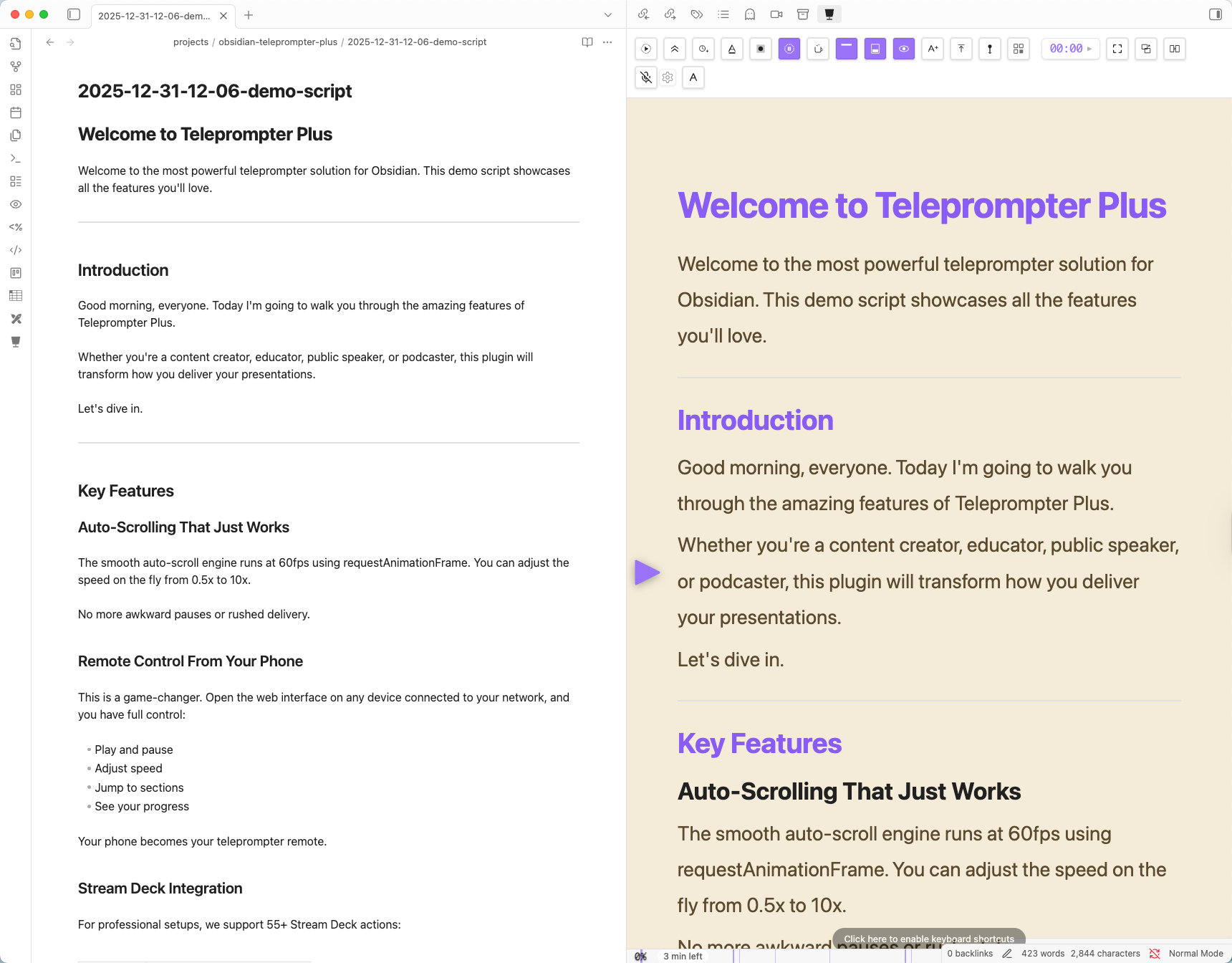
*Clean reading display with hierarchical navigation panel, eyeline guide, and real-time position tracking.*
### Mobile remote
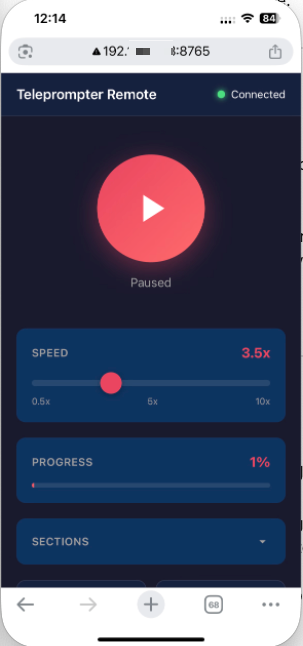
*Touch-friendly remote — phone, tablet, or second computer on the same network.*
### Stream Deck
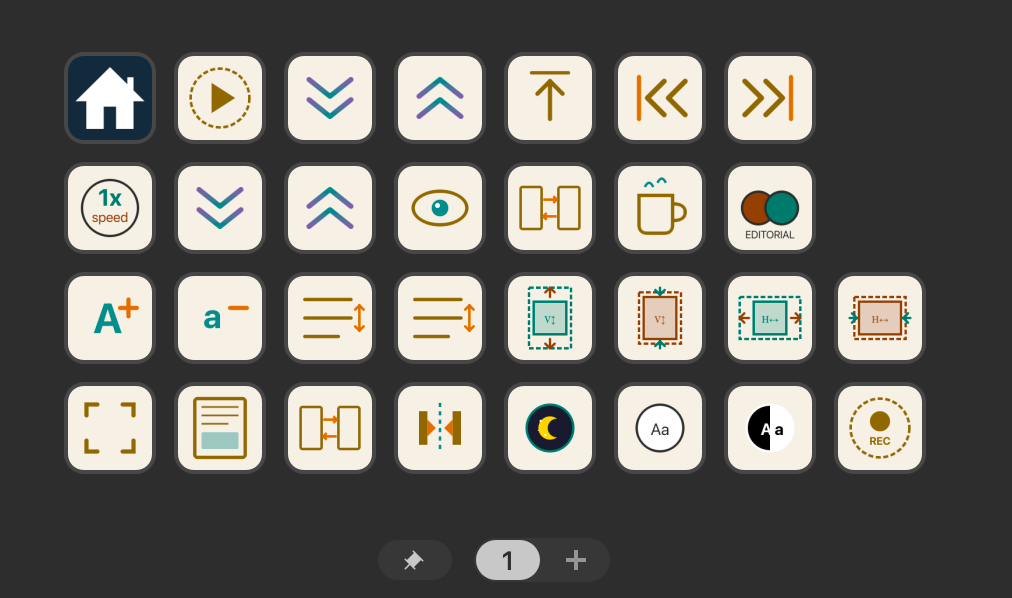
*55+ hardware actions with live state synchronization across all controls.*
### Settings
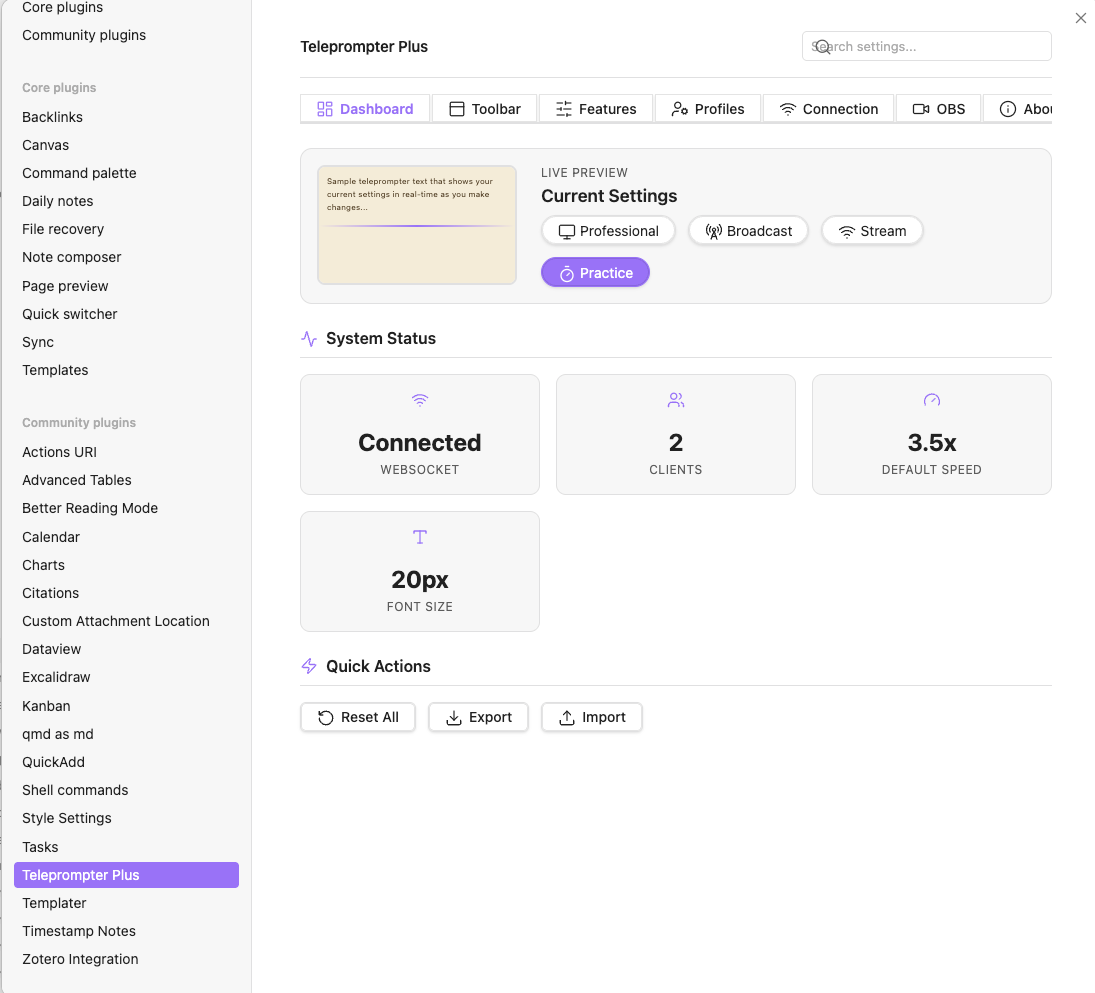
*Six-tab settings: Dashboard, Toolbar, Features, Profiles, Connection, About.*
---
## Installation
### Community Plugin browser (recommended once published)
Obsidian → Settings → Community plugins → Browse → search **Teleprompter Plus** → Install → Enable.
### Manual install
1. Download `main.js`, `styles.css`, and `manifest.json` from the [latest release](https://github.com/JuracyAmerico/obsidian-teleprompter-plus/releases/latest).
2. Place them in `/.obsidian/plugins/teleprompter-plus/` (create the folder if needed).
3. Obsidian → Settings → Community plugins → Reload → enable **Teleprompter Plus**.
### Build from source
```bash
git clone https://github.com/JuracyAmerico/obsidian-teleprompter-plus.git
cd obsidian-teleprompter-plus
bun install
bun run build
# copy dist/main.js, dist/styles.css, and manifest.json into your vault's plugins folder
```
See [CONTRIBUTING.md](CONTRIBUTING.md) for the full development setup.
---
## Quick start
1. **Open** — click the teleprompter ribbon icon, or run *Open Teleprompter Plus* from the command palette (`Cmd/Ctrl + P`).
2. **Pick a note** — the active note loads automatically and updates live as you edit.
3. **Play** — click Play (or press your hotkey). Adjust speed with `+` / `−`, font size with `Aa+` / `Aa−`.
4. **Navigate** — click any header in the side panel to jump there. Click the minimap on the right to scrub.
5. **Reset** — Reset returns to the top.
For 25+ keyboard commands, see Obsidian → Settings → Hotkeys → Teleprompter Plus.
---
## Settings overview
| Tab | What's there |
|-----|--------------|
| **Dashboard** | Live preview, quick profile picker, health status |
| **Toolbar** | Choose which controls appear in the teleprompter toolbar |
| **Features** | Collapsible cards by category — appearance, playback, navigation, voice, OBS, WebSocket |
| **Profiles** | 8 built-in profiles + your own saved configurations |
| **Connection** | Optional local WebSocket server for Stream Deck + mobile remote |
| **About** | Plugin info, shortcuts, credits |
---
## Stream Deck
55+ actions across 8 categories — Playback, Speed, Font, Navigation, Display, Utility, Countdown, Flip. Real-time bidirectional state sync: the Stream Deck button updates live when you change the teleprompter from any source.
```json
{ "command": "toggle-play" }
{ "command": "set-speed", "value": 3 }
{ "command": "jump-to-header", "value": 1 }
```
Full action catalog, configuration steps, and Stream Deck plugin setup: **[docs/stream-deck-actions.md](docs/stream-deck-actions.md)**.
---
## WebSocket API
A local-only WebSocket server (default `ws://127.0.0.1:8765`) lets you build custom controls in any language.
```typescript
const ws = new WebSocket('ws://127.0.0.1:8765')
ws.onopen = () => ws.send(JSON.stringify({ command: 'play' }))
ws.onmessage = (e) => {
const msg = JSON.parse(e.data as string)
if (msg.type === 'state') console.log('speed:', msg.data.speed)
}
```
Full command list, state shape, and integration examples: **[docs/websocket-api.md](docs/websocket-api.md)**.
> **Privacy** — the server binds to `127.0.0.1` only. No LAN or internet exposure by default. The mobile remote piggy-backs on your existing Obsidian session over the same loopback bridge.
---
## Text-to-Speech
Three engines, selected automatically based on availability:
1. **Kokoro MLX** *(best quality, Apple Silicon)* — 22 voice presets (male/female, American/British English), audio-synced scrolling, sentence-by-sentence highlighting. See [docs/tts-setup.md](docs/tts-setup.md) for the one-time Python venv install.
2. **macOS `say`** — built-in system voices (Samantha, Daniel, etc.). No setup.
3. **Web Speech API** — universal fallback. Quality varies by OS and browser engine.
Pause/resume from the toolbar or keyboard. Citations are resolved from your bibliography (Quarto/Pandoc `.bib` files).
---
## Troubleshooting
Most common issues:
| Issue | Fix |
|-------|-----|
| **WebSocket port already in use** | Settings → Connection → change port (default `8765`). Click *Restart server*. |
| **Stream Deck not connecting** | Settings → Connection → *Restart server*. Confirm the Stream Deck plugin is installed and points at the same port. |
| **Plugin doesn't appear after install** | Verify `/.obsidian/plugins/teleprompter-plus/` contains `main.js`, `styles.css`, `manifest.json`. Reload Obsidian (`Cmd/Ctrl + R`). |
| **Content not updating when switching notes** | Close and reopen the teleprompter view. |
| **Fullscreen looks wrong** | Plugin fullscreen is in-window. For true OS fullscreen, use Obsidian's *View → Toggle Fullscreen* first. |
| **Pin window does nothing** | macOS and Windows only. Some Linux window managers override this. |
Full troubleshooting guide: **[docs/troubleshooting.md](docs/troubleshooting.md)**.
---
## Architecture
```mermaid
%%{init: {'theme':'base', 'themeVariables': {
'background':'#0a0a0a',
'primaryColor':'#001a26',
'primaryTextColor':'#e0fbff',
'primaryBorderColor':'#00d4ff',
'secondaryColor':'#1a0a02',
'tertiaryColor':'#001824',
'lineColor':'#00d4ff',
'fontFamily':'Inter, sans-serif'
}}}%%
flowchart LR
subgraph Clients["🎮 EXTERNAL CLIENTS"]
direction TB
StreamDeck["Stream Deck
55+ actions"]
Mobile["Mobile Remote
touch web UI"]
Custom["Custom Scripts
TS · Node · Python"]
end
subgraph Bridge["🔌 WEBSOCKET BRIDGE"]
direction TB
WS["ws://127.0.0.1:8765
loopback only"]
Commands["Command Router"]
Broadcast["State Broadcaster"]
WS --> Commands
WS --> Broadcast
end
subgraph Obsidian["📔 OBSIDIAN PLUGIN"]
direction TB
Plugin["Plugin Entry
main.ts"]
View["Teleprompter View
ItemView"]
Settings["Settings Manager"]
Plugin --> View
Plugin --> Settings
subgraph Core["Core Components"]
direction LR
Svelte["Svelte 5 UI"]
Markdown["Markdown
marked + hljs"]
State["State
$state · $effect"]
end
View --> Core
end
subgraph Branches["⚡ SIDE BRANCHES"]
direction TB
TTS["TTS Engines
Kokoro · say · Web Speech"]
Cite["Citation Resolver
[@key] → (Author, Year)"]
OBS["OBS Service
recording sync"]
end
StreamDeck <-->|"commands ⇄ state"| WS
Mobile <--> WS
Custom <--> WS
Bridge <-->|"local IPC"| Plugin
View --> TTS
View --> Cite
Plugin --> OBS
classDef client fill:#1a0a02,stroke:#FF6B00,stroke-width:2px,color:#FF6B00
classDef bridge fill:#001824,stroke:#00d4ff,stroke-width:3px,color:#00d4ff
classDef obs fill:#001a26,stroke:#00d4ff,stroke-width:2px,color:#00d4ff
classDef branch fill:#001824,stroke:#00d4ff,stroke-width:2px,stroke-dasharray: 5 5,color:#e0fbff
class StreamDeck,Mobile,Custom client
class WS,Commands,Broadcast bridge
class Plugin,View,Settings,Svelte,Markdown,State obs
class TTS,Cite,OBS branch
```
> Orange = command sent from a client. Cyan = state update broadcast back. All traffic stays on `127.0.0.1` — never on LAN.
A richer Excalidraw version of this diagram is in **[docs/architecture.excalidraw](docs/architecture.excalidraw)** — open it in Obsidian (with the Excalidraw plugin) to view, edit, or export to PNG/SVG for slides and presentations.
Design system, component reference, and icon catalog: **[docs/](docs/)**.
---
## Contributing
Pull requests welcome. See **[CONTRIBUTING.md](CONTRIBUTING.md)** for the tech stack, project structure, build workflow, code style, and contribution guidelines.
---
## Changelog & roadmap
Full version history in **[CHANGELOG.md](CHANGELOG.md)**. Latest release: see the [Releases page](https://github.com/JuracyAmerico/obsidian-teleprompter-plus/releases).
Have an idea? [Open a discussion](https://github.com/JuracyAmerico/obsidian-teleprompter-plus/discussions) or [submit an issue](https://github.com/JuracyAmerico/obsidian-teleprompter-plus/issues).
---
## Credits & license
Created by **Juracy Américo** ([@JuracyAmerico](https://github.com/JuracyAmerico)).
Built with [Obsidian](https://obsidian.md), [Svelte 5](https://svelte.dev), [TypeScript](https://www.typescriptlang.org), [Vite](https://vitejs.dev), [Tailwind CSS](https://tailwindcss.com), [marked.js](https://marked.js.org), [highlight.js](https://highlightjs.org), and [ws](https://github.com/websockets/ws).
MIT License. Copyright © 2024–2026 Juracy Américo. See [LICENSE](LICENSE).
### Support
If this plugin saves you time, you can support continued development:
