# Loose Ends
**Write notes now and tag them later, with an inbox of the notes still waiting for tags.**
Works well with [Tag Along](https://community.obsidian.md/plugins/tag-along),
which shows your tags as a folder tree. See
[Works well with](#10-works-well-with).



[](https://github.com/jorritvanderheide/obsidian-loose-ends/actions/workflows/ci.yml)
[](LICENSE)
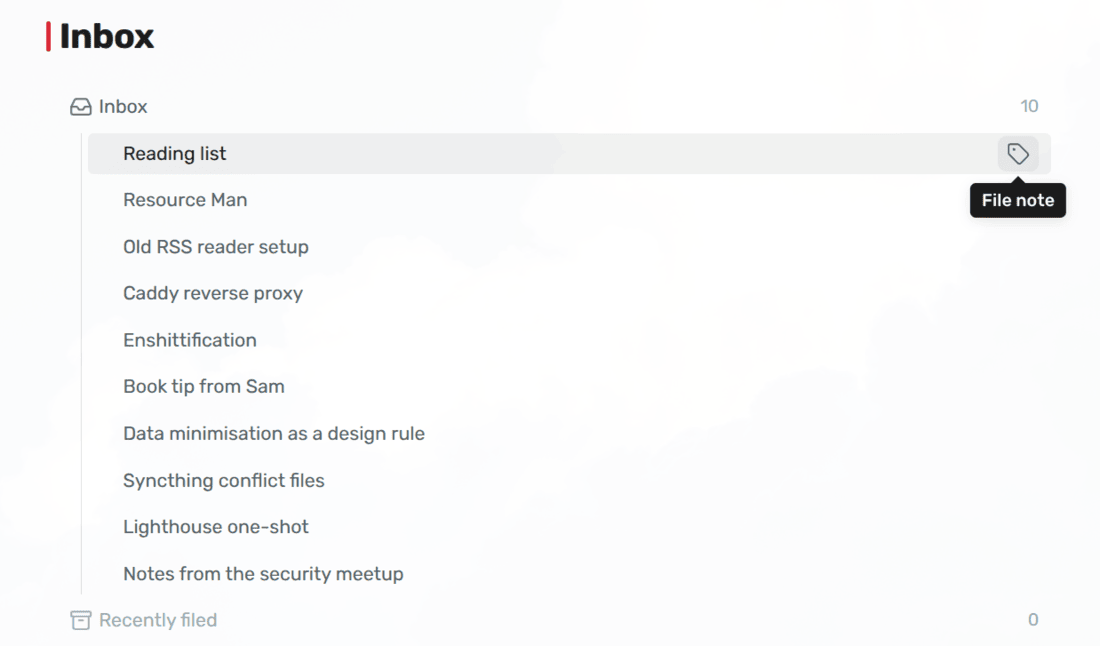
You're in a meeting, or halfway through an article, and a thought comes up.
Before you can write it down, you have to decide where it goes: which folder,
which tags. That's the worst possible moment to decide, because you still have
the thought. So either you stop to sort it and lose the thread, or you don't,
and the note ends up in a pile that nobody will ever sort.
Loose Ends splits the two. You write the note now, and sort it later. Until
you've sorted it, the note carries one tag saying so, and that tag keeps it in
front of you. The moment you've given it every tag it needs, the extra tag goes
away by itself.
## 1 Installation
Install Loose Ends in Obsidian: go to Settings → Community plugins → Browse,
search for "Loose Ends", then install and enable it. You can also open
[its page in the plugin directory](https://community.obsidian.md/plugins/loose-ends).
Loose Ends needs Obsidian 1.13 or later, and works on desktop and mobile.
## 2 Getting started
Loose Ends does nothing until you tell it what a note needs. So:
1. **Say what every note needs.** In Settings → Loose Ends → **Axes**, click
**Add axis**. Type `domain` in the first field and `work, personal` in the
second. Add a second axis: `source`, with `article, book, meeting`. Every
note now needs a `domain/…` tag and a `source/…` tag.
2. **Name the unfiled tag.** Set **Unfiled tag** to `inbox`. That's the tag a
note carries while it's missing something.
3. **Write a note.** Run **Add note**, type a name, and press Enter. The note
opens with the cursor ready, and gets the `inbox` tag, because it doesn't
have a `domain` or `source` yet.
4. **See what's waiting.** Put this block on a note of your own, like a
dashboard:
````
```loose-ends
```
````
It lists every note that's still missing something, newest first.
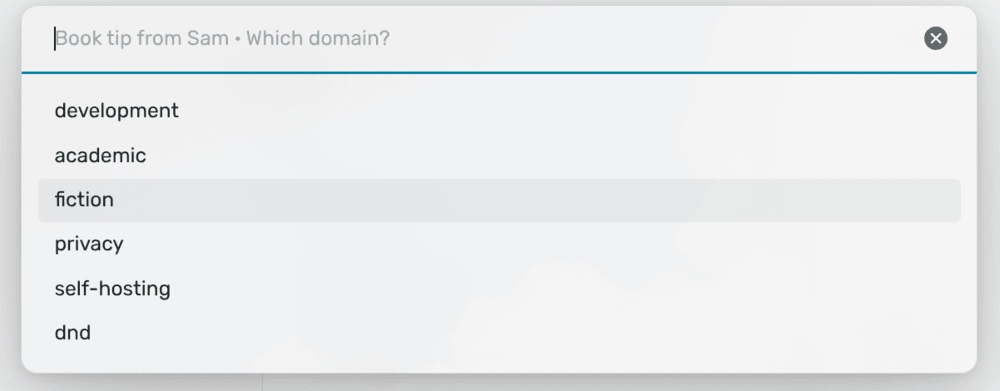
5. **File it.** Click the tag button on a row, or run **File note** in the note
itself. Loose Ends asks *Which domain?* and *Which source?*, and once you've
answered both, the `inbox` tag is gone and the note moves to **Recently
filed**.
## 3 Safety and quality
Loose Ends only writes two things in a note: the tag you pick when it asks you
a question, and the unfiled tag. Every other tag, every other property and
every word you wrote stay as they are. It only ever writes in your notes
folder, so notes that belong to something else, like a literature folder, are
left alone. [Section 11](#11-network-and-file-disclosure) lists exactly what it
writes and when.
It doesn't connect to the internet and doesn't run any programs.
Every push is tested, and every release is built in the open with a signed
attestation, so you can check that the file you installed is the one that was
built. [Section 11.4](#114-how-releases-are-built) says how.
## Table of contents
- [4 Documentation](#4-documentation)
- [5 Features](#5-features)
- [6 How it works](#6-how-it-works)
- [7 Templates](#7-templates)
- [8 Commands](#8-commands)
- [9 Settings](#9-settings)
- [10 Works well with](#10-works-well-with)
- [11 Network and file disclosure](#11-network-and-file-disclosure)
- [12 Questions or issues?](#12-questions-or-issues)
- [13 Support](#13-support)
- [14 License](#14-license)
## 4 Documentation
If you want to work on the plugin:
- [**Architecture**](docs/architecture.md) - How the code is layered, and how
the unfiled tag is kept up to date without the plugin triggering itself.
- [**Filing model**](docs/filing-model.md) - What "filed" means, why values are
compared exactly, and what the notes folder is for.
- [**Templates**](docs/templates.md) - Placeholders, dates in names, prompts,
and how a note is matched to its template.
- [**Settings**](docs/settings.md) - How settings are stored and checked, and
what to do when one changes.
- [**Compatibility**](docs/compatibility.md) - What a release may and may not
change, so notes, templates and settings keep working across updates.
- [**Development**](docs/development.md) - Setup, tests, checks and releases.
## 5 Features
### 5.1 Writing
- **Add note** - One prompt for the name and the template, and nothing else.
- **Or any other way** - A note made with Obsidian's new note button, as a daily
note, or with Templater or QuickAdd gets the unfiled tag too, as long as it's
in your notes folder.
- **Templates** - Any note in your template folder, with `{{title}}`,
`{{date}}` and `{{cursor}}`.
- **Dates in names** - A template can put today's date in the note's name, or
the date you type.
- **Prompts that stay out of your note** - A question under a template's
heading is drawn in the note, and never written to the file.
### 5.2 Filing
- **File note** - Asks only what a note is still missing, one question at a
time, with your most recent answers first.
- **Set an answer later** - One **Set** command per axis, to change an answer
at any time.
- **Right-click** - File a note from its menu, in the file explorer or anywhere
else Obsidian offers one.
- **Stop halfway** - Close a question, and the answers you already gave are
kept.
### 5.3 The inbox
- **Inbox block** - A list of every note still missing something, on any note
you like, with what each one is missing on hover.
- **One-click filing** - File a note straight from its row.
- **Recently filed** - The notes you filed in the last seven days.
### 5.4 Staying honest
- **A tag that can't go stale** - The unfiled tag is worked out from the note's
own tags every time. Delete it by hand and it comes back; answer the last
question and it goes.
- **Exact answers** - Only the values you listed count, so a typo or an old
tag never quietly passes as filed.
- **Only your notes** - Nothing outside your notes folder is ever tagged.
## 6 How it works
### 6.1 Axes
An **axis** is a question every note has to answer, and the answer is a tag.
`domain` asks what a note is about, and accepts `domain/work` or
`domain/personal`. `source` asks where it came from, and accepts
`source/article`, `source/book` or `source/meeting`. You choose the axes and
the answers they accept:
```
domain work, personal
source article, book, meeting
```
A note that has an answer for every axis is **filed**. A note that's missing
one is **unfiled**, and gets the tag you named for that, such as `inbox`.
Only the tags in a note's `tags` property count as answers. Loose Ends writes
them there too.
### 6.2 The unfiled tag is worked out, not stored
The unfiled tag isn't a record of anything. It's worked out from the note's own
tags every time the note changes, and only written so that you can see it, for
example as a folder in a tag tree. **Your answers are the record.**
That's why it can't go stale. Delete the tag by hand, and it comes back.
Answer the last question, and it goes. Change the axes, and every note in the
notes folder is checked again when you close the settings.
### 6.3 Values are compared exactly
`domain/work/project-x` doesn't answer the `domain` axis, and neither does a
bare `domain`. Only `domain/work` and `domain/personal` do, because those are
the values you listed. If you want `work/project-x` as an answer, add it to the
list: a value can have a slash in it like any other.
When Loose Ends asks about an axis, the question names any tag under it that
isn't one of its values, and picking a value replaces it. Nothing else ever
touches it.
This is on purpose, and it's the bug this plugin was written after. Its
predecessor accepted anything that *started with* `domain/`, so a nested tag
passed as an answer while no picker would ever offer it. The only way to make
one was typing it by hand, which made the first typo a matter of time, and one
that didn't show up until the tag tree came apart.
### 6.4 The notes folder
The **Notes folder** does two jobs: it's where **Add note** makes new notes,
and it's the only place Loose Ends ever writes the unfiled tag. Keep it narrow
if other plugins own some of your notes, like a folder of literature notes:
those will never answer your axes, so without the folder they'd stay unfiled
forever.
## 7 Templates
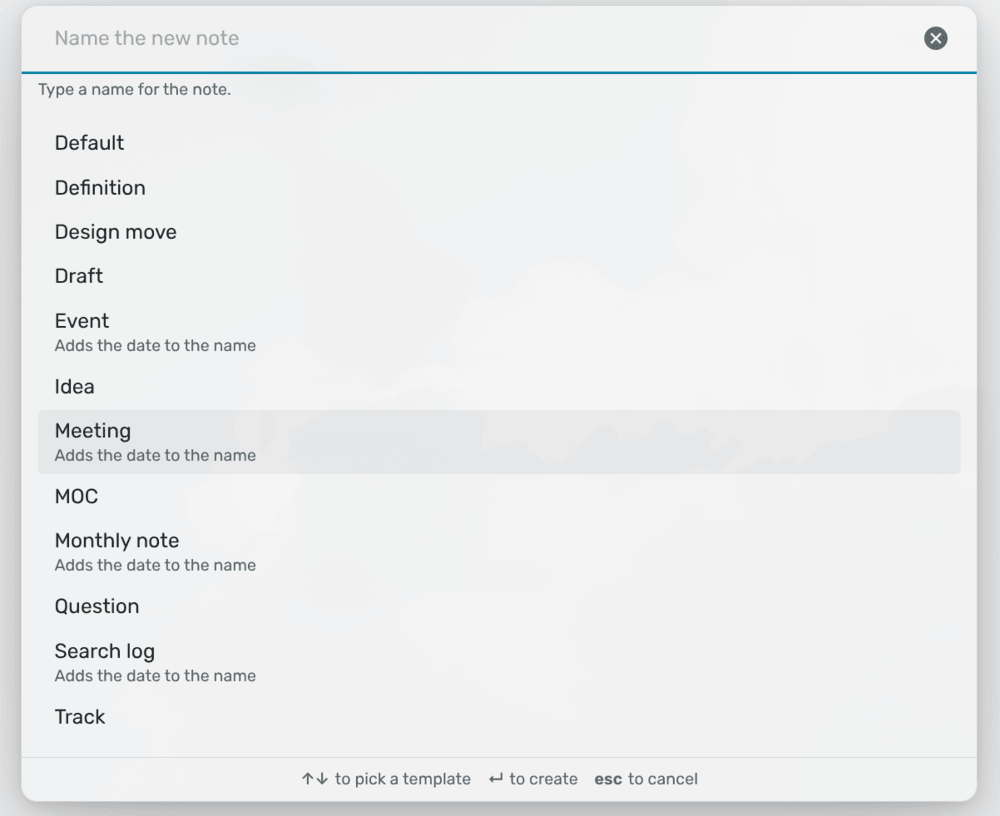
**Add note** offers every Markdown file directly in your template folder. On a
fresh install, Loose Ends puts a `Default` template there to start with.
| Placeholder | Becomes |
| --- | --- |
| `{{title}}` | The name you typed |
| `{{date}}` | Today's date, as `YYYY-MM-DD` |
| `{{date:YYYY-MM}}`, `{{date:YYYY}}` | The same date, cut short, so it still sorts |
| `{{cursor}}` | Where the cursor starts |
Case and spaces inside the braces don't matter.
**Dates in names.** When the title heading has a date in it, like
`# {{title}} {{date}}`, the note's name gets the date too: typing `Hanna` makes
`Hanna 2026-09-30`. If you type a date yourself, that date is used instead of
today's, so `Hanna 2026-10-07` stays `Hanna 2026-10-07`, for a meeting you
prepare before the day. A heading dated to the month also takes a typed month:
`# {{title}} {{date:YYYY-MM}}` and `Budget 2026-10` make `Budget 2026-10`.
**Prompts.** Put an HTML comment right under a heading, and it becomes that
heading's prompt:
```markdown
## Decisions
```
**Add note** leaves the comment out of the note. Instead, the question is shown
faintly on the empty line under the heading, until you write something there.
Because it only lives in the template, rewording it rewords it in every note,
and nothing stays behind under what you wrote.
A note is matched to its template by its headings. A template with no heading
besides its title can't be recognised, so its prompts are never shown.
## 8 Commands
None of the commands has a hotkey, so you can choose your own in Settings →
Hotkeys.
- `Loose Ends: Add note` - Asks for a name and a template, and makes the note
in your notes folder.
- `Loose Ends: File note` - Asks for each answer the open note is still
missing.
- `Loose Ends: Set ` - Changes one answer on the open note, whether or
not it already had one. There's one for each axis, named after it.
- `Loose Ends: Refresh tags` - Checks every note in your notes folder against
the axes. This also runs by itself when the axes change.
**File note** and **Set** are also on the right-click menu of every note in the
notes folder: **File note** while the note is still missing something, and
**Set** always.
## 9 Settings
| Setting | Default | |
| --- | --- | --- |
| **Notes folder** | Whole vault | Where **Add note** makes new notes, and the only folder where Loose Ends adds tags. See [The notes folder](#64-the-notes-folder). |
| **Template folder** | `Templates` | The templates **Add note** offers. See [Templates](#7-templates). |
| **Remember the last template** | On | Offer the template you picked last first. When it's off, `Default` comes first, then the rest by name, for when one template is the usual answer. |
| **Unfiled tag** | Empty | The tag written on a note that's still missing an answer, and the name of the inbox block's first group. Leave it empty for no tag. |
| **Axes** | None | What a note has to answer. Each axis is a top-level tag and the values it accepts. The pickers offer your most recent answers first, then the rest in the order you listed them. |
**Refresh tags** is at the bottom of the settings too.
## 10 Works well with
These plugins are by the same author. Each does one thing, and Loose Ends
doesn't need the other, but they fit together nicely.
### 10.1 Tag Along
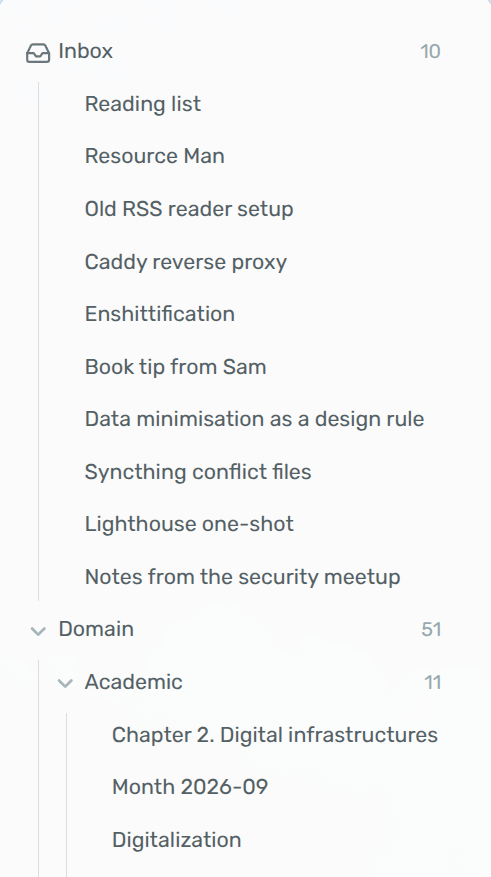
[Tag Along](https://community.obsidian.md/plugins/tag-along) shows your vault
as a folder tree built from your tags. Each axis becomes a tree, like `domain`
and `source`, and the unfiled tag becomes a folder of everything still waiting.
Set **Unfiled tag** to `inbox`, and make `inbox` an exclusive folder in Tag
Along: a new note then shows up in `inbox` only, and moves to its proper
folders the moment you've finished filing it.
## 11 Network and file disclosure
Loose Ends runs entirely on your device. It never connects to the internet and
doesn't send anything anywhere.
### 11.1 What it reads
- **Notes:** The `tags` property of the notes in your notes folder, which it
gets from Obsidian's own index of your notes, and the headings of the note
you're editing, to show its prompts.
- **Templates:** The Markdown files in your template folder, for **Add note**
and the prompts.
### 11.2 What it changes in your notes
Only in notes in your notes folder, and only these:
- **Answers:** The tag you pick when it asks about an axis, in the note's
`tags` property. Any other tag under that axis is replaced.
- **The unfiled tag:** Added when a note is missing an answer, and taken off
when it isn't.
- **New notes:** **Add note** makes the note you ask for.
When it adds a tag, it keeps the `tags` list sorted, the way the Linter plugin
does, so your next save doesn't show a change nobody made. The tags
themselves stay as they are, but the property is written back as a plain list:
a comma or space separated string becomes a list, a leading `#` is dropped, and
a tag that was there twice is kept once.
### 11.3 What it stores
- **Starter template:** On a fresh install, `Default.md` in the template
folder, unless a file with that name is already there. If you delete it, it
isn't written again.
- **Settings:** Its own `data.json` in the plugin folder.
- **Recent picks:** The order you last picked templates in, and the answers for
each axis, so your usual choice comes first.
- **Filing dates:** When each note was filed, for **Recently filed**.
Recent picks and filing dates are habits rather than settings, so they're kept
in Obsidian's local storage for this vault, and don't sync to your other
devices.
### 11.4 How releases are built
Every push is built, linted with [ESLint](https://eslint.org/) and the official
[Obsidian ESLint plugin](https://github.com/obsidianmd/eslint-plugin), tested
with [Vitest](https://vitest.dev/), and built with Nix as well. Releases are
built by GitHub Actions from the tagged source, after the same checks and a
check that the tag is the version in `manifest.json`, with every action pinned
to an exact version, and come with a signed build provenance attestation, so
you can check that the file you installed is the one that was built:
```sh
gh attestation verify main.js --repo jorritvanderheide/obsidian-loose-ends
```
## 12 Questions or issues?
Have a look at the [FAQ](FAQ.md) first: it covers the most common surprises,
like an unfiled tag that keeps coming back. If something still doesn't work, or
you have an idea, please
[open an issue](https://github.com/jorritvanderheide/obsidian-loose-ends/issues/new/choose).
Found a security problem? Please report it privately, as described in the
[security policy](SECURITY.md).
The source lives on [Codeberg](https://codeberg.org/BW20/obsidian-loose-ends)
and is mirrored to [GitHub](https://github.com/jorritvanderheide/obsidian-loose-ends).
## 13 Support
Loose Ends is free. If you find it useful, you can support its development on
Liberapay:
[](https://liberapay.com/BW20)
## 14 License
Copyright © 2026 Jorrit van der Heide. Licensed under the [EUPL-1.2](LICENSE).