# Settings Assistant
> 🇬🇧 English · [🇩🇪 Deutsch](https://github.com/johannes-kaindl/settings-assistant/blob/main/README.de.md)
**Change app and plugin settings through reviewed profiles or a local-LLM chat — with secrets left out, a diff before every write, and snapshots to roll back.**
[](https://github.com/johannes-kaindl/settings-assistant/blob/main/LICENSE)
[](https://github.com/johannes-kaindl/settings-assistant/blob/main/LICENSE-DOCS)
[](https://github.com/johannes-kaindl/settings-assistant/releases)

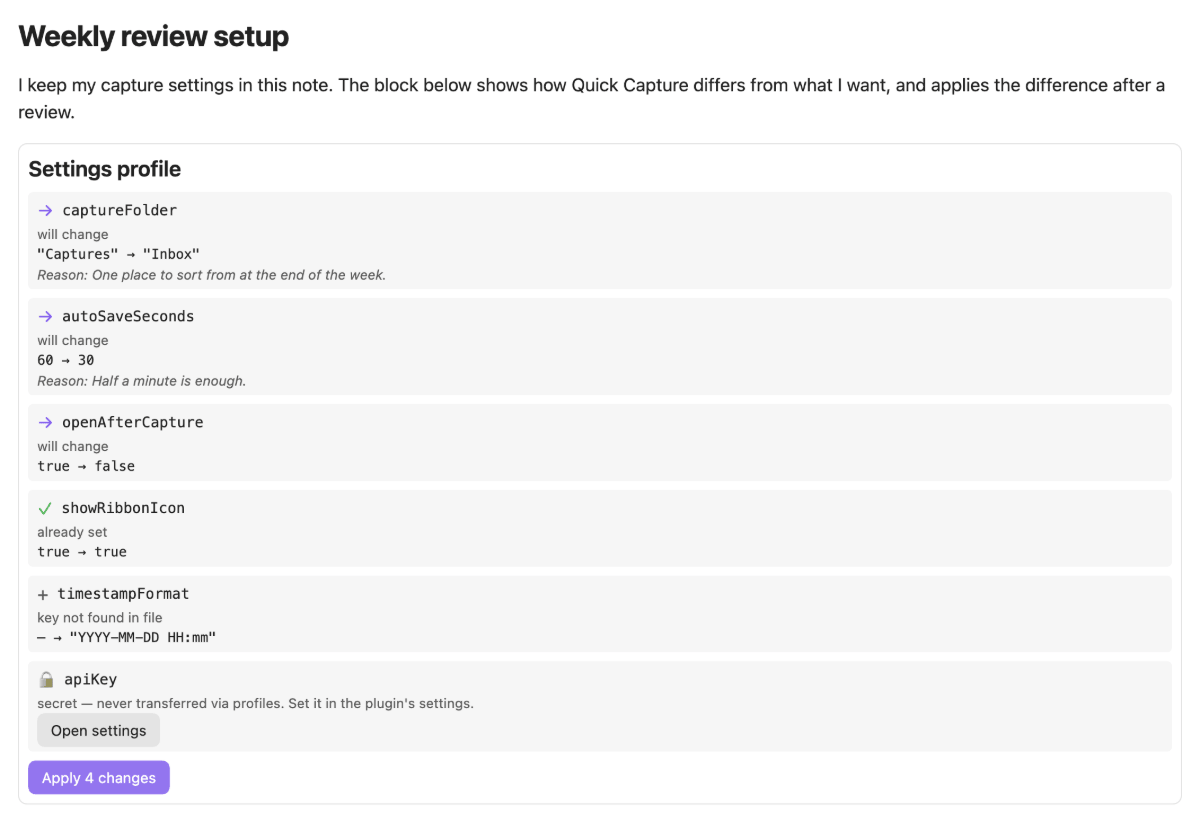
Settings live in JSON files inside your configuration folder, and changing them by hand is easy to get wrong and hard to undo. Settings Assistant puts a review step in between: you describe the change as a profile (or ask the chat to draft one), the plugin compares it with the current state, shows every difference, and writes only what you tick — after saving a snapshot you can restore later.
## What it does
- **Profiles as notes.** A fenced block with the language `settings-profile` holds the settings you want. In reading view it shows a live comparison with the current state and an apply button. The same profile applied in another vault brings two vaults in line.
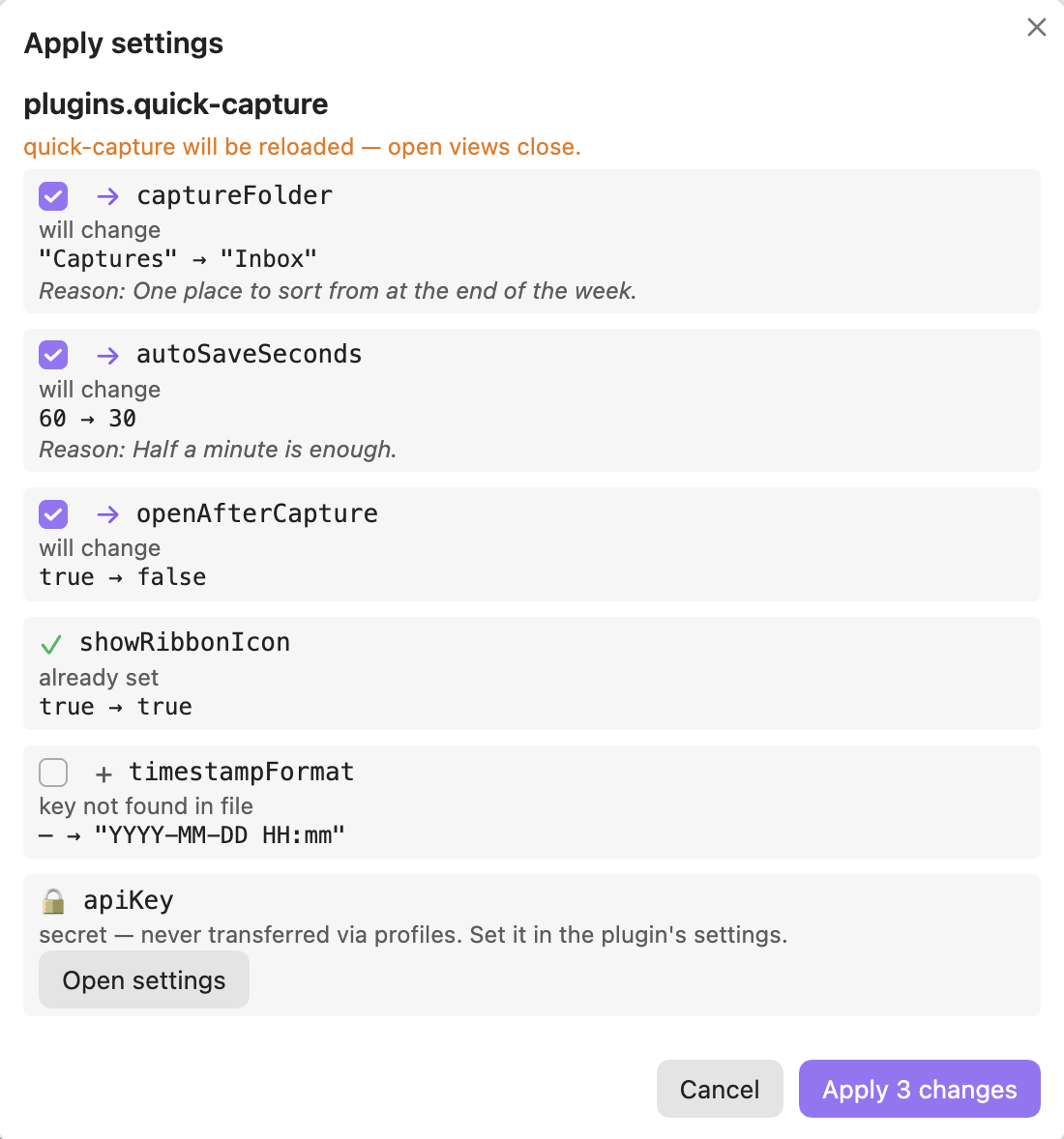
- **A diff before every write.** Each key becomes a check row: will change, already set, key not found, plugin not installed, and so on. Rows that would change something are ticked, everything else is not. Nothing is written until you confirm.
- **Secrets never travel.** Values under names like `apiKey`, `token`, `password` or `authorization` are left out of profiles, chat context, saved notes and the API. They appear as a locked row with a button to the plugin's own settings. Snapshots copy a file unchanged, secrets included, and stay in your configuration folder; see [Why secrets never travel](https://github.com/johannes-kaindl/settings-assistant/blob/main/docs/explanation-secrets.md#where-the-rule-stops).
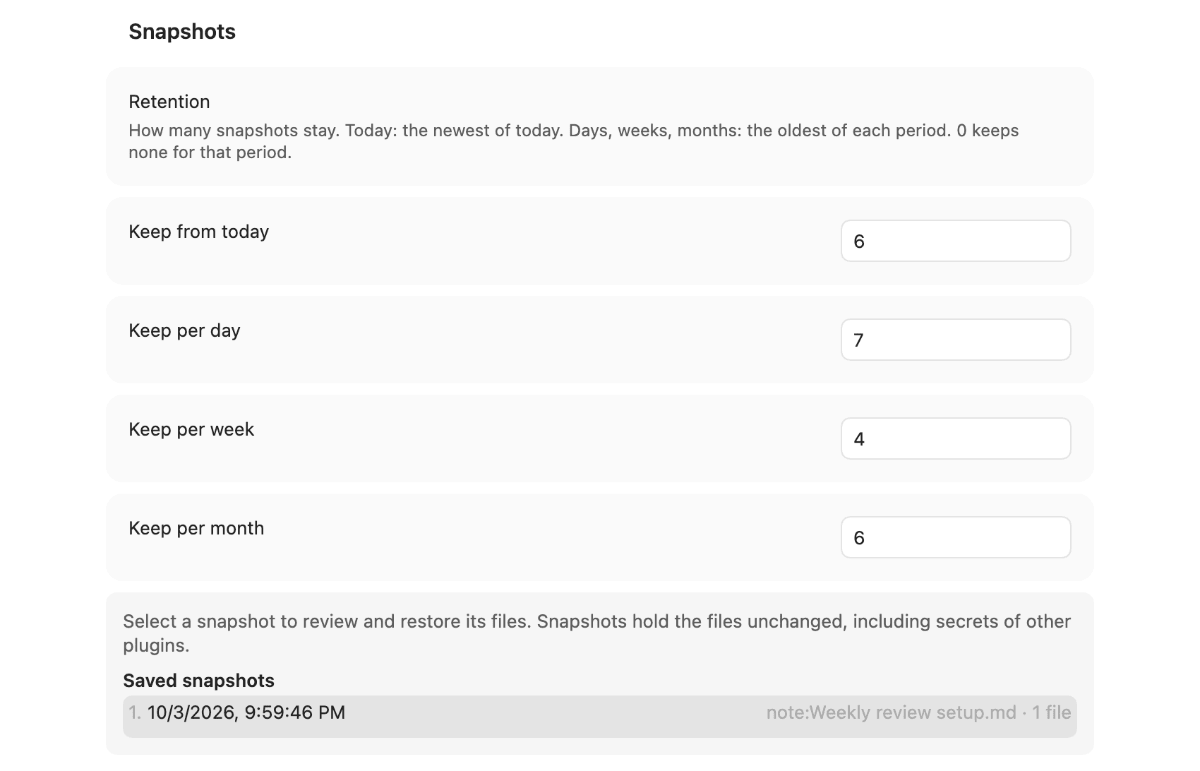
- **Snapshots and undo.** Before any write the affected files are saved. The command **Undo last apply** and the snapshot list in the settings restore them, with a per-file check whether the file changed since.
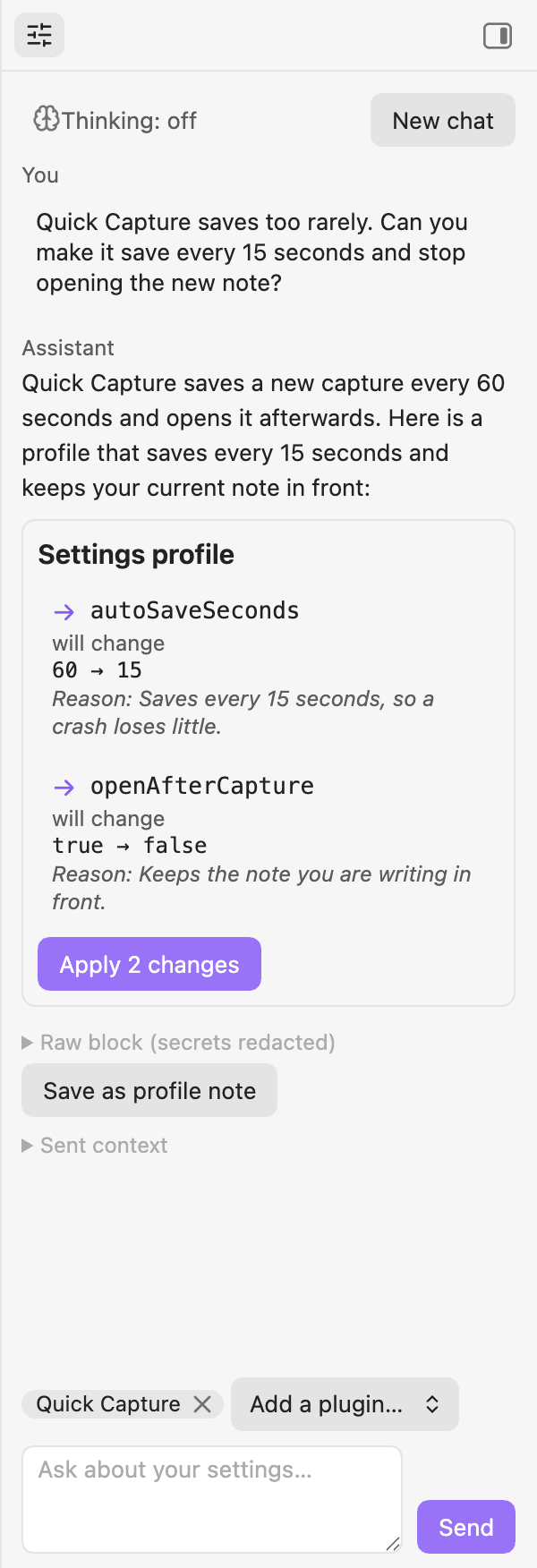
- **A settings chat.** A sidebar chat with your local model drafts a profile from a question. You see exactly what was sent, which keys were withheld, and the raw profile block. The chat never writes by itself.
- **Hotkeys too.** Besides each plugin's `data.json`, version 1 can write `hotkeys.json`. The other Obsidian files can be read and appear as read-only rows.
- **For other plugins.** A small, versioned API offers redacted reading, a plan, and a write path with its own confirmation dialog. See [`docs/API.md`](https://github.com/johannes-kaindl/settings-assistant/blob/main/docs/API.md).
- **Model-agnostic and local.** No model name is hard-coded. Endpoints come from the LLM Endpoint Manager if it is installed, otherwise from a local list in the settings. API keys of that list are stored in Obsidian's secret storage, not in `data.json`.
- **Bilingual interface.** English is canonical; the interface follows Obsidian's display language and ships a full German translation.
## Requirements
- **Obsidian 1.11.4+** (desktop or mobile; the chat has not been measured on mobile yet). The version is the floor because API keys are kept in Obsidian's secret storage.
- **For the chat only:** an OpenAI-compatible local server with a chat model loaded, such as [LM Studio](https://lmstudio.ai), [Ollama](https://ollama.com) or MLX — or the LLM Endpoint Manager plugin, which supplies the endpoints. New to local LLMs? The **[local LLM setup guide](https://uplink.jkaindl.de/llm-setup)** walks you through server, model and access end to end. Profiles in notes work without any model.
- **Not covered in version 1:** appearance and CSS, and writing `app.json`, `appearance.json`, `core-plugins.json` or `community-plugins.json`. See [Known limits](https://github.com/johannes-kaindl/settings-assistant/blob/main/docs/reference-known-limits.md).
## Install
### Manual
The plugin is not in the Community Store yet. Download `main.js`, `manifest.json` and `styles.css` from the [latest release](https://github.com/johannes-kaindl/settings-assistant/releases) into `/.obsidian/plugins/settings-assistant/` (use your configuration folder if it is not `.obsidian`), then enable **Settings Assistant** under **Settings → Community plugins**.
### From source
```bash
git clone https://github.com/johannes-kaindl/settings-assistant
cd settings-assistant
npm install
npm run build # produces main.js
```
## Usage
1. Write a profile in any note. Reading view then shows the comparison:
````markdown
```settings-profile
{
"version": 1,
"plugins": {
"my-plugin": { "maxRounds": 20 }
},
"notes": {
"plugins.my-plugin.maxRounds": "Shorter runs on the work machine."
}
}
```
````
2. Press **Apply N change(s)**. A dialog lists the rows grouped by file; untick what you do not want, then confirm. A plugin that is switched on is turned off, written and turned on again, so open views of it close.
3. To ask instead of write: run **Open settings chat** (or use the ribbon icon), name a plugin in your question, and read the answer. A proposed profile appears with the same rows and the same apply button; **Save as profile note** keeps it for another vault.
4. To undo: run **Undo last apply**, or pick a snapshot in the settings under **Snapshots**. A file that changed since the apply is shown as such and is not ticked.
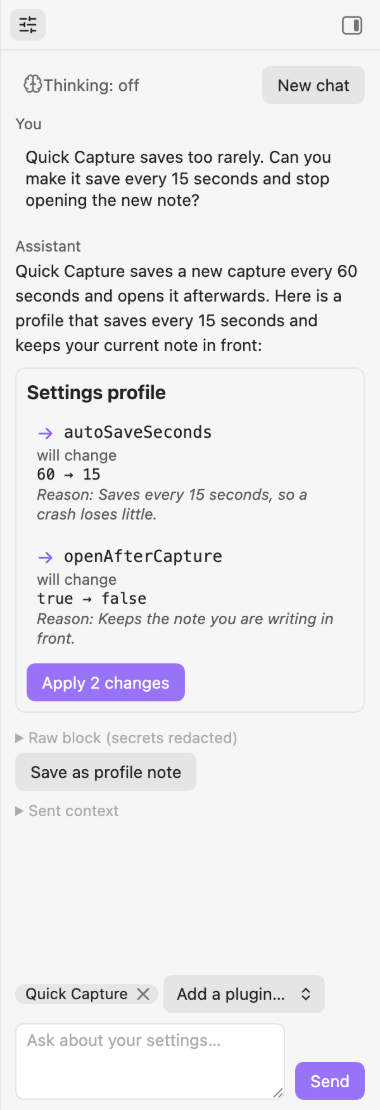
Click the preview for the full-size chat
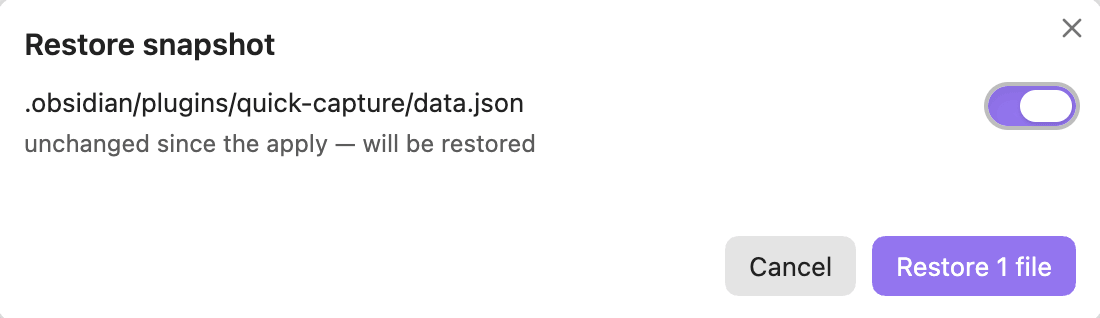 The walk-through [First profile](https://github.com/johannes-kaindl/settings-assistant/blob/main/docs/tutorial-first-profile.md) does all of this once, step by step.
## Configuration
**Settings → Community plugins → Settings Assistant**, from top to bottom:
| Setting | What it does |
|---|---|
| Help | Opens the documentation and the issue tracker. |
| Endpoint | With the LLM Endpoint Manager installed: choose an endpoint or let the first reachable one win. Without it: an ordered list of OpenAI-compatible servers, each with an optional API key and model (or **— (server picks)**), a connection status, the context length of the model when the server names it, and a **Test connection** button |
| Request | The sampling values, thinking level and token budget actually sent for the current model family, with the last request and any deviations of the session. |
| Retention | How many snapshots stay: **Keep from today**, **Keep per day**, **Keep per week**, **Keep per month**. Defaults 6, 7, 4 and 6; 0 keeps none for that period. |
| Saved snapshots | The list of snapshots, newest first. Selecting one opens the restore dialog. |
The walk-through [First profile](https://github.com/johannes-kaindl/settings-assistant/blob/main/docs/tutorial-first-profile.md) does all of this once, step by step.
## Configuration
**Settings → Community plugins → Settings Assistant**, from top to bottom:
| Setting | What it does |
|---|---|
| Help | Opens the documentation and the issue tracker. |
| Endpoint | With the LLM Endpoint Manager installed: choose an endpoint or let the first reachable one win. Without it: an ordered list of OpenAI-compatible servers, each with an optional API key and model (or **— (server picks)**), a connection status, the context length of the model when the server names it, and a **Test connection** button |
| Request | The sampling values, thinking level and token budget actually sent for the current model family, with the last request and any deviations of the session. |
| Retention | How many snapshots stay: **Keep from today**, **Keep per day**, **Keep per week**, **Keep per month**. Defaults 6, 7, 4 and 6; 0 keeps none for that period. |
| Saved snapshots | The list of snapshots, newest first. Selecting one opens the restore dialog. |
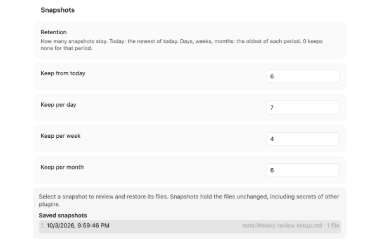
Click the preview for the full-size section
## How it works
Everything that is about settings lives in a pure core without any Obsidian import: parsing a profile, comparing it with the files, finding secrets, patching JSON while keeping unknown keys, order and indentation, and deciding what a restore may touch. A gate keeps that boundary, so the core is tested in plain Node.
All three entrances — a note, the chat and the API — deliver a profile and an origin to one write path: read the files, compare, show the dialog, save a snapshot (if that fails, nothing is written), write each file, read it back and report what the plugin corrected. On an error it stops and offers a restore instead of rolling back on its own. Only one apply runs at a time.
Writing is limited to `plugins//data.json` of other plugins and `hotkeys.json`. The plugin's own `data.json` is never written through a profile, and the plugin never switches itself off or on.
## Documentation
- [Documentation index](https://github.com/johannes-kaindl/settings-assistant/blob/main/docs/README.md) — all pages in one place.
- [Getting started: First profile](https://github.com/johannes-kaindl/settings-assistant/blob/main/docs/tutorial-first-profile.md) — from the install to your first applied change.
- [Troubleshooting](https://github.com/johannes-kaindl/settings-assistant/blob/main/docs/troubleshooting.md) — the exact message, its cause and the fix.
- [Align two vaults](https://github.com/johannes-kaindl/settings-assistant/blob/main/docs/howto-align-two-vaults.md) and [Ask the chat](https://github.com/johannes-kaindl/settings-assistant/blob/main/docs/howto-ask-the-chat.md) — task-oriented guides.
- [Profile format](https://github.com/johannes-kaindl/settings-assistant/blob/main/docs/reference-profile-format.md), [Check rows](https://github.com/johannes-kaindl/settings-assistant/blob/main/docs/reference-check-rows.md) and [Known limits](https://github.com/johannes-kaindl/settings-assistant/blob/main/docs/reference-known-limits.md) — reference.
- [Why secrets never travel](https://github.com/johannes-kaindl/settings-assistant/blob/main/docs/explanation-secrets.md) and [Snapshots and retention](https://github.com/johannes-kaindl/settings-assistant/blob/main/docs/explanation-snapshots.md) — explanation.
- [Plugin API v1](https://github.com/johannes-kaindl/settings-assistant/blob/main/docs/API.md) — for plugin authors.
## Contributing
- [`AGENTS.md`](https://github.com/johannes-kaindl/settings-assistant/blob/main/AGENTS.md) — architecture, conventions and gotchas for contributors and AI agents.
- [`CHANGELOG.md`](https://github.com/johannes-kaindl/settings-assistant/blob/main/CHANGELOG.md) — what changed per release.
## License
Code AGPL-3.0-or-later ([`LICENSE`](LICENSE)), documentation CC BY-SA 4.0 ([`LICENSE-DOCS`](LICENSE-DOCS)).
## Acknowledgements
Lessons learned from Config Sync (MIT, xooooooooox/obsidian-config-sync) informed several edge cases. No code was copied.