# Mailstone
> 🇬🇧 English · [🇩🇪 Deutsch](https://github.com/johannes-kaindl/mailstone/blob/main/README.de.md)
**Mailstone turns a mail folder on your server into notes in your vault — the server decides what becomes a note, and reading never marks a message as read.**
[](https://github.com/johannes-kaindl/mailstone/blob/main/LICENSE)
[](https://github.com/johannes-kaindl/mailstone/blob/main/LICENSE-DOCS)
[](https://github.com/johannes-kaindl/mailstone/releases)
-7c3aed)
Triage stays where your mail already lives: move a message into one designated IMAP folder — from your phone, from webmail, from a mail rule — and the next sync writes it into the vault as a Markdown note, with the original `.eml` beside it. Sending uses the same account over SMTP, and the plugin delivers iMIP calendar invitations on behalf of the sister plugin [`calendar-notes`](https://github.com/johannes-kaindl/calendar-notes).
## Features
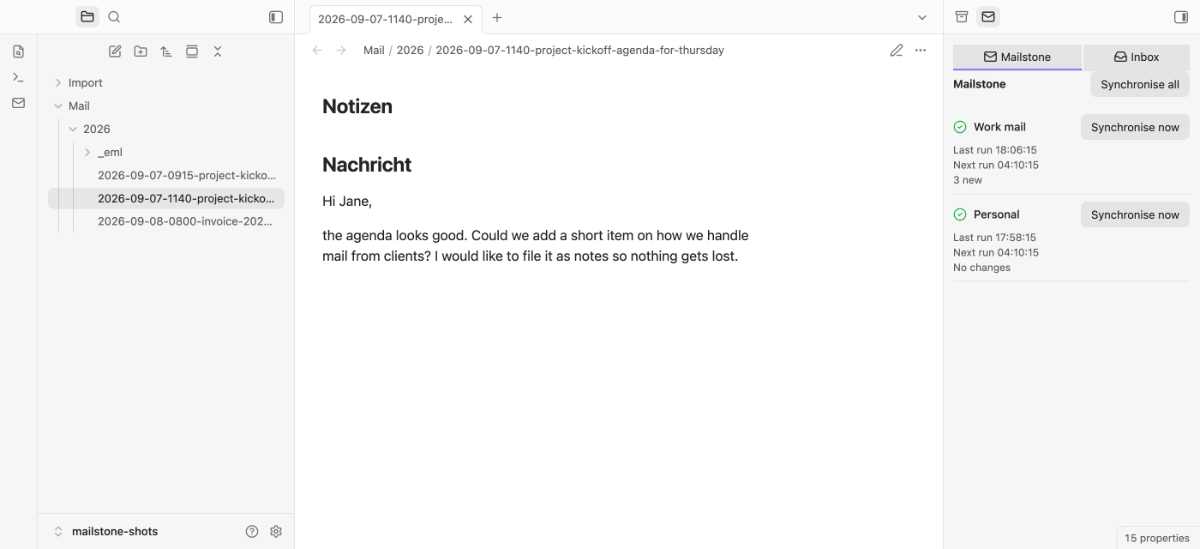
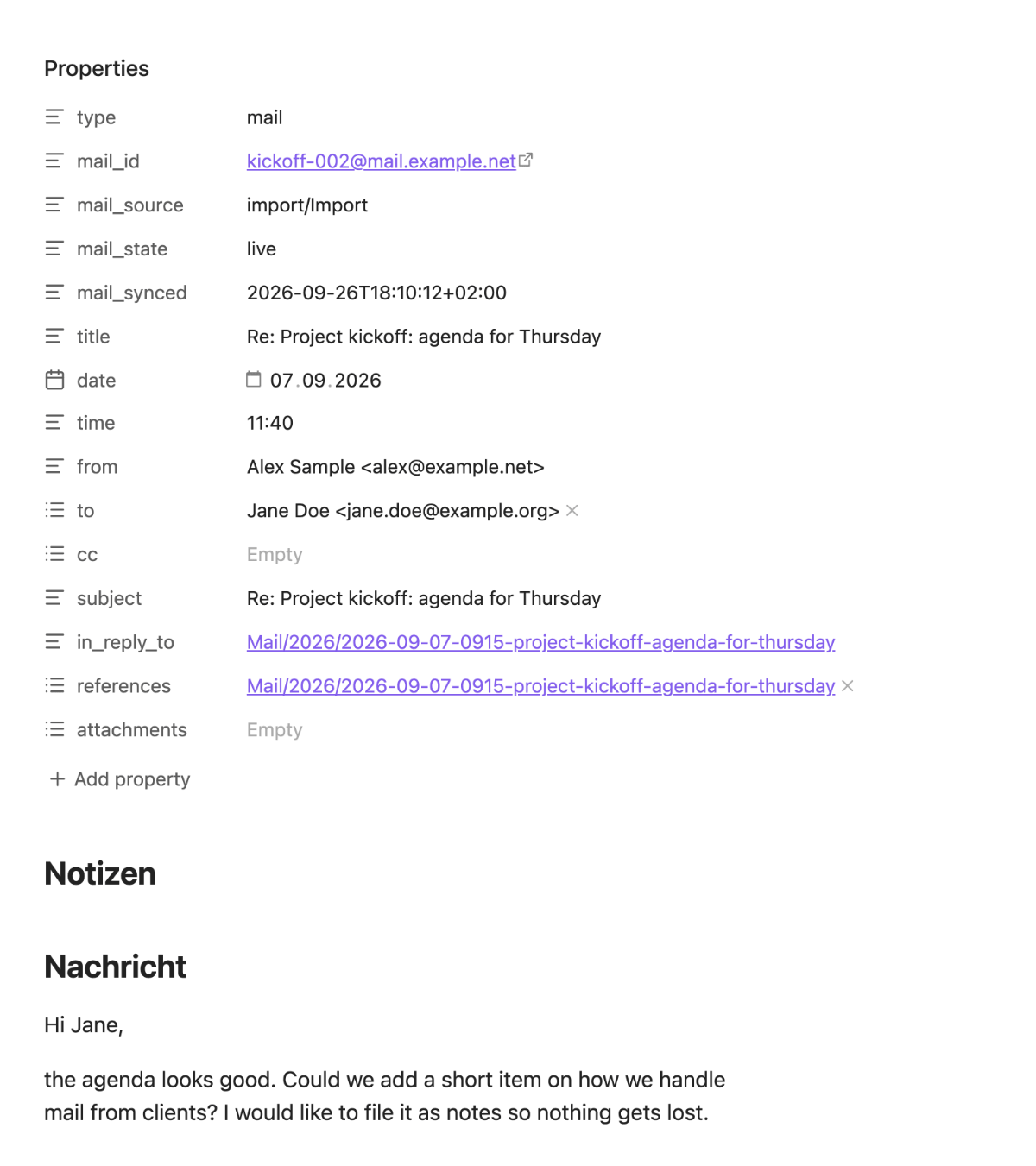
- **Mail as notes.** A server-side folder decides what becomes a note. The Message-ID is the identity, and the original `.eml` stays next to the note, so everything derived from it can be rebuilt.
- **A panel in the right sidebar.** Per account: what the last run did, when the next one is due, the counters that are not zero, the error in plain words — and a button to synchronise now, for one account or all of them. The last run survives a restart.
- **An inbox tab.** The last 100 messages of your inbox, with a tick for everything that is already a note. Three actions per row: *Move to vault* and *Archive* (both server-side, both after a confirmation) and — once [TaskNotes](https://github.com/callumalpass/tasknotes) is installed — *Create task*.
- **Commands on a mail note.** Re-render from the `.eml`, relink threads, extract an attachment, reply in your external mail client, create a TaskNotes task. Each shows a preview before it writes.
- **Import without a server.** *Import .eml files from a vault folder* turns `.eml` files you already have into notes — no account needed.
- **Sending.** SMTP through the same account, including iMIP invitations for `calendar-notes`. Other plugins can send through Mailstone too, after you confirm each one once.
- **Reading never marks anything as read.** Listing, previewing and syncing use `EXAMINE` and `BODY.PEEK`; moving a message carries its flags along. Another tool that keys off "unread" is not disturbed.
- **Mobile: read what is already synced.** Synchronised notes are ordinary Markdown notes on mobile. Sync, sending and the inbox tab need a network layer mobile Obsidian does not provide and stay off there.
## Requirements
- **Obsidian 1.13.0 or newer.** Desktop for everything; mobile only reads notes that a desktop already synchronised.
- **An IMAP/SMTP account** you can reach with an app password. Providers that require OAuth (Gmail with 2FA, Microsoft 365) are not supported — there is no OAuth flow.
- **A folder on the mail server** that acts as the allowlist (default name `Vault`), and a second one for the archive. Anything you file in the allowlist folder becomes a note; nothing else is touched.
- **TLS is not optional.** Certificate checking cannot be turned off, and plaintext authentication without TLS is refused.
## Install
### Community Plugins
Settings → Community plugins → Browse → "Mailstone" → Install, then enable it. Updates arrive like for any Community plugin. The two ways below are alternatives.
### AnySource Sideloader
[AnySource Sideloader](https://github.com/johannes-kaindl/anysource-sideloader) installs and updates plugins from any git forge. Subscribe to this catalog once:
```
https://git.jkaindl.de/jkaindl/obsidian-catalog/raw/branch/main/catalog.json
```
Mailstone then appears in the sideloader's plugin list and updates like any other plugin, every download checksum-verified.
### Manual
Download `main.js`, `manifest.json` and `styles.css` from the [latest release](https://github.com/johannes-kaindl/mailstone/releases/latest) into `/.obsidian/plugins/mailstone/`, then enable the plugin in Settings → Community plugins. Updates then have to be repeated by hand.
### BRAT (beta)
Add `johannes-kaindl/mailstone` in [BRAT](https://github.com/TfTHacker/obsidian42-brat).
### From source
```bash
git clone https://git.jkaindl.de/jkaindl/mailstone
cd mailstone && npm install && npm run build
# main.js manifest.json styles.css → /.obsidian/plugins/mailstone/
```
`npm run gate` runs the full check suite (lint, type checks, unit and integration tests, purity check, build). `npm run smoke:e2e -- --port ` is a maintainer-only check against a running Obsidian with TaskNotes installed; it is deliberately not part of `gate`.
## Usage
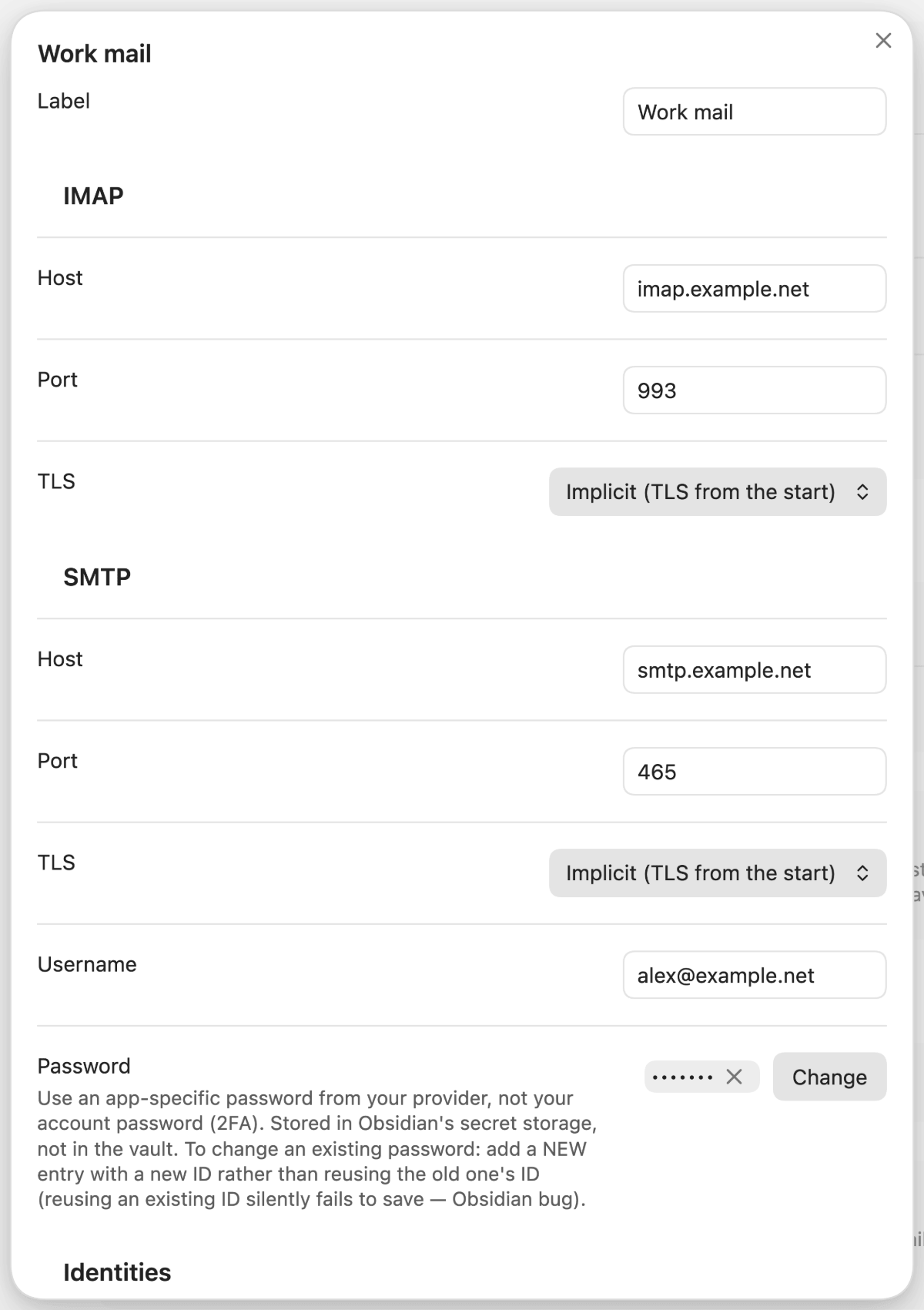
1. **Set up an account.** Settings → Mailstone → *Add account*: IMAP and SMTP host, port and TLS mode, username, an app-specific password, at least one identity, and the folder names as your IMAP server shows them. *Test SMTP connection* checks host, TLS and login without sending anything.
 2. **Decide on the server which mail matters.** Move it into your allowlist folder. The next sync — every few minutes, or *Synchronise now* in the sidebar — writes a note under `Mail//` and the `.eml` under `Mail//_eml/`.
 3. **Or work from the inbox tab.** Open the sidebar with the ribbon icon or the command *Mailstone: Open the sidebar panel*, switch to **Inbox**, and use *Move to vault* on anything worth keeping. The message moves into the allowlist folder on the server, and the following sync writes the note.
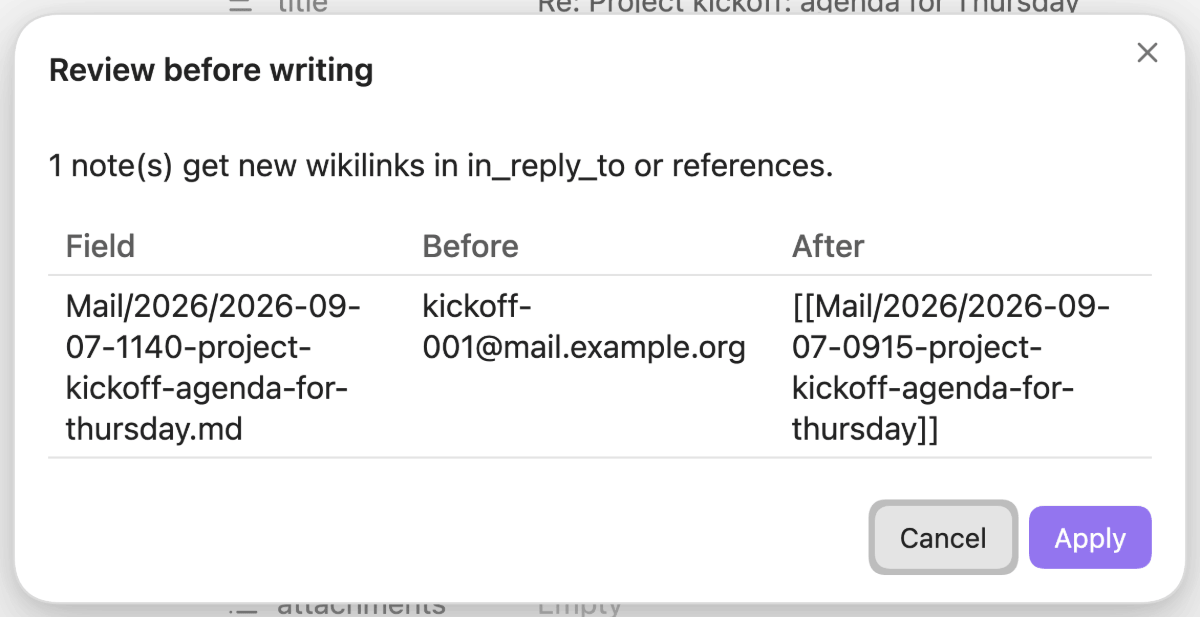
4. **On a mail note**, the command palette offers *Re-render mail note from its .eml*, *Relink mail threads*, *Extract an attachment from a mail note*, *Reply to a mail in the external mail client* and *Create a TaskNotes task*. Only the ones that apply to the open note appear. Each one shows what it would change before it writes:
3. **Or work from the inbox tab.** Open the sidebar with the ribbon icon or the command *Mailstone: Open the sidebar panel*, switch to **Inbox**, and use *Move to vault* on anything worth keeping. The message moves into the allowlist folder on the server, and the following sync writes the note.
4. **On a mail note**, the command palette offers *Re-render mail note from its .eml*, *Relink mail threads*, *Extract an attachment from a mail note*, *Reply to a mail in the external mail client* and *Create a TaskNotes task*. Only the ones that apply to the open note appear. Each one shows what it would change before it writes:
 ### Configuration
Click the preview for the full-size image
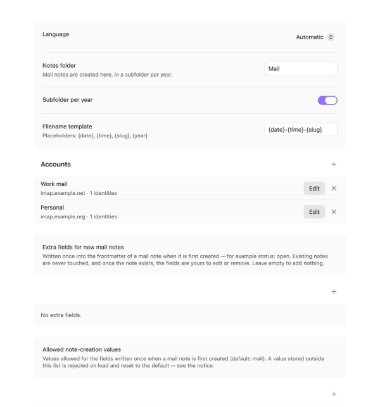
Settings → Mailstone. Per account (*Add account* / *Edit*):
| Setting | What it does | Default |
|---|---|---|
| IMAP / SMTP: Host, Port, TLS | `Implicit` (usually 993/465) or `STARTTLS` (143/587) | — |
| Username, Password | The password lives in Obsidian's secret storage, never in `data.json` or the vault | — |
| Identities | Addresses you may send from; one is the default | — |
| Folders: Inbox | The folder the inbox tab lists | `INBOX` |
| Folders: Allowlist | The folder that decides what becomes a note | `Vault` |
| Folders: Archive | Where *Archive* moves a message | `Archive` |
| Folders: Sent | Where a sent copy is filed; empty turns the copy off | `Sent` |
| Sync enabled / Sync interval (minutes) | Automatic sync per account | on / 5 |
Global settings:
| Setting | What it does | Default |
|---|---|---|
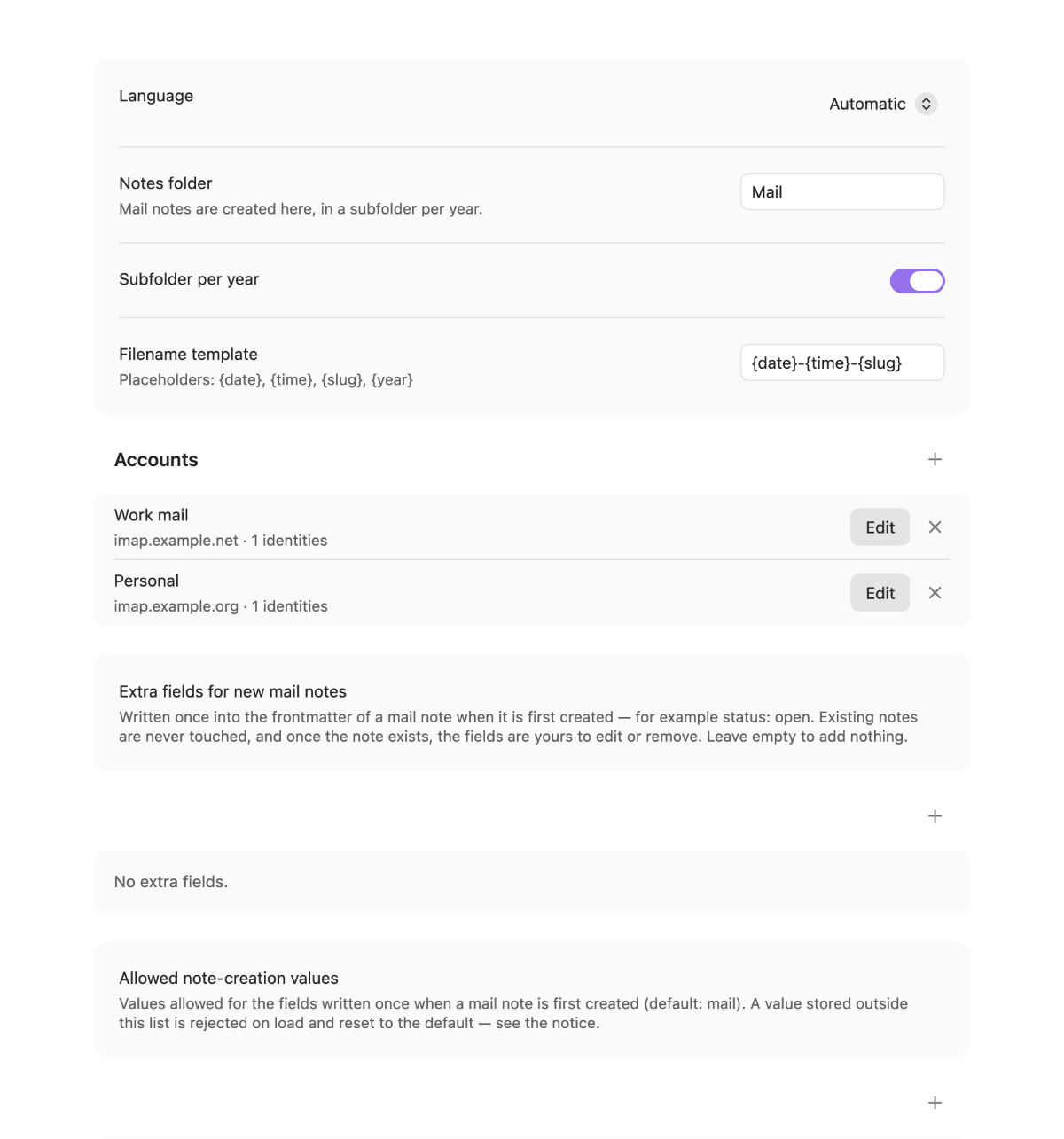
| Notes folder | Where mail notes are created, in a subfolder per year | `Mail` |
| Subfolder per year | Turns the year subfolders off | on |
| Filename template | Placeholders `{date}`, `{time}`, `{slug}`, `{year}` | `{date}-{time}-{slug}` |
| Extra fields for new mail notes | Fields written once into a note's front matter when it is first created, for example `status: open` | none |
| Allowed note-creation values | Values accepted for the fields written at creation | `mail` |
| Plugins allowed to send | Plugins that send through Mailstone without asking; revoke one to be asked again | none |
| Open the panel at startup | Opens the sidebar panel when Obsidian starts | off |
| Debug log | Writes the IMAP/SMTP dialogue to the developer console, passwords masked | off |
| Language | Interface language | Automatic |
## Documentation
- [Documentation index](https://github.com/johannes-kaindl/mailstone/blob/main/docs/README.md)
- [Getting started](https://github.com/johannes-kaindl/mailstone/blob/main/docs/getting-started.md) — from installation to your first mail note
- [Troubleshooting](https://github.com/johannes-kaindl/mailstone/blob/main/docs/how-to/troubleshooting.md) — the error messages, what causes them, what to do
## How it works
**The server decides, not the plugin.** A folder on the mail server is the allowlist. Sync reads it, and every message in it becomes a note — no rules engine, no filters in the plugin.
**The Message-ID is the identity.** It survives re-downloads, folder moves and renamed files. The `.eml` next to each note is the fidelity surface: front matter, rendered body and attachments can be rebuilt from it, so a formatting change never costs you data.
**Notes are merged, not overwritten.** Your own text lives outside a marked zone (`%% mailstone:begin %%` … `%% mailstone:end %%`) and is compared by hash before any write. If you edited the managed zone, the write is refused rather than silently applied. Mailstone never deletes a note: a message that leaves the folder is marked `detached`, and putting it back reattaches it.
**Two kinds of IMAP session, enforced by the compiler.** The read path cannot call `SELECT` or `UID MOVE`; those live on a separate session used only by the inbox actions. That is why "reading never marks as read" is a property of the type system, not a rule someone has to remember. Architecture and conventions are in [`AGENTS.md`](https://github.com/johannes-kaindl/mailstone/blob/main/AGENTS.md).
## Contributing
Issues and pull requests on [GitHub](https://github.com/johannes-kaindl/mailstone/issues); the canonical repository is on [git.jkaindl.de](https://git.jkaindl.de/jkaindl/mailstone). Test-driven (`npm test`, full check with `npm run gate`); larger features go through brainstorm → spec → plan → TDD. See [`AGENTS.md`](https://github.com/johannes-kaindl/mailstone/blob/main/AGENTS.md).
## License
- **Code:** AGPL-3.0-or-later ([`LICENSE`](https://github.com/johannes-kaindl/mailstone/blob/main/LICENSE); dual-license option in [`LICENSING.md`](https://github.com/johannes-kaindl/mailstone/blob/main/LICENSING.md)).
- **Docs/Text:** CC BY-SA 4.0 ([`LICENSE-DOCS`](https://github.com/johannes-kaindl/mailstone/blob/main/LICENSE-DOCS)).
Copyright © 2026 Johannes Kaindl.