# LingoTuner
> ๐ฌ๐ง English ยท [๐ฉ๐ช Deutsch](https://github.com/johannes-kaindl/lingotuner/blob/main/README.de.md)
**Retune the communication style of a text with four dials and a local LLM โ direct or diplomatic, explicit or implicit, factual or social, literal or figurative. Nothing leaves your machine.**
[](https://github.com/johannes-kaindl/lingotuner/blob/main/LICENSE)
[](https://github.com/johannes-kaindl/lingotuner/blob/main/LICENSE-DOCS)
[](https://github.com/johannes-kaindl/lingotuner/releases)

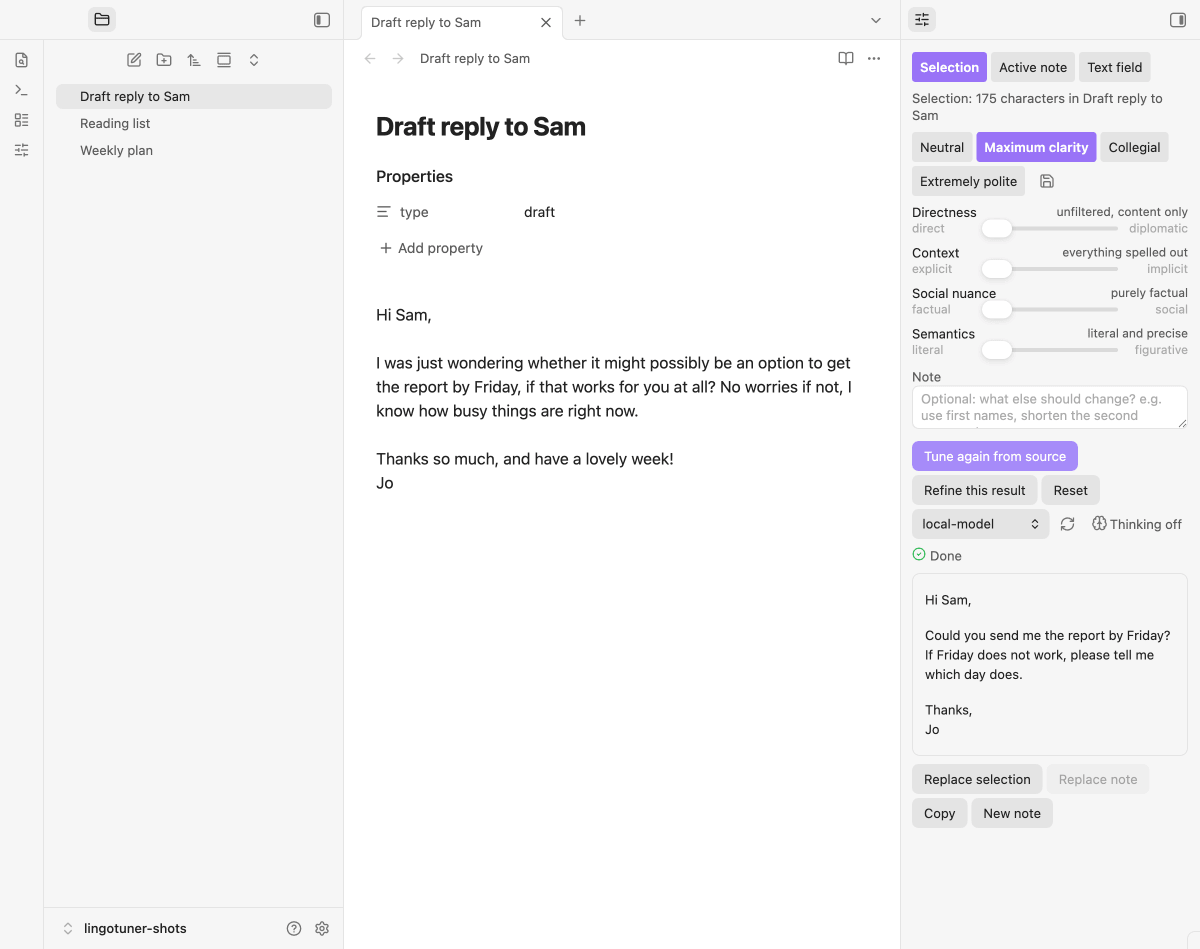
Neurodivergent and neurotypical communication styles differ along a few well-described dimensions: how direct a request is, how much context is spelled out, how much social framing surrounds the content, and how literal the language is. LingoTuner is an interpreter between those styles. Select a text, set four dials, add a note if you like, and a local model rewrites the text โ same information, different style. A sidebar panel next to your note holds the four sliders, the note field, the streamed result and the four ways out of it.

## What it does
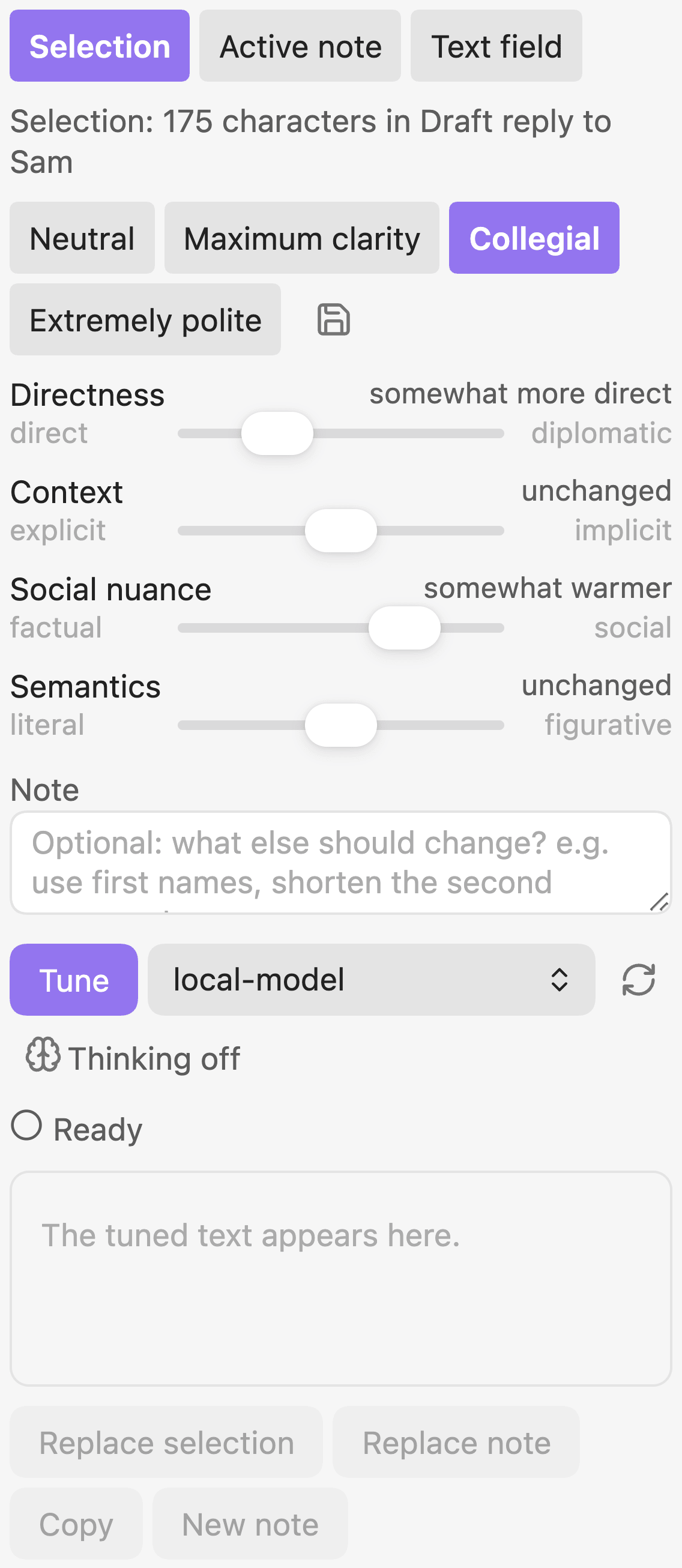
- **Four dials, five steps each.** Directness, context, social nuance and semantics, each from โ2 to +2. The middle means "leave this dimension alone"; only what you move is instructed, and each step carries its own before/after example for the model. The model never sees a number, only the name of the step.
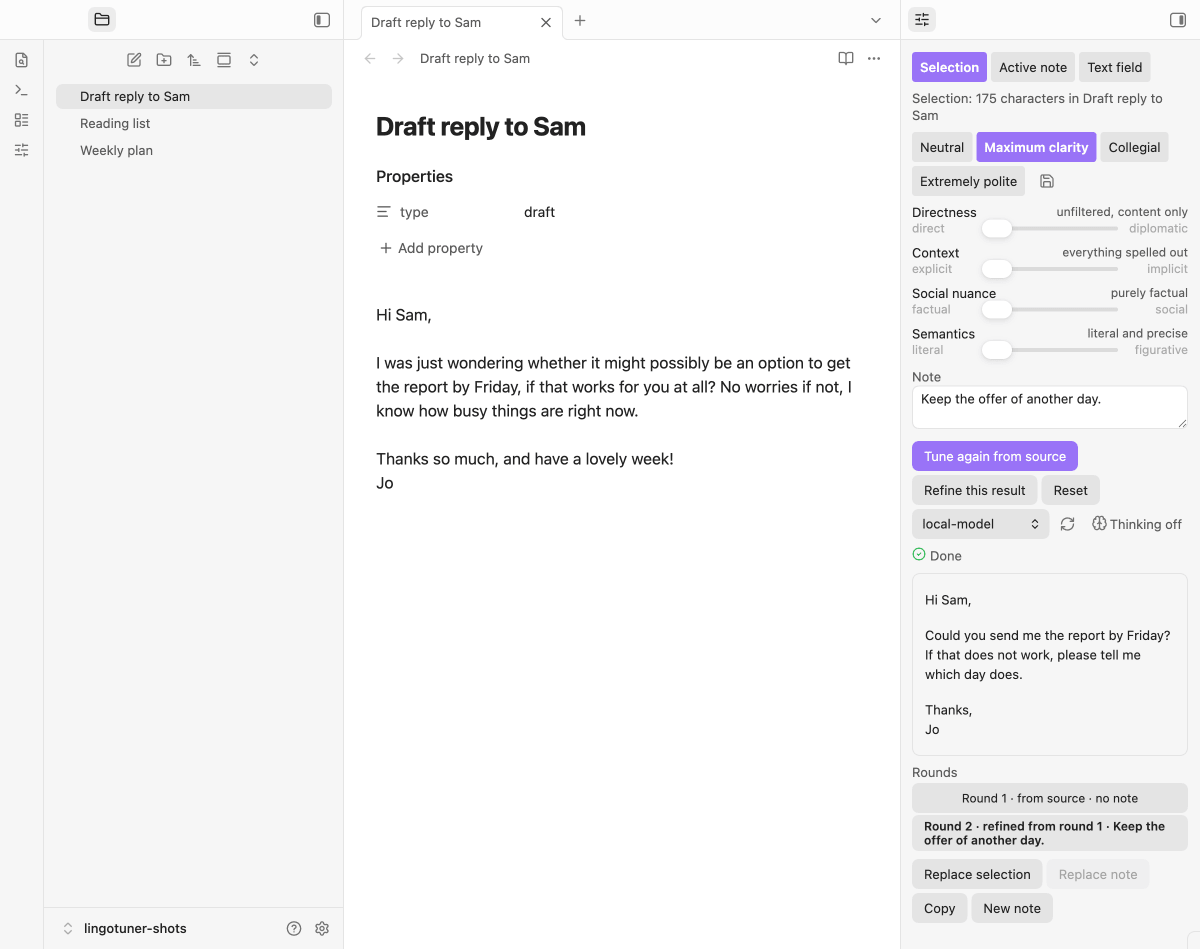
- **A note with priority.** "Use first names", "shorten the second paragraph" โ free text that is put into the prompt *after* the dials and explicitly outranks them. A note alone is enough for a run, without touching a single dial.
- **Three sources, four outputs.** Take the selection, the body of the active note, or text pasted into the panel; then replace the selection, replace the note body, copy, or create a new note. Replacing goes through the editor, so Cmd+Z undoes it in one step, and replacing a note leaves its frontmatter untouched.
- **Streaming preview, round history.** The result grows paragraph by paragraph instead of appearing after a blind wait. Every run is kept as a round: go back to an earlier one, refine it further, or start again from the source โ later rounds stay.
- **Presets.** Four are built in (Neutral, Maximum clarity, Collegial, Extremely polite); any dial combination can be saved under your own name. A combination that matches no preset is shown as "(adjusted)".
- **Prompts you can override.** An optional vault folder may replace the shipped system prompt (`system.md`) or single example pairs (`_.md`). Empty means the shipped text โ so improvements still reach you. One button writes the shipped texts into the folder as a starting point; existing files are never overwritten.
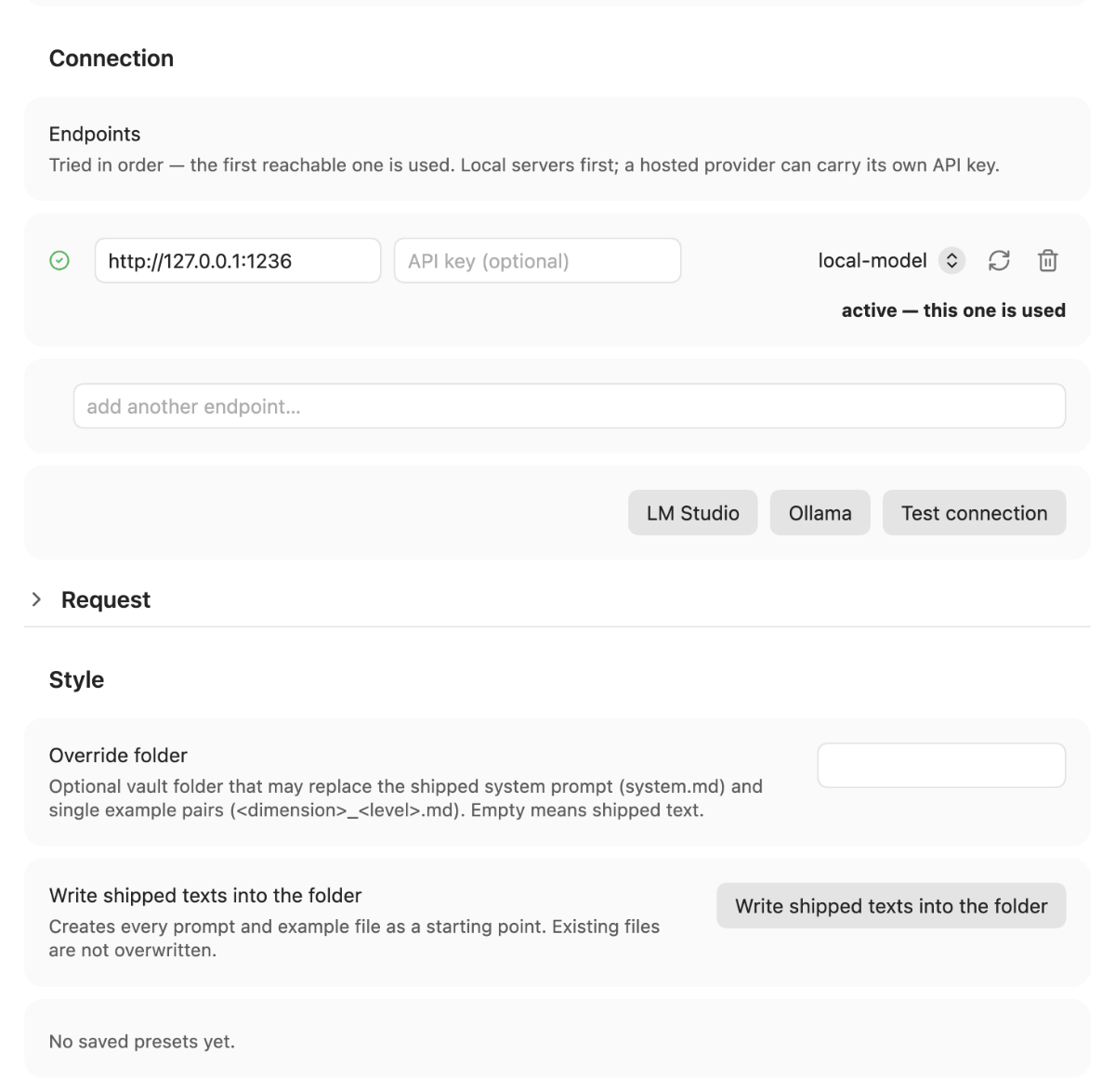
- **Local by design.** Any OpenAI-compatible server: LM Studio, Ollama, MLX. Several endpoints can be listed and are tried in order. A hosted provider is possible, but only if you add its address and key yourself โ and a row carrying a key says so.
- **Model-agnostic.** No model name is hard-coded. The list is read live from the endpoint's `GET /v1/models`; leaving the setting empty lets the server use whatever it has loaded. Reasoning models are handled: `` output is separated from the result, and reasoning is suppressed where the server supports it.
- **For other plugins.** `app.plugins.plugins["lingotuner"].api.tune(text, "clarity")` runs the same path as the panel and returns `{ ok: true, text, truncated }` or a named reason. Every call is also reported to LLM Lab if that plugin is installed.
- **Bilingual interface.** English is canonical; the UI and the example bank follow Obsidian's display language and ship a full German translation.
## Requirements
- **Obsidian 1.11.4+** (desktop or mobile).
- **An OpenAI-compatible local server** with a chat model loaded โ [LM Studio](https://lmstudio.ai), [Ollama](https://ollama.com) or MLX. New to local LLMs? The **[local LLM setup guide](https://uplink.jkaindl.de/llm-setup)** walks you through server, model and mobile access end to end.
- **CORS, if the connection test is green but the stream is blocked.** The result is streamed over XHR from the origin `app://obsidian.md`, and a server that answers a plain request may still refuse that. In LM Studio enable CORS in the server settings (`lms server start --bind 0.0.0.0 --cors` sets both at once โ a missing flag is reset to its default); for Ollama set `OLLAMA_ORIGINS=app://obsidian.md`. If the server refuses the stream, the plugin retries once without streaming, so the answer still arrives โ all at once instead of token by token. Only when that fails too does it name the case instead of reporting a generic network error.
- **A mid-size model, if you care about the result.** The rewrite has to keep every piece of information while changing the style; measured against a local LM Studio, a 35B mixture-of-experts model invented no information, never switched language and never returned the text unchanged, across all 16 dial steps in both languages. Two of those steps (`context:-2`, `social:2`) hit the intended tone but not the concreteness of the reference text. A very small model tends to shorten instead of rephrase.
## Install
### Catalog (recommended)
**Via [AnySource Sideloader](https://github.com/johannes-kaindl/anysource-sideloader)**, which installs and updates plugins from any git forge. Subscribe to the Order from Traces catalog once under **Settings โ AnySource Sideloader โ Catalogs โ Add**:
```
https://git.jkaindl.de/jkaindl/obsidian-catalog/raw/branch/main/catalog.json
```
LingoTuner then appears in the sideloader's plugin list and updates like any other plugin; every download is checksum-verified. To install just this one plugin without the catalog, add its repository URL as a source instead: `https://github.com/johannes-kaindl/lingotuner`.
### Manual
Download `main.js`, `manifest.json` and `styles.css` from the [latest release](https://github.com/johannes-kaindl/lingotuner/releases) (or the `lingotuner.zip` bundle, which contains exactly those three files) into `/.obsidian/plugins/lingotuner/`, then enable the plugin under **Settings โ Community plugins**.
### From source
```bash
git clone https://github.com/johannes-kaindl/lingotuner
cd lingotuner
npm install
npm run build # produces main.js
```
Copy `main.js`, `manifest.json` and `styles.css` into `/.obsidian/plugins/lingotuner/`.
## Usage
1. Open the panel โ ribbon icon (sliders) or the command **Open panel**. With text selected, **Tune selection** opens the panel and takes the selection with it.
2. Pick a source: **Selection**, **Active note** or **Text field**. The status line says what was picked up ("Selection: 412 characters in Mail to X") or why nothing can run ("Select some text in a note first", "The note is in reading mode").
3. Move the dials or pick a preset, and add a note if something specific should change.
4. Press **Tune**. The result streams in; **Cancel** stops it and keeps what has arrived. From the second round on, the panel lists the rounds and one click returns to any of them.
5. Not quite right? **Refine this result** applies a new note to the result you are looking at; **Tune again from source** starts over from the original text.
6. Take the result out: **Replace selection**, **Replace note** (asks first, keeps the frontmatter), **Copy**, or **New note**.
The replace buttons stay disabled unless the source is still live โ same note, still in editing mode, text unchanged since it was read. Copy and New note always work.
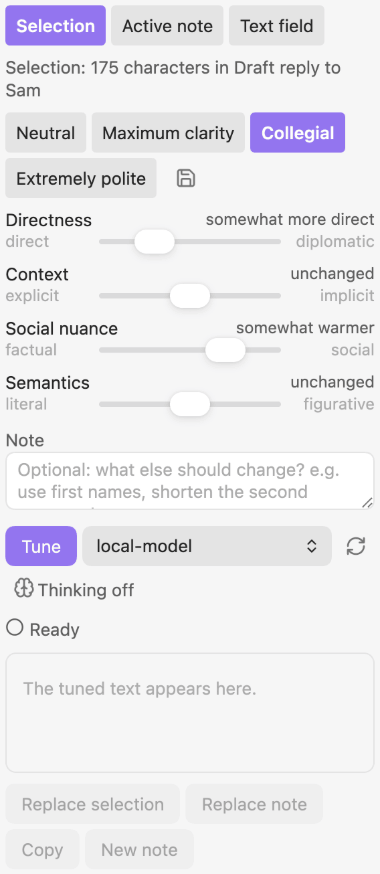
Click the preview for full size โ the four dials with their step names
## Configuration
**Settings โ Community plugins โ LingoTuner**, grouped into connection, style and output:
| Setting | What it does |
|---|---|
| Endpoints | An ordered list of OpenAI-compatible servers, each with an optional API key and model override. The first reachable one is used; every row shows its own reachability status. API keys are kept in Obsidian's keychain, not in the plugin's data file. |
| Request | Shows the sampling values, thinking level and token budget actually sent for the current model family and backend, with per-family overrides, the last request and any deviations for the running session. The thinking control in the panel switches between off and the model's preferred level; a per-family toggle in this section turns it into a four-level dropdown. |
| Override folder | Optional vault folder with `system.md` and `_.md` files that replace shipped prompt text. Empty means shipped text. |
| Saved presets | Your own dial combinations, saved from the panel. |
| Logbook | Off by default. When on, every run is appended to a monthly note (time, model, dial values, note, original, result). |
| Folder for new notes | Where **New note** puts the tuned text. Empty means the vault root. |
## How it works
The prompt is assembled, not templated. A system part states the invariants โ keep the language of the text, add nothing, drop nothing, keep the Markdown structure, return only the rewritten text. Each dial that is *not* in the middle adds one instruction block with the name of its step plus one before/after example pair for exactly that step; a dial in the middle adds nothing at all, which is why "all dials centred and no note" is reported as nothing to do rather than sent to a model. The note, if present, is appended last with an explicit precedence over everything above it.
The answer is streamed over XHR (server-sent events), reasoning output is separated from the result before it is displayed, and a stream cut short by the token limit is shown with a warning rather than silently kept. The whole path โ prompt building, dial model, session history, source guards โ lives in `src/core/` without importing `obsidian`, and a gate keeps it that way, which is why it can be tested in plain Node.
## Documentation
- [Documentation index](https://github.com/johannes-kaindl/lingotuner/blob/main/docs/README.md) โ all guides in one place.
- [Getting started](https://github.com/johannes-kaindl/lingotuner/blob/main/docs/getting-started.md) โ from the install to your first tuned text.
- [Use the Apple Intelligence endpoint](https://github.com/johannes-kaindl/lingotuner/blob/main/docs/use-apple-intelligence.md) โ tune on the device through an Apple Shortcut, with its limits.
- [Troubleshooting](https://github.com/johannes-kaindl/lingotuner/blob/main/docs/troubleshooting.md) โ the exact message, its cause and the fix.
## Contributing
- [`AGENTS.md`](https://github.com/johannes-kaindl/lingotuner/blob/main/AGENTS.md) โ architecture, conventions and gotchas for contributors and AI agents.
- [`docs/internal/SMOKE.md`](https://github.com/johannes-kaindl/lingotuner/blob/main/docs/internal/SMOKE.md) โ the GUI smoke test: what is checked against a running Obsidian, and how to reproduce the run.
- [`docs/internal/LAB.md`](https://github.com/johannes-kaindl/lingotuner/blob/main/docs/internal/LAB.md) โ the measured run of all 16 example pairs against a local model, with the findings that shaped the shipped prompt text.
- [`CHANGELOG.md`](https://github.com/johannes-kaindl/lingotuner/blob/main/CHANGELOG.md) โ what changed per release.
## License
Code AGPL-3.0-or-later ([`LICENSE`](LICENSE)), documentation CC BY-SA 4.0 ([`LICENSE-DOCS`](LICENSE-DOCS)).