# Audio Interface
> ๐ฌ๐ง English ยท [๐ฉ๐ช Deutsch](https://github.com/johannes-kaindl/audio-interface/blob/main/README.de.md)
**Read your notes aloud and turn them into WAV files โ locally, with no cloud, no account, no Python.**
[](https://github.com/johannes-kaindl/audio-interface/blob/main/LICENSE)
[](https://github.com/johannes-kaindl/audio-interface/blob/main/LICENSE-DOCS)
[](https://github.com/johannes-kaindl/audio-interface/releases)
[](https://obsidian.md)
Reading aloud works the moment you install the plugin, with the voices already on your computer.
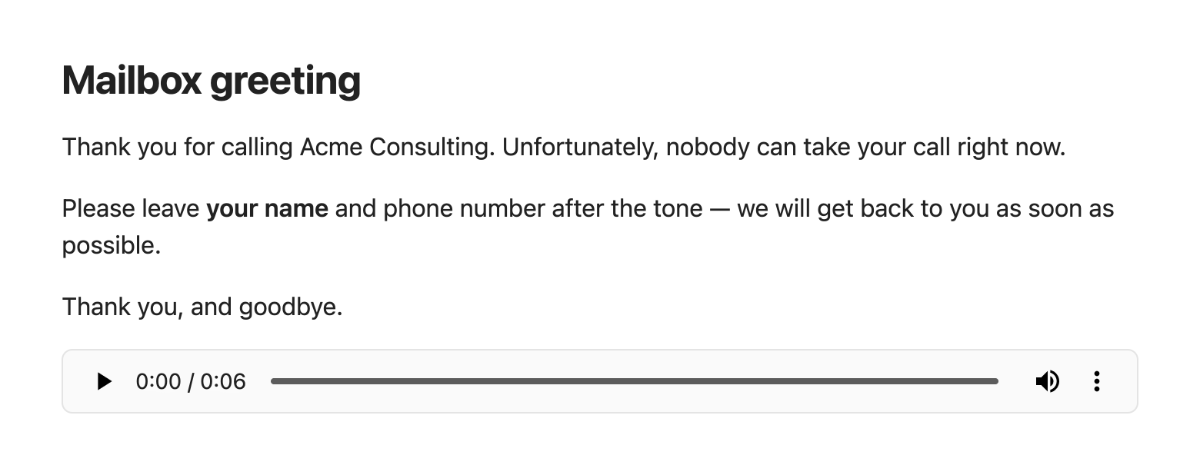
Exporting a note as a WAV file โ say, a mailbox greeting for your phone system โ is a deliberate
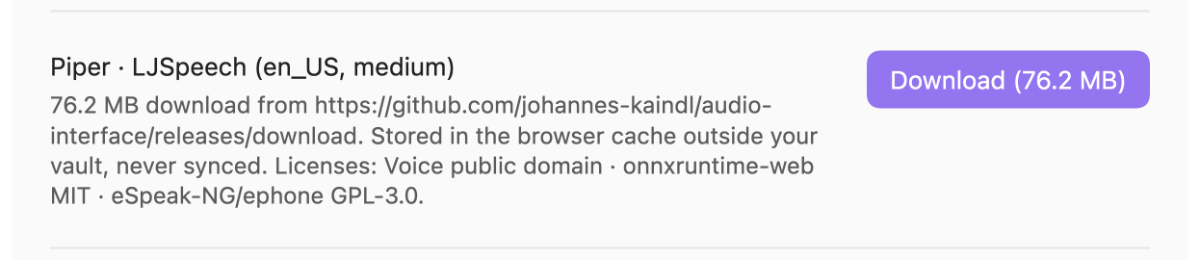
opt-in: you enable it, you press *Download*, and only then does a voice (English or German) arrive
on your disk.

## Features
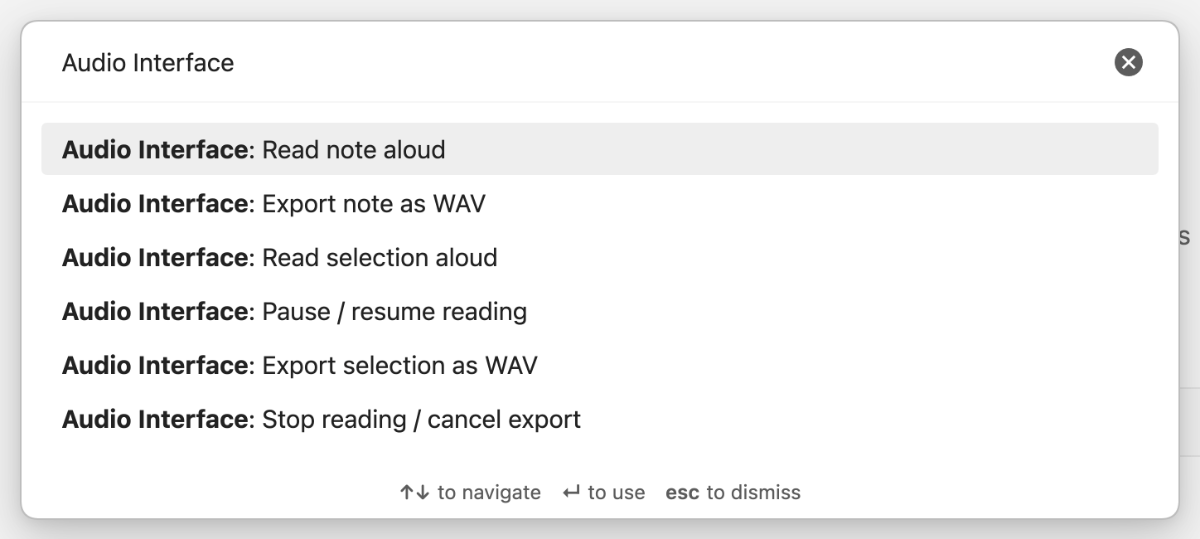
- **Read aloud** the current note or selection with your system voices โ start, pause/resume and
stop from the command palette, the ribbon icon or the status bar. Nothing to set up.
- **Export as WAV** with a downloadable voice โ **English** (Piper, *LJSpeech*) or **German**
(Piper, *Thorsten*), medium quality, switchable in the settings. Choose the
**phone-system profile** (8 kHz mono 16 bit โ what PBX mailboxes such as 3CX expect) or the
voice's native 22.05 kHz. Files land next to the note or in a folder of your choice and are never
overwritten.
- **Read aloud with the downloaded voice** instead of the system voice, once it is there.
- **Speech-ready text:** frontmatter, code blocks, images/embeds and comments are skipped; links
speak their display text; headings, lists, tables and callouts are read with natural pauses.
- **Turn audio files into text** โ right-click any audio file in your vault and choose
*Transcribe audio*. The transcript is saved as a note next to the recording, with the audio
embedded so you can listen back. Off by default; two backends: a companion program running on
your own computer, or an Apple Shortcut (see [How it works](#how-it-works)).
- **Works on mobile, too:** on iOS/iPadOS, an Apple Shortcut transcribes audio files and turns
text into a spoken-word file โ the two capabilities that need a downloadable voice or a local
program on the desktop. See [Set up the Apple Shortcut](https://github.com/johannes-kaindl/audio-interface/blob/main/docs/apple-shortcuts.md).
- **Honest network use:** one download, from this repository's release, only after your click,
verified against checksums, removable again. Transcription talks **only** to an address on your
own machine (or to the Shortcuts app, entirely on-device), and only when you turn it on โ see
[How it works](#how-it-works).
## Requirements
- **Obsidian 1.8.7 or newer**, desktop (macOS, Windows, Linux) or mobile (iOS/iPadOS 26+ for the
Apple Shortcut path). The downloadable voice and WAV export are desktop-only; on mobile, use the
Apple Shortcut for transcription and spoken-word files.
- **Reading aloud** uses the voices of your operating system. If no German voice is listed, install
one in the OS (macOS: System Settings โ Accessibility โ Spoken Content โ System voice).
- **WAV export** needs about 80 MB of free disk space for the first voice and its runtime; a second
voice adds about 60 MB, because the runtime is shared.
## Install
### From Obsidian's Community plugins browser (recommended)
1. **Settings โ Community plugins โ Browse**, search for **"Audio Interface"**, select **Install**.
2. **Enable** it.
Updates then arrive like any other community plugin update.
### With AnySource Sideloader
[AnySource Sideloader](https://git.jkaindl.de/jkaindl/anysource-sideloader) installs and updates plugins from any git forge, independent of the Community Store. Add this repository as a source: `https://git.jkaindl.de/jkaindl/audio-interface`, then install Audio Interface and enable it.
### Manual
Download `main.js`, `manifest.json` and `styles.css` from the [latest Forgejo release](https://git.jkaindl.de/jkaindl/audio-interface/releases/latest) and copy them into `/.obsidian/plugins/audio-interface/`, then enable the plugin. Or download `audio-interface.zip` from the release โ it contains exactly these files โ and unpack it into `.obsidian/plugins/`; `checksums.sha256` lets you verify the download: `shasum -a 256 -c checksums.sha256`.
### From source
```bash
git clone https://git.jkaindl.de/jkaindl/audio-interface
cd audio-interface && npm install && npm run build
# main.js manifest.json styles.css โ /.obsidian/plugins/audio-interface/
```
Source: [git.jkaindl.de/jkaindl/audio-interface](https://git.jkaindl.de/jkaindl/audio-interface)
## Usage
1. Open a note and run **Read note aloud** (command palette, or the ribbon icon). Select some text
first and use **Read selection aloud** for just that part.
2. **Pause / resume reading** and **Stop reading / cancel export** are commands too โ or click the
status bar item, which shows the progress while the plugin speaks.
3. To export: enable WAV export in the settings and download the voice (see below). The commands
**Export note as WAV** and **Export selection as WAV** appear in the palette as soon as the voice
is ready. The file is written next to the note (or into your target folder), and a notice tells
you where.
| | |
|---|---|
|
| The status bar item shows what is happening โ *Reading 1/5*, *Rendering 2/9*, *Downloading 12/78 MB* โ and a click stops it. |
### Configuration
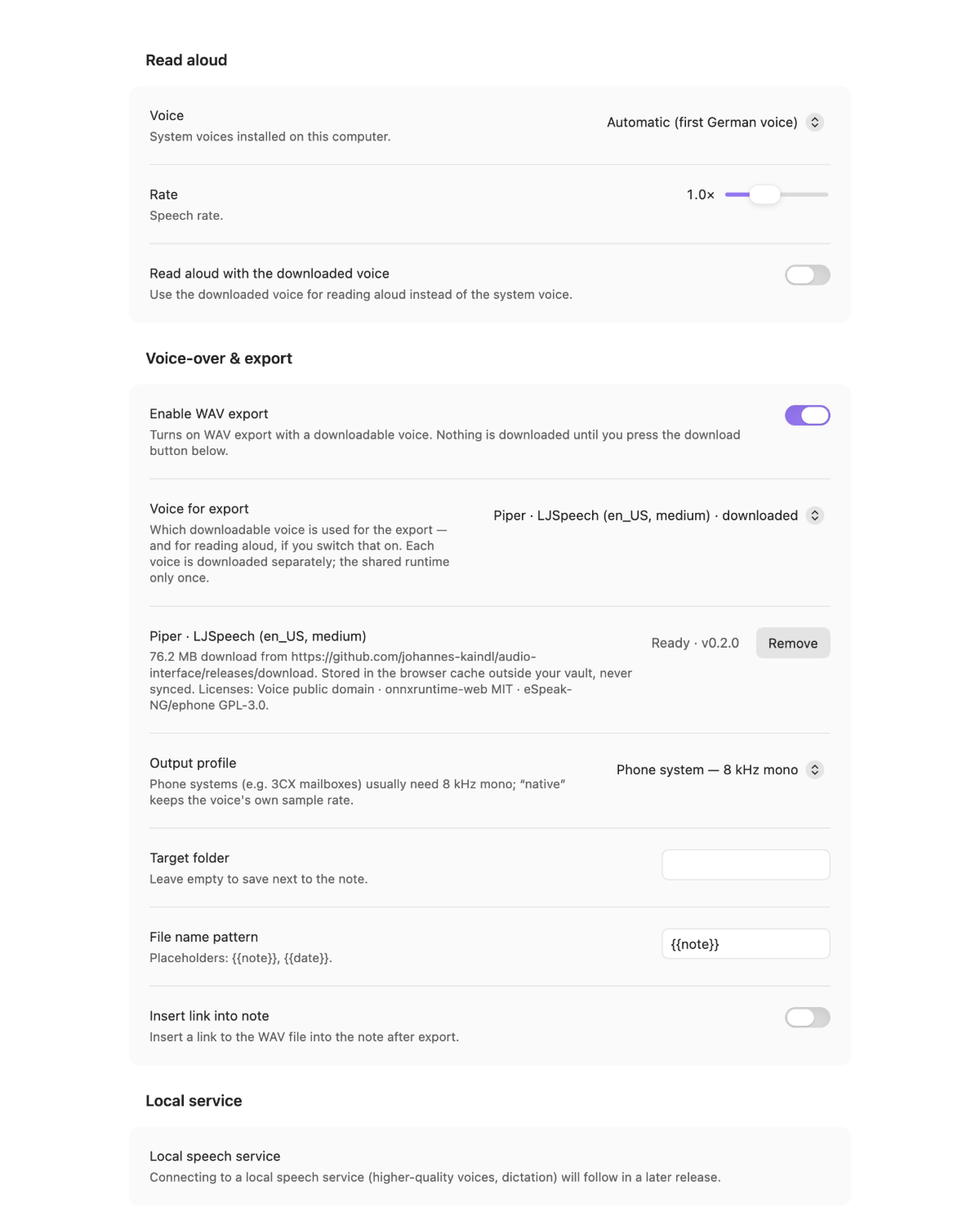
| Setting | What it does | Default |
|---|---|---|
| Voice | Which system voice reads aloud; *Automatic* picks the first German one | Automatic |
| Rate | Speech rate for reading aloud (0.5รโ2ร) | 1.0ร |
| Read aloud with the downloaded voice | Use the Piper voice instead of the system voice for reading aloud (only shown once the voice is ready) | off |
| Enable WAV export | Reveals the voice row and the export settings โ downloads nothing by itself | off |
| Voice for export | Which downloadable voice speaks: *Piper ยท LJSpeech (en_US)* or *Piper ยท Thorsten (de_DE)*. Each entry shows what it still costs to download, or *downloaded* | follows Obsidian's display language |
| Piper ยท โฆ (the selected voice) | The voice row: size, source and licenses, with **Download** / **Cancel** / **Remove** | not downloaded |
| Output profile | *Phone system โ 8 kHz mono* or *Native (voice sample rate)* | Phone system |
| Target folder | Vault folder for the WAV files; empty = next to the note | empty |
| File name pattern | `{{note}}` and `{{date}}` are replaced; existing files get `-2`, `-3`, โฆ | `{{note}}` |
| Insert link into note | Append `![[file.wav]]` at the cursor after a successful export | off |
## How it works
**Reading aloud** uses the browser's speech synthesis inside Obsidian โ your operating system's
voices, sentence by sentence, with pauses derived from the note's structure. No audio data is
produced, which is also why system voices cannot export a file.
**WAV export is an opt-in.** Out of the box the plugin downloads **nothing**. When you enable export
and press **Download**, it fetches these files **once, from this repository's Forgejo release**
(`https://git.jkaindl.de/jkaindl/audio-interface/releases`); no other server is contacted:
| File | Size | What it is | License |
|---|---|---|---|
| `piper-worker.js` | โ 3 MB | Synthesis worker (Piper pipeline, eSpeak-NG phonemizer as WASM, English + German dictionaries) | AGPL-3.0-or-later; contains ephone/eSpeak-NG (GPL-3.0-or-later), onnxruntime-web (MIT) |
| `ort-wasm-simd-threaded.wasm` | โ 13 MB | ONNX Runtime Web (CPU) | MIT |
| `en_US-ljspeech-medium.onnx` + `.json` | โ 61 MB | Piper voice *LJSpeech* (English, 22.05 kHz) | dataset public domain |
| `de_DE-thorsten-medium.onnx` + `.json` | โ 60 MB | Piper voice *Thorsten* (German, 22.05 kHz) | dataset CC0 |
Only the voice you selected is fetched โ the first two files are shared, so a second voice costs
just its model.
 |
Every file is checked against a SHA-256 checksum embedded in the plugin before it is used; a mismatch disables the voice and names the file. The files live in the browser cache of the Obsidian app, outside your vault โ never synced, never in your files โ and Remove deletes them again. The download can be cancelled; partial downloads resume. |
Synthesis then runs in a Web Worker inside Obsidian (ONNX Runtime, CPU), the result is resampled
to the chosen profile, encoded as 16-bit WAV and written through Obsidian's vault API. There is no
telemetry. Architecture and measurements: [`AGENTS.md`](AGENTS.md).
### Transcription and what leaves your vault
**Nothing leaves your computer.** Turning *Turn audio files into text* on lets the plugin talk to
one more address โ a transcription program that **you** run on your own machine, by default
`http://127.0.0.1:8765`. The settings accept **only** local addresses (`127.0.0.1`, `localhost`,
`[::1]`); anything else falls back to the default, so a typo cannot send your recordings to a
stranger's server. The plugin never starts that program, and never installs it: if it is not
running, you get a message and nothing else happens.
When you transcribe a file, the plugin decodes it inside Obsidian, mixes it down to mono,
resamples it to 16 kHz and sends that as WAV. Decoding locally is not a detail โ the program reads
audio through libsndfile, which does **not** understand `webm` or `m4a`, and those are exactly what
Obsidian's own audio recorder produces. The transcript is written as a new note next to the
recording; nothing is overwritten.
The companion program is [`audio-ui`](https://git.jkaindl.de/jkaindl/audio-ui) โ speech
recognition (Parakeet) running locally on Apple Silicon. It is optional: without it, the plugin
does everything else exactly as before.
### Spoken-word files and mobile (Apple Shortcut)
On iOS/iPadOS there is no local companion program and no downloadable voice, so two features run
through an Apple Shortcut instead: transcription (a second backend next to the local program,
switchable in the settings) and a new **spoken-word file** โ turn a note or selection into an
audio file, saved into the vault. Both work on the desktop too, as a second option. See
[Set up the Apple Shortcut](https://github.com/johannes-kaindl/audio-interface/blob/main/docs/apple-shortcuts.md) for setup, limits (no streaming, the shortcut
chooses the file extension) and troubleshooting.
## Roadmap
Transcribing audio files is available now (see above). **Live dictation** โ speaking and having
the text appear as you go โ needs the companion program to listen to the microphone itself, which
is being built there; the plugin will stay a thin client that receives text. Higher-quality voices
through the same local program are planned for a later release.
## Contributing
Issues and pull requests on [git.jkaindl.de](https://git.jkaindl.de/jkaindl/audio-interface).
Test-driven (`npm run gate`); larger features via brainstorm โ spec โ plan โ TDD
(specs and plans live in the maintainer's vault cockpit). See [`AGENTS.md`](AGENTS.md).
## Documentation
- [Documentation index](https://github.com/johannes-kaindl/audio-interface/blob/main/docs/README.md)
- [Getting started](https://github.com/johannes-kaindl/audio-interface/blob/main/docs/getting-started.md) โ from reading a note aloud to a WAV file
- [Set up the Apple Shortcut](https://github.com/johannes-kaindl/audio-interface/blob/main/docs/apple-shortcuts.md) โ transcription and spoken-word files on mobile
- [Troubleshooting](https://github.com/johannes-kaindl/audio-interface/blob/main/docs/troubleshooting.md) โ the messages you may see, what they mean and what to do
## License
- **Code:** AGPL-3.0-or-later ([`LICENSE`](https://github.com/johannes-kaindl/audio-interface/blob/main/LICENSE)).
- **Documentation:** CC BY-SA 4.0 ([`LICENSE-DOCS`](https://github.com/johannes-kaindl/audio-interface/blob/main/LICENSE-DOCS)).
- **Third-party:** onnxruntime-web (MIT), ephone/eSpeak-NG (GPL-3.0-or-later), Piper voices
*LJSpeech* (dataset public domain) and *Thorsten* (dataset CC0) โ shipped as release assets, see
the table above.
Copyright ยฉ 2026 Johannes Kaindl.
