# UI Sketch **Language:** English · [한국어](#한국어) · 📖 [Full docs](https://jkraccoon.github.io/obsidian-ui-sketch/) · [한국어 문서](./docs/ko/README.md) [![License: MIT](https://img.shields.io/badge/License-MIT-yellow.svg)](./LICENSE) [![Obsidian](https://img.shields.io/badge/Obsidian-1.5%2B-7c3aed)](https://obsidian.md) [![Sponsor](https://img.shields.io/github/sponsors/jkRaccoon?label=Sponsor&logo=GitHub)](https://github.com/sponsors/jkRaccoon) [![Tests](https://img.shields.io/badge/tests-116%20passing-brightgreen)](./tests) > **Sketch web UI wireframes from human-readable YAML — rendered inline in your Obsidian notes. 44 components. AI-friendly structure. Theme-adaptive.** > > **사람이 읽기 쉽고 AI가 다루기 좋은 YAML로 웹 UI 와이어프레임을 그려서 Obsidian 노트 안에 바로 렌더링합니다. 컴포넌트 44개. AI 친화 구조. 테마 자동 적응.** --- ## Why this exists Product specs, design briefs, RFCs, kickoff docs — when planners and UI/UX designers describe a screen in markdown, they reach for ASCII boxes: ```text +---------+------------------+ | Header | Actions | +---------+------------------+ | Sidebar | Body | | | | +---------+------------------+ ``` Slow to draw. Painful to edit. Easy to misalign. And worst of all, **the structure is gone the moment you type it out**. To your eyes it's a header with a sidebar; to anything trying to read it — a teammate skimming, a script parsing, an LLM rewriting — it's just `String.split('|')`. That last reader matters more than ever. A growing share of product writing now happens with an AI in the loop: co-drafting the spec, asking the model to revise a layout, generating screen variants from a brief. **AI is excellent at reasoning over structured data and miserable at decoding ASCII rectangles.** Your spec ends up being two things at once — a picture humans can almost read, and a string the model can't understand. Neither audience is well served. **UI Sketch is one simple trade.** Stop drawing the UI in text. Describe it in YAML instead: ```yaml screen: - navbar: { brand: "DocHub" } - row: items: - col: { flex: 1, items: [ { sidebar: { items: ["Home", "Docs"] } } ] } - col: { flex: 3, items: [ { card: { title: "Welcome" } } ] } ``` One source. Three audiences: - **Humans skim it in seconds.** YAML reads like an outline, not a maze of pipes and dashes. You can see the layout without rendering it. - **AI consumes it as data.** Every screen, component, and prop is addressable. Models can mutate, validate, diff, generate variants — no decoding step. - **Readers see a real wireframe.** Flip to reading view and the same YAML renders as a mid-fi frame, in your Obsidian theme. No mental reconstruction. That's the whole pitch. Anywhere you'd otherwise reach for an ASCII sketch — spec docs, design briefs, RFCs, AI-assisted product threads — you get a single artifact that you, your reviewers, and your tools can all edit. ![UI Sketch rendering a dashboard wireframe from YAML](./docs/img/hero.png) --- # English ## See it in action Drop this in a ` ```ui-sketch ` fenced block, switch to Reading view, and the wireframe appears inline. ```yaml viewport: desktop screen: - navbar: { brand: "DocHub", items: ["Home", "Docs", "Pricing"] } - row: gap: 16 items: - col: flex: 1 items: - sidebar: { items: ["Getting Started", "API", "FAQ"] } - col: flex: 3 items: - heading: { level: 1, text: "Welcome back" } - row: gap: 12 items: - card: { title: "Tasks", body: "12 open" } - card: { title: "Docs", body: "3 drafts" } - button: label: "New document" variant: primary note: "Navigates to /documents/new" ``` A single `viewport:` key flips between desktop, tablet, and mobile:
**`viewport: mobile`** — a 375px login form ([recipe](./docs/recipes/login-form.md)): ![Mobile login form sketch](./docs/img/recipes/login-form-1.png) **`viewport: desktop`** — a named-area grid dashboard ([recipe](./docs/recipes/dashboard.md)): ![Dashboard grid layout](./docs/img/recipes/dashboard-1.png)
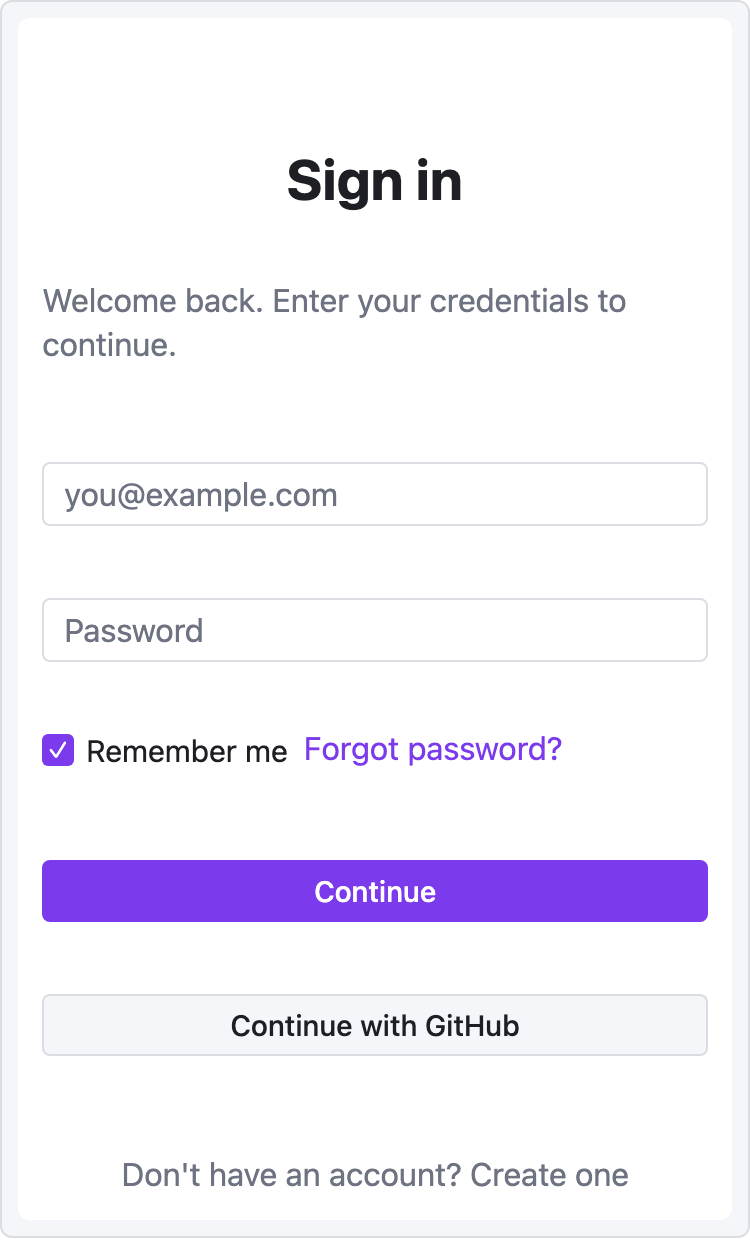
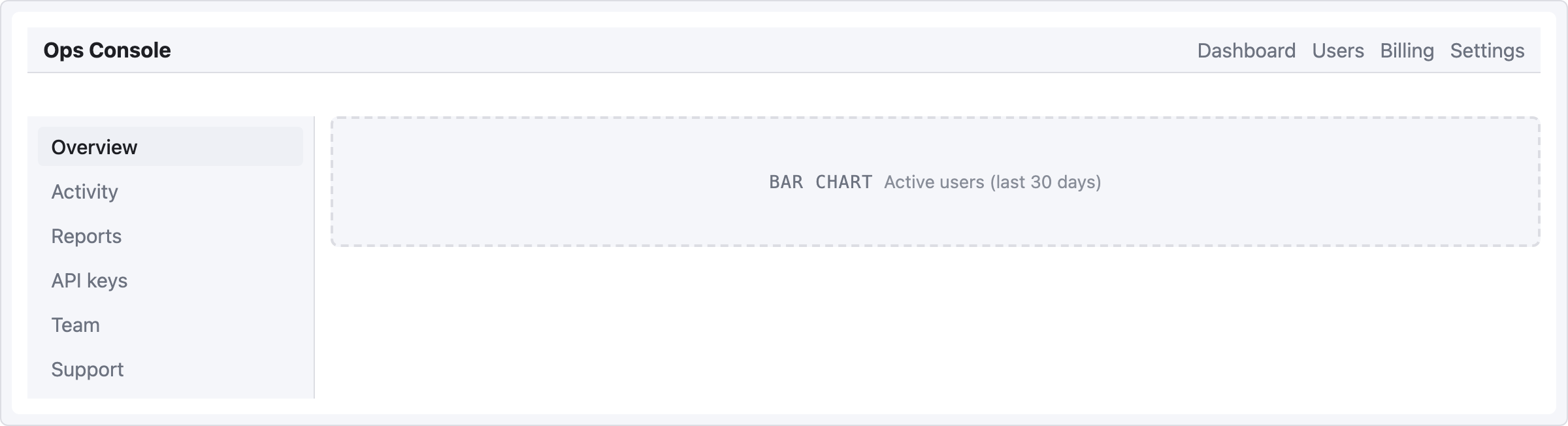
## What you trade ASCII for | Pain | Before (ASCII) | After (UI Sketch) | |---|---|---| | Aligning columns | `│ Header │ Actions │` gymnastics | `- row: { items: [...] }` | | Tweaking layout | Retype the entire diagram | Edit one line of YAML | | Reading someone else's sketch | Decode what the boxes meant | Render it and see | | Keeping vault consistent with theme | Manual color adjustments | Uses Obsidian CSS variables automatically | | Asking an LLM to revise the layout | Paste an ambiguous picture | Paste structured YAML | - **Mid-fi by design.** Not a Figma replacement — a *fast sketching* tool that lives in your notes. - **Theme-adaptive.** Light, dark, and community themes inherit via `var(--interactive-accent)` and friends. - **Friendly errors.** YAML typo? Red box with the exact line. Unknown component? Levenshtein-based suggestion. - **Safe.** Depth and node-count caps prevent runaway blocks. The `raw:` escape hatch runs through `sanitize-html` — no XSS surface. - **Zero runtime state.** Every render is a pure function from YAML to DOM. No surprises in Live Preview. ## Quick start ### 1. Install **One-click from Obsidian Community (recommended)**: 1. Open the plugin page: **[community.obsidian.md/plugins/ui-sketch](https://community.obsidian.md/plugins/ui-sketch)**. 2. Click the **Add** button — Obsidian opens and installs UI Sketch automatically. 3. Enable **UI Sketch** under Settings → Community plugins. **From inside Obsidian** — Settings → **Community plugins** → **Browse** → search `UI Sketch` → **Install** → enable. **Pre-release / dev build (BRAT)**: 1. Install the [BRAT](https://github.com/TfTHacker/obsidian42-brat) community plugin. 2. BRAT → "Add Beta plugin" → `jkRaccoon/obsidian-ui-sketch`. 3. Enable **UI Sketch** in Community plugins. **Manual install**: 1. Download `main.js`, `manifest.json`, and `styles.css` from [the latest release](https://github.com/jkRaccoon/obsidian-ui-sketch/releases). Release assets are signed with [GitHub artifact attestations](https://docs.github.com/en/actions/security-for-github-actions/using-artifact-attestations/using-artifact-attestations-to-establish-provenance-for-builds); verify with `gh attestation verify main.js --repo jkRaccoon/obsidian-ui-sketch`. 2. Copy them into `/.obsidian/plugins/ui-sketch/`. 3. Enable the plugin in Settings. ### 2. Write your first sketch In any note, add a fenced code block tagged `ui-sketch`: ````markdown ```ui-sketch screen: - navbar: { brand: "MyApp" } - button: { label: "Sign in", variant: primary } ``` ```` Switch to Reading view (`Ctrl/Cmd+E`). You'll see a rendered wireframe. ### 3. Go deeper Full documentation lives in [**`docs/`**](./docs/README.md): - [Getting Started](./docs/getting-started.md) — a 5-minute tutorial - [YAML Reference](./docs/yaml-reference.md) — complete syntax - [Component Reference](./docs/components/README.md) — prop tables and examples for all 44 components - [Recipes](./docs/recipes/dashboard.md) — copy-paste templates for common screens - [Troubleshooting](./docs/troubleshooting.md) — error levels and common fixes ## Component catalog **44 components in 8 categories, plus one escape hatch.** Every component accepts the base props (`id`, `w`, `h`, `align`, `pad`, `note`, `muted`) on top of its type-specific props. Detailed prop tables live in the [Component Reference](./docs/components/README.md). | Category | Components | |---|---| | [**Layout structure**](./docs/components/layout.md) | `container` · `card` · `panel` · `divider` · `spacer` | | [**Navigation**](./docs/components/navigation.md) | `navbar` · `sidebar` · `tabs` · `breadcrumb` · `pagination` · `stepper` | | [**Basic input**](./docs/components/input-basic.md) | `button` · `input` · `textarea` · `select` · `checkbox` · `radio` | | [**Advanced input**](./docs/components/input-advanced.md) | `toggle` · `slider` · `date-picker` · `file-upload` · `search` | | [**Display**](./docs/components/display.md) | `heading` · `text` · `image` · `icon` · `avatar` · `badge` · `tag` · `kbd` | | [**Feedback**](./docs/components/feedback.md) | `alert` · `progress` · `toast` · `modal` · `skeleton` | | [**Data**](./docs/components/data.md) | `table` · `list` · `tree` · `kv-list` | | [**Placeholder**](./docs/components/placeholder.md) | `chart` · `map` · `video` · `placeholder` | | [**Escape hatch**](./docs/components/raw.md) | `raw` (sanitized HTML) | A few examples: ```yaml alert: severity: warn title: "Heads up" message: "Review before committing." table: columns: ["Name", "Role", "Status"] rows: - ["Ada", "PM", "✓"] - ["Ben", "ENG", "…"] tree: items: - label: "src" children: - { label: "main.ts" } - { label: "types.ts" } - { label: "docs" } kbd: keys: ["Ctrl", "K"] ``` ## YAML structure See the [**YAML Reference**](./docs/yaml-reference.md) for complete syntax. Quick overview: ```yaml viewport: desktop | tablet | mobile | custom # default: desktop (1200px) width: 375 # custom only height: 640 # custom only theme: adaptive # v0.2 only supports "adaptive" background: default | muted | transparent screen: # required: array OR grid - ... ``` Two layout models, mutually exclusive at the root: **Flex (row/col nesting)** — primary model, fits 99% of web UIs: ```yaml screen: - row: gap: 12 items: - col: { flex: 1, items: [ { sidebar: {...} } ] } - col: { flex: 3, items: [ ... ] } ``` **Named-area grid** — for dashboard layouts: ```yaml screen: grid: areas: - "nav nav nav" - "side main main" - "side foot foot" cols: "180px 1fr 1fr" rows: "56px 1fr 48px" map: nav: { navbar: { brand: "MyApp" } } side: { sidebar: { items: ["Home", "Docs"] } } main: { card: { title: "Welcome" } } foot: { text: { value: "© 2026" } } ``` ## Error handling UI Sketch never fails silently. Every problem gets surfaced with something actionable. | Level | When | Result | |---|---|---| | **L1** YAML parse error | Malformed YAML | Full-block error box with line/col | | **L2** Structure error | Missing `screen`, unknown viewport, etc. | Full-block error box with path | | **L3** Component error | Unknown component type or invalid props | Inline error box at that component's position — rest of the wireframe still renders | | **L4** Empty block | No content | Friendly placeholder with a starter example | **Typo suggestions** (Levenshtein distance ≤ 2): > ⚠ `butn`: unknown component type · Did you mean "button"? **Safety caps**: - Max tree depth: **32** - Max node count: **5000 per block** - `raw:` HTML always runs through `sanitize-html` — no `