# Tab Numbers
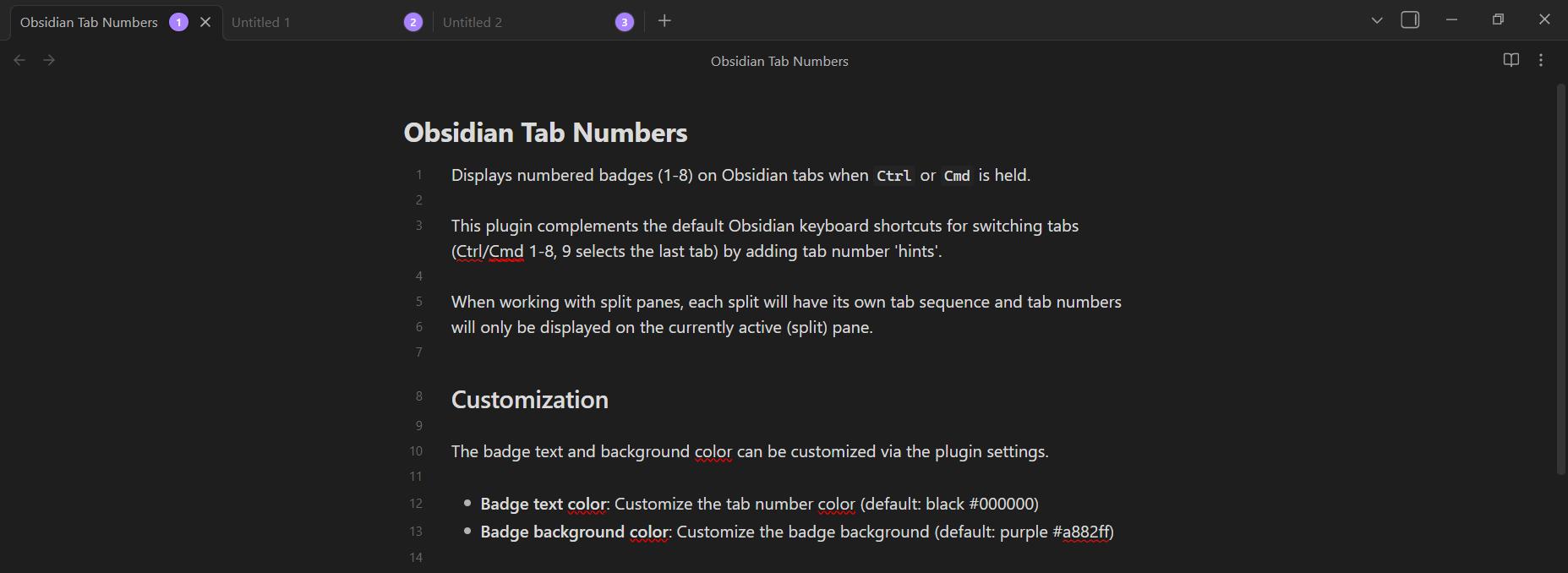
Displays numbered badges (1-8) on Obsidian tabs when Ctrl or Cmd is held.
This plugin complements the default Obsidian keyboard shortcuts for switching tabs (Ctrl/Cmd 1-8, 9 selects the last tab)
by adding tab number 'hints'. When working with split panes, each split will have its own tab sequence and tab numbers
will only be displayed on the currently active (split) pane.
## Screenshots
## Customization
The badge text and background color can be customized via the plugin settings.
- **Badge text color**: Customize the tab number color (default: black #000000)
- **Badge background color**: Customize the badge background (default: purple #a882ff)
## Installation
Manual installation is currently the only supported method.
1. **Download the plugin files from the latest release on GitHub**
- Download the `main.js`, `manifest.json`, and `styles.css` files.
2. **Copy files to your vault's plugin directory**:
- Copy `main.js`, `manifest.json`, and `styles.css` to:
```
/path/to/your/vault/.obsidian/plugins/tab-numbers/
```
3. **Reload Obsidian**:
- Open Developer Console: **Ctrl/Cmd + Shift + I**
- Run: `app.commands.executeCommandById('app:reload')`
- Or restart Obsidian
4. **Enable the plugin**:
- Go to **Settings → Community plugins**
- Find "Tab Numbers" and enable the plugin
## Development
### Setup
```bash
# Install dependencies
pnpm install
# Start development build (watch mode)
pnpm run dev
# Production build
pnpm run build
```
### Testing
To test the plugin during development:
1. **Build the plugin**:
```bash
pnpm run build
```
2. **Copy files to your test vault**:
- Copy `main.js`, `manifest.json`, and `styles.css` to:
```
/path/to/your/vault/.obsidian/plugins/tab-numbers/
```
3. **Reload Obsidian**:
- Open Developer Console: **Ctrl/Cmd + Shift + I**
- Run: `app.commands.executeCommandById('app:reload')`
- Or restart Obsidian
4. **Enable the plugin**:
- Go to **Settings → Community plugins**
- Find "Tab Numbers" and enable the plugin