# Workbench Explorer Sort
Per-folder sorting, directly in Obsidian's native File Explorer.



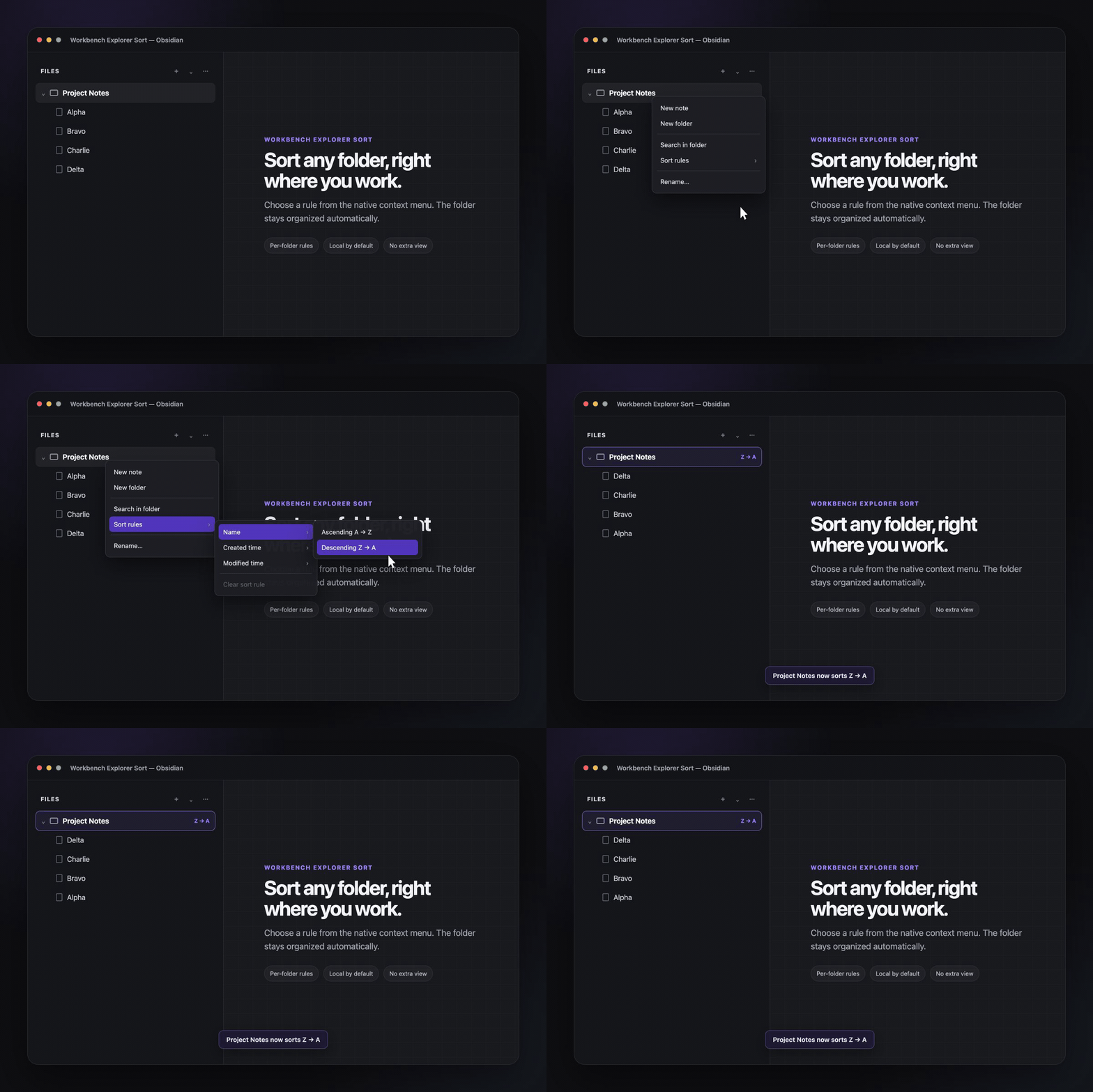
Workbench Explorer Sort adds persistent sorting rules to individual folders in Obsidian's native file tree. Right-click a folder, choose a rule, and keep working—there is no separate view to manage.
## Why it is useful
- **Folder-specific:** sort project notes alphabetically while keeping a journal newest-first.
- **Native workflow:** every rule lives in the File Explorer context menu.
- **Persistent:** rules survive restarts and follow folders when they are renamed.
- **Private by default:** the plugin makes no network requests and stores settings in your vault's local plugin data.
## Sort modes
| Field | Directions |
| --- | --- |
| Name | A → Z, Z → A |
| Created time | New → Old, Old → New |
| Modified time | New → Old, Old → New |
## Use it
1. Right-click any folder in **Files**.
2. Choose **Sort rules**.
3. Pick **Name**, **Created time**, or **Modified time**, then choose a direction.
To return the folder to Obsidian's default order, choose **Sort rules → Clear sort rule**.
## Install
### Community plugins
1. Open **Settings → Community plugins → Browse**.
2. Search for **Workbench Explorer Sort**.
3. Select **Install**, then **Enable**.
[Open the plugin listing](https://obsidian.md/plugins?id=workbench-explorer-sort)
### Manual installation
Download `main.js`, `manifest.json`, and `styles.css` from the [latest release](https://github.com/IvyYang1999/obsidian-workbench-explorer-sort/releases/latest), then place them in:
```text
/.obsidian/plugins/workbench-explorer-sort/
```
Reload Obsidian and enable the plugin under **Settings → Community plugins**.
## Optional CLI
`cli.js` lets local scripts and agents read or update the same rules. It is included in GitHub releases but is not installed by Obsidian's Community Plugins browser.
Run it from a vault root:
```bash
node /path/to/cli.js list
node /path/to/cli.js get "Project Notes"
node /path/to/cli.js set "Project Notes" name-desc
node /path/to/cli.js clear "Project Notes"
```
Pass `--vault /path/to/vault` when running it from another directory. Supported mode values are `name-asc`, `name-desc`, `ctime-desc`, `ctime-asc`, `mtime-desc`, `mtime-asc`.
## Compatibility
- Obsidian 1.13.0 or later
- Desktop only
## Development
```bash
npm ci
npm run check
npm run dev
```
See [CONTRIBUTING.md](CONTRIBUTING.md) for the contribution workflow.
## License
[MIT](LICENSE) © IvyYang1999