
Agent Comments
Comments alongside your notes. @ an agent to reply.
Works on its own; stored as plain text in the Markdown.



Install in Obsidian ·
Website ·
中文说明 ↓
## What it does
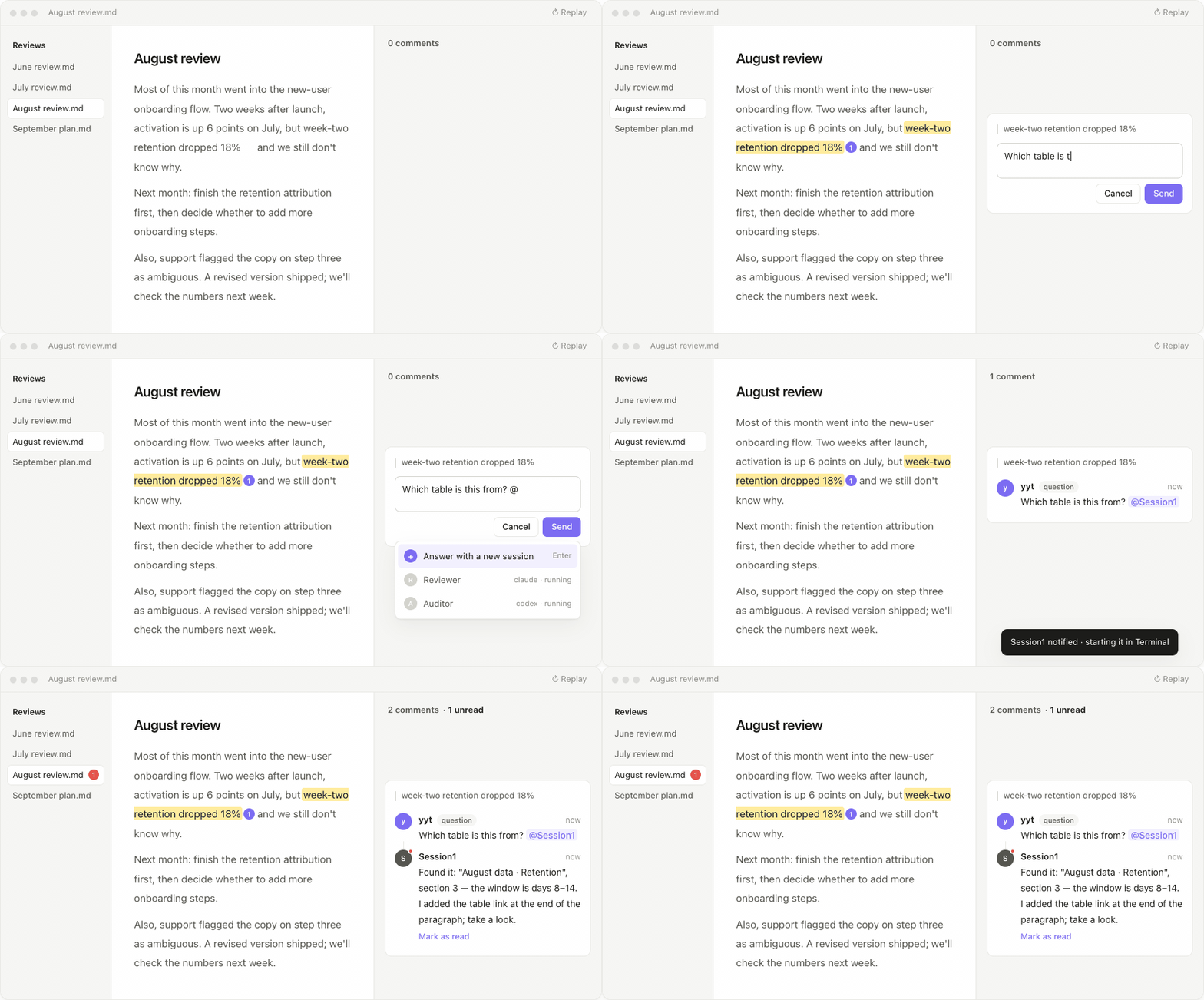
**Highlight → comment.** Select text, right-click *Add inline comment*. A card appears in the right sidebar, level with the passage, and follows it as you scroll. The note itself only gets a soft highlight and a small counter.
**@ a real session.** Type `@` in a comment to pick a running Claude Code / Codex session on your machine — or choose *Answer with a new session* and the plugin starts one in Terminal (macOS). The letter is dropped into that session's mailbox; a small hook (installed on request) injects it into the session's context; the session reads the note and writes its reply back into the file.
**Suggested edits.** A reply can carry a replacement for the highlighted passage — from a person or from the AI session. The card shows old → new with *Accept* / *Decline*; nothing in the note changes until you accept.
**Unread, at a glance.** Replies from other people or AI get a red dot, the panel header shows *N comments · M unread*, and the file explorer shows a red count on the document. Mark as read with one click, resolve a thread when it's done, react with an emoji. One switch turns the unread signals off.
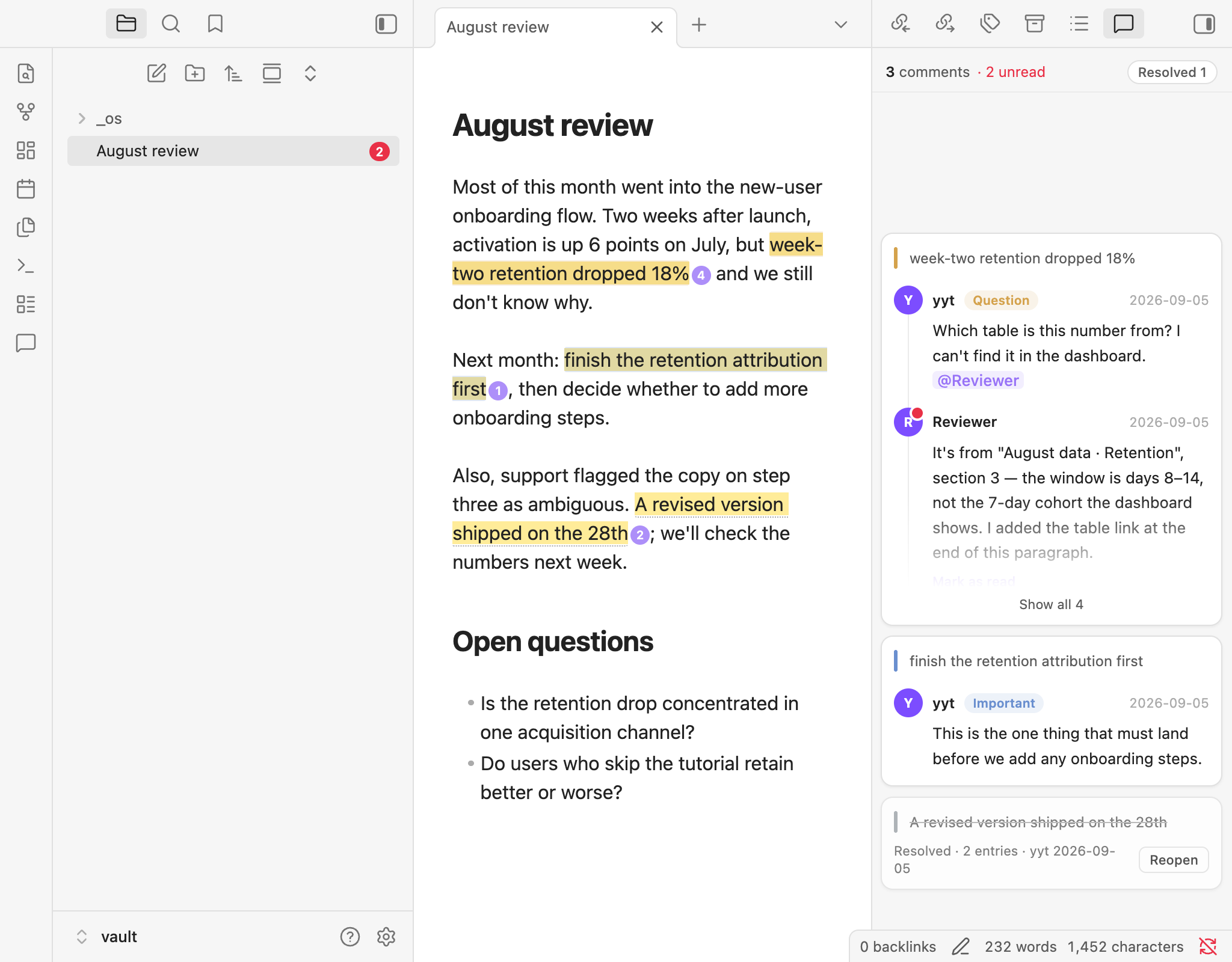
**Editing and reading view, desktop and mobile.** The same highlight and badge appear in reading view, with the raw markup hidden. Long threads fold to a preview until you expand or focus them.
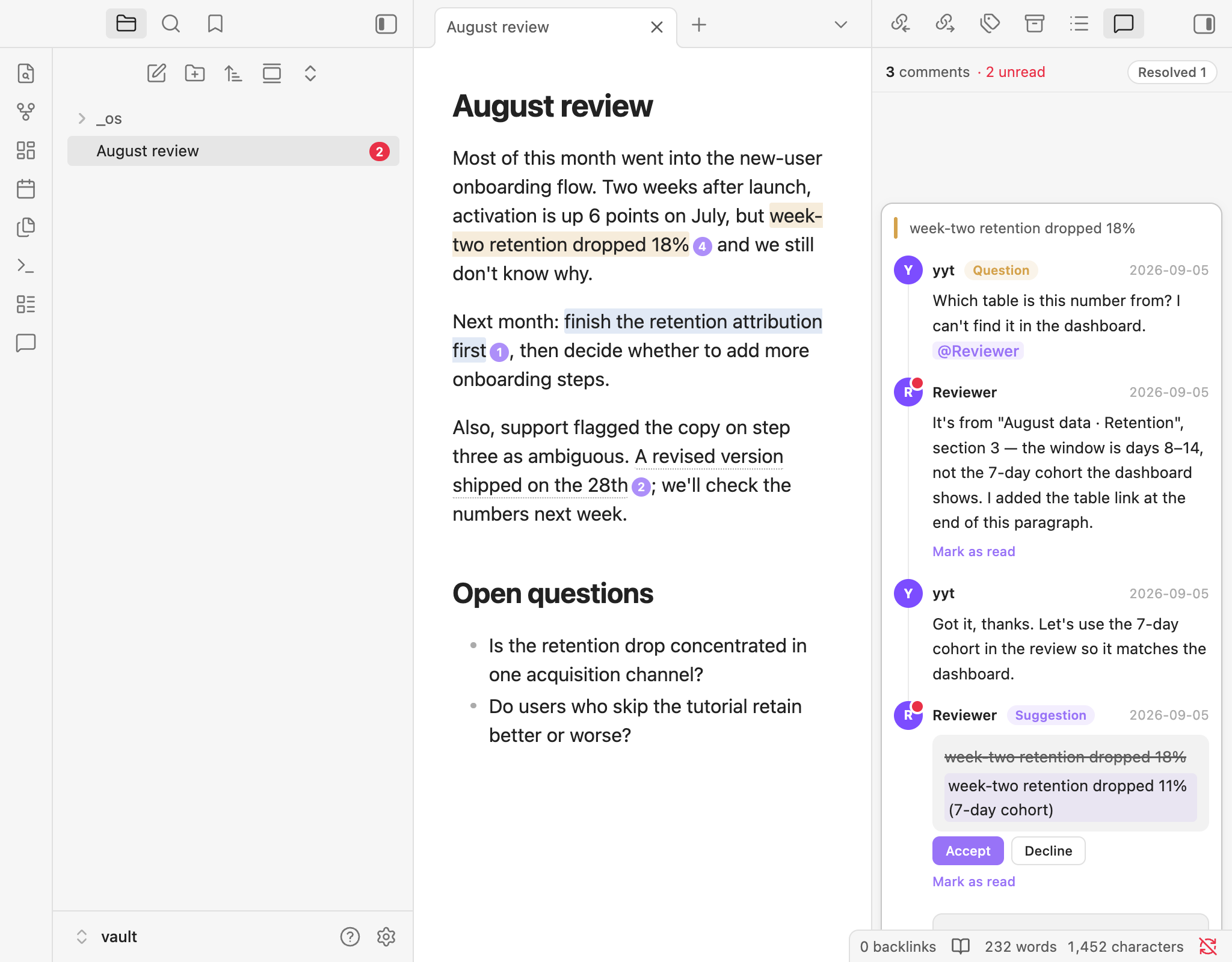
**Plain text storage.** A comment is one line of CriticMarkup-style text next to the passage:
```
{==retention dropped 18% in week two==}{>>yyt|2026-09-05|question: Which table is this from? [@Session1](agent:3f9a12c0)<<}
```
No database, no sidecar files. It syncs with iCloud / Git / Obsidian Sync like any other text, diffs cleanly, and stays readable without the plugin.
## Install
Obsidian → Settings → Community plugins → Browse → search **Agent Comments**. Or open obsidian://show-plugin?id=inline-comments.
Pre-release builds: [BRAT](https://github.com/TfTHacker/obsidian42-brat) → *Add a beta plugin* → `IvyYang1999/obsidian-inline-comments`.
Obsidian 1.8+, desktop and mobile. Session discovery, the hook, and *Answer with a new session* (which launches Terminal) are desktop features; the last one is macOS only for now.
## Using @
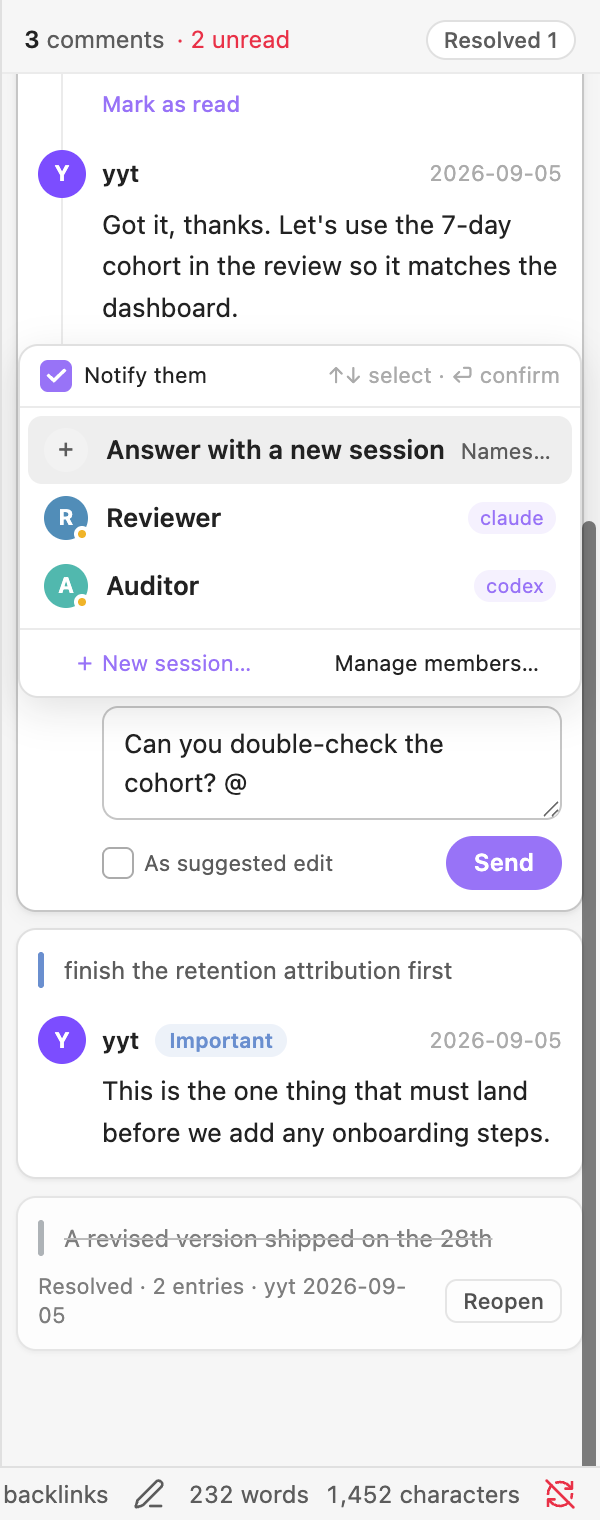
1. **Manage members** (from the `@` dropdown or the settings tab) lists the Claude Code / Codex sessions running on this machine. Give one a name to make it mentionable — or just `@` a name that doesn't exist yet and the plugin creates the session for you.
2. **Install hook**, once. It adds three entries (`UserPromptSubmit`, `Stop`, `SessionStart`) to `~/.claude/settings.json`, backs the file up first, touches nothing else, and *Uninstall* removes exactly those entries.
3. Write `@Name` in a comment and send. The letter lands in `///`; the session sees it the next time it speaks or finishes, reads the note, and appends a reply.
The plugin never talks to the network. Letters and replies are local files in your vault; what your AI tool does with them is up to that tool.
The UI follows Obsidian's language (English or 中文); you can pin either in settings.
## Settings
| Setting | What it does |
|---|---|
| Author name | Signs your comments; your own replies never count as unread |
| Unread notifications | Master switch for red dots, *Mark as read*, the header count and the explorer badge |
| Show resolved | Keep resolved threads in the panel (collapsed) or hide them |
| Mention delivery / mailbox root | Where letters are written |
| Panel background | Follow sidebar, follow editor, or a custom colour |
| Comment types | Built-in agree / disagree / question / important / note, plus your own with a colour |
## Development
```bash
npm install --legacy-peer-deps
npm run build # tsc + esbuild → main.js
npm test # vitest, pure functions
npm run e2e # boots an isolated Obsidian and runs ~70 UI assertions
```
Design notes live in [`DESIGN.md`](DESIGN.md). Releases are built by CI from a version tag and ship with build-provenance attestations.
---
## 中文
**Agent Comments**——在 Obsidian 笔记的原文旁边留言(划线评论),@ 一个 Agent 来回复。评论以纯文本形式紧挨着原文存在 `.md` 里,不联网、不建库。
- **划线,即评论。** 选中文字右键「添加划线评论」,卡片挂在右侧栏、与原文水平对齐、跟着滚动。
- **@ 一个正在跑的会话。** 打 `@` 点名本机的 Claude Code / Codex 会话,或「用新会话回答」让插件在终端里替你开一个;留言以文件送到它手里,它读完文档把回复写回原位。
- **修改建议。** 回复可以附带对划线原文的替换文本(人或 AI 都能提),卡片上显示 原文 → 改法,点「采纳」原文才会变。
- **未读一眼看清。** 别人或 AI 的回复带红点,面板顶部常驻「N 条评论 · M 未读」,文件目录里对应文档也挂红色角标;看完点「标为已读」,聊完点「解决」,也可以加个 emoji 反应。设置里「未读通知」一键关掉。
- **编辑与阅读视图、桌面与手机。** 阅读视图里同款高亮 + 角标,原始标记隐藏;超长线程折叠成预览。
**安装**:Obsidian 设置 → 第三方插件 → 浏览,搜 **Agent Comments**;或直接打开 obsidian://show-plugin?id=inline-comments。Obsidian 1.8 以上,桌面与手机;会话发现、hook、「用新会话回答」(开终端)是桌面能力,最后一项目前仅 macOS。预发布版用 BRAT 添加 `IvyYang1999/obsidian-inline-comments`。
官网中文版:https://agent-comments.yytyyf.com
**关于隐私**:插件本身不联网。@ 只是往你电脑上的一个文件夹写一个文件,会话在你自己的终端里跑;首次 @ 需要在「管理成员」里点一次「安装 hook」——它只往 `~/.claude/settings.json` 加三条,可一键卸载。
作者 [yytyyf](https://yytyyf.com) · MIT