# MyOnePage
Stop rewriting your notes for your team. Add `myone.page: true` to a note and it opens as a styled one-page report:
big numbers, cards, funnels, tables, a Gantt timeline. Click any text to edit it, and the edit is saved back to the
note. It stays a plain Markdown note you can still open, search and link.
**See finished pages first** (each one is a single note, open in a browser, no sign-in):
[investor update](https://myone.page/templates/investor-update) ·
[board pre-read](https://myone.page/templates/board-pre-read) ·
[client proposal](https://myone.page/templates/client-proposal) ·
[client results report](https://myone.page/templates/client-report) ·
[strategy memo](https://myone.page/templates/strategy-memo) ·
[product brief](https://myone.page/templates/product-brief) ·
[project status report](https://myone.page/templates/project-status-report) ·
[weekly update](https://myone.page/templates/weekly-update) ·
[project brief](https://myone.page/templates/project-brief) ·
[one-page business plan](https://myone.page/templates/one-page-business-plan) ·
[company one-pager](https://myone.page/templates/business-one-pager) ·
[Obsidian plugin market analysis](https://myone.page/blog/what-makes-an-obsidian-plugin-win)
**The plugin is free.** Pages, editing on the page, HTML export and writing pages with AI work without an account, with
no time limit. **Sharing is optional:** publish a page to [myone.page](https://myone.page) and your team edits it in
the browser, with their edits back in your note within 60 seconds, end-to-end encrypted. Your first 3 shared pages
are free (the people you share with sign in); a paid plan adds unlimited pages and links open to anyone. Readers
don't need Obsidian and pay nothing. See [Share on the web](#share-on-the-web-optional).
## Get started
1. **Install.** On the [plugin's page](https://community.obsidian.md/plugins/myone-page), click **Install**: it opens
Obsidian on MyOnePage. Click **Install**, then **Enable**. (In Obsidian itself: Settings → Community plugins →
Browse → MyOnePage.) If Obsidian first asks you to turn on community plugins, that is its own one-time switch for
every plugin from outside Obsidian, not something MyOnePage needs: plugins run with access to your notes, so
Obsidian keeps them off until you choose.
2. **Make your first page.** Click the page icon in the left ribbon (**New MyOnePage**) and pick a template to write
over, or **With AI, from your notes**. Or, on any note, choose **Make a page with AI** in its ⋯ menu (top right) or its right-click menu.
3. **Share it** (optional). The share button at the top of the page publishes it and copies the link.
## Start from a template
Run **New page from template** (or the ribbon's page icon, **New MyOnePage…** on a folder in the file explorer, or
the button in the plugin's settings) and pick one. You get a new note with the outline of that kind of page, open at
once: the parts, numbers, cards and timeline it needs, each field saying what goes there (`[Company]`, `\$0`, "One
line, with a number"). Click any text and write your own, or click **Fill it with AI** above the page to have an AI
chat fill it from your notes (see [Write pages with AI](#write-pages-with-ai)).
| Template | For | Follows |
| ---------------------- | --------------------------------------- | ---------------------------------------------------------------------- |
| Investor update | investors and advisors, monthly | YC's format: numbers, highlights, lowlights, asks, goals |
| Board pre-read | the board, two days before each meeting | Sequoia's board deck: big picture, numbers against plan, one deep dive |
| Client proposal | a client, before the contract | the options as cards, the timeline, the price |
| Client results report | a client, each quarter | a quarterly business review: results against goals, the next 90 days |
| Product brief | the team building it | a Shape Up pitch: problem, appetite, solution, rabbit holes, no-gos |
| Strategy memo | the team and the board, yearly | Rumelt's kernel: diagnosis, guiding policy, coherent actions |
| Project status report | a sponsor or steering group, weekly | red, amber or green per area, milestones, risks, decisions needed |
| Weekly update | the team and its manager, every Friday | progress, plans, problems: shipped, numbers, next week, blockers |
| Project brief | everyone on a project, before it starts | goal, scope in and out, stakeholders (RACI), timeline, budget, metrics |
| One-page business plan | founders, a bank, early investors | a lean canvas, the market, the revenue model, 12 months of milestones |
| Company one-pager | customers, partners and investors | problem, solution, traction, customers, team, the ask |
| Blank | anything | a title, a hero line and one part |
To see one finished first, open its example on myone.page (the links above). **Use this template** at the top of an
example opens Obsidian with a new note from the matching template, if the plugin is installed.
## Use
Add `myone.page: true` to a note's frontmatter. The note then opens as a page. You can also open any note as a page
with **Open current note as a one-pager**, or from the file menu.
```markdown
---
myone.page: true
title: Q4 plan
---
# Ship the ==new onboarding== by December
## 01 · Where we are
> [!stats]
>
> - **42%** finish setup today
> - [x] **3** teams on board
**Rule:** one owner per part.
```
- Click any text on the page to edit it. Drag items to reorder them.
- **Open as Markdown** at the top of the tab shows the note itself, and the page button at the top of the note
brings the page back. **Cycle view: editing, reading, one-pager** does the same from the command palette.
- **HTML** saves `.html`: one read-only file you can send to anyone. It goes next to the note, or to the
folder set in **HTML export folder** in the plugin settings.
- **Themes**: seven looks, each light and dark (see [Themes](#themes)).
- The page follows Obsidian's light or dark mode; **☀** / **☾** in the bar (or **Light or dark** in the settings)
picks one for every page instead.
### Blocks
| Block | Markdown |
| ------------------ | ------------------------------------------------- |
| Part | `## 01 · Title` |
| Small heading | `### Text` |
| Rule | `**Lead:** text` |
| Numbered list | `1. **Lead.** text` |
| Table | a Markdown table |
| Callout box | `> [!lineage] Lead` |
| Cards, small cards | `> [!cards]`, `> [!uc]` with `> - **Title** text` |
| Big numbers | `> [!stats]` with `> - **42** label` |
| Funnel | `> [!cascade]` with `> - **85** label` |
| Steps | `> [!flow]` with `> - step` |
| Command columns | `> [!cmdcols]` |
| Lean canvas | `> [!canvas]` |
| Timeline | a ` ```mermaid ` block starting with `gantt` |
| Pie chart | a ` ```mermaid ` block starting with `pie` |
| Bar chart | a ` ```mermaid ` block starting with `xychart` |
Anything else is shown as plain text, exactly as written.
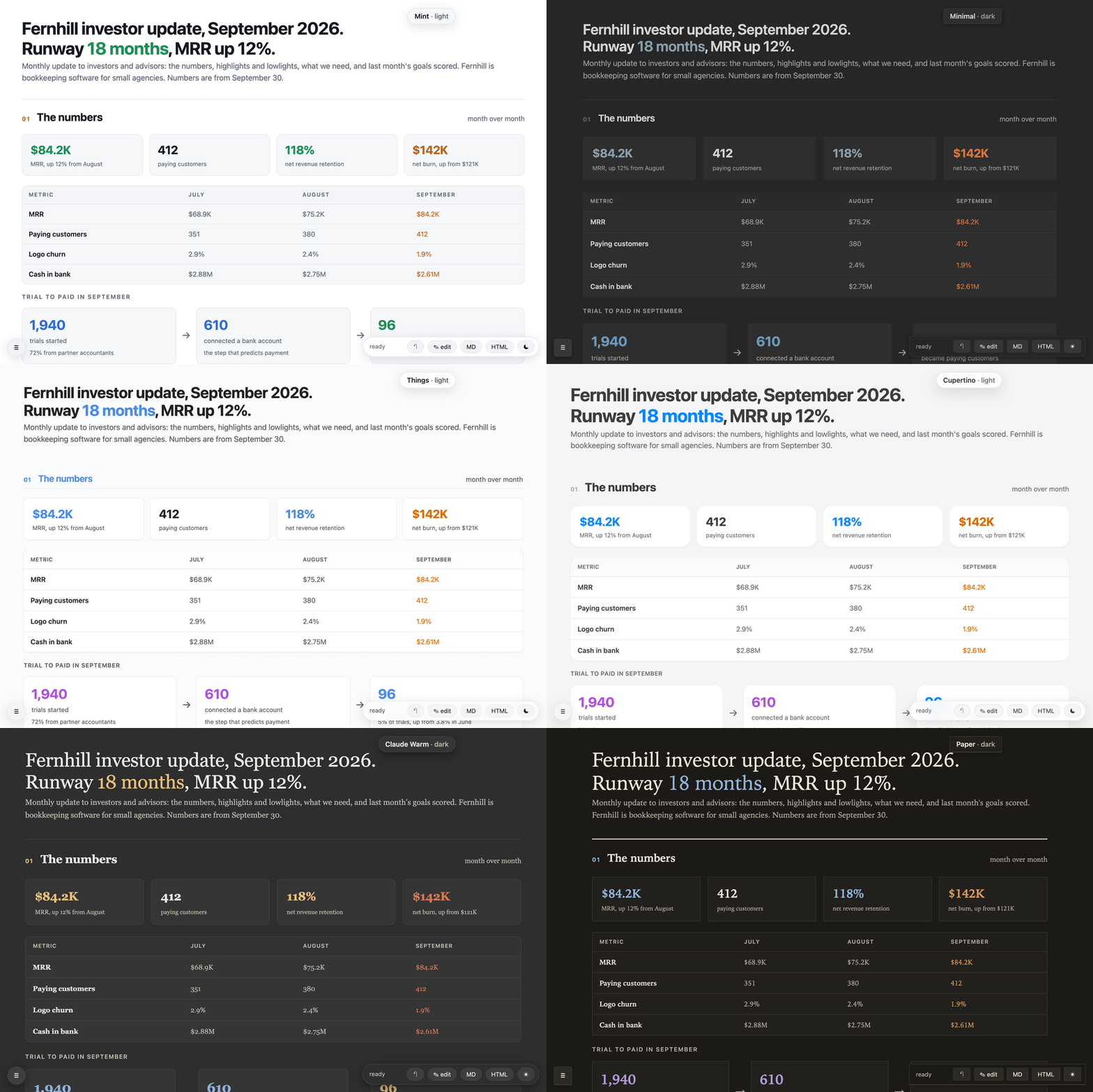
## Themes
Pick one under **Appearance** in the plugin settings; it applies to every page. Each theme is a whole look, not just a
palette: its own corners, borders, shadows, spacing, page width, fonts and headings, in a light and a dark version.
| Theme | After | The look |
| -------------- | ---------------- | ---------------------------------------------------------------------- |
| Mint (default) | myone.page | slate or white, a mint accent, rounded bordered cards |
| Minimal | kepano's Minimal | flat borderless cards, a narrow airy page, light headings |
| GitHub | GitHub (Primer) | bordered boxes, 6px corners, underlined section titles, striped tables |
| Things | Things | white cards lifted by a hairline shadow, blue section titles |
| Cupertino | Cupertino | white cards on grey, large corners, a frosted bar, a large title |
| Claude Warm | Claude Warm | warm ivory and charcoal, serif text, a sans interface |
| Paper | a printed report | book serif, hairlines, square corners, a heavy rule over each section |
Light or dark follows Obsidian; **☀** / **☾** in a page's bar, or **Light or dark** in the settings, picks one for
every page instead. HTML files keep the theme and open in their reader's light or dark. Shared pages on the web show
the default theme, light or dark as the reader's system is set.
## Write pages with AI
The AI writes the page; the plugin shows it, lets you edit it and shares it. Three ways, from no setup to most
automatic:
1. **Any AI chat, no setup.** On any note, choose **Make a page with AI** (in its ⋯ menu or right-click menu, under the
**New MyOnePage** ribbon icon, or as a command). **Copy the request** copies the page format and the note; paste it into Claude, ChatGPT or any
AI chat. Paste the answer back into **Paste the AI's answer** and click **Make the page**: the page opens as a new
note next to yours, which stays as it is. Whatever the page can't read stays as plain text, and a notice says how
many parts that is. **Start from** picks a template for the AI to follow (the one a page was made from, on
**Fill it with AI**; while that page is still the bare outline, the answer replaces it). Works on mobile too.
2. **The Claude app (claude.ai, Claude desktop).** Give Claude the whole format once as a skill: download
`myone-page-skill.zip` from [myone.page/ai](https://myone.page/ai) and upload it in Claude
under Customize → Skills → + → Create skill → Upload a skill (code execution must be on, in Settings →
Capabilities). On a paid plan, Customize → Plugins → Add marketplace → `itsdionis/MyOnePage` does the same and
keeps it up to date. Then ask Claude for a one-pager and paste its answer into **Make a page
with AI**, or let Claude write the note straight into your vault if it can open the folder.
3. **Coding agents in the vault (Claude Code, Codex, Cursor).** In the plugin settings, **Set up Claude Code, Codex
and Cursor** writes the skill into the vault (see [Files](#files)); the plugin refreshes it on update unless you
edited it. Outside Obsidian: `npx skills add itsdionis/MyOnePage`, or in Claude Code
`/plugin marketplace add itsdionis/MyOnePage` then `/plugin install myone-page@myonepage`.
`skills/myone-page/` is the skill: `SKILL.md` (the whole page format), `check.mjs` and `md.js` (the checker),
`example.md` (a page that uses every block type), `templates/` (the outlines above, which the AI starts from). `check.mjs` checks a page and rewrites it in the canonical form the
page saves (Node 18 or later, no install):
```sh
node check.mjs path/to/note.md # errors, warnings, and blocks that fell back to plain text
node check.mjs --fix path/to/note.md # rewrite it canonically
```
## Share on the web (optional)
You can publish a page so that other people can read or edit it in a browser. Nothing is sent anywhere until you
click share. Everything above (pages, editing, HTML export, writing pages with AI) is free and works without an account.
- **An account is required to publish (made for you); payment for more than 3 pages.** Sharing needs an account
on a sharing server, [myone.page](https://myone.page) unless you set another. The first time you click share, the
plugin makes a random token and registers it as a new account, with no sign-up. You sign in (Google or an email
link) only when you want to: the globe button on a shared page opens it signed in as its owner. 3 shared pages
are free, shared with people who sign in. A paid plan adds unlimited pages and pages open to anyone with the link
(founding price $1.99/month for the first 100 members, then $3.99; $19/year; $49 lifetime; 30-day refund). The people you share with
sign in with Google or any email address, or not at all for a page open to anyone. The server is a separate service and is
not part of this repository.
- **Network use.** From your first share (or once you enter a token), the plugin talks to the sharing server and
nothing else. It sends only notes that have `share:` in their frontmatter, and syncs them both ways (every 60
seconds by default, and a few seconds after you stop typing in a shared note). Notes without `share:` never leave
your device. The one other request: **Set up** under **Coding agents** downloads `check.mjs` (the page checker)
from the same server, and keeps it only if its SHA-256 matches the one built into the plugin.
- **Files and clipboard.** The plugin reads and writes your notes only through Obsidian's vault API. It lists the
vault's Markdown files to find the notes with `share:` (to sync them and list them under **Shared pages**). It
writes the clipboard when you copy a link or a request for an AI chat, and reads it only when you click **Paste
the answer** in **Make a page with AI**. It never uses Node's `fs`. `check.mjs`, the page checker that **Set up**
puts in your vault for a coding agent to run, does; so it isn't inside `main.js` (the plugin downloads it, see
above), and the plugin never runs it.
- **End-to-end encrypted.** A shared note is encrypted on your device (AES-GCM) before it is sent. The key is the
part of the link after `#`, which browsers never send to the server, so the server stores only ciphertext. Besides
that, it receives the `editors:` and `viewers:` lists, so it can check who may open the page.
- The token is kept in the plugin's settings (`.obsidian/plugins/myone-page/data.json`), so every device that syncs
the vault shares one account. The vault already holds each page's key (in its `share:` link); keep both out of a
public repository. A note shared from another account is left alone, never moved.
To share a note, click the share button on the page (or run **Share current note on the web**). The plugin adds
`share: new`, publishes the note, writes the link into `share:` and copies it. Add emails, `@domain`s or `anyone` to
`editors:` and `viewers:` to let people in (`anyone` needs a plan). Remove `share:` to take the page offline. A
note the free plan has no room for gets `share: waiting` and is published by itself once there is room (a page taken
offline, or a plan).
## How it's built
MyOnePage is built by a three-time CTO, to the standard of software a team trusts with its plans:
- **Tested end to end.** Before a change to sharing ships, 100+ automated checks drive a real Obsidian (this plugin,
freshly built, in a temp vault) and a real Chrome against a fresh copy of the server: the first share, edits
syncing both ways, conflicts, sign-in, the free limit, restarts.
- **End-to-end encrypted with standard cryptography.** AES-256-GCM through Web Crypto (`engine/seal.js`), with the
page's address bound into the ciphertext as additional data. The key never leaves the link's `#` fragment.
- **No silent overwrites.** Every web save carries the version it started from (`If-Match`); a stale save is refused.
A note changed on both sides keeps the web version next to it as a separate file.
- **Checked on every release.** TypeScript, ESLint with Obsidian's review rules, Prettier, and `check.mjs` on every
example and template (`pnpm verify`); the release itself is built by GitHub Actions from the tagged code.
- **Runs everywhere Obsidian does,** including Obsidian mobile on older iPhones: no Node APIs in the engine.
## Files
The plugin writes only to your vault: to the notes you edit on a page, to `.html` when you click **HTML**, to
the new notes **New page from template** and **Make a page with AI** make (or the bare template page **Fill it with AI**
fills), and, when a shared note was changed on both sides, to
` (web version).md`. When you click **Set up** under **Coding agents** (desktop only), it writes `SKILL.md`,
`check.mjs` (downloaded, see _Network use_), `md.js`, `example.md` and `templates/` to `.claude/skills/myone-page/`
(Claude Code, Cursor) and `.agents/skills/myone-page/` (Codex), and rewrites them on a plugin update unless you edited
them. Errors are also
logged to `log.txt` in the plugin folder.
## Build
```sh
pnpm install
pnpm build # main.js: src/main.ts bundled by esbuild, with the engine files (engine/) as text and check.mjs's SHA-256
pnpm dev # rebuild on change
pnpm skill # copy check.mjs, md.js and the example into skills/myone-page/ (node skill.mjs --zip : the zip;
# --checker : /.mjs, the check.mjs a sharing server serves at /web/check/ for Set up)
pnpm verify # Prettier, ESLint (Obsidian's rules), the sample page, the skill copies, the build: what a release runs
```
The engine (`engine/`) is classic browser scripts. The plugin runs it inside a sandboxed iframe; `check.mjs` loads
`md.js` in Node.
## License
[MIT](LICENSE)

 Pick one under **Appearance** in the plugin settings; it applies to every page. Each theme is a whole look, not just a
palette: its own corners, borders, shadows, spacing, page width, fonts and headings, in a light and a dark version.
| Theme | After | The look |
| -------------- | ---------------- | ---------------------------------------------------------------------- |
| Mint (default) | myone.page | slate or white, a mint accent, rounded bordered cards |
| Minimal | kepano's Minimal | flat borderless cards, a narrow airy page, light headings |
| GitHub | GitHub (Primer) | bordered boxes, 6px corners, underlined section titles, striped tables |
| Things | Things | white cards lifted by a hairline shadow, blue section titles |
| Cupertino | Cupertino | white cards on grey, large corners, a frosted bar, a large title |
| Claude Warm | Claude Warm | warm ivory and charcoal, serif text, a sans interface |
| Paper | a printed report | book serif, hairlines, square corners, a heavy rule over each section |
Light or dark follows Obsidian; **☀** / **☾** in a page's bar, or **Light or dark** in the settings, picks one for
every page instead. HTML files keep the theme and open in their reader's light or dark. Shared pages on the web show
the default theme, light or dark as the reader's system is set.
## Write pages with AI
The AI writes the page; the plugin shows it, lets you edit it and shares it. Three ways, from no setup to most
automatic:
1. **Any AI chat, no setup.** On any note, choose **Make a page with AI** (in its ⋯ menu or right-click menu, under the
**New MyOnePage** ribbon icon, or as a command). **Copy the request** copies the page format and the note; paste it into Claude, ChatGPT or any
AI chat. Paste the answer back into **Paste the AI's answer** and click **Make the page**: the page opens as a new
note next to yours, which stays as it is. Whatever the page can't read stays as plain text, and a notice says how
many parts that is. **Start from** picks a template for the AI to follow (the one a page was made from, on
**Fill it with AI**; while that page is still the bare outline, the answer replaces it). Works on mobile too.
2. **The Claude app (claude.ai, Claude desktop).** Give Claude the whole format once as a skill: download
`myone-page-skill.zip` from [myone.page/ai](https://myone.page/ai) and upload it in Claude
under Customize → Skills → + → Create skill → Upload a skill (code execution must be on, in Settings →
Capabilities). On a paid plan, Customize → Plugins → Add marketplace → `itsdionis/MyOnePage` does the same and
keeps it up to date. Then ask Claude for a one-pager and paste its answer into **Make a page
with AI**, or let Claude write the note straight into your vault if it can open the folder.
3. **Coding agents in the vault (Claude Code, Codex, Cursor).** In the plugin settings, **Set up Claude Code, Codex
and Cursor** writes the skill into the vault (see [Files](#files)); the plugin refreshes it on update unless you
edited it. Outside Obsidian: `npx skills add itsdionis/MyOnePage`, or in Claude Code
`/plugin marketplace add itsdionis/MyOnePage` then `/plugin install myone-page@myonepage`.
`skills/myone-page/` is the skill: `SKILL.md` (the whole page format), `check.mjs` and `md.js` (the checker),
`example.md` (a page that uses every block type), `templates/` (the outlines above, which the AI starts from). `check.mjs` checks a page and rewrites it in the canonical form the
page saves (Node 18 or later, no install):
```sh
node check.mjs path/to/note.md # errors, warnings, and blocks that fell back to plain text
node check.mjs --fix path/to/note.md # rewrite it canonically
```
## Share on the web (optional)
You can publish a page so that other people can read or edit it in a browser. Nothing is sent anywhere until you
click share. Everything above (pages, editing, HTML export, writing pages with AI) is free and works without an account.
- **An account is required to publish (made for you); payment for more than 3 pages.** Sharing needs an account
on a sharing server, [myone.page](https://myone.page) unless you set another. The first time you click share, the
plugin makes a random token and registers it as a new account, with no sign-up. You sign in (Google or an email
link) only when you want to: the globe button on a shared page opens it signed in as its owner. 3 shared pages
are free, shared with people who sign in. A paid plan adds unlimited pages and pages open to anyone with the link
(founding price $1.99/month for the first 100 members, then $3.99; $19/year; $49 lifetime; 30-day refund). The people you share with
sign in with Google or any email address, or not at all for a page open to anyone. The server is a separate service and is
not part of this repository.
- **Network use.** From your first share (or once you enter a token), the plugin talks to the sharing server and
nothing else. It sends only notes that have `share:` in their frontmatter, and syncs them both ways (every 60
seconds by default, and a few seconds after you stop typing in a shared note). Notes without `share:` never leave
your device. The one other request: **Set up** under **Coding agents** downloads `check.mjs` (the page checker)
from the same server, and keeps it only if its SHA-256 matches the one built into the plugin.
- **Files and clipboard.** The plugin reads and writes your notes only through Obsidian's vault API. It lists the
vault's Markdown files to find the notes with `share:` (to sync them and list them under **Shared pages**). It
writes the clipboard when you copy a link or a request for an AI chat, and reads it only when you click **Paste
the answer** in **Make a page with AI**. It never uses Node's `fs`. `check.mjs`, the page checker that **Set up**
puts in your vault for a coding agent to run, does; so it isn't inside `main.js` (the plugin downloads it, see
above), and the plugin never runs it.
- **End-to-end encrypted.** A shared note is encrypted on your device (AES-GCM) before it is sent. The key is the
part of the link after `#`, which browsers never send to the server, so the server stores only ciphertext. Besides
that, it receives the `editors:` and `viewers:` lists, so it can check who may open the page.
- The token is kept in the plugin's settings (`.obsidian/plugins/myone-page/data.json`), so every device that syncs
the vault shares one account. The vault already holds each page's key (in its `share:` link); keep both out of a
public repository. A note shared from another account is left alone, never moved.
To share a note, click the share button on the page (or run **Share current note on the web**). The plugin adds
`share: new`, publishes the note, writes the link into `share:` and copies it. Add emails, `@domain`s or `anyone` to
`editors:` and `viewers:` to let people in (`anyone` needs a plan). Remove `share:` to take the page offline. A
note the free plan has no room for gets `share: waiting` and is published by itself once there is room (a page taken
offline, or a plan).
## How it's built
MyOnePage is built by a three-time CTO, to the standard of software a team trusts with its plans:
- **Tested end to end.** Before a change to sharing ships, 100+ automated checks drive a real Obsidian (this plugin,
freshly built, in a temp vault) and a real Chrome against a fresh copy of the server: the first share, edits
syncing both ways, conflicts, sign-in, the free limit, restarts.
- **End-to-end encrypted with standard cryptography.** AES-256-GCM through Web Crypto (`engine/seal.js`), with the
page's address bound into the ciphertext as additional data. The key never leaves the link's `#` fragment.
- **No silent overwrites.** Every web save carries the version it started from (`If-Match`); a stale save is refused.
A note changed on both sides keeps the web version next to it as a separate file.
- **Checked on every release.** TypeScript, ESLint with Obsidian's review rules, Prettier, and `check.mjs` on every
example and template (`pnpm verify`); the release itself is built by GitHub Actions from the tagged code.
- **Runs everywhere Obsidian does,** including Obsidian mobile on older iPhones: no Node APIs in the engine.
## Files
The plugin writes only to your vault: to the notes you edit on a page, to `
Pick one under **Appearance** in the plugin settings; it applies to every page. Each theme is a whole look, not just a
palette: its own corners, borders, shadows, spacing, page width, fonts and headings, in a light and a dark version.
| Theme | After | The look |
| -------------- | ---------------- | ---------------------------------------------------------------------- |
| Mint (default) | myone.page | slate or white, a mint accent, rounded bordered cards |
| Minimal | kepano's Minimal | flat borderless cards, a narrow airy page, light headings |
| GitHub | GitHub (Primer) | bordered boxes, 6px corners, underlined section titles, striped tables |
| Things | Things | white cards lifted by a hairline shadow, blue section titles |
| Cupertino | Cupertino | white cards on grey, large corners, a frosted bar, a large title |
| Claude Warm | Claude Warm | warm ivory and charcoal, serif text, a sans interface |
| Paper | a printed report | book serif, hairlines, square corners, a heavy rule over each section |
Light or dark follows Obsidian; **☀** / **☾** in a page's bar, or **Light or dark** in the settings, picks one for
every page instead. HTML files keep the theme and open in their reader's light or dark. Shared pages on the web show
the default theme, light or dark as the reader's system is set.
## Write pages with AI
The AI writes the page; the plugin shows it, lets you edit it and shares it. Three ways, from no setup to most
automatic:
1. **Any AI chat, no setup.** On any note, choose **Make a page with AI** (in its ⋯ menu or right-click menu, under the
**New MyOnePage** ribbon icon, or as a command). **Copy the request** copies the page format and the note; paste it into Claude, ChatGPT or any
AI chat. Paste the answer back into **Paste the AI's answer** and click **Make the page**: the page opens as a new
note next to yours, which stays as it is. Whatever the page can't read stays as plain text, and a notice says how
many parts that is. **Start from** picks a template for the AI to follow (the one a page was made from, on
**Fill it with AI**; while that page is still the bare outline, the answer replaces it). Works on mobile too.
2. **The Claude app (claude.ai, Claude desktop).** Give Claude the whole format once as a skill: download
`myone-page-skill.zip` from [myone.page/ai](https://myone.page/ai) and upload it in Claude
under Customize → Skills → + → Create skill → Upload a skill (code execution must be on, in Settings →
Capabilities). On a paid plan, Customize → Plugins → Add marketplace → `itsdionis/MyOnePage` does the same and
keeps it up to date. Then ask Claude for a one-pager and paste its answer into **Make a page
with AI**, or let Claude write the note straight into your vault if it can open the folder.
3. **Coding agents in the vault (Claude Code, Codex, Cursor).** In the plugin settings, **Set up Claude Code, Codex
and Cursor** writes the skill into the vault (see [Files](#files)); the plugin refreshes it on update unless you
edited it. Outside Obsidian: `npx skills add itsdionis/MyOnePage`, or in Claude Code
`/plugin marketplace add itsdionis/MyOnePage` then `/plugin install myone-page@myonepage`.
`skills/myone-page/` is the skill: `SKILL.md` (the whole page format), `check.mjs` and `md.js` (the checker),
`example.md` (a page that uses every block type), `templates/` (the outlines above, which the AI starts from). `check.mjs` checks a page and rewrites it in the canonical form the
page saves (Node 18 or later, no install):
```sh
node check.mjs path/to/note.md # errors, warnings, and blocks that fell back to plain text
node check.mjs --fix path/to/note.md # rewrite it canonically
```
## Share on the web (optional)
You can publish a page so that other people can read or edit it in a browser. Nothing is sent anywhere until you
click share. Everything above (pages, editing, HTML export, writing pages with AI) is free and works without an account.
- **An account is required to publish (made for you); payment for more than 3 pages.** Sharing needs an account
on a sharing server, [myone.page](https://myone.page) unless you set another. The first time you click share, the
plugin makes a random token and registers it as a new account, with no sign-up. You sign in (Google or an email
link) only when you want to: the globe button on a shared page opens it signed in as its owner. 3 shared pages
are free, shared with people who sign in. A paid plan adds unlimited pages and pages open to anyone with the link
(founding price $1.99/month for the first 100 members, then $3.99; $19/year; $49 lifetime; 30-day refund). The people you share with
sign in with Google or any email address, or not at all for a page open to anyone. The server is a separate service and is
not part of this repository.
- **Network use.** From your first share (or once you enter a token), the plugin talks to the sharing server and
nothing else. It sends only notes that have `share:` in their frontmatter, and syncs them both ways (every 60
seconds by default, and a few seconds after you stop typing in a shared note). Notes without `share:` never leave
your device. The one other request: **Set up** under **Coding agents** downloads `check.mjs` (the page checker)
from the same server, and keeps it only if its SHA-256 matches the one built into the plugin.
- **Files and clipboard.** The plugin reads and writes your notes only through Obsidian's vault API. It lists the
vault's Markdown files to find the notes with `share:` (to sync them and list them under **Shared pages**). It
writes the clipboard when you copy a link or a request for an AI chat, and reads it only when you click **Paste
the answer** in **Make a page with AI**. It never uses Node's `fs`. `check.mjs`, the page checker that **Set up**
puts in your vault for a coding agent to run, does; so it isn't inside `main.js` (the plugin downloads it, see
above), and the plugin never runs it.
- **End-to-end encrypted.** A shared note is encrypted on your device (AES-GCM) before it is sent. The key is the
part of the link after `#`, which browsers never send to the server, so the server stores only ciphertext. Besides
that, it receives the `editors:` and `viewers:` lists, so it can check who may open the page.
- The token is kept in the plugin's settings (`.obsidian/plugins/myone-page/data.json`), so every device that syncs
the vault shares one account. The vault already holds each page's key (in its `share:` link); keep both out of a
public repository. A note shared from another account is left alone, never moved.
To share a note, click the share button on the page (or run **Share current note on the web**). The plugin adds
`share: new`, publishes the note, writes the link into `share:` and copies it. Add emails, `@domain`s or `anyone` to
`editors:` and `viewers:` to let people in (`anyone` needs a plan). Remove `share:` to take the page offline. A
note the free plan has no room for gets `share: waiting` and is published by itself once there is room (a page taken
offline, or a plan).
## How it's built
MyOnePage is built by a three-time CTO, to the standard of software a team trusts with its plans:
- **Tested end to end.** Before a change to sharing ships, 100+ automated checks drive a real Obsidian (this plugin,
freshly built, in a temp vault) and a real Chrome against a fresh copy of the server: the first share, edits
syncing both ways, conflicts, sign-in, the free limit, restarts.
- **End-to-end encrypted with standard cryptography.** AES-256-GCM through Web Crypto (`engine/seal.js`), with the
page's address bound into the ciphertext as additional data. The key never leaves the link's `#` fragment.
- **No silent overwrites.** Every web save carries the version it started from (`If-Match`); a stale save is refused.
A note changed on both sides keeps the web version next to it as a separate file.
- **Checked on every release.** TypeScript, ESLint with Obsidian's review rules, Prettier, and `check.mjs` on every
example and template (`pnpm verify`); the release itself is built by GitHub Actions from the tagged code.
- **Runs everywhere Obsidian does,** including Obsidian mobile on older iPhones: no Node APIs in the engine.
## Files
The plugin writes only to your vault: to the notes you edit on a page, to `