GIFs.md
Introduce GIFs to your notes in Obsidian with this plugin now!



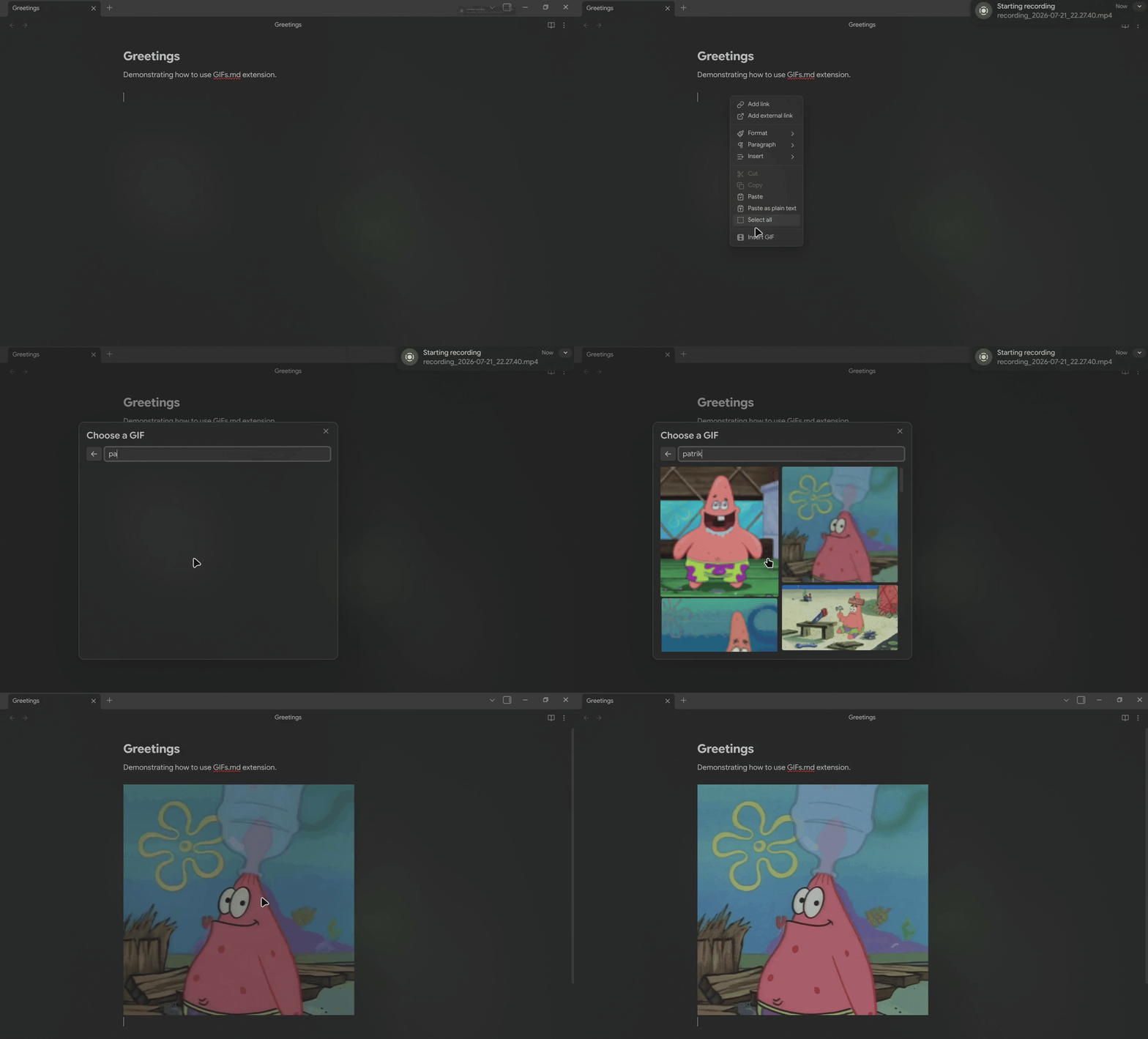
## Features
- Search for GIFs by keyword using the Klipy API.
- Browse trending GIFs and explore curated categories.
- Insert any GIF as a standard Markdown image at your cursor position.
- Access the GIF picker via the command palette or the right-click editor menu.
## How to use
Open the GIF picker in any editor using one of these methods:
- **Command palette** — Open the Command Palette (`Cmd/Ctrl + P`) and run `GIFs.md: Insert GIF`.
- **Right-click menu** — Right-click anywhere in an active note and select **Insert GIF**.
- **Ribbon Icon** — Click on the film icon the ribbon to activate the GIF search menu.
- **Custom hotkey** — Assign a shortcut under **Settings -> Hotkeys** by searching for `GIFs.md`.
The modal displays trending categories by default. Click a category to view matching GIFs, or type a query into the search bar. Click any GIF to instantly insert it into your note.
## Installation
## Community Plugin (Recommended)
1. Open **Settings** and go to **Community Plugins**.
2. Search for **GIFs.md** and click **Install**.
3. Restart obsidian and enable the plugin.
> Or go to [GIFs.md](https://community.obsidian.md/plugins/gifs-md) and click **Install**.
### Using [BRAT](https://github.com/TfTHacker/obsidian42-brat)
1. Go to BRAT settings and search for **Add Beta Plugins** or via the command palette.
2. Paste the URL of this repository in the field (`https://github.com/ikrishagarwal/GIFs.md/`)
3. Click on **Add Plugin**
4. Reload obsidian
### Manual installation
You can install the plugin automatically via terminal scripts or by downloading the release files manually. Run these commands from the **root directory of your Obsidian vault.**
#### Option 1: macOS / Linux (Bash)
Download and run the installation script directly via terminal:
```bash
bash <(curl -sL https://raw.githubusercontent.com/ikrishagarwal/GIFs.md/main/install.sh)
```
1. Restart obsidian
2. Open **Settings** and go to **Community Plugins**
3. Search for **GIFs.md** and enable it.
#### Option 2: Windows (PowerShell)
Download and run the installation script directly via PowerShell:
```powershell
irm https://raw.githubusercontent.com/ikrishagarwal/GIFs.md/main/install.ps1 | iex
```
1. Restart obsidian
2. Open **Settings** and go to **Community Plugins**
3. Search for **GIFs.md** and enable it.
#### Option 3: File download
1. Download `gifs-md-plugin.zip` from the [latest GitHub Release](https://github.com/ikrishagarwal/GIFs.md/releases/latest).
2. Unzip it inside your vault's plugin directory (`.obsidian/plugins/gifs-md/`).
3. Move the downloaded files into that folder and reload Obsidian.
4. Open **Settings** and go to **Community Plugins**.
5. Search for **GIFs.md** and enable it.
## Settings
| Setting | Description |
| -------- | --------------------------------------------------------------------------------------------------------- |
| Per page | Number of GIF results shown per search (8 to 50). |
| Locale | Language code for API search requests (e.g., `en_US`, `fr_FR`). |
| User ID | Auto-generated unique ID used to personalize search results, store favorite GIFs, and filter hidden GIFs. |
## Network & Privacy Disclosure
This plugin connects to the **Klipy API** (`api.klipy.com`) to retrieve search results, trending categories, and media preview URLs.
- **Data sent:** Search queries typed into the GIF picker, locale settings, and an auto-generated **User ID**.
- **Purpose of User ID:** The User ID is passed to Klipy to deliver personalized GIF recommendations, remember favorited media, and exclude blocked GIFs from showing up in future search results.
- **Privacy:** No vault content, note data, file names, or personal hardware identifiers are collected or transmitted.
## License
[MIT](/LICENSE) © Krish