[](https://github.com/iceblyte/ghostmark/releases)
[](https://github.com/iceblyte/ghostmark/actions/workflows/ci.yml)
[](LICENSE)

*English · [简体中文](README.zh-CN.md)*
---
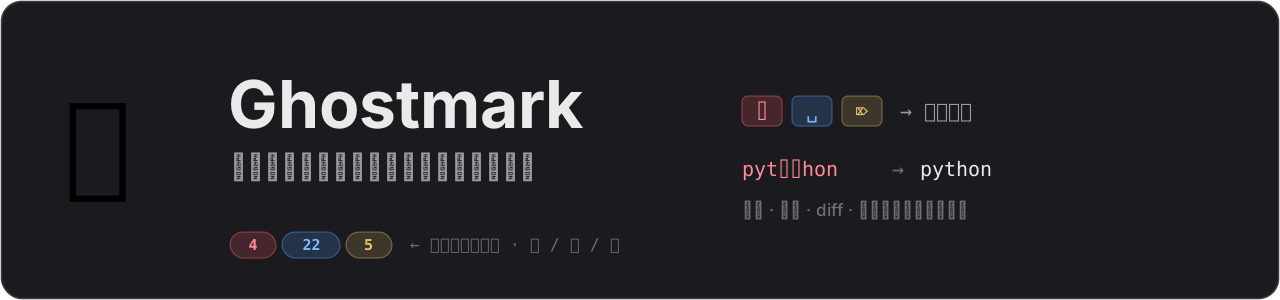
When you clip web pages into Obsidian with the Web Clipper, some sites slip
**invisible watermark characters** into the text — zero-width clusters inside
words, runs of exotic spaces at paragraph ends, hidden bidi marks. They render
as nothing, but they silently break:
- 🔍 **Search** — a word with a hidden character never matches;
- 🔗 **Links & wikilinks** — polluted titles fail to link;
- 📝 **Diffs & git history** — lines look unchanged but are not;
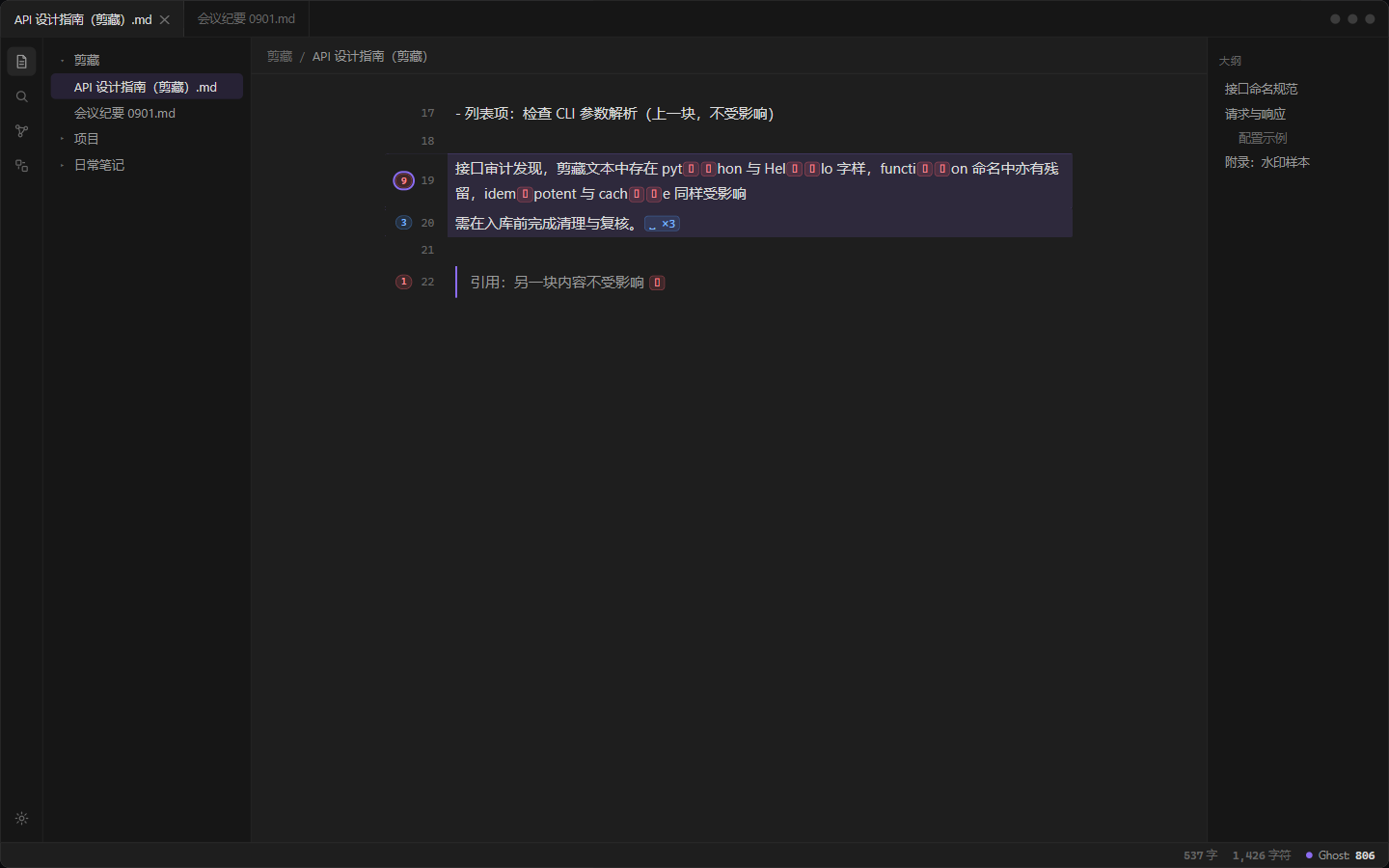
- 💥 **Code you paste into terminals** — `pyt⟪2062⟫hon` simply doesn't run.
Ghostmark makes them **visible**, and cleans them with context-aware,
confirmable, undoable actions.
## Inspect mode
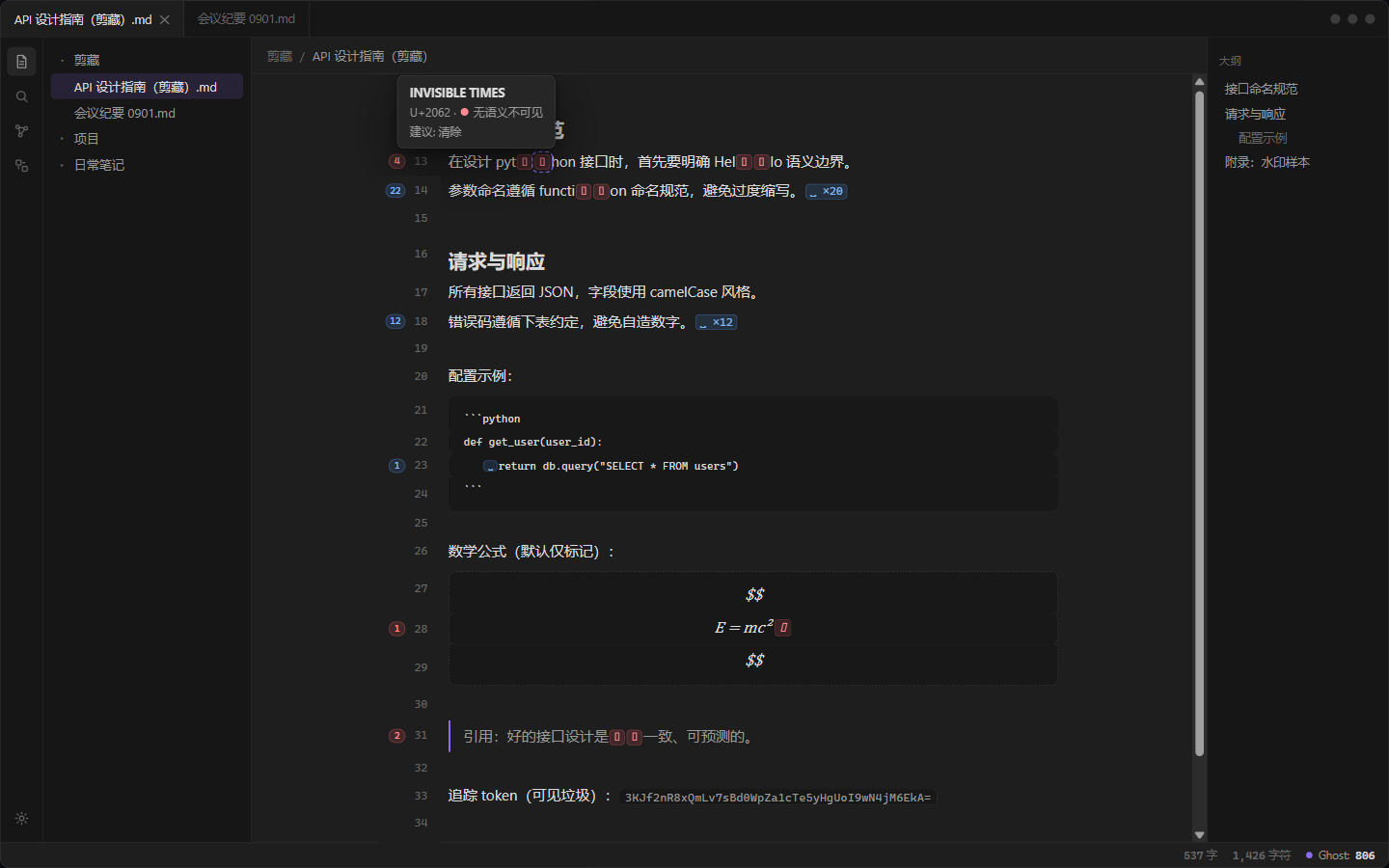
One toggle (command, status-bar click, or a hotkey you assign) renders every
hit as an inline glyph — in Source mode and Live Preview, across all notes.
 | Color | Meaning | Default action |
| --- | --- | --- |
| 🔴 red `⌷` | invisible, no semantics — zero-width and format characters (U+200B, U+2060–2064, U+061C, U+180E, U+200E/F, U+FFFE/F, U+FEFF, U+00AD, bidi controls U+202A–202E & U+2066–2069, tag characters, C0/C1 controls, noncharacters, …) | removed — including inside code |
| 🟣 purple `⌗` | base64 tracking tokens (≥20 token chars ending in `=`) | visible garbage — click a glyph to clear that segment; included by the clear commands |
| 🔵 blue `␣` | space-like (U+2002, U+2009, U+2007, U+202F, U+00A0, and the remaining width-varying spaces) | runs of ≥2 removed whole, isolated → plain space; one-to-one in code |
| 🟡 yellow `⌦` | protected semantics (ZWJ is hard-locked, ZWNJ, variation selectors) | marked only, never touched |
The red group also covers U+2028/2029 line and paragraph separators, which
default to *convert to space* so the words beside them never glue together.
The ideographic space (U+3000) is legitimate Chinese typography and is never
touched. Base64 tokens glued in front of words mark only the trailing
44-character window, data URI payloads are exempt, and tokens inside code are
marked but never swept (a setting toggle turns base64 marking off entirely).
Gutter badges are **segmented** — one colored segment per category with its own
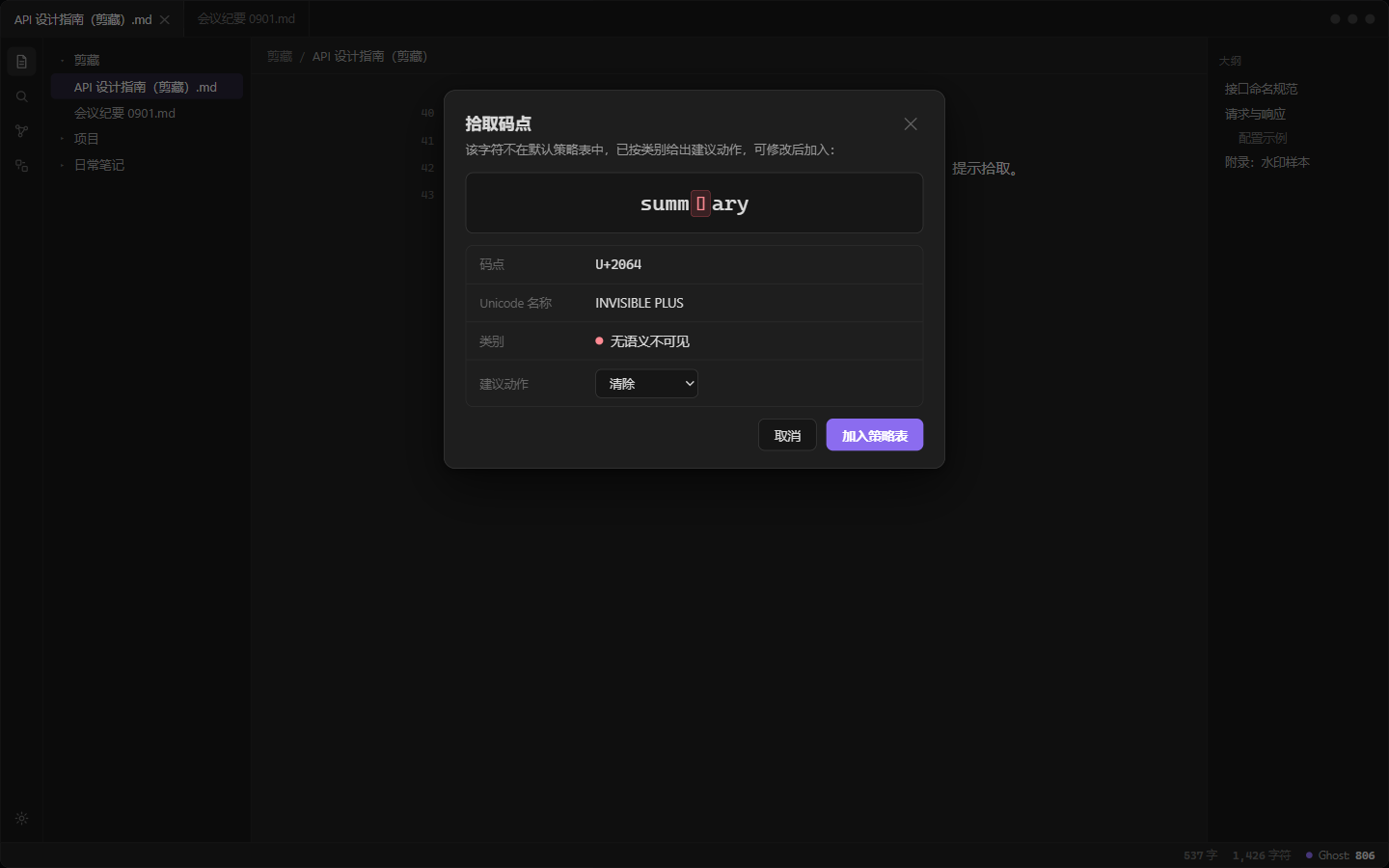
count — and clicking one clears the enclosing block. Hovering any glyph shows
the character's name, codepoint, category and suggested action. The status bar
keeps a live `Ghost: N` count for the active note.
Live Preview's properties panel hides the frontmatter — so when the frontmatter
carries marks, a **`frontmatter contains N marks` summary bar** appears above the editor
content (segmented per category, like the gutter badges — rendered outside the
document so it can never interfere with selection or cursors). Clicking it
clears the frontmatter; in Source mode the raw marks are visible and the bar
steps aside.
## Clear with confidence
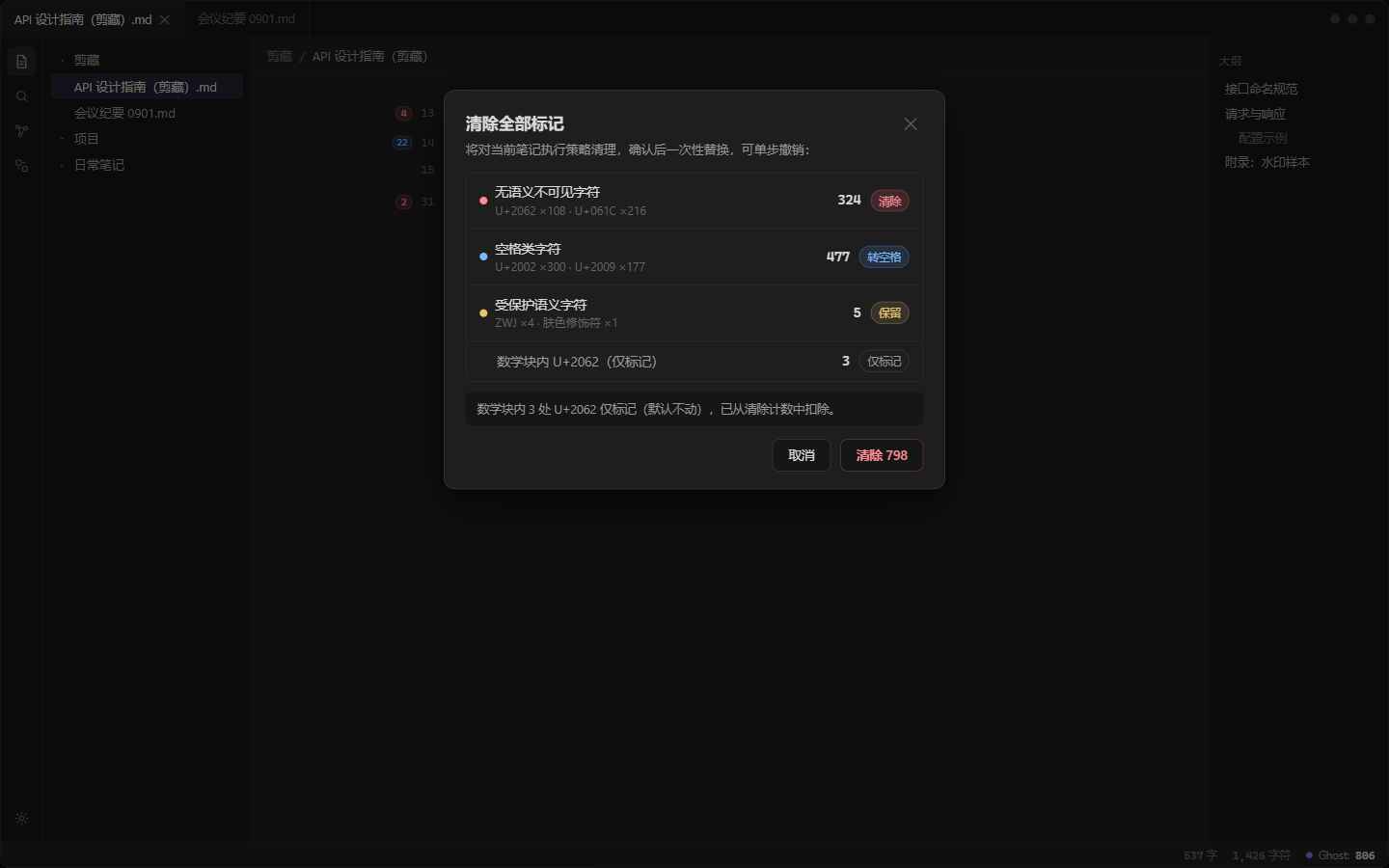
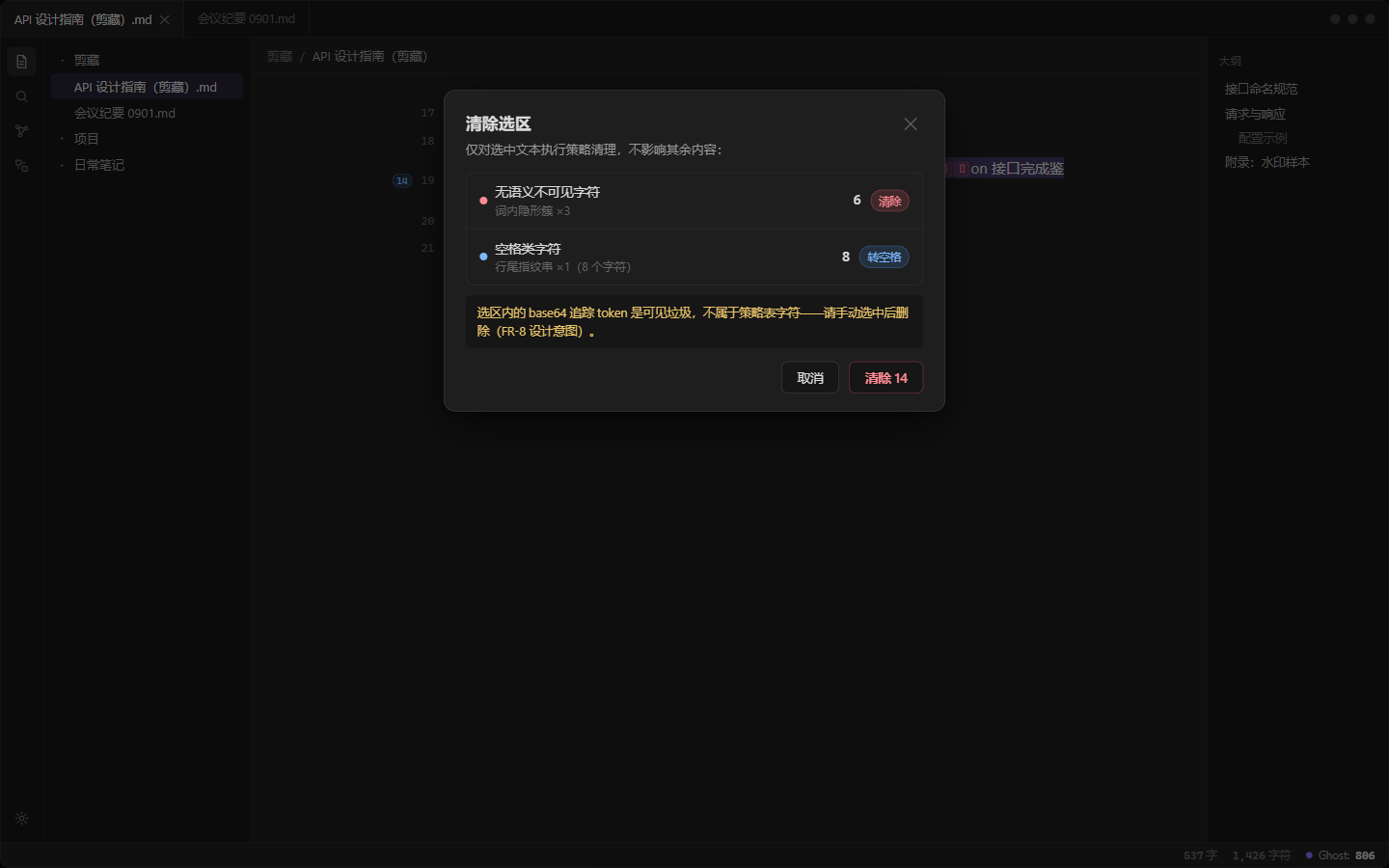
Clearing always shows a confirm modal with the category breakdown, applies as
**one transaction** (Obsidian's native single-step undo works out of the box),
and reports what it did — including what it deliberately left behind.
| Color | Meaning | Default action |
| --- | --- | --- |
| 🔴 red `⌷` | invisible, no semantics — zero-width and format characters (U+200B, U+2060–2064, U+061C, U+180E, U+200E/F, U+FFFE/F, U+FEFF, U+00AD, bidi controls U+202A–202E & U+2066–2069, tag characters, C0/C1 controls, noncharacters, …) | removed — including inside code |
| 🟣 purple `⌗` | base64 tracking tokens (≥20 token chars ending in `=`) | visible garbage — click a glyph to clear that segment; included by the clear commands |
| 🔵 blue `␣` | space-like (U+2002, U+2009, U+2007, U+202F, U+00A0, and the remaining width-varying spaces) | runs of ≥2 removed whole, isolated → plain space; one-to-one in code |
| 🟡 yellow `⌦` | protected semantics (ZWJ is hard-locked, ZWNJ, variation selectors) | marked only, never touched |
The red group also covers U+2028/2029 line and paragraph separators, which
default to *convert to space* so the words beside them never glue together.
The ideographic space (U+3000) is legitimate Chinese typography and is never
touched. Base64 tokens glued in front of words mark only the trailing
44-character window, data URI payloads are exempt, and tokens inside code are
marked but never swept (a setting toggle turns base64 marking off entirely).
Gutter badges are **segmented** — one colored segment per category with its own
count — and clicking one clears the enclosing block. Hovering any glyph shows
the character's name, codepoint, category and suggested action. The status bar
keeps a live `Ghost: N` count for the active note.
Live Preview's properties panel hides the frontmatter — so when the frontmatter
carries marks, a **`frontmatter contains N marks` summary bar** appears above the editor
content (segmented per category, like the gutter badges — rendered outside the
document so it can never interfere with selection or cursors). Clicking it
clears the frontmatter; in Source mode the raw marks are visible and the bar
steps aside.
## Clear with confidence
Clearing always shows a confirm modal with the category breakdown, applies as
**one transaction** (Obsidian's native single-step undo works out of the box),
and reports what it did — including what it deliberately left behind.
 ## Commands & settings
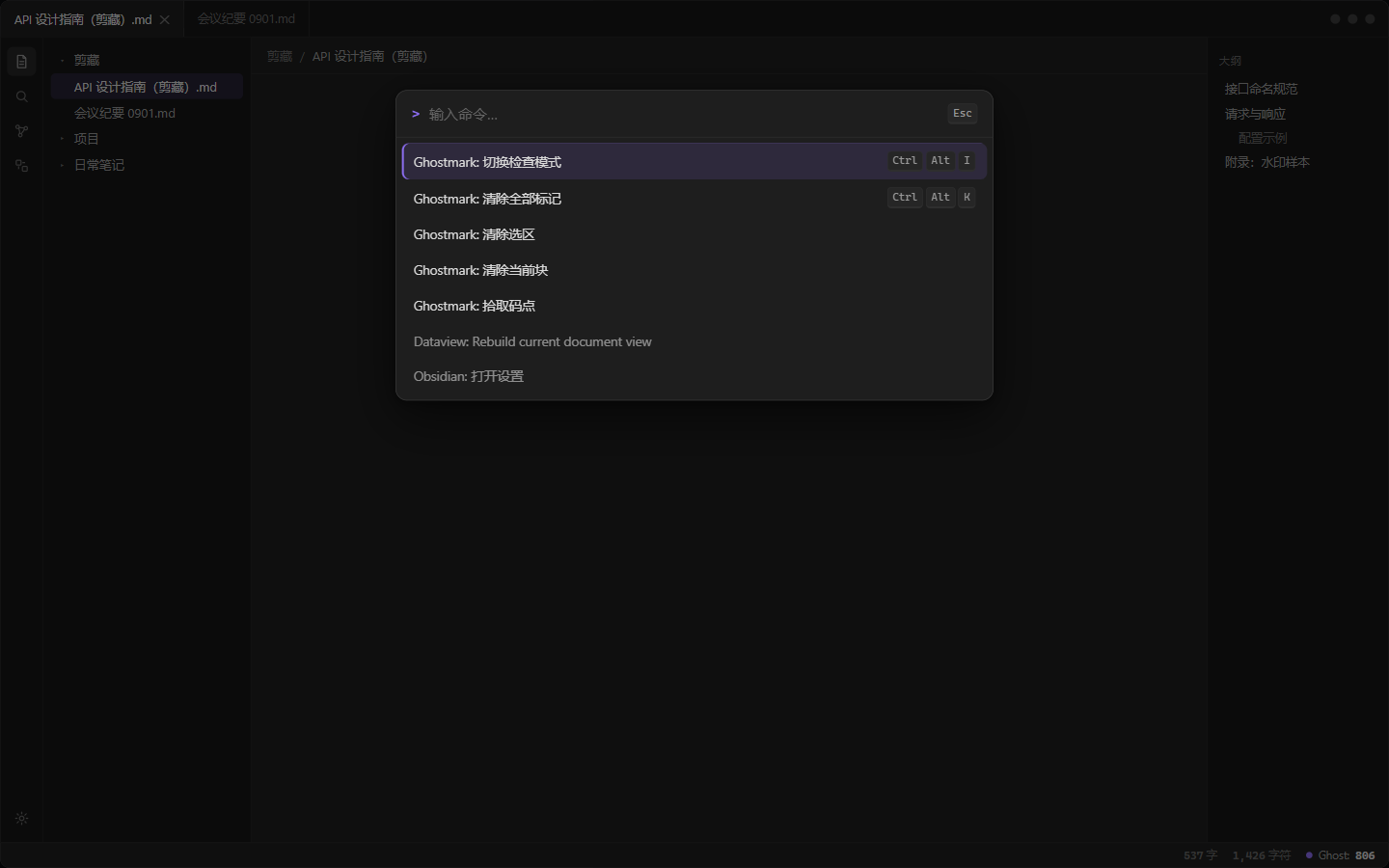 | Command | Suggested hotkey (not set by default — bind it in Settings → Hotkeys) |
| --- | --- |
| Ghostmark: Toggle inspect mode | `Ctrl/Cmd + Alt + I` |
| Ghostmark: Clear all marks | `Ctrl/Cmd + Alt + K` |
| Ghostmark: Clear selection | — (needs a selection) |
| Ghostmark: Clear current block | — (needs inspect mode) |
| Ghostmark: Jump to next mark | `Ctrl/Cmd + Alt + .` |
| Ghostmark: Jump to previous mark | `Ctrl/Cmd + Alt + ,` |
| Ghostmark: Pick codepoint | — |
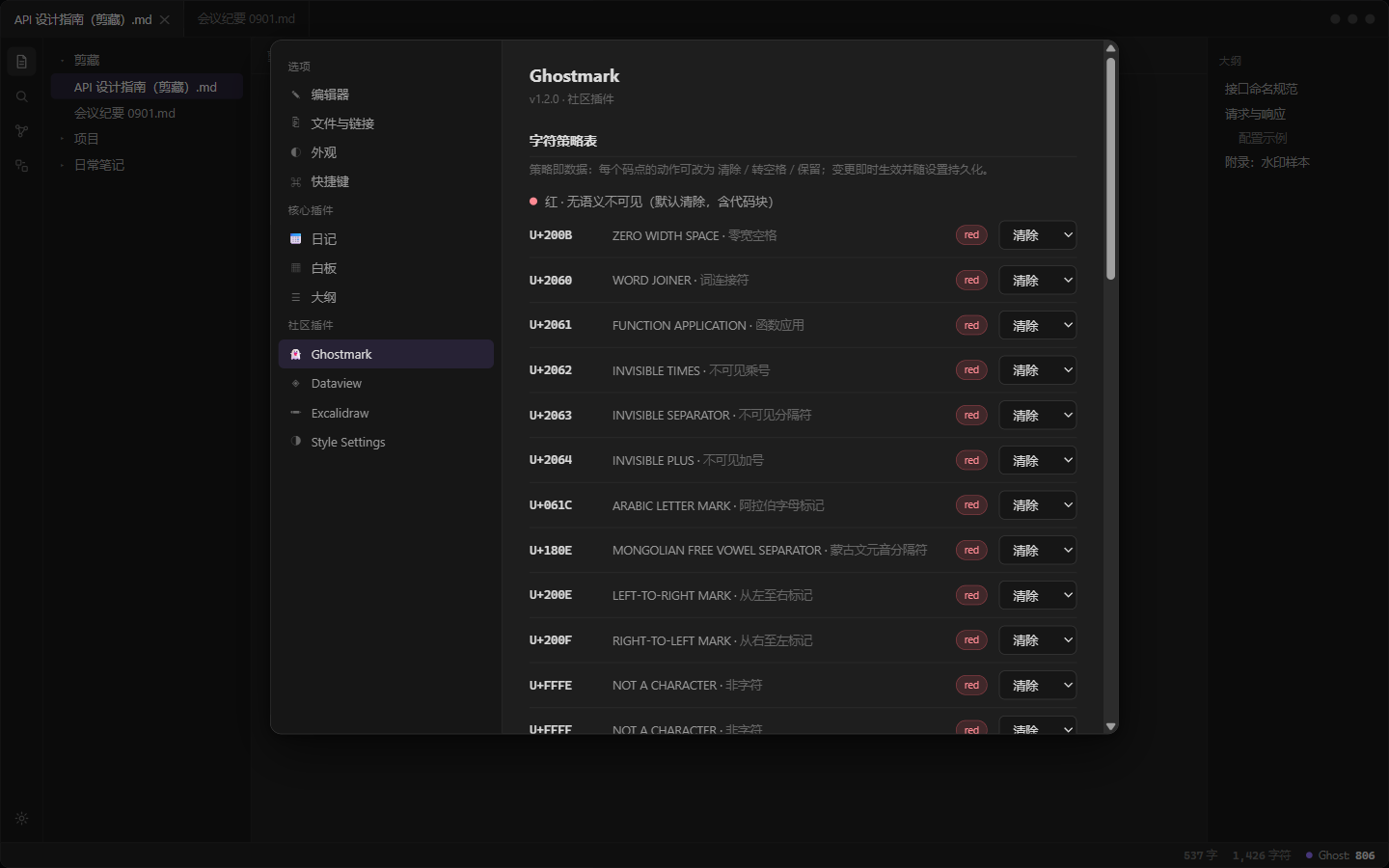
Settings group the 46 default policy rows (editable per codepoint group, with
the picked additions section), context rules (math blocks are **mark-only** by
default — MathML transcoding can put a meaningful U+2062 in a formula; base64
marking is on by default), interface options and a bilingual UI
(English / 简体中文, following Obsidian's language by default).
| Command | Suggested hotkey (not set by default — bind it in Settings → Hotkeys) |
| --- | --- |
| Ghostmark: Toggle inspect mode | `Ctrl/Cmd + Alt + I` |
| Ghostmark: Clear all marks | `Ctrl/Cmd + Alt + K` |
| Ghostmark: Clear selection | — (needs a selection) |
| Ghostmark: Clear current block | — (needs inspect mode) |
| Ghostmark: Jump to next mark | `Ctrl/Cmd + Alt + .` |
| Ghostmark: Jump to previous mark | `Ctrl/Cmd + Alt + ,` |
| Ghostmark: Pick codepoint | — |
Settings group the 46 default policy rows (editable per codepoint group, with
the picked additions section), context rules (math blocks are **mark-only** by
default — MathML transcoding can put a meaningful U+2062 in a formula; base64
marking is on by default), interface options and a bilingual UI
(English / 简体中文, following Obsidian's language by default).
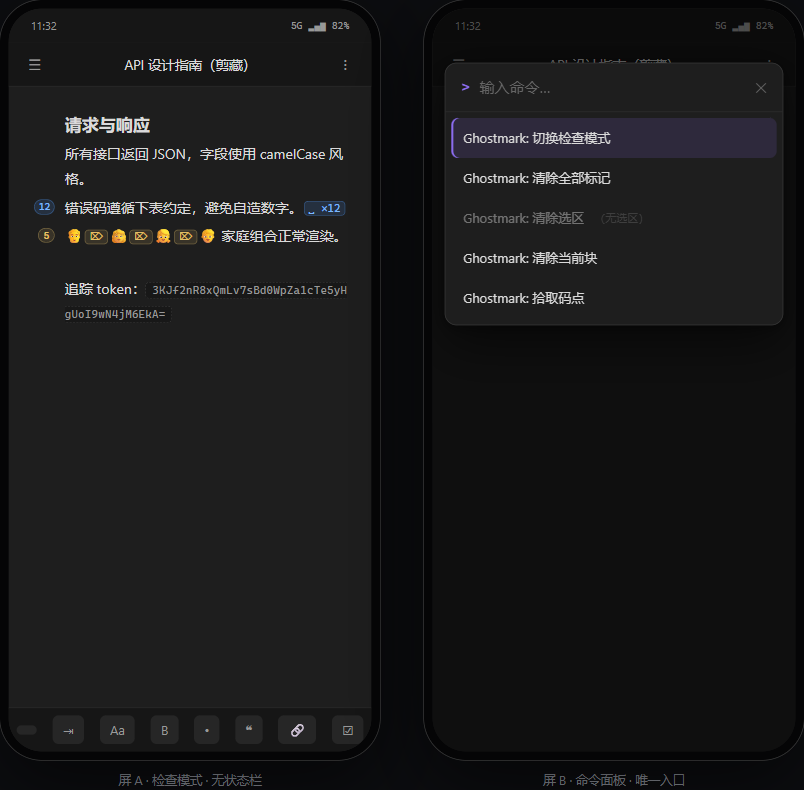
 ## On mobile
Decorations and all seven commands work on mobile; only the status bar is
desktop-specific — the command palette is the mobile entry.
## On mobile
Decorations and all seven commands work on mobile; only the status bar is
desktop-specific — the command palette is the mobile entry.
 ## Install
**Ghostmark is available in the official community plugin store** — the
easiest way to install it, with updates handled by Obsidian itself:
1. Open *Settings → Community plugins*;
2. Search **Ghostmark**, press **Install**, then **Enable**.
Or jump straight to the [plugin page](https://obsidian.md/plugins?id=ghostmark).
### Via BRAT
BRAT works against this repository (its releases ship the files BRAT
expects), but with the plugin already in the store it only makes sense
for testing fixes ahead of a store release:
1. Install and enable [BRAT](https://github.com/TfTHacker/obsidian42-brat);
2. Run **BRAT: Add a beta plugin for testing** from the command palette;
3. Enter `iceblyte/ghostmark` and confirm, then enable **Ghostmark**.
BRAT follows this repository's releases; store installs keep updating
through the store.
### Manual
1. Download `main.js`, `manifest.json` (and `styles.css`) from the
[latest release](https://github.com/iceblyte/ghostmark/releases/latest);
2. Put them in `
## Install
**Ghostmark is available in the official community plugin store** — the
easiest way to install it, with updates handled by Obsidian itself:
1. Open *Settings → Community plugins*;
2. Search **Ghostmark**, press **Install**, then **Enable**.
Or jump straight to the [plugin page](https://obsidian.md/plugins?id=ghostmark).
### Via BRAT
BRAT works against this repository (its releases ship the files BRAT
expects), but with the plugin already in the store it only makes sense
for testing fixes ahead of a store release:
1. Install and enable [BRAT](https://github.com/TfTHacker/obsidian42-brat);
2. Run **BRAT: Add a beta plugin for testing** from the command palette;
3. Enter `iceblyte/ghostmark` and confirm, then enable **Ghostmark**.
BRAT follows this repository's releases; store installs keep updating
through the store.
### Manual
1. Download `main.js`, `manifest.json` (and `styles.css`) from the
[latest release](https://github.com/iceblyte/ghostmark/releases/latest);
2. Put them in `