



# Franklin
Meet **🪁 Franklin**, your personal AI agent for Obsidian. Franklin reads your vault, helps you think through notes, and proposes reviewable changes to your Markdown files.
Franklin is **provider-agnostic**, and currently supports you bringing your [OpenAI Plus/Pro subscriptions](https://openai.com/codex/), [OpenCode Go subscriptions](https://opencode.ai/docs/go/) via API key, and [OpenRouter](https://openrouter.ai) API keys.
Franklin's core local experience is **free**. Features that can run purely on your machine are intended to remain free.
> The Franklin project is more than an Obsidian plugin. We are also building an experimental **agent sdk** that allows for quick and deep integration of novel AI workflows into any application; we just chose to demo this idea with Obsidian. To learn more or contribute to the broader effort, see [Our Philosopy](#our-philosophy) or join the [Discord](https://discord.gg/KRFy6ECMnf)!
### Main Use Cases
**As a Personal Librarian**
Franklin helps you organize, maintain, and rediscover your vault.
- Split large notes into smaller, linked notes.
- Move notes into suitable directories based on your existing structure.
- Surface older notes that are relevant to your current work.
- Connect recent files to forgotten ideas, related readings, and past projects.
- Find relevant notes, PDFs, highlights, and references locally or **online**.
**As a Tutor**
Franklin helps you understand new material using your notes and source texts.
- Explain unfamiliar concepts step by step.
- Ground explanations in your notes, PDFs, and other source material.
- Adapt teaching to your existing knowledge and preferences.
- Resolve misunderstanding and ambiguity to develop greater clarity.
- Ask Socratic questions, create exercises, and identify gaps in your understanding.
**As a Research Assistant**
Franklin helps you investigate, synthesize, and cite information.
- Search across your vault, local files, and the web.
- Summarize papers, articles, documentation, and notes.
- Compare sources and extract key claims, assumptions, and disagreements.
- Produce briefs, outlines, tables, and research maps.
## Table of contents
- [Getting Started + Installation](#getting-started)
- [Features](#features)
- [Roadmap](#roadmap)
- [Our Philosopy](#our-philosophy)
- [License](#license)
## Getting Started
1. Install and enable Franklin in the Obsidian plugin store.
2. Go to the Franklin settings page and authenticate with a model provider in settings or from the model selector.
3. Use the sidebar button or command to open Franklin up
4. Start talking with Franklin to read, search, or edit notes in your vault.
5. Review proposed file changes before accepting them.
Franklin is currently in **early release**. Join the [Discord](https://discord.gg/KRFy6ECMnf) to follow and support development!
## Features
### ✏️ Making changes
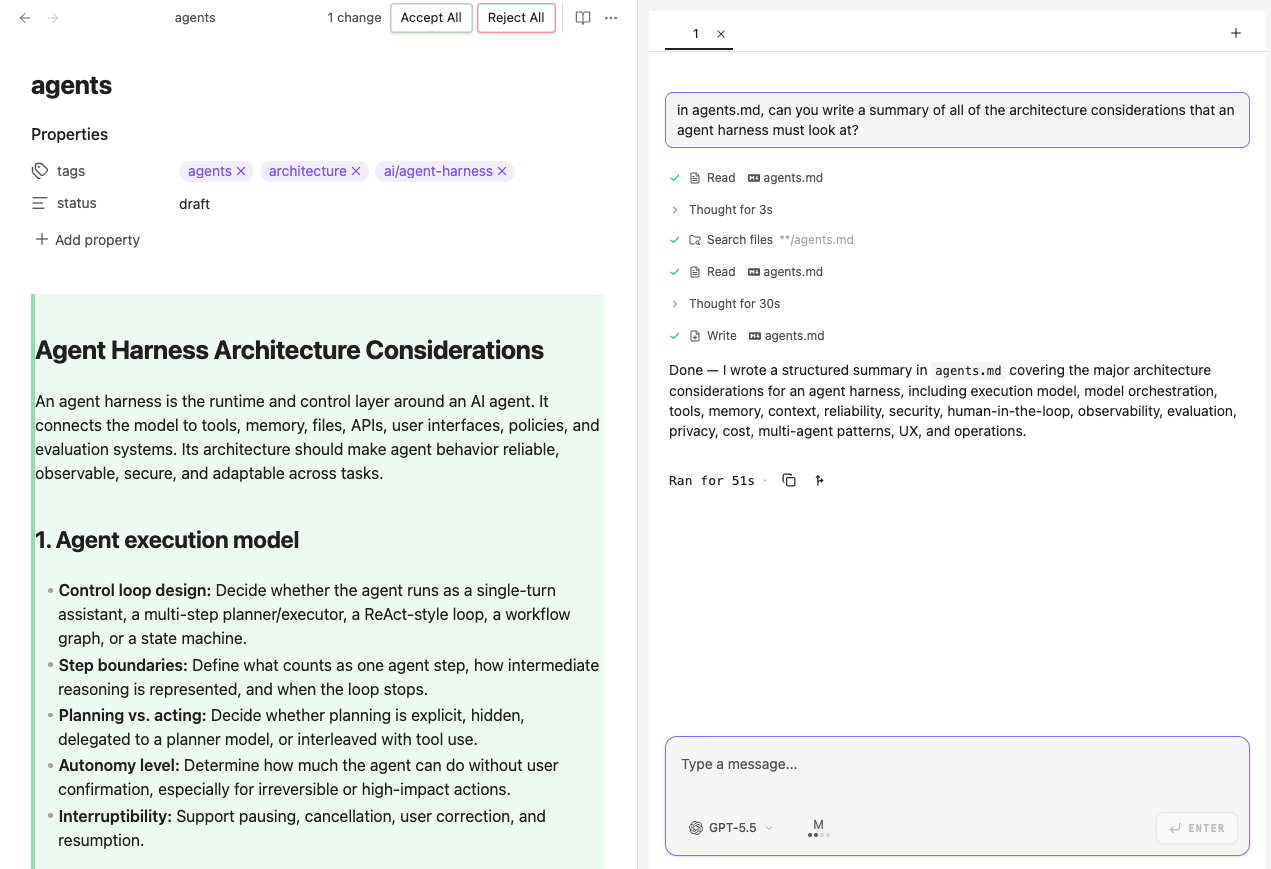
Franklin proposes changes to your vault: it can add, modify, or delete files.
### ⚡️ Model agnostic
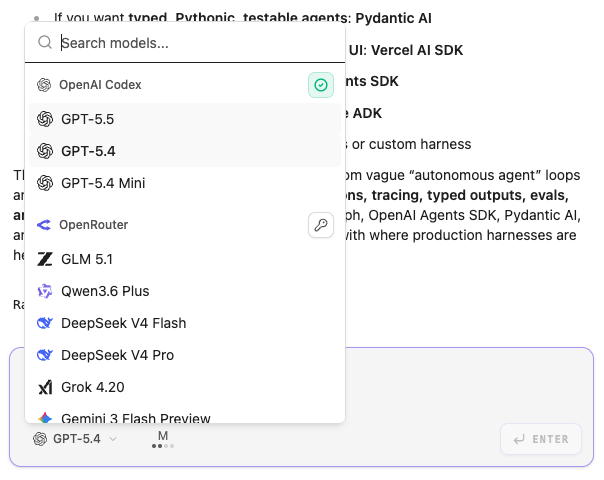
Swap LLM providers mid-conversation. Everything else stays the same.
### 🔐 Sandboxed filesystem access
On Mac and Linux, agents have restricted permission on what they may see and edit:
- broad read access across the filesystem, except for .env files and the .obsidian folder
- narrow write permissions: the agent can write only within your vault root and `/tmp`.
We are actively working towards making filesystem permissions **configurable** and robust.
> [!IMPORTANT]
> The model has access to a `grep` tool that it uses for keyword searches within files. By default, we try to run this in a **sandboxed environment** with the same read and write access described above. The sandbox requires `ripgrep` to be installed on your computer (see [installation instructions](https://ripgrep.dev/download/)).
>
> If you are on Windows or do not have `ripgrep` installed, `grep` will run with unrestricted access. However, in most cases, the agent will not search for words outside your vault. Improving the agent's security is still a work in progress.
### And lots more!
- Web search and page fetch
- Persistent conversations
- Multiple conversations in parallel
- Project instructions via `CLAUDE.md`
- Per-turn token tracking
- Forking last turn into a new conversation
- Sub-Agents
- PDF Support
- Image Support
- `@`-style mention system
- Auto-shares "what you see"
## Roadmap
Below is a list (in approximate priority) of what we are building:
- Support for additional subscriptions and API providers such as Anthropic and Grok
- Greater parity with popular coding agents like Claude Code, including:
- Terminal
- MCP
- AGENTS.md
- Skills
- Context Compaction
- Branching at any point in conversation
- Conversation rewind
- Integrations with popular platforms like:
- Twitter/X
- Conversation Organization:
- Hierchical viewe
- Auto-named conversations
- Better usage tracking:
- Chat costs
- Cost budgets
## Our Philosophy
(wip)
### BYOK/S philosophy
We believe in BYOK/S: bring your own _keys_ or _subscription_.
- Conversation history stays on your machine;
- Power the agent with any supported model, either via a subscription or an API key;
- The agent stays the same, even if the underlying LLM model changes.
A new top model might be released every month, but your Franklin agent doesn't care. **We believe agent harnesses shouldn't be chains.** ⛓️💥
## Disclosures
Franklin
## License
Copyright 2026 Franklin contributors.
Licensed under the Apache License, Version 2.0. See [LICENSE](LICENSE).