# Harness Like
**An Obsidian implementation inspired by DeepSeek Harness** — run a Cordis plugin system and an AI agent inside Obsidian. The agent reads and writes your notes, calls tools and goes through approvals; you (or the agent) can write your own Cordis plugins to extend Obsidian's commands, tools, panels, ribbon icons, status bar and settings tabs.
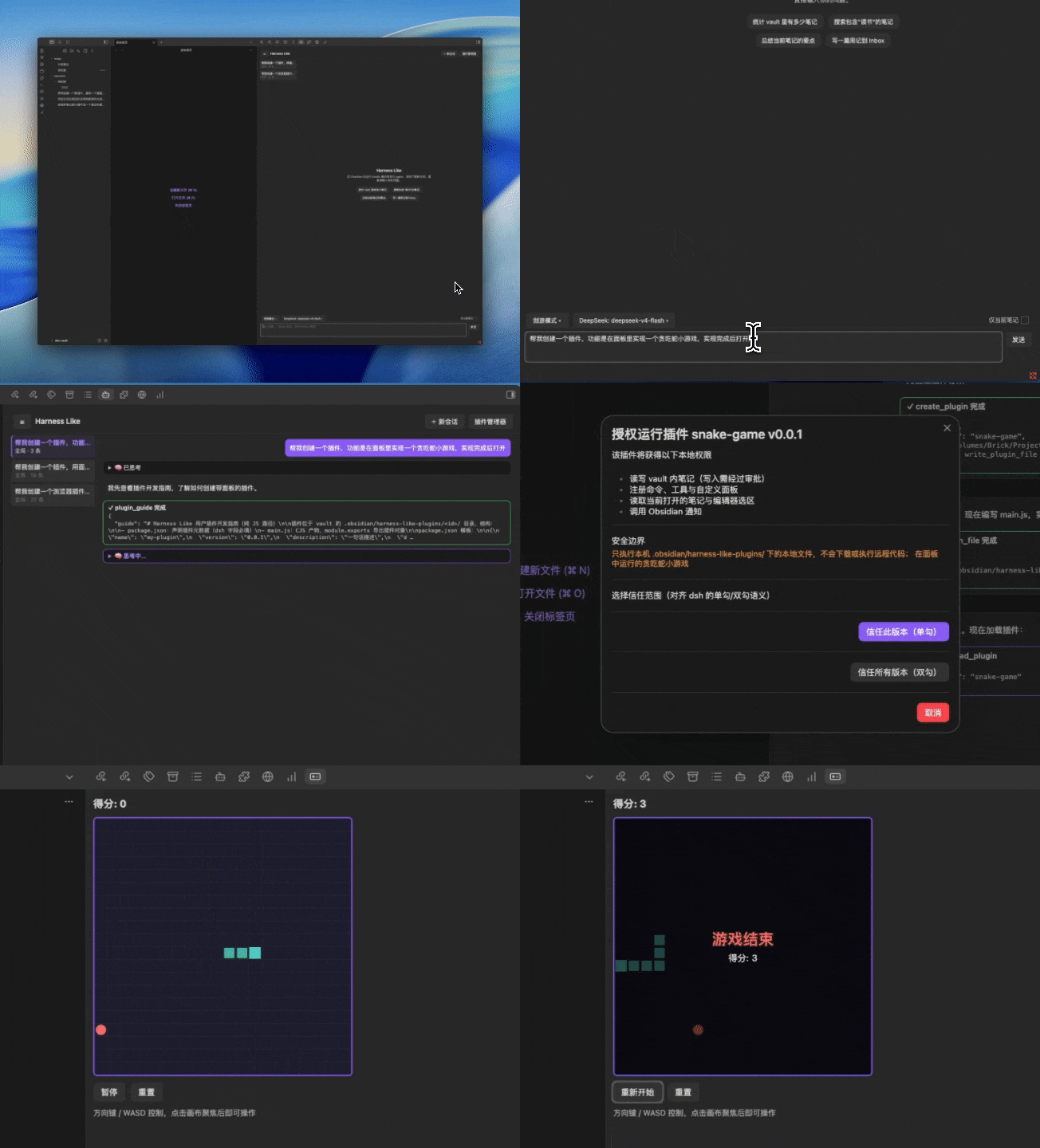
> **Status: beta** — core features are complete; the UI supports Chinese & English (and can follow Obsidian's language).
>
> **Desktop only** — Harness Like runs in the Obsidian **desktop** app (macOS / Windows / Linux). Obsidian Mobile is **not** supported.
[English](#en) · [中文](#zh)
---
## English
### What is Harness Like?
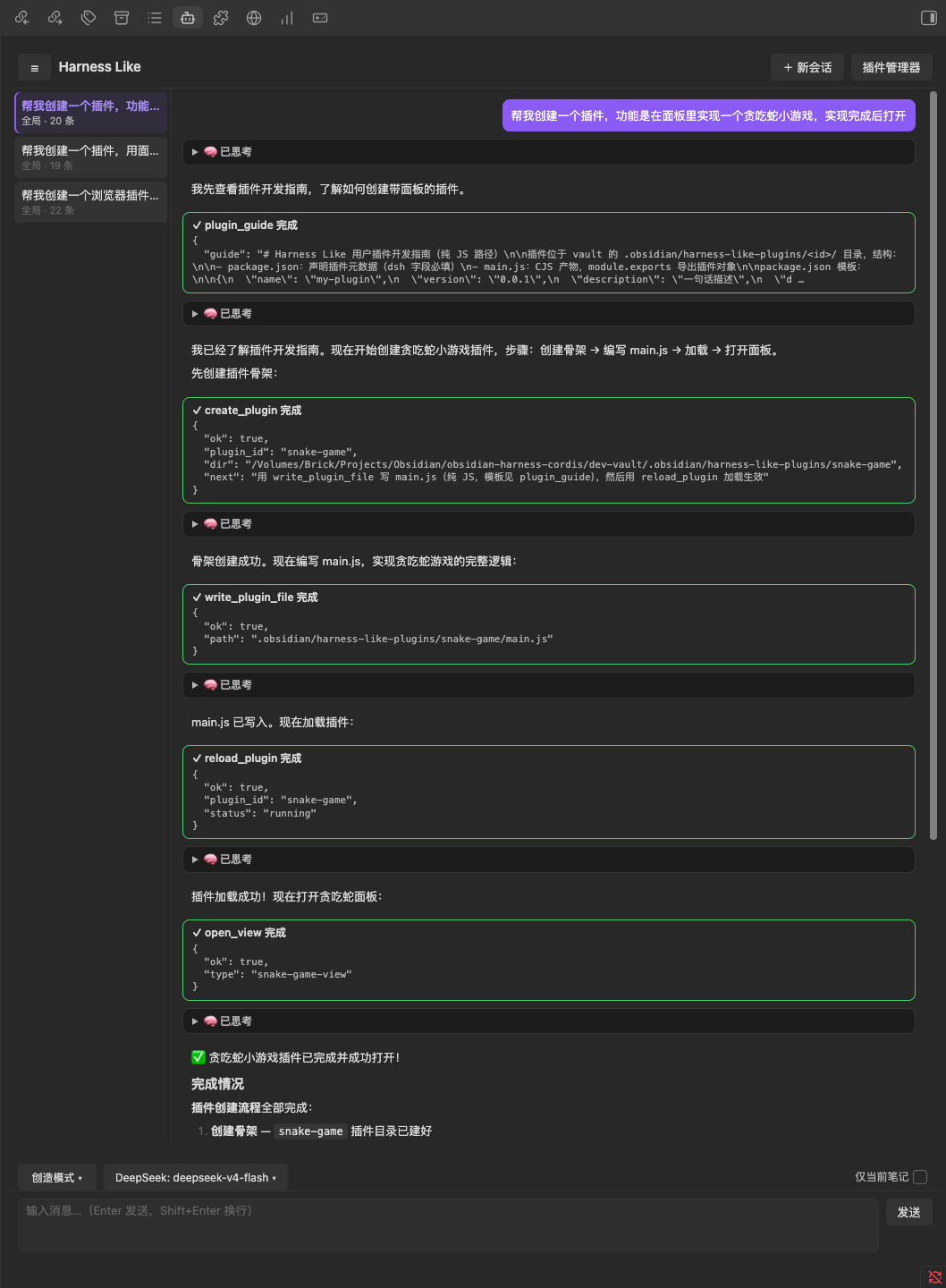
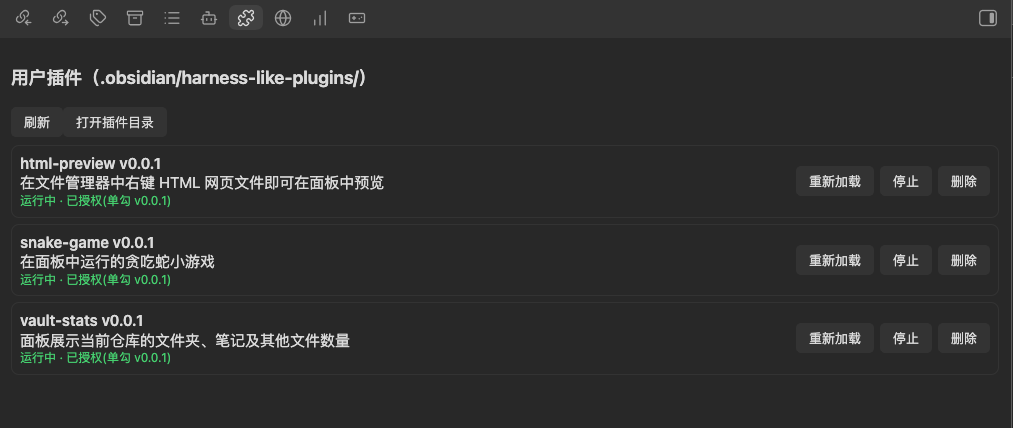
Harness Like is an Obsidian implementation inspired by DeepSeek Harness. It embeds a Cordis runtime inside the Obsidian plugin process, exposes Obsidian's APIs as Cordis services, and lets an AI agent read and write your notes through tools — with human approval at every step to keep your data safe. In **Create Mode**, you can build, iterate and reload your own **Cordis plugins** entirely through conversation — whatever you can imagine, you can create.
(Note: these are not Obsidian-native plugins — they are Cordis plugins adapted to Obsidian's extension points provided by Harness Like.)
> Detailed user guide: [**Harness Like Docs**](https://frank6com.github.io/obsidian-harness-like/)
### Screenshots
### Installation
1. From the **official plugin directory**: [Harness Like](https://community.obsidian.md/plugins/harness-like) (desktop only) — in Obsidian: Settings → Community plugins → Browse → search "Harness Like".
2. Manual install (alternative): copy `main.js`, `manifest.json`, `styles.css` from the repository root to `.obsidian/plugins/harness-like/` in your vault.
### Quick Start
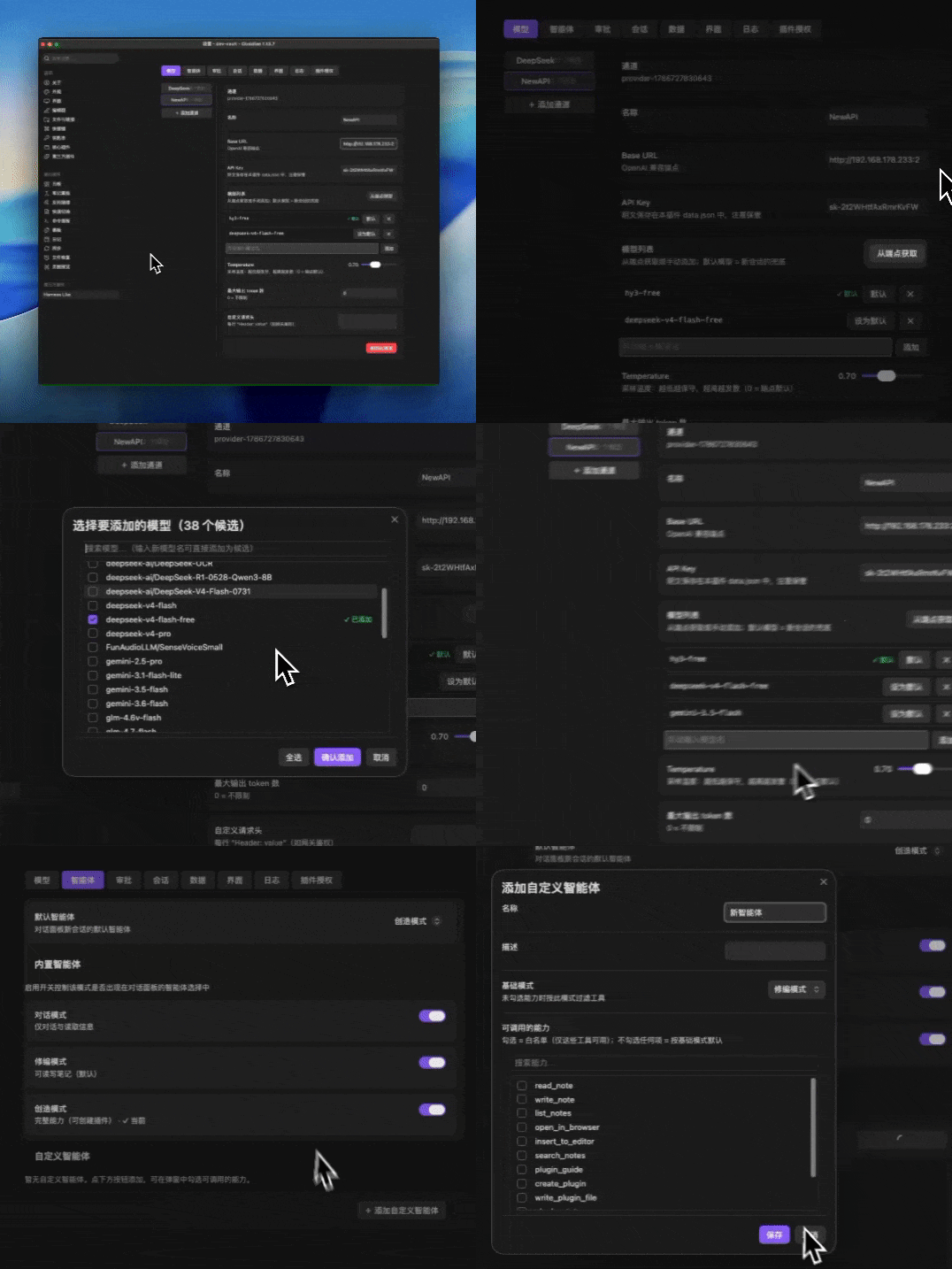
1. Open host settings (Settings → Community plugins → Harness Like) → **Models**: enter your API Key (DeepSeek endpoint pre-configured), add models, set a default.
2. Click the bot icon in the ribbon (or run "Open Harness Like Panel").
3. Ask something: *"Count the notes in this vault"* — the agent calls tools with visible cards; writes ask for approval.
### Feature highlights
- **Chat + tools**: streaming, live tool cards, phase indicator, stop/retry; auto-continuation when the model returns an empty response (e.g. thinking exhausted the output quota);
- **Three agent modes**: Chat (read-only) / Edit (read & write notes) / Create (build plugins) + custom agents with capability whitelists;
- **Approval chain**: per-tool policy → current-note mode → directory whitelist → approval dialog;
- **Create plugins in conversation**: panels, commands, tools, icons, translations, obsidian:// deep links — no coding; the AI verifies generated code (syntax & forbidden APIs) before loading;
- **Multi-provider models** (OpenAI-compatible) with per-model defaults and context-window metadata;
- **Session export** to a configurable directory; **backup/migrate** by copying folders;
- **Bilingual UI** (follows Obsidian's language); translation plugins can override strings.
### FAQ
- **Where are my API keys stored?** Plain text in `.obsidian/plugins/harness-like/data.json` — keep it safe.
- **Can I export chats?** Yes — per-session Markdown export, target directory configurable (Settings → Sessions).
- **Can I back up my sub-plugins?** Copy `.obsidian/harness-like-plugins//` to the same location in the new vault and re-authorize.
- **Is it safe?** Plugins execute only local files; loading requires authorization; writes go through approval. Zero telemetry.
### Docs & support
- User guide & plugin development: [Harness Like Docs](https://frank6com.github.io/obsidian-harness-like/)
- Issues / feature requests: GitHub **Issues** (templates provided)
- Questions & ideas: GitHub **Discussions**
### License
MIT
### For contributors
- Skip this section as a user. Full development docs: [Development](https://frank6com.github.io/obsidian-harness-like/development/index.html).
- Questions? Ask in GitHub **Discussions** or file feature requests in **Issues**.
---
## 中文
### 这是什么?
Harness Like 是 DeepSeek Harness 理念的 Obsidian 实现:在 Obsidian 插件进程内嵌入 Cordis 运行时,把 Obsidian 的 API 暴露为 Cordis 服务,让 agent 可以通过工具读写你的笔记,同时为了保障数据安全全程带人工审批;而在**创造模式**下,甚至能按照你的想法完全通过对话创建、迭代并重载你自己的 **Cordis 插件**,让您的想法言出法随。
`(注意此并非 Obsidian 原生插件,而是通过本插件针对 Obsidian 提供的扩展点适配的 Cordis 插件)`
> 详细使用指南:[**Harness Like 文档站**](https://frank6com.github.io/obsidian-harness-like/)
### 界面截图
### 安装
1. 从**官方插件目录**安装:[Harness Like](https://community.obsidian.md/plugins/harness-like)(仅限桌面端)——Obsidian 内:设置 → 第三方插件 → 浏览 → 搜索 "Harness Like"。
2. 手动安装(备选):从仓库根目录复制 `main.js`、`manifest.json`、`styles.css` 到 vault 的 `.obsidian/plugins/harness-like/`。
### 快速开始
1. 打开主插件设置(设置 → 第三方插件 → Harness Like)→「模型」:填入 API Key(已预置 DeepSeek 端点),添加模型并设为默认;
2. 点击侧边栏机器人图标(或运行「打开 Harness Like 面板」);
3. 提问试试:*"统计 vault 里有多少笔记"*——agent 调用工具并展示卡片,写操作会请求审批。
### 功能一览
- **对话 + 工具**:流式输出、工具卡片实时状态、阶段提示条、停止/重试;模型空响应(如思考耗尽输出配额)自动续跑;
- **三种智能体模式**:对话(只读)/ 修编(读写笔记)/ 创造(创建插件)+ 自定义智能体(能力白名单);
- **审批链**:工具级策略 → 仅当前笔记 → 目录白名单 → 审批弹窗;
- **对话内创建子插件**:面板、命令、工具、图标、翻译、obsidian:// 深链——零代码;AI 加载前自动校验生成代码(语法与禁用 API);
- **多模型提供方**(OpenAI 兼容)、模型级默认、上下文窗口元数据;
- **会话导出**到可配置目录;**备份/迁移**只需复制目录;
- **中英文界面**(跟随 Obsidian 语言);翻译插件可覆盖文案。
### 常见问题
- **API Key 存在哪里?** 明文保存在 `.obsidian/plugins/harness-like/data.json`,请注意保管。
- **对话能导出吗?** 可以——按会话导出 Markdown,导出目录可在 设置 → 会话 配置。
- **子插件能备份吗?** 复制 `.obsidian/harness-like-plugins//` 到新 vault 相同位置,重新授权即可。
- **安全吗?** 插件只执行本地文件;加载需授权;写操作走审批链。零遥测。
### 文档与反馈
- 使用指南与插件开发:[Harness Like 文档站](https://frank6com.github.io/obsidian-harness-like/)
- 问题 / 功能请求:GitHub **Issues**(已配置模板)
- 提问与想法:GitHub **Discussions**
### 许可证
MIT
---
## 面向贡献者
- 使用者可直接跳过本节。完整开发文档见文档站[开发文档](https://frank6com.github.io/obsidian-harness-like/zh/development/index.html)栏目(中文文档位于 /zh/,站点默认英文)。
- 有问题请在 GitHub Discussions 提问,或在 Issues 里提交功能请求。