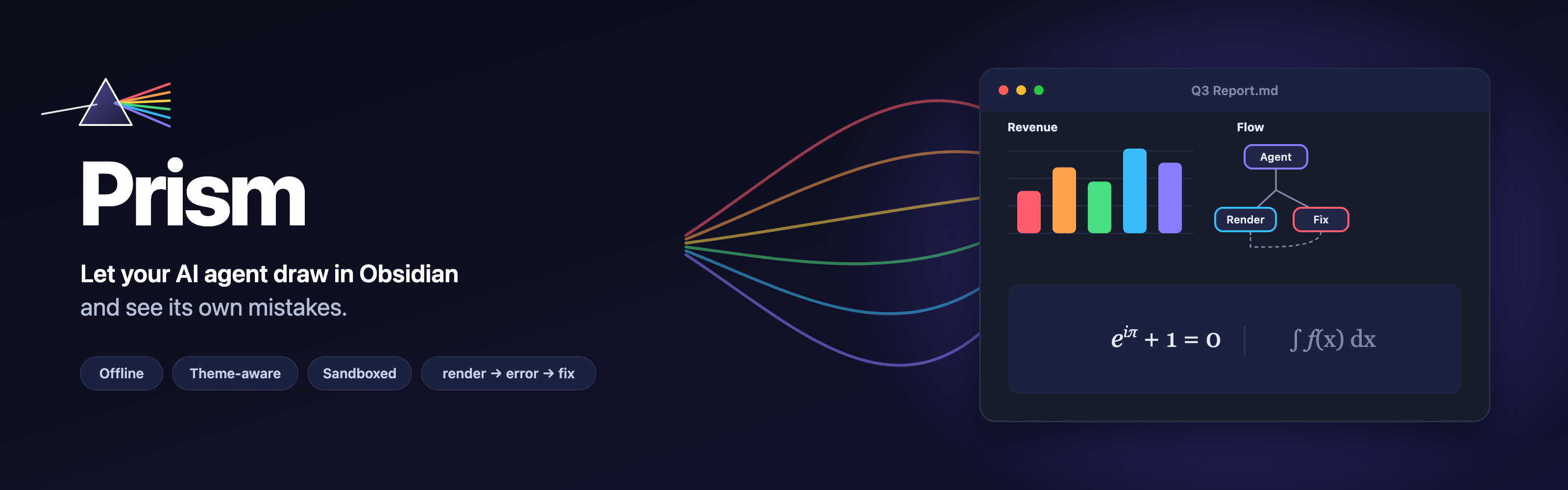
Interactive charts, diagrams, dashboards and formulas right inside your notes.
Offline, in your vault's theme, safely sandboxed – and built so Claude Code and Codex can render, check and fix what they write.
Now as a community plugin! Here: https://community.obsidian.md/plugins/prism-viz




Install ·
Quickstart ·
With AI agents ·
Features ·
Privacy ·
Example vault
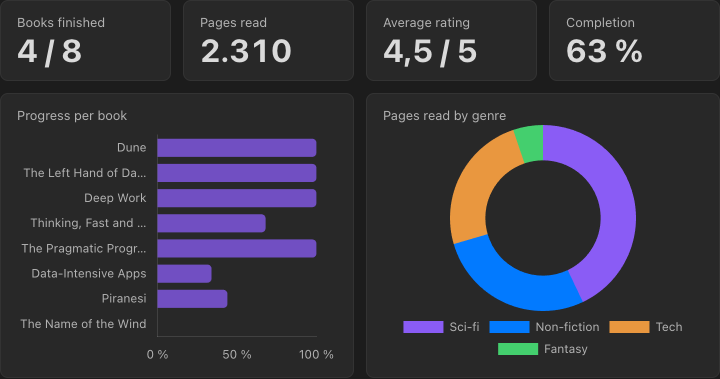
A dashboard built from a plain Markdown table in the same note. Edit the table and the charts follow.
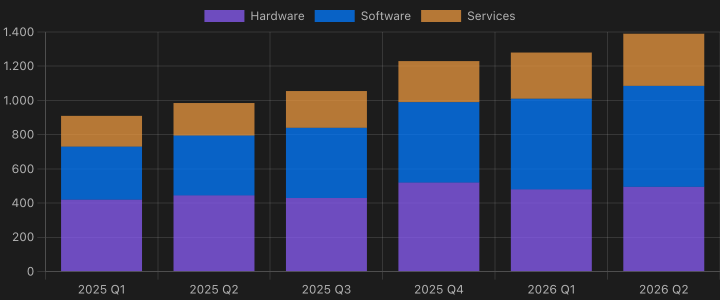
No-code charts: a YAML spec pointing at a table |
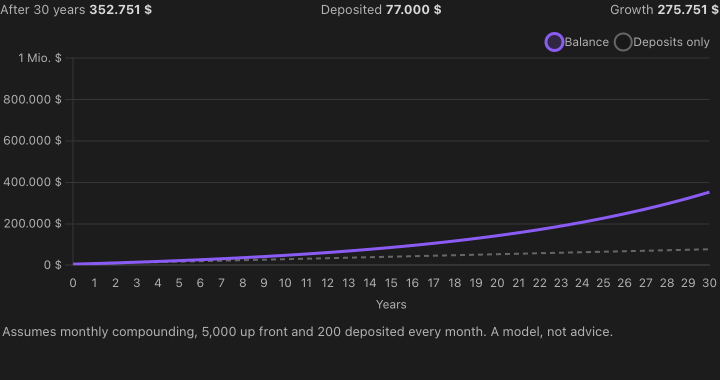
Explorable explanations: a slider in one block drives a chart in another |
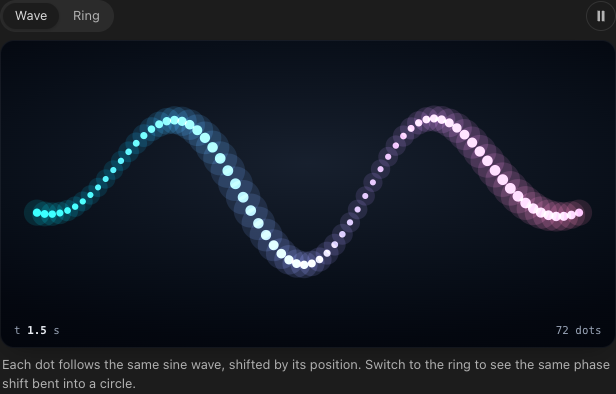
Scenes: prism.canvas + prism.animate, paused off screen |
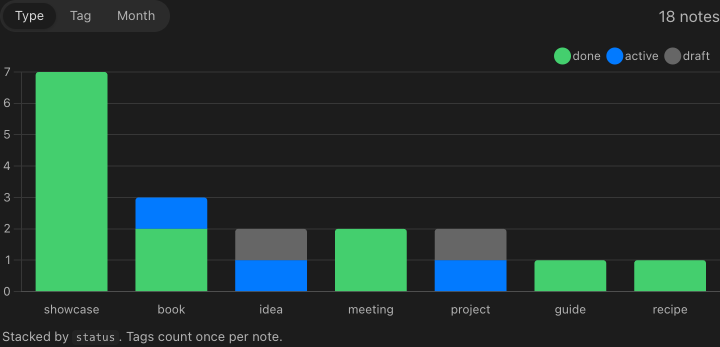
Your vault as data: prism.notes() over frontmatter |
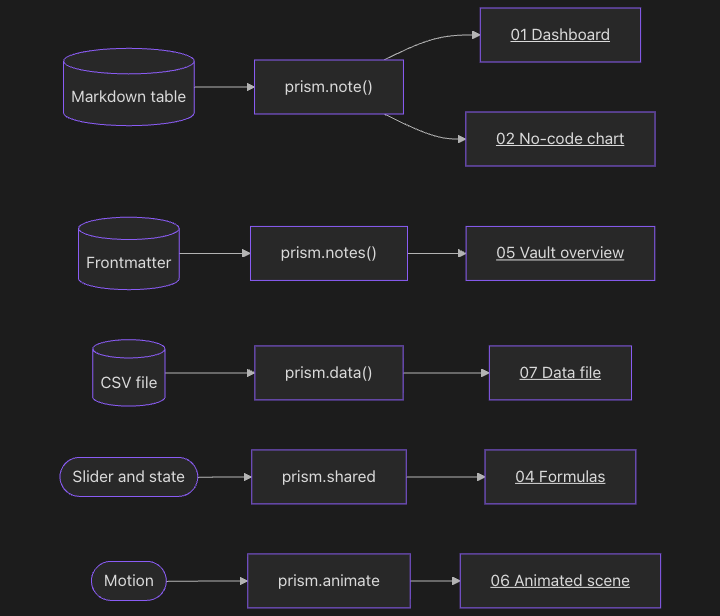
Mermaid: [[links]] in nodes open the note |

Formulas: KaTeX, offline, with mhchem |
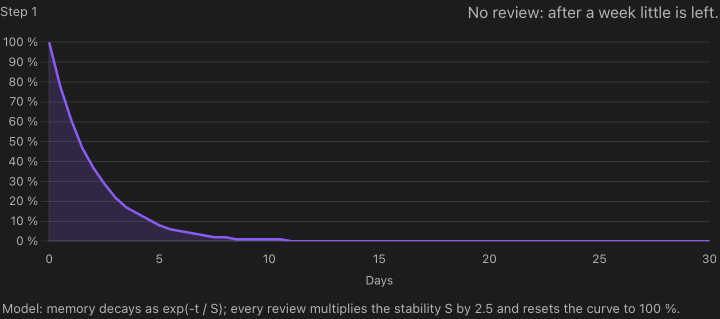
Scrollytelling: the chart follows the section you are reading |
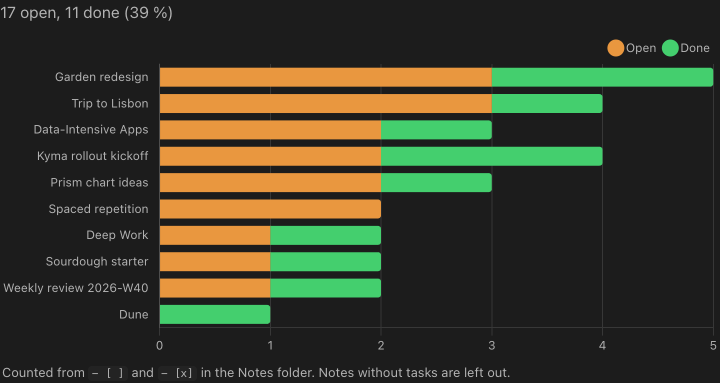
Tasks across the vault: prism.notes({ include: ["tasks"] }) |
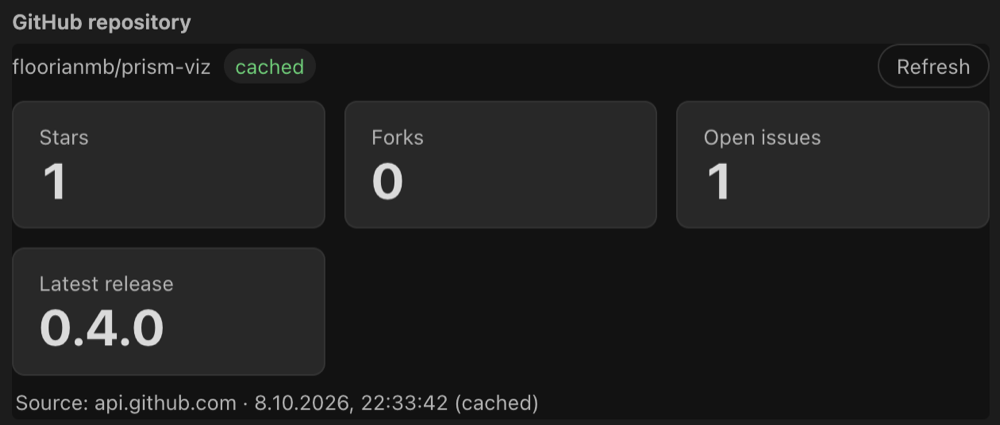
Live API data (opt-in): prism.http.json, sent by Obsidian, no CORS |
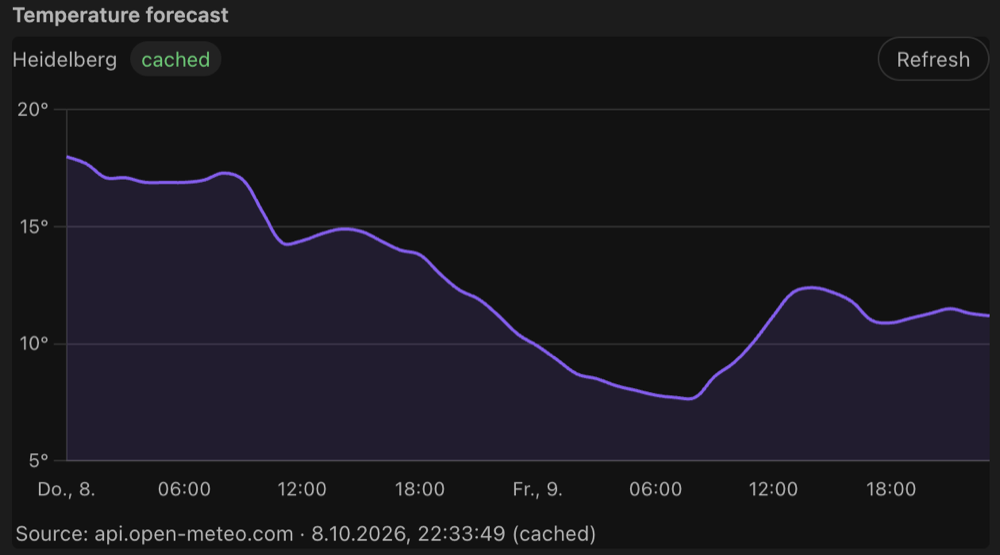
Charts from web APIs: cached in prism.state, every loading state handled |

Web pages (opt-in): ```viz web as a desktop webview, works for sites that refuse framing |
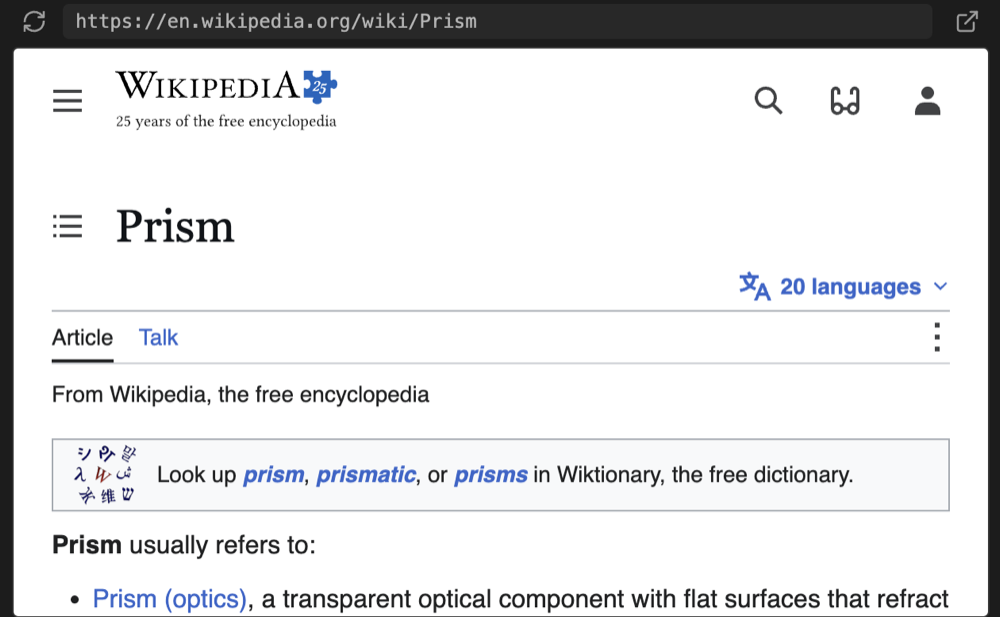
…or as an iframe: mode: iframe, also on mobile |
All of these are in the example vault, together with variants, a link graph, the page monitor, a Bases chart and an HTML widget. Screenshots are real renders in Obsidian's default dark theme.
## Why Prism?
- **🤖 Built for agents.** Your agent writes a ` ```viz ` block, renders the note from the command line and gets back errors *with note line numbers* plus a PNG snapshot. It fixes the block until the render is clean, with no copy-pasting screenshots back and forth. A ready-made skill teaches Claude Code and Codex how to do it.
- **📒 Your notes are the data.** Chart a Markdown table, the frontmatter of every note, your tasks, links and backlinks, or a CSV in your vault. Edit the note and the chart follows. Widgets can write back too: check off tasks, fill in a habit tracker, set a property.
- **🎨 Looks like it belongs.** Blocks pick up your theme's colors and fonts, switch live between light and dark, size themselves and show up in PDF exports.
- **🔒 Safe by default.** Every block runs in a sandboxed iframe with a strict CSP and no network access. Chart.js, D3, Mermaid, three.js and KaTeX are bundled, so everything works offline.
## Install
**From the community plugins** (recommended)
1. Open *Settings → Community plugins → Browse* and search for **Prism**.
2. Select *Install*, then *Enable*.
3. https://community.obsidian.md/plugins/prism-viz
**With [BRAT](https://github.com/TfTHacker/obsidian42-brat)** (for beta versions)
1. Install and enable *BRAT* from the community plugins.
2. Run *BRAT: Add a beta plugin for testing* and enter `floorianmb/prism-viz`.
3. Enable **Prism** under *Settings → Community plugins*.
**Manually**
1. Download `main.js`, `manifest.json` and `styles.css` from the [latest release](https://github.com/floorianmb/prism-viz/releases/latest).
2. Put them into `/.obsidian/plugins/prism-viz/`.
3. Reload Obsidian and enable **Prism**.
**Just looking?** Open the [`examples/`](examples/) folder as a vault. It has a note for every feature.
## Quickstart
Put a table in a note and add a chart below it. No code needed:
````markdown
| Month | Notes | Tasks done |
| ----- | ----: | ---------: |
| Jan | 34 | 21 |
| Feb | 41 | 29 |
| Mar | 57 | 38 |
^stats
```viz chart title="My vault in Q1"
type: bar
source: ^stats
x: Month
```
````
Change a number in the table and the chart updates. Want more? A ` ```viz ` block takes any HTML, SVG and JavaScript, with the bundled libraries and a `prism` API for your notes:
````markdown
```viz chart title="Notes by type"
```
````
Or start from a template: *Prism: Insert starter* (dashboard, architecture diagram, timeline, chart from frontmatter, chart from a table, formula).
## Use it with Claude Code or Codex
1. **Install the skill.** Prism opens a page with the install command for your vault after you install or update it; open it again any time with *Prism: Install agent skill*. On macOS/Linux the command is:
```bash
d="$(mktemp -d)" && git clone --depth 1 https://github.com/floorianmb/prism-viz.git "$d" && node "$d/scripts/install-skill.mjs" --vault '/path/to/your/vault' && rm -rf "$d"
```
This installs the newest skill. The page in Obsidian fills in your vault path and installs the skill of your Prism version (`git clone --branch `). Run it again after updating Prism; from 0.6.5 on, the skill tells you when it no longer matches the installed plugin.
It copies [`skill/`](skill/) to `~/.claude/skills/prism` and `~/.codex/skills/prism` (wherever those folders exist) and puts the render script into the vault's plugin folder (the community plugin download only contains `main.js`, `manifest.json` and `styles.css`). From a clone: `npm run install-skill -- --vault '/path/to/your/vault'`.
For other agents, run *Prism: Generate agent rules* as well. It writes `PRISM.md` and a snippet for your `CLAUDE.md` / `AGENTS.md`.
2. **Ask for a visualization**, e.g. *"Add a dashboard of my reading list to Books.md"*.
3. **The agent closes the loop** on its own:
```bash
node .obsidian/plugins/prism-viz/scripts/prism-render.mjs "Books.md"
```
Without Obsidian running, `prism-render.mjs --lint "Books.md"` checks the note offline (YAML errors, unknown keys, missing tables and columns, script syntax errors) and prints the same JSON; exit `0` = ok, `1` = errors, `4` = file not found. It is static, so the agent lints first and renders for the snapshot. See [`docs/lint.md`](docs/lint.md).
The note renders invisibly in the running Obsidian app. The command prints JSON with every error (note line, origin, message) and the paths of the PNG snapshots, and exits with `0` = ok, `1` = block errors, `2` = render failed, `3` = Obsidian not reachable. The agent fixes the block, looks at the snapshot and renders again until the result is clean.
If something breaks while you are reading, use *Copy prompt for agent* in the block's menu or error panel. It copies the location, the errors, the source and the render command, ready to paste.
## Features
Visualize anything: HTML/JS blocks, no-code charts, tables, formulas, Mermaid, Bases, HTML files
- **`viz` code blocks** (Live Preview and Reading view): HTML fragment or full document, rendered in an iframe via `srcdoc`. Info line: library keywords `chart`, `d3`, `mermaid`, `three`, plus `height=N`, `title="…"`, `id=name`, `raw`, `eager`, `notoolbar`, `source`. All libraries are bundled into `main.js`.
- **No-code charts**: a ```` ```viz chart ```` block may contain a YAML spec instead of HTML (`type`, `source: ^table-id | table: | file.csv | notes`, `x`, `y`, `series`, `filter`, `aggregate`, `sort`, `stacked` …).
- **Charts from frontmatter**: `source: notes` gives one row per note (title, every property, folder, modified, tags), narrowed with `folder:` and `tag:`; `aggregate: count | sum | avg | min | max` groups them. "Notes per status" or "mood over time" in five lines of YAML. See [`docs/frontmatter-charts.md`](docs/frontmatter-charts.md).
- **Charts from tasks**: `source: tasks` gives one row per task of your notes (text, done, due, done date, priority, tags, note): open tasks per project or tasks done per day without code.
- **Calendar heatmaps and maps**: `type: calendar` shows one cell per day (daily notes, habits, tasks done; a click opens the day's note), `type: map` colors the regions of a GeoJSON file from your vault. See [`docs/calendar-and-map.md`](docs/calendar-and-map.md).
- **Periods, goals, computed columns**: `group: month` counts or sums dates per day, week, month, quarter or year; `goal: 40` and `lines` draw reference lines; `compute: { pace: "pages / days" }` adds columns (charts and tables, no `eval`). See [`docs/periods-goals-compute.md`](docs/periods-goals-compute.md).
- **KPI tiles, timelines, link graphs, flows**: `type: kpi` (big numbers, change to the last period, sparkline, goal bar), `type: timeline` (Gantt from tasks or notes), `source: links` + `type: graph` (the link network of your notes) and `type: sankey`. See [`docs/new-chart-types.md`](docs/new-chart-types.md).
- **Click to source**: a click on a bar, point or segment of a chart without `select` opens the table row in the note, the note or the task's line behind it. See [`docs/cross-filter.md`](docs/cross-filter.md).
- **Cross-filter**: `select: genre` on a chart and `filter: { genre: $shared.genre }` on a table or chart: a click on a bar filters the other blocks of the note. See [`docs/cross-filter.md`](docs/cross-filter.md).
- **Tables**: ```` ```viz table ```` renders a searchable, sortable table with locale number formats, source links and confidence badges.
- **Formulas**: ```` ```viz math ```` renders LaTeX with KaTeX (offline, fonts inlined, mhchem).
- **Mermaid that navigates**: `A["[[Note]]"]` labels open the note on click.
- **Bases**: a "Prism chart" view for `.base` files (Obsidian 1.10+): group by a property, count or aggregate a value, split into series, stacked, sorted; also as calendar and map.
- **HTML files**: `![[file.html]]` embeds use the same renderer, and `.html` files open in a Prism view. Options via ``, `` or `![[file.html|height=400]]`.
- **Page monitor**: ```` ```viz monitor ```` shows RAM and CPU of the page it is on.
Your notes as data: tables, frontmatter, tasks, links, CSV/JSON files
- **`prism.note()`** returns the block's own note: frontmatter, headings, links, backlinks, tasks and typed Markdown tables (German number formats, units, `–` as empty). `prism.onNoteChange` follows edits.
- **`prism.notes({ folder, tag, limit, sort, order, include })`** queries the vault (read-only path, title, tags, frontmatter, mtime). `include: ["links", "backlinks", "headings", "tasks"]` adds those per note, and tasks carry Tasks-plugin dates and priorities. `prism.onNotesChange` fires on changes.
- **Widgets that edit their note**: `prism.edit.setTask`, `setCell`, `addRow` and `setProperty` change the block's own note: habit trackers, checklists, boards, quick-entry forms. Each block asks once ("Allow edits"), changes in the editor can be undone with Cmd/Ctrl+Z, and other notes are never touched. See [`docs/note-edits.md`](docs/note-edits.md).
- **Data files**: `prism.data("folder/file.csv")` reads CSV/TSV (row objects, column-wise typed), JSON/GeoJSON, YAML and TXT. Access is read-only and limited to the folders listed under *Data folders* in the settings (empty = off; notes and hidden files are never readable). `prism.dataFiles(folder?)` lists them, `prism.onDataChange(cb)` follows changes, and `prism.parseCsv(text)` parses inline CSV.
Explorable explanations and scenes: shared state, sliders, scrollytelling, animation
- **Shared state**: `prism.shared` is state shared by all blocks of a note. `prism.state.bind` / `prism.shared.bind` two-way bind form controls, so a slider in one block can drive charts in others.
- **Scrollytelling**: `prism.onSection(cb)` reports the heading the reader is at while scrolling.
- **Variants**: `prism.variants` shows alternative views of the same content with a persisted switcher.
- **Building blocks**: `prism.canvas` (crisp canvas that follows its element), `prism.animate` (frame loop with real elapsed time that pauses off screen and respects reduced motion), `prism.segmented` (persisted segmented control) and the classes `.toolbar`, `.stage`, `.hud`, `.chip`, `.icon-button`, `.caption`.
- **Persisted state**: `prism.state.get/set/delete` is stored in the plugin data, and `localStorage` is shimmed onto it. Give a block `id=name` to pin its state; without an id, the state moves along with the block when blocks above it are inserted, removed or edited. See [`docs/block-state.md`](docs/block-state.md).
Built for agents: headless render CLI, error log with note lines, skill, gallery
- **Render on demand**: `obsidian://prism?render=[&id=…&snapshot=0&width=720&timeout=60]` renders every viz block of a note (or an HTML file) invisibly in the running app and writes `.prism/renders/.json` and `latest.json` (status, errors with note lines, snapshot paths, and how much each block's snapshot changed since the last render). The CLI `scripts/prism-render.mjs` wraps it. `--all [folder]` renders every note with viz blocks and prints a summary. On macOS Obsidian stays in the background.
- **Offline check**: `prism-render.mjs --lint ""` (or `--lint --all [folder]`) finds spec and script errors without Obsidian. See [`docs/lint.md`](docs/lint.md).
- **Errors in the editor**: the lines that caused an error or warning are underlined in Live Preview and source mode, with the message at the end of the line. See [`docs/editor-errors.md`](docs/editor-errors.md).
- **Error feedback**: `window.onerror`, unhandled rejections, `console.error`, CSP violations, Mermaid errors and timeouts show up as a badge and are written to `/.prism/errors.json` with note path and line numbers. Optional PNG snapshots go to `.prism/snapshots/`.
- **Agent skill** ([`skill/`](skill/)): `SKILL.md` with the plan → write → render → fix workflow, `design.md` with the quality bar, and `reference.md` with the full API. *Prism: Install agent skill* shows the install command for your vault.
- **Gallery**: *Prism: Open gallery* lists every viz block of the vault with its latest snapshot and render status. *Render previews* renders the missing ones.
Feels native: theme bridge, auto-height, page previews, fullscreen, PDF export, block menu
- **Theme bridge**: Obsidian's CSS variables (colors, fonts, sizes, palette) are available inside the frame and update live on theme and light/dark changes. A default stylesheet and helper classes (`.card`, `.grid`, `.row`, `.kpi`, …) are included; opt out with `raw`. Chart.js and Mermaid follow the theme automatically.
- **Auto-height** via `ResizeObserver`, cached per block so re-renders do not jump.
- **Pinch to zoom**: pinch on the trackpad or touch screen to zoom into any block (up to 500 %, never below 100 %, no empty space around the content). Scrolling keeps scrolling the note; drag to move around while zoomed. See [`docs/pinch-zoom.md`](docs/pinch-zoom.md).
- **Page previews**: note links inside blocks show Obsidian's hover preview after a short rest on the link (*Settings → Prism → Link preview delay*, default 0.6 s; `prism.hoverNote` for canvas/SVG hit areas). Blocks know about fullscreen via `prism.displayMode`.
- **PDF export**: each block is rendered in the light theme and replaced by a static PNG.
- **Baked images for Publish and GitHub**: *Prism: Bake blocks as images* saves a PNG of every block of a note and links it below the block. Where Prism does not run (Obsidian Publish, GitHub, other apps), readers see the image; in Obsidian with Prism it stays hidden. See [`docs/bake.md`](docs/bake.md).
- **Block menu**: one small ⋯ button opens show source, reload, fullscreen, PNG export, copy as PNG, record a 5 s WebM video, SVG export, CSV export (charts and tables without code: the numbers they show, in your language's number format), save as `.html`, copy source / errors and *Copy prompt for agent*. In blocks with a `title` it sits in the title row, so it never covers the content; otherwise it shows in the top right corner on hover. *Reset zoom* appears next to it while a block is zoomed.
Safe by default: sandbox, CSP, no network, loop guard
- **Sandbox**: `sandbox="allow-scripts"` (no same-origin, top navigation, popups, forms or modals) and the CSP `default-src 'none'; script-src 'unsafe-inline'; style-src 'unsafe-inline'; img-src data: blob:; font-src data:;` plus `base-uri`/`form-action 'none'`. Messages are accepted only from the block's own frame with a per-render token, and navigation away from the srcdoc is detected and reverted.
- **Network is off** unless you allowlist domains. **Online access** is opt-in and off by default: *API requests* (`prism.http`, requests wait for a click by default, approved per host) and *Web pages* (` ```viz web ` blocks, iframes). Turning either on shows the consequences and asks for confirmation.
- **Robustness**: lazy rendering, loops in user scripts are stopped after 2 s of blocking, a ready/heartbeat watchdog with a Stop button, a crash guard that does not auto-run a block that froze Obsidian before, and full cleanup on unload.
The complete API is documented in [`skill/reference.md`](skill/reference.md).
## Settings
Default height, maximum auto height, theme sync, lazy rendering, error log, errors in the editor, blocks may edit their note, snapshots, data folders, network allowlist and online access.
## Network use and privacy
Prism works offline and does not connect to the internet unless you turn that on yourself.
- **No network by default.** Chart.js, D3, Mermaid, three.js, KaTeX and html-to-image are bundled in `main.js`. Nothing is downloaded at runtime, and the plugin never installs or updates code on its own.
- **No telemetry, no account, no ads.** Prism has no server of its own and sends no usage data anywhere.
- **Opt-in network access.** Only these settings, all empty or off by default, let blocks reach the network. Which remote services are contacted depends entirely on the URLs and domains you put into your notes and settings:
- *Network allowlist*: blocks may load scripts, styles, images and fonts from, and send requests to, the domains you list here.
- *Online access → API requests*: blocks may call web APIs with `prism.http` through Obsidian's `requestUrl`, to show live data. By default nothing is sent until you click **Run requests** below the block. The click approves only the hosts the bar names; a request to any other host asks again. See [`docs/online-access.md`](docs/online-access.md).
- *Online access → Web pages*: ` ```viz web ` blocks and `