# Objects
> **Rethink your notes as objects.** Create structured, perfectly organized notes directly in your flow using simple triggers.
[](https://obsidian.md)
[](https://opensource.org/licenses/MIT)
---
## Why Objects?
This plugin was built for a specific kind of note-taker: **The Obsidian Lover who misses Objects.**
If you've experimented with apps like **Anytype** or **Capacities** because you loved their object-oriented approach, but ultimately found yourself returning to the power, privacy, and flexibility of **Obsidian**, then this is for you.
**Objects** brings that missing piece to your vault. No more manual folder navigation or messy template applications—just pure, structured creation without leaving your keyboard.
---
## What it does
**Objects** bridges the gap between thinking and documenting. Instead of breaking your creative flow to manually create files, navigate folders, or apply templates, you simply define "Objects" (like `@person`, `@meeting`, or `@atomic-note`) and trigger them anywhere.
- **Unified Workflow**: Creation, organization, and linking happen in one single interaction.
- **Smart Routing**: Notes are automatically moved to their designated folders based on their type.
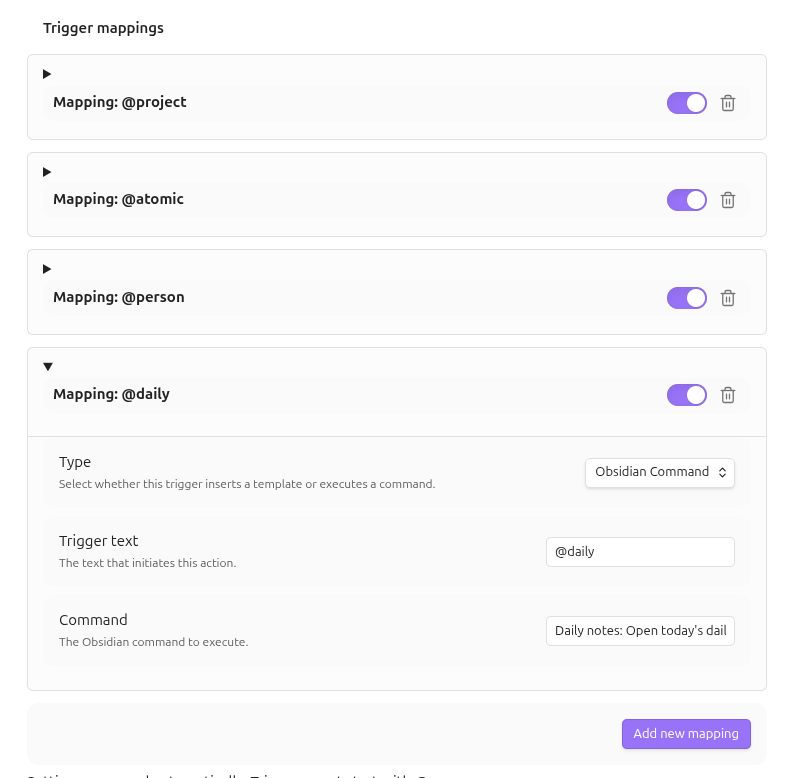
- **Command Execution**: Map triggers to any Obsidian command (e.g., `@reload` to reload the app, `@daily` to open the daily note) to stay in your flow.
- **Dynamic Content**: Uses a powerful fallback system (`{{title}}`, `{{date}}`, `{{time}}`) or integrates natively with [Templater](https://github.com/SilentVoid13/Templater).
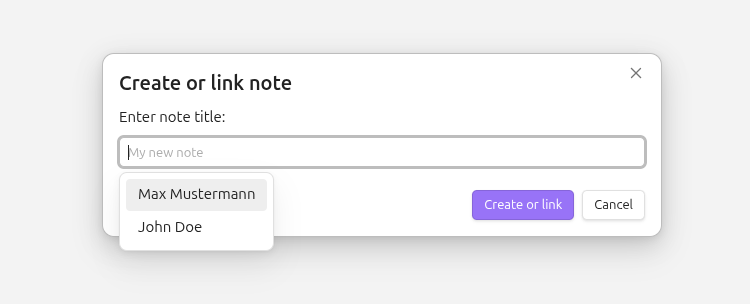
- **Intelligent Linking**: If an object already exists, the plugin links to it instead of creating a duplicate. The creation modal suggests existing notes in real-time.
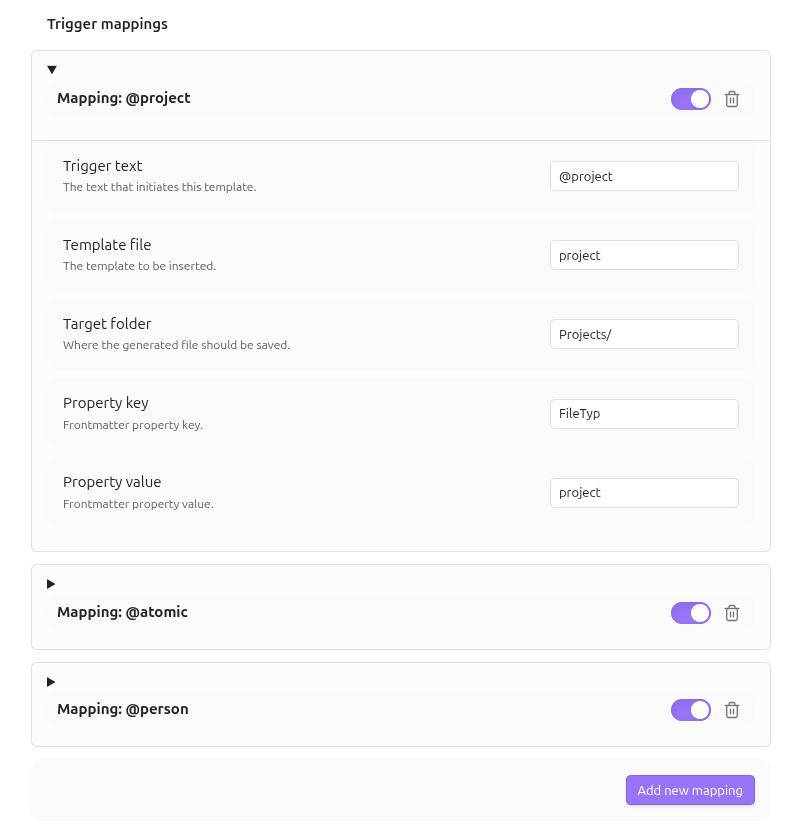
- **Property Management**: Automatically add frontmatter properties (e.g., `type: project`) to newly created notes and filter suggestions by them.
- **Archive Awareness**: Define tags or properties to mark notes as archived, excluding them from your active suggestion flow.
---
## Preview
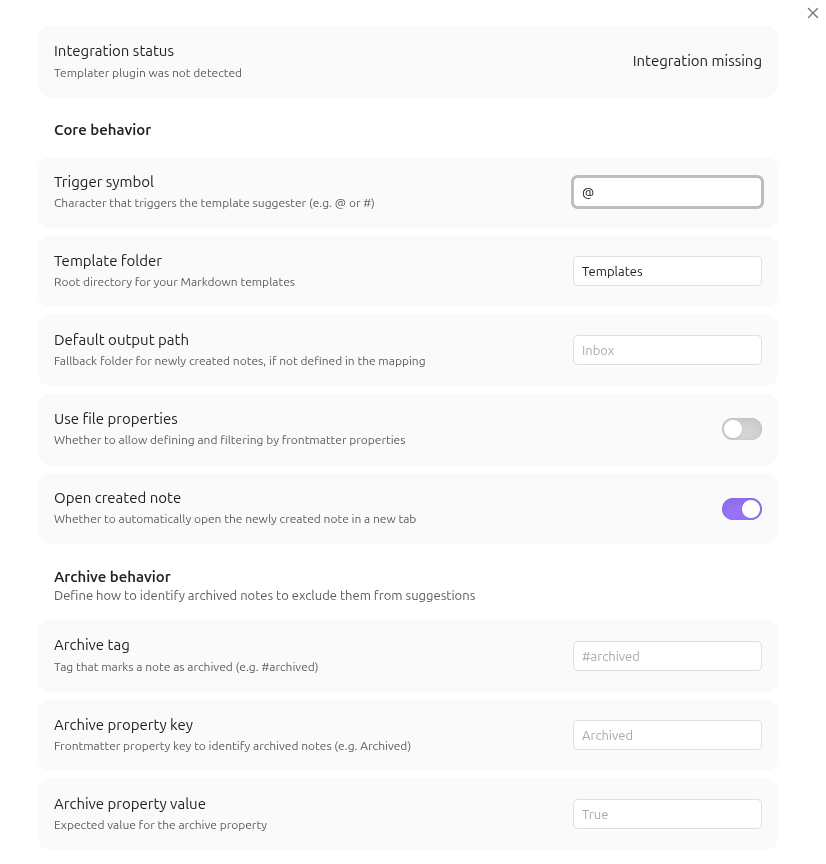
1. Configure custom triggers, mappings, and property keys 2. Or use triggers for command-shortcuts 3. Trigger with your custom symbol and select your object type 4. Enter the name—intelligent autocompletion suggests existing notes
---
## Try it out (Demo Vault)
To see **Objects** in action without configuring anything, check out our **Demo Vault**:
1. Download the `demo/Objects-Demo-Vault` folder from this repository.
2. Open Obsidian and select **"Open folder as vault"**.
3. Choose the downloaded `Objects-Demo-Vault` folder.
4. Open the `Welcome.md` file inside the vault for a quick guided tour.
The demo vault is pre-configured with sample templates, folders, and triggers to show you the power of object-oriented note-taking.
---
## How to use it
1. **Trigger**: Type your trigger symbol (default `@`) followed by the object type (e.g., `@project`) anywhere in your editor.
2. **Identify**: A suggestion list appears—select your desired object.
3. **Name**: A modal pops up. Type the name of your new object (e.g., "Deep Work Initiative"). The modal will suggest existing notes based on your folder and property mappings.
4. **Confirm**: Hit `Enter`.
5. **Result**: A clean markdown link is inserted at your cursor. The note is created or linked in the background using your specified template and properties.
> [!TIP]
> **Trigger Conflicts**: If the `@` symbol is already being used by other plugins (like *Mention* or *Calendar*), you can easily change the **Trigger symbol** in the plugin settings to something else, like `#` or `!`. Existing mappings will update automatically.
---
## Settings
Customize **Objects** to fit your personal knowledge management system:
| Setting | Description |
| :--- | :--- |
| **Trigger symbol** | Character that triggers the suggester (e.g. @, #, or !). |
| **Core Configuration** | Set your global `Template Folder` and a `Default Output Path`. |
| **Behavioral Toggle** | Enable `Open created note` to automatically open new notes in a new tab. |
| **Property Support** | Enable `Use file properties` to add and filter by frontmatter keys and values. |
| **Archive Behavior** | Define tags (e.g. `#archived`) or properties to exclude notes from suggestions. |
| **Trigger Mappings** | Map triggers to specific templates, folders, and properties with an enable/disable toggle. |
| **Status Check** | Real-time validation of your Templater integration. |
---
## Platform Support
Objects is designed for both **Desktop** and **Mobile** environments.
- **Tested on**: Linux, Android (Mobile), iOS (Mobile)
- **Compatible with**: macOS, Windows
---
## Installation
### Via Obsidian (Recommended once released)
1. Open **Settings** > **Community Plugins**.
2. Click **Browse** and search for `Objects`.
3. Click **Install**, then **Enable**.
### Via BRAT (Recommended)
1. Install the [BRAT plugin](https://github.com/TfTHacker/obsidian42-brat).
2. Open **Settings** > **BRAT**.
3. Click **Add Beta Plugin**.
4. Paste: `Finn-Kraemer/obsidian-objects`
5. Click **Add Plugin** and enable **Objects**.
### Manual Installation
1. Download the `main.js` and `manifest.json` from the [latest release](https://github.com/Finn-Kraemer/obsidian-objects/releases).
2. Create a folder named `obsidian-objects` in your vault's `.obsidian/plugins/` directory.
3. Move the downloaded files into that folder.
---
## License
This project is licensed under the **MIT License**. See the [LICENSE](./LICENSE) file for details.