# Download Pulse
**Analytics for Obsidian plugin authors who ship more than one plugin.**
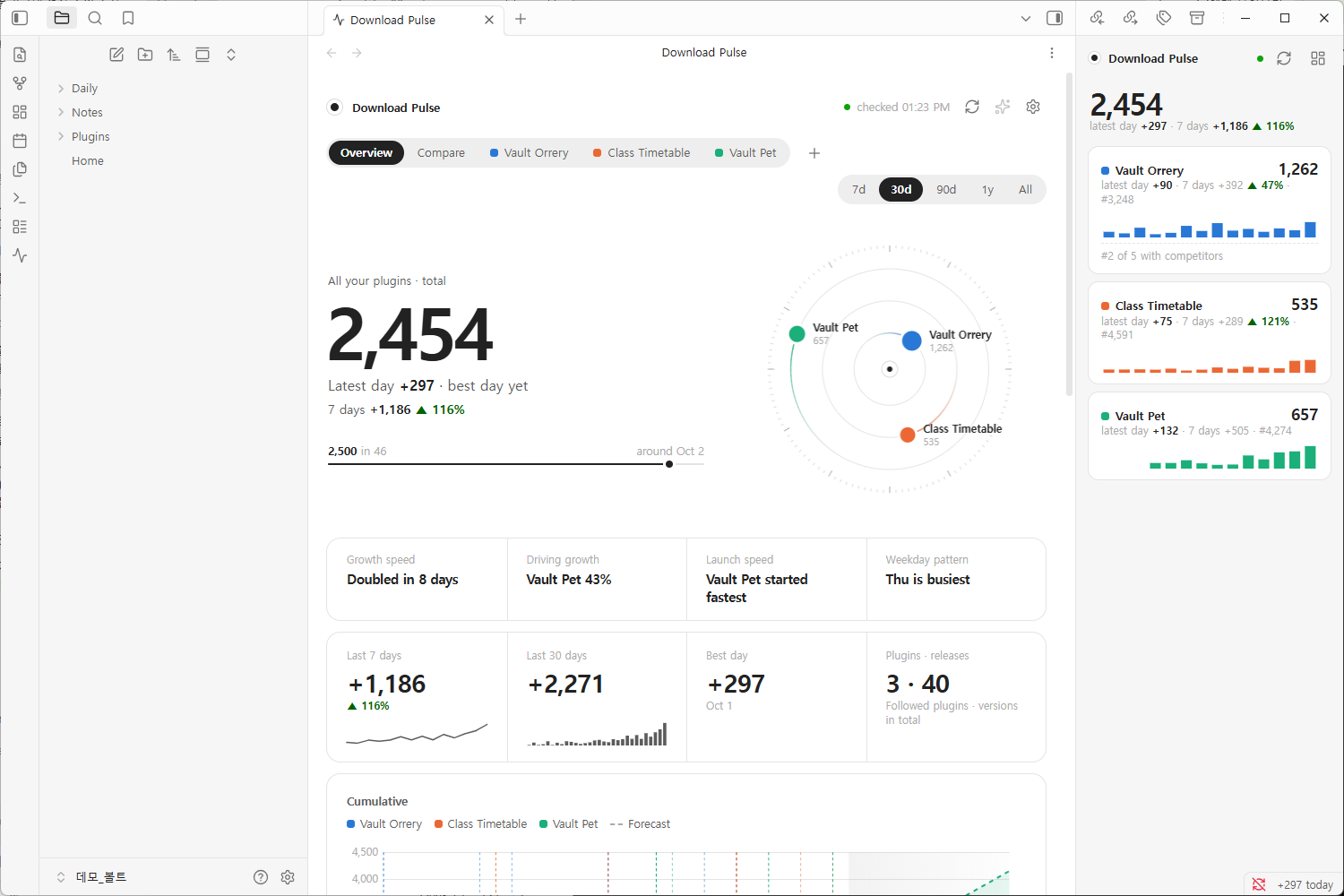
Every plugin's downloads, rank and milestones in one dashboard, the insights
worth acting on, and a live watch on the plugins you compete with. When
there's something to celebrate, share it as an image card for a post or a story.
中文
The community directory gives you one number per plugin: a lifetime total.
Once you maintain a few plugins, that number stops answering the questions you
actually have:
- **Which of my plugins is growing, and which has stalled?** One overview for all of them, plus side-by-side comparison by date or by days since listing.
- **Did that release move anything?** Downloads in the three days before and after every release, and how each version launched.
- **Am I gaining on the competition, or falling behind?** Your share of the group's new downloads, the gap to the plugin ahead and the day you'd pass it, and whoever is closing in from behind.
Download Pulse records the official numbers every day and answers those
questions in plain sentences: *"Driving growth: Vault Pet 43%"*,
*"Galaxy View is pulling away"*, *"1,500 around Oct 6"*.
### Who it's for
- **Authors with a portfolio.** Five plugins means five numbers to check. Here they're one page, ranked by momentum.
- **Authors in a crowded niche.** If there are four other graph views or task managers, you want to know who's winning the new users, and why.
- **Authors about to build.** Follow the leaders of a niche before you write a line, and see if it's growing at all.
---
## What it shows
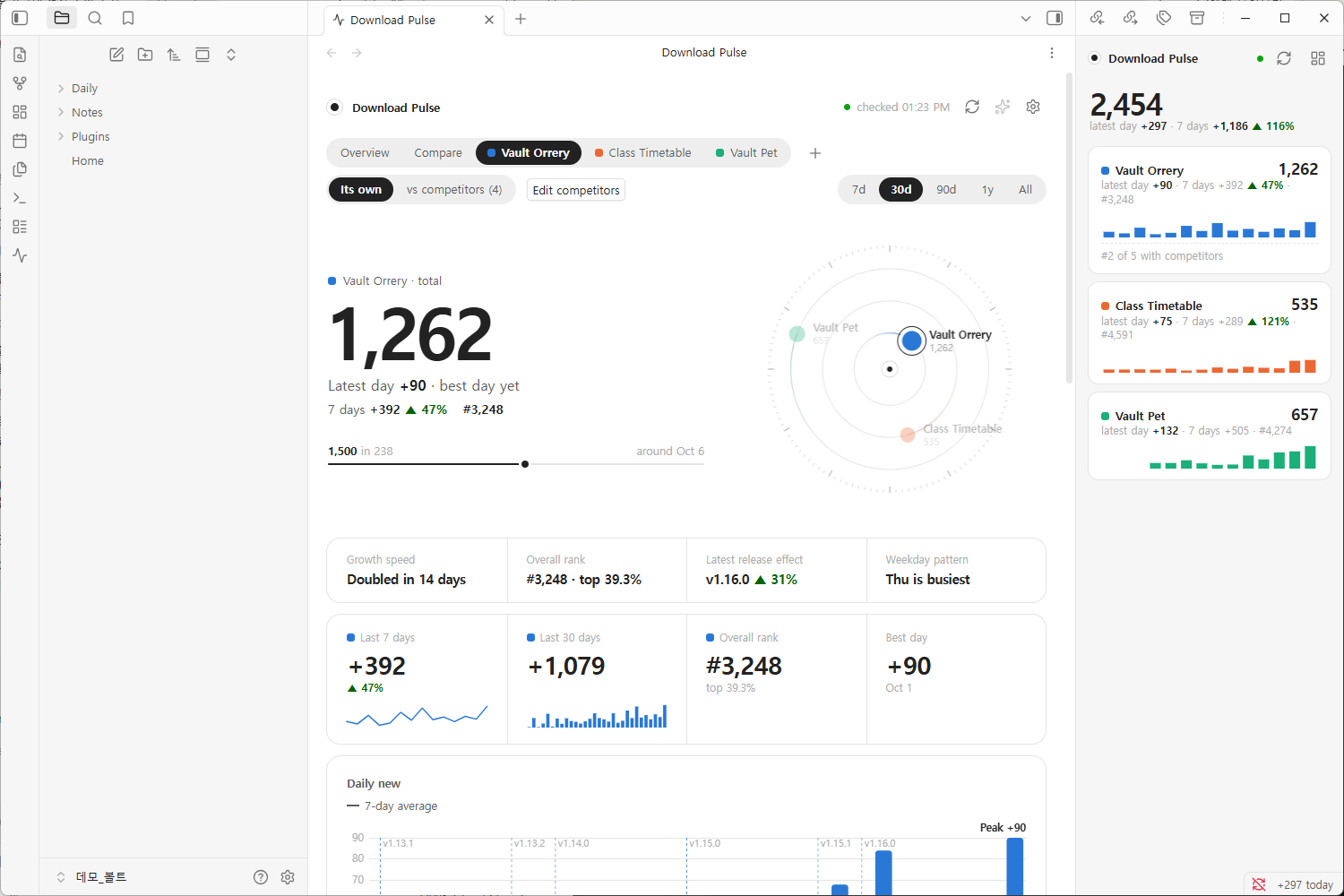
**Your plugins, one by one and together.** For each plugin you get the total
with a forecast, daily new downloads with a 7-day average, rank among all
community plugins, the first three days of every release, and downloads by
version. You also get a weekday pattern, a calendar and the milestones it has
passed. With more than one plugin, *Overview* adds them up and *Compare* puts
them side by side, by date or by days since listing.
**Every card says what it shows.** Each card opens with one plain sentence, so
you can read the page top to bottom without decoding a chart: *"651 fewer than
the week before · biggest drop Vault Pet −451"*, *"Oct expected ~7,854 · 3.5×
Sep"*, *"Within a week: 250 places up, to Search Templates Library"*.
**Where it's heading, and how sure that is.**
- **Outlook**: the total a week, a month and at the year's end, each with a range. The range comes from how far this plugin's own forecasts missed over the last three weeks, and the card says which way they leaned.
- **Months**: downloads per calendar month, by plugin, with the current month projected to its end and compared with the same days of the last one.
- **Where the week's change came from**: the last 7 days against the 7 before, split by plugin, so you see who pulled the sum up or down.
- **Records**: best day, best week, longest rise, quickest climb between milestones, best rank and best release start. A record set in the last two days is marked *new*.
- **Overtaking ladder**: the plugins 1, 10, 50, 100, 250, 500 and 1,000 places above you in the overall ranking, and the one just below, with when you'd pass each at both paces.
- **Release effect** and **release scores**: each release's 3 days before and after, and per plugin how often a release was followed by more downloads.
- **Race** and **stream**: your plugins' totals as a bar race from the first day, and their daily downloads as one stream whose thickness is that day's pace.
**Official, or without bots.** Bots fetch many old versions of a plugin at
once, so on such a day several older versions grow by the same small count.
Download Pulse records each of your plugins' downloads by version every day,
takes that equal growth out, and with the *Official | Without bots* switch
shows every number of your own plugins on that basis. Ranks and competitors
stay official, since the stats file has no versions for other plugins. Bots
that only fetch the newest version can't be told apart, so *without bots* is
still an upper bound. The switch appears once there are three days to split;
importing the standalone dashboard's `history.json` brings the past with it.
**A weekly report in your vault.** *Write weekly report note* (command, the
note button at the top of the dashboard, or *Settings → Weekly report*) writes
a Markdown note: the week at a glance, a table by plugin, this week's releases
and the milestones coming up in the next 30 days.
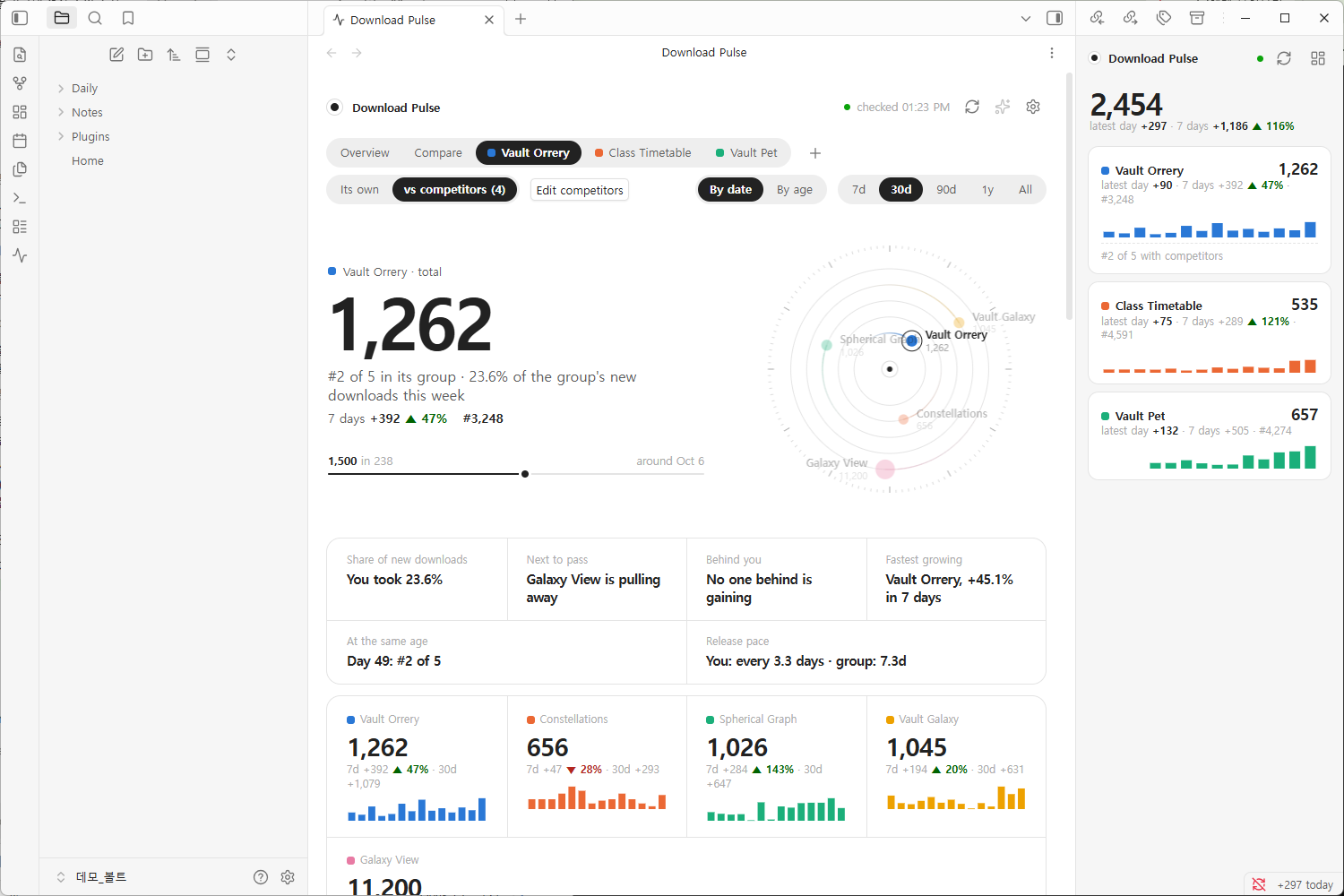
**Your plugin against its competitors.** Pick the plugins you compete with (it
suggests similar ones from the directory) and switch a plugin's page to
*vs competitors*:
- **Share of new downloads**: your part of the group's last 7 days, and how it moved.
- **Next to pass**: the plugin just ahead of you, the gap, and at both 14-day paces how many days until you pass it. Or that it is pulling away.
- **Behind you**: whether anyone below is closing in, and when they'd pass you.
- **Fastest growing**: growth relative to size, so a small plugin on the rise stands out.
- **At the same age**: everyone's total on the same day after listing.
- **Release pace**: how often you ship compared with the group.
**Installs, not just downloads.** The official count also includes Obsidian
checking for updates. Download Pulse also reads how often each release's
`main.js` was downloaded, which Obsidian fetches only to install or update a
plugin. The *Installs (main.js)* tile shows that total and its pace a day.
**A plugin that drops out of the official stats.** When the newest official
file no longer lists one of your plugins, its total stops at the last value
instead of looking like a quiet day. The dashboard says so on its page, in
the overview and in the sidebar, with the installs since then. If milestone
notices are on, you also get a notice that day. The usual cause is a new
release waiting for Obsidian's automated review (its Review on
community.obsidian.md says "Not scanned"); otherwise the plugin was removed
from the directory.
Plugins of very different sizes switch the cumulative chart to a log scale on
their own, so a plugin with 600 downloads isn't a flat line under one with 11,000.
**Your theme, light or dark.** The dashboard uses your theme's fonts and a
palette of deep, evenly bright colors, and keeps a deliberately quiet look: one
big number, hairlines, and color only where it means a plugin. The orbit at the
top puts the biggest plugin on the innermost ring; each planet's speed and
trail follow its last 7 days, and small moons circle it, one per GitHub star (up to eight).
---
## Share your numbers
Passed 1,000 downloads, or had your best month yet? Turn it into an image
card and post it. The card shows your plugins' total, what they gained in the
last 7, 30 or 90 days, a chart of new downloads a day with each plugin in its
color, and one line per plugin: its total, its gain and where it ranks among all
community plugins. Long names and big numbers are measured and fitted, so text
never runs into the next column.
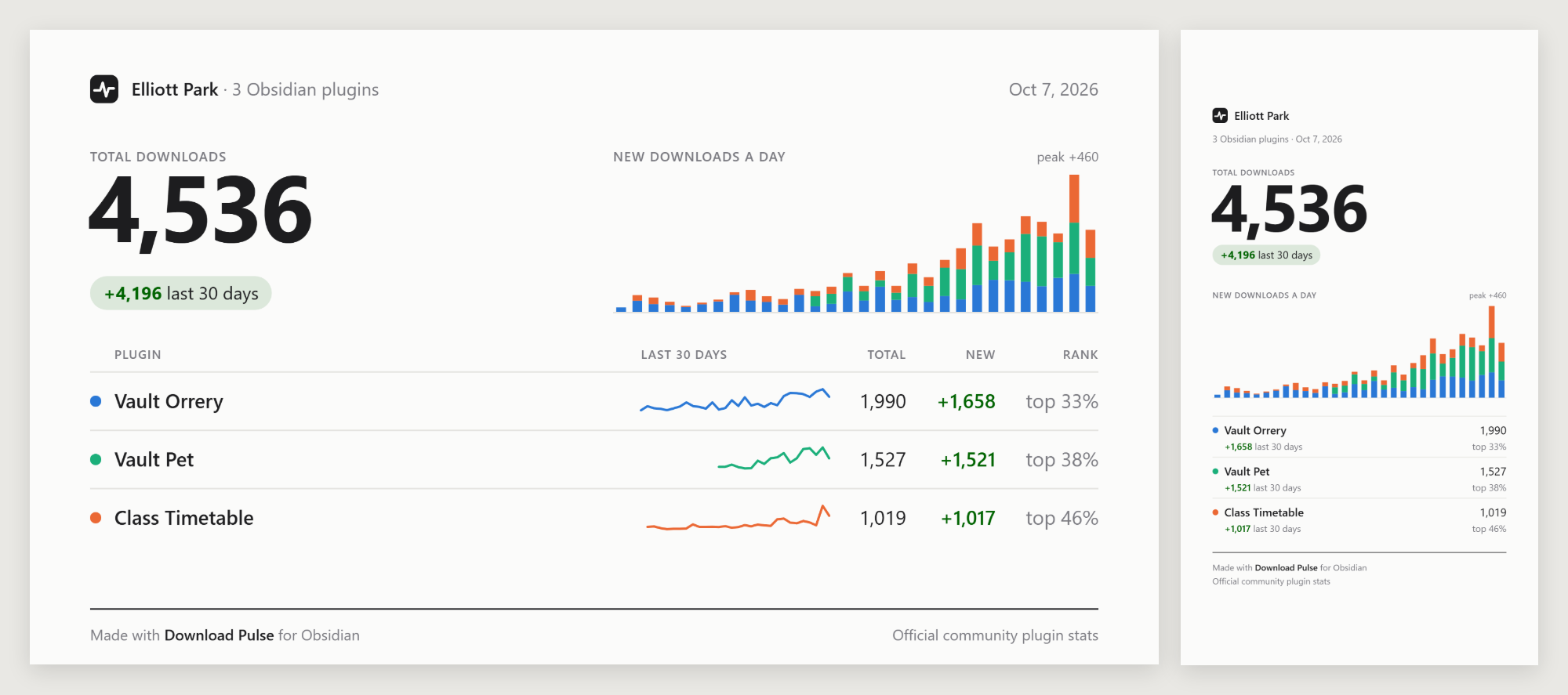
- **Post 16:9**: 1200×675, saved at twice the size. For X, Discord, Reddit and the forum.
- **Story 9:16**: 1080×1920 for Instagram and other stories. The top and bottom are left clear for the story's own buttons.
- **Light or dark**, whatever your Obsidian theme is.
- **Copy image** to paste it straight into a post or a message, **Save to vault** to keep it as a PNG in your attachment folder, or **Download PNG** (desktop) to pick a place on your computer.
Open it with the image button at the top of the dashboard, *Share a card of
your plugins* in the command palette, or *Share* on a milestone notice. The
card is drawn on your device and nothing is uploaded until you post it.
---
## Three ways to look at it
| | Where | For |
|---|---|---|
| **Dashboard** | A tab in the main area. Move it to its own window from the tab menu. | Reading the charts. It needs width, so it opens as a tab, not in a sidebar. |
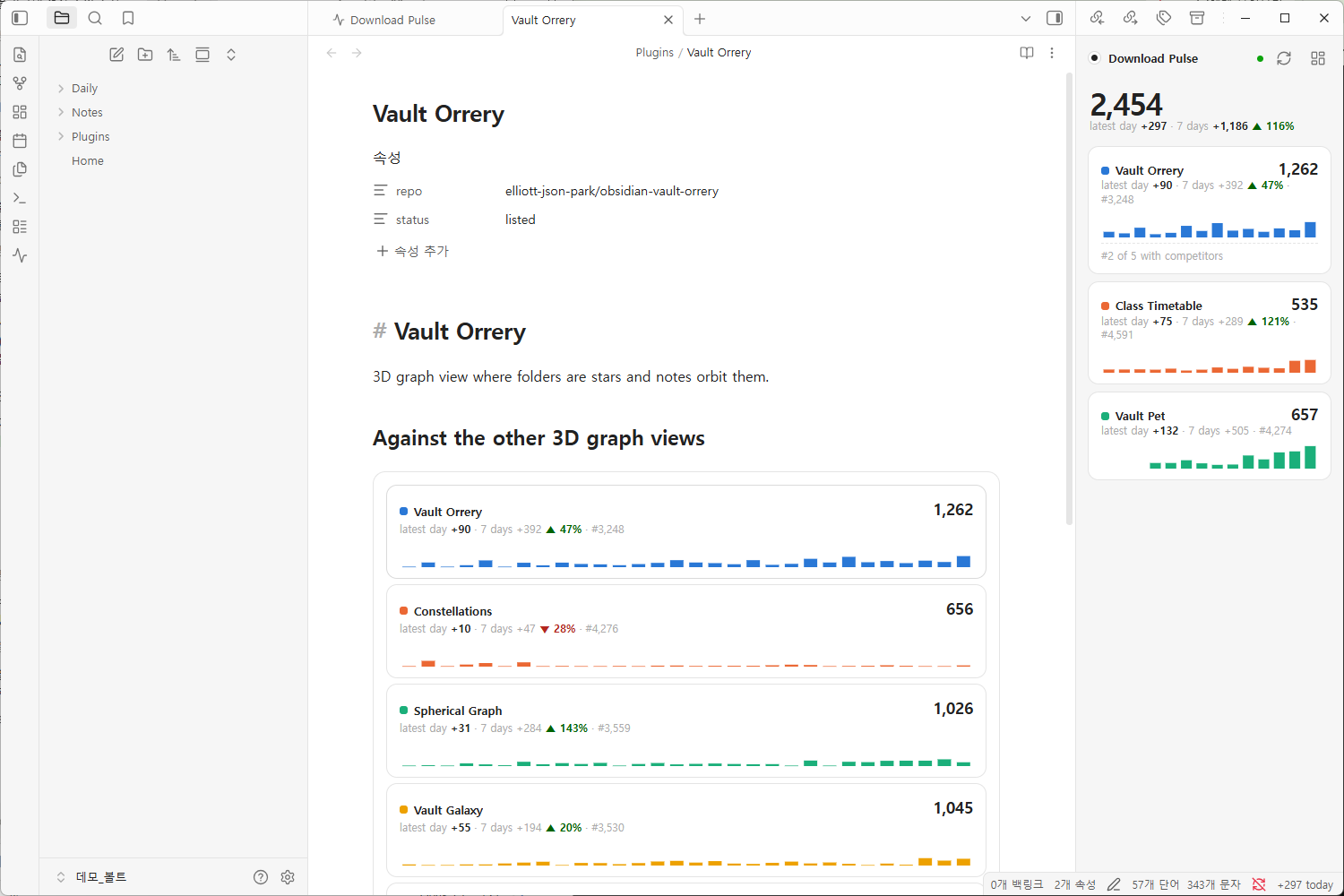
| **Glance** | The right sidebar | A widget that stays in view: totals, the latest day, two weeks of bars, and where you stand against your competitors. Click a plugin to open it in the dashboard. |
| **Code block** | Any note | A summary in a daily note or a homepage. |
````markdown
```plugin-pulse
```
````
Shows all your plugins. Options, one per line:
````markdown
```plugin-pulse
plugin: vault-orrery
rivals: true
days: 30
```
````
- `plugin:` — one or more plugin ids, comma-separated. Default: all of yours.
- `rivals: true` — the plugin and its competitors, one card each.
- `days:` — how many days of bars, 7 to 60. Default: 14.
**Links into the dashboard.** `obsidian://plugin-pulse?view=vault-orrery&mode=rivals`
opens a page of the dashboard from anywhere: a note, a bookmark, a launcher.
`view` is `overview`, `compare` or a plugin id; `mode` is `self` or `rivals`;
`range` is `7`, `30`, `90`, `365` or `all`.
An optional status bar item shows your plugins' new downloads on the latest day.
---
## Getting started
1. **Install** Download Pulse from Settings → Community plugins.
2. **Open the dashboard** with the pulse icon in the ribbon, or *Download Pulse: Open dashboard* in the command palette.
3. **Follow your plugins.** Type your author name or GitHub username and every plugin listed under it is found at once. Or search any plugin by name.
4. **Add competitors** with *Add competitors* on a plugin's page.
Past daily totals are filled in right away (see [Where the numbers come
from](#where-the-numbers-come-from)), so the charts aren't empty on day one.
Rank history starts the day you install, because only the official file has it.
**Any plugin works, not only your own.** Follow the leaders in a niche before
you build in it, or watch a plugin you depend on.
### Commands
*Open dashboard* · *Open glance in the sidebar* · *Refresh now* · *Follow a plugin* · *Add a competitor* · *Share a card of your plugins* · *Write weekly report note*
### Settings
- **Your plugins**: reorder, remove, and edit each one's competitors.
- **Check for new stats**: by default right after Obsidian publishes the day's file (around 00:25 UTC), and every 30 minutes while it is late; or every 1 to 6 hours, or only when you refresh. It also checks when you open the dashboard or return to Obsidian. The dashboard header shows when the next file is due.
- **Fill in past history**, **Catch up on missed days**, **Read official history**: see below.
- **GitHub token**: optional, for release dates and stars beyond GitHub's anonymous limit.
- **Weekly report**: the folder the note goes to, and *Write now*.
- **Motion**, **Status bar**, **Milestone notices** (also when one of your plugins drops out of the official stats), **Language** (English, 한국어, 中文; follows Obsidian by default).
- **Export / import history** as JSON, for backup or another device. Import also reads the `history.json` of the standalone HTML dashboard this plugin grew out of.
---
## Where the numbers come from
Obsidian publishes every community plugin's total downloads once a day in
[`community-plugin-stats.json`](https://github.com/obsidianmd/obsidian-releases/blob/HEAD/community-plugin-stats.json).
That number counts installs **and updates**, so it isn't a count of users. A
plugin that ships often collects downloads from its existing users too.
Download Pulse reads that file and keeps each day's value in its own data file.
A "day" is the UTC day the downloads happened: the file published just after
midnight UTC holds the day before, so that is the date it gets. Forecasts and "around
Oct 6" estimates assume the last 7 days' pace continues; the range around them is
how far that assumption missed over the last 21 checks (pooled over your plugins
for one too new to have enough of its own).
### Network use
Download Pulse makes only anonymous `GET` requests for public data, and sends
nothing about your vault:
| Request | Why | When |
|---|---|---|
| `api.github.com/repos/obsidianmd/obsidian-releases/commits` | Has a new stats file been published? One small call. | Each check (right after the daily publish by default, when you open the dashboard, and when you return to Obsidian; at most once per 5 minutes) |
| `raw.githubusercontent.com/obsidianmd/obsidian-releases/…/community-plugin-stats.json` | The official numbers, about 2.5 MB | Only when Obsidian has published a new file, about once a day |
| `raw.githubusercontent.com/obsidianmd/obsidian-releases/HEAD/community-plugins.json` | Plugin names, authors and repos for search and suggestions | When you search or add competitors |
| `api.github.com/repos//` and `…/releases` | Stars and release dates of followed plugins, and `main.js` download counts of your own | At most twice a day per plugin |
| `yulei-chen.github.io/obsidian-plugin-download-stats/data/plugins/.json` | Earlier daily totals from a public, third-party archive of the official file. Not affiliated with Obsidian. | When you follow a plugin, then every few days. **Turn off with *Fill in past history*.** |
With *Fill in past history* off, history starts the day you follow a plugin.
*Read official history* can instead download the official file for each of
the past 14 or 30 days. That's about 2.5 MB a day, and you also get each
day's rank. *Catch up on missed days* does the same for up to 7 days (3 on
mobile) when Obsidian was closed.
There is no telemetry, and the GitHub token, if you add one, stays in
Obsidian's secret storage.
---
## 中文
**Download Pulse** 是为发布了多个插件的 Obsidian 开发者准备的下载统计面板。每天读取 Obsidian 官方的第三方插件统计,把你所有插件的下载量、排名和里程碑放在一个仪表盘里,并用简短的句子告诉你哪个插件在增长、哪个停滞了。
- **总览与对比**:所有插件一页看完,可按日期或按上架天数并排比较。
- **发布效果**:每次发布前后 3 天的下载量,以及每个版本的首发表现。
- **竞品监控**:你在竞品组新增下载中的占比、与前一名的差距和预计超越的日期,以及身后正在追近的插件。
- **实际安装**:每个版本 main.js 的下载次数。Obsidian 只在安装或更新插件时下载它,因此不包含自动的更新检查。
- **统计中断提醒**:你的插件从最新的官方统计中消失时(通常是新版本在等待 Obsidian 的自动审核),在页面、总览和侧边栏中标出,并发出通知。
- **一句话结论**:每张卡片开头用一句话说明要看什么。
- **展望与记录**:一周、一个月和年底的预测及其范围(依据过去 21 次预测的偏差)、按月下载、本周变化的来源、各项纪录,以及排名上方 1~1,000 名的“超越阶梯”。
- **官方 | 排除机器人**:机器人会一次下载很多旧版本,Download Pulse 按版本每天记录并剔除这部分,可切换查看你自己插件的数字。
- **每周报告**:把一周的概况、按插件的表格、本周发布和即将到来的里程碑写成库中的 Markdown 笔记。
- **分享卡片**:横版 16:9 或竖版 9:16 的 PNG 图片,方便发帖或发动态。
- **界面支持中文 · English · 한국어**:默认跟随 Obsidian 的语言,也可以在 设置 → Download Pulse → 语言 中切换。
- 只读取公开数据,不会发送任何关于你仓库的信息。
安装:设置 → 第三方插件 → 浏览 → 搜索 “Download Pulse”
---
## More from the same author
- **[Vault Orrery](https://community.obsidian.md/plugins/vault-orrery)**: your vault as a 3D galaxy, where every folder is a solar system. Replay how it grew, note by note.
- **[Vault Pet](https://community.obsidian.md/plugins/vault-pet)**: a pixel cat that lives at the bottom of your workspace and levels up as you write.
- **[Class Timetable](https://community.obsidian.md/plugins/class-timetable)**: a weekly class timetable for students, with each class's lecture notes one click away. Desktop and mobile.
- **[Tag Graph](https://community.obsidian.md/plugins/tag-graph)**: a graph view for Bases where tags, folders and properties become hubs. Tag, retag and merge by dragging.
## Development
```bash
npm install
npm run build # type-check and bundle main.js
npm test # storage, analysis and the refresh engine against a fake network
npm run harness # the real plugin in a browser page at http://localhost:5178
```
The harness runs `src/` with a small stand-in for the `obsidian` module and
live data. Add `?demo&bare&motion=off&view=vault-orrery&mode=rivals` to open a
given page, and `?import` to load `.harness/history.json` (the standalone dashboard's
history) first. The screenshots above are of the plugin running in Obsidian 1.13. `npx eslint .` runs the
same rules as Obsidian's plugin review.
Chart.js is bundled into `main.js`. See [THIRD-PARTY-NOTICES.md](THIRD-PARTY-NOTICES.md).
## License
[MIT](LICENSE) © Elliott Park