# Table Dashboard
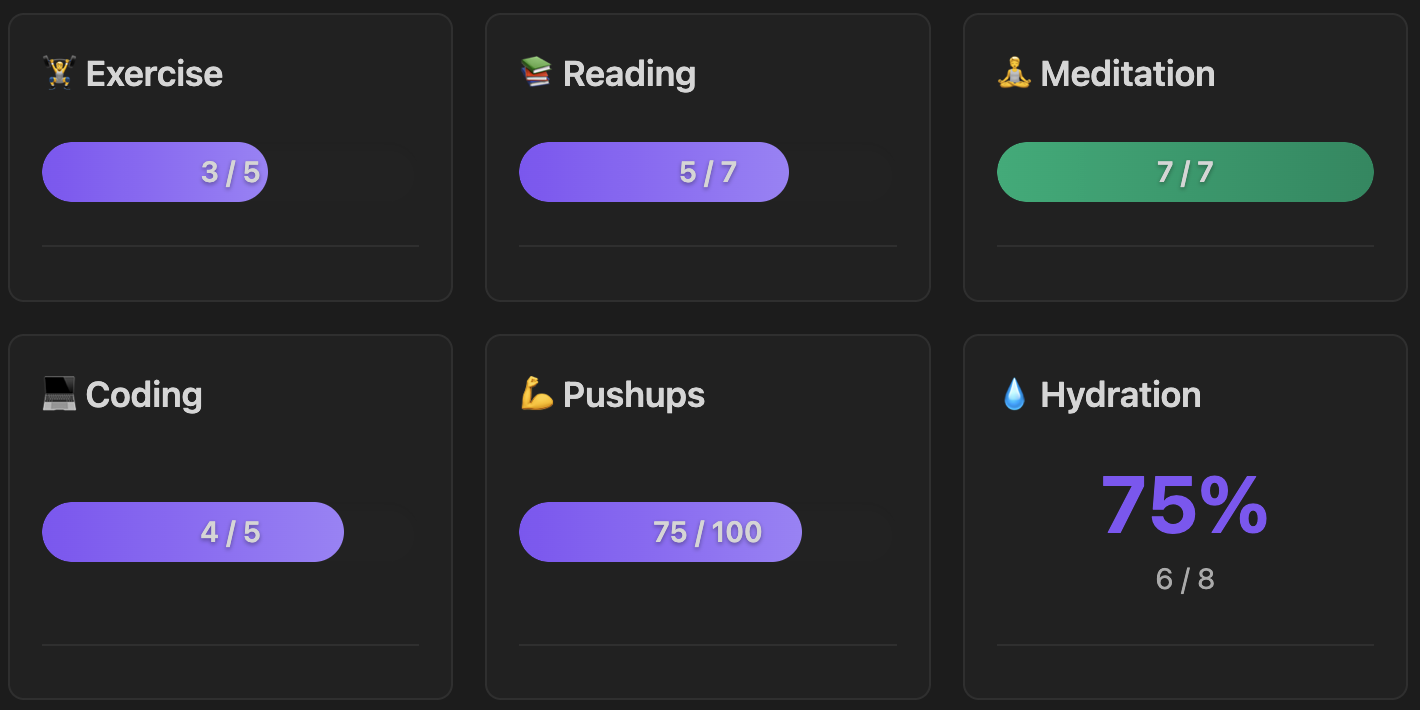
Create dynamic dashboard visualizations from your markdown tables. Progress bars, counters, streaks, and more — all powered by your existing data.
## Features
- 📊 **Multiple Visualizations**: Progress bars, counters, percentages, streaks, line plots
- 📁 **Flexible Sources**: Current file, specific file, or entire folder
- 📋 **Table-Powered**: Extract and visualize data from markdown tables
- 🏷️ **Table Tagging**: Filter which tables to scan using HTML comments
- 🎯 **Dynamic Goals**: Extract goals from table columns
- 📅 **Time Periods**: Daily, weekly, monthly, yearly, or all-time filtering
- 🎨 **Layout Options**: Grid or compact-list for multi-widget dashboards
- ➕ **Aggregation**: Count, sum, average, min, max
- 🛠️ **Helpful Errors**: Clear guidance and examples when configuration is incorrect
## Installation
### Manual Installation
1. Download `main.js`, `manifest.json`, and `styles.css` from releases
2. Create folder: `/.obsidian/plugins/table-dashboard/`
3. Copy files into that folder
4. Reload Obsidian and enable the plugin
### From Source
```bash
cd /.obsidian/plugins/
git clone table-dashboard
cd table-dashboard
npm install
npm run build
```
## Quick Start
### Simple Table Tracker
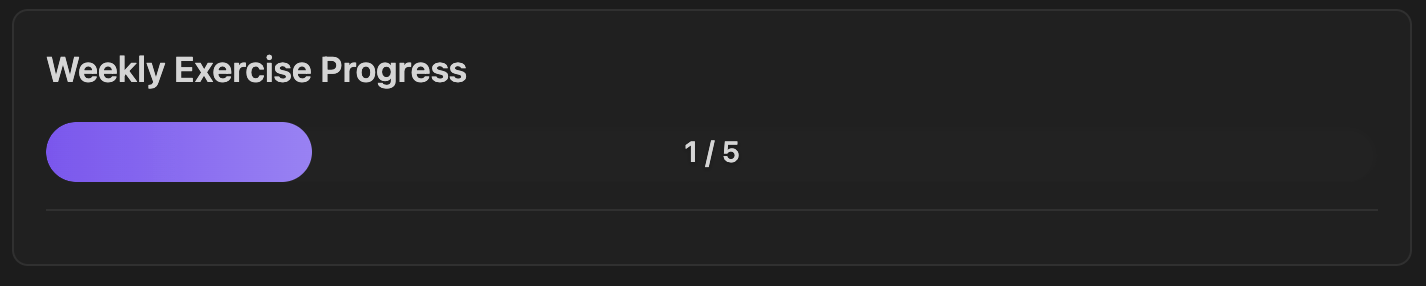
Visualize data from a table in the current file:
```markdown
| Activity | Done |
|----------|------|
| Exercise | ✓ |
| Reading | ✓ |
```
````
```table-dashboard
type: progress_bar
source: current-file
tableTag: weekly
keyColumn: Activity
key: Exercise
valueColumn: Done
value: "✓"
goal: 5
label: Weekly Exercise
```
````
### Multi-Widget Dashboard
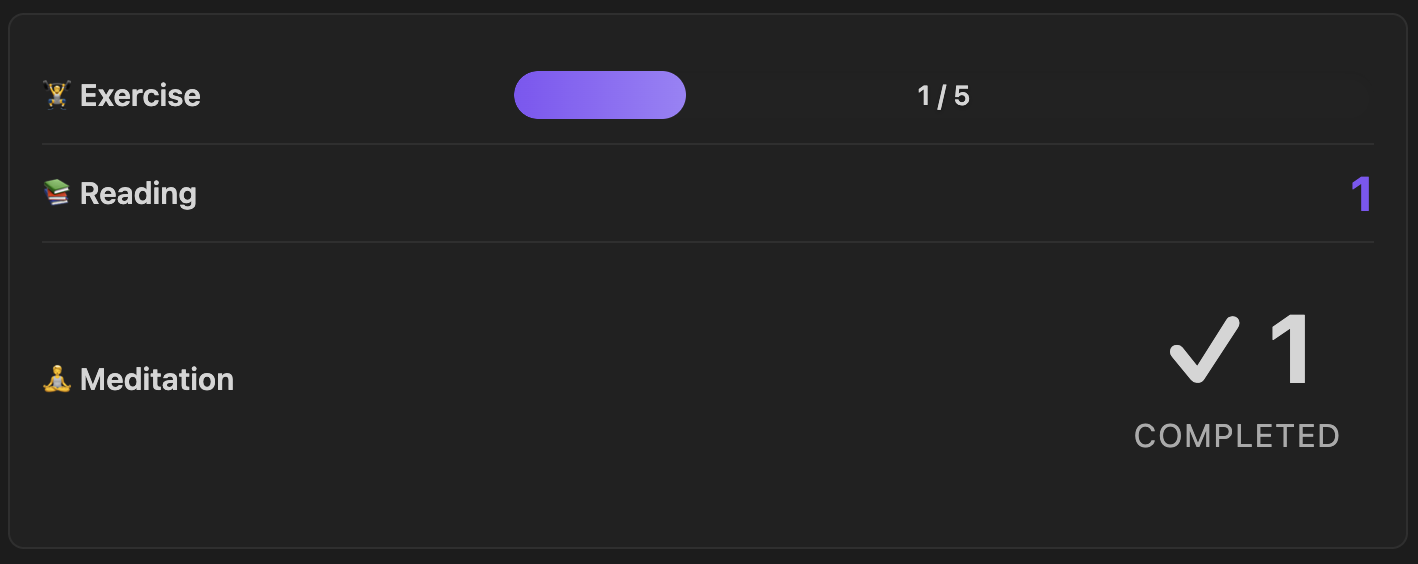
Multiple trackers in one block with compact layout:
```
````table-dashboard
layout: compact-list
source: current-file
tableTag: weekly
type: progress_bar
keyColumn: Activity
key: Exercise
valueColumn: Done
value: "✓"
goal: 5
label: 🏋️ Exercise
---
type: counter
keyColumn: Activity
key: Reading
valueColumn: Done
value: "✓"
label: 📚 Reading
---
type: counter
keyColumn: Activity
key: Meditation
valueColumn: Done
value: "✓"
label: 🧘 Meditation
```
````
## Source Types
### Current File
Scan tables in the file containing the tracker block:
````
```table-dashboard
type: progress_bar
source: current-file
keyColumn: Activity
key: Exercise
valueColumn: Done
value: "✓"
label: Exercise Progress
```
````
### Specific File
Scan tables in a specific file (useful for dashboards):
````
```table-dashboard
type: progress_bar
source: file:Trackers/Monthly Habits.md
keyColumn: Activity
key: Exercise
valueColumn: Done
value: "✓"
goal: 20
label: Monthly Exercise
```
````
### Folder (Pattern Mode)
Scan multiple files in a folder, counting text pattern occurrences:
````
```table-dashboard
type: streak
source: folder:Daily Notes
pattern: "- [x] Meditation"
period: monthly
label: Meditation Streak
```
````
**Note:** For folder mode, filenames should include dates in `YYYY-MM-DD` format for period filtering and streak calculation.
## Table Mode
### Basic Structure
Tables require a **key column** (to identify rows) and a **value column** (to extract data):
```markdown
| Activity | Done |
|----------|------|
| Exercise | ✓ |
| Reading | ✓ |
```
````
```table-dashboard
type: counter
source: current-file
keyColumn: Activity
key: Exercise
valueColumn: Done
value: "✓"
label: Exercise Count
```
````
### Table Tagging
Filter which tables to scan using HTML comment tags:
```markdown
| Activity | Done |
|----------|------|
| Exercise | ✓ |
| Activity | Done |
|----------|------|
| Project | ✓ |
```
````
```table-dashboard
type: counter
source: current-file
tableTag: weekly
keyColumn: Activity
key: Exercise
valueColumn: Done
value: "✓"
label: Weekly Exercise
```
````
### Value Types
**Text matching** - count cells containing specific text:
```yaml
value: "✓" # Match checkmark
value: "done" # Match "done"
value: "yes" # Match "yes"
```
**Numeric** - extract and aggregate numbers:
```yaml
value: numeric
aggregate: sum # Sum all numbers
```
**Any** - count any non-empty cell:
```yaml
value: any
```
### Numeric Values
Sum numeric values from a table:
```markdown
| Activity | Reps |
|----------|------|
| Pushups | 25 |
| Situps | 30 |
```
````
```table-dashboard
type: counter
source: current-file
tableTag: reps
keyColumn: Activity
key: Pushups
valueColumn: Reps
value: numeric
aggregate: sum
label: Total Pushups
```
````
### Dynamic Goals
Extract goals from a table column:
```markdown
| Activity | Current | Goal |
|----------|---------|------|
| Running | 8 | 20 |
```
```table-dashboard
type: progress_bar
source: current-file
tableTag: goals
keyColumn: Activity
key: Running
valueColumn: Current
value: numeric
aggregate: sum
goalColumn: Goal
label: Running Progress
```
````

## Visualization Types
| Type | Description | Best For |
|------|-------------|----------|
| `progress_bar` | Visual bar showing progress toward goal | Goal tracking |
| `counter` | Simple count display | Totals |
| `percentage` | Percentage of goal completed | Completion rates |
| `streak` | Consecutive days (folder mode) or count | Habit streaks |
| `line_plot` | Trend chart over time (folder mode) | Trends |
## Layouts
### Grid Layout (Default)
````
```table-dashboard
layout: grid
gridColumns: 2
source: current-file
tableTag: weekly
type: progress_bar
keyColumn: Activity
key: Exercise
valueColumn: Done
value: "✓"
goal: 5
label: Exercise
---
type: counter
keyColumn: Activity
key: Reading
valueColumn: Done
value: "✓"
label: Reading
```
````
### Compact List
````
```table-dashboard
layout: compact-list
source: current-file
tableTag: weekly
type: progress_bar
keyColumn: Activity
key: Exercise
valueColumn: Done
value: "✓"
goal: 5
label: Exercise
---
type: progress_bar
keyColumn: Activity
key: Reading
valueColumn: Done
value: "✓"
goal: 3
label: Reading
```
````
## Configuration Reference
### Required Parameters
| Parameter | Description |
|-----------|-------------|
| `type` | Visualization: `progress_bar`, `counter`, `percentage`, `streak`, `line_plot` |
| `source` | Where to scan: `current-file`, `file:`, or `folder:` |
### Table Mode Parameters
| Parameter | Required | Description |
|-----------|----------|-------------|
| `keyColumn` | ✅ | Column containing row identifiers |
| `valueColumn` | ✅ | Column to read values from |
| `value` | ✅ | What to match: `numeric`, `any`, or exact text like `"✓"` |
| `key` | ❌ | Filter to rows containing this value in keyColumn |
| `tableTag` | ❌ | Filter to tables with this HTML comment tag |
| `goalColumn` | ❌ | Column to extract dynamic goal from |
| `aggregate` | ❌ | How to combine values: `count` (default), `sum`, `average`, `max`, `min` |
### Pattern Mode Parameters
| Parameter | Required | Description |
|-----------|----------|-------------|
| `pattern` | ✅ | Text to search for in file content |
| `useRegex` | ❌ | Enable regex matching (default: false) |
### Common Optional Parameters
| Parameter | Description |
|-----------|-------------|
| `goal` | Static goal number |
| `label` | Display label |
| `period` | Time filter (folder mode): `daily`, `weekly`, `monthly`, `yearly`, `all-time` |
### Block-Level Parameters
Apply to entire dashboard (before first `type:`):
| Parameter | Description |
|-----------|-------------|
| `layout` | `grid` (default) or `compact-list` |
| `gridColumns` | Number of columns for grid layout |
| `source` | Default source for all widgets |
| `tableTag` | Default table tag for all widgets |
## Examples
See [`examples/widget-screenshot-demo.md`](examples/widget-screenshot-demo.md) for ready-to-use templates.
## Error Handling
When you misconfigure a widget, the plugin displays helpful error messages with guidance on how to fix the issue.
**Example: Missing required fields**
````
```table-dashboard
type: counter
source: current-file
keyColumn: Activity
```
````
This configuration is missing `valueColumn` and `value`, which are required for table mode. Instead of a cryptic error, you'll see:
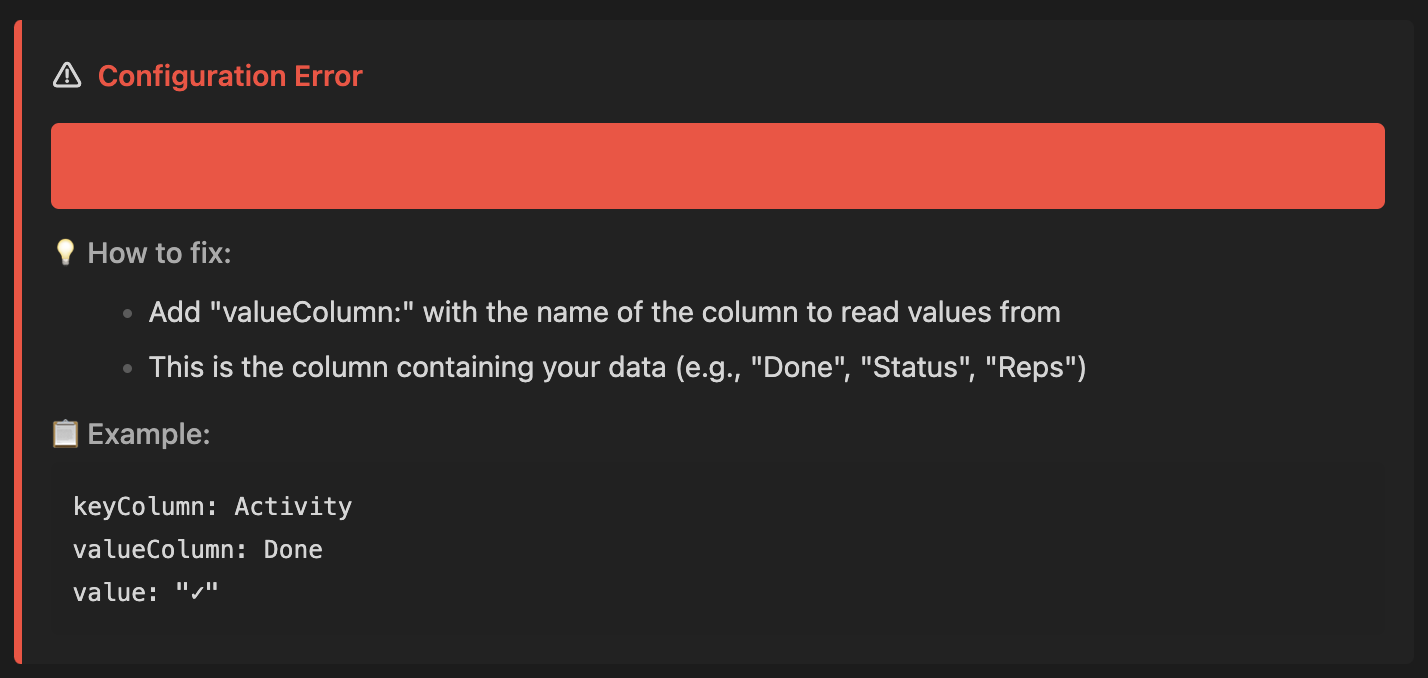
The error display includes:
- ⚠️ Clear description of what's wrong
- 💡 Step-by-step guidance on how to fix it
- 📋 Example code snippet showing correct syntax
## Troubleshooting
**Tracker shows 0:**
- Verify `keyColumn` matches your table header exactly (case-insensitive)
- Check that `key` value exists in your table
- For `tableTag`: ensure the HTML comment is above the table
- Check `value` matches what's in your cells
**Streak shows 0:**
- Streaks require folder mode with date-named files (YYYY-MM-DD)
- For current-file mode, streak shows the count instead
**Doesn't update:**
- Trackers update on file save
- Reload Obsidian (Cmd+R / Ctrl+R) if stuck
**Period filtering not working:**
- Only works with `source: folder:...`
- Filenames must include dates in YYYY-MM-DD format
## Development
```bash
npm install
npm run dev # Watch mode
npm run build # Production
npm test # Run tests
```
## License
MIT License - see [LICENSE](LICENSE) file for details.
---